Tag: agentic ai

  • Build a Tech Radar to Track AI Trends and Tools in 2026

    Build a Tech Radar to Track AI Trends and Tools in 2026

    Introduction

    The world of artificial intelligence moves at a breathtaking pace. Every week brings a new model, a fresh capability, or a surprising shift in what machines can do. For professionals and business leaders, keeping up feels less like a choice and more like a survival skill.

    Actually, the numbers back that up. According to the 2026 Artificial Intelligence Index Report from Stanford, generative AI reached nearly 53 percent population-level adoption within just three years. That is faster than the personal computer or the internet. The 2026 State of AI Agents Report shows organizations expect AI agents to spread well beyond engineering and IT in the next 12 months. The message is clear. AI is not coming. It is already here.

    Here is the challenge. With so many announcements, product launches, and trend pieces flying around, it is easy to get lost in the noise.

    A person looking thoughtfully at multiple data sources, symbolizing information overload.

    You might feel overwhelmed trying to separate real breakthroughs from hype. That is where the idea of a tech radar comes in.

    A tech radar is a structured way to monitor, filter, and prioritize emerging technologies. Instead of reacting to every headline, you build a system that helps you spot the signals that actually matter for your work. This is especially valuable in 2026, when the gap between early adopters and everyone else keeps growing wider.

    In this article, we will walk through a practical framework for building your own tech radar. You will learn how to cut through the noise, identify the most impactful AI trends, and stay ahead of the curve without burning out. Whether you are exploring the artificial intelligence series for the first time or trying to understand the different types of ai and llm ai models, this guide will give you a clear path forward. For ongoing updates, you might also want to check out our guide on AI tool discovery for 2026, which covers how to find trusted tech sources that deliver real business results. And if you want daily AI insights delivered straight to your inbox, consider The AI Newsletter Worth Reading.

    What is a Tech Radar and Why It Matters

    So what exactly is a tech radar? Think of it like a weather radar for technology. Instead of tracking storms, you track emerging tools, platforms, and practices. A tech radar gives you a clear picture of what matters right now and what might matter next year.

    The idea started with Thoughtworks. Their team created a simple visual tool to help engineers decide which technologies to use, which to try out, and which to set aside. Today, that same approach is used by organizations of all sizes to get a handle on the fast-moving AI landscape. You can explore their latest snapshot on the ThoughtWorks Technology Radar page.

    Most tech radars use a simple layout. Four quadrants group technologies into categories like Tools, Platforms, Techniques, and Languages. Around those quadrants sit four rings that show how ready each technology is. The rings are usually named Adopt, Trial, Assess, and Hold.
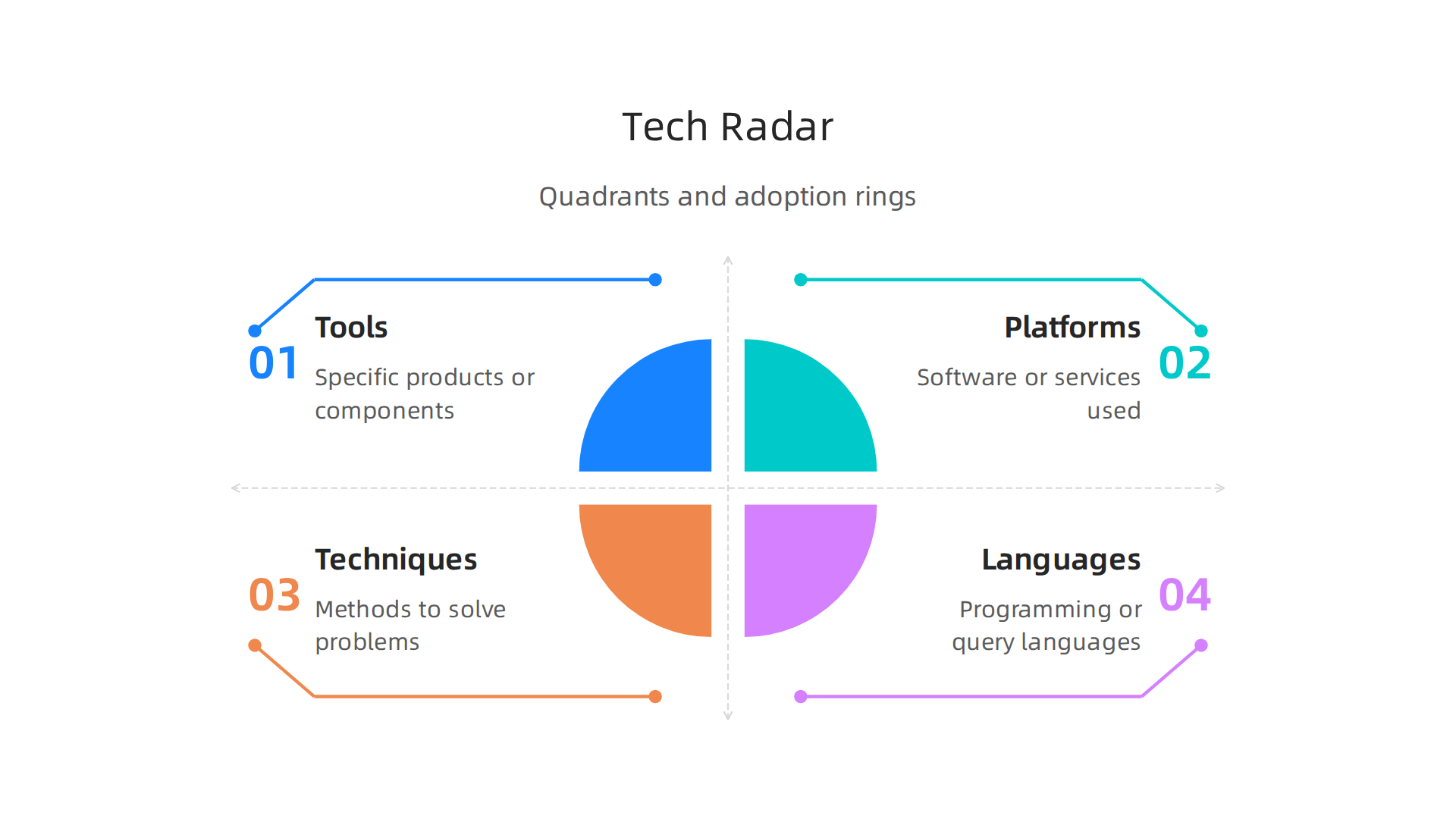
    Visual representation of a tech radar, showing four quadrants and four adoption rings.

    This structure helps you see at a glance where each piece of technology fits and what you should do with it. A great overview of this setup is available in the guide on how to create a tech radar from OneUptime.

    Why does this matter so much in 2026? Because the number of AI tools and models keeps exploding. Without a system, you spend hours chasing shiny objects. With a tech radar, you and your team agree on what deserves attention.

    A team of diverse professionals collaborating around a whiteboard, discussing strategy and making decisions.

    You stop wasting energy on tools that do not fit your goals. You focus on the ones that will actually move the needle.

    A tech radar also forces honest conversations. When your team looks at a new LLM or a different type of AI tool, you discuss where it belongs on the radar. Should you adopt it now or just assess it? That discussion alone saves months of wasted effort. For a deeper look at how this framework came to be and how to build one yourself, check out the technology radar definition and guide from ITONICS.

    Here is the bottom line. A tech radar turns noise into clarity. It helps you navigate the artificial intelligence series of updates without drowning in them. And when you couple that clarity with smart tool choices, you stay ahead. If you are still unsure about picking the right tools for your business, take a look at our guide on how to choose AI for business tools that deliver real results.

    Key AI Trends Shaping 2026

    With your tech radar ready, it is time to look at the actual trends you will want to track. The AI world is moving faster than ever, and knowing what is real versus what is just hype makes all the difference. Here are three key shifts defining 2026.
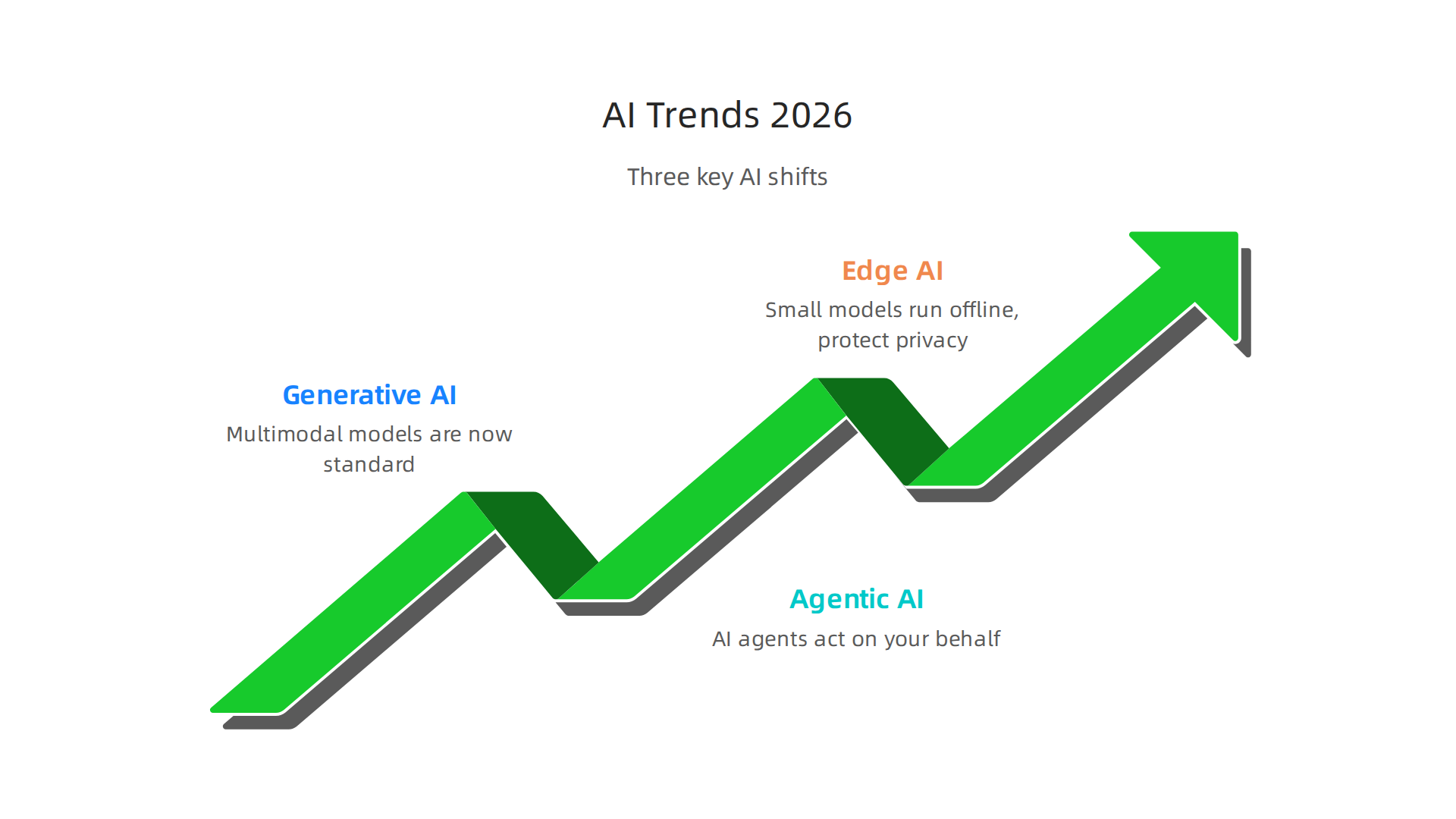
    An overview of the three major AI trends influencing the landscape in 2026.

    Generative AI has grown up. We are past the era of simple text and image generators. Multimodal models that handle text, images, audio, and video all at once are now the standard. The latest data shows generative AI adoption hit nearly 53% of the US population within three years, according to the Stanford AI Index Report 2026. That is faster than personal computers ever were. For your tech radar, this means every tool you evaluate likely includes generative features. The question is no longer if it uses AI, but how well it combines multiple types of input.

    Agentic AI is the next big wave. Instead of just generating content, AI agents can now act on your behalf. These autonomous systems book meetings, write code, manage customer inquiries, and even run parts of a business. The 2026 State of AI Agents Report found that organizations expect these agents to expand beyond IT into research, reporting, and other departments. If you have not yet placed agentic tools on your radar, this is the year to move them from Assess to Trial. For a real world example, check out our look at the Galaxy AI 2026 agentic assistant for business and content creation.

    Edge AI and small language models make AI more accessible. Not every task needs a giant model running in the cloud. Small language models that run on your phone, laptop, or even a sensor are becoming incredibly capable. This shift means AI is no longer just for companies with big budgets and data centers. It works offline, protects privacy, and costs less. The IBM trends overview for 2026 highlights how these compact models are opening up new use cases across industries. For your tech radar, pay attention to tools labeled "small" or "edge." They often deliver 80% of the value at 20% of the cost.

    So where do you start? Your tech radar should have at least one entry in each of these three categories. Keep multimodal generative tools in Adopt if they already work for your team. Put agentic platforms in Trial to test them on a small project. And place edge or small language models in Assess so you understand their limits before committing.

    These trends will shape how you build, buy, and use AI this year. Staying on top of them is not optional if you want to stay competitive. And if you want a steady stream of clear, daily updates on exactly these developments, we recommend you check out The AI Newsletter Worth Reading. It cuts through the noise so you can focus on what actually matters for your business.

    How to Build Your Own AI Tech Radar

    Now that you know the key trends shaping 2026, you need a system to keep track of them all. Building your own AI tech radar gives you a repeatable process for deciding which tools and platforms to adopt, trial, assess, or hold.

    A professional outlining a plan or strategy with notes, demonstrating focus and organization.

    Here is how to do it in three simple steps.
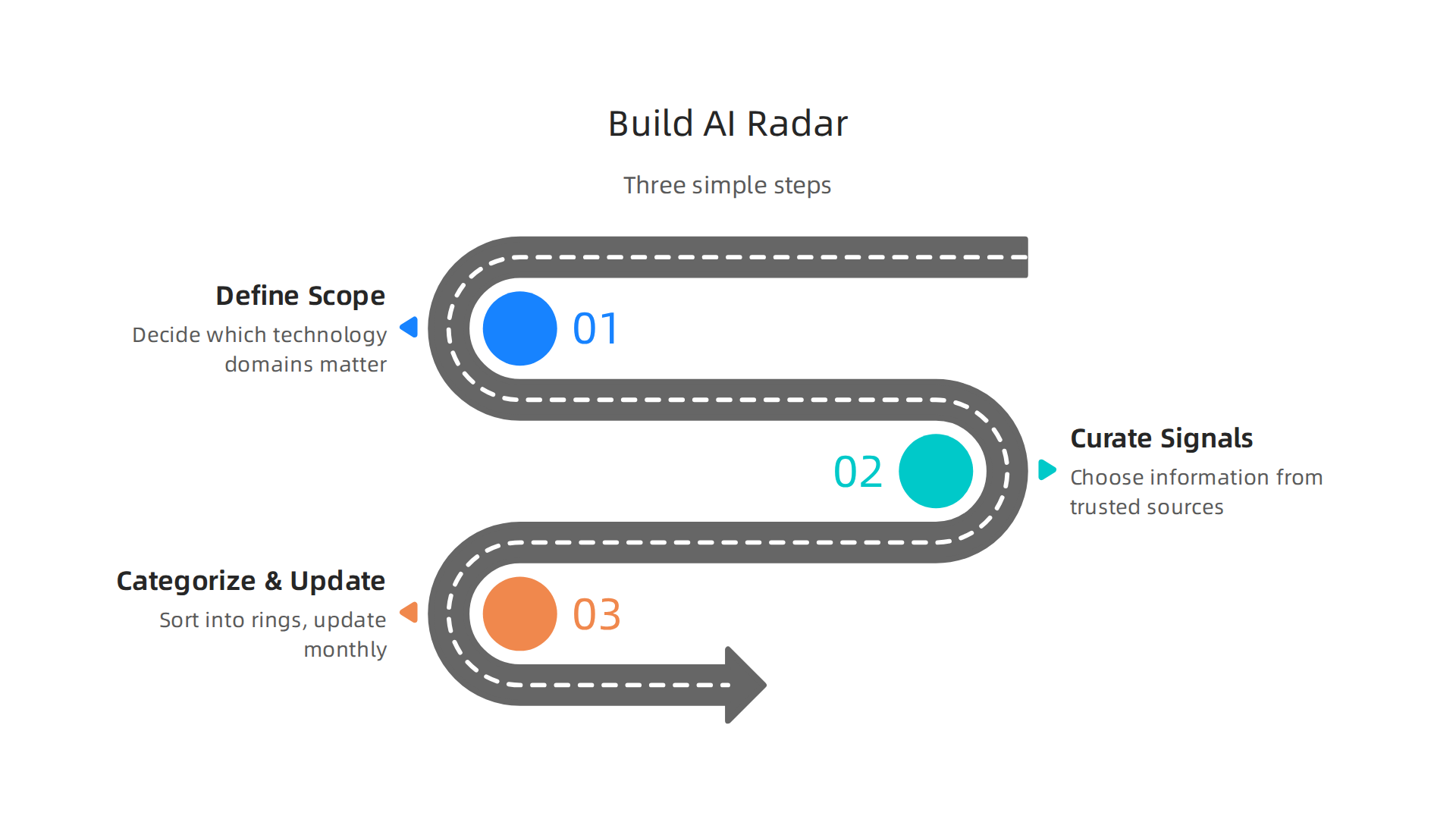
    A step-by-step guide on how to construct a personal AI tech radar.

    Step 1: Define your radar scope. Before you start tracking anything, decide which technology domains actually matter to your business. Are you focused on content creation tools? Automation platforms? Data analytics? Limit your radar to two or three areas. A focused radar beats a scattered one every time. The goal is to avoid information overload, not add to it. When you define your scope clearly, you give yourself permission to ignore the rest. For a deeper understanding of how to set up the framework, read this guide on building a technology radar that walks through scope and purpose.

    Step 2: Curate signals from trusted sources. You cannot track everything, so choose where you get your information carefully. Look for analyst reports, industry newsletters, and active communities where practitioners share what is actually working. Social media is noisy. Stick to sources that prove their value over time. For a practical approach to finding reliable AI sources that deliver real business results, check out our AI tool discovery 2026 guide. Bookmark two or three sources and check them weekly. That is enough to stay current without burning out.

    Step 3: Categorize and update regularly. Once you have a list of technologies, sort them into four rings. Adopt means use it freely for new projects. Trial means test it on a small scale. Assess means study it but do not commit yet. Hold means wait or avoid. The popular framework uses these tech radar Adopt Trial Assess Hold categories to standardize decisions across your team. Update your radar every month. Remove tools that never leave the Assess ring. Move tools from Trial to Adopt when they prove themselves. A stale radar is worthless.

    That is it. Three steps. You can set this up in an afternoon using a simple spreadsheet or a shared document. The hard part is sticking with the process. But once you do, your tech radar becomes your single source of truth for every AI decision you make this year.

    Top AI Tools to Watch in 2026

    Once your tech radar framework is ready, you need to fill it with the right candidates. Here is a look at the top AI tools to watch in 2026, grouped by how businesses are actually using them.

    Text Generation and Coding. The biggest category remains text generation. Tools like ChatGPT, Claude, and Gemini lead the pack for drafting content, brainstorming ideas, and handling customer support. On the coding side, GitHub Copilot and similar assistants have become standard for developers. These tools fall squarely into the Adopt or Trial rings of your radar depending on your team size. For a full list of options, check out this roundup of the Top 14 AI Tools for Businesses in 2026.

    Image, Video, and Data. Image and video generation tools have also matured. Midjourney and Runway ML remain strong choices for creative work. Data analysis tools like HubSpot AI and Salesforce Einstein are helping teams make sense of customer data faster. A good tech radar helps you compare these different types of AI side by side. You can learn more about how HubSpot AI streamlines business operations if marketing and sales tools are in your scope.

    Evaluating for Your Radar. The key is picking tools that offer strong ROI and fit into your existing stack. A tool that requires a massive overhaul of your workflow might belong in the Hold or Assess ring. A tool that plugs in easily and saves time immediately is a candidate for Trial or Adopt. Staying on top of all these new releases is a full time job. That is why we recommend subscribing to a trusted source that curates the best tools for you. The AI Newsletter Worth Reading delivers clear daily updates so you never miss a tool worth adding to your tech radar.

    Populating your radar with strong candidates in each category gives you a clear view of where to invest your time and budget in 2026. Update your list as new tools emerge and old ones fall behind.

    Evaluating AI Tools for Your Business

    So you have a list of promising AI tools. Now comes the harder part: figuring out which ones are worth your time and money.

    A person meticulously examining documents or data, representing careful evaluation and decision-making.

    How do you know if a tool is a good fit for your team? You need a set of clear evaluation criteria.

    Think of it like test-driving a car before you buy it. You would not sign a contract without checking the engine, the comfort, and the price. The same goes for AI tools. Here are the five main criteria to use when scoring each candidate on your tech radar.
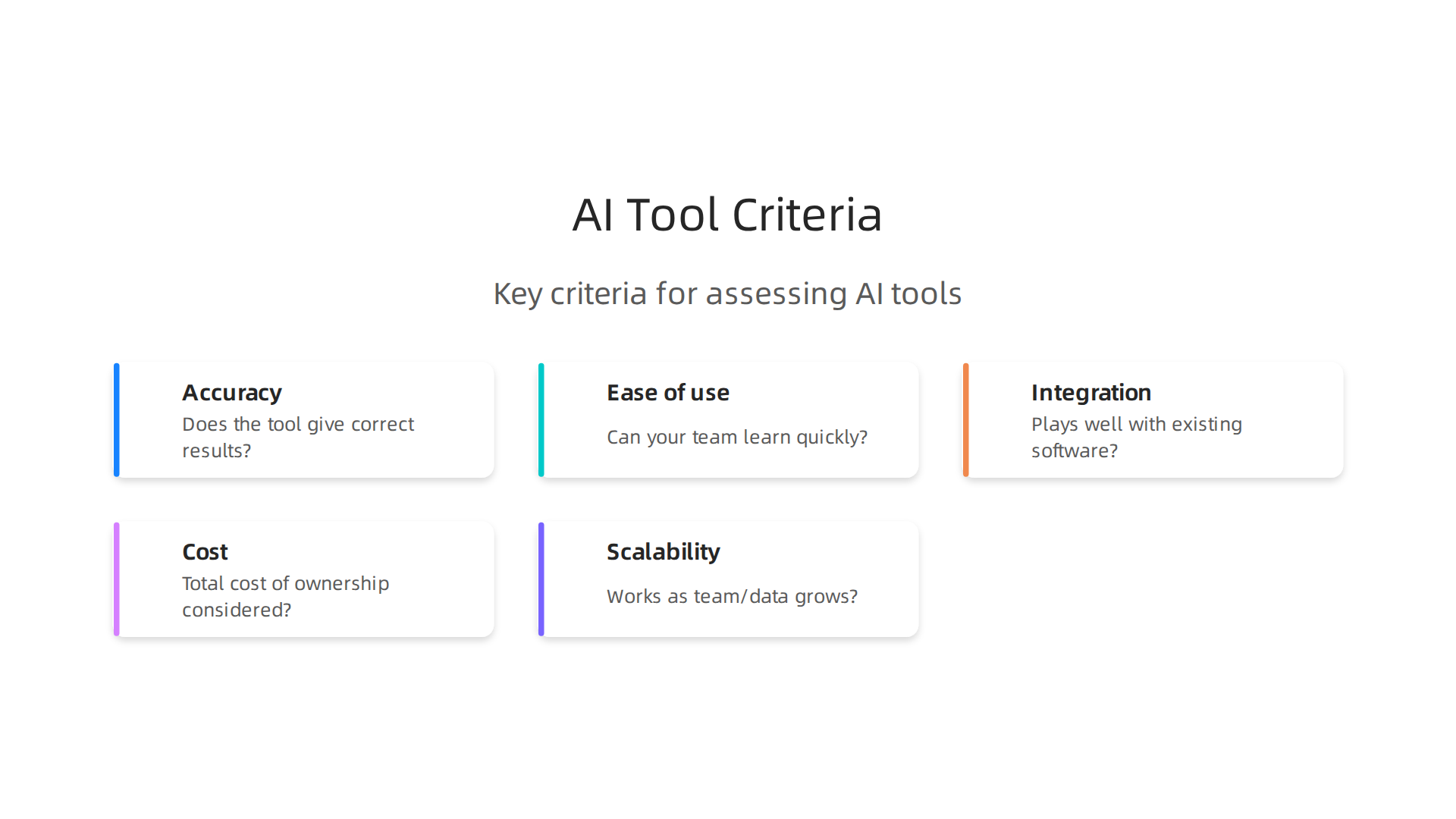
    Key criteria for assessing and scoring potential AI tools for business adoption.

    Accuracy. Does the tool give correct results most of the time? For an LLM AI chatbot helping with customer support, you need reliable answers. For a code generator like GitHub Copilot, the code should compile and run without major bugs. Test with real examples from your work.

    Ease of use. Can your team learn the tool quickly? A steep learning curve can kill adoption. Ask a few team members to try it out. If they get frustrated in the first hour, the tool might belong in the Hold ring.

    Integration. Does it play well with your existing software? Tools that connect with your CRM, project management app, or data warehouse save you from manual data entry. Check for pre-built integrations or an API. A tool that requires a custom setup might be too heavy for a quick trial.

    Cost. Look beyond the monthly subscription. Factor in training time, potential productivity dips, and any extra infrastructure you need. Calculate the total cost of ownership. For small to medium businesses, a free tier or reasonable per-seat pricing often makes sense.

    Scalability. Will the tool still work when your team grows or data volume increases? An AI tool that handles 100 users might break at 500. Ask the vendor about performance under load and look for case studies from companies your size.

    Running a formal proof of concept is the best way to test these criteria. Instead of buying a full license upfront, start with a trial period. Give a small team a real project to complete. Measure the time saved, the quality of output, and any friction points. This hands-on approach reveals issues that marketing pages never show.

    A good way to structure this is to follow a step-by-step evaluation process, similar to how companies build a tech radar for technology management. Define your scoring system, test each tool against your real use cases, and then assign it to a ring: Adopt, Trial, Assess, or Hold.

    One common dilemma is choosing between a general-purpose AI tool and a specialized one. General-purpose tools like ChatGPT or Claude handle many tasks but may lack depth. Specialized tools for legal, medical, or design work often deliver higher accuracy in their niche. The trade-off comes down to flexibility versus precision. If you need a tool that does one thing extremely well, go specialized. If you want a Swiss Army knife that your whole team can use, go general. A clear guide to choosing AI for business tools can help you weigh these options.

    Your tech radar is only as useful as the data you put into it. Take the time to evaluate each tool honestly. Update your scores as you learn more. The goal is to make informed decisions that save your business time and money, not to chase every shiny new release.

    The ROI of Early AI Adoption

    So you have placed a few tools on your tech radar. You have run trials, scored them against your criteria, and moved some into the Adopt ring. Now comes the moment of truth: What kind of return can you expect from all this effort?

    The data from 2026 is encouraging. According to The ROI of Gen AI and Agents 2026 report, 92 percent of early adopters report positive returns on their generative AI projects. Senior executives expect up to a 47 percent return on agentic investments within the next 12 months. Those numbers make a strong case for moving forward.

    But ROI is not automatic. It depends on two things: thoughtful integration and change management. If you plug an AI tool into a broken process, you just get a faster broken process. You need to clean up the workflow first. And your team needs time to learn the new tool without pressure. Rush this step, and your returns will suffer.

    Here are the three key metrics to track as you measure your tech radar investments.

    Time saved. This is the easiest win to measure. Pick a task your team does regularly. Time how long it takes before the AI tool, then measure again after adoption. A customer support team using an LLM AI chatbot might cut email response time from three hours to 45 minutes. That time adds up fast across the whole team.

    Revenue impact. Does the AI tool help you sell more or keep customers longer? For sales teams, an assistant that surfaces customer data during calls can boost close rates. For marketers, tools that help publish content faster with better targeting drive more qualified leads. Track the dollar value directly.

    Revenue impact. Does the AI tool help you sell more or keep customers longer? For sales teams, an assistant that surfaces customer data during calls can boost close rates. For marketers, tools that help publish content faster with better targeting drive more qualified leads. Track the dollar value directly.

    Customer satisfaction improvement. Faster responses, fewer errors, and personalized recommendations all improve the customer experience. Happier customers spend more and stay longer. Check your satisfaction scores before and after adoption to see the real difference.

    Your tech radar gives you a framework to track these metrics over time. When the numbers prove a tool is working, you move it deeper into Adopt. When a tool underperforms, you shift it to Hold without second guessing yourself.

    Early adoption carries some risk. But the 2026 numbers show that most businesses come out ahead. The key is to start small, measure everything, and adjust as you go. For a deeper look at applying these metrics in marketing, check out this guide on how to get real ROI from AI marketing cloud in 2026.

    Staying current with AI developments helps you make smarter choices for your tech radar. The AI Newsletter Worth Reading delivers clear daily updates that keep you informed without the noise.

    Common Pitfalls in AI Tool Selection

    Even when you understand the ROI story, picking the right tools off your tech radar can still trip you up. The 2026 data shows ai adoption is moving fast. But speed without caution leads to costly mistakes. Here are three traps that catch even smart teams.

    Information overload leads to analysis paralysis. With hundreds of AI tools launching every month, it is easy to get stuck comparing features that do not matter. You read reviews, watch demos, and subscribe to newsletters until your inbox is full. But you never actually pick one. The 2026 Stanford HAI AI Index Report shows artificial intelligence adoption has hit nearly 53 percent at the population level. That flood of options is real. To avoid paralysis, limit your research window. Give yourself two weeks to explore, then pick the top two candidates for a trial. Your tech radar is meant to speed up decisions, not slow them down.

    Over-reliance on hype without proof of concept. A tool gets buzz on social media. A competitor talks about it in a case study. But buzz is not a business case. The 2026 Virtuous Nonprofit AI Adoption Report found that while 79 percent of organizations saw small to moderate improvements from AI, only 7 percent reported major improvements. High expectations do not always match reality. Before you move any tool into the Adopt ring, run a small pilot. Test it on a real task with your data and your team. Let the results speak louder than the marketing.

    Neglecting data privacy, security, and compliance requirements. This is the one that comes back to bite you. You focus on features and price, but you forget to check where your data goes. Some LLM AI tools send prompts to external servers. Some store your customer information without clear consent. If you work in a regulated industry like healthcare or finance, a quick deployment can turn into a legal headache. Always review the vendor’s data handling policy before you sign. If the tool cannot meet your compliance standards, shift it to Hold no matter how shiny it looks.

    These pitfalls are avoidable. With a clear process and a honest look at your own needs, your tech radar stays useful. For a deeper guide on filtering the noise, check out this walkthrough on how to choose AI for business tools that deliver real results.

    Summary

    This article explains how to create and use an AI tech radar to cut through the noise of rapid AI development and make smarter technology decisions in 2026. It defines the tech radar framework (quadrants and the Adopt/Trial/Assess/Hold rings), highlights three major trends to prioritize—multimodal generative AI, agentic AI, and edge/small models—and offers a three-step process to build your own radar: set scope, curate trusted signals, and categorize/update regularly. You’ll also get practical guidance on evaluating tools with five concrete criteria (accuracy, ease of use, integration, cost, scalability), how to run trials and proofs of concept, and which metrics to track for ROI. The piece covers top tool categories to watch, common selection pitfalls like hype and privacy oversights, and how to turn the radar into a repeatable decision system your team can use month after month. After reading, you’ll know how to populate a focused radar, run meaningful pilots, measure outcomes, and avoid costly mistakes when adopting AI.


  • How to Get Real ROI from AI Marketing Cloud in 2026

    How to Get Real ROI from AI Marketing Cloud in 2026

    Introduction

    Feeling lost in the flood of marketing cloud options in 2026? You are not alone.

    A person feeling overwhelmed by complex choices, reflecting the challenge of selecting marketing cloud options.

    The marketing cloud platform market is growing fast, with estimates showing it could hit $32.88 billion by 2033 Grand View Research. At the same time, AI is reshaping the game entirely. The AI-in-marketing market is already around $47 billion in 2026 Soku.ai. And major players like Salesforce are rebuilding their marketing cloud for the age of AI SalesforceBen.

    SalesforceBen offers insights and news on Salesforce products, including their AI-powered marketing cloud.

    But here is the thing. Most marketers struggle to cut through all the hype. You hear buzzwords like “agentic” and “predictive intelligence,” but what actually works? A recent survey found that 63% of marketers are already using generative AI Salesforce Marketing Statistics. Yet many still feel unsure about which platform will deliver real results for their business.

    That is where this guide comes in. We will give you a simple, structured framework to evaluate, implement, and get the most out of an AI-powered marketing cloud. No fluff. Just practical steps that help you make smart choices.

    Staying on top of these changes is tough. That is why we recommend the The Deep View Newsletter for clear daily AI updates that keep you informed without the noise. And if you are still figuring out where to find reliable tech news, check out our list of 10 top AI websites professionals trust for real insights.

    Let us start by looking at what a marketing cloud really is and why it matters in 2026.

    What Is a Marketing Cloud? The AI-Enhanced Foundation

    Let me paint a picture. You wake up, check your email campaign stats in one tool, jump to social media scheduling in another, then open your ad manager for PPC data, and finally pull up Google Analytics for web traffic. By the time you have connected all the dots, it is lunchtime.

    That is the old way. A marketing cloud changes everything by pulling email, social, ads, analytics, customer data, and more into a single unified platform. Instead of jumping between dashboards, you see the full picture in one place.

    What makes a marketing cloud different in 2026?

    The global marketing cloud platform market was worth $15.86 billion in 2025 and is expected to reach $32.88 billion by 2033 Grand View Research. At the same time, the AI in marketing market sits around $47 billion in 2026 and keeps climbing Soku.ai. Those numbers tell you one thing: marketing clouds are not just getting bigger. They are getting smarter.

    Today, a modern marketing cloud uses AI to orchestrate customer journeys across every channel. It learns from behavior, predicts what someone will do next, and personalizes messages at scale. Major players like Salesforce are rebuilding their marketing cloud around agentic AI, meaning the platform can act on its own to trigger the right message at the perfect moment SalesforceBen. That is a huge leap from the old batch-and-blast email days.

    How this helps small businesses and teams

    If you run a small business, a good marketing cloud acts as your digital marketing platform for small businesses. It handles everything from email nurture sequences to ad retargeting, all without needing a room full of specialists. And if you are involved in affiliate programs, many platforms now include affiliate tracking and management right inside the cloud. So you can run what is affiliate marketing campaigns alongside your other channels without extra software.

    But here is the challenge: how do you pick the right one? You need the right tech choice tools to compare features, pricing, and AI capabilities. That is where having a trusted source for AI updates really helps. For a no-nonsense daily digest on all the tech tools shaping marketing, we recommend the The Deep View Newsletter.

    The Deep View Newsletter provides daily AI updates for marketing professionals.

    It cuts through the noise and gives you practical insights you can use.

    And if you want to see how the biggest players compare, check out our roundup of 10 top AI websites professionals trust for real news and tools to sharpen your research.

    Now that you understand the AI-enhanced foundation of a marketing cloud, let us walk through the exact criteria you should use to evaluate and choose the best platform for your business.

    How AI Is Reshaping Marketing Cloud Capabilities in 2026

    So now you know what a marketing cloud is and why it matters. But the old marketing cloud from a few years ago? It is almost nothing like what you see today. AI has completely changed the game. In 2026, a modern marketing cloud is less of a tool you control and more of a smart system that works alongside you.

    A team collaborating, symbolizing the partnership between marketers and AI-powered systems.

    Predictive segmentation and real-time personalization

    One of the biggest upgrades is how AI handles customer data. Instead of manually building segments based on simple rules like "opened email last week," AI looks at thousands of data points. It predicts who is most likely to buy, who is about to churn, and what message will work best for each person. This is what Salesforce calls using AI to unify and analyze your data so you learn more about customer preferences Salesforce.

    Salesforce is a leading CRM provider, integrating AI into its marketing cloud solutions.

    That predictive power lets you send the right offer at the exact right moment, without guessing.

    Real-time personalization is another leap. As someone visits your site, the marketing cloud can adjust the next email, ad, or push notification based on what they just did. It is not batch processing anymore. It is instant. According to the Perficient team, Salesforce Marketing Cloud now uses AI tools to deliver real-time personalization and even autonomous agents that boost marketing ROI Perficient. That means less manual work and better results.

    Automated content generation and embedded AI

    AI also writes content now. Leading marketing clouds use natural language processing to generate subject lines, email body copy, social posts, and even ad headlines. You give it a few keywords and a tone, and the platform drafts multiple variations for you to test. Some platforms also include computer vision, so they can analyze images and suggest which visuals will perform best.

    These features are now built right into the core platform. For example, Salesforce Marketing Cloud includes tools like interactive email forms and data extensions, but the real magic in 2026 is how AI powers every step of the journey igmGuru. You do not need separate AI tools plugged in. It is already there.

    The big 2026 trend: agentic AI workflows

    Here is where things get really interesting. In 2026, the biggest shift is toward agentic AI. That means the marketing cloud does not just suggest actions. It takes them on its own. Campaigns can adjust themselves without you touching a thing. If a certain email subject line is underperforming, the AI swaps it for a better one. If a customer is stuck in a journey step, the system triggers a new path.

    Salesforce calls this Agentforce Marketing. The whole ecosystem is being rebuilt around this idea. As the SalesforceBen team explains, the platform follows an agentic path where AI acts independently to deliver the best experience SalesforceBen. Deloitte also notes that Salesforce’s 2026 evolution enhances core CRM with AI-driven automation and real-time data intelligence, creating unified agentic workflows Deloitte Digital. That is a huge time saver for small teams.

    If you want to stay on top of these rapid changes, getting a clear daily briefing helps. Many marketers turn to a newsletter that cuts through the hype and delivers practical AI updates. You can start with something like the The Deep View Newsletter to get actionable insights on AI tools and trends every morning.

    Now that you see how AI is reshaping marketing clouds, the next step is figuring out which platform fits your needs. We will walk through that next.

    Essential AI Features to Look for in a Marketing Cloud Platform

    So which platform is right for you? Not all marketing cloud platforms are built the same in 2026. Some are just fancy email senders. Others are smart systems that work like a co-pilot. Before you pick one, check for these three must-have features.

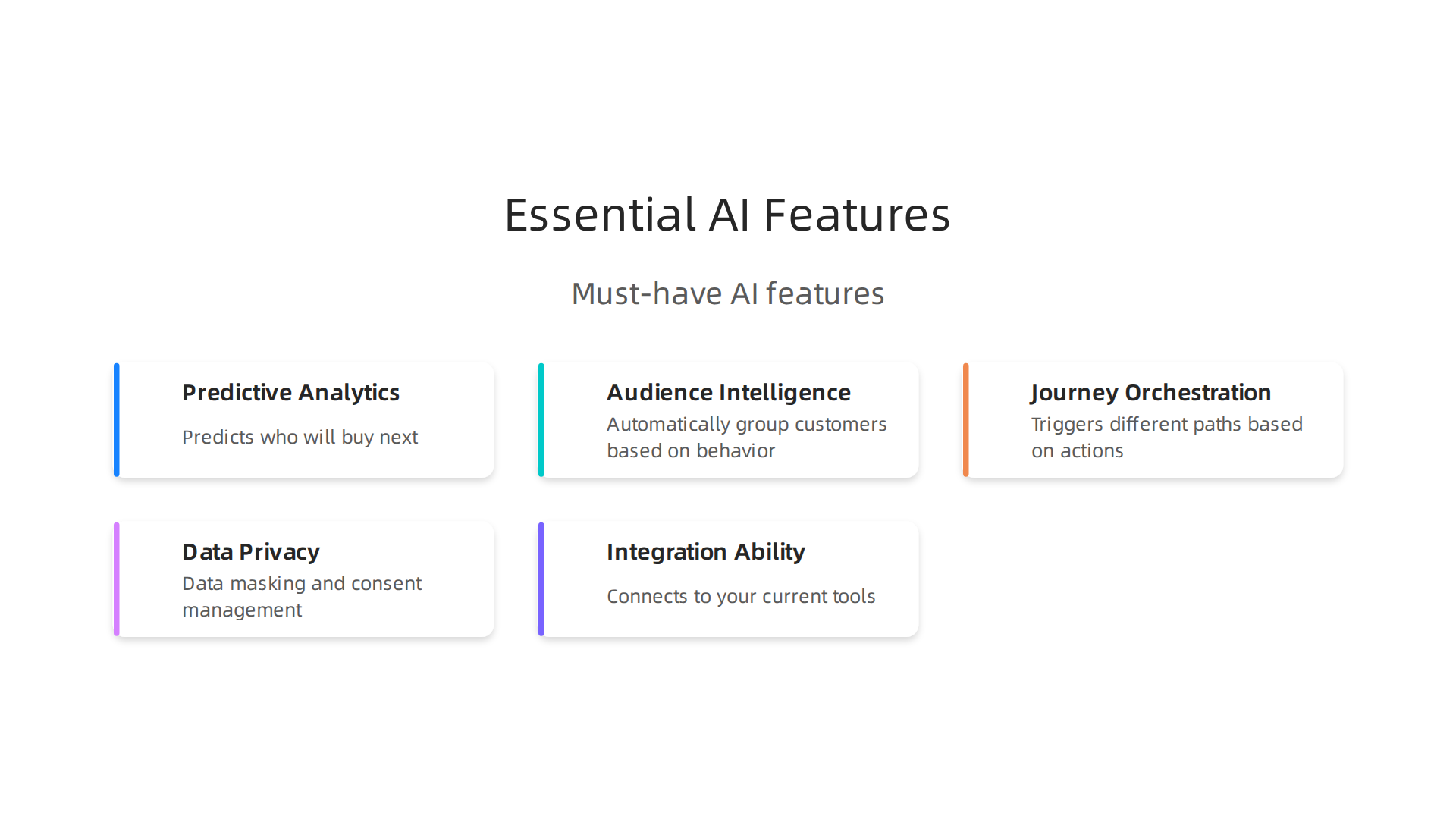
    Key AI capabilities that distinguish modern marketing cloud platforms in 2026.

    Predictive analytics, audience intelligence, and journey orchestration

    First, look for predictive analytics. The best platforms use AI to study your customer data and spot patterns you might miss. They predict who will buy next, who might leave, and what offer they need to see. This is what Salesforce calls using AI to unify and analyze your data so you learn more about customer preferences Salesforce. Without this, you are just guessing.

    Second, audience intelligence matters. The platform should automatically group your customers based on behavior, not just basic rules. It should tag people in real time as they browse, click, or ignore your messages.

    Third, journey orchestration. Do not settle for a tool that only builds simple email flows. You need a platform that triggers different paths based on what each person does. If someone stops engaging, the AI should switch to a new message or offer without you doing anything. That is where agentic AI truly shines. As the SalesforceBen team explains, the platform now follows an agentic path where AI acts independently to deliver the best experience SalesforceBen.

    Data privacy and compliance are non-negotiable

    In 2026, you cannot ignore privacy. Every marketing cloud you consider must include data masking and consent management features. That means the system automatically hides sensitive data and respects each customer’s opt-in choices. If a platform struggles with this, skip it. You do not want legal trouble down the road.

    Integration ability with your existing tech stack

    Finally, check how well the platform connects to your current tools. Does it work with your CRM, your ecommerce store, and your analytics software? A marketing cloud is only useful if it talks to everything else you use. If it requires a ton of custom coding to connect, that is a red flag. Choose a platform that plays nice with your stack.

    Comparing features across many tools can feel overwhelming. To help you stay informed and spot the best options, many professionals turn to reliable sources. For a great starting point, check out this list of 10 top AI websites professionals trust for real news and tools. It will point you to the right resources.

    And if you want a daily briefing that cuts through all the noise, the The Deep View Newsletter delivers practical AI updates every morning. It is a simple way to stay sharp while you shop for your next platform.

    Comparing Top Marketing Cloud Providers: AI Edition

    Now you know what to look for. But how do the big players actually compare in 2026? Here is a quick breakdown of the three main options and who they work best for.

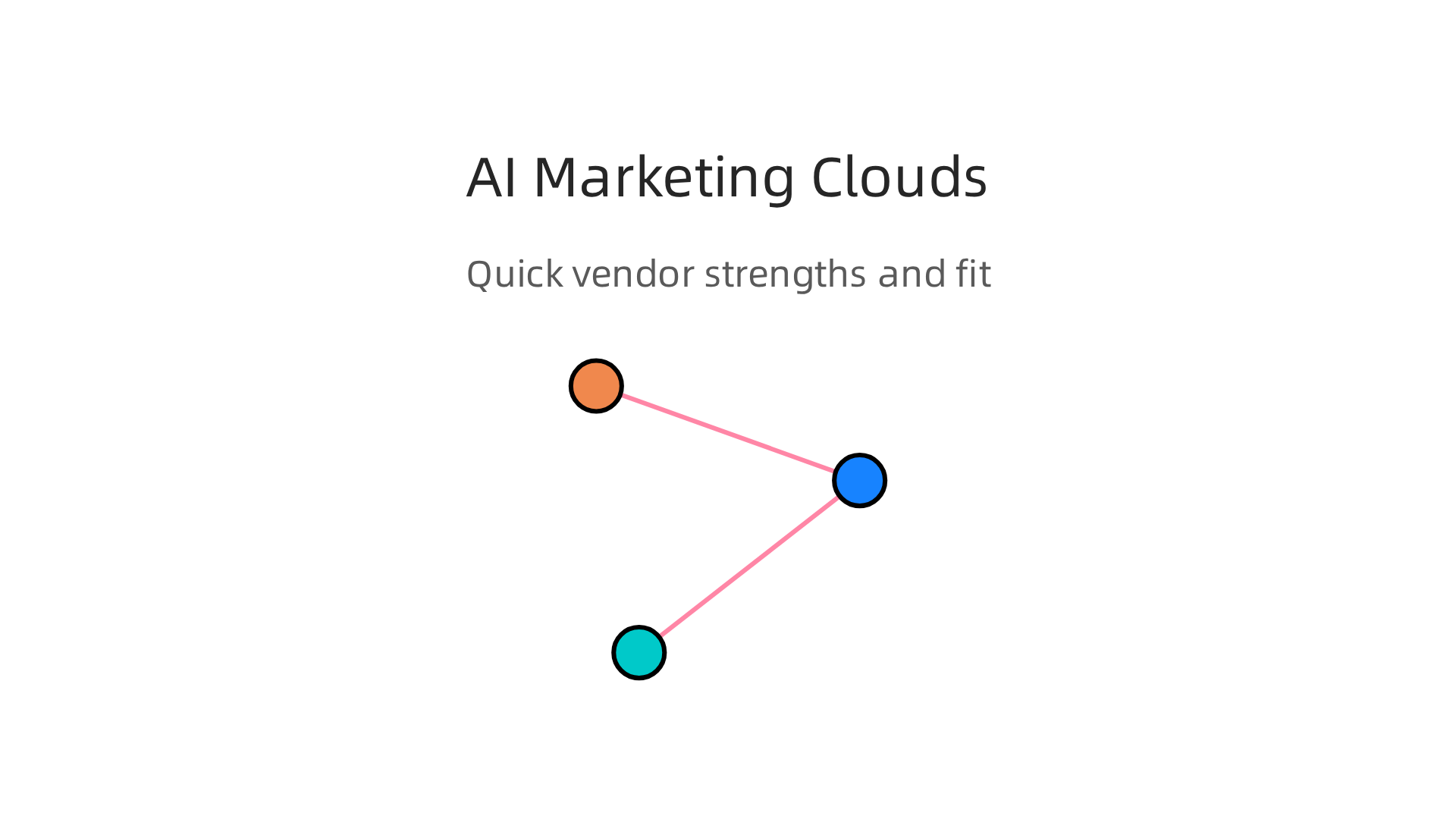
    A comparison of top marketing cloud providers, highlighting their AI strengths and ideal use cases.

    The quick comparison table

    Provider AI Strength Best For Pricing Range
    Salesforce Marketing Cloud Agentic journey orchestration, predictive scoring Large enterprises with complex funnels High, but scalable
    Adobe Experience Cloud Deep personalization across web, email, ads Brands that need consistent multi-channel experiences High, with enterprise licensing
    HubSpot Simple AI tools for small teams, low learning curve Small to mid-size businesses that want all-in-one Mid-range, free tier available

    Salesforce Marketing Cloud: The AI power player

    Salesforce continues to lead the enterprise space. Their agentic AI features mean the system can act on its own, adjusting journeys without waiting for your team. Predictive analytics, real-time segmentation, and deep CRM integration make it a strong choice if you already use Salesforce. But the cost is high, and you often need help from a certified partner. In fact, many businesses turn to top Salesforce Marketing Cloud partners for implementation and support Cyntexa. If you have the budget and the team, this is the most advanced option.

    Adobe Experience Cloud: Personalization at scale

    Adobe is the best fit if you care about delivering the right content across every touchpoint. Its AI engine analyzes customer behavior across email, web, social, and ads. Then it personalizes everything in real time. Adobe works well for companies that already use its other products like Adobe Analytics or Adobe Commerce. But be warned: setup is complex, and pricing is not transparent. Smaller businesses might find it too much.

    HubSpot: Simple and affordable

    HubSpot is the go-to for small to mid-size businesses. Its AI features are not as deep as Salesforce or Adobe, but they are much easier to use. You get predictive lead scoring, smart email sends, and basic journey automation right out of the box. HubSpot integrates with hundreds of tools, so you do not need a developer to connect everything. For a digital marketing platform for small businesses, it is often the smartest starting point. And if you later outgrow it, you can migrate to a bigger system.

    How to pick the right one for you

    Think about these three things:

    • Your team size: Small teams love HubSpot. Big teams need Salesforce or Adobe.
    • Your budget: HubSpot has a free tier and clear plans. The other two require a bigger investment.
    • Your existing tech: If you already use Salesforce CRM or Adobe products, stick with that family.

    The best marketing cloud is the one you can actually use. Do not buy a Ferrari if you only need a reliable sedan. And do not settle for a bicycle if you are trying to win a race.

    Still unsure which tool fits your use case? Many professionals start by exploring curated lists of tech choice tools to understand what others in their industry use. For example, this guide to top AI marketing tools in 2026 breaks down real pricing and honest limitations Marketing Mary.

    And for a visual walkthrough, you can watch a comparison of top marketing automation systems on YouTube YouTube.

    One more thing: do not forget to check how each platform handles privacy. Compliance features like data masking and consent management vary a lot between these providers. Make sure yours matches your local laws.

    The quickest way to stay ahead in this fast-changing space is to keep learning. If you want a daily dose of practical AI updates delivered each morning, the The Deep View Newsletter gives you fresh insights without the noise. It is one of the best ways to keep your tech choices sharp in 2026.

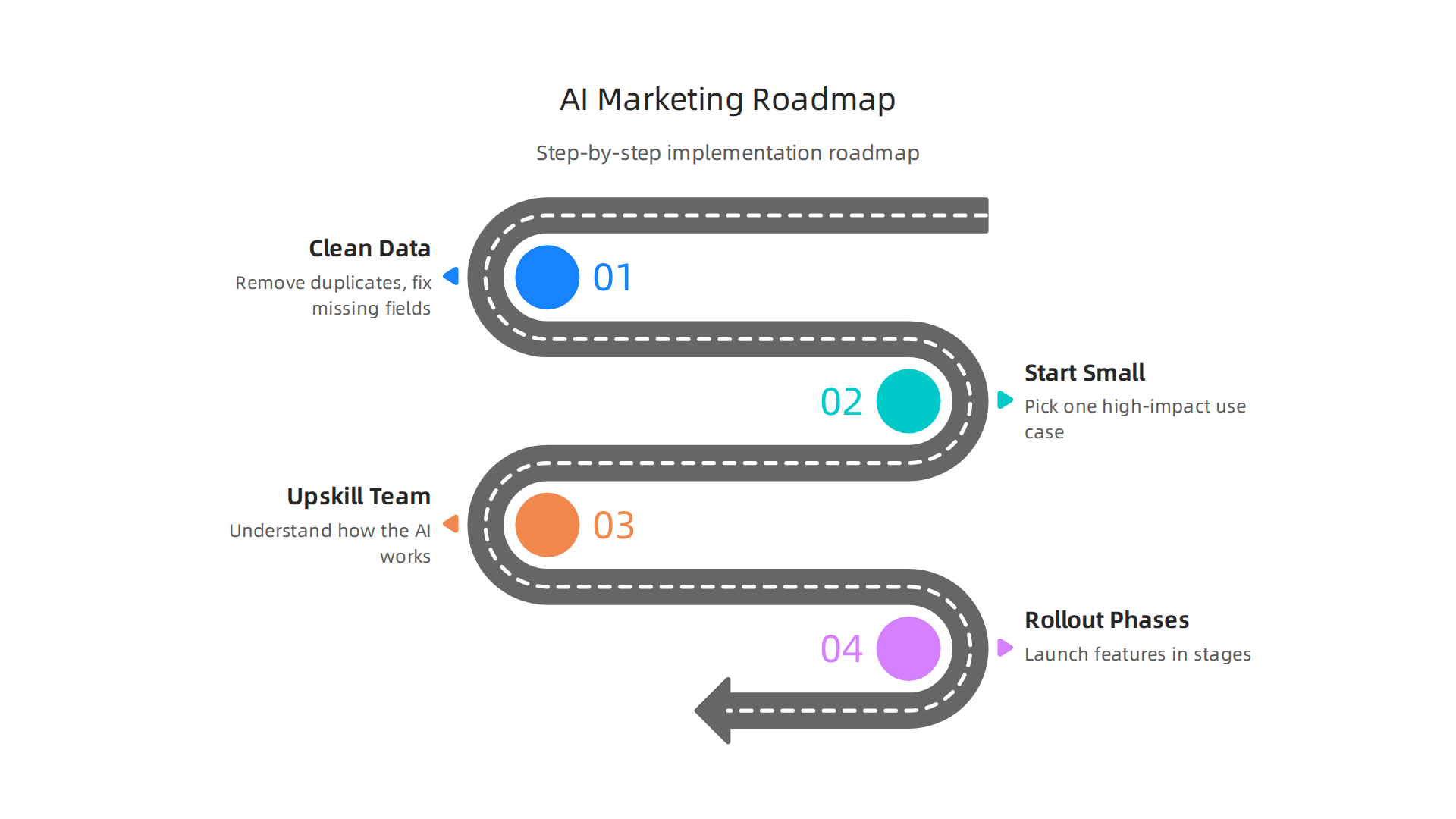
    Implementing AI in Your Marketing Cloud: A Step-by-Step Roadmap

    You picked your marketing cloud. Good. But here is the thing. Choosing the platform is only half the battle. Actually making AI work inside it is where most people get stuck. If you skip the setup steps, your fancy new tool will just sit there. Or worse, it will give you bad results.

    So let us walk through a simple roadmap that works in 2026.

    A step-by-step roadmap for successfully implementing AI features in your marketing cloud platform.

    Follow these steps, and you will avoid the common traps that waste time and money.

    Step 1: Clean your data first

    AI is only as smart as the data you give it. Garbage in, garbage out. Before you turn on any AI feature, you need to clean your customer data. Remove duplicates. Fix missing fields. Standardize how you record names, emails, and purchase history. This is boring work, but it is the most important step. Many cloud providers like DigitalOcean emphasize data readiness as a foundation for AI success DigitalOcean. If your data is messy, your AI will make wrong predictions.

    Step 2: Start with one high-impact use case

    Do not try to automate everything at once. Pick one thing that will give you a quick win. Predictive lead scoring is a great start. It helps your sales team focus on the people most likely to buy. Your marketing cloud already has this feature built in. Turn it on for one audience segment. See how it performs. Then expand. The best AI marketing tools in 2026 all suggest starting small and scaling up The Smarketers. If you try to do too much too fast, you will overwhelm your team and your system.

    Step 3: Upskill your team

    Your people need to understand how the AI works and what it can do. Run training sessions. Show them real examples. Let them play in a sandbox environment. A common mistake is buying a powerful tool and assuming everyone will figure it out on their own. That never works. If you use Salesforce, many businesses hire certified partners early on to guide the team through the learning curve Cyntexa. But even without a partner, you can start with free courses and tutorials. The key is to build confidence before pushing new features live. For ongoing learning, our curated list of top AI websites professionals trust is a great starting point for your team.

    Step 4: Roll out in phases

    Launch your AI features in stages. For example, start with email personalization for one segment. Once that runs smoothly, add behavior-based triggers. Then add predictive scoring. Then add full journey automation. Each phase gives you a chance to fix issues without breaking everything. Over-customization is a real trap. Some teams try to configure every possible setting and end up with a system nobody can manage. Keep it simple at first. You can always add complexity later.

    Common pitfalls to avoid

    Change management matters. Your team might resist new AI tools if they feel threatened or confused. Explain how AI helps them work better, not replaces them. Also, watch out for over-customization. Stick to the core features before building custom integrations. And never skip the data cleanup. It will come back to haunt you.

    Keep learning as you go

    The AI landscape shifts fast. The tools you use today might look different next year. That is why staying informed matters. A daily newsletter like The Deep View gives you clear updates without the hype. It is a simple way to keep your skills sharp and your tech choices smart. If you want to stay ahead in 2026, make learning a habit The Deep View Newsletter.

    Implementation takes time. But if you follow this roadmap, you will get real results from your marketing cloud. And you will avoid the frustration that comes with rushing in.

    Measuring ROI of AI-Powered Marketing Cloud Investments

    So you followed the roadmap. Your marketing cloud is live with AI features. Good. Now comes the question everyone asks but few answer well. Is it actually working?

    A person reviewing charts and data, focused on measuring the success and ROI of initiatives.

    Here is the thing. Most businesses spend big on AI but never track whether it pays off. A 2026 study found that only 19% of content marketers track AI-specific KPIs Digital Applied. That means 81% are flying blind. Do not be one of them.

    Track the right metrics

    Measuring ROI from your marketing cloud comes down to three main numbers. First, look at your conversion rate lift. Is your AI helping more people buy? Second, watch your cost per acquisition or CPA. Good AI should lower this over time. Third, track time saved across your team. When AI handles personalization and segmentation, your people can focus on bigger strategy work The Hovi.

    Attribution is more than just sales

    Do not only look at direct revenue. AI also creates operational efficiencies. Your attribution model should capture both hard savings like lower ad spend and soft gains like faster reporting and better audience insights Kanerika. When you add those up, the real ROI is often much higher than it first appears.

    Use benchmarks to check yourself

    What is a good click rate or conversion rate? It depends on your industry. But you can use public benchmarks to set realistic goals for your digital marketing platform for small businesses or enterprise. For example, AI product recommendations lift email click rates to an average of 3.75%. Top performers see even higher numbers Klaviyo. Compare your results to these standards. If you fall short, adjust your strategy.

    Keep learning and improving

    ROI tracking is not a one-time task. The tools and benchmarks shift every few months. That is why it helps to stay connected to trustworthy sources for updates on tech choice tools and industry shifts. Our curated list of AI websites professionals trust is a solid starting point.

    For daily updates on the specific metrics that drive real ROI, without all the hype, many professionals rely on The Deep View Newsletter. It cuts through the noise so you can focus on what actually moves the needle for your business.

    Data Privacy and Compliance in AI Marketing Clouds

    Professionals discussing data security, highlighting the importance of privacy and compliance.

    All that data your marketing cloud collects? It comes with serious rules. And those rules are getting stricter every year.

    In 2026, you have to juggle regulations like the GDPR in Europe, the CCPA in California, and a growing list of AI-specific laws popping up worldwide. These laws set hard limits on how you can collect, store, and use customer data.

    Here is the challenge. Your AI marketing cloud needs data to work. But it also needs permission to use that data. That is where built-in privacy controls come in.

    A good digital marketing platform for small businesses now includes features like consent tokens and data anonymization. Consent tokens track who said yes to what. Data anonymization strips away personal details so you can still analyze patterns without risking someone’s privacy.

    Look for tech choice tools inside your marketing cloud that handle these tasks automatically. You do not want to be the person manually checking if every email address has permission.

    The real cost of ignoring compliance

    Non-compliance is not just a legal headache. It can destroy your business.

    Fines from regulators can run into the millions. But the hidden cost is worse. When customers find out you mishandled their data, they leave. Trust is hard to build and easy to lose.

    That is why staying on top of the latest regulations matters so much. The rules change fast. One of the smartest things you can do is follow reliable sources that track these shifts for you.

    For a solid starting point, check out this list of AI websites professionals trust for real updates on tech tools and compliance news.

    And if you want daily summaries on the privacy and compliance changes that actually affect your marketing cloud, many business owners rely on The Deep View Newsletter. It helps you stay informed without drowning in noise.

    Compliance is not exciting. But it keeps your business running. Build it into your AI marketing cloud from day one and you will save yourself a world of pain later.

    Future-Proofing Your Marketing Strategy with AI and Marketing Cloud

    Getting compliance right is your foundation. But a strong foundation only matters if you build something lasting on top of it. The real question is this. Is your marketing cloud ready for what is coming next?

    The pace of change in 2026 is faster than ever. Gartner predicts that by 2027, a huge 80% of enterprise marketers will use generative AI every single day. But here is the catch. Only those who keep a close eye on strategy and oversight will actually see a good return on that investment.

    So what is coming next?

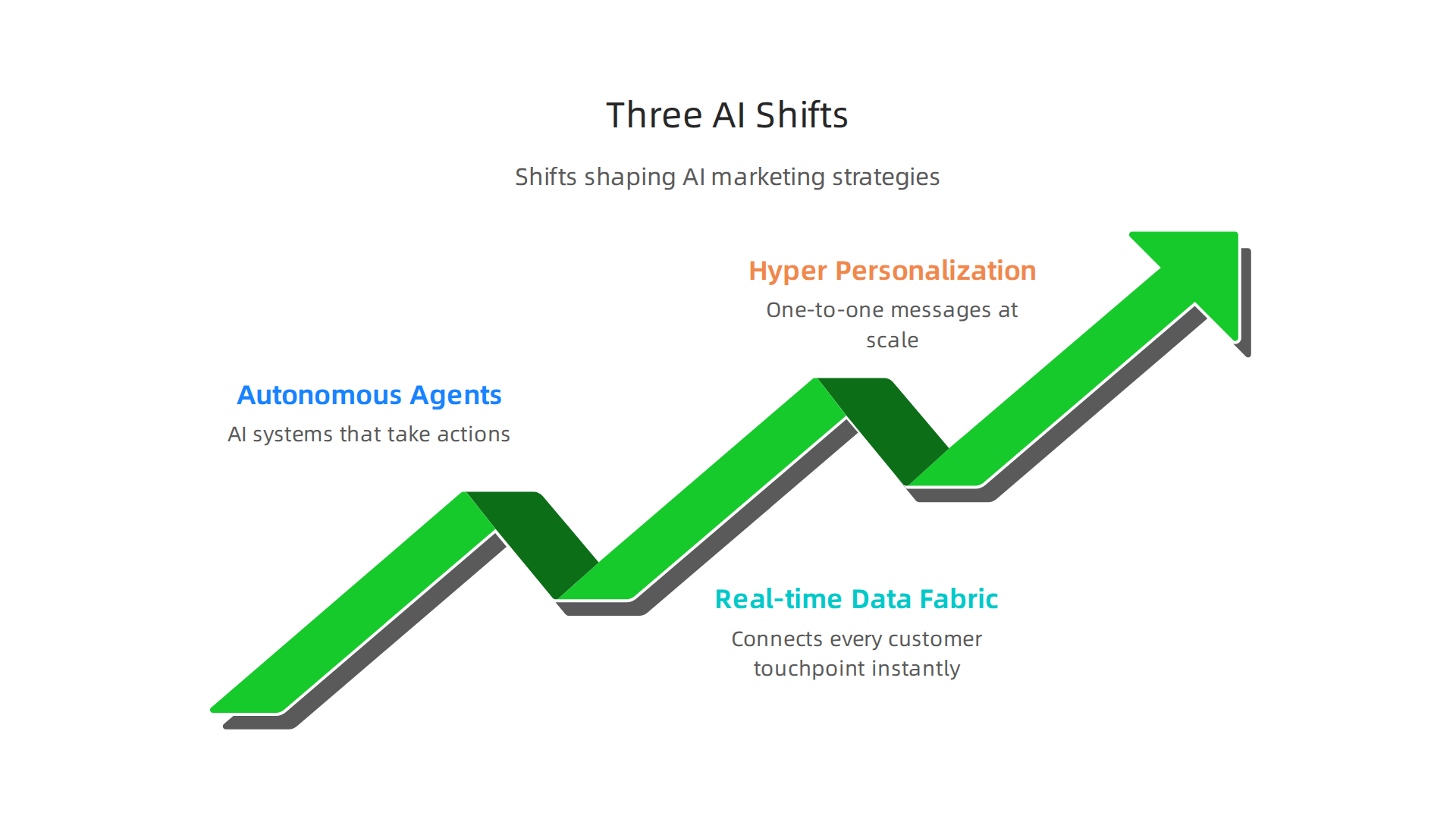
    The three major shifts defining the future of AI-powered marketing cloud strategies.

    The big three shifts on the horizon

    First, we have autonomous agents. These are AI systems that do not just suggest actions. They take actions. Imagine an AI in your marketing cloud that spots a drop in email engagement, automatically adjusts the send time, rewrites the subject line, and triggers a new test campaign without you lifting a finger. Google Cloud’s latest AI agent trends report for 2026 shows this is moving from experimental to essential for businesses that want to scale.

    Second is the real-time data fabric. Your digital marketing platform for small businesses should not have to wait hours or days to process data. A data fabric connects every customer touchpoint instantly. It gives you a complete picture of your audience the moment they act, which makes your campaigns faster and more relevant.

    Third is hyper-personalization. We are past the era of just "Hi {{first_name}}." AI now studies past behavior, current context, and predicted future needs to create one-to-one messages at scale. The 2026 AI marketing trends analysis from Improvado confirms that personalization depth is now the top driver of customer loyalty.

    Why flexibility and learning matter most

    Here is the thing. No one knows exactly what the next big breakthrough will be. That is why locking yourself into a rigid stack is dangerous. You need a marketing cloud that works with modern tech choice tools and adapts as new platforms emerge.

    Building a culture of continuous learning matters just as much. The teams that win are the ones that experiment early. If you are curious about what an AI agent actually looks like in practice, check out our review of the Galaxy AI 2026 agentic assistant for business and content creation. And if you want to see how blending human intuition with machine speed creates better results, take a look at our breakdown of human or AI creativity.

    Early adopters are pulling ahead

    The data is clear on this one. Companies testing agentic workflows today are building a serious lead. According to Salesforce trends for 2026 and the Dotdigital marketing predictions, the brands that treat AI as a core team member rather than just a tool are seeing faster campaign launches and higher customer satisfaction.

    According to WSI World’s marketing predictions, "Search Everywhere" optimization and privacy-first data strategies are becoming non-negotiable for staying visible.

    How to stay ahead without burnout

    The hardest part of future-proofing is simply keeping up. Trends shift fast. New tools launch every week. You do not have time to chase every single headline.

    Want to stop guessing and start knowing what is next? The Deep View Newsletter delivers the day’s most important AI and tech updates straight to your inbox. It is the easiest way to stay ahead of the curve without the noise.

    The future of marketing belongs to the curious. Stay flexible. Keep learning. And let your marketing cloud do the heavy lifting.

    Summary

    This guide explains how AI has transformed marketing clouds in 2026 and gives a practical framework for choosing, implementing, and measuring an AI-powered marketing platform. It starts by defining a modern marketing cloud and highlights key AI capabilities—predictive segmentation, real-time personalization, automated content generation, and agentic workflows—that make platforms smarter and more autonomous. The article lays out the essential features to vet (predictive analytics, audience intelligence, journey orchestration, privacy controls, and integration ability), compares major vendors (Salesforce, Adobe, HubSpot) by use case and budget, and provides a step-by-step rollout plan focused on data cleanup, single high-impact pilots, team upskilling, and phased launches. It also shows how to track ROI with the right metrics, why compliance must be built in, and what trends (autonomous agents, real-time data fabric, hyper-personalization) will shape the next wave. Readers finish with concrete actions: what to check before buying, how to get quick wins, how to measure impact, and where to keep learning to avoid costly mistakes.

  • Galaxy AI 2026 Agentic Assistant for Business and Content Creation

    Galaxy AI 2026 Agentic Assistant for Business and Content Creation

    Introduction

    Have you ever wished your phone could actually do the heavy lifting for you? Not just answer questions or set timers, but really handle the boring stuff like scheduling meetings, organizing your email, or helping you create content. That’s exactly what Galaxy AI is starting to deliver in 2026.

    A person looking focused and relaxed, benefiting from smart technology assisting with daily tasks.

    Galaxy AI is quickly becoming a serious player in the AI assistant space. Samsung has been pushing hard to make AI more useful and personal. The Galaxy S26 series now features what Samsung calls "agentic AI." This means the AI can act on your behalf to automate workflows, handle scheduling, and much more. Samsung shared the full details at their Unpacked event in February 2026.

    So what makes Galaxy AI different from other tools like HeyGen AI or Dreamina AI? A big part of it is on-device intelligence. Instead of sending all your data to the cloud, Galaxy AI processes a lot of information right on your device. This keeps your data more private and secure. Samsung has been open about how trust, security, and privacy shape the future of AI, especially during their talks at CES 2026.

    For businesses, this is big news. Teams in content creation, marketing, and operations are starting to explore what Galaxy AI can do. Whether it’s helping with writing, generating ideas, or automating daily tasks, the potential is real. According to a detailed whitepaper on the Galaxy AI revolution, Samsung is leading with technologies focused on communication, creativity, productivity, and health.

    In this article, we will give you a complete and practical overview of Galaxy AI. We will look at the technology behind it, how it works in real life, and whether it can actually deliver a good return on investment for your business.

    If you want to stay ahead in the fast-moving world of AI, it helps to have a trusted source of news. We recommend signing up for The Deep View Newsletter. It delivers clear daily AI updates straight to your inbox so you never miss what matters.

    And if you are curious about other smart tools that can boost your productivity, check out our guide on how to choose and use an AI powered research assistant. It covers practical tips for picking the right AI helper for your needs.

    What is Galaxy AI? Core Architecture and Philosophy

    So what actually powers Galaxy AI? It helps to understand the engine before you push the pedal.

    Galaxy AI is not one single tool. It is a full suite of AI models and features built by Samsung. At the February 2026 Unpacked event, Samsung introduced what they call "agentic AI" for the Galaxy S26 series. This means the AI can act on your behalf. It can handle tasks like scheduling meetings or organizing your inbox without you needing to guide every step.

    The secret to how Galaxy AI works lies in two core ideas: privacy and personalization.

    First, privacy. Samsung processes a lot of the AI work directly on your device. Your photos, messages, and personal data do not have to travel to a cloud server to be analyzed. This on-device processing is a big deal. Samsung has been open about how trust and security shape the future of AI, especially during their discussions at CES 2026. You get powerful AI help without giving up control of your information.

    Second, personalization. Galaxy AI learns from how you use your phone. It adapts to your habits, your tone, and your schedule. Over time, it becomes more helpful because it knows what matters to you. The system blends on-device smarts with cloud intelligence when needed. This hybrid approach means you get fast responses for simple tasks and deeper power for bigger jobs.

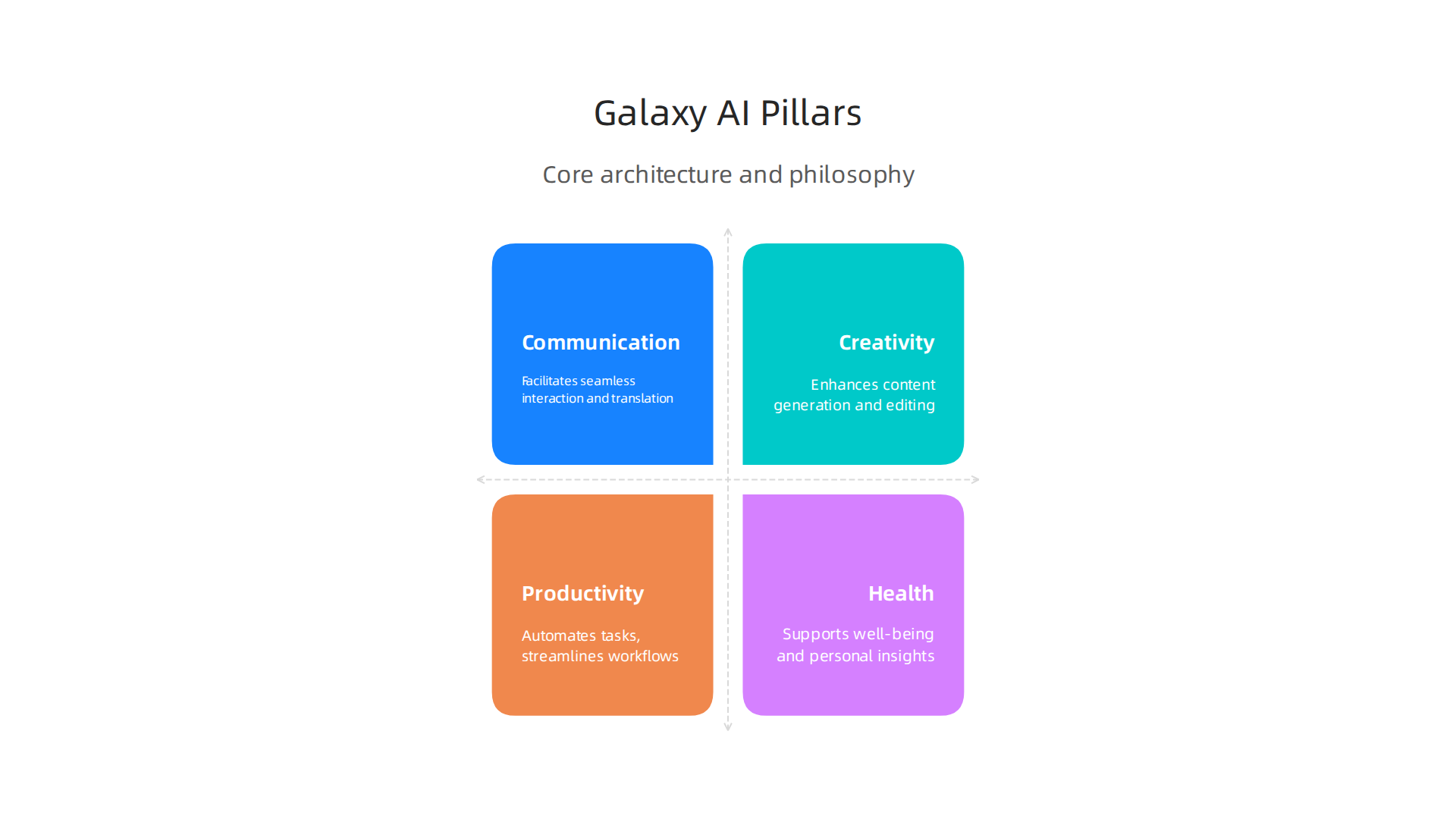
    According to a detailed whitepaper on the Samsung Galaxy AI revolution, Samsung’s technology focuses on four main areas: communication, creativity, productivity, and health.

    The four fundamental pillars driving Samsung's Galaxy AI technology.

    Understanding these pillars helps you know which features to use for your specific workflow.

    When you know how Galaxy AI thinks about privacy and personalization, it becomes easier to pick the right tools for your day. For example, you might use on-device translation for a private chat but use cloud-powered image editing for a creative project. Knowing the architecture helps you work smarter.

    If you want to explore other smart assistants that can boost your daily workflow, check out our guide on how to choose and use an AI powered research assistant. It covers practical tips for picking the right helper for your needs.

    And if you want to stay updated on all things AI without the noise, subscribe to The Deep View Newsletter. It sends clear daily AI news straight to your inbox so you never miss what matters.

    Galaxy AI for Content Creation: Text, Image, and Video Tools

    Now that you understand the engine behind Galaxy AI, let us look at how it helps you create content. Whether you write emails, edit photos, or make short videos, Galaxy AI brings powerful tools right to your phone.

    A creative professional focused on crafting engaging content, possibly with a mobile device nearby.

    Galaxy AI includes generative text assistants that can help you write messages, summarize long articles, or translate languages in real time. This is important for professionals who need to move fast. A 2026 benchmarks report on the state of AI in marketing shows that content velocity is a top trend reshaping the industry. Having an AI powered assistant on your device means you can draft a reply, polish a post, or summarize a meeting transcript without switching apps. It keeps your flow going.

    When it comes to images and video, Galaxy AI shines because it does the work right on your device. You do not need to upload your personal photos to a cloud server to edit them. This on-device processing means low latency and better privacy. You can remove objects from a video, adjust lighting in a photo, or generate a new background with just a few taps. It is like having a mini desktop editor in your pocket, but with the extra benefit of working offline.

    How does this stack up against tools like ChatGPT or Adobe Firefly? Those tools are powerful, but they usually need an internet connection and a separate account. Galaxy AI is built directly into the Samsung ecosystem. It is always ready, it learns your style, and it does not send your data to a distant server. For marketers following the latest AI investments, having a mobile-first, offline-capable creation suite is a major advantage.

    If you are curious about how AI creativity compares to human creativity across different platforms, check out our analysis on human or AI creativity.

    The world of AI content creation is changing fast. Do not get left behind. Subscribe to The Deep View Newsletter. It sends clear daily AI updates straight to your inbox so you always know what tools actually work.

    Galaxy AI for Marketing: Personalization and Campaign Automation

    Content creation is just the start. The real magic happens when you use Galaxy AI to run smarter marketing campaigns. In 2026, personalization is no longer a nice to have. It is what customers expect. Galaxy AI helps you deliver it, right from your phone.

    A small team collaborating on a marketing strategy, brainstorming ideas and reviewing data.

    Here is how. Galaxy AI can analyze on-device data to build hyper personalized customer segments. It looks at behavior, preferences, and past interactions without sending private data to the cloud. This matters because 46% of marketers now use AI to scale creative work, according to the 2026 Digital Advertising Trends Report by Smartly.

    Smartly.io homepage, a platform specializing in digital advertising automation for marketers.

    And up to 30% of marketing budgets get wasted on generic outreach. Galaxy AI helps you stop that waste.

    You can also automate repetitive campaign tasks. Galaxy AI writes ad copy variations for you. It sets up A/B tests automatically. It even integrates with major marketing platforms so your campaigns run on autopilot. This matches what the State of AI in Marketing 2026 benchmarks report calls content velocity: the ability to produce and test more content in less time. Early adopters report better conversion rates and much faster campaign setup times.

    Think about what that means for your workflow. Instead of spending hours writing five versions of a Facebook ad, you let your AI powered assistant handle the first draft. You just review and tweak. It is the same approach top marketing teams use when they invest in AI for creative workflows and testing, as the Section AI article on 2026 AI investments points out.

    If you want to learn more about writing copy that sounds natural and connects with people, check out our guide on how to use AI to write content that sounds human.

    Personalization and automation are changing marketing fast. Galaxy AI puts these tools in your pocket. Are you ready to use them? Stay ahead of the curve by getting clear daily updates on what actually works. Subscribe to The Deep View Newsletter. It delivers practical AI insights straight to your inbox every day.

    Galaxy AI for Business Operations: Workflow and Data Analysis

    Marketing gets all the glory, but the real time drains in business are the boring tasks. Data entry. Report generation. Chasing down numbers from different systems. If you run a small team or wear many hats, you know exactly what I mean. Galaxy AI can take over these repetitive jobs and free up your brain for bigger decisions.

    A business leader reviewing important documents or reports, making strategic decisions with confidence.

    Here is how it works in practice. Galaxy AI automates many of the routine tasks that eat up your day. It can pull data from spreadsheets, fill in forms, and generate weekly reports without you touching a keyboard. This is especially useful when you think about enterprise security. Galaxy AI offers data processing and feature restrictions through the Knox Service Plugin, so you can configure Galaxy AI data processing to match your company’s security policies.

    Samsung Knox documentation portal, detailing enterprise security solutions and policy configurations for Galaxy AI.

    Your sensitive business data stays safe.

    The feature that really changes things is natural language querying. You do not need to be a data analyst or know SQL. You just ask a question in plain English. "Show me last month’s sales by region." Or "Which products have the lowest inventory?" Galaxy AI understands your request, searches your business database, and returns the answer instantly. For non-technical team members, this is a game changer. It puts the power of data analysis into everyone’s hands.

    Think of the use cases across different departments. In supply chain management, Galaxy AI can spot delays and suggest reorder points before stock runs low. In customer service, it can summarize support tickets and identify common complaints. The time savings add up fast. Instead of spending two hours pulling a report, you get the answer in seconds.

    If you want to dig deeper into how AI can transform your daily research and analysis workflows, read our guide on how to choose and use an AI powered research assistant. It covers the best tools to pair with Galaxy AI for maximum efficiency.

    The bottom line is this. Galaxy AI turns your phone into a business operations hub. It automates the boring stuff, answers your data questions, and helps you move faster. Ready to see what else AI can do for your business? Subscribe to The Deep View Newsletter for daily insight on the tools that actually deliver results in 2026.

    Galaxy AI vs. Competitors: Feature-by-Feature Comparison

    By now you have seen how Galaxy AI handles business tasks. But how does it stack up against the big cloud-based names like GPT-4, Google Gemini, and Claude? Let us break it down feature by feature.

    The biggest difference comes down to where the processing happens. Most AI assistants, including GPT-4 and Gemini, rely on cloud servers to answer your questions. That means your data travels to a remote data center, gets processed, and comes back to you. Galaxy AI is different. It does a lot of work right on your device. This on-device processing is not just faster. It also means sensitive business data never leaves your phone. For industries like healthcare, law, and finance, that is a huge win.

    When we look at raw benchmarks, the cloud assistants still lead in some areas. According to recent testing, GPT-5.4 scores around 93.1% on coding benchmarks, edging out Claude Opus 4.6’s 90.4%. And on general reasoning tests, models like Gemini 3.0 score in the high 80s on GPQA Diamond. But here is the thing. These scores require an internet connection and sending data to the cloud. If you are offline, those models are useless. Galaxy AI keeps working without a network.

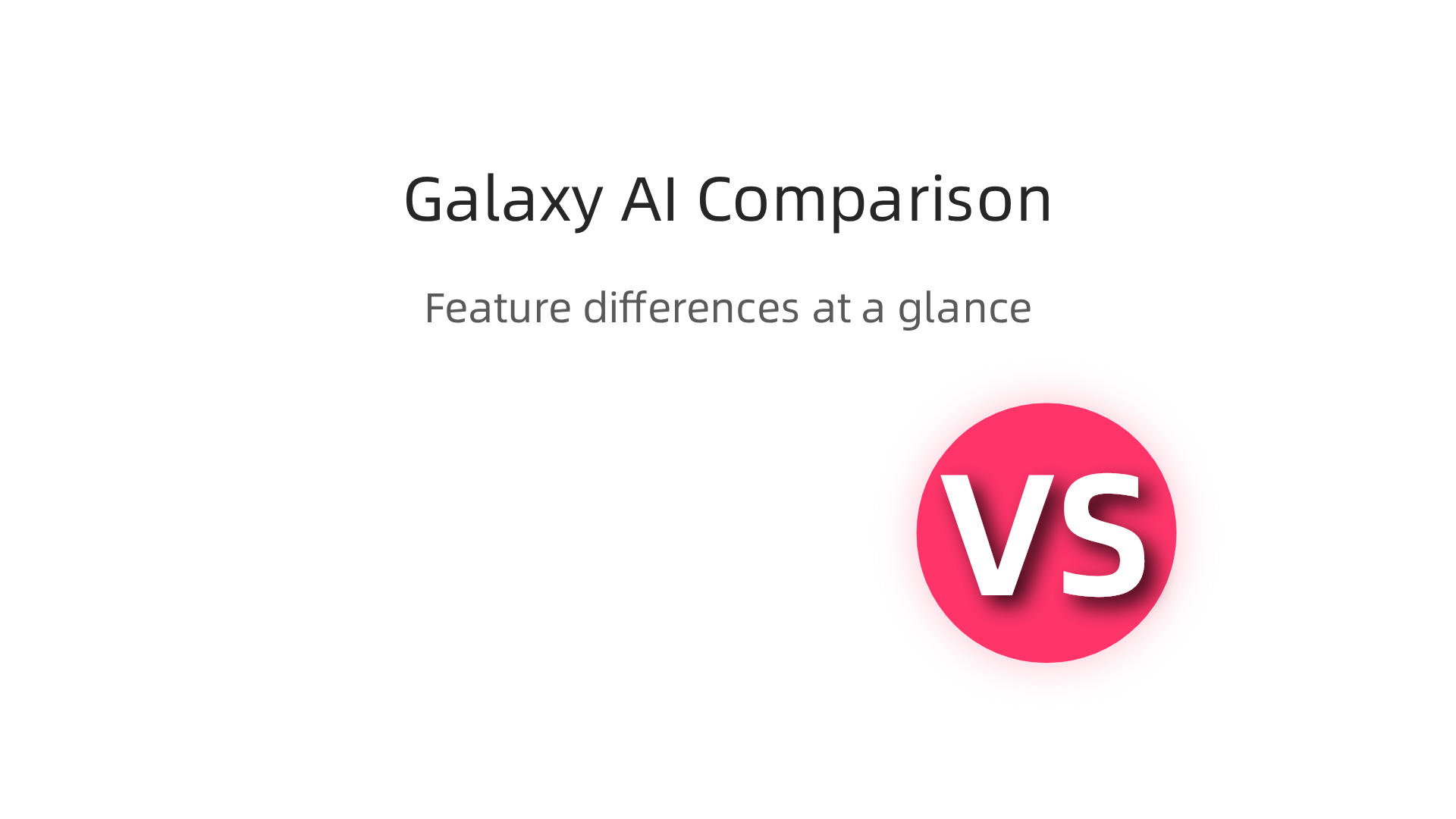
    The table below shows the key differences at a glance:

    | Feature | Galaxy AI | GPT-4/Gemini/Claude |

    A feature-by-feature comparison of Galaxy AI's on-device processing versus cloud-based AI models.

    |———|———–|———————|
    | Processing location | On-device (privacy focused) | Cloud (requires internet) |
    | Works offline | Yes | No |
    | Data privacy | High (data stays on your phone) | Lower (data sent to cloud) |
    | Coding benchmarks | Good for device tasks | Higher overall scores |
    | Latency | Instant (no network delay) | Depends on connection speed |

    For many business users, the privacy trade-off is worth it. You do not need the world’s best coding model to automate a report or pull up sales numbers. You need something that works fast, works offline, and keeps your data safe. Galaxy AI delivers on all three.

    If you want to stay on top of how these AI tools compare, check out our guide to the top AI websites professionals trust for real news and tools. It is a great resource for finding the latest benchmarks and reviews.

    Want side-by-side comparisons like this delivered to your inbox every day? Subscribe to The Deep View Newsletter for daily insight on the tools and models that actually deliver results in 2026.

    Integrating Galaxy AI with Existing Tech Stacks

    Now that you have seen how Galaxy AI stacks up against cloud-based tools, you might wonder: How do I actually connect this to the software my team already uses? The good news is that Galaxy AI is built to play nice with your current setup.

    Galaxy AI offers a range of APIs and SDKs that let developers build custom integrations. This means your IT team can connect Galaxy AI directly to your company’s internal systems, databases, and workflows. Instead of using a separate AI dashboard, you can embed the AI powered assistant right into the apps your people use every day. For example, if you run a healthcare clinic, you could integrate Galaxy AI with your patient management system so it helps schedule appointments or answer billing questions, all without sending patient data to the cloud. Samsung’s Knox Platform for Enterprise lets you set policies for Galaxy AI data processing to meet your security requirements check Samsung Knox docs.

    For teams that are not doing custom development, Galaxy AI also comes with plugins and connectors for popular business tools. You can connect it to Microsoft 365, Google Workspace, and Salesforce right out of the box. Imagine having Galaxy AI automatically generate a summary of your Google Doc or pull the latest sales numbers from Salesforce and turn them into a clean report. No extra coding needed. Your team just clicks and it works.

    And if your business deals with industry-specific language, you can fine-tune Galaxy AI models to fit. A law firm could train it on legal terms and case law. A factory might teach it to recognize specific machine errors. This custom model fine-tuning makes the AI much more useful than a one-size-fits-all solution.

    If you want to see how other AI tools connect to real-world workflows, check out our guide on how to choose and use an AI-powered research assistant in 2026. It gives practical tips for picking tools that fit your stack.

    Ready to get the latest on AI integrations? Subscribe to The Deep View Newsletter for daily updates on the tools that actually make a difference in 2026.

    Best Practices for Deploying Galaxy AI in Your Organization

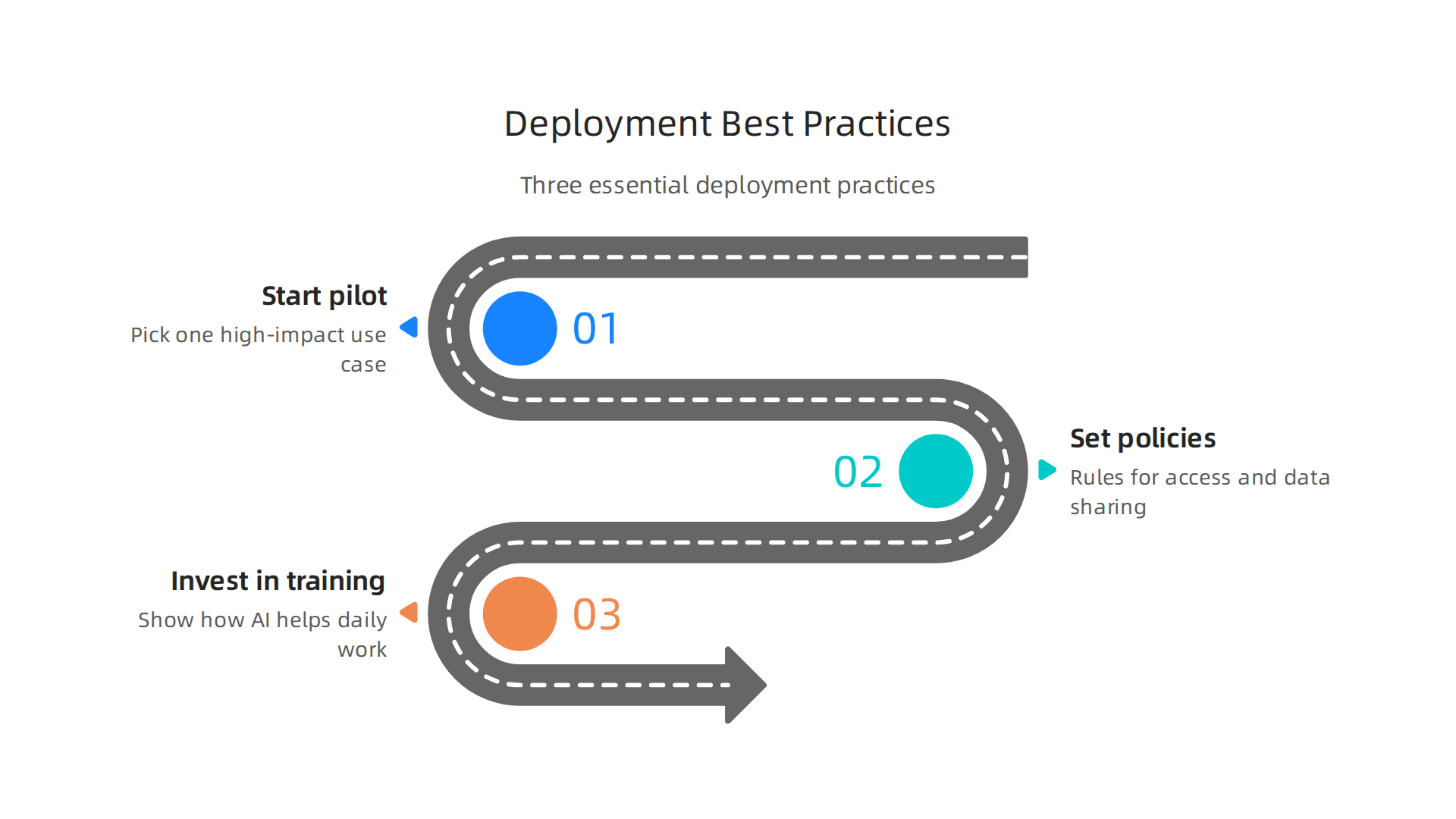
    You have Galaxy AI connected to your systems. Now what? Rolling out a new AI powered assistant across an entire company can feel overwhelming. But you can avoid the common pitfalls by following three simple best practices.

    Three essential best practices for a successful deployment of Galaxy AI within an organization.

    Start with a pilot project. Do not try to use Galaxy AI everywhere at once. Pick one high-impact use case. Maybe that is automating customer support replies. Or generating weekly sales reports. A small pilot lets your team learn what works without risking big disruptions. You can measure success by looking at time saved or error rates. For example, you might compare Galaxy AI’s performance against other top models on specific tasks by checking the latest benchmark results from MindStudio to see how it stacks up for coding or writing tasks.

    MindStudio.ai homepage, a platform for building AI applications without code.

    Once you prove the value in one area, expand slowly.

    Set clear governance policies. Before employees start using Galaxy AI, your organization needs rules. Who can access the AI? What data is okay to share? How do you handle privacy? Samsung Knox lets you control data processing policies, but you also need a written policy for acceptable use. This helps prevent mistakes like feeding sensitive customer information into the AI. A detailed analysis of ChatGPT versus Gemini versus Claude can show you how different models handle data, which informs your governance choices. Your policy should cover data retention, audit logs, and what happens if the AI makes a mistake.

    Invest in training and change management. The best AI tool fails if nobody uses it. Your people might worry that Galaxy AI will replace them. Or they might not understand how it helps their daily work. Provide hands-on training sessions. Show real examples. Let employees practice using the AI powered assistant in a safe environment. Talk about how AI can handle boring tasks so your team can focus on creative and strategic work. For more insight into how humans and AI can work together, read our guide on human or AI creativity and what the data says about collaboration in 2026. It explains how teams that embrace AI collaboration actually become more productive and innovative.

    Start small. Set clear rules. Teach your people well. That is the recipe for a smooth and successful Galaxy AI rollout.

    For daily updates on the AI tools shaping business in 2026, subscribe to The Deep View Newsletter.

    Measuring Success: KPIs and ROI of Galaxy AI

    You have deployed Galaxy AI. But how do you know if it is working? You need clear numbers to show the value. That means tracking the right KPIs and calculating your return on investment.

    Start by defining your most important KPIs. For Galaxy AI, focus on three main areas. First, productivity savings. How much time do your employees save each week? You can measure this by comparing task completion times before and after the rollout. Second, error reduction. Is the AI powered assistant making fewer mistakes than your old processes? Track error rates in customer support replies, data entry, or report generation. Third, new revenue from AI driven insights. Did Galaxy AI help your team find patterns in customer behavior that led to more sales? These three KPIs give you a solid baseline.

    According to the Olakai AI ROI framework, you should also measure qualitative benefits like employee satisfaction and innovation speed. A practical guide from Olakai explains how to balance hard metrics with softer outcomes.

    Olakai AI homepage, providing insights and frameworks for measuring AI ROI in business.

    Another helpful resource from Tropicapp shows how CFOs at companies like Zapier measure AI ROI using five frameworks that go beyond just time saved. You can read their AI ROI frameworks from Tropicapp to see real world examples.

    For the ROI calculation, add up all the costs: licensing fees, training time, integration work. Then compare that to the value of time saved and revenue gained. But do not forget the intangible wins. Employees who feel less bored by repetitive tasks tend to stay longer. That is harder to measure but just as important. A comprehensive framework from RevGen Partners outlines how to capture both tangible and intangible factors.

    To set realistic expectations, look at industry benchmarks. Reports from leading analysts can show what other companies achieve with similar AI tools. For a curated list of trusted sources for AI benchmarks and news, check out our guide on the 10 top AI websites professionals trust in 2026. This will help you compare your Galaxy AI results against industry standards.

    Measuring success is not a one time task. Check your KPIs monthly. Adjust your goals as you learn more. Galaxy AI can deliver big returns, but only if you track the right numbers.

    Want daily updates on AI tools that boost your bottom line? Subscribe to The Deep View Newsletter for clear, actionable insights every day.

    Summary

    Galaxy AI is Samsung’s hybrid, agentic assistant built into the Galaxy S26 line that combines on-device intelligence with cloud power to automate tasks, create content, and protect user data. This article explains Galaxy AI’s core architecture—privacy-first on-device processing plus selective cloud use—and shows how those design choices matter for marketers, content creators, and business teams. You’ll learn practical use cases for writing, image and video editing, campaign personalization, and operations automation, plus how Galaxy AI compares with cloud-first models like GPT and Gemini. The guide also covers integration paths, rollout best practices (pilot projects, governance, training), and ways to measure KPIs and ROI so you can decide if Galaxy AI fits your workflow and security needs.