Tag: ai content creation

  • Mastering AI For Marketing Services In 2026

    Mastering AI For Marketing Services In 2026

    In 2026, artificial intelligence (AI) is changing everything, especially in the world of marketing. What started as a new trend is now a must-have tool for any business offering marketing services. It’s no longer enough to just be curious about AI. Now, marketing teams need a clear plan to use AI wisely.

    Businesses need to move from just looking at AI to having a real strategy for it.

    A marketing team collaborates to outline a clear AI strategy, moving beyond simple curiosity to defined goals.

    Without a good plan, companies might miss out on big chances to grow or make things better. Experts agree that business leaders need smart ways to find new opportunities, pick the best ideas for using AI, test them out carefully, see what works, and then use those good ideas on a larger scale. This helps turn early tries with AI into real wins for the business From AI pilots to performance: 3 things leaders need to unlock.

    This guide is here to help you get a handle on AI for your marketing services. We will give you easy-to-understand ways to think about AI. You’ll learn about how to pick the right AI tools and how to measure if they are truly helping your business. We will show you real examples of how AI can help with many tasks. This includes making better content, putting together impressive AI for presentations, and even having an intelligent AI virtual assistants for businesses to support your team.

    You’ll find practical ways to test new AI tools, checklists to help you choose the best options, and tips on how to see if your AI efforts are really paying off. Our goal is to make sure you can use AI to make your marketing smarter, faster, and more effective.

    To stay on top of the latest AI trends and how they impact business, consider subscribing:
    The AI Newsletter Worth Reading

    Before you pick any AI tools for your team, it’s super important to have a clear plan. Think of it like going on a trip. You wouldn’t just grab a map and start driving without knowing where you want to go, right? The same goes for using AI in your marketing services. In 2026, simply getting AI tools isn’t enough. You need a smart way to use them to reach your business goals.

    Your AI plan should directly match what your marketing services are trying to do. For example, if you want to get more new customers (called lead generation), AI could help find people who are most likely to buy from you. If your goal is to keep current customers happy and loyal (retention), AI might help you send them special messages they will love. Or, if you need to make lots of new ads or content quickly, AI can help scale your creative output. Having a clear vision like this is a key step to building a good AI strategy for marketing, as experts say you need to define the main results you want to achieve How do I build an AI strategy for marketing?.

    To figure out which AI ideas to try first, you can use a simple plan. Ask yourself three things about each AI idea:
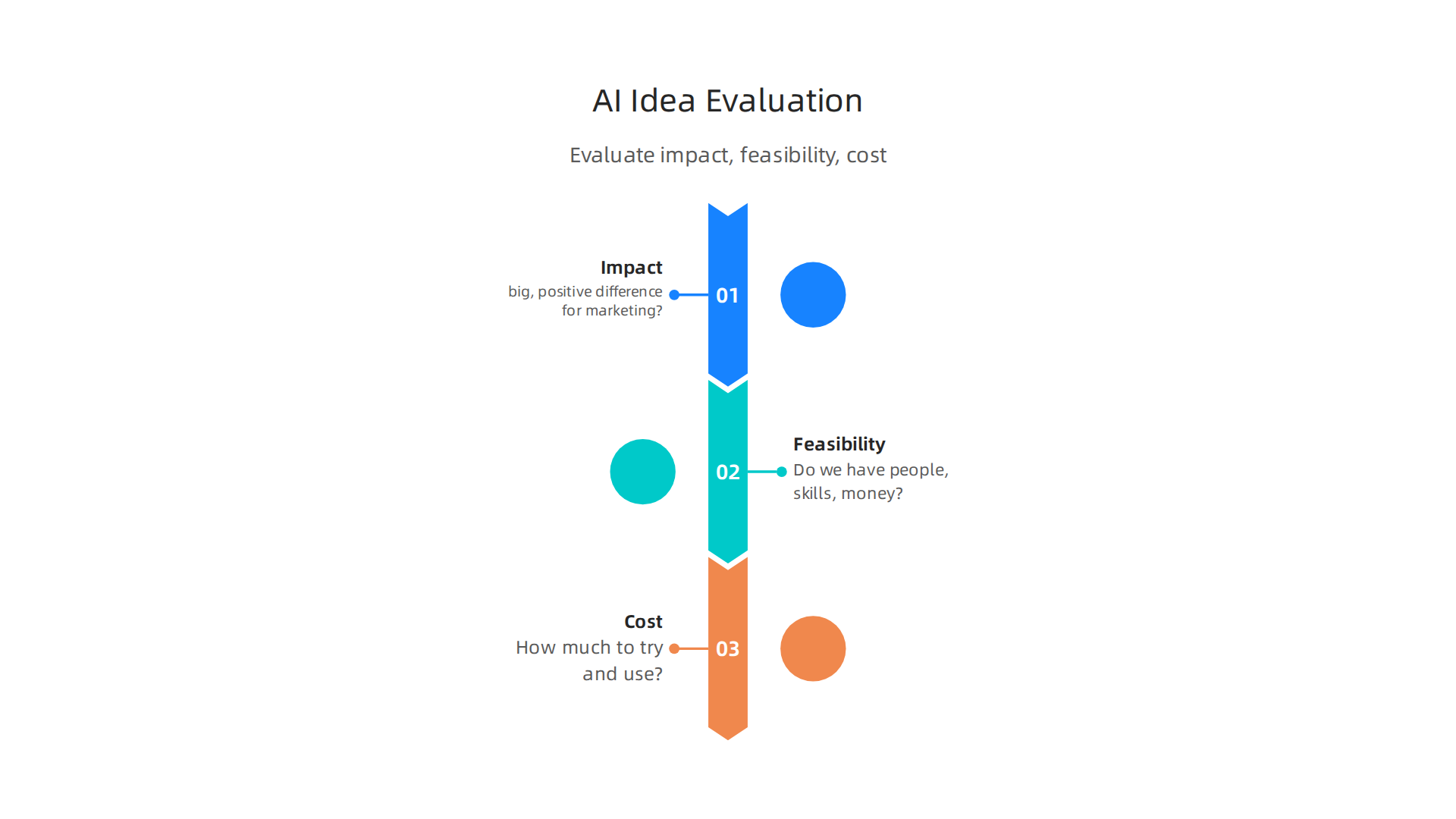
    Evaluate potential AI initiatives by considering their impact, feasibility, and cost.

    • Impact: Will this AI idea truly make a big, positive difference for our marketing services?
    • Feasibility: Can we actually do this right now? Do we have the people, skills, and money needed to make it happen?
    • Cost: How much will it cost to try out and use this AI tool?
      By thinking about these three points, you can choose the best projects that will bring the most value without costing too much or being too hard to set up. To learn more about selecting the right technology, consider reading our guide on how to pick AI tools for business to drive growth in 2026.

    A big mistake many teams make is picking AI tools before they know what they want to achieve. This is like buying a fancy hammer without knowing if you need to build a house or fix a leaky faucet. When you choose tools first, you might end up with expensive software that doesn’t really help your marketing services goals. This can lead to wasted money and time. Reports from 2026 show that while many businesses are using AI, a lot of them aren’t truly seeing big improvements in their work because they lack a clear plan State of Marketing in an AI-Driven World: 2026 Adobe Report. In fact, one report found that only 41% of marketers can clearly show how AI is helping them make more money Report: The State of AI in Marketing 2026. By setting your strategy first, you make sure that every AI tool you choose works towards your real business needs.

    Now that you have a clear plan for what you want your marketing services to achieve, the next step is to look closely at your current ways of doing things. This helps you find the best spots where AI can make a real difference. Think of it as looking under the hood of your marketing car to see which parts could run better with a little AI tune-up.

    To do this, you need to audit your marketing processes. This means checking out everything your team does, from making ads to talking with customers. Where are the tasks that take a lot of time? Where do you wish you had more help or better insights? These are often the places where AI can fit in perfectly.

    Many marketing teams in 2026 are finding big wins with AI in a few key areas:
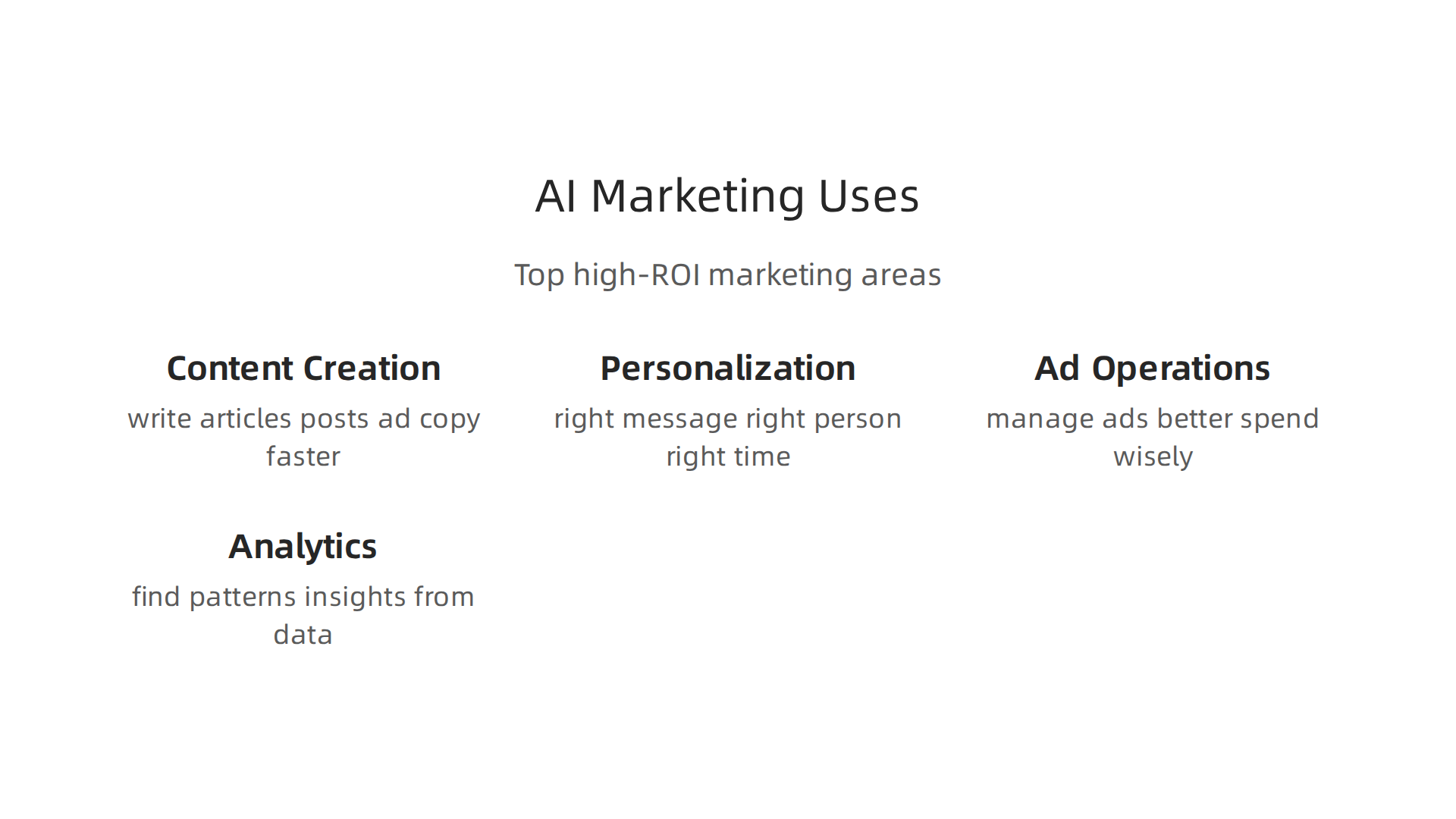
    Explore the top areas where AI is delivering significant value for marketing teams.

    • Content Creation: This is still the top use case for AI. AI can help write articles, social media posts, or ad copy much faster. This means your team can create more content without getting swamped. Reports show that content creation is used by 78% of teams, making it the most common way to use AI in marketing State of AI Marketing 2026 | Enterprise AI Adoption Report.
    • Personalization: AI can help you send the right message to the right person at the right time. This makes customers feel special and more likely to buy.
    • Ad Operations (Ad Ops): AI can manage your ads better by figuring out who to show them to and when, which helps you spend your ad money wisely.
    • Analytics: AI can look at huge amounts of data and find patterns or insights that humans might miss. This helps you understand what’s working and what’s not in your marketing campaigns. It’s like having a super-smart marketing assistant.

    When you’re looking at different ideas for using AI, you should score each one based on three things:

    • Potential Impact (ROI): How much positive change or money will this AI idea bring in? Will it truly help your marketing services grow or save costs? Teams focused on ROI see much better results from their AI efforts, with 83% of marketing teams reporting clear gains from generative AI AI Marketing Stats for 2026: ROI & Benchmarks.
    • Data Readiness: Do you have the right kind of data that the AI tool needs to work well? If not, how hard will it be to get that data ready?
    • Integration Complexity: How easy or hard will it be to connect this new AI tool with the other tools and systems you already use?

    Sometimes it’s better to start with a "narrow pilot." This means trying out an AI tool for a small, specific task with a small team. For example, you might use AI to just help with writing headlines for your emails. If that works well, then you can think about a "platform-wide rollout," which means using AI across many different tasks and teams in your marketing services. Starting small helps you learn and fix problems before doing something big.

    To learn more about how marketing pros choose AI tools for their work, check out our guide on how marketing specialists choose AI tools for marketing and drive ROI.

    For daily updates on how AI is changing marketing and business, you’ll want to stay informed.
    Get clear daily AI updates from The AI Newsletter Worth Reading.

    Choosing the right AI tools for your marketing services is a big step after you know where AI can help most.

    A professional carefully evaluates different AI tools and vendors to make an informed decision.

    It’s like picking the best helper for your team. You want to make sure the tool can actually do the job well. To do this, you need a good checklist.

    What to Look For in AI Tools

    When you’re looking at different AI tools, keep these things in mind:
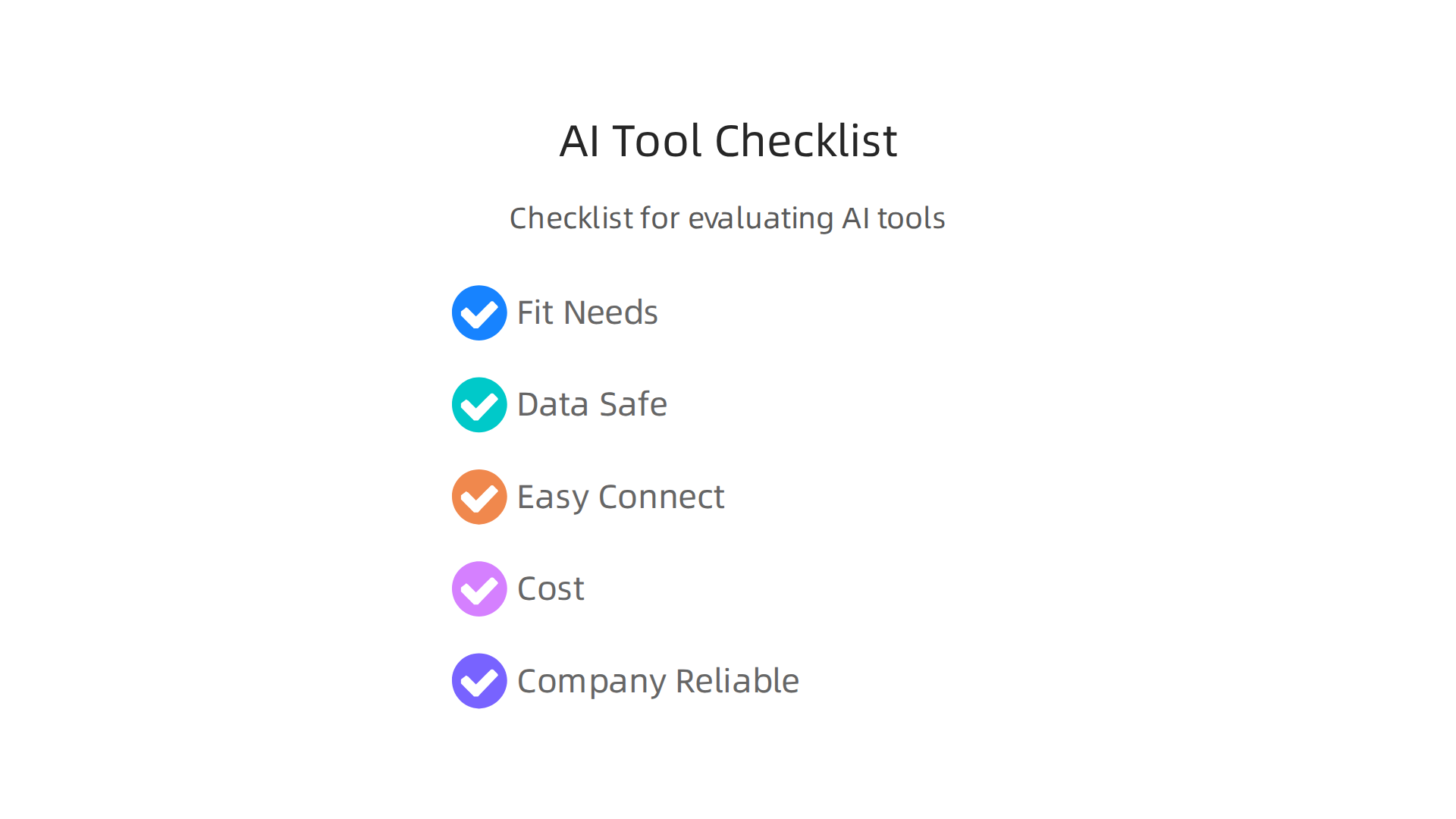
    Checklist for evaluating AI tools, focusing on needs fit, data safety, integration, cost, and company reliability.

    • Does it fit your needs? The AI tool must be able to do the specific tasks you need. If you want AI to help write social media posts, the tool should be good at that. Don’t pick a tool that does many things poorly when you need one thing done perfectly. You want a tool that truly boosts your marketing services.
    • Is your data safe? AI tools often need to use your company’s data. You must be sure that the tool and the company that made it will keep your information private and secure. This is very important for trust and legal reasons.
    • How easy is it to connect? Think about your current marketing tools. Will the new AI tool easily work with them? Or will it be a headache to link everything up? An AI tool that connects smoothly with your existing setup makes life much easier.
    • What does it cost? Understand how the AI tool charges you. Is it a monthly fee, or do you pay based on how much you use it? Make sure the cost makes sense for your budget and the value you expect to get. Tools that offer clear pricing help you manage your money better.
    • Is the company reliable? Look at the company behind the AI tool. Have they been around for a while? Do they update their tools often? A strong, reliable company means you’ll get good support and that the tool will keep getting better. A template for evaluating technology vendors can help you score different options to ensure they meet your business needs and values R E S P O N S I B L E A I T E M P L A T E.

    Testing AI Tools in Real Life

    Once you have a few tools in mind, it’s a good idea to test them. This is called a "Proof of Concept" (POC) or a "pilot."

    • Try them side-by-side: Don’t just pick one tool. Try out two or three tools at the same time for the same small task. For example, have Tool A and Tool B both write headlines for your next email campaign. See which one does better. This helps you compare them fairly.
    • Focus on how they work, not just features: It’s not just about what a tool can do, but how well it actually works for your team every day. Does it save time? Is it easy to use? Does it fit into your team’s workflow without causing problems? This helps you find the best fit for your marketing services. A good way to compare is by using a scorecard for different criteria, making sure you look at things like how deep the AI’s capabilities are and how well it fits your specific marketing needs How to Evaluate B2B AI Marketing Vendors: 12 Questions … – Tofu HQ.

    By carefully checking these things, you can choose AI tools that truly help your marketing efforts grow. If you want a more general guide on how to make smart choices for your business, you can read more about how to pick AI tools for business to drive growth in 2026. This careful process makes sure you’re getting a real marketing assistant, not just a fancy gadget.

    After testing AI tools with a small "Proof of Concept," the next big step is to make them a regular part of your marketing services. This means moving from a small test to full "production." It’s like moving from trying out a recipe to cooking it for all your customers every day. You need a clear plan to do this right.

    Getting AI Tools Ready for Daily Marketing

    Putting AI into your daily work for your marketing services needs careful steps.

    • Set up the Data Flow: Your AI tools need good data to work. Think about how your company’s information will safely get to the AI tool. This involves setting up "data pipelines," which are like highways for your data. You also need to make sure the data is clean and correct. If the data is bad, the AI’s results will be bad too. For marketing leaders, a good approach to data governance is key when using AI systems Snowflake’s Agentic Enterprise Framework Puts Data ….
    • Keep Testing and Improving: Even after a pilot program, you should keep testing the AI. As your marketing needs change, the AI tools might need to learn new things or be adjusted. This helps ensure the AI continues to perform its best for your team.
    • Rollout Slowly: Don’t just give the AI tool to everyone at once. Start with a small group, get their feedback, and then slowly bring more people on board. This "rollout cadence" helps everyone get used to the new tools without too much stress. It also lets you fix small problems before they become big ones.

    Teamwork and Rules for AI Success

    Making AI a permanent part of your marketing services means more than just turning on a new tool. It needs good teamwork and clear rules.

    • Assign Clear Roles: While marketing teams often lead the charge in adopting AI, they need help from others. Your IT team can help with security, your legal team can make sure you follow privacy rules, and data experts can check for fairness. Having everyone work together helps make sure the AI is used responsibly. In fact, setting up strong governance that includes different departments is important for using AI in a way that truly helps the business What governance structures support responsible AI?.
    • Create AI Rules (Governance): Just like you have rules for how your team works, you need rules for how your AI works. This is called "AI governance." It helps make sure the AI tools are used fairly, correctly, and ethically. For example, the European Data Protection Board updated its rules in 2026 to make sure AI agents follow data privacy principles at every step AI Agents and Data Privacy: A 2026 Compliance Guide – MTM Blog.
    • Watch for Bias and Protect Privacy: AI tools learn from data, and sometimes that data can have unfair patterns, or "bias." You need to look for this bias and work to fix it, perhaps by using fair data generation techniques Mitigating bias in artificial intelligence: Fair data generation via …. Also, always make sure the AI tool handles customer data with the highest privacy standards, especially in 2026, when data privacy rules are stricter than ever. Staying up-to-date on compliance is a must.

    By taking these steps, you make sure your AI tools don’t just work in a test, but truly become a strong marketing assistant for your business. This careful planning helps your marketing services grow and adapt for the future.

    If you want to keep learning about how AI impacts your business and marketing, you’ll find helpful insights in "The AI Newsletter Worth Reading." Get clear daily AI updates from The Deep View Newsletter.

    5) Measure What Matters: KPIs, Attribution, and ROI for AI-Driven Marketing

    Once AI tools are part of your daily marketing services, it’s super important to know if they are actually helping.

    A professional focuses intently on data and reports, measuring the impact of marketing initiatives.

    You need to measure their success. This means looking at certain numbers, understanding how AI causes good changes, and checking if you are getting a good return on your money.

    Picking the Right Numbers to Watch

    Before you even start using AI for your marketing, you need to know what you want to improve. These are called Key Performance Indicators, or KPIs. They are like scores that show how well your marketing is doing. For AI-driven marketing, you might look at things like:

    • How many new customers you get.
    • How many people click on your ads.
    • How much money each customer spends over time (this is called customer lifetime value, or LTV).
    • How much it costs to get a new customer (this is called customer acquisition cost, or CAC).

    It’s a good idea to know what these numbers were before you used AI. This way, you can see if the AI is making them better. Experts say you should set clear goals and measure your starting point before adding AI to your marketing efforts How do I measure the ROI of AI marketing investments?. This helps you tell a real story about how AI helps your marketing services.

    Knowing What Changes Are Due to AI

    When you use AI, many things might change. How do you know for sure that AI is the reason for a boost in sales or leads? This is where "attribution" and "experimentation" come in.

    • Attribution means figuring out which part of your marketing efforts gets credit for a result. With AI, you want to give the AI the right amount of credit.
    • Experimentation is like running a science test. You can split your audience into two groups: one that gets the AI-powered marketing (the "test" group) and one that doesn’t (the "control" group). By comparing these groups, you can see the true extra help, or "incremental lift," that AI brings. Methods like A/B tests help you find the real impact of your AI tools 2026 Marketing Playbook: Proven AI & Attribution Strategies. Companies that use smart attribution methods can see much better returns on their marketing money Marketing Attribution Statistics (2026): 54+ Data Points on ….

    To really dive deep into how AI can boost your sales and leads, learning about these measurement methods is key. You can find more helpful advice on how marketing specialists choose AI tools to drive ROI.

    Figuring Out Your Return on Investment (ROI)

    ROI means how much money you get back for the money you spent. For AI in marketing, it’s about seeing if the AI tools are worth their cost. A simple way to think about it is:

    ROI = (Extra Money Made + Money Saved − Total Cost of AI) ÷ Total Cost of AI

    Measuring AI’s ROI in marketing is not just a single number; it’s a process of setting a baseline, running tests, and then seeing the extra lift AI provides How Directors Measure AI ROI in Ad Campaigns | Pixis. Many companies are already seeing great results. In fact, about 60% of companies that have changed how they measure AI are getting two to three times their money back, or even more Report: The State of AI in Marketing 2026 – Jasper. This shows that with careful planning and measurement, AI can be a powerful marketing assistant.

    When you measure what matters, you make sure your AI investments are truly helping your marketing services grow and succeed. For further reading on this topic, consider learning more about how to get real ROI from AI marketing cloud.

    6) Data Governance, Privacy, and Ethical Considerations for Marketing Services

    After seeing how artificial intelligence (AI) can help your marketing services grow and succeed, it’s just as important to talk about how to use it wisely and fairly.

    Key ethical considerations for AI in marketing: data safety, fairness, and transparency.

    This means looking closely at how you handle data, respect people’s privacy, and make sure your AI systems are ethical. It’s not just about making money; it’s about building trust and following the rules in 2026.

    Keeping Data Safe and Private with AI

    When you use AI for marketing services, you’re often dealing with lots of customer information. "Data governance" is like having a clear set of rules for how you collect, store, and use this data. It makes sure your data is correct, kept safe, and used in a way that follows the law. Experts agree that your AI plan and your data rules must go hand-in-hand Snowflake’s Agentic Enterprise Framework Puts Data Governance at the Center of Marketing.

    In 2026, privacy is a big deal. New guidelines, like those from the European Data Protection Board, tell us that when AI agents process personal information, we must only collect the data we truly need and only use it for the reasons we said we would AI Agents and Data Privacy: A 2026 Compliance Guide. This is called "data minimization" and "purpose limitation." To help with this, you should do special checks, sometimes called "privacy impact assessments," before using AI systems that handle personal data. These assessments help ensure you’re using AI responsibly and protecting people’s privacy Privacy as the Foundation of Responsible AI Governance. It’s a key part of the larger topic of mastering the AI future standard 2026.

    Making AI Fair and Unbiased

    AI learns from the data it’s given. If that data has unfair patterns or gaps, the AI can learn those same biases and make unfair decisions. For instance, an AI for marketing services might unfairly target certain groups or miss others, just because of old data.

    To make sure your AI is fair, you need to:

    • Find Bias: Look closely at the data you feed your AI and the results it gives. You want to spot any unfair patterns. Learning to understand how an AI model works is important for finding these biases Systematic literature review on bias mitigation in generative AI.
    • Fix Bias: Take steps to reduce any bias you find. This can mean changing the data, adjusting the AI’s learning process, or fixing the results it gives. These steps can happen before, during, or after the AI does its work Bias mitigation in generative AI.

    It’s about making sure your AI acts like a fair and helpful marketing assistant, not one that carries old prejudices.

    Being Clear and Keeping Records

    For ethical AI, it’s also important to be clear about how your AI makes decisions. This is called "transparency." It means you should be able to explain, in simple terms, why your AI chose one thing over another.

    You also need good records. Keeping detailed notes about your AI systems helps you show how they work, what data they use, and why they make certain choices. This is very helpful if you ever need to have an audit or review. Having different teams involved, like marketing, legal, and IT, can help ensure everyone is on the same page and that your AI systems are both effective and responsible. This kind of teamwork is vital for a good strategic guide to marketing AI agents and their ethical deployment.

    Staying informed about the newest AI practices, including ethical guidelines, is important for any business leader.

    Get clear daily AI updates and stay ahead of the curve. The AI Newsletter Worth Reading will keep you in the know.

    Summary

    This article explains how marketing teams should move from experimenting with AI to running a clear, business-focused AI strategy that drives measurable results. It covers how to set goals that align AI initiatives with marketing KPIs, how to audit current processes to find high-impact use cases (content, personalization, ad ops, analytics), and a simple prioritization framework based on impact, feasibility, and cost. You’ll learn how to run narrow pilots, evaluate and compare tools with a vendor checklist, and prepare data pipelines and rollout plans for production. The guide also details governance needs—privacy, bias mitigation, and cross-functional roles—and shows how to measure AI success through attribution, experimentation, and ROI calculations. After reading, you’ll be able to pick the right pilot projects, test tools sensibly, and scale AI in marketing while protecting data and proving value.


  • MacBook Air M2 Chip: Real-World Performance for AI and Creative Pros

    MacBook Air M2 Chip: Real-World Performance for AI and Creative Pros

    Why the MacBook Air M2 chip matters for AI and creative pros

    If you make cool things with AI or work as a creative professional, picking the right computer is super important.

    A creative professional brainstorming ideas, reflecting the demands of AI and design tasks.

    You need a machine that’s strong enough to handle big tasks, but also easy to carry around. And let’s be honest, you also want it to be a good price! This is where thinking about the MacBook Air M2 chip comes in.

    In 2026, many people are asking: can a laptop known for being light and simple truly keep up with the demands of modern AI work and advanced creative apps? It’s a tricky balance between having a portable computer, getting great performance, and not spending too much money. You want a tool that helps you with ai content creation, not one that slows you down.

    This article is here to help you make smart choices. We will look at important things like how fast the MacBook Air M2 chip really is for AI tasks and everyday creative jobs. For example, all Macs with M-series chips, including the M2, still support the newest macOS versions, which is great for keeping your software up to date and running smoothly Will My Mac Get macOS 27? Intel Macs Dropped — June 2026. We’ll also check which apps work best and share tips to make your work go faster.

    We’ll guide you through practical benchmarks to watch out for and show you how to check if your favorite apps are ready for Apple Silicon. Plus, we’ll offer smart workflow tips and helpful advice on buying your next MacBook, whether you’re looking for a new one or thinking about a refurbished macbook apple model to save some cash. The goal is to help you find the best MacBook for AI projects.

    Want to keep up with all the fast changes in AI and tech?
    Get clear daily AI updates from The AI Newsletter Worth Reading.

    To really pick the best MacBook, it helps to know what’s inside. Let’s look closely at the MacBook Air M2 chip and what makes it special for creative tasks and AI.

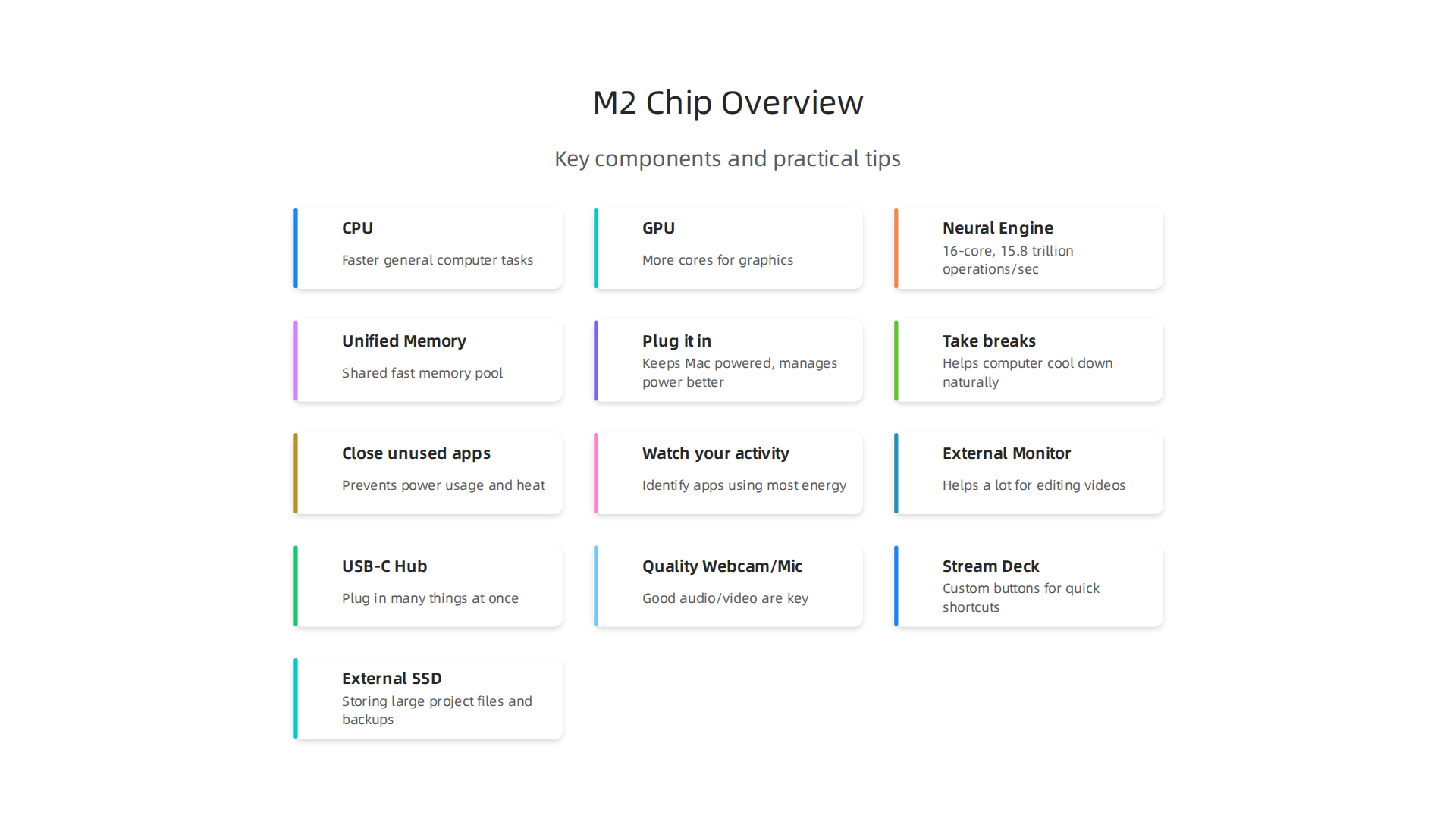
    The M2 chip is like the brain of the MacBook Air. It’s called a "System on a Chip" or SoC.

    The M2 System on a Chip integrates multiple processors for efficient performance.

    This means it has many important parts all working together on one small piece: the main processor (CPU), the graphics processor (GPU), and a special part for AI tasks called the Neural Engine. All these parts share memory, which is a big deal for speed.

    More Power for Your Ideas

    When the MacBook Air M2 chip came out, it brought big changes compared to the older M1 chip. The CPU, which handles most general computer tasks, became faster. In fact, by April 2026, the M2 chip has shown an impressive 18% boost in CPU speed over the M1, which helps everyday work feel much smoother From M2 to M6: Charting the Performance Leap in MacBook Air and ….

    The GPU got better too, with more cores to handle graphics. This is super helpful for creative pros who work with images, videos, or 3D models. When you’re editing a video or using complex design software, the GPU does a lot of the heavy lifting. The M2 chip was also made to speed up video work by adding a strong media engine that helps with special video formats like ProRes Three Ways To Bring Apple Silicon M2 Into Your Workflow. This means your ai content creation will go much faster.

    The Neural Engine and Unified Memory

    For anything related to AI, the Neural Engine is key. The M2 chip has a 16-core Neural Engine that can do up to 15.8 trillion operations every second MacBook Air With M2 – Is It A Good Studio Computer?. This is vital for tasks like making AI-powered noise reduction work faster or using AI filters for photos and videos. It makes your MacBook Air smart enough to handle advanced AI tools on its own.

    Perhaps the biggest advantage for creatives and AI users is "unified memory." Imagine your computer’s CPU, GPU, and Neural Engine all sharing one big pool of fast memory. That’s what Apple’s unified memory does. Instead of each part having its own small, separate memory, they all access the same large, quick memory pool. This helps avoid bottlenecks and lets these parts work together much more efficiently. This setup is especially good for working with large language models (LLMs) and other big AI tasks, as it allows the chip to be both cost effective and efficient Profiling Large Language Model Inference on Apple Silicon – arXiv. The M2 offers 50% more memory bandwidth than the M1, and you can get up to 24GB of this faster memory. This means the chip can move data around super quickly, which is crucial for big creative projects and intensive AI workloads.

    To dive deeper into how well the MacBook Air M2 handles different AI tasks, check out our guide on MacBook Air 2022 AI Workloads Guide Benchmarks and Workflows.

    The special unified memory and Neural Engine in the MacBook Air M2 chip make it great for certain AI tasks. The M2 chip is very good at "AI inference." This means it’s good at using AI models that have already been built.

    Professionals reviewing AI-generated content or designs on screen.

    Think of it like a smart assistant that can quickly understand and apply what it has learned.

    For example, if you’re using AI to remove noise from a video or apply cool style filters to your photos, the M2 chip can handle these jobs quickly. Its special Neural Engine helps a lot with these tasks. Reports show that AI-powered noise reduction or style transfer can be much faster on the M2 Air compared to older Intel Macs because of this dedicated 16-core Neural Engine Macbook Air M2 16GB for Video Editing. The Neural Engine is specifically designed to make these kinds of calculations super fast, making your ai content creation smoother. The design helps the M2 be very effective at deep learning inference tasks Performance Analysis and Optimization of MobileNetV2 on Apple M2.

    When looking at how well the M2 performs for AI, you’ll often see benchmarks. These are like speed tests for computers. For AI tasks, especially those using large language models (LLMs) right on your computer, a key measurement is "tokens per second." This tells you how fast the AI can understand and create text. For example, in 2026, benchmarks show that models like Gemma 4 E2B can run at about 158 tokens per second on more powerful M5 Max chips, while Phi-4 Mini can reach around 135 tokens per second Apple Silicon LLM Benchmarks 2026. The M2 chip, with its fast unified memory, is quite capable for lighter LLMs, with memory bandwidth being a key factor for AI inference speed across all Apple Silicon chips Apple Silicon for AI: M1 vs M2 vs M3 vs M4 vs M5 Compared.

    However, the MacBook Air is a thin laptop without a fan. This means that if you make the macbook air m2 chip work very hard for a long time, it can get hot. To protect itself, the computer will slow down a bit. This is called "thermal throttling." For very heavy AI tasks, like training a brand new AI model from scratch, the fanless design of the MacBook Air M2 means it might lose some performance over time M2 MacBook Air Loses 25% Performance in Sustained Workload. Some tests show that even a 5-minute AI model training loop can cause it to slow down Don’t Buy an Apple Laptop Until the New MacBook Air Comes.

    So, for quick, everyday AI tasks and using already-made AI models, the MacBook Air M2 is a strong choice. But for very long and intense AI training or complex data crunching, you might need to use cloud services (where powerful computers do the work online) or consider a MacBook Pro with active cooling (a fan) or a desktop Mac. To learn more about selecting the right Apple computer for your AI work, check out our guide on picking the best MacBooks for AI.

    If you want to stay on top of all the latest developments in AI tools and how they perform, you’ll love The Deep View Newsletter.
    The AI Newsletter Worth Reading

    App compatibility: creative tools, plugins, and AI integrations

    The good news is that most creative apps and new AI tools work very well with the MacBook Air M2 chip today. When Apple first made its own chips, some older apps needed a special helper called Rosetta to run. Rosetta helps apps made for Intel chips work on Apple Silicon. But now, in 2026, many big programs have been updated to run "natively" on the M2 chip. This means they are built to use the M2 chip’s full power directly.

    For example, popular video editing software like Final Cut Pro and many Adobe programs are now made for Apple Silicon. This makes things like ai content creation smoother and faster on your macbook air m2 chip. For even deeper dives into how creative apps perform, you might find insights on how the MacBook Air M2 compares to M3 for developers.

    Checking App and Plugin Compatibility

    It’s important to know that macOS 27, the newest version of Apple’s computer system, mainly supports Apple Silicon Macs. This includes all Macs with M1, M2, M3, M4, or M5 chips, like your MacBook Air M2 macOS 27 Supported Macs: Full Compatibility List. If you have older apps, you might need to check if they still use Rosetta. You can find out which apps still need Rosetta by going to your System Settings, then General, then About This Mac, and looking for "Intel-Based Apps" macOS 27 Golden Gate liste vos apps qui ne seront plus …. There are also websites that help you check if your favorite programs are ready for Apple Silicon Check if your favorite programs are optimized for Apple Silicon using this website.

    For creative work, sometimes you use extra tools called plugins or extensions. Most of these have also been updated. For example, popular control devices like Stream Decks work well on Apple Silicon Macs, and their software runs natively Does Stream Deck Work on Apple Silicon Macs (M1, M2 …). If you happen to be considering a refurbished MacBook Apple model, knowing about app compatibility is just as important.

    Even if an app or plugin isn’t perfectly updated, some still work using Rosetta. However, for the best speed and experience, especially with AI tools, you want apps that run natively. This ensures your macbook air m2 chip can make the most of its special features for all your creative and AI tasks.

    Battery life and thermals: real usage considerations for long creative sessions

    Even though the MacBook Air M2 chip is powerful and great for many creative apps, it’s good to think about how it handles long, tough tasks.

    A person deeply focused on a long creative task in a comfortable setting.

    This is especially true for things like video editing or intense ai content creation. These jobs can make your computer work very hard, which affects both battery life and how hot the computer gets.

    The M2 chip is very good at using power wisely for quick bursts of work. You can do a lot in short amounts of time without any trouble. However, if you’re running a heavy program for a long time, like hours of complicated video rendering or ongoing AI processing, your macbook air m2 chip might get warm.

    How your MacBook Air M2 chip stays cool

    Here’s the thing: the MacBook Air models, including the M2, do not have a fan inside. This means they cool down by letting heat escape through the metal body. When the chip gets too hot from working hard for a long time, it starts to slow down a little bit. This is called "thermal throttling," and it’s how the computer protects itself from overheating.

    Tests have shown that the MacBook Air M2 chip can lose about 25% of its speed when doing very heavy, continuous work. This happens so it can stay at a safe temperature M2 MacBook Air Loses 25% Performance in Sustained…. For example, if you’re training an AI model, the chip might reduce its speed to keep cool, often around 65 to 72 degrees Celsius How To Run Open-source LLMs Locally On A MacBook Air …. This is a normal safety feature, not a problem with your Mac.

    Tips for long creative sessions

    So, what can you do to keep your macbook air m2 chip running smoothly during long creative sessions?

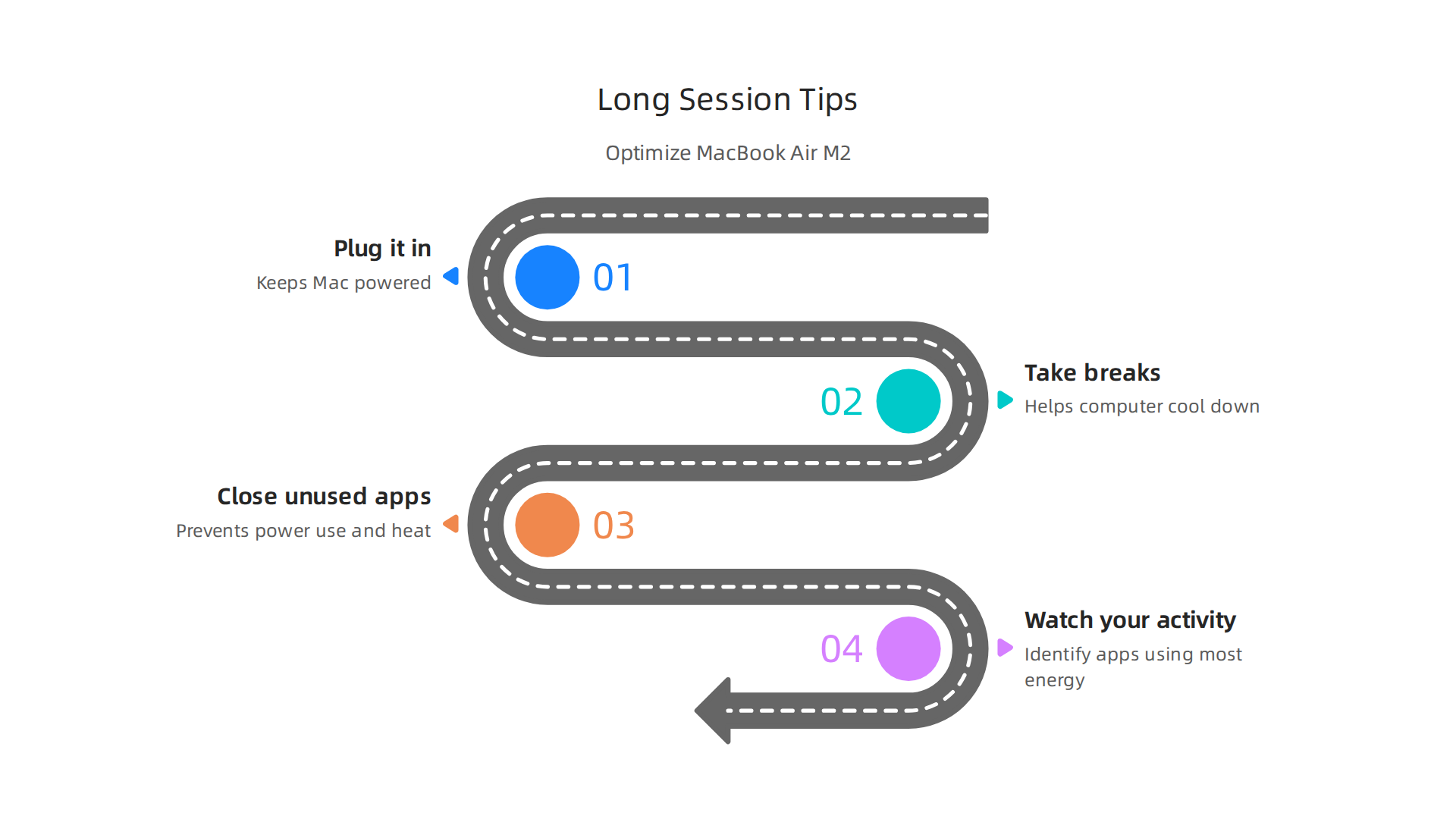
    Optimize your MacBook Air M2 for demanding creative and AI workloads.

    1. Plug it in: For any major project that will take a long time, it’s best to keep your MacBook Air plugged into power. This stops it from using battery and helps it manage power better.
    2. Take breaks: Give your computer a little break now and then. This helps it cool down naturally.
    3. Close unused apps: Make sure you only have the programs open that you truly need. Extra apps can use up power and create more heat.
    4. Watch your activity: You can use a tool like Activity Monitor on your Mac to see which apps are using the most energy and making your computer work hard. This can help you figure out what might be causing it to get warm MacBook Running Hot? 6 Things To Check Before It Gets Worse.

    Even with these points, the MacBook Air M2 remains a very capable machine for creative tasks and ai content creation. Knowing how it handles demanding work means you can plan your workflow better. For more details on using your M2 for AI, check out our guide on MacBook Air 2022 AI workloads guide benchmarks and workflows.

    To stay on top of the latest advancements in AI tools and how they impact your creative and business workflows, consider subscribing to The AI Newsletter Worth Reading. You’ll get clear daily AI updates to keep you informed.

    To get the most out of your macbook air m2 chip for creative and ai content creation tasks, it helps to know how to set up your workflow smartly.

    A team collaborating to optimize their workflow for creative and AI projects.

    This means making sure your apps work well with the Apple Silicon chip inside your Mac and knowing when to use your computer directly versus using cloud services.

    Making Apps Work Best with Apple Silicon

    The M2 chip is built by Apple, so apps that are also built for Apple Silicon chips will run fastest. You can find out if your favorite programs are optimized for these chips by checking community resources online Check if your favorite programs are optimized for Apple Silicon using this website. In 2026, many apps have been updated, but it’s still good to check. Also, remember that macOS 27, the newest operating system, only works with Apple Silicon Macs, meaning older Intel-based Macs won’t get updates Will My Mac Get macOS 27? Intel Macs Dropped — June 2026.

    Workflow Ideas for Creative Tasks

    Here are some ways to set up common creative and AI tasks:

    • Image Generation (AI): For making images with AI, you might use apps that run on your macbook air m2 chip itself or online tools. For lighter tasks, running AI image tools on your Mac can be quick. For more complex or faster image generation, using cloud-based AI services is often better. These services use powerful computers elsewhere, so your Mac doesn’t have to work as hard. You can learn more about text-to-image tools in our Promptchan AI guide generate images and videos from text in 2026.
    • Video Editing: The macbook air m2 chip can handle video editing well, especially with apps designed for Apple Silicon. Keep your project files on a fast external drive to save space on your Mac. This also helps the computer run smoothly, as it doesn’t need to read and write large files from its internal storage as much.
    • Code-Assisted Design & Development: If you’re using your Mac for coding or design that involves code, tools like Homebrew can help set up your development environment. Many developers find the M2 chip suitable for their daily work, and there are guides for creating a The Perfect Mac Setup for Mobile Development in 2026.

    File Management and Offloading Heavy Tasks

    When working on big projects, keeping your Mac’s internal storage from getting full is key. Use external hard drives or cloud storage for large video files, AI datasets, and project backups.

    For tasks that are too heavy for your MacBook Air, like training very large AI models or rendering super detailed 3D scenes, you might need to "offload" them. This means sending them to a more powerful computer in the cloud. The MacBook Air does not support external graphics cards (eGPUs), so you cannot add more graphics power to it. For very demanding AI work, a Mac Studio or even a cloud service might be a better choice. You can consider picking the best MacBooks for AI for your 2026 projects if you need more power.

    While your MacBook Air with the M2 chip is powerful, it’s good to know its limits, especially for very tough tasks.

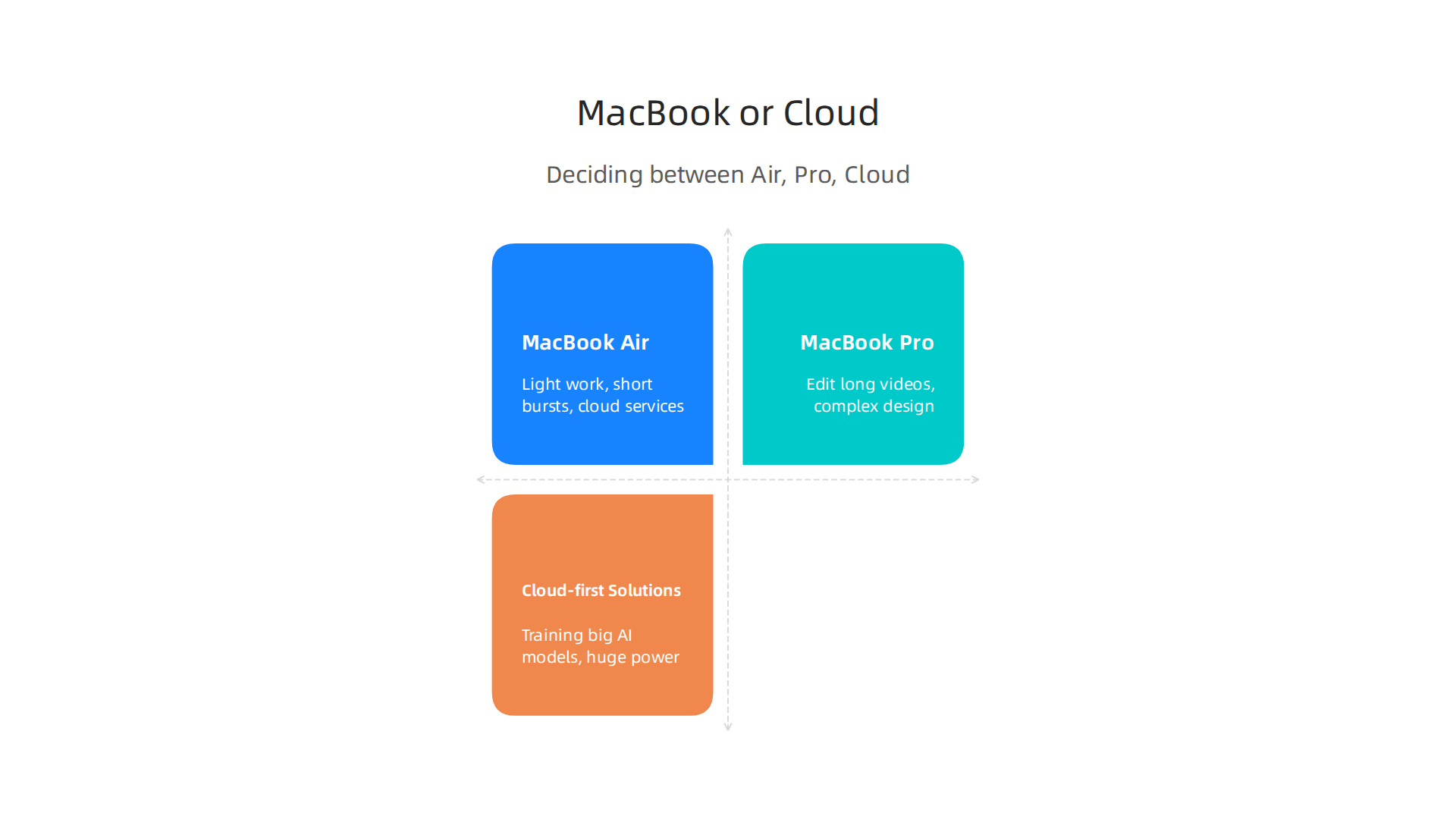
    Deciding between MacBook Air, Pro, or cloud services for AI/creative work.

    The MacBook Air is designed to be super thin and light, so it does not have a fan to keep it cool. This means when you push it really hard for a long time, like during intense AI content creation or video rendering, it can get warm. To protect itself, the macbook air m2 chip might slow down a bit. This is called "thermal throttling," and it means the computer lowers its speed to stay cool M2 MacBook Air Loses 25% Performance in Sustained Workload. Reviewers agree that the M2 MacBook Air has a heat problem under such heavy use. This can be a concern if you plan to run open-source AI models locally for long periods How To Run Open-source LLMs Locally On A MacBook Air Without Thermal Throttling.

    Cost and Alternatives

    When thinking about buying a MacBook Air, consider the total cost of ownership. This isn’t just the price you pay upfront. It also includes how much you save on repairs and how well the Mac holds its value over time. Macs often cost more to buy, but they can be cheaper in the long run because they last longer and keep more of their value Why Macs Cost More on Day One and Less Over Three Years.

    • MacBook Air is enough if:

      • Most of your work is light, like writing, browsing, and quick photo edits.
      • You do short bursts of creative or AI tasks.
      • You use cloud services for the heaviest work.
      • Your budget is tighter, and you’re looking for good value, perhaps even a refurbished macbook apple model Refurbished M2 MacBook Air: Still Worth It?.
    • Upgrade to a MacBook Pro if:

      • You regularly edit long videos, do complex graphic design, or run demanding AI models directly on your computer for many hours.
      • You need constant high performance without slowing down. The MacBook Pro models have fans to keep them cool during tough jobs.
    • Consider cloud-first solutions if:

      • You often need huge amounts of power for tasks like training big AI models.
      • You want to avoid buying very expensive hardware.
      • You need to share powerful computing resources with a team.

    For more details on finding the right Mac for your budget and creative needs, you can check out our guide on MacBook Air Sale 2026: Which Model is Right for Creative Work.

    No matter what choice you make, staying informed about the latest AI tools and trends is always a good idea. Get clear daily AI updates to help you navigate the fast-changing world of technology.

    The AI Newsletter Worth Reading

    Choosing the right MacBook Air for your work, especially when it involves tasks like AI content creation, is more than just picking a model. It’s about thinking how the computer fits into your daily workflow, what extra tools you need, and how you buy it if you’re part of a team.

    Buying checklist: configs, accessories, and procurement tips for teams

    Here’s how to think about setting up your MacBook Air:

    1. Right MacBook Air for Your Role

    • For the Solo Creator or Light User: If you mainly write, browse the internet, and do quick photo edits, a standard macbook air m2 chip will work great. Think about getting 16GB of memory (RAM) instead of 8GB. This small upgrade helps your computer handle more tasks at once and keeps it speedy for longer, especially with light ai content creation. The storage size depends on how much you save on your computer versus using cloud storage.
    • For the Remote Editor or More Intense User: If you do more challenging creative tasks or heavier AI work for short periods, a MacBook Air with 16GB or even 24GB of memory is a good idea. Remember, the M2 Air can still get warm during long, hard tasks. Make sure your important software works well on Apple Silicon chips like the M2. Many programs are now made specifically for these chips, which means they run very fast. But some older apps might need a special tool called Rosetta to work, which can slow things down. You can easily check if your programs are ready for Apple Silicon using helpful websites. For more ideas on finding the right model for heavy tasks, check our guide on picking the best MacBooks for AI.
    • For the Small Creative Team Lead: When buying for a team, you want to make sure everyone has the right tools. For team members who need constant high performance for demanding AI tasks, a MacBook Pro might be a better choice, or using powerful cloud computing services. If many team members use MacBook Airs, buying refurbished macbook apple models can save money without losing much performance, as these machines hold their value well.

    2. Must-Have Accessories

    To get the most out of your macbook air m2 chip for creative work, consider these add-ons:

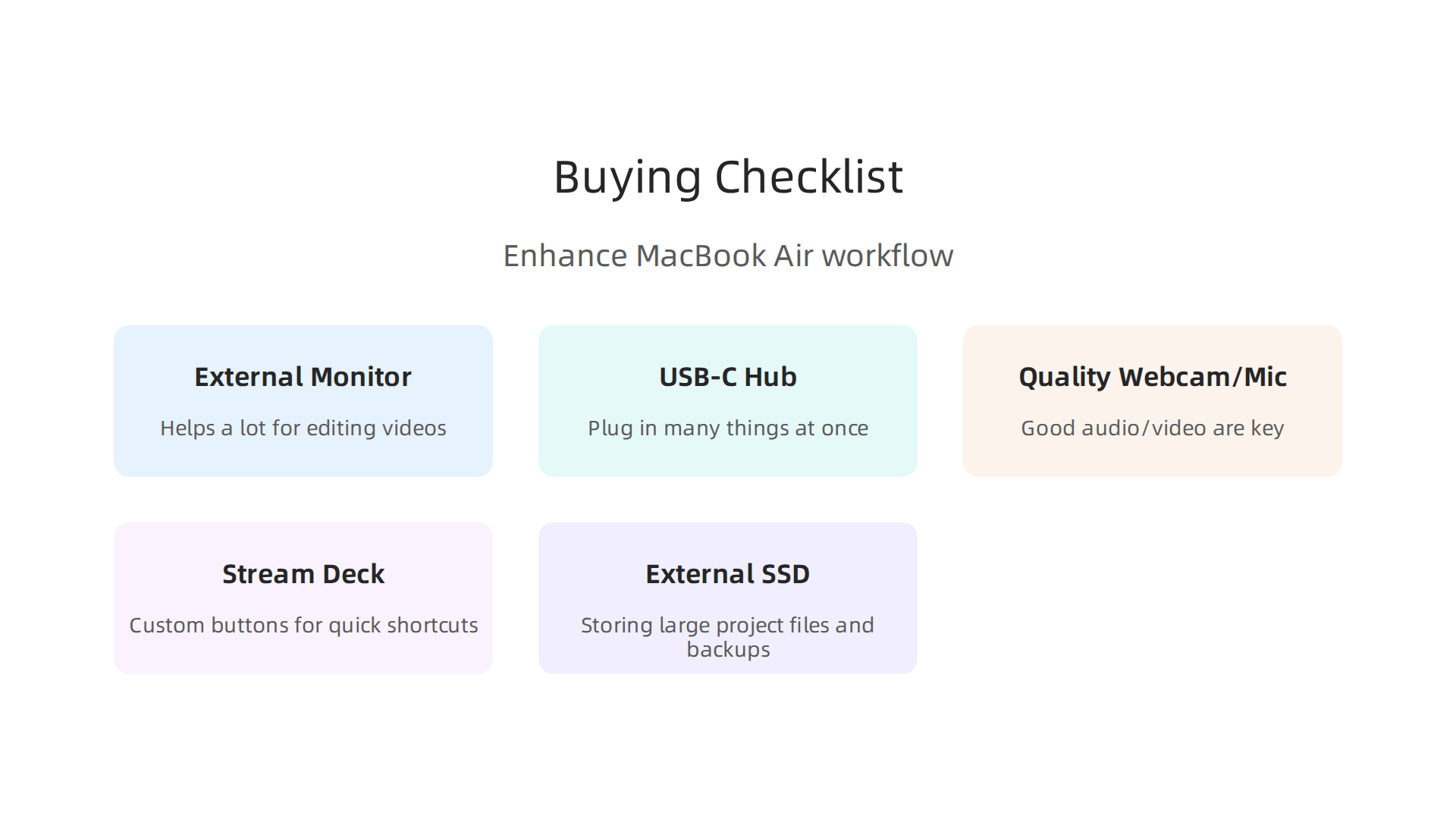
    Essential accessories to enhance your MacBook Air M2 creative workflow.

    • External Monitor: A bigger screen helps a lot for editing videos, designing graphics, and other visual work.
    • USB-C Hub or Docking Station: These let you plug in many things at once, like external hard drives, your monitor, and charging cables.
    • Quality Webcam and Microphone: For remote meetings, recording voiceovers for ai content creation, or online teaching, good audio and video are key.
    • Stream Deck: This handy device has custom buttons you can program for quick shortcuts in your creative apps. Good news: Stream Deck works on Apple Silicon Macs very well.
    • External SSD: If you chose a MacBook Air with less internal storage, a fast external SSD is perfect for storing large project files and backups.

    3. Procurement Tips for Teams

    • Test Before You Buy Many: Always try out one macbook air m2 chip with your team’s real work before buying a whole fleet. This helps you see how it performs in practice. Our guide on MacBook Air M2 for AI workloads offers benchmarks and workflows you can use.
    • Think About Total Cost: While Macs might seem more expensive at first, they often cost less over time. This is because they usually last longer, need fewer repairs, and keep more of their value when you want to sell them later. This is called total cost of ownership.
    • Future-Proof Your Purchase: Looking ahead, macOS 27, the newest operating system expected this year, will likely only support Apple Silicon Macs. This means buying an M-series Mac now ensures your team’s computers will get the latest updates and security features for years to come.

    Summary

    This article explains why the MacBook Air with the M2 chip is a strong pick for many AI creators and creative professionals, and where its limits lie. It breaks down the M2’s System on a Chip design — CPU, GPU, Neural Engine and unified memory — and shows how those features speed up AI inference, video editing, and other creative tasks. The piece covers real-world benchmarks, the benefits of unified memory for LLMs and media workflows, and the practical impact of the Air’s fanless design (thermal throttling and battery considerations). You’ll also get guidance on app compatibility (native Apple Silicon vs Rosetta), workflow tips for on-device work vs cloud offloading, and a buying checklist for configs, accessories, and team procurement. In short, after reading you’ll know when an M2 Air is enough, when to choose a Pro or cloud, and how to configure and run your machine to get the best creative and AI performance.

  • Promptchan AI Guide: Generate Images and Videos from Text in 2026

    Promptchan AI Guide: Generate Images and Videos from Text in 2026

    Introduction: The New Creative Frontier

    Have you ever stared at a blank page or an empty design canvas, wishing for a creative partner that never runs out of steam?

    A person looking thoughtfully, perhaps sketching or brainstorming, symbolizing the start of a creative process.

    That is exactly what generative AI promises. And in 2026, tools like Promptchan AI are making that promise real for creators and businesses around the world.

    The numbers back this up. According to recent research, the generative AI content creation market size is expected to reach nearly USD 143 billion by 2035. That kind of growth does not happen by accident. It reflects a real hunger for practical AI solutions that actually work. If you are new to evaluating these platforms, our AI tool discovery tips can point you in the right direction.

    But here is the thing. With new AI tools launching almost every week, how do you know which ones are worth your time? Information overload is a real problem. You do not need more hype. You need clear, practical guidance.

    That is what this guide is all about. We cut through the noise to give you a focused look at what Promptchan AI offers, how it compares with platforms like Creatify AI, Haiper AI, and Stability AI, and how you can use these tools to get better results in less time.

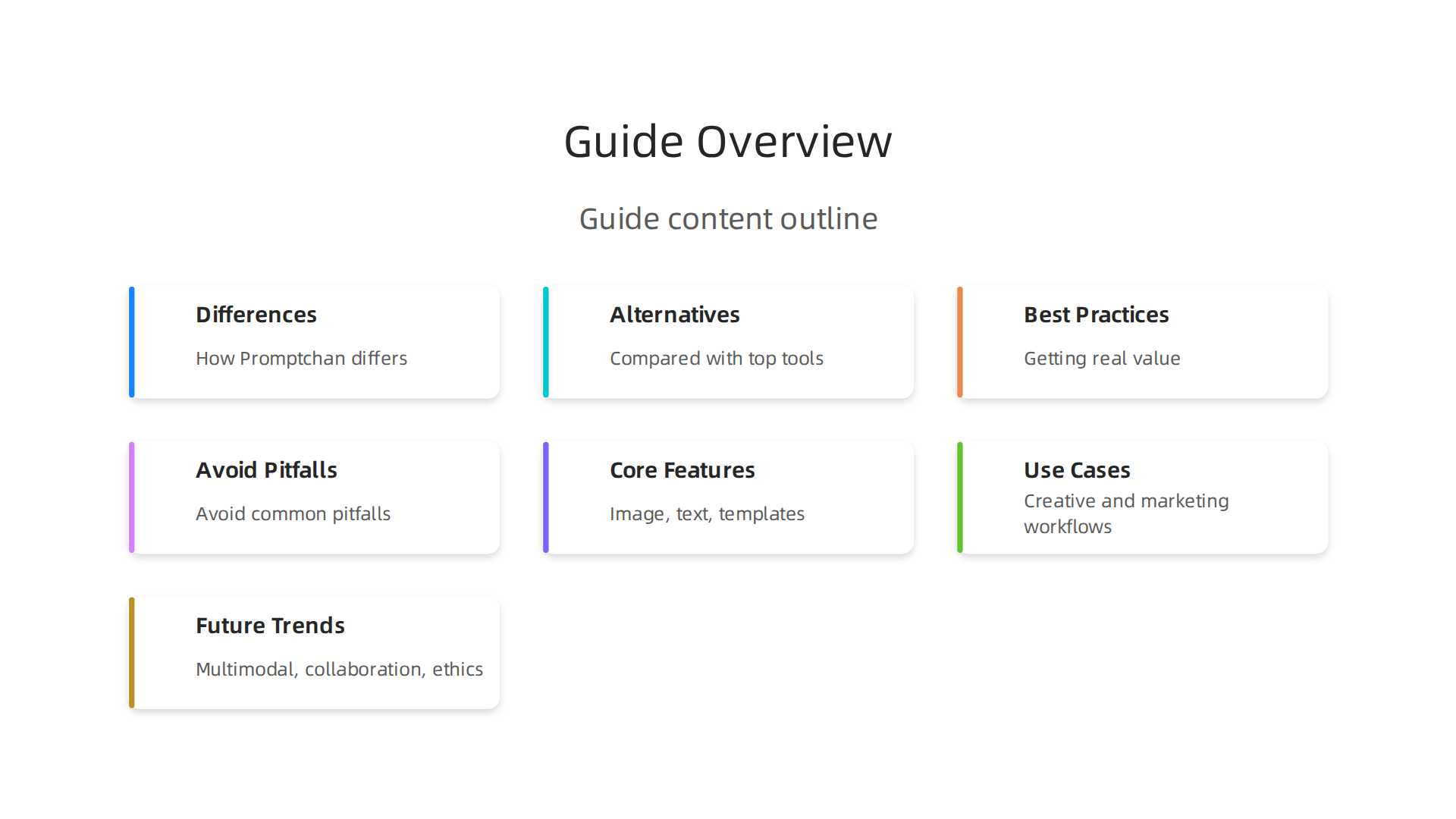
    Here is what we cover:

    • What makes Promptchan AI different from other AI tools
    • How it compares with the top alternatives in 2026
    • Best practices for getting real value from your AI investment
    • Tips for avoiding common pitfalls when adopting new AI tools

    Explore the key topics covered in this guide to understanding Promptchan AI and its place in the creative landscape.

    Whether you are a solo creator, a marketer, or a business owner exploring AI for the first time, this guide is here to help. If you want to stay ahead of the latest trends without the overwhelm, The Deep View Newsletter delivers clear daily AI updates straight to your inbox. Let us dive into the new creative frontier and see what Promptchan AI can really do.

    What Is Promptchan AI? A Comprehensive Overview

    So what exactly is Promptchan AI? Think of it as a specialized creative partner built for generating images and videos from text descriptions. You type in what you want to see, and the AI brings it to life. It is a browser-based platform that focuses on artistic and creative content, with a strong reputation for handling complex prompts accurately.

    The technology underneath is what makes this possible. Promptchan AI uses multiple underlying models to generate its outputs. This includes variants of Stable Diffusion, along with its own fine-tuned models that are trained specifically for creative tasks. The result is a tool that understands detailed instructions and turns them into visuals across many styles. As one detailed analysis explains, the platform is known for its ability to handle multi-part prompts more faithfully than many competitors.

    In 2026, Promptchan AI has become a go-to option for creators who want strong prompt control and a wide range of artistic styles. You can generate images that look photorealistic, anime-inspired, or even fully stylized like 3D renders. The platform offers a community gallery with over 20 million user-generated images, giving you endless inspiration for your own projects.

    How does it fit into the bigger AI tool picture? You probably know names like ChatGPT for writing and Midjourney for art. Promptchan AI sits in a similar space but focuses more on unrestricted creative expression. It follows a freemium model, with subscriptions starting at a low price point, making it accessible whether you are testing the waters or ready to commit.

    For creators who want to understand how different AI platforms compare for business tasks, our guide to choosing AI for business provides useful context. Promptchan AI is one piece of a much larger puzzle, and knowing how it connects to tools like Creatify AI, Haiper AI, and Stability AI helps you build a smarter workflow.

    Key Features and Capabilities of Promptchan AI

    Promptchan AI packs three core features into one easy-to-use platform. Image generation covers styles from photorealistic to anime, with strong prompt control as shown in a detailed Promptchan AI pricing and features in 2026 review. Text generation comes through the AI companion chat, while prompt templates use weighted tags and 100+ presets to speed up your workflow. This makes it simple to jump from idea to final image without a steep learning curve. For creators looking to streamline their process further, learn how to master your 2026 strategy with AI virtual assistants. To keep up with the rapid pace of AI releases, get daily updates from The AI Newsletter Worth Reading.

    Image and Visual Content Generation

    When you type a text prompt into Promptchan AI, the platform turns your words into high-quality images in seconds. The engine can generate results at up to 4K resolution. A detailed Promptchan AI pricing and features overview confirms the platform supports styles from photorealistic to anime and hentai. You get strong control through weighted tags and negative prompts, meaning you can tell the AI exactly what to include and what to avoid. The platform also supports multiple aspect ratios for different formats. If the first result is not quite right, you can refine your prompt and generate again.

    Compared to dedicated tools like DALL·E 3 and Stable Diffusion, Promptchan AI excels at following complex multi-part prompts faithfully. A PromptChan AI alternative comparison rates its prompt adherence as very strong. However, the platform lacks built-in editing tools like inpainting or outpainting. The native resolution also caps around 1024px, so you may want to use an external upscaler for larger outputs.

    For creators exploring different kinds of visual AI tools, see how Meshy AI turns text and images into 3D models in minutes.

    Text and Storytelling Capabilities

    Beyond generating visuals, Promptchan AI also helps you tell stories. The platform’s Chat 2.0 feature, rebuilt with 8x expanded context memory in the V8 update, lets you build ongoing conversations with AI characters. You can develop a character’s personality, backstory, and reactions over time, treating it like a collaborative writing partner for interactive fiction or roleplay scenarios.

    The platform also supports prompt engineering, which is really a form of creative writing. Crafting detailed prompts with weighted tags, emotions, and poses turns you into a director of visual stories. You describe scenes, actions, and moods, and the AI brings them to life. This skillset carries over into other content workflows too — if you can write strong prompts here, you can apply that same clarity to copywriting and social media posts.

    For creators who want to maintain a character across multiple images — say, for a comic strip or a visual novel — Promptchan AI’s character consistency feature helps you keep the same look from scene to scene. That makes it easier to tell sequential stories without losing the thread.

    If you are exploring how AI can help you write better content in general, check out how to write human-sounding content with AI for practical tips.

    Top Use Cases for Creative Content and Prompt Generation

    Promptchan AI is not just one tool for one job. It fits into several creative workflows. Here is how different creators can use it.

    Marketing professionals can generate product visuals and campaign mockups in seconds.

    A team actively discussing ideas and collaborating on a project, representing varied professional use cases of AI tools.

    Instead of waiting for a designer, marketers can type a prompt and get a usable image right away. This speeds up the whole creative process for social media ads and landing pages.

    Creative writers and visual artists benefit too. If you are developing a character for a story or game, you can bring that character to life visually. Use prompts to explore different looks, emotions, and settings before settling on the final design.

    Educational content creators can build visual aids for lessons or tutorials. A single text prompt can produce a scene that explains a complex idea more clearly than words alone.

    For a deeper look at how AI tools like this fit into modern marketing strategies, explore this practical guide on AI inbound marketing frameworks.

    If you want to keep up with how AI tools are changing content creation every day, The AI Newsletter Worth Reading delivers clear daily updates straight to your inbox.

    Marketing Content Creation

    Marketing teams are always under pressure to produce more content faster. That is where promptchan ai shines. Instead of spending hours writing ad copy, email sequences, and social media posts from scratch, you can generate them in seconds with the right text prompts.

    The real magic happens when you start A/B testing. You can create multiple versions of a headline or call to action for different audience segments. Test one tone for new subscribers and another for loyal customers. See what sticks without waiting days for a copywriter.

    Your CRM and automation tools can also connect directly into this workflow. Generate on-brand content that flows straight into your email platform or social scheduler. This keeps your messaging consistent across every channel.

    According to the 2026 guide on AI content marketing, tools like this help small businesses create entire drafts and product descriptions from simple prompts. That frees up your team to focus on strategy and refinement instead of staring at a blank page.

    For more on how AI tools integrate with your existing systems, check out this overview of how HubSpot AI streamlines business operations across marketing, sales, and service.

    Creative Writing and Storytelling

    Writing a novel or a short story takes time and patience. promptchan ai can help you get unstuck fast. Need a plot outline? Type in a premise and get three different story arcs. Struggling with a character’s voice? Generate dialogue options that match their personality.

    The tool is especially useful for beating writer’s block. Keep a library of prompt templates ready. When you hit a wall, run a prompt for "next scene ideas" or "conflict twist." You might find a direction you never considered.

    Consistency matters in longer projects. Use promptchan ai to check that your tone stays the same from chapter to chapter. You can even ask it to rewrite a passage in the voice of a specific character. This keeps your story feeling whole. As Navigating the Frontier of AI Content Creation points out, AI tools help with editing, tone, and style so your writing sounds polished.

    For more on blending human creativity with AI, read this piece on how undetectable AI helps you write content that sounds human.

    Visual Art and Design Prompts

    Just like writing, visual design gets a big boost from AI. With promptchan ai, you can generate concept art, logos, and social media visuals in seconds. Use negative prompts and style modifiers to fine-tune your results. For example, add "no shadows" or "cyberpunk style" and the tool adjusts instantly.

    Once your image looks right, export it directly to tools like Photoshop or Canva for further edits. This lets you keep your creative flow without switching apps. As generative AI use cases for marketing explain, AI tools now create images and videos that fit campaign needs quickly.

    For more on transforming text into 3D visuals, check out this guide on AI tools for 3D model generation.

    Promptchan AI vs. the Competition: A Head‑to‑Head Comparison

    Now that you have seen how promptchan ai handles image generation, it helps to know how it stacks up against other popular tools. Every AI platform has strengths, and picking the right one depends on your goal.

    An individual thoughtfully considering options, illustrating the process of choosing the right AI tool for specific needs.

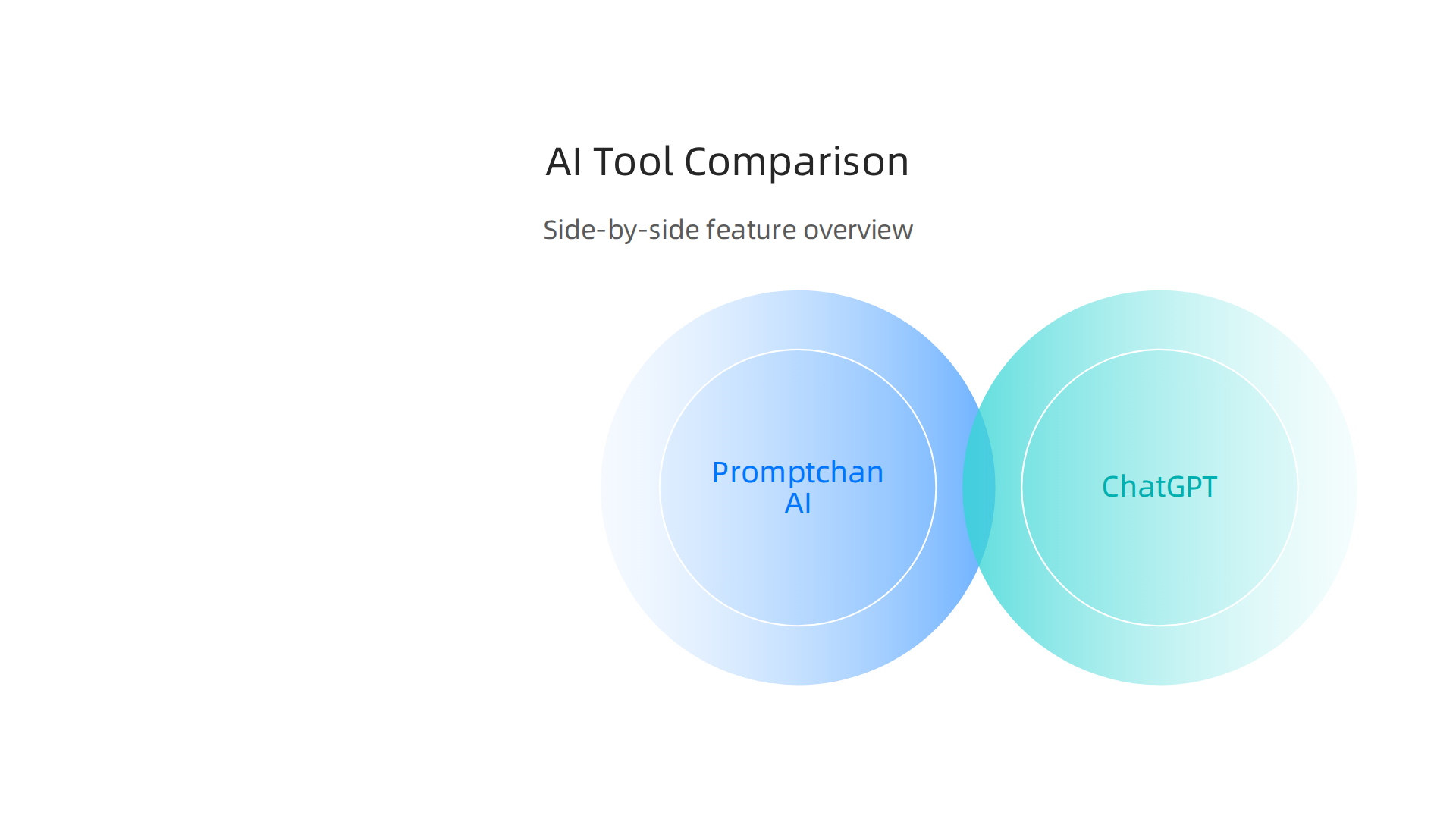
    Here is a clear side‑by‑side look at promptchan ai, ChatGPT, Jasper, Midjourney, and Writesonic.

    A comparative overview of Promptchan AI against leading tools like ChatGPT, Jasper, Midjourney, and Writesonic across key criteria.

    Tool Best For Starting Price Output Quality Ease of Use
    promptchan ai Visual content, concept art, logos Competitive (flexible plans) High: realistic and stylized images Very easy: natural language prompts
    ChatGPT Idea generation, writing, research Starting from $20 per month (Plus) Good for text, less visual Extremely simple
    Jasper Brand‑aligned marketing content Starting from $69 per month High for branded writing, lacks native image gen Moderate: needs voice setup
    Midjourney Artistic, high‑quality images Subscription (used by teams) Very high: detailed artistic output Moderate: requires Discord
    Writesonic SEO‑optimized blog posts Competitive Good for long‑form SEO content Easy: guided workflows

    How they compare in real use. ChatGPT and Jasper shine for written content.

    The official website for OpenAI, the creators of ChatGPT, highlighting its role as a leading AI tool for text generation and research.

    Midjourney produces stunning art but needs some learning.

    A glimpse of the Midjourney website, showcasing its focus on generating artistic, high-quality images.

    Writesonic is built for marketers who need search‑friendly articles fast. Promptchan ai sits in a sweet spot: it delivers professional visuals quickly without a steep learning curve. You type a description, add a style modifier like "cyberpunk" or "no shadows," and the image appears in seconds. That makes it ideal for creators who want both quality and speed.

    For a broader view of how AI tools can fit your daily work, check out this guide on AI tool discovery for business results. It walks through practical ways to evaluate new platforms.

    Next step. The AI landscape moves fast. New tools and updates appear every week. Staying on top of what matters saves time and money. That is exactly why people turn to clear, daily insights. The AI Newsletter Worth Reading delivers fresh updates straight to your inbox so you never miss a breakthrough. Give it a try and see how informed choices make your creative work easier.

    Best Practices for Effective Prompt Engineering with Promptchan AI

    Getting great images from promptchan ai starts with how you write your prompts. Clear, specific instructions make all the difference. Instead of saying "a dog," try "a happy golden retriever puppy on a sunny beach." That gives the AI useful context and constraints. Add a style like "watercolor painting" or "no background" to refine the output even more.

    Do not expect perfection on the first try. Test a prompt, see what comes out, then tweak it. Change one word or add a detail and run it again.

    A person meticulously reviewing and refining work, embodying the iterative process of prompt engineering for better AI outputs.

    That simple loop of iterative refinement is the fastest way to improve results. As experts teach in the latest top prompt engineering trends in 2026, continuous testing beats guessing every time.

    Promptchan ai also comes with a built-in prompt library and ready-made templates. Start with those. They show you how successful prompts are structured and save you from starting at a blank screen. Over time, you will learn to blend those templates with your own creative twists.

    If you want to dive deeper into evaluating which AI tools fit your workflow, check out this guide on how to choose AI for business tools that deliver real results. It gives practical steps for picking the right platform.

    Structuring Prompts for Consistency

    The most reliable promptchan ai prompts follow a simple template: role, instruction, context, and output format.

    Tell the AI who it is. "You are a fantasy character designer." Give the task. "Create a young elf with silver hair." Add context. "She lives in an enchanted forest at twilight." Specify the format. "Use a semi-realistic art style."

    This structure keeps results steady. As Prompt Engineering Best Practices 2026: 5 Rules explains, labeled sections work better than long paragraphs.

    Use the same words every time. If you call a style "watercolor" in one prompt and "paint" in another, promptchan ai may shift its output. Consistency in terminology leads to consistency in results.

    Save your winning prompts in a document. Test changes one at a time and note what works. This simple habit keeps your best work safe.

    For more tips on finding the right AI tools, check out this guide on ai tool discovery in 2026.

    Iterative Refinement and Feedback Loops

    Your first prompt will rarely be your best. That is totally normal. The real skill with promptchan ai comes from refining based on what you get back.

    Look at each output and ask: what is missing? What is wrong? Then adjust only that one thing. As the guide on prompt engineering best practices explains, prompt engineering is never a one-and-done task. Continuous testing lets you evaluate what works and make small fixes.

    If the tone feels off, change just the tone instruction. If the format is wrong, fix only that part. Test again. Repeat.

    Promptchan ai remembers your conversation history. Use this to your advantage. Instead of starting from scratch each time, build on what the model already knows. "Remember how I wanted that fantasy character last time? Now give me a sci-fi version with the same level of detail." This saves time and keeps results consistent.

    Teamwork helps too. Share your working prompts with colleagues. Let them test your prompts with different inputs. They will spot gaps you missed. A fresh pair of eyes often catches a vague instruction or a missing constraint.

    For more on choosing the right tools for your workflow, check out this guide on enterprise AI platforms 2026. It helps you match platform features to your specific needs.

    Future Trends in AI Creative Content Generation

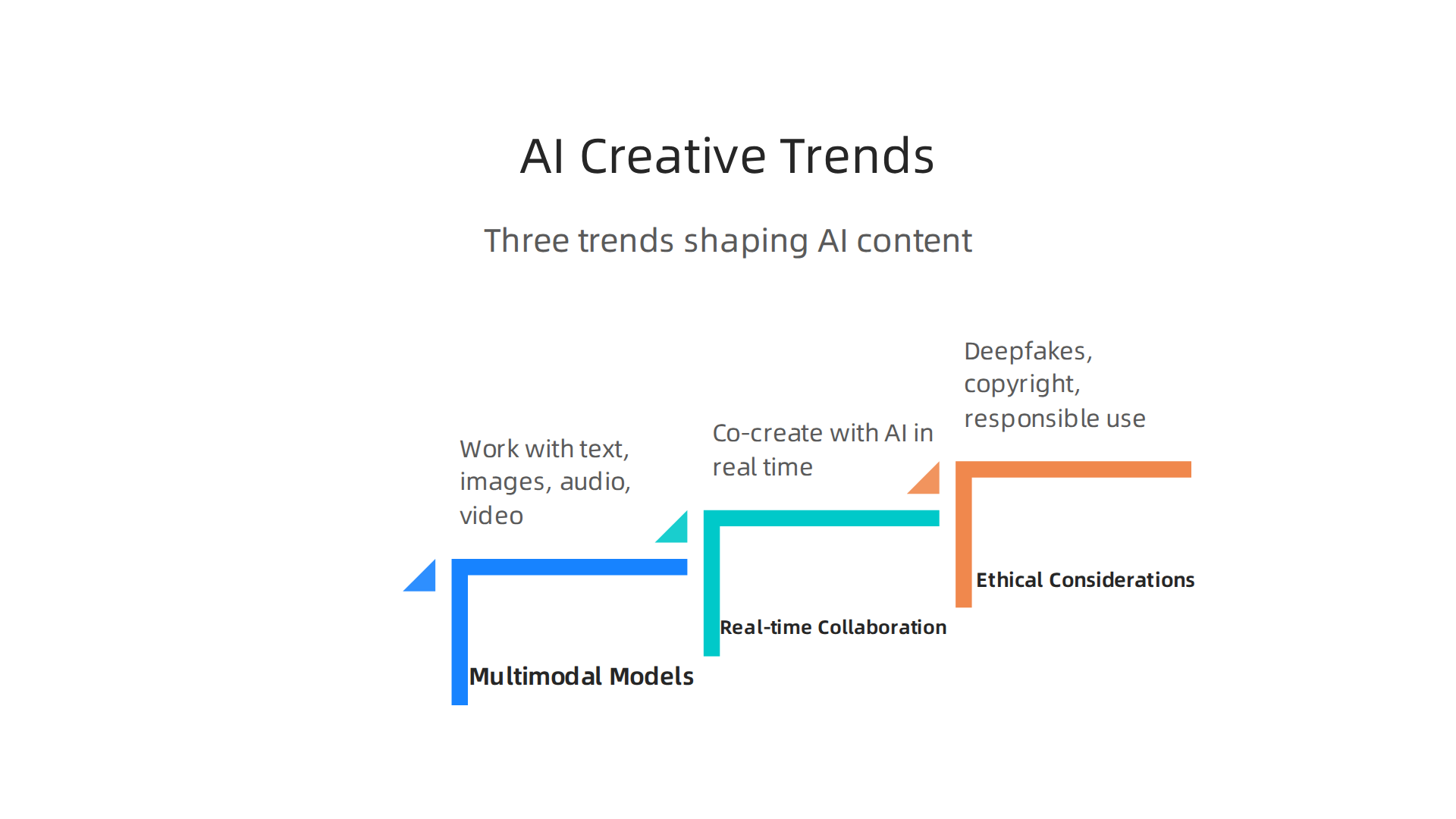
    As AI tools get smarter, the way we create content keeps changing fast. If you have been refining prompts with promptchan ai, you are already seeing how powerful these models can be. But what comes next? Let us look at three big trends shaping the future of AI creative content generation.

    Key trends driving the evolution of AI in content creation, including multimodal models, real-time collaboration, and ethical considerations.

    First up: multimodal models. These are AIs that can work with text, images, audio, and video all at once. Instead of describing a scene in words and then switching to a different tool for the video, you give one prompt and get back a full package. For example, you might type a sentence and get a short video clip with matching music and narration. This is no longer science fiction. In fact, a 2026 report on AI marketing trends calls multimodal marketing "table stakes by Q3 2026." Tools like Runway Gen-3 and Pika 1.5 now generate 1080p video from text in under five minutes. That means promptchan ai users can expect to create richer, more engaging content with less back-and-forth.

    Second, real-time collaboration and editing is becoming a standard feature. Soon you will not just send a prompt and wait for an output. You will co-create with the AI in real time, tweaking colors, voices, or scenes as the model generates them. Think of it like editing a document with a smart assistant that never gets tired. This shift makes tools like creatify ai, haiper ai, and stability ai even more useful for teams working on tight deadlines. If you want to learn more about how AI is changing the balance between human input and machine output, check out this piece on human or AI creativity.

    Third, and most important: ethical considerations. As AI content floods the internet — a LinkedIn analysis notes that by 2026, AI-generated content will likely exceed human-made content online — we face real risks. Deepfakes are a growing problem. According to data from the Generative AI trends report, Resemble AI logged 2,031 verified deepfake incidents in just the third quarter of 2025, more than all of 2024 combined. And humans are bad at spotting them: only 24.5% of people correctly identify high-quality deepfakes. That is worse than a coin flip.

    Copyright is another sticky issue. If an AI generates an image that looks like a famous artist’s style, who owns the rights? These questions are not settled yet. Responsible use means checking outputs, adding watermarks, and being transparent about AI involvement. Promptchan ai itself gives you control over tone and format, but the final responsibility rests with you.

    To stay on top of these fast-moving changes, you need reliable information. That is exactly what The AI Newsletter Worth Reading delivers every day — clear updates on tools, trends, and ethics so you can create with confidence.

    Summary

    This article is a practical guide to Promptchan AI, a browser-based generative platform built to turn text prompts into high-quality visual assets and creative work. It explains how Promptchan combines multiple models (including Stable Diffusion variants and fine-tuned creative models) with features like weighted tags, negative prompts, prompt templates, and a Chat 2.0 companion to support visual storytelling and character consistency. The guide compares Promptchan with tools such as Midjourney, ChatGPT, and Writesonic, and shows which platforms work best for image-first versus text-first tasks. You’ll learn concrete prompt-engineering practices—use role, instruction, context, and format; iterate and tweak one element at a time; save winning prompts—and see real use cases for marketers, writers, and educators. The article also notes practical limits (native editing tools and native resolution caps), the platform’s freemium pricing approach, and how to integrate outputs into design tools. Finally, it outlines future trends like multimodal generation, real-time collaboration, and rising ethical questions about deepfakes and copyright so you can adopt the tool responsibly.

  • Galaxy AI 2026 Agentic Assistant for Business and Content Creation

    Galaxy AI 2026 Agentic Assistant for Business and Content Creation

    Introduction

    Have you ever wished your phone could actually do the heavy lifting for you? Not just answer questions or set timers, but really handle the boring stuff like scheduling meetings, organizing your email, or helping you create content. That’s exactly what Galaxy AI is starting to deliver in 2026.

    A person looking focused and relaxed, benefiting from smart technology assisting with daily tasks.

    Galaxy AI is quickly becoming a serious player in the AI assistant space. Samsung has been pushing hard to make AI more useful and personal. The Galaxy S26 series now features what Samsung calls "agentic AI." This means the AI can act on your behalf to automate workflows, handle scheduling, and much more. Samsung shared the full details at their Unpacked event in February 2026.

    So what makes Galaxy AI different from other tools like HeyGen AI or Dreamina AI? A big part of it is on-device intelligence. Instead of sending all your data to the cloud, Galaxy AI processes a lot of information right on your device. This keeps your data more private and secure. Samsung has been open about how trust, security, and privacy shape the future of AI, especially during their talks at CES 2026.

    For businesses, this is big news. Teams in content creation, marketing, and operations are starting to explore what Galaxy AI can do. Whether it’s helping with writing, generating ideas, or automating daily tasks, the potential is real. According to a detailed whitepaper on the Galaxy AI revolution, Samsung is leading with technologies focused on communication, creativity, productivity, and health.

    In this article, we will give you a complete and practical overview of Galaxy AI. We will look at the technology behind it, how it works in real life, and whether it can actually deliver a good return on investment for your business.

    If you want to stay ahead in the fast-moving world of AI, it helps to have a trusted source of news. We recommend signing up for The Deep View Newsletter. It delivers clear daily AI updates straight to your inbox so you never miss what matters.

    And if you are curious about other smart tools that can boost your productivity, check out our guide on how to choose and use an AI powered research assistant. It covers practical tips for picking the right AI helper for your needs.

    What is Galaxy AI? Core Architecture and Philosophy

    So what actually powers Galaxy AI? It helps to understand the engine before you push the pedal.

    Galaxy AI is not one single tool. It is a full suite of AI models and features built by Samsung. At the February 2026 Unpacked event, Samsung introduced what they call "agentic AI" for the Galaxy S26 series. This means the AI can act on your behalf. It can handle tasks like scheduling meetings or organizing your inbox without you needing to guide every step.

    The secret to how Galaxy AI works lies in two core ideas: privacy and personalization.

    First, privacy. Samsung processes a lot of the AI work directly on your device. Your photos, messages, and personal data do not have to travel to a cloud server to be analyzed. This on-device processing is a big deal. Samsung has been open about how trust and security shape the future of AI, especially during their discussions at CES 2026. You get powerful AI help without giving up control of your information.

    Second, personalization. Galaxy AI learns from how you use your phone. It adapts to your habits, your tone, and your schedule. Over time, it becomes more helpful because it knows what matters to you. The system blends on-device smarts with cloud intelligence when needed. This hybrid approach means you get fast responses for simple tasks and deeper power for bigger jobs.

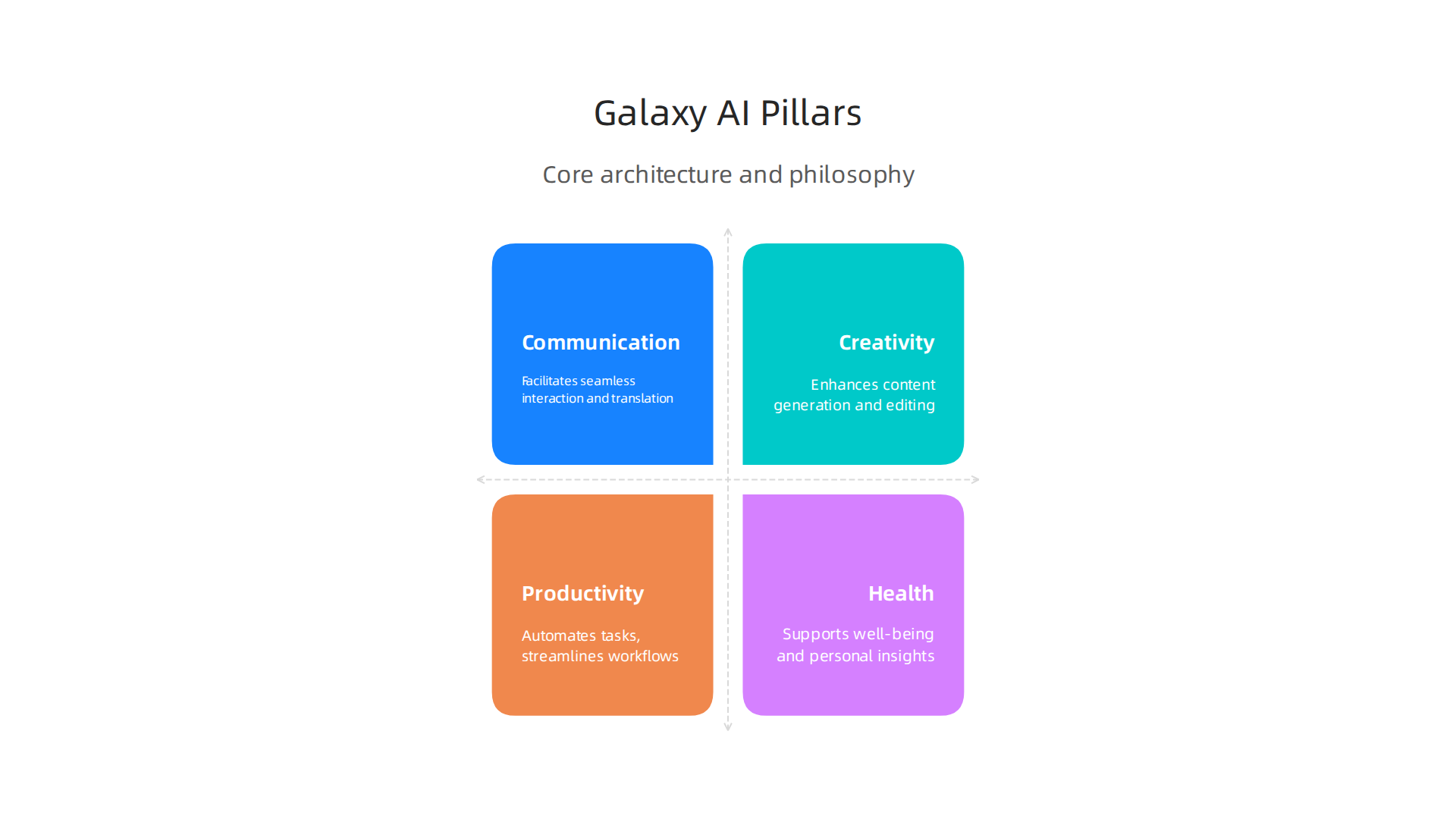
    According to a detailed whitepaper on the Samsung Galaxy AI revolution, Samsung’s technology focuses on four main areas: communication, creativity, productivity, and health.

    The four fundamental pillars driving Samsung's Galaxy AI technology.

    Understanding these pillars helps you know which features to use for your specific workflow.

    When you know how Galaxy AI thinks about privacy and personalization, it becomes easier to pick the right tools for your day. For example, you might use on-device translation for a private chat but use cloud-powered image editing for a creative project. Knowing the architecture helps you work smarter.

    If you want to explore other smart assistants that can boost your daily workflow, check out our guide on how to choose and use an AI powered research assistant. It covers practical tips for picking the right helper for your needs.

    And if you want to stay updated on all things AI without the noise, subscribe to The Deep View Newsletter. It sends clear daily AI news straight to your inbox so you never miss what matters.

    Galaxy AI for Content Creation: Text, Image, and Video Tools

    Now that you understand the engine behind Galaxy AI, let us look at how it helps you create content. Whether you write emails, edit photos, or make short videos, Galaxy AI brings powerful tools right to your phone.

    A creative professional focused on crafting engaging content, possibly with a mobile device nearby.

    Galaxy AI includes generative text assistants that can help you write messages, summarize long articles, or translate languages in real time. This is important for professionals who need to move fast. A 2026 benchmarks report on the state of AI in marketing shows that content velocity is a top trend reshaping the industry. Having an AI powered assistant on your device means you can draft a reply, polish a post, or summarize a meeting transcript without switching apps. It keeps your flow going.

    When it comes to images and video, Galaxy AI shines because it does the work right on your device. You do not need to upload your personal photos to a cloud server to edit them. This on-device processing means low latency and better privacy. You can remove objects from a video, adjust lighting in a photo, or generate a new background with just a few taps. It is like having a mini desktop editor in your pocket, but with the extra benefit of working offline.

    How does this stack up against tools like ChatGPT or Adobe Firefly? Those tools are powerful, but they usually need an internet connection and a separate account. Galaxy AI is built directly into the Samsung ecosystem. It is always ready, it learns your style, and it does not send your data to a distant server. For marketers following the latest AI investments, having a mobile-first, offline-capable creation suite is a major advantage.

    If you are curious about how AI creativity compares to human creativity across different platforms, check out our analysis on human or AI creativity.

    The world of AI content creation is changing fast. Do not get left behind. Subscribe to The Deep View Newsletter. It sends clear daily AI updates straight to your inbox so you always know what tools actually work.

    Galaxy AI for Marketing: Personalization and Campaign Automation

    Content creation is just the start. The real magic happens when you use Galaxy AI to run smarter marketing campaigns. In 2026, personalization is no longer a nice to have. It is what customers expect. Galaxy AI helps you deliver it, right from your phone.

    A small team collaborating on a marketing strategy, brainstorming ideas and reviewing data.

    Here is how. Galaxy AI can analyze on-device data to build hyper personalized customer segments. It looks at behavior, preferences, and past interactions without sending private data to the cloud. This matters because 46% of marketers now use AI to scale creative work, according to the 2026 Digital Advertising Trends Report by Smartly.

    Smartly.io homepage, a platform specializing in digital advertising automation for marketers.

    And up to 30% of marketing budgets get wasted on generic outreach. Galaxy AI helps you stop that waste.

    You can also automate repetitive campaign tasks. Galaxy AI writes ad copy variations for you. It sets up A/B tests automatically. It even integrates with major marketing platforms so your campaigns run on autopilot. This matches what the State of AI in Marketing 2026 benchmarks report calls content velocity: the ability to produce and test more content in less time. Early adopters report better conversion rates and much faster campaign setup times.

    Think about what that means for your workflow. Instead of spending hours writing five versions of a Facebook ad, you let your AI powered assistant handle the first draft. You just review and tweak. It is the same approach top marketing teams use when they invest in AI for creative workflows and testing, as the Section AI article on 2026 AI investments points out.

    If you want to learn more about writing copy that sounds natural and connects with people, check out our guide on how to use AI to write content that sounds human.

    Personalization and automation are changing marketing fast. Galaxy AI puts these tools in your pocket. Are you ready to use them? Stay ahead of the curve by getting clear daily updates on what actually works. Subscribe to The Deep View Newsletter. It delivers practical AI insights straight to your inbox every day.

    Galaxy AI for Business Operations: Workflow and Data Analysis

    Marketing gets all the glory, but the real time drains in business are the boring tasks. Data entry. Report generation. Chasing down numbers from different systems. If you run a small team or wear many hats, you know exactly what I mean. Galaxy AI can take over these repetitive jobs and free up your brain for bigger decisions.

    A business leader reviewing important documents or reports, making strategic decisions with confidence.

    Here is how it works in practice. Galaxy AI automates many of the routine tasks that eat up your day. It can pull data from spreadsheets, fill in forms, and generate weekly reports without you touching a keyboard. This is especially useful when you think about enterprise security. Galaxy AI offers data processing and feature restrictions through the Knox Service Plugin, so you can configure Galaxy AI data processing to match your company’s security policies.

    Samsung Knox documentation portal, detailing enterprise security solutions and policy configurations for Galaxy AI.

    Your sensitive business data stays safe.

    The feature that really changes things is natural language querying. You do not need to be a data analyst or know SQL. You just ask a question in plain English. "Show me last month’s sales by region." Or "Which products have the lowest inventory?" Galaxy AI understands your request, searches your business database, and returns the answer instantly. For non-technical team members, this is a game changer. It puts the power of data analysis into everyone’s hands.

    Think of the use cases across different departments. In supply chain management, Galaxy AI can spot delays and suggest reorder points before stock runs low. In customer service, it can summarize support tickets and identify common complaints. The time savings add up fast. Instead of spending two hours pulling a report, you get the answer in seconds.

    If you want to dig deeper into how AI can transform your daily research and analysis workflows, read our guide on how to choose and use an AI powered research assistant. It covers the best tools to pair with Galaxy AI for maximum efficiency.

    The bottom line is this. Galaxy AI turns your phone into a business operations hub. It automates the boring stuff, answers your data questions, and helps you move faster. Ready to see what else AI can do for your business? Subscribe to The Deep View Newsletter for daily insight on the tools that actually deliver results in 2026.

    Galaxy AI vs. Competitors: Feature-by-Feature Comparison

    By now you have seen how Galaxy AI handles business tasks. But how does it stack up against the big cloud-based names like GPT-4, Google Gemini, and Claude? Let us break it down feature by feature.

    The biggest difference comes down to where the processing happens. Most AI assistants, including GPT-4 and Gemini, rely on cloud servers to answer your questions. That means your data travels to a remote data center, gets processed, and comes back to you. Galaxy AI is different. It does a lot of work right on your device. This on-device processing is not just faster. It also means sensitive business data never leaves your phone. For industries like healthcare, law, and finance, that is a huge win.

    When we look at raw benchmarks, the cloud assistants still lead in some areas. According to recent testing, GPT-5.4 scores around 93.1% on coding benchmarks, edging out Claude Opus 4.6’s 90.4%. And on general reasoning tests, models like Gemini 3.0 score in the high 80s on GPQA Diamond. But here is the thing. These scores require an internet connection and sending data to the cloud. If you are offline, those models are useless. Galaxy AI keeps working without a network.

    The table below shows the key differences at a glance:

    | Feature | Galaxy AI | GPT-4/Gemini/Claude |

    A feature-by-feature comparison of Galaxy AI's on-device processing versus cloud-based AI models.

    |———|———–|———————|
    | Processing location | On-device (privacy focused) | Cloud (requires internet) |
    | Works offline | Yes | No |
    | Data privacy | High (data stays on your phone) | Lower (data sent to cloud) |
    | Coding benchmarks | Good for device tasks | Higher overall scores |
    | Latency | Instant (no network delay) | Depends on connection speed |

    For many business users, the privacy trade-off is worth it. You do not need the world’s best coding model to automate a report or pull up sales numbers. You need something that works fast, works offline, and keeps your data safe. Galaxy AI delivers on all three.

    If you want to stay on top of how these AI tools compare, check out our guide to the top AI websites professionals trust for real news and tools. It is a great resource for finding the latest benchmarks and reviews.

    Want side-by-side comparisons like this delivered to your inbox every day? Subscribe to The Deep View Newsletter for daily insight on the tools and models that actually deliver results in 2026.

    Integrating Galaxy AI with Existing Tech Stacks

    Now that you have seen how Galaxy AI stacks up against cloud-based tools, you might wonder: How do I actually connect this to the software my team already uses? The good news is that Galaxy AI is built to play nice with your current setup.

    Galaxy AI offers a range of APIs and SDKs that let developers build custom integrations. This means your IT team can connect Galaxy AI directly to your company’s internal systems, databases, and workflows. Instead of using a separate AI dashboard, you can embed the AI powered assistant right into the apps your people use every day. For example, if you run a healthcare clinic, you could integrate Galaxy AI with your patient management system so it helps schedule appointments or answer billing questions, all without sending patient data to the cloud. Samsung’s Knox Platform for Enterprise lets you set policies for Galaxy AI data processing to meet your security requirements check Samsung Knox docs.

    For teams that are not doing custom development, Galaxy AI also comes with plugins and connectors for popular business tools. You can connect it to Microsoft 365, Google Workspace, and Salesforce right out of the box. Imagine having Galaxy AI automatically generate a summary of your Google Doc or pull the latest sales numbers from Salesforce and turn them into a clean report. No extra coding needed. Your team just clicks and it works.

    And if your business deals with industry-specific language, you can fine-tune Galaxy AI models to fit. A law firm could train it on legal terms and case law. A factory might teach it to recognize specific machine errors. This custom model fine-tuning makes the AI much more useful than a one-size-fits-all solution.

    If you want to see how other AI tools connect to real-world workflows, check out our guide on how to choose and use an AI-powered research assistant in 2026. It gives practical tips for picking tools that fit your stack.

    Ready to get the latest on AI integrations? Subscribe to The Deep View Newsletter for daily updates on the tools that actually make a difference in 2026.

    Best Practices for Deploying Galaxy AI in Your Organization

    You have Galaxy AI connected to your systems. Now what? Rolling out a new AI powered assistant across an entire company can feel overwhelming. But you can avoid the common pitfalls by following three simple best practices.

    Three essential best practices for a successful deployment of Galaxy AI within an organization.

    Start with a pilot project. Do not try to use Galaxy AI everywhere at once. Pick one high-impact use case. Maybe that is automating customer support replies. Or generating weekly sales reports. A small pilot lets your team learn what works without risking big disruptions. You can measure success by looking at time saved or error rates. For example, you might compare Galaxy AI’s performance against other top models on specific tasks by checking the latest benchmark results from MindStudio to see how it stacks up for coding or writing tasks.

    MindStudio.ai homepage, a platform for building AI applications without code.

    Once you prove the value in one area, expand slowly.

    Set clear governance policies. Before employees start using Galaxy AI, your organization needs rules. Who can access the AI? What data is okay to share? How do you handle privacy? Samsung Knox lets you control data processing policies, but you also need a written policy for acceptable use. This helps prevent mistakes like feeding sensitive customer information into the AI. A detailed analysis of ChatGPT versus Gemini versus Claude can show you how different models handle data, which informs your governance choices. Your policy should cover data retention, audit logs, and what happens if the AI makes a mistake.

    Invest in training and change management. The best AI tool fails if nobody uses it. Your people might worry that Galaxy AI will replace them. Or they might not understand how it helps their daily work. Provide hands-on training sessions. Show real examples. Let employees practice using the AI powered assistant in a safe environment. Talk about how AI can handle boring tasks so your team can focus on creative and strategic work. For more insight into how humans and AI can work together, read our guide on human or AI creativity and what the data says about collaboration in 2026. It explains how teams that embrace AI collaboration actually become more productive and innovative.

    Start small. Set clear rules. Teach your people well. That is the recipe for a smooth and successful Galaxy AI rollout.

    For daily updates on the AI tools shaping business in 2026, subscribe to The Deep View Newsletter.

    Measuring Success: KPIs and ROI of Galaxy AI

    You have deployed Galaxy AI. But how do you know if it is working? You need clear numbers to show the value. That means tracking the right KPIs and calculating your return on investment.

    Start by defining your most important KPIs. For Galaxy AI, focus on three main areas. First, productivity savings. How much time do your employees save each week? You can measure this by comparing task completion times before and after the rollout. Second, error reduction. Is the AI powered assistant making fewer mistakes than your old processes? Track error rates in customer support replies, data entry, or report generation. Third, new revenue from AI driven insights. Did Galaxy AI help your team find patterns in customer behavior that led to more sales? These three KPIs give you a solid baseline.

    According to the Olakai AI ROI framework, you should also measure qualitative benefits like employee satisfaction and innovation speed. A practical guide from Olakai explains how to balance hard metrics with softer outcomes.

    Olakai AI homepage, providing insights and frameworks for measuring AI ROI in business.

    Another helpful resource from Tropicapp shows how CFOs at companies like Zapier measure AI ROI using five frameworks that go beyond just time saved. You can read their AI ROI frameworks from Tropicapp to see real world examples.

    For the ROI calculation, add up all the costs: licensing fees, training time, integration work. Then compare that to the value of time saved and revenue gained. But do not forget the intangible wins. Employees who feel less bored by repetitive tasks tend to stay longer. That is harder to measure but just as important. A comprehensive framework from RevGen Partners outlines how to capture both tangible and intangible factors.

    To set realistic expectations, look at industry benchmarks. Reports from leading analysts can show what other companies achieve with similar AI tools. For a curated list of trusted sources for AI benchmarks and news, check out our guide on the 10 top AI websites professionals trust in 2026. This will help you compare your Galaxy AI results against industry standards.

    Measuring success is not a one time task. Check your KPIs monthly. Adjust your goals as you learn more. Galaxy AI can deliver big returns, but only if you track the right numbers.

    Want daily updates on AI tools that boost your bottom line? Subscribe to The Deep View Newsletter for clear, actionable insights every day.

    Summary

    Galaxy AI is Samsung’s hybrid, agentic assistant built into the Galaxy S26 line that combines on-device intelligence with cloud power to automate tasks, create content, and protect user data. This article explains Galaxy AI’s core architecture—privacy-first on-device processing plus selective cloud use—and shows how those design choices matter for marketers, content creators, and business teams. You’ll learn practical use cases for writing, image and video editing, campaign personalization, and operations automation, plus how Galaxy AI compares with cloud-first models like GPT and Gemini. The guide also covers integration paths, rollout best practices (pilot projects, governance, training), and ways to measure KPIs and ROI so you can decide if Galaxy AI fits your workflow and security needs.

  • Best AI Avatar Tools for Video Content in 2026

    Best AI Avatar Tools for Video Content in 2026

    Introduction

    Have you ever wished you could create a professional video without stepping in front of a camera?

    A person thoughtfully considering new ways to produce professional video content efficiently.

    Maybe you need a training video, a social media post, or a product demo, but you don’t have the time or budget for actors, lighting, and reshoots. That is exactly where an ai avatar can help.

    AI avatars are changing how creators, marketers, and business owners produce video content. Instead of filming a real person, you can generate a realistic digital presenter who speaks your words in seconds. The numbers prove this is no passing trend. The global AI avatar market was worth about USD 9.78 billion in 2025 and is expected to grow to USD 12.90 billion in 2026, according to Precedence Research. Other reports show the market could reach over USD 24 billion by 2033, growing at a rate of more than 33% each year.

    But here is the challenge. With so many AI avatar tools launching every month, choosing the right one for your workflow can feel like a guessing game. Some tools focus on photorealistic humans, others on cartoon characters. Some let you clone your own face, while others offer ready made options. And it is not always easy to tell an ai or human presenter apart anymore.

    That is where this guide comes in. We have analyzed the top AI avatar platforms available in 2026. We look at real use cases, pricing, quality, and best practices so you can make a smart choice. Whether you are a solo creator, a marketing team, or a training department, you will find practical advice here.

    For more context on how AI is reshaping creative work, check out our take on human or ai creativity and what collaboration looks like this year.

    The world of video content is moving fast. Let us help you keep up without the headache. If you want to stay ahead of every new trend and tool, subscribe to The Deep View Newsletter for clear daily updates straight to your inbox.

    What Are AI Avatars and Why They Matter for Content Creators

    Have you ever watched a video and wondered if the person speaking was real or generated? That is the power of an ai avatar. In simple terms, an AI avatar is a digital character created by artificial intelligence. It can look like a realistic human, move naturally, and speak any text you give it.

    For content creators in 2026, this is a game changer. You no longer need a full production setup to make professional videos. You just write a script, choose an avatar, and let the software do the rest. According to the AI Avatars Industry Report 2026, these avatars now use advanced AI to read emotions and match tone, making them feel more real than ever.

    The shift from traditional video production to AI driven creation is happening fast. The global AI avatar market was worth USD 9.78 billion in 2025 and rose to USD 12.90 billion in 2026, according to Precedence Research. Other reports, like the one from Transpire Insight, show the market growing at over 33% each year. This growth shows that creators, marketers, and businesses are choosing speed and scale over old school filming.

    Why do they matter so much? Because video content is still king in 2026, but making it was always expensive and slow. AI avatars change that. A creator can make a training video, a product demo, or a social media post in minutes.

    An individual confidently presenting, showcasing the power of streamlined content creation.

    Need to change a line in the script? Just edit the text and regenerate. No reshoots needed. Sometimes the quality is so good that it is hard to tell the difference between an ai or human presenter. This efficiency lets you focus on your message instead of the logistics of filming.

    Of course, keeping things authentic matters. You want your brand to feel human, even when using a digital presenter. That is why we wrote about balancing tech and personality in our guide on human or ai creativity. The best results come from using AI as a tool, not a crutch. It helps you scale your work while keeping your unique voice.

    The AI landscape changes fast. New tools, updates, and best practices pop up daily. To make sure you never miss an important shift, subscribe to The Deep View Newsletter. It is the easiest way to get clear, practical AI news straight to your inbox every day.

    Top Use Cases for AI Avatars in Creative Content Production

    So you know what an AI avatar is and why it matters. But where do you actually use one? The short answer is almost anywhere you would use a human presenter. In 2026, creators and brands are finding new ways to bring these digital characters into their daily workflow. Here are the most powerful use cases right now.

    An infographic highlighting the diverse applications of AI avatars in modern content production.

    Marketing and Sales Videos

    This is the biggest use case by far. Instead of hiring actors, renting a studio, and spending days editing, you can generate a polished product demo or brand video in minutes. A great example comes from the 2026 holiday season. One brand used an interactive AI Santa avatar that drove over 1 million engagements across 43 countries, according to a collection of AI marketing case studies. That is the kind of scale that would cost a fortune with traditional production.

    Sales teams also use AI avatars to personalize outreach at scale. You can send a video where the avatar speaks directly to a prospect by name, mentions their company, and addresses their specific pain point. The Vidyard guide on AI avatars in sales shows how teams save hours per rep each week while keeping that one-to-one feel.

    See how Vidyard supports video for sales and marketing, a common application for AI avatars.

    Educational and Training Content

    Think about onboarding videos, compliance training, or how-to tutorials. Instead of filming a real person once and having that video go stale, you use an avatar. If the policy changes, you just update the script. The avatar handles it perfectly every time. The AI Avatars Industry Report 2026 highlights that training departments are adopting avatars fast because they cut production costs by over 60% while keeping the content consistent.

    Social Media Content

    Social media demands volume. You need fresh video content every day for TikTok, Instagram Reels, YouTube Shorts. Filming that many takes is exhausting. AI avatars let you generate short, engaging clips from a single script. You can even create different versions for different platforms without extra work. The tone stays consistent, and the avatar looks professional every time.

    Personalized Messaging

    This one overlaps with sales, but it goes beyond. Customer support, account updates, and event invitations can all use a personalized avatar. Imagine a banking app that sends you a short video message from a digital assistant, explaining your monthly spending in a friendly way. That is already happening. According to the AI Avatar Statistics 2026 report, 85% of customer interactions in retail will be managed by AI including avatars. Personalized video creates trust and cuts through the noise.

    Live Streaming with Avatars

    This is an emerging use case that is growing fast. Streamers and event hosts now run live broadcasts where an AI avatar responds to audience questions in real time. The avatar looks like a cartoon or a realistic human, and it reacts naturally. The market data backs this up. The global AI avatar market is expected to hit $110.9 billion by 2034, growing at over 30% each year according to OpenPR. Live streaming is a big part of that growth.

    Internal Communications

    Finally, companies use AI avatars for internal announcements. The CEO can record a quarterly update using an avatar that looks like them, but without blocking a full day for filming. You can also create training videos for remote teams in multiple languages without hiring translators. It keeps everyone on the same page without the logistics nightmare.

    Here is the thing. The best results happen when you treat the avatar as a tool, not a replacement for your brand voice. You still need to write a good script and pick the right avatar style. If you want to dig deeper into how to keep the human element alive, check out our guide on human or ai creativity.

    The AI landscape keeps shifting. New use cases appear every month. To stay ahead without spending hours searching for news, subscribe to The Deep View Newsletter. It delivers clear, practical AI insights straight to your inbox each day.

    How to Choose the Right AI Avatar Tool: A Comparison Framework

    Now that you know what you can do with an AI avatar, the next step is picking the right tool.

    A team collaborating around a whiteboard, strategizing on tool selection for their content needs.

    In 2026, the market has dozens of options. But three platforms keep rising to the top: HeyGen, Synthesia, and Colossyan.

    Explore HeyGen's user interface to see its natural-looking AI avatars and video creation features.

    Review Synthesia's platform for enterprise-grade AI video generation, featuring a vast avatar library.

    Discover Colossyan's AI video creation platform, known for its balance of quality, speed, and compliance features.

    Each one shines in different areas. Here is a framework to help you decide without getting stuck in analysis paralysis.

    The Key Criteria to Evaluate

    Before you pick a platform, think about these five factors.

    An infographic detailing the essential factors to consider when selecting an AI avatar platform.

    They matter more than flashy features.

    Realism and Avatar Quality. Does the avatar look natural? Do the lips sync with the audio? Can you tell it is a computer? According to a detailed comparison from AIMagicX, HeyGen leads in avatar naturalness with over 100 avatars and support for 175+ languages. Synthesia is close behind with 240+ avatars and 140+ languages. Colossyan focuses on enterprise quality but has a smaller library.

    Customization Options. Can you clone your own face and voice? Can you adjust the background, clothing, and gestures? Some platforms lock you into preset avatars. Others let you create a fully custom AI avatar that matches your brand.

    Language and Voice Support. If you need to reach a global audience, this is critical. HeyGen supports 175+ languages. Synthesia supports 140+. Colossyan supports around 100. Check that your target languages are included.

    Pricing and Plans. This varies a lot. The 2026 AI Avatar Toolkit from Marketing Agent Blog notes that Synthesia leads in enterprise quality but comes at a higher price point. HeyGen is more budget friendly for solo creators and small teams. Colossyan sits in the middle.

    Integration and Workflow Fit. Can you connect the tool with your existing video editor, LMS, or CRM? Does it export in the formats you need? Is there a team collaboration feature?

    Side-by-Side Tool Comparison

    Here is a quick snapshot based on the latest 2026 data from multiple comparison sources including Colossyan’s own comparison page.

    Feature HeyGen Synthesia Colossyan
    Avatar Library 100+ 240+ 70+
    Languages Supported 175+ 140+ 100+
    Voice Cloning Yes Yes Yes
    Best For Social media, natural look Enterprise, structured editing Training, compliance
    Starting Price Mid-range Higher Mid-range
    Collaboration Team plans Team plans Enterprise plans

    According to Vidmetoo’s comparison, HeyGen also scores well on SOC 2 compliance, which matters if you work with sensitive data.

    A Simple Decision Matrix

    Still unsure? Match your situation to the right pick.

    A simple decision matrix to guide creators in choosing the most suitable AI avatar tool for their specific needs.

    Solo Creator or Social Media Manager. Go with HeyGen. It gives you the most natural looking avatars, supports tons of languages for international reach, and keeps the price reasonable.

    Corporate Trainer or Compliance Specialist. Pick Synthesia. Its large avatar library and structured editing tools make it perfect for long form training videos. The Slashdot comparison shows Synthesia ranks highest for enterprise features.

    Marketing Team or Agency Needing Speed. Try Colossyan. It balances quality with fast rendering times and strong compliance features.

    Anyone Who Values Custom Avatars. Look at HeyGen or Synthesia. Both let you create custom AI avatars by uploading your own footage.

    The Human Element Still Matters

    Here is the thing. The best AI avatar tool in the world cannot replace a good script and a clear message. The avatar is just the delivery system. You still need to plan your content, know your audience, and keep the human touch. If you want to explore how to blend human and AI creativity effectively, check out our guide on human or AI creativity.

    Next Steps

    Start by identifying your primary use case. Then pick two or three platforms from this list and test their free trials. Most of them offer one. Try creating a short video and see which one feels easiest and looks best.

    As you evaluate your options, staying updated on the latest tool changes and benchmarks can save you hours of research. That is exactly why subscribe to The Deep View Newsletter. It delivers clear, practical AI insights straight to your inbox each day so you always know which tools are actually worth your time.

    Now let’s get into the hands on reviews. I tested these three platforms myself in 2026, and here is what I found.

    HeyGen: The Natural Look King

    HeyGen is the tool I reach for when I need an AI avatar that actually looks like a real person. Its avatar quality is the best I have seen. The lip sync is tight, the eye movements feel natural, and the voices sound less robotic than most competitors.

    Strengths. Over 100 avatars and support for 175+ languages. According to AIMagicX, HeyGen leads in avatar naturalness. It also scores well on SOC 2 compliance, which matters if you deal with sensitive data. The Colossyan comparison page confirms HeyGen wins on naturalness.

    Weaknesses. The avatar library is smaller than Synthesia’s. Advanced editing features are limited compared to enterprise platforms.

    Target audience. Solo creators, social media managers, and marketers who want quick, viral ready videos. Pricing is mid range and budget friendly for individuals. It is perfect for short clips for TikTok, Instagram, or YouTube Shorts.

    Synthesia: The Enterprise Powerhouse

    Synthesia feels like a full video production studio inside a browser. It has the largest avatar library with over 240 options and supports 140+ languages. The structured editing interface makes it easy to build long form videos like training modules or product demos.

    Strengths. Massive avatar selection, robust editing tools, and strong enterprise features. The Marketing Agent Blog notes that Synthesia leads in enterprise quality. I found the collaboration tools helpful for team projects.

    Weaknesses. Higher price point. The avatars are good but not quite as natural looking as HeyGen’s top models.

    Target audience. Corporate trainers, L&D teams, and large marketing departments. Best for compliance videos, onboarding, and internal communications where consistency matters more than speed.

    Colossyan: The Balanced Performer

    Colossyan sits between HeyGen and Synthesia. It offers around 70+ avatars and 100+ languages, but it focuses on fast rendering and strong compliance features.

    Strengths. Good balance of quality and speed. SOC 2 compliant. The Vidmetoo comparison highlights Colossyan’s strong editing capabilities. It is also ranked well for training use cases on Slashdot.

    Weaknesses. Smaller avatar library and fewer language options than the other two. Less suited for social media viral content.

    Target audience. Marketing teams and agencies that need quick turnaround on professional videos. Also good for compliance heavy industries like healthcare and finance.

    My Pick for Creators

    If you are a solo creator or running a small team, HeyGen gives you the best mix of natural quality, language support, and price. If you work in a large organization with multiple stakeholders, Synthesia is the safer bet. Colossyan is a strong middle ground.

    No matter which tool you choose, remember that the avatar is just the messenger. The script and message still matter most. For more on balancing human creativity with AI tools, read our guide on human or AI creativity.

    The AI avatar space changes fast. New updates and features come out every month. To stay ahead without drowning in noise, subscribe to The Deep View Newsletter. It delivers clear daily insights on the tools that actually matter.

    Best Practices for Creating Engaging Avatar Content

    Picking the right platform is just the first step. The real magic happens when you know how to use your ai avatar well. Here are the best practices I follow to make sure every video feels real, connects with viewers, and actually gets results.

    An infographic outlining key strategies for producing engaging and effective video content using AI avatars.

    Write for the Ear, Not the Eye

    Script writing for avatars is different from writing for a blog. You need short sentences, natural pauses, and conversational tone. Read your script out loud before you record. If it sounds stiff to you, it will sound robotic through an avatar.

    Keep your sentences under 20 words when you can. Use contractions like "you’ll" instead of "you will." And leave space for pauses. A small silence between ideas makes the avatar look more thoughtful.

    Match Pacing to Your Platform

    Your avatar video should move at the right speed for where you post it.

    • TikTok and Instagram Reels. Fast pacing wins here. Keep videos under 60 seconds. Start with a hook in the first 3 seconds. The avatar should talk quickly and energetically.
    • YouTube. You have more room. Videos can be 5 to 10 minutes long. Slow down the pace. Let the avatar pause between key points. Add B-roll or screen recordings to break up the talking.
    • LinkedIn. Professional and steady wins the day. Aim for 2 to 4 minutes. Focus on value. Use a calm, authoritative voice style.

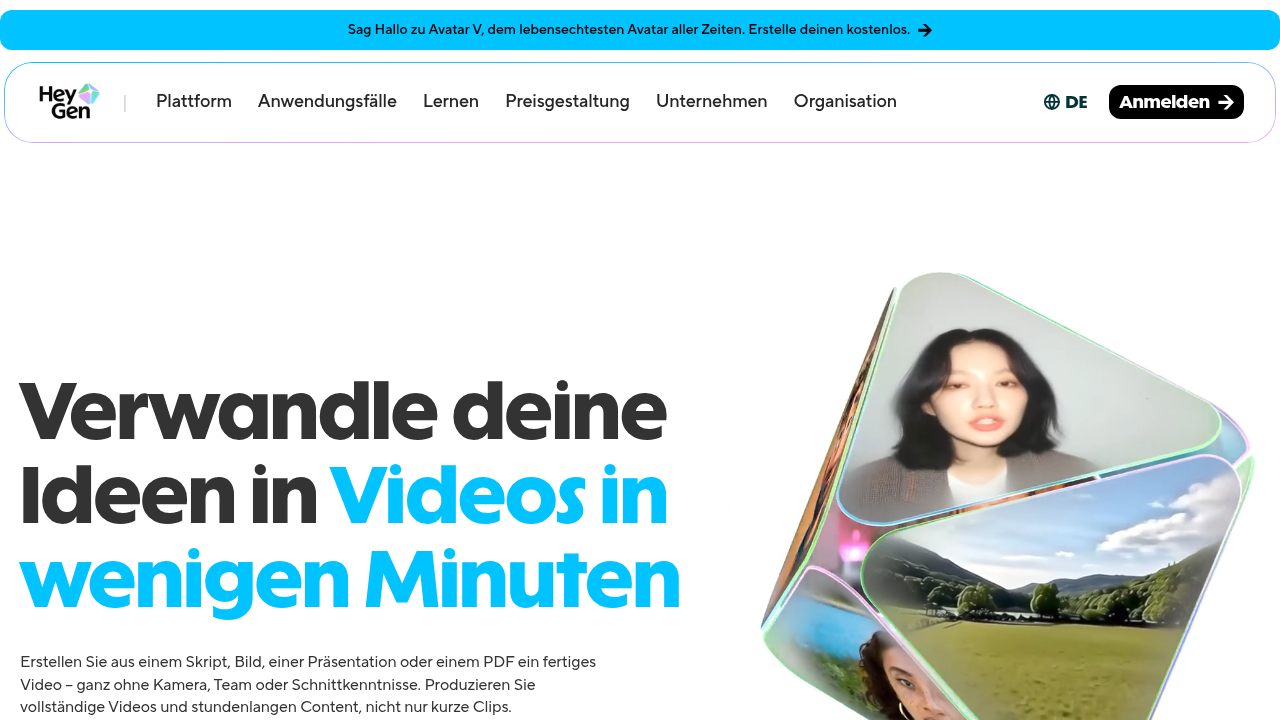
    According to the AI Avatars Complete Guide 2026, understanding platform specific best practices makes a huge difference in viewer retention.

    Blend Avatar Footage with Real Video

    One of the best tricks I have learned is to mix ai avatar clips with real human footage. This adds authenticity. Start with a real person introducing the topic. Then switch to the avatar for the explanation. End with the real person again for a personal closing.

    This hybrid approach builds trust. Viewers know the content is AI generated, but they also see a real human behind it. For more on finding the right line between human and machine, check out our article on human or AI creativity.

    Disclose Your AI Use

    Here is something many creators overlook in 2026. You need to be transparent about using an ai avatar. More than a dozen sources I reviewed, including the Creator’s Guide to AI Disclosure in 2026, highlight that audiences reward honesty. A simple line like "This video was created with AI" at the start or in the description goes a long way.

    Use Visual Style That Feels Human

    Small details matter. Add background elements like a bookshelf, plant, or subtle animation behind the avatar. Make sure the avatar looks at the camera, not off to the side. Use hand gestures if your tool supports them. These small choices make the ai avatar feel less like a robot and more like a presenter you trust.

    The difference between a good avatar video and a great one often comes down to these little touches.

    Stay Updated So You Stay Ahead

    The ai avatar space evolves fast. Tools release new features every month. What works today might feel outdated next quarter. The best way to keep learning without the overwhelm is to follow a trusted source.

    That is exactly why I recommend The Deep View Newsletter. It delivers clear daily insights on the AI tools that actually matter. No fluff. Just practical updates that help you create better content every time.

    The Future of AI Avatars in Content Production

    The world of ai avatar technology is moving fast.

    An individual contemplating the rapid evolution and future trends of AI avatar technology.

    What felt futuristic last year is already here in 2026. And the next few years will bring even bigger changes. Let me walk you through what is coming next.

    Real-Time Avatars with Emotional Intelligence

    One of the biggest shifts I see is avatars that can react in real time. Instead of pre-recorded videos, you will soon have avatars that respond to questions live. They will read tone of voice and adjust their replies.

    According to the AI Avatar Trends report from Genies, avatars are becoming emotionally intelligent. This is called affective computing. It means your ai avatar will know if a viewer sounds confused or excited and change how it talks to match that mood. That is a huge leap forward.

    Multi-Lingual Avatars That Sound Natural

    Another trend is language flexibility. The best tools in 2026 already let you create an ai avatar that speaks multiple languages with accurate lip sync and natural accents. This opens up global audiences without hiring voice actors in every market.

    The Vidyard guide on using AI avatars in sales and marketing highlights how teams are scaling personalized outreach across different languages with a single avatar. This saves time and money.

    Integration with Other AI Tools

    Here is where things get really interesting. Your ai avatar will not work alone. It will connect directly with AI script writers, AI video editors, and AI analytics tools. You will write a script with one tool, generate the avatar video with another, and edit it with a third, all in one smooth workflow.

    TechCrunch noted in early 2026 that AI is moving from hype to pragmatism. That means tools are getting better at working together. For a deeper look at how AI tools are evolving, check out our guide on the top AI websites professionals trust for real news and tools.

    Ethical Questions and Platform Rules

    All this power comes with responsibility. Platforms are updating their rules about AI generated content. Some require clear labels. Others limit how avatars can be used.

    You need to stay aware of these policies. The Harvard Business Review piece on AI ROI reminds us that trust is a key part of adoption. If viewers feel tricked, they will not engage. Always disclose when you use an ai avatar. It keeps your audience on your side.

    What This Means for You

    The future of content production is not about replacing humans. It is about giving you more power to create. Real-time avatars, emotional awareness, and tool integrations will help you produce better content faster.

    To keep up with these changes without spending hours researching, I recommend The Deep View Newsletter. It gives you clear daily updates on the AI tools that matter most. No fluff. Just practical insights to help you stay ahead.

    Summary

    This guide explains what AI avatars are, why they matter for creators and businesses, and how to use them to produce professional video faster and cheaper. It covers the main use cases—marketing, training, social media, personalized messaging, live streaming, and internal comms—then gives a practical framework for choosing a platform based on realism, customization, language support, pricing, and integrations. The article includes hands-on reviews of HeyGen, Synthesia, and Colossyan, showing which works best for solo creators, enterprises, and agencies, and it explains how to test tools using free trials. You’ll also get concrete best practices for writing scripts, pacing for different platforms, disclosure, and visual styling to keep videos authentic. Finally, the guide looks ahead to real-time, emotionally aware avatars, multi-lingual capabilities, and ethical considerations so you can adopt avatar tech responsibly and effectively.