Tag: ai development

  • Microsoft AI: Explore Microsoft’s AI Products and Services

    Microsoft AI: Explore Microsoft’s AI Products and Services

    Introduction

    Microsoft AI is not one product with a single sign-up page. It spans consumer-facing Copilot experiences, AI associated with Microsoft 365, and cloud tools for building or deploying AI. The right place to start depends on what you want to do and whether you are an individual, a workplace user, or a developer.

    This guide groups Microsoft’s offerings by audience so you can move from your goal to a relevant official destination. Microsoft’s Azure architecture guidance provides a framework for understanding its development platforms and AI capabilities, while its Copilot support pages explain access for individuals and work users. These resources cover different parts of the ecosystem; Microsoft’s official information is distributed across product-specific support, licensing, pricing, and technical documentation rather than presented in one comprehensive catalog.

    What Microsoft AI Includes

    The Microsoft AI ecosystem includes products for people using AI directly as well as services and tools for organizations building with AI. Microsoft’s Azure architecture guidance groups its AI portfolio into development platforms, prebuilt AI capabilities, data platforms, and tools for creating custom models. That framework helps map Azure’s offerings, but it does not cover every consumer-facing product.

    For individual and workplace users, Microsoft’s Copilot information describes different access routes, including free Copilot and Copilot experiences associated with Microsoft 365. Those are distinct from Azure’s development and cloud categories. Developers and business teams may also encounter separate services for model development, prebuilt capabilities, data, and deployment, with details documented by product.

    The official Copilot overview and Azure AI architecture guidance are useful starting points for their respective areas, not a single definitive catalog of all Microsoft AI products.

    Important distinction: “Microsoft AI” refers to an ecosystem of separate products and services, not one tool. Choose a destination based on whether you want an individual Copilot experience, workplace access, or tools for AI development and deployment.

    Names, features, plan eligibility, supported languages, and regional availability can change. Check the relevant live Microsoft page before signing up or planning a deployment.

    Microsoft AI Products for Everyday Use

    If you want an AI assistant for personal, general-purpose use, start with Microsoft Copilot. Microsoft describes its free Copilot experience as available at no cost for general questions, answers, and web-based tasks. Its support page on free Copilot explains how that experience differs from Copilot in Microsoft 365. Microsoft also notes that features, functionality, and availability may vary by region, so check the current information for your location rather than relying on a fixed feature or quota list.

    If you already use Microsoft 365 Personal or Family, check what Copilot capabilities are included with your subscription. Microsoft states that those plans include Copilot capabilities in Word, Excel, PowerPoint, Outlook, and OneNote. The statement does not mean every feature is available in every application or tier. Microsoft’s Copilot access information is the place to check current access details and subscription options.

    The practical distinction is that free Copilot is a separate starting point from Copilot capabilities included with Microsoft 365 subscriptions. Your account type, plan, region, and the product surface you use can affect what is available. Before subscribing, confirm the current plan details and feature access on Microsoft’s official support pages. Those pages describe Microsoft’s current offering; they do not establish that every listed capability will be available to every user.

    To choose between these routes, start with where you want to use AI. For general questions and web-based tasks, review the free Copilot information. If you want Copilot capabilities in Microsoft 365 applications, check the access page for the subscription and applications relevant to you. Confirm the exact plan name and feature availability before making a decision, especially if you rely on a particular app or are in a region where availability may differ. Microsoft’s product pages are the current reference for these details, which can change over time.

    Microsoft AI for Work and Productivity

    For workplace use, distinguish Microsoft Copilot from Microsoft 365 Copilot. Microsoft presents Copilot for individual users and work, while Microsoft 365 Copilot experiences are associated with Microsoft 365 applications and subscriptions. The name alone does not tell you which features your organization can access: the plan, account type, region, cloud environment, and product surface may all matter.

    Organizations considering Microsoft 365 Copilot should begin with Microsoft’s licensing options. The documentation lists eligible plans and licensing arrangements, but eligibility tables can change. A qualifying base subscription does not establish access to every Copilot feature in every tenant, region, cloud, or application. Check the live licensing documentation against your organization’s setup before making a purchase or rollout decision.

    Microsoft provides separate business and enterprise Copilot information. Its business pricing page describes business offerings and distinguishes included everyday AI experiences from usage-billed advanced AI experiences. Its enterprise pricing page describes a separate enterprise offer. Prices and terms are specific to the product and market presented and may change; they should not be treated as universal across countries, billing arrangements, or customer types. Some add-ons also require an eligible Microsoft 365 plan.

    Before comparing options, identify the Microsoft 365 applications and user accounts your organization intends to support, then check that the relevant license covers them. Confirm whether a Copilot license is included with the chosen plan or must be added separately, and review usage and regional conditions for the specific offer. These checks help distinguish a plan that qualifies for licensing from access to particular features.

    For availability, Microsoft states that Copilot is accessible in many regions but may not be available in certain markets. Review current regional and licensing information with Microsoft before choosing a plan. The official pages clarify product scope and access conditions, but do not establish that a particular option will suit every organization.

    Microsoft AI for Developers and Businesses

    Developers and organizations looking to build with Microsoft AI have several distinct destinations to consider.

    A developer and product lead review a hand-drawn application architecture sketch.

    The right one depends on whether the work involves ready-made capabilities, custom agents, model development, or the cloud environment used to manage AI applications.

    Microsoft Foundry is described by Microsoft as a platform for enterprise AI operations, model builders, and application development, bringing agents, models, and tools into a shared management environment. Its resource can also provide an Azure-managed boundary for areas such as identity, access control, security, billing, and monitoring. Start with Microsoft’s Foundry overview to explore that platform. The documentation uses both “Microsoft Foundry” and “Azure AI Foundry” wording, so check the current page title and terminology.

    For applications that need existing AI capabilities, Foundry Tools are described as prebuilt and customizable APIs and models. The documented areas include speech, translation, language understanding, document intelligence, vision, content safety, and search. Microsoft’s Azure AI architecture guidance provides context for these tools and related development options. The naming may change; the guidance notes that Foundry Tools were formerly called Azure AI services.

    Microsoft Copilot Studio serves a different purpose: Microsoft describes it as a low-code platform for building, customizing, and deploying AI-powered agents, including extending Microsoft 365 Copilot with enterprise data and custom workflows. It is an agent-building destination, rather than a general-purpose chat page or a traditional machine-learning service. Confirm licensing, message limits, and connector availability directly, as those details were not verified here.

    For traditional machine-learning lifecycle work, Microsoft describes Azure Machine Learning as a cloud service for building, training, and deploying machine-learning models at scale. This is distinct from Foundry, and the available guidance does not establish which is preferable for a particular project. Model availability, regions, and quota requirements can vary; consult the Foundry model documentation before planning a deployment. These destinations help frame the options, but do not constitute a complete, permanent catalog of Microsoft AI services.

    How to Find the Right Microsoft AI Product

    Start with the task and the person who will use the tool. Microsoft’s official information is distributed across product, support, licensing, and Azure documentation, rather than gathered in one definitive overview. Use this map to choose a starting point, then check the linked page for current eligibility and availability.

    Reader type or need Relevant product or service category Official Microsoft destination
    Individual seeking general answers or web-based tasks Free Microsoft Copilot Copilot access and availability
    Workplace user seeking AI in Microsoft 365 applications Microsoft 365 Copilot Copilot access information and licensing options
    Developer building an AI application or using models and tools Microsoft Foundry and Foundry Tools Foundry overview
    Team building or customizing AI-powered agents Microsoft Copilot Studio Azure AI architecture guidance
    Developer building, training, or deploying machine-learning models Azure Machine Learning Azure AI architecture guidance

    For an organization, first decide whether the need is employee productivity, a custom agent, or an application built with AI models. That distinction points toward Microsoft 365 Copilot, Copilot Studio, or Azure development resources, respectively. Compare requirements and governance needs before selecting a destination.

    Product names, features, plan eligibility, languages, and regional access can change. For workplace products, check account and subscription requirements. For Azure development, verify model, region, and quota details in the relevant documentation before deployment. No single destination establishes every current price or requirement across Microsoft’s AI offerings.

    Conclusion

    Microsoft AI is an ecosystem of different destinations, not a single product. Individual users can start with Copilot, workplace users should check Microsoft 365 Copilot access and licensing, and developers can explore Foundry, Copilot Studio, or Azure Machine Learning according to their project. Confirm current features, eligibility, and regional availability on Microsoft’s official pages before signing up or deploying.

    The best starting point depends on whether you want an assistant for personal tasks, AI within work applications, tools to build or customize agents, or cloud services for developing and deploying models. These categories have different access and setup considerations, so compare the relevant product page with your account, intended use, and deployment needs.

    For ongoing coverage of AI and technology developments, subscribe free to The Deep View Newsletter, our newsletter, for clear daily updates.

    Summary

    Microsoft AI includes separate Copilot experiences for individuals and Microsoft 365 users, along with cloud services and tools for building AI applications, agents, and machine-learning models. Learn how to identify a relevant starting point and what access, licensing, and availability details to verify.

  • When Did AI Become Popular The 2023 Breakthrough and Its 2026 Relevance

    When Did AI Become Popular The 2023 Breakthrough and Its 2026 Relevance

    Why the question ‘When did AI become popular?’ still matters in 2026

    Artificial intelligence, or AI, feels like it’s everywhere in 2026, doesn’t it? From helping us write emails to suggesting what movies to watch, AI applications touch so much of our daily lives. You might even hear about powerful tools like Tencent AI changing big businesses. But with all this new tech popping up so fast, many people are asking: when did AI become popular? It’s a simple question, but the answer is a bit tricky, and it still matters a lot for how we think about the future.

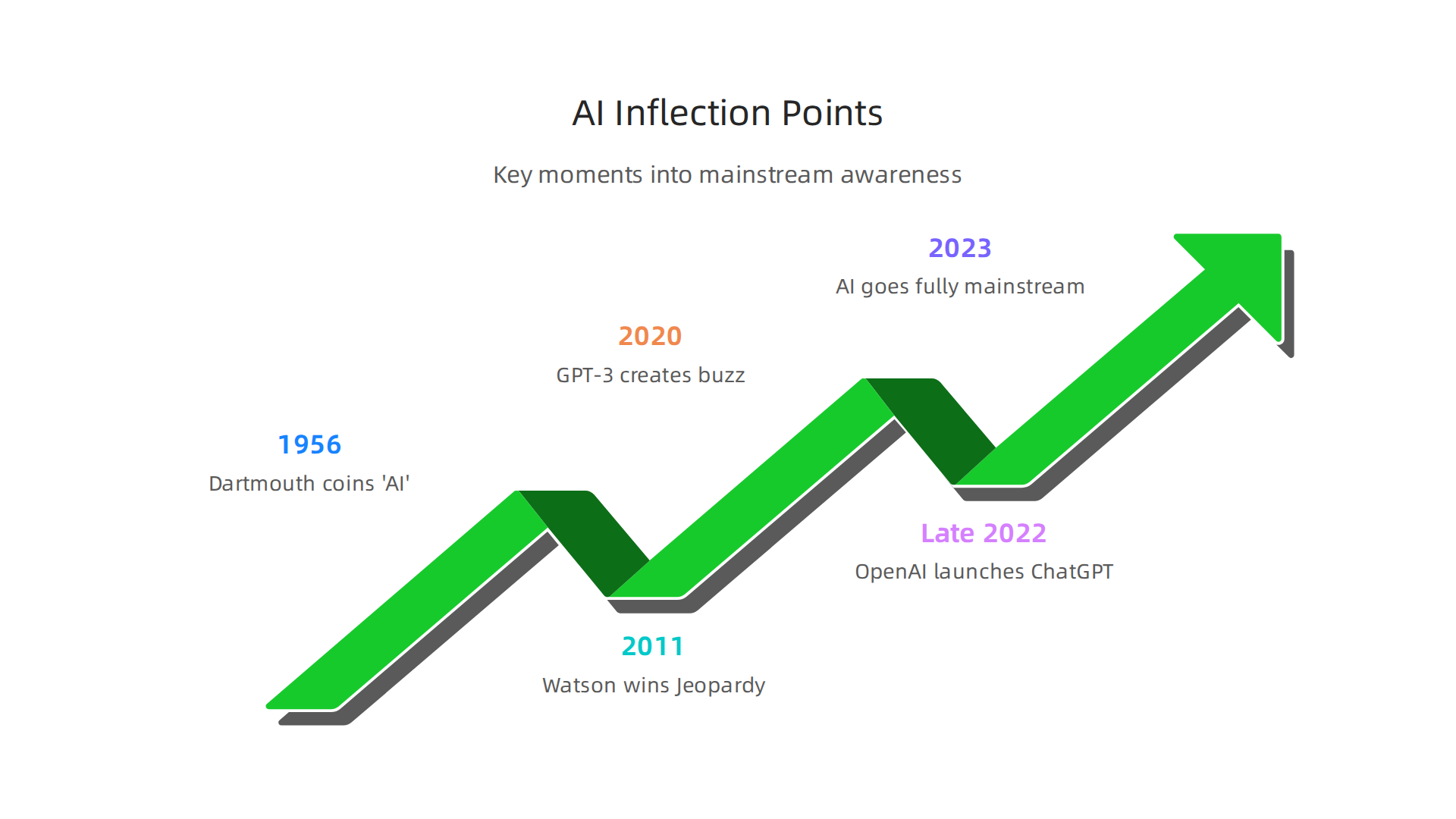
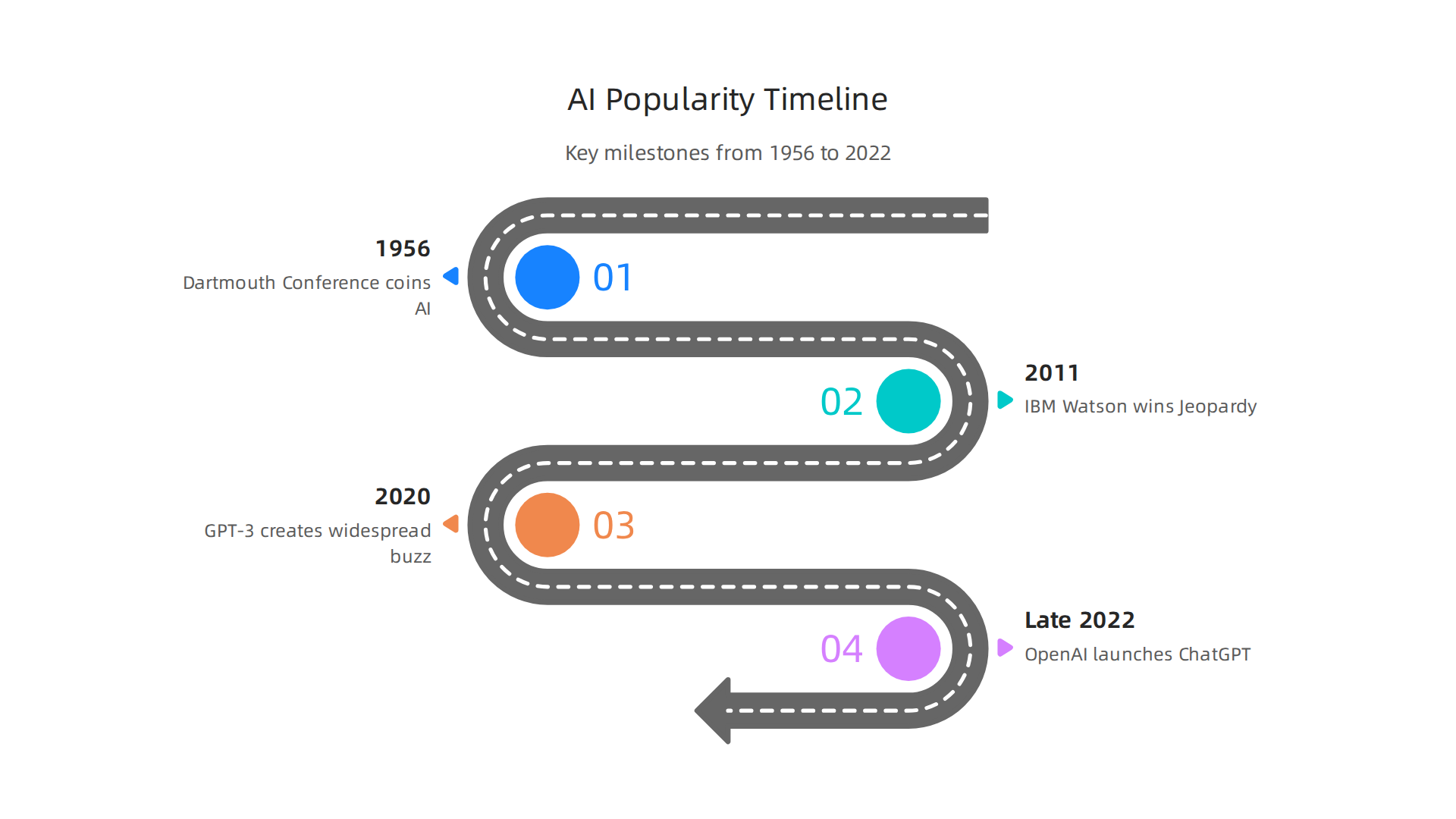
    The truth is, AI isn’t really new. The idea of machines thinking for themselves goes way back. The actual term "artificial intelligence" was first used at a special meeting at Dartmouth in 1956.

    An infographic illustrating significant historical milestones in the journey of AI from academic concept to mainstream technology.

    Many people see this Dartmouth Conference as the very beginning of AI as a field of study [1, 2]. So, in a way, AI has been around for a long, long time.

    However, its journey from university labs to everyday use has been anything but a straight line. For many years, AI was mostly for scientists and big companies. It had its ups and downs, with times of great excitement followed by "AI winters" where interest and funding went down [3]. This long history makes it hard to pinpoint exactly when AI shifted from being something only experts knew about to something everyone talks about.

    Actually, the biggest change happened much more recently. While some AI tools started getting noticed in the 2010s, like when IBM’s Watson won on Jeopardy! in 2011 [4, 5], 2023 was a big turning point when AI truly went mainstream for most people [6]. This huge boom was partly thanks to new tools like ChatGPT, which became very popular very quickly in late 2022 [7]. Suddenly, advanced AI was easy for anyone to try.

    This rapid change can be confusing for business leaders, creators, and even everyday users.

    People engaged in an animated discussion, representing the widespread conversation and occasional confusion surrounding new technology like AI.

    It’s hard to keep up! That’s why understanding the full story of AI’s rise is so important. This article will help you make sense of it all. We will look at the major steps AI has taken through history and explain how it has changed society, from discussions about AI policy to worries about AI replacing jobs. We will also highlight practical business applications, showing you how smart use of AI can help your company grow in 2026.

    Staying informed about the fast-moving world of AI is key. If you want clear, daily updates on AI and technology, consider subscribing to The AI Newsletter Worth Reading to get insights straight to your inbox. This kind of knowledge helps you make better choices, whether you’re looking for new tools to boost productivity or thinking about the bigger picture of AI’s impact on our world. You can also explore our guide on how to choose AI for business tools that deliver real results to find solutions for your specific needs.

    Early Origins: Foundational Research and the Pre-Popularity Era

    The idea of machines that can think for themselves might seem very modern, but its true beginnings are much older. To understand when AI became popular, we have to look back at the smart people who first dreamed it up. The year 1956 is often called the official start for artificial intelligence as a field of study. This was when a special meeting, known as the Dartmouth Summer Research Project on Artificial Intelligence, happened. At this important event, key thinkers like John McCarthy, Marvin Minsky, Nathaniel Rochester, and Claude Shannon came together. It was McCarthy who first used the phrase "artificial intelligence," giving the new field its name [1]. This meeting set the stage for all the AI applications we see today.

    Before this big meeting, other important ideas were already brewing. A British mathematician named Alan Turing, for example, thought about machine intelligence as far back as the 1940s. In 1950, he proposed what we now call the Turing Test. This was a way to figure out if a machine could "think" like a human [2]. Such early ideas were like tiny seeds planted for the huge AI tree we have in 2026. If you want to dive deeper into the very start, you can explore more about when was artificial intelligence made.

    For many years after the Dartmouth conference, AI stayed mostly in university labs. It was a specialized topic for scientists and researchers. There were big challenges that kept it from becoming popular with everyone. Things like limited computer power meant that even simple AI programs needed huge machines to run. There wasn’t a lot of data for these programs to learn from, either. Because of these limits, AI work was hard and expensive. It mostly involved solving very specific, small problems. Think of it like building tiny models instead of a full city.

    This meant that even though the ideas were exciting, practical AI applications for everyday people or businesses were still far off. The field went through periods of big excitement followed by times when interest and money dried up. These quiet times are sometimes called "AI winters." During these winters, it wasn’t clear if AI would ever deliver on its big promises. This long, slow journey from an academic idea to a worldwide phenomenon makes the question "when did AI become popular" so interesting and complex.

    Citations:
    [1] AI TURNS FIFTY: REVISITING ITS ORIGINS
    [2] The History of AI: A Timeline of Artificial Intelligence – Coursera

    The first booms and AI winters: cycles of hype and slowdown

    Even with the challenges of early AI, there were times when people got very excited about its possibilities. These were like springtimes for AI, where lots of new money and interest flowed in. They showed glimpses of when AI might become popular.

    One of the first big "booms" happened in the late 1960s and early 1970s. Researchers were making programs that could solve simple math problems or understand some written words. People thought machines would soon be thinking just like humans. Governments and big companies put money into AI research. It felt like anything was possible, and new AI applications were just around the corner.

    However, the computers back then were still very slow and could not hold much information. The smart programs only worked for very specific, small tasks. They could not handle real-world problems that were messy and complex. This led to the first "AI winter" in the mid-1970s. Money for research dried up, and people became disappointed because AI had promised too much too soon. It was a tough time for those working in the field.

    But AI did not disappear. It had another boost in the 1980s, thanks to "expert systems." These were AI programs designed to act like human experts in a very narrow field, such as diagnosing diseases or helping find oil. Companies started to use these smart AI for business to solve practical problems. This renewed excitement made people wonder if this was truly when AI would become popular.

    Sadly, this boom did not last either. Expert systems were very expensive to build and update. They only worked well for their specific tasks and could not learn new things easily. As a result, the second "AI winter" arrived in the late 1980s and early 1990s. Funding for AI projects dropped again, and many companies stopped their AI work. The American Association for Artificial Intelligence (AAAI) even warned about this incoming "AI Winter" where money and interest would decrease significantly What is the history of artificial intelligence (AI)?.

    These cycles of big hopes followed by quiet times taught researchers important lessons. They learned that real progress takes time, and that making big promises before the technology is ready can hurt the field. Each "winter" forced AI scientists to rethink their methods and set more realistic goals, slowly building the foundation for the incredible AI we see in 2026.

    A person looking thoughtful and contemplative, symbolizing the periods of reflection and re-evaluation during AI's 'winters'.

    When AI entered mainstream public consciousness: key inflection points

    The lessons learned during the "AI winters" helped scientists build a stronger foundation. This careful work finally paved the way for artificial intelligence to truly grab the public’s attention and become popular. People started to see how AI could do amazing things, not just in labs but in everyday life. So, when did AI become popular in a big way? It was a journey with some very important stops.

    One of the first big moments that made people sit up and notice was in 2011. This is when IBM’s Watson AI played and won against human champions on the TV show Jeopardy! This was a huge deal because Watson could understand complex questions, dig through lots of information, and give smart answers. It showed the world that AI could handle language and facts in a way never seen before, going beyond simple math problems and truly popularizing data-driven AI The History of Artificial Intelligence.

    Fast forward to the 2020s, and AI started to make even bigger waves. In 2020, GPT-3, a very advanced language model, created a lot of buzz. It showed how AI could write text that seemed very human-like The History of AI: A Timeline of Artificial Intelligence. But the real breakthrough, the moment when AI went truly mainstream, happened in late 2022. This was when OpenAI launched ChatGPT. This clever chatbot could respond to text questions in incredibly human ways, quickly gathering 100 million users in just two months When Did AI Become Popular? A Complete Timeline. This event, along with AI art winning competitions, truly kickstarted the current AI boom and made everyone ask, "When did AI become popular?" The answer, for most people, points to 2023 as the year AI went fully mainstream

    Infographic showing key moments that propelled AI into public awareness, from IBM Watson to ChatGPT.

    When did Artificial Intelligence become Popular?.

    These new, easy-to-use AI applications changed everything. Suddenly, people could interact directly with AI and see its power for themselves. This led to a huge increase in media attention, with news coverage often focusing on new products and breakthroughs UK media coverage of artificial intelligence dominated by industry and industry sources. People began to talk more about topics like how AI applications might change their jobs. Discussions about preparing for what jobs will AI replace became common. Also, big questions about AI policy and ethical use of AI started to fill headlines.

    In 2026, AI is no longer a niche topic for scientists. It is part of our daily conversations, from the latest Tencent AI developments to personal AI assistants. This widespread awareness means more people are looking for clear, daily updates on the rapidly changing AI landscape.

    Get clear daily AI updates from The AI Newsletter Worth Reading.

    Societal impacts: jobs, ethics, and policy responses

    The moment AI became popular also brought about big discussions about its effect on our daily lives. When people started seeing powerful AI applications like ChatGPT in 2022 and 2023, it changed how we think about jobs, fairness, and how governments should make rules for this new technology.

    AI and the Future of Work

    One of the biggest worries many people have is about ai replacing jobs. It’s true that AI can do many tasks that humans used to do. For example, some reports in 2026 suggest that AI could cause about 92 million jobs to change or even disappear by 2030 globally, mainly by automating tasks that are easy to repeat The Multifaceted Impact of Artificial Intelligence on Global Labor. This can make people, especially those with fewer skills, worry about their job security.

    However, it’s not all bad news. While some jobs might change, AI also creates new kinds of jobs. Experts believe that AI-related trends could help create 11 million new jobs The debate on AI and jobs. For example, we need people to build, maintain, and train AI systems, or to create new ai applications that help businesses grow. The World Bank’s 2026 report also highlights the promise of AI for many sectors World Development Report 2026: The Promise of Artificial. So, the talk is less about AI completely taking over and more about how jobs will change and what new skills people will need.

    Ethical Questions and AI Policy

    Beyond jobs, the rise of AI has also brought up important questions about ethics. This means thinking about what is right and wrong when we use AI.

    A diverse group of professionals collaborating in a meeting, discussing ethical considerations and policy responses to technological advancements.

    For example, how do we make sure AI systems are fair and don’t make unfair decisions? How do we protect people’s privacy when AI uses so much data?

    These questions are very important for ai policy. Different countries and even different parts of the same country are looking at ways to create rules for AI. Some want to move fast to make sure AI benefits everyone, while others are more careful, wanting to prevent harm first. These rules can cover things like how AI is built, how it’s used in healthcare, or even in self-driving cars. Companies like Tencent AI and others are already working within these new and changing guidelines. Making these policies is a big challenge because AI changes so quickly.

    The quick pace of change in AI also means that new AI applications are popping up everywhere. Since when did AI become popular in the early 2020s, businesses quickly learned that this technology could do more than just make people worry about jobs or create new AI policy rules. It could actually change how whole industries work. Let’s look at some key areas where AI is making a big difference in 2026.

    Healthcare: A Fast-Changing Field

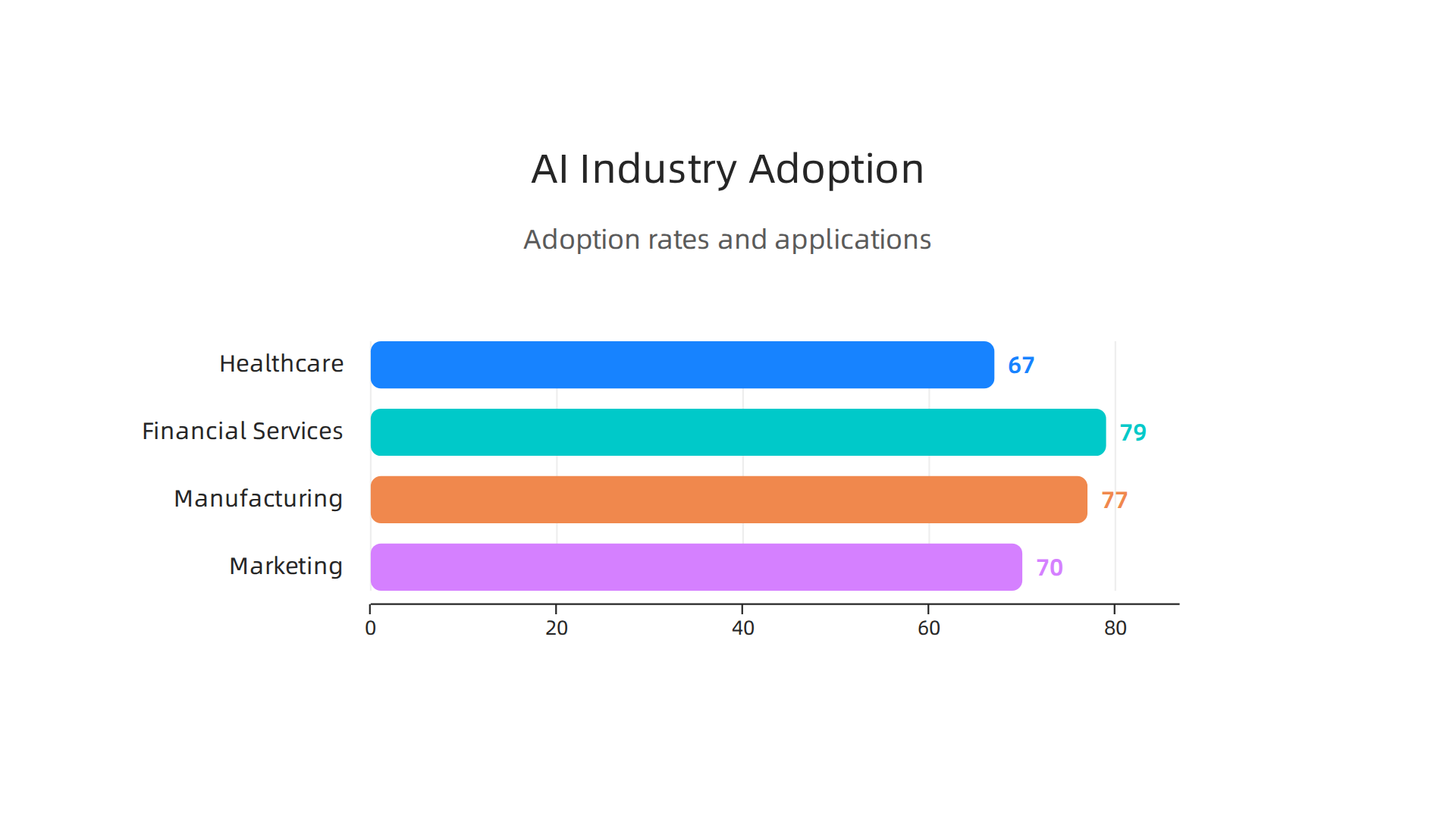
    Healthcare is one of the fastest areas to adopt AI. We’ve seen a big jump in how much AI is used here, going from 38% in 2024 to 67% in 2026.

    An infographic displaying the adoption rates and key applications of AI across various industries in 2026.

    This big change is thanks to new breakthroughs and clearer rules about how AI can be used in medical care AI Adoption Statistics by Industry 2026.

    AI helps doctors and hospitals in many ways. It helps with making clinical decisions, looking at medical images like X-rays, and even finding new medicines. For example, 61% of medical tech experts use AI for medical imaging, and 57% of drug companies use it to discover new drugs AI Use Cases and Key Statistics and Trends for 2026. These AI applications show a clear return on investment (ROI) by making healthcare better and faster.

    Money Matters: AI in Financial Services

    The finance world is another big user of AI. Banks and insurance companies are using AI a lot, with adoption rates as high as 79% AI Adoption Statistics 2026: Business & Enterprise Data. They use it to spot fraud, decide who gets a loan, and help with trading on the stock market. AI is really good at looking through lots of numbers quickly to find patterns that humans might miss. This helps financial services run more smoothly and keep customers’ money safe. The industry sees high returns from using these smart tools, setting standards for how much AI is used and how well it works 2026 Industry AI Adoption Report: Benchmarks by Sector.

    Building Things: AI in Manufacturing

    Manufacturing is also getting a big boost from AI. While it might have started a bit slower, AI is now very important for making sure factories run well. In 2026, many manufacturers are using AI for things like checking machine parts before they break, which is called predictive maintenance, and making sure products are made perfectly every time. About 77% of manufacturing companies use AI [AI Adoption Rate by Sector Globally 2024-2025 – Inforia — AI]. This helps them avoid costly problems and make better products.

    Marketing and Other Industries

    AI is also changing how businesses talk to their customers. In marketing, AI helps create content, understand what customers want by looking at data, and make sure products are seen by the right people. About 70% of businesses are actively using AI in their daily work, and many see that AI helps them make more money and lower costs How AI Is Driving Revenue, Cutting Costs and Boosting Productivity ….

    Overall, the fast growth of AI since when did AI become popular has shown that these tools can bring real value. Most businesses are now past the "just trying it out" stage and are seeing clear benefits. This means if you’re looking for ways to use smart tools in your business, now is a great time to learn how to choose AI for business tools that deliver real results in 2026.

    If you’re looking to bring smart tools into your business, the next logical step is figuring out how to pick the right ones and put them to use. This isn’t always easy, as many businesses found out since artificial intelligence became popular. It’s not just about buying new software; it’s about changing how you work. That’s why having a good plan to evaluate and adopt AI applications is so important in 2026.

    How Businesses Evaluate and Adopt AI Today: Frameworks and Practical Steps

    Adopting AI needs a clear roadmap, especially for smaller businesses and larger company teams.

    A dynamic business team collaboratively planning strategies on a whiteboard, embodying the structured approach to AI adoption.

    It helps to think of it like building something new: you wouldn’t start without a blueprint, right? A good framework helps you avoid common pitfalls and make sure your AI efforts truly help your business grow. Many companies, including those large businesses using tencent ai, follow certain steps to make sure AI works for them.

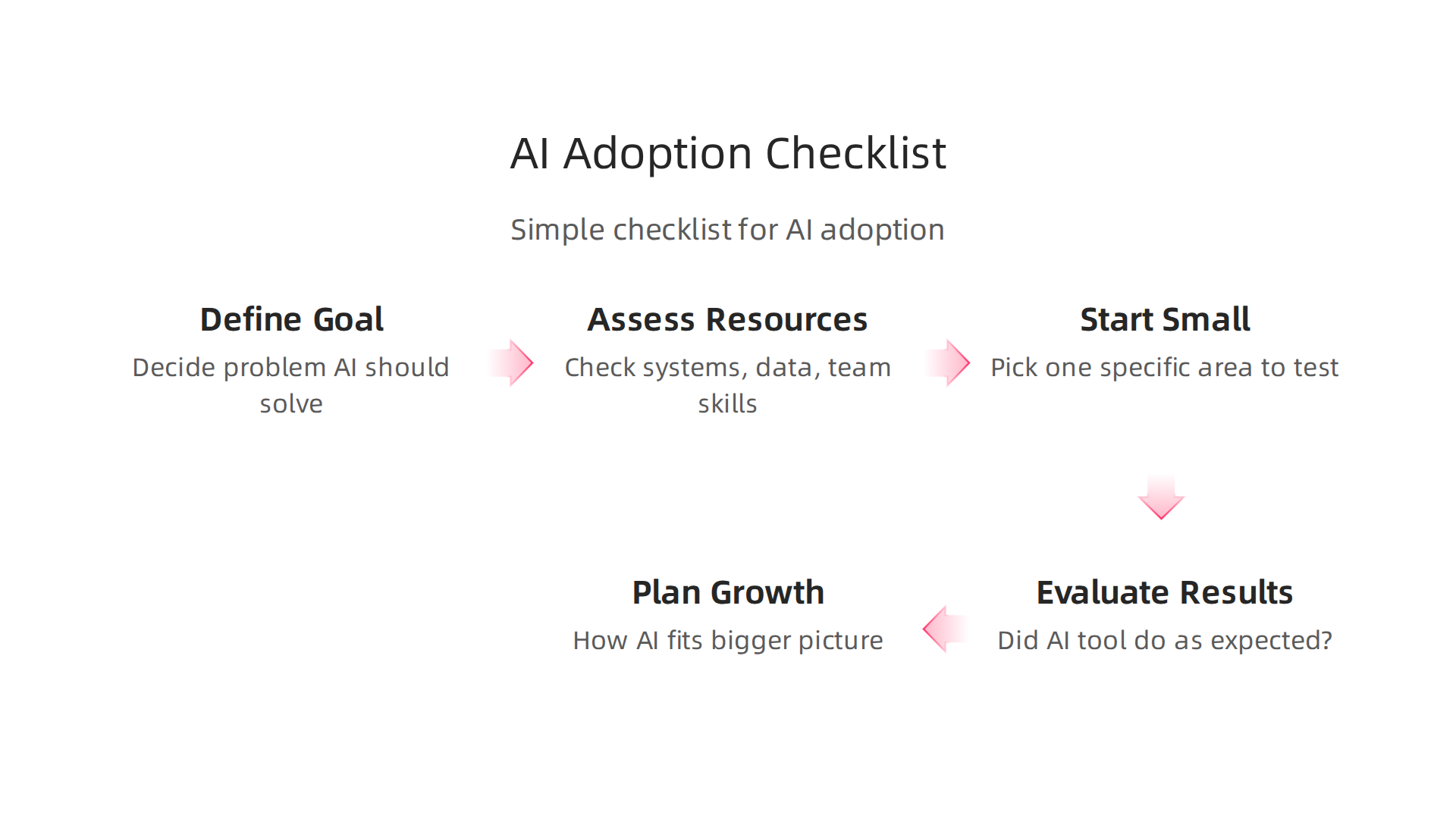
    Here’s a simple checklist for bringing AI into your business:

    Infographic outlining practical steps businesses should follow to successfully evaluate and adopt AI tools.

    • 1. Know What You Want to Achieve: Before anything else, decide what problem AI should solve or what goal it should help you reach. Do you want to save money, make customers happier, or create new products? Be very clear about the results you expect, like reducing customer wait times by a certain percentage. This is key for measuring success later on The AI Adoption Playbook: 2026 Edition.
    • 2. Look at What You Have: Check your current systems, data, and the skills of your team. Do you have good quality data for AI to learn from? Can your existing software connect with new AI tools? Do your employees need training? Understanding your starting point helps you pick the right tools and prepare your team.
    • 3. Start Small with a Pilot Project: Don’t try to change everything at once. Pick one specific area to test an AI tool. For example, maybe you start with an AI tool to help answer common customer questions. This lets you see how the AI works in real life and fix any issues without affecting your whole business. Experts suggest starting with internal tasks that can show quick wins The 2026 AI Adoption Playbook for Business Leaders.
    • 4. Check the Results and Learn: After your pilot, look closely at the numbers. Did the AI tool do what you expected? Did it save money or time? What worked well, and what didn’t? Use what you learn to make things better and decide if you should use the AI tool more widely.
    • 5. Plan for Growth and Connections: If the pilot was a success, think about how to use the AI tool in more parts of your business. This often means making sure it works smoothly with all your other systems. Having a plan for how AI will fit into your company’s bigger picture is important for long-term success AI Adoption in Business: Complete 2026 Strategy Guide.

    To dive deeper into making smart AI choices, consider reading our guide on Smart AI for Business: Your 2026 Guide to Successful Adoption.

    Overcoming Common Hurdles in AI Adoption

    Even with a good plan, businesses often run into common problems when adopting AI:

    • Budget Concerns: AI tools can cost money. To deal with this, focus on tools that promise a clear return on investment (ROI). Starting small (as in step 3 above) also helps manage costs.
    • Lack of Skills: Many teams might not have the right skills to work with AI. You can solve this by offering training to your current employees or hiring new people with AI knowledge. It’s also important to think about what jobs will AI replace, and how to help your team learn new skills instead. While some jobs might change, AI often creates new opportunities for skilled workers The debate on AI and jobs – European Parliament.
    • Integration Challenges: Getting new AI systems to talk to your older software can be tricky. Look for AI tools that are made to work with other systems easily.
    • Understanding AI Policy: As AI becomes more common, new rules and guidelines are being set. Businesses need to understand these rules to make sure they use AI safely and ethically. This helps build trust and avoids problems later on.

    By thoughtfully following these steps and addressing potential problems head-on, businesses of all sizes can make the most of AI in 2026.

    Staying informed about these fast-moving changes is critical. Get clear daily AI updates from The AI Newsletter Worth Reading.

    Summary

    This article explains why asking