Tag: ai for smbs

  • AI Hardware 2026 A Business Leader’s Guide to Growth

    AI Hardware 2026 A Business Leader’s Guide to Growth

    Why AI Hardware Matters for Computer Companies and Business Leaders in 2026

    The world of technology is changing fast, and artificial intelligence (AI) is at the center of it all. In 2026, we are seeing a huge boom in special computer parts made just for AI. This is changing how all computer companies work and what business leaders need to know. No longer are simple, general-purpose computers enough. Now, there are many different types of AI hardware, from powerful chips in big data centers to smarter parts inside a small desktop computer.

    This big change means new chances for computer companies to make exciting products. It also means that businesses can do more amazing things with AI, like making work easier or understanding customers better.

    A business leader reflects on emerging technological opportunities and strategic decisions for company growth.

    The global market for AI hardware is growing very quickly. Experts say it was worth about $103.63 billion in 2026 and will keep getting bigger. This growth shows just how important these new specialized parts are becoming for every kind of business and for the big tech companies that make them, too Global Artificial Intelligence (AI) Hardware Market Size.

    But with all these new tools and fast changes, it can be hard to know what’s best. Business leaders often feel like there’s too much information. It’s tough to figure out which new AI hardware is truly good and which is just hype. Plus, everyone worries about how much things cost. Choosing the wrong hardware can waste money and slow down your business goals. For example, knowing if a simple, powerful desktop or one of the best mini pc options is good enough for your AI tasks can be tricky.

    That’s where this guide comes in. We want to help you understand all the new AI hardware trends that are happening in 2026. We’ll look at what big tech companies are doing and how different computer companies are trying to stand out. Most importantly, we’ll give you clear, easy steps to pick, buy, and use these new AI tools in your business. This way, you can make smart choices that truly help your company grow and do well. To learn more about selecting the right tools, you can explore our guide on how to choose AI-ready business computers in 2026.

    Staying on top of these changes is key for any business. The world of AI moves incredibly fast, and new hardware comes out all the time. Knowing the latest can give your business a real edge.

    Want to keep up with all the daily AI news and tech insights? The AI Newsletter Worth Reading delivers clear updates straight to your inbox.

    State of AI Hardware in 2026: Market Trends Affecting Computer Companies

    In 2026, the world of AI hardware is shaped by a few major trends that all computer companies need to watch. Businesses are thinking carefully about where they run their AI tasks. Do they use big cloud services or do they keep everything in their own offices?

    A team collaborates, discussing critical market trends and strategic choices affecting their business.

    This choice has a big impact on who buys what kind of hardware.

    Many businesses are choosing a "cloud-first" approach. This means they use the computing power of large cloud providers like Amazon, Google, or Microsoft. These providers have huge data centers filled with powerful AI chips. For computer companies, this means a big market to sell their chips and servers to these "big tech" giants. These cloud companies buy a lot of the best AI hardware to rent out to smaller businesses.

    However, some companies still prefer to keep their AI systems "on-premises" in their own buildings. This can be for privacy, special security needs, or simply to have more control over their data. This trend creates chances for traditional computer companies that build and sell high-end servers and workstations directly to businesses. It’s a balance between ease of use (cloud) and full control (on-premises). For those looking to set up their own powerful systems, learning how to build and optimize your AI workstation for peak performance 2026 can be a smart step.

    Another big trend is how special AI chips are being made. Instead of general-purpose chips, we see a rise in chips made just for AI. Companies like NVIDIA are leading the way, holding a very large share of the AI data center chip market in 2026, with AMD also growing its share significantly Cloud Ai Market Share: Aws…. What’s more, some big tech companies are now making their own custom AI chips, called ASICs, for their specific needs. This helps them save money and get exactly the performance they want. This shift means that traditional computer companies now need to think about sourcing these specialized chips or even designing their own.

    Finally, how businesses buy AI hardware is changing. It’s not just about how powerful a chip is anymore. In 2026, companies are also looking at how fast parts connect to each other, how much power they use, and how well they can be cooled down. These are big challenges for hardware makers and drive new ideas in chip design and system building Top 7 AI Chips Priorities Hyperscalers Accelerate for 2026. This means computer companies need to offer more than just raw power; they need to provide full solutions that manage energy and heat efficiently. As businesses look to leverage these advancements, understanding how to identify AI leadership among chip makers and system integrators becomes critical for smart investment.

    Key Hardware Innovations: Chips, Accelerators, and Custom Silicon

    Building on the idea of specialized AI chips from the previous section, let’s look closer at the amazing new parts that make AI work in 2026. Computer companies are always finding new ways to make these parts faster and better. It’s not just about one type of chip anymore; there’s a whole family of them, each good at different tasks.

    At the heart of AI power are different kinds of processors. Most people know about GPUs (Graphics Processing Units), like those from NVIDIA. These chips are great at handling many tasks at once, which is perfect for training big AI models. But now, we also have TPUs (Tensor Processing Units) from Google, NPUs (Neural Processing Units) often found in phones and laptops for on-device AI, and other special chips called IPUs (Intelligence Processing Units). Each one is designed to speed up AI in its own way. Many of these specialized AI accelerators are compared in detail for their performance and features AI Accelerators Beyond GPUs | Introl Blog.

    A big trend in 2026 is that chips are made for very specific jobs. Some chips are best for "training" AI models. This is like teaching a child from scratch, which takes a lot of power and time. Other chips are built for "inference." This is like when the child already knows something and just needs to give a quick answer. Inference tasks need chips that are super fast and use less power, like the ones you’d find in a best mini PC or a smart device. These chips can be up to ten times more power-efficient for tasks like understanding speech or recognizing faces Original Research Paper AI Hardware Accelerators ….

    Also, many "big tech" giants are now making their very own custom AI chips, known as ASICs (Application-Specific Integrated Circuits). These chips are tailor-made for their unique AI programs, helping them save money and get exactly what they need. This means computer companies that make standard hardware must also adapt. They either need to use these custom chips or come up with their own special designs. This change is shaking up how computer companies sell their products, pushing them to offer more complete, AI-ready solutions. For businesses, learning how to choose AI-ready business computers in 2026 is more important than ever.

    Staying on top of these rapid changes can be tough.
    If you’re looking to understand the latest developments in AI hardware and tools, we recommend checking out The AI Newsletter Worth Reading. Get clear daily AI updates from The Deep View Newsletter.

    Staying on top of these rapid changes can be tough. Now, let’s look at how major computer companies are changing their plans and products for the world of AI in 2026.

    Top Computer Companies – Product Strategies and Roadmaps

    The rise of AI has truly shaken up how computer companies create their products. Traditional companies that make PCs and servers, along with the big cloud providers, are all rethinking their strategies. They need to build hardware that can handle the heavy demands of AI, whether it’s for training complex AI models or running everyday AI tasks. According to a 2026 report, the enterprise hardware world is changing fast because of AI’s needs, leading to more AI servers and new data centers 2026 Global Hardware and Consumer Tech Industry Outlook.

    Many big tech companies are making smart moves. For example, NVIDIA is known for its powerful GPUs. Their roadmap for 2026 and beyond includes new generations of GPUs like the "Rubin" R200 and advanced server CPUs, showing a clear path for future AI power Driving Down The AI System Roadmap With Nvidia. AMD is also a major player, with its Instinct MI350 Series GPUs already being used by large cloud providers. They even showed off their "Helios" systems with the MI450 Series GPUs, aiming to deliver top-notch performance for AI AMD Unveils Strategy to Lead the $1 Trillion Compute …. These companies are not just making chips; they are building entire systems, like AMD’s Helios rack system, to make AI easier to use for businesses.

    Then there are companies like Apple and Meta. Apple is pushing its M5 chips to lead the AI PC market in 2026, putting special AI parts directly into devices you use every day Apple’s M5 Roadmap Revealed: The 2026 AI Silicon Offensive to …. Meta is also developing its own custom AI chips, called Meta Training and Inference Accelerator (MTIA), to power its huge data centers Meta outlines roadmap for four new in‑house AI chips to …. This trend of companies making their own chips means other hardware makers must work closely with these giants or create their own unique designs to offer complete AI-ready tools.

    When looking at what these companies plan for the future, called their roadmaps, we see a big focus on making AI systems more energy efficient.

    A professional sketches out a project roadmap on a whiteboard, outlining future strategies and goals.

    For example, AMD expects its 2026 rack-scale AI solutions to be much more efficient than older models AMD claims its 2026 rack-scale AI solution is 4X more …. These signals tell us which computer companies are truly committed to making AI hardware better for the long run. Understanding these shifts is key for any business looking to adopt AI and for anyone interested in future technologies, including iot companies as AI moves into more devices. If you want to dive deeper into selecting the right tools, learn how to Choose the Best AI Tech Products for Your Team.

    Knowing the plans and roadmaps of big computer companies is important. But just as crucial is understanding the real-world challenges of making these powerful AI tools. This means looking at how things are built, how they get from the factory to you, and what they cost.

    Manufacturing, Supply Chains, and Cost Trends for AI Hardware

    Making advanced AI hardware is not always easy. The process involves many steps and relies on a complex network of suppliers. In 2026, we still see challenges like getting enough materials and making sure parts are delivered on time. This is called supply-chain strain.

    Team members collaborate on logistics and supply chain management, addressing challenges in product delivery.

    For example, the global semiconductor industry, which makes the chips for AI, is seeing a big increase in demand, driven by AI. While chipmaking capacity is growing, it’s still a careful balancing act to keep up Global Semiconductor Industry Outlook – GSA. These delays can make it harder for businesses to get the AI-ready computers and systems they need when they want them.

    The actual cost of AI hardware is also a big factor. This cost comes from a few places. First, there’s the price of silicon wafers, which are the basic building blocks for chips. Then, there’s the cost of packaging these tiny, powerful chips so they can work in a computer. Energy efficiency is another key cost driver. The more power an AI system uses, the more expensive it is to run, especially for big data centers. Because of this, computer companies are working hard to make their AI chips use less power. Total Cost of Ownership (TCO) for data centers, which includes electricity, cooling, and maintenance, is a major concern for businesses investing in AI. To manage these expenses and get the most from new technology, businesses need a smart approach, like learning how to Cut Costs Without Cutting Corners in AI Operations.

    Another important trend is being kind to the Earth and following rules. Computer companies and even smaller iot companies are now thinking about how their products affect the environment. This means looking at where materials come from, how much energy factories use, and what happens to products when they are no longer needed. Governments also have a say. For example, the U.S. government has incentives for semiconductor manufacturing, showing how rules can impact where and how chips are made GAO-26-109121, SEMICONDUCTORS. These rules and desires for greener products mean that businesses must think carefully about how they buy and use AI hardware.

    Staying updated on these manufacturing and cost trends is important for anyone wanting to get the most out of AI technology in 2026.


    Get clear daily AI updates.

    The AI Newsletter Worth Reading

    Want to stay ahead in the fast-moving world of AI? The AI Newsletter Worth Reading delivers easy-to-understand daily insights right to your inbox.Knowing the plans and roadmaps of big computer companies is important. But just as crucial is understanding the real-world challenges of making these powerful AI tools. This means looking at how things are built, how they get from the factory to you, and what they cost.

    Manufacturing, Supply Chains, and Cost Trends for AI Hardware

    Making advanced AI hardware is not always easy. The process involves many steps and relies on a complex network of suppliers. In 2026, we still see challenges like getting enough materials and making sure parts are delivered on time. This is called supply-chain strain. For example, the global semiconductor industry, which makes the chips for AI, is seeing a big increase in demand, driven by AI. While chipmaking capacity is growing, it’s still a careful balancing act to keep up Global Semiconductor Industry Outlook – GSA. These delays can make it harder for businesses to get the AI-ready computers and systems they need when they want them.

    The actual cost of AI hardware is also a big factor. This cost comes from a few places. First, there’s the price of silicon wafers, which are the basic building blocks for chips. Then, there’s the cost of packaging these tiny, powerful chips so they can work in a computer. Energy efficiency is another key cost driver. The more power an AI system uses, the more expensive it is to run, especially for big data centers. Because of this, computer companies are working hard to make their AI chips use less power. Total Cost of Ownership (TCO) for data centers, which includes electricity, cooling, and maintenance, is a major concern for businesses investing in AI. To manage these expenses and get the most from new technology, businesses need a smart approach, like learning how to Cut Costs Without Cutting Corners in AI Operations.

    Another important trend is being kind to the Earth and following rules. Computer companies and even smaller iot companies are now thinking about how their products affect the environment. This means looking at where materials come from, how much energy factories use, and what happens to products when they are no longer needed. Governments also have a say. For example, the U.S. government has incentives for semiconductor manufacturing, showing how rules can impact where and how chips are made GAO-26-109121, SEMICONDUCTORS. These rules and desires for greener products mean that businesses must think carefully about how they buy and use AI hardware.

    Staying updated on these manufacturing and cost trends is important for anyone wanting to get the most out of AI technology in 2026.


    Get clear daily AI updates.

    The AI Newsletter Worth Reading

    Want to stay ahead in the fast-moving world of AI? The AI Newsletter Worth Reading delivers easy-to-understand daily insights right to your inbox.

    When picking AI hardware, just knowing the price isn’t enough. You also need to know how well it works and if it’s the right fit for your specific tasks. This means looking at performance benchmarks and understanding what different kinds of AI work need from their hardware.

    Performance Benchmarks and Workload Fit: How to Evaluate Hardware

    To truly know if an AI computer or chip is good, you have to measure its performance. These measurements are called benchmarks. They show how fast and efficient a piece of hardware is at doing AI jobs. When you talk to different computer companies, ask for these numbers. For example, some chips are great at training AI models, which is like teaching the AI new things. Others are better at "inference," which means using the AI model to do its job, like recognizing a picture or answering a question.

    Actually, GPUs (Graphics Processing Units) are often best for training big AI models. But special chips called ASICs (Application-Specific Integrated Circuits) can be much more efficient for inference tasks, sometimes doing the work ten times better for the same power Original Research Paper AI Hardware Accelerators …. This is why knowing your workload is so important.

    Here are some types of AI work and what they usually need:

    • Training: This is when AI models learn from lots of data. It needs powerful hardware that can do many math problems at once. GPUs are a common choice for this.
    • Inference: This is when the AI model is used after it’s been trained. It needs hardware that can quickly give answers or make decisions. Specialized chips like ASICs or even some CPUs can be very good here.
    • Large Language Models (LLMs): These are the AI brains behind chatbots and writing tools. They need hardware that can handle huge amounts of text and quickly process requests. Special benchmarks exist just for LLM inference performance, where different chips are ranked by how fast they can generate text The Best AI Chips Ranked by Inference Performance (2026).
    • Vision and Multimodal AI: These involve AI that "sees" images or videos and sometimes hears sounds too. They need hardware that can process visual and audio data very quickly.

    To make sure you pick the right hardware, it’s a good idea to test it yourself. This is called a "proof-of-concept benchmark."

    Here’s a simple checklist to help you compare AI hardware:

    1. Define Your Work: What specific AI tasks will you run? Training, inference, LLMs, vision, or something else?
    2. Look at Key Numbers: Ask vendors for metrics like TFLOPS (how many math operations per second) for training and TOPS (for inference), memory size, and how much power it uses.
    3. Check for Real-World Tests: Are there independent tests or standard benchmarks like MLPerf that show how the hardware performs with real AI applications?
    4. Do Your Own Test: If you can, try running a small version of your AI task on the hardware.
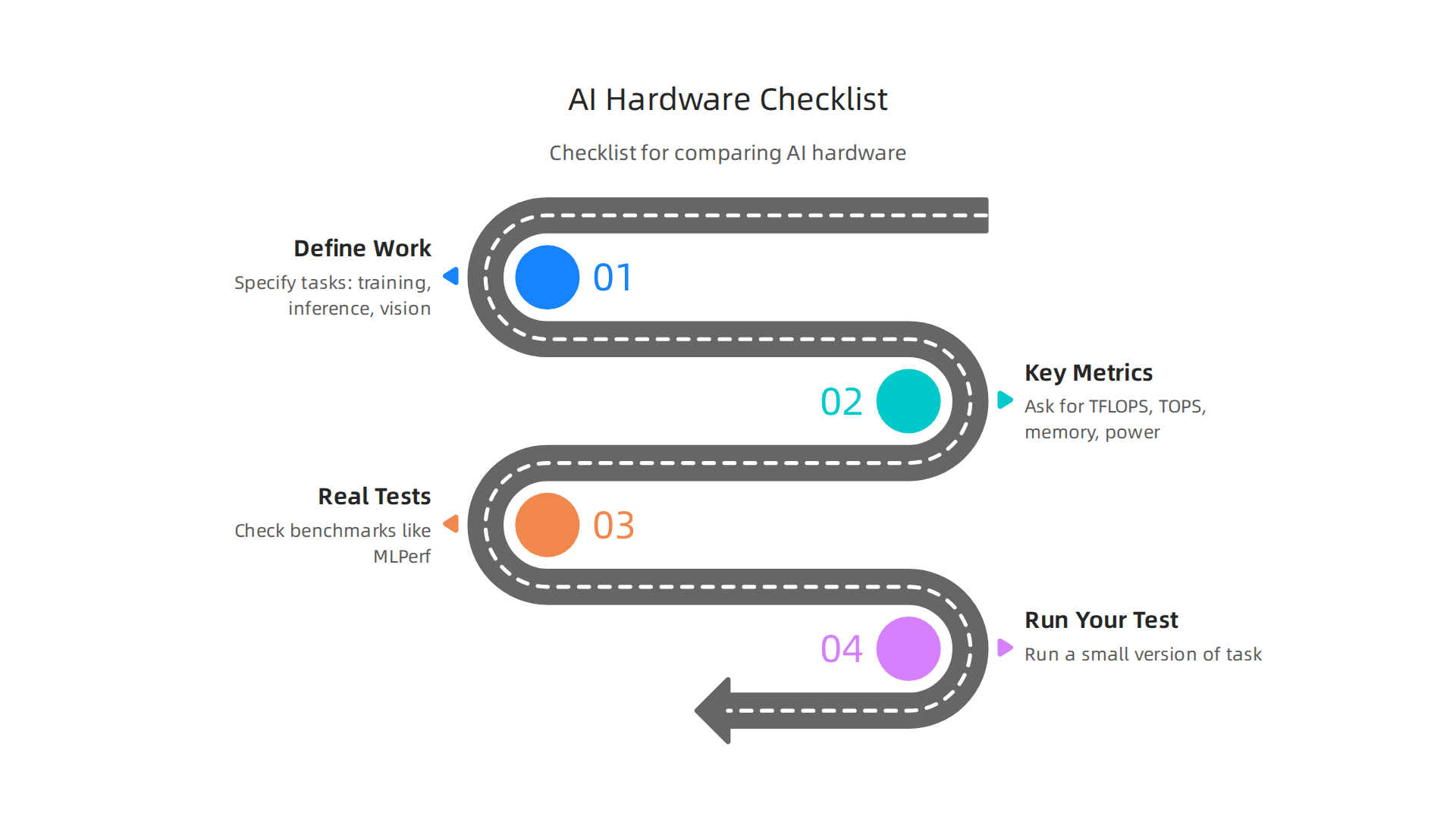
    A clear checklist outlining practical steps for businesses to evaluate and select the right AI hardware.

    This helps you see how it really works for your needs. A good way to do this is to run the same task many times and see how consistent the results are Cloud to Edge: Benchmarking LLM Inference on Hardware ….

    By doing these checks, you can make a smarter choice for your AI hardware. If you’re looking for help deciding which computers are best for AI, learn more about how to choose the right AI-ready business computers in 2026. This careful planning helps you get the most value for your money.

    Choosing the right AI hardware is more than just looking at how fast it runs or its price tag. You also need to think about how well it will fit into your current systems, how you will use it every day, and its full cost over time. This is called the total cost of ownership.

    Integration, Deployment, and Total Cost of Ownership

    Getting new AI hardware to work properly means more than just plugging it in. You have to think about how it talks to your existing software. This involves things like software stacks, which are all the programs that make your AI work, and drivers, which help the hardware and software communicate. It also includes orchestration, which is like directing all the different parts of your AI system to work together smoothly. If these parts don’t play well, it can cause big headaches. Many computer companies offer tools and support to help with this, but it’s important to ask them about it upfront.

    Also, consider the ecosystem around the hardware. Does it have good support from other developers? Are there many tools that work with it? This maturity of the ecosystem can make a huge difference in how easy it is to use and manage your AI systems. Big tech companies often have wide support for their hardware, but you should still check.

    The price you pay for hardware is just the start. The true cost, or Total Cost of Ownership (TCO), includes many hidden fees. For example, AI hardware can use a lot of power. This means higher electricity bills. It also gets hot, so you might need special cooling systems, which also cost money to buy and run. Don’t forget software licensing fees, which you pay to use the programs that run on your AI hardware. And you’ll need people to set up, manage, and fix these systems, which adds to staff costs. All these things add up over time. Knowing the full picture helps you make smarter choices about which solutions truly save you money. The global semiconductor industry, which makes these chips, is always changing, with updates to supply chains and new reports coming out in 2026 that can affect prices and availability Global Semiconductor Industry Outlook – GSA.

    How you put your AI hardware to use is also key. This is called deployment. There are a few main ways:

    • Edge Deployment: This means putting AI hardware right where the work happens. For example, a smart camera at a factory that checks products instantly. This is great for speed and privacy. Many IoT companies use this method. Sometimes a powerful best mini PC can handle edge AI tasks.
    • Cloud Deployment: This is when you use AI power from big data centers over the internet, like from Google or Amazon. It’s flexible and you only pay for what you use, but it needs a good internet connection.
    • Hybrid and Cloud-Bursting: This mixes the two. You might do most AI work locally, but send big, tough jobs to the cloud when you need extra power. This gives you the best of both worlds.

    Thinking about these different ways of deploying AI helps you choose hardware that fits your business needs, not just today, but in the future too. To learn more about getting your AI systems ready, you might want to explore how to build and optimize your AI workstation for peak performance 2026.

    Keeping up with the fast-changing world of AI and tech can be hard.
    The Deep View Newsletter makes it easy, delivering clear daily AI updates right to your inbox. Stay informed without the info overload.
    The AI Newsletter Worth Reading

    Keeping up with the fast-changing world of AI and tech can be hard, especially when you’re trying to figure out the best way to buy new tools. For small and medium-sized businesses (SMBs) and internal teams, making smart choices about AI hardware needs a clear plan.

    Buying Guidance for SMBs and Teams: Practical Steps and Checklists

    When your team or small business thinks about getting new AI tools, it’s easy to feel lost with all the options. You want solutions that fit your budget and don’t need a tech expert to set up every time. That’s why having a simple guide can make a big difference.

    Staying informed without feeling overwhelmed is key.
    The AI Newsletter Worth Reading delivers clear, daily updates right to your inbox.

    One of the first big decisions is whether to use cloud services, buy your own hardware (on-premise), or mix both. Think of it this way:

    • Cloud capacity is like renting computing power. It’s great if your AI work changes a lot or if you only need extra power sometimes. You pay for what you use, and you don’t have to worry about maintaining the hardware. This can be very cost-effective for tasks that come and go.
    • On-premise hardware means buying and owning the AI computers yourself. This often makes sense if your AI work is constant and heavy. While the upfront cost is higher, it can be cheaper in the long run if your systems are used almost all the time. Actually, for tasks that are used a lot, having your own hardware can pay for itself quickly, sometimes in less than four months according to a 2026 report comparing on-premise versus cloud costs for generative AI On-Premise vs Cloud: Generative AI Total Cost of Ownership (2026 Edition).
    • Hybrid approaches blend these two. You might handle most tasks on your own computers but send very big jobs to the cloud when needed. This gives you flexibility and control.

    To make sure you pick the right tools, here’s a simple checklist:

    • What problem are you solving? Clearly know what you want AI to do for your business.
    • How much money do you have? Set a clear budget for buying and running the AI tools.
    • Who will use it? Make sure the tools are easy enough for your team.
    • What kind of support is offered? Good help from the computer companies who sell the hardware is important for small teams.
    • Can it grow with you? Pick solutions that can handle more work as your business gets bigger.
    • Is it secure? Protect your important information.
    • Does it work with what you already have? New AI tools should fit smoothly into your existing setup.
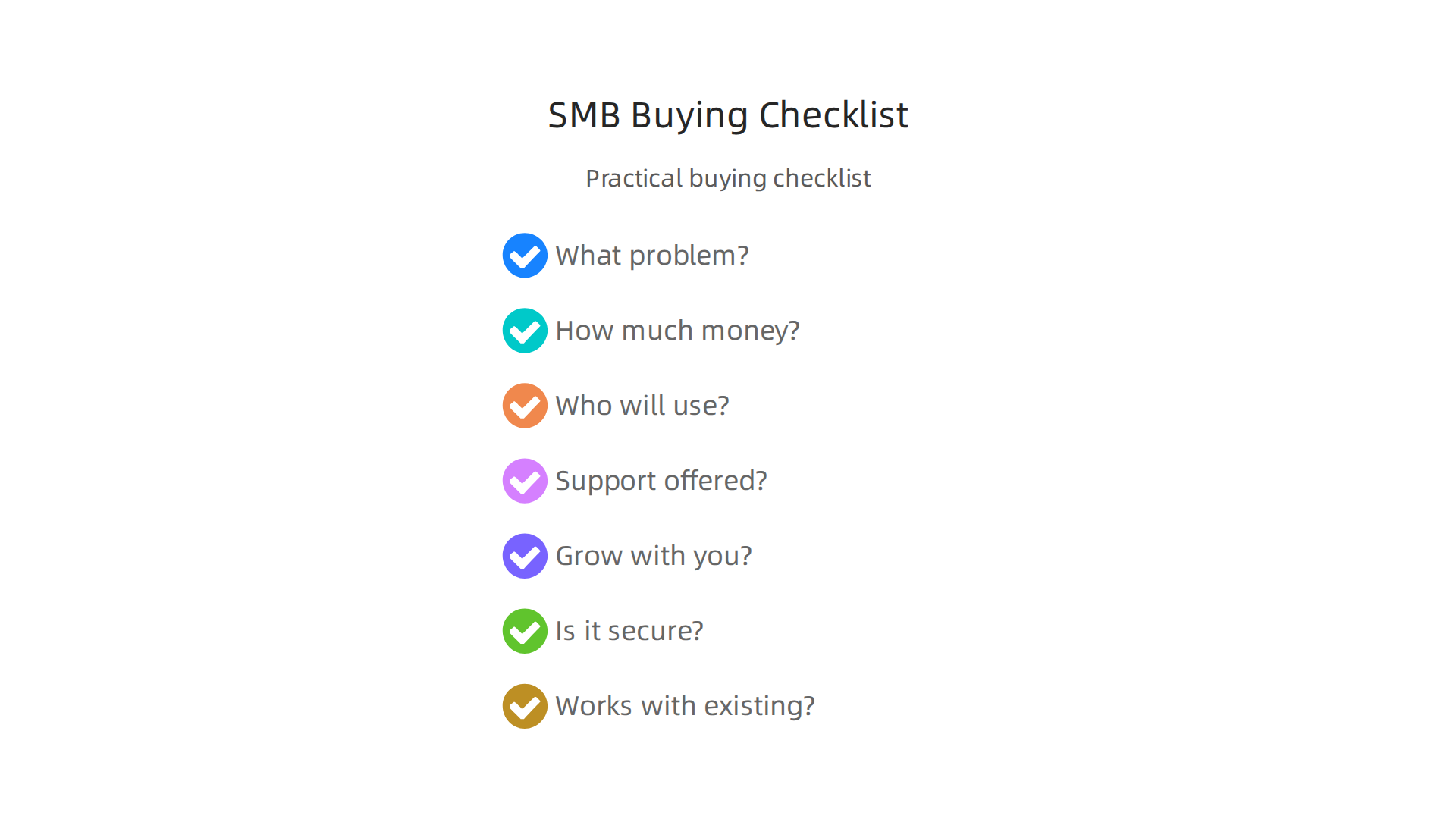
    A practical checklist designed to guide small and medium-sized businesses in making informed AI hardware purchasing decisions.

    To reduce risks, start small. Try a pilot program with a few users before rolling it out to everyone. Then, do a phased rollout, which means slowly bringing in the new AI tools step by step. Also, always check vendor service level agreements (SLAs). These are like promises from the computer companies about how well their systems will work and the support they will give. Looking at how other successful AI companies make these decisions can also give you ideas. These steps help make sure your new AI tools really help your business grow without too much trouble.

    Summary

    This article explains why specialized AI hardware is a critical strategic issue for computer companies and business leaders in 2026, describing rapid market growth and the rise of purpose‑built chips across cloud, edge, and endpoint devices. It covers major trends—cloud‑first buys versus on‑premises control, custom ASICs from big tech, and a diverse landscape of GPUs, TPUs, NPUs and other accelerators—and why those choices affect performance, cost and sustainability. The guide walks through real operational concerns: supply‑chain strain, energy and cooling costs, vendor roadmaps, and how to read benchmarks and workload fit for training, inference and LLMs. It also explains total cost of ownership, integration challenges, and deployment models (edge, cloud, hybrid), and gives practical buying and pilot steps for SMBs and teams. After reading, leaders will know which questions to ask vendors, how to benchmark hardware for their workloads, and how to build a phased, cost‑aware AI hardware plan that limits risk and scales over time.


  • Understanding What Is Information Technology for Business Success in 2026

    Understanding What Is Information Technology for Business Success in 2026

    For business leaders in 2026, the world of technology can feel like a fast-moving river. There’s so much information, and it changes all the time. It’s easy to get lost in technical words and complicated ideas. That’s why truly understanding what is information technology is more important than ever.

    The University of Cincinnati's online resources offer foundational knowledge on information technology for business professionals.

    Many decision-makers, especially those leading small to medium-sized businesses (SMBs) or departments, often feel overwhelmed.

    Business leaders often grapple with complex technology decisions, seeking clarity amidst rapid change.

    They know technology is crucial, but they struggle to get a clear, simple picture of what IT really means for their company’s success. They need to know how IT helps them reach their goals, not just what new gadgets are out there. Things like what is digital marketing and how it connects to IT, or the role of hbs artificial intelligence tools, can seem like separate puzzles. But they are all pieces of the bigger IT picture.

    This article will help clear things up. We will look at a simple definition of information technology, break down its main parts, and show how businesses use it every day to get better results. You’ll learn how IT impacts everything from keeping your data safe to making your team more productive. We will also give you practical tips on how to use IT wisely, helping you make smart choices for your business in 2026. This includes understanding the role of cutting-edge tools like enterprise AI platforms 2026 and how they fit into your overall IT strategy.

    If you find yourself swimming in too much tech news and wish for simpler, clearer updates, you’re not alone. Staying on top of the rapidly changing world of AI and IT can be a full-time job.

    Get clear daily AI updates from The AI Newsletter Worth Reading.

    What is Information Technology (IT)? A concise business-focused definition

    Let’s make things simple. When we talk about what is information technology, we are really talking about using computers and all their tools to manage information. Think of it this way: IT is all the systems, programs, and gadgets that help businesses collect, save, work with, and share their important information. It’s about making sure your business’s data is handled well, from the moment it comes in to when it’s used or stored.

    Many people think of IT as just the tech department that fixes computer problems or sets up new software. While that’s part of it, for businesses in 2026, what is information technology means much more. It’s not just about the technical stuff. It’s about how those technical tools help your business grow, make more money, and stay safe.

    Imagine a business without IT. How would it keep track of sales? How would employees talk to each other if they work from different places? How would customer information be protected? It would be very hard, right? IT provides the answers to these challenges. It’s the engine that powers almost every modern business operation.

    Here’s how we can think about IT in a business way:

    • IT as a Technical Helper: This is the part many people know. It includes the computers, networks, internet connections, and software that let your business run. It’s the team that makes sure everything is working smoothly. They set up your email, keep your websites running, and help you when your printer doesn’t work. They are the backbone, making sure the tools are there and ready.
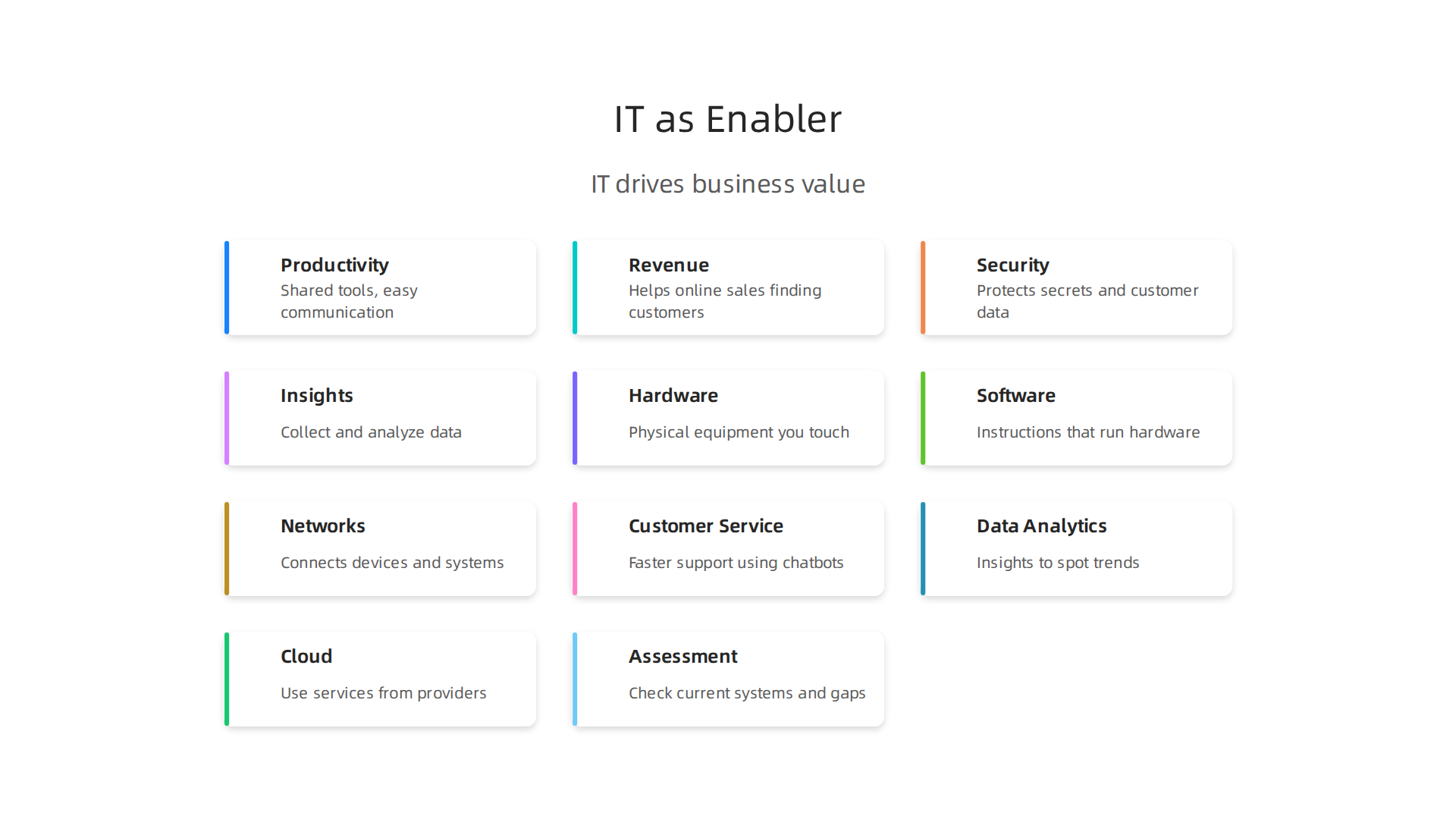
    • IT as a Business Enabler: This is the more important part for leaders. IT is not just fixing things. It’s about using technology to reach your business goals.

    Information Technology extends beyond technical support, acting as a powerful enabler for achieving core business objectives.

    For example, IT can help you:
    * Be more productive: Tools like shared documents and easy communication apps mean your team can get more done, faster.
    * Make more money: IT helps with online sales, finding new customers, and understanding what customers want.
    * Stay safe: IT protects your important company secrets and customer data from being lost or stolen. This is a big deal today.
    * Make smart choices: With IT, you can collect and look at data to understand what’s working and what’s not. This helps you make better plans for the future.

    So, when we talk about what is information technology, remember it’s two sides of the same coin. One side is the actual computers and programs. The other side is how those tools help your business succeed, solve problems, and achieve its goals. It’s about using technology wisely to make your company stronger in every way.

    For business leaders, truly understanding IT means looking beyond the wires and screens. It means seeing how technology can open new doors for your company, help you connect with customers, and keep you ahead of others.

    Teams collaborate to integrate IT solutions into broader business strategies, aiming for innovation and competitive advantage.

    It also means knowing how to choose AI for business tools that deliver real results in 2026 that fit your specific needs. When you understand IT this way, you can make better decisions for your business. You can learn how to identify AI leadership discover top tech companies for business in 2026 and see how they use IT to drive success.

    Core components of IT: hardware, software, networks, and data

    In the last section, we talked about how information technology is much more than just wires and screens. But what are those wires and screens, exactly? To truly understand what is information technology, it helps to break it down into its main parts. These are the basic building blocks that make up almost every IT system your business uses.

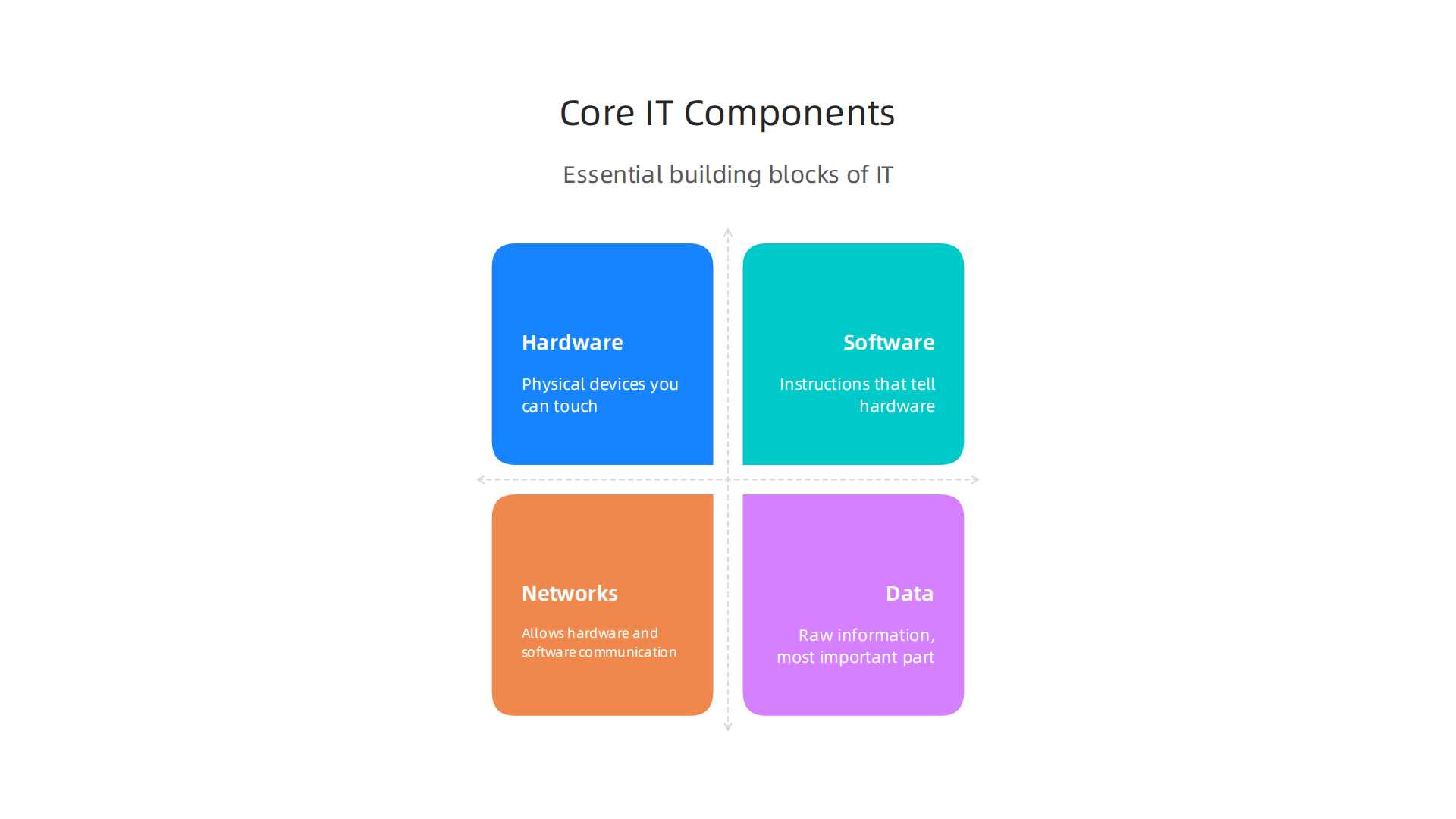
    Most experts agree that IT systems have four main technical components: hardware, software, networks, and data.

    Essential building blocks of any information technology system include hardware, software, networks, and data.

    Sometimes "people" and "processes" are also included, but for now, let’s focus on the technical side that forms the backbone of digital business in 2026. According to some views, these four parts are the core technologies of information systems Identifying the Components of Information Systems.

    Let’s look at each part:

    Hardware

    Hardware is all the physical stuff you can touch. Think about your office:

    • Computers: Desktops, laptops, tablets.
    • Servers: These are powerful computers that store lots of information and run programs for many users at once. They are like the big brains of the office, often kept in a special room.
    • Phones and other gadgets: Your smartphone, smart watches, and other smart devices are also hardware.
    • Printers, scanners, and other tools: Any physical device that connects to a computer system.

    Hardware is the foundation. Without it, you couldn’t run any programs or store any information.

    Software

    Software is the set of instructions that tells the hardware what to do. You can’t touch software, but you use it every day:

    • Operating Systems: This is the main program that makes your computer work, like Windows or macOS.
    • Applications (Apps): These are the programs you use for specific tasks. For example, word processors, email programs, customer management tools, or tools for what is digital marketing.
    • Business Programs: Special software designed for things like accounting, managing sales, or keeping track of inventory.
    • AI Tools: Many businesses in 2026 are using powerful AI software to help with everything from customer service to making smart decisions.

    Software makes hardware useful by letting you do things with it.

    Networks

    Networks are what allow hardware and software to talk to each other. They connect different devices so they can share information:

    • Internet: The biggest network of all, connecting computers around the world.
    • Local Area Networks (LANs): These connect computers in one building or office.
    • Wi-Fi: A wireless network that lets you connect without cables.
    • Communication lines: The physical cables or wireless signals that carry data between devices.

    Networks are essential for communication and sharing resources, especially for teams that work from different places.

    Data

    Data is the raw information itself. It’s the most important part because it’s what businesses work with and need to protect.

    • Customer information: Names, addresses, buying habits.
    • Sales records: How much was sold, when, and to whom.
    • Employee details: Payroll, contact info.
    • Business documents: Reports, plans, emails.

    Data is the fuel for your business. The hardware stores it, the software processes it, and the networks move it around.

    How These Parts Work Together

    These core components don’t work alone. They are all connected and rely on each other. Imagine a digital marketing campaign:

    • Your team uses hardware (computers, phones) running software (marketing apps, email programs) to create ads.
    • These ads are shared through networks (the internet, social media platforms) to reach customers.
    • All the results, like how many people clicked or bought something, become data that is collected, stored, and analyzed by the hardware and software.

    This teamwork allows businesses to run smoothly, make smart choices, and reach their goals. The better these components are managed and integrated, the more effective your overall IT system will be. Understanding these components helps business leaders see the full picture of their technology tools.

    If you want to keep up with how all these components are changing with new technologies, especially in AI, staying informed is key.

    The AI Newsletter Worth Reading

    How businesses use IT: common applications and high-value use cases

    Now that we understand the basic parts of information technology, let’s see how these parts come together to help businesses every day. Understanding what is information technology in action means looking at how companies, big and small, use it to solve problems and make more money. In 2026, IT is not just for tech companies; it’s a must-have for every kind of business.

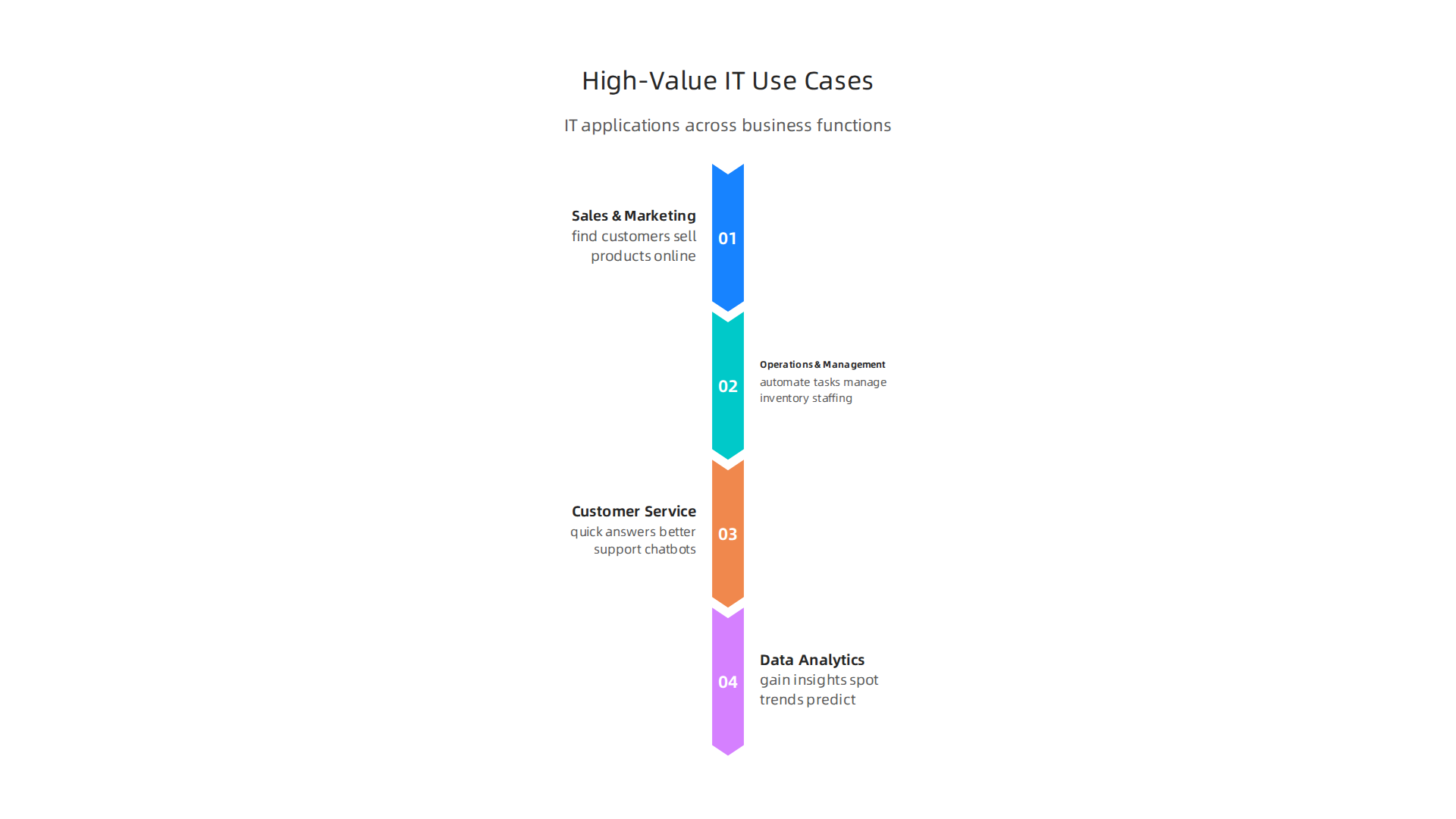
    Information technology drives value in many parts of a business. Here are some of the most common and important ways:

    Information technology applications span sales, operations, customer service, and data analytics to drive business value.

    Sales and Marketing

    This is where IT helps businesses find customers and sell products.

    • Reaching Customers: Companies use IT to run online ads, manage social media, and send email campaigns. This helps them talk to many people at once. For example, knowing what is digital marketing helps businesses use social media platforms and email software to reach their target audience.
    • Understanding Customers: Special software helps businesses track what customers like, what they buy, and what they say. This data helps them offer better products and services. Many businesses are using AI inbound marketing to create personalized messages.

    AI Tools News Today provides insights into cutting-edge artificial intelligence applications for business strategies.

    • Improving Sales: Sales teams use IT tools to keep track of potential customers, schedule meetings, and manage their sales pipeline. This makes their work faster and more organized.
    • High Value: Investing in AI for sales and marketing is common, with over half of AI investments going to these areas, according to MIT research highlighted in a 5 Technology Highlights for 2026 (and Beyond) report.

    Operations and Management

    IT makes sure the business runs smoothly behind the scenes.

    • Making Things Efficient: IT helps automate tasks that used to take a lot of time, like managing inventory, tracking orders, or even scheduling staff. This means fewer mistakes and faster work.
    • Supply Chain Management: For businesses that make or sell products, IT helps manage everything from where raw materials come from to getting the final product to the customer. This keeps costs down and ensures things arrive on time.
    • Smart Decisions: Businesses use IT to gather information about how they are doing. This helps leaders make better choices about what to do next. Agentic AI, for instance, is expected to make operations more efficient by automating complex workflows and speeding up decisions, according to 2026 AI Business Predictions. Tools like AI operations cut costs without cutting corners in 2026 help businesses save money.

    Customer Service and Support

    Good customer service is key, and IT plays a huge part.

    • Quick Answers: Chatbots and AI-powered systems can answer customer questions right away, any time of day. This helps customers get help without waiting. Virtual assistants for businesses are becoming very common, helping to master customer strategy in 2026.
    • Better Support: When a customer needs to talk to a person, IT systems help support teams see all the customer’s past issues and purchases. This lets them offer help that is fast and helpful. AI is now an everyday business reality for handling millions of customer interactions, as noted in the Top 6 Emerging Technologies for Digital Transformation in 2026 report.

    Data Analytics and Business Intelligence

    This is where businesses use their data to gain insights.

    • Understanding Performance: IT tools collect huge amounts of data from sales, websites, and customer interactions. Then, they sort and show this data in easy-to-understand reports.
    • Spotting Trends: By looking at data, businesses can see patterns. Maybe customers buy more of a certain product at a specific time, or a new marketing idea is working really well. This helps them plan for the future. For example, online market research surveys powered by AI can uncover valuable trends.
    • Predicting the Future: With advanced IT, especially with AI, businesses can even guess what might happen next. This could be predicting what customers will want or how much stock they will need. Many companies report that AI use cases now deliver business value.

    Overall, information technology is the backbone of almost every business activity today. It helps companies be more efficient, connect better with customers, and make smarter choices. Businesses that truly understand how to choose AI for business tools and use these applications wisely are the ones that will lead in 2026 and beyond.

    Overall, information technology is the backbone of almost every business activity today. It helps companies be more efficient, connect better with customers, and make smarter choices. Businesses that truly understand how to choose AI for business tools and use these applications wisely are the ones that will lead in 2026 and beyond.

    IT infrastructure and architecture: practical models for SMBs and teams

    Now that we have a good idea of what information technology does for businesses, let’s look at how it is actually built and set up. This is called IT infrastructure and architecture. Think of it like planning how to build a house: you need to decide on the foundation, walls, and roof before you can add furniture. For small and medium-sized businesses (SMBs) and teams, choosing the right way to set up their IT is super important. It affects how much things cost, how fast things work, and how secure their information is.

    There are a few main ways businesses set up their IT. Let’s explore them.

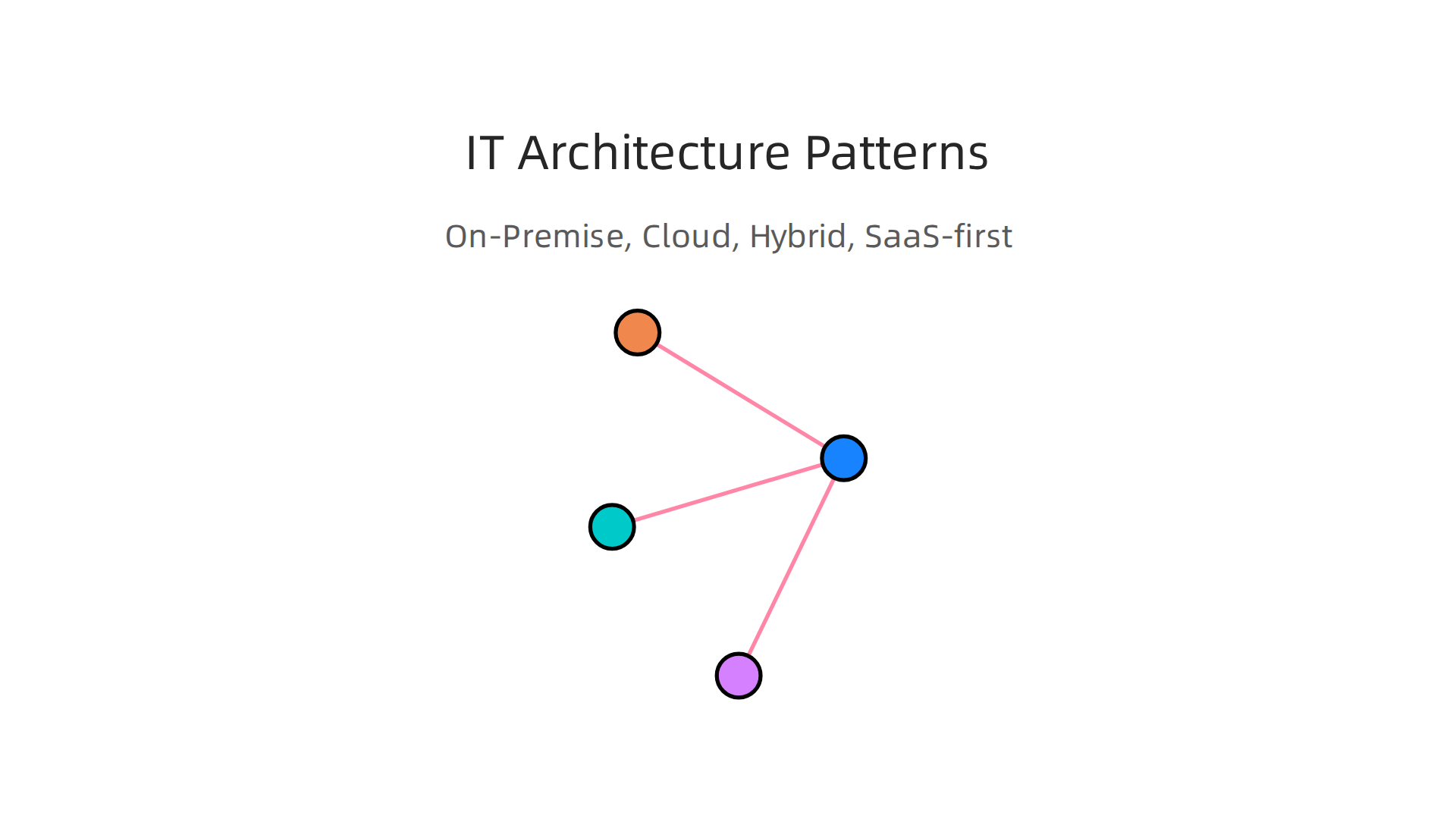
    Businesses can choose from various IT architecture patterns like On-Premise, Cloud, Hybrid, and SaaS-first, each with distinct advantages.

    Common IT Architecture Patterns

    • On-Premise: This means a business keeps all its IT equipment, like servers and computers, in its own office. They own everything and are in charge of running and fixing it.
      • Good for: Companies that need total control over their data and systems, or have special security rules.
      • Trade-offs: It costs a lot to buy all the equipment upfront. You also need a team to manage and maintain it, which can be expensive and time-consuming.
    • Cloud: With cloud computing, businesses use services from other companies (like Amazon, Google, or Microsoft) over the internet. They don’t own the servers; they rent space and services.
      • Good for: Businesses that want to save money on hardware, grow quickly, and be able to work from anywhere. It’s often more flexible.
      • Trade-offs: You rely on another company for your IT, so you have less control. Costs can also add up if you use many services or don’t manage them well. Security can also be a worry if you don’t pick the right cloud provider.
    • Hybrid: This is a mix of both on-premise and cloud. Some things stay in the office, and some are in the cloud.
      • Good for: Companies that need some control for very important data or old systems, but still want the benefits of the cloud for other tasks.
      • Trade-offs: It can be more complex to manage both types of systems together.
    • SaaS-first (Software as a Service): This model means a business uses mostly ready-made software that is hosted in the cloud. Think of tools like Gmail, Salesforce, or Zoom. You just pay a monthly fee to use them.
      • Good for: SMBs and teams that want quick and easy access to powerful tools without any IT setup. It’s often very user-friendly.
      • Trade-offs: You have little control over the software itself, and your data is stored with the SaaS provider. Customizing these tools can be harder.

    Choosing the Right Architecture

    Picking the best IT setup depends on your business’s needs. In 2026, many businesses are moving towards cloud and SaaS options because they offer more flexibility and often save money in the long run. Modern infrastructure is often "purpose-built" for specific goals, not just one-size-fits-all solutions, as highlighted in Tech Trends 2026.

    Here’s what to think about:

    • Scale: How big is your business now, and how much do you plan to grow? Cloud services can grow with you easily, while on-premise requires buying new hardware.
    • Budget: How much money can you spend upfront and each month? On-premise has high upfront costs, while cloud and SaaS usually have lower monthly fees.
    • Team Skillsets: Does your team have the skills to manage complex servers and networks? If not, cloud or SaaS might be easier since the provider handles a lot of the technical work. Many businesses find that choosing the right platforms, like Enterprise AI Platforms 2026 Top Providers and How to Choose the Right One, helps them make the best use of information technology.

    Understanding what is information technology on a structural level helps you make smart choices for your business. It’s not just about having computers; it’s about having the right system to support your goals.

    To stay on top of the latest advancements and strategies in AI and technology that impact these architectural choices, consider subscribing to The AI Newsletter Worth Reading. It provides clear daily AI updates to help you navigate the evolving tech landscape.

    Now that we know the different types of IT setups, like on-premise or cloud, the next big step is putting them into action. This is about making a plan, dealing with any problems that pop up, and checking if your new IT tools are actually helping your business. It’s not just about what is information technology itself, but how you use it smartly.

    Implementing IT: Strategy, Adoption Challenges, and Measuring ROI

    Bringing new technology into a business needs a clear game plan. Think of it like building a road: you can’t just start laying asphalt anywhere. You need to plan the route, prepare the ground, and make sure people know how to use it.

    A Smart Way to Roll Out New IT

    For businesses in 2026, a step-by-step approach helps a lot. It makes sure you don’t spend too much money or time on things that don’t work.

    A structured approach to implementing new IT ensures efficient adoption and maximizes return on investment.

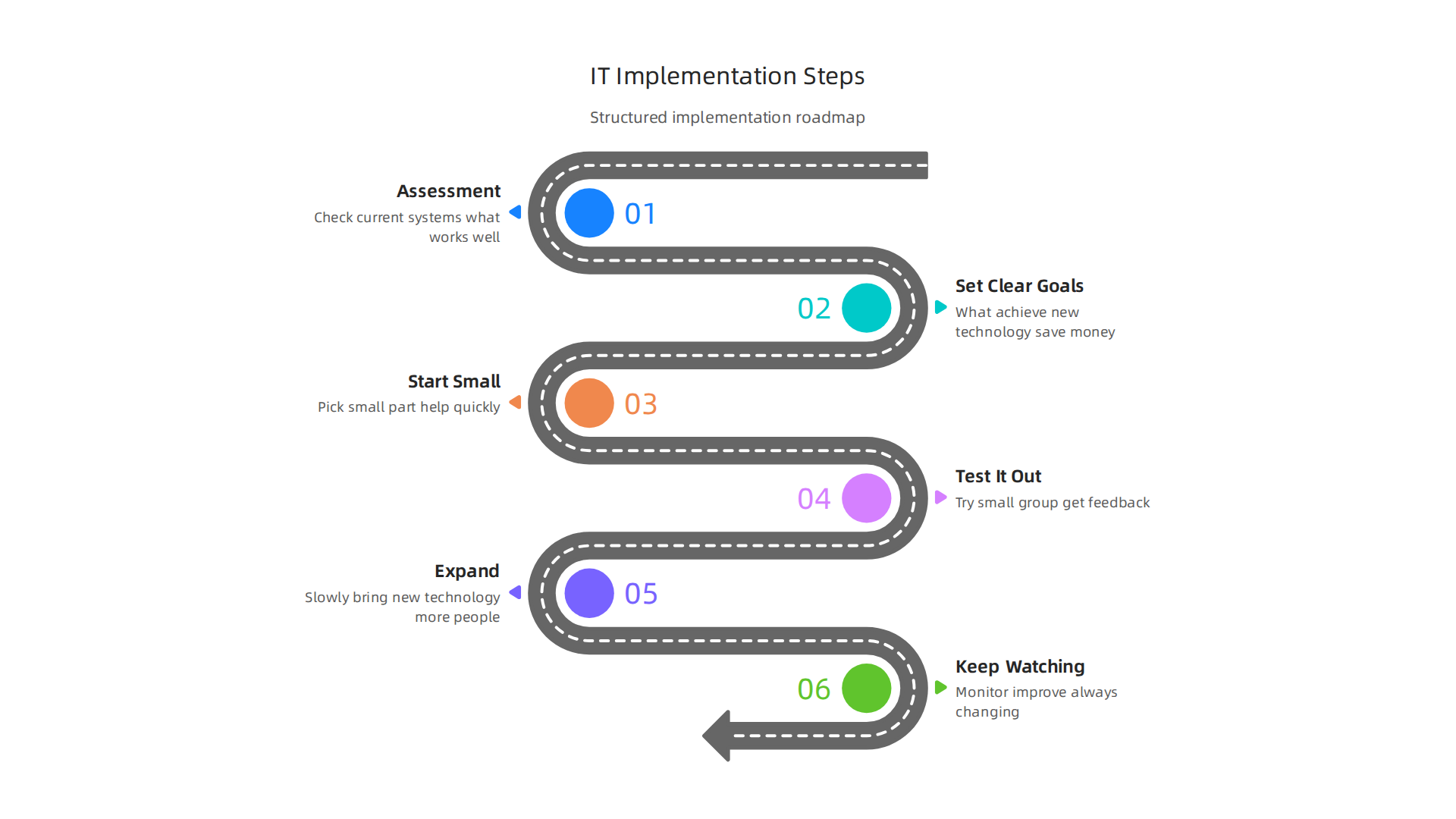
    1. Look at What You Have (Assessment): First, check your current systems. What works well? What causes problems? Where do you waste time? This helps you see where new IT can make the biggest difference. A good assessment can take a couple of weeks before you buy anything new, as noted in the Small Business Digital Transformation Guide 2026.
    2. Set Clear Goals: What do you want to achieve with new technology? Do you want to save money, make customers happier, or speed up work? It’s important to set goals that you can actually measure, advises the article IT Strategy for Small Businesses: Critical Mistakes to Avoid in 2026.
    3. Start Small (Quick Wins): Pick a small part of your business where new IT can help quickly. Maybe automate one simple task. This shows your team how useful the new tools can be without changing everything at once.
    4. Test It Out (Pilot Program): Before rolling out a new system to everyone, try it with a small group or department. Get their feedback and fix any issues.
    5. Expand (Scale Up): Once you know it works, slowly bring the new technology to more people in your business.
    6. Keep Watching (Monitor and Improve): Information technology is always changing. Keep an eye on how your systems are doing, what your team thinks, and if there are new tools that could help even more. An effective strategy roadmap often includes short-term goals for quick wins and then expands to optimize and standardize over months, as suggested by IT Strategy for Small Businesses: Basics and Best Practices in 2026.

    Overcoming Challenges When Adopting New IT

    Even with a good plan, bringing in new IT can have bumps in the road.

    • People’s Skills: Your team might not know how to use new tools right away.
      • Fix: Offer clear training and support. Show them how the new tools make their jobs easier, not harder.
    • Budget Worries: New technology costs money.
      • Fix: Start with smaller investments that show quick returns. This proves the value and can help get more money for bigger changes later. Also, consider the total cost over time, not just the upfront price.
    • Old Systems (Legacy Systems): Sometimes, older computer systems don’t play well with new ones.
      • Fix: Plan carefully how to connect old and new systems, or decide which old systems need to be replaced entirely. Sometimes moving parts to the cloud can help with this.

    Remember, what is information technology for your business should make things better, not harder. Choosing the right AI for business tools and platforms is also a big part of successful adoption today, especially when you are looking for systems that can truly deliver results.

    Knowing Your IT Investment is Worth It (Measuring ROI)

    ROI stands for "Return on Investment." It’s how you know if the money and time you put into new IT are giving you good results.

    • Cost Savings: Are you spending less on paper, travel, or manual labor?
    • Time Saved: Are tasks getting done faster? Is your team more productive?
    • Happier Customers: Are customers getting better service or finding what they need more easily?
    • More Sales: Is new technology helping you reach more customers or sell more products?

    By keeping track of these things, you can see the real value that new information technology brings to your business. This helps you make smart choices for the future and keeps your business strong and ready for what comes next. To identify the best tools for your specific needs, it’s wise to understand how to choose AI for business tools that deliver real results.

    After making smart choices about your information technology for the future, it’s super important to think about how to keep everything safe. This means focusing on security, privacy, and making sure you follow all the rules, which is called compliance. For any business leader in 2026, knowing these things is just as key as knowing what is information technology itself.

    Security, privacy, and compliance: what leaders must know

    Keeping your business’s IT safe is like putting a strong lock on your front door. It protects your important information and keeps bad guys out. Without good security, all the great things new technology brings could be lost.

    Essential Security Steps for Small Businesses

    Small and medium-sized businesses (SMBs) might not have huge IT teams, but they still need to protect themselves. Here are some basic but important security controls:

    • Strong Passwords and MFA: Make sure everyone uses very strong passwords. Also, turn on Multi-Factor Authentication (MFA). This means you need a second way to prove it’s you, like a code from your phone, to log in. This is a top priority for protecting access, as noted in the 2026 IT Trends for SMBs: The Top 10 You Should Prepare For.
    • Back Up Your Data: Always have copies of your important files stored in a safe place, separate from your main computers. If something goes wrong, you can get your data back.
    • Keep Software Updated: Old software can have weak spots that hackers can use. Always update your computers and apps as soon as new versions come out.
    • Protect Your Network: Use a firewall to act as a barrier between your business network and the internet. Also, have good antivirus software on all devices. According to Best Cybersecurity Practices for SMBs in 2026, these steps are crucial.

    Genatec offers insights and services for best cybersecurity practices tailored for small and medium-sized businesses.

    • Control Who Sees What: Not everyone needs to see every piece of information. Give people access only to the data they need for their job. This is called access control and is a key cybersecurity best practice for 2026.
    • Train Your Team: Teach your employees about common online dangers, like phishing emails. People are often the first line of defense.

    Dealing with Risks Smartly (Risk-Based Prioritization)

    You might not have endless money or time to fix every single security problem. So, it’s smart to focus on the biggest risks first. This is called "risk-based prioritization."

    1. Find Your Most Important Stuff: What data or systems are most critical for your business?
    2. Think About What Could Go Wrong: What kinds of attacks or problems could hurt these important things?
    3. How Likely Is It? How often do these problems happen?
    4. How Bad Would It Be? If a problem does happen, how much damage would it cause?

    By asking these questions, you can put your limited resources towards fixing the problems that are most likely and would cause the most trouble. For instance, protecting sensitive customer data might be a bigger priority than a glitch on your internal coffee machine tracker. Prioritizing helps you use your budget and time well. Understanding the landscape of available tools can also help. Many businesses look to enterprise AI platforms 2026 to help secure their data and operations.

    Staying informed about new threats and solutions is a constant job for leaders.

    Get clear daily AI updates from The AI Newsletter Worth Reading.

    To keep up with the world of IT, leaders in 2026 must also look at big changes happening right now. These changes are mostly about cloud computing and Artificial Intelligence, or AI. These new ways of doing things are changing how IT teams work and opening up new chances for businesses.

    A diverse team discusses future strategies, leveraging emerging IT trends like cloud computing and artificial intelligence.

    Emerging trends: cloud, AI, and the future of IT for businesses

    After learning about keeping your business IT safe, it’s time to talk about what’s new and exciting. Technology doesn’t stay still. Two of the biggest ideas shaping what is information technology today are cloud computing and Artificial Intelligence. These are changing how businesses use computers and data every single day.

    The Cloud: Computing from Anywhere

    Think of cloud computing like renting space for your things instead of buying a whole house. Instead of buying and keeping big computer servers in your office, businesses use the internet to store their data and run their software on computers owned by someone else. This is the "cloud."

    This shift changes a lot for IT teams. They spend less time fixing broken computers or setting up new ones. Instead, they focus on choosing the best cloud services and making sure they work well for the business. This gives businesses more freedom. They can grow faster, save money on hardware, and let employees work from anywhere. Cloud technologies are very important for cybersecurity, right after AI, according to the Global Cybersecurity Outlook 2026.

    Artificial Intelligence: Smart Tools for Business

    Artificial Intelligence, or AI, means making computers smart enough to learn and make decisions, much like people do. You might already use AI when your phone suggests the next word you want to type or when a website recommends a product.

    For IT, AI means finding and setting up special tools that use AI. IT teams help make sure these AI tools work safely and help the business reach its goals. For businesses, AI opens up many new doors. It can help them understand customers better, make new products, or finish tasks faster. Many businesses are looking at different enterprise AI platforms 2026 to help with these new opportunities. These advanced information technologies are changing how we do business in the 21st century.

    Knowing When to Try New Technology

    With so many new things always coming out, how do you know when to jump in and when to wait? Here are some simple signals for leaders:

    • Solve a Real Problem: Does this new technology, like a special AI tool, help fix a problem your business has right now? If it does, it might be worth looking into.
    • Start Small: Don’t try to change everything at once. Pick one small project to test the new technology. See how it works and if it helps. This is a good way to build a tech radar to track AI trends and tools in 2026.
    • Look at Your Money: Does it make sense for your budget? Sometimes, waiting a bit can make new technology cheaper and easier to use.
    • Think About Your Team: Can your team learn and use this new technology? Do they have the right skills?

    By thinking about these points, you can make smart choices about what new parts of information technology to bring into your business.

    Summary

    This article explains what information technology (IT) means for business leaders in clear, practical terms and shows how IT drives growth, efficiency, and security in 2026. It defines IT in a business context, breaks down the core technical components—hardware, software, networks, and data—and illustrates common, high-value use cases across sales, operations, customer service, and analytics. The piece compares IT architecture models (on‑premise, cloud, hybrid, SaaS) and gives a practical roadmap for implementing new technology: assess, set goals, pilot, scale, and measure ROI. It also covers essential security controls and a risk‑based approach to prioritize defenses, plus guidance on when and how to adopt cloud and AI tools. After reading, leaders will know how to choose appropriate architectures and AI platforms, run safer deployments, and measure the business impact of their IT choices.