Tag: business technology 2026

  • Top 10 Technology Trends Business Leaders Must Adopt in 2026

    Top 10 Technology Trends Business Leaders Must Adopt in 2026

    Why the ‘Top 10 Technology Trends’ Matter for Business Leaders in 2026

    It feels like every day brings news of a new tool or breakthrough. For business leaders in 2026, keeping up with all these changes can be a real headache.

    A business leader thoughtfully considering future strategies amidst rapid technological changes.

    You hear about so many new things, it’s hard to know what’s truly important for your business and what’s just hype. This flood of information makes it tough to decide where to put your time and money. It’s especially tricky with how fast technology moves these days, constantly reshaping our future.

    Think about Artificial Intelligence (AI). Just a short time ago, it was a new idea for many businesses. Now, in 2026, AI is a big part of how many companies work. For example, about 72% of large businesses are already using AI in some way, running at least one AI program in their daily work routines.
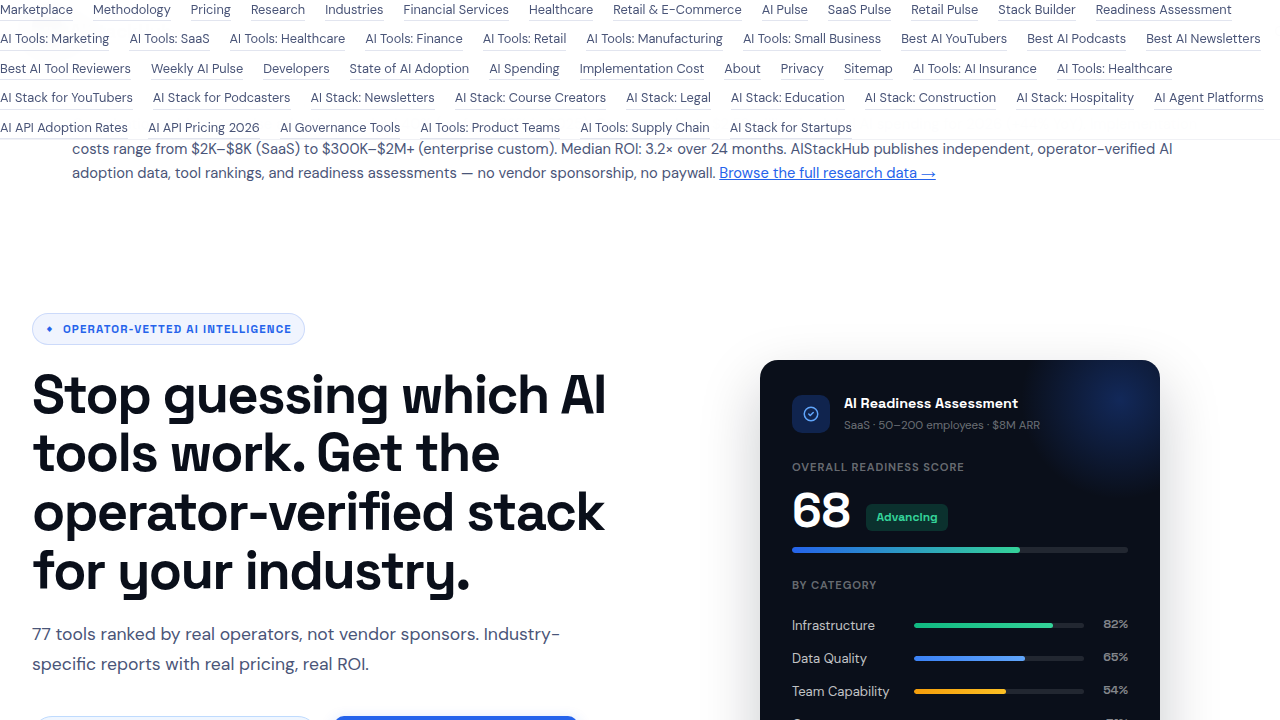
    A platform tracking the state of AI adoption across industries and company sizes.

    This shows how quickly things can change, and how important it is to keep an eye on the State of AI Adoption 2026: Rates by Industry & Company Size.

    This speedy tech adoption curve means leaders need to be smart about picking which innovations to focus on. It’s not just about knowing what the top 10 technology trends are, but also understanding why they matter to your specific business and how to use them well. Trying to figure this out alone, sifting through endless articles and reports about AI startups and other new technologies, can feel like a full-time job.

    This guide is here to help. We’ll cut through the noise to show you the most important top 10 technology trends for businesses in 2026. You’ll get clear, easy-to-understand explanations, real-world examples of how these trends can help your company, and simple steps to start using them. Our goal is to make sure you have the knowledge to make smart choices, stay ahead of the game, and build a smart future for your business.

    To stay on top of daily updates without feeling overwhelmed, consider subscribing to The AI Newsletter Worth Reading.

    Generative AI and LLMs: Practical Use Cases and Implementation Steps

    One of the most exciting parts of the current tech adoption curve is Generative AI and Large Language Models, often called LLMs. These are computer programs that can create new things, like text, images, or even computer code. Think of them as very smart assistants that can understand what you ask for and then make something completely new based on your request. In 2026, many businesses are already seeing big benefits from using them.

    Actually, about 79% of organizations now use Generative AI in some way, showing how quickly this tech has grown since 2024 Generative AI Adoption Statistics 2026: Enterprise Data. This makes Generative AI one of the most important top 10 technology trends for business leaders today.

    Here are some ways businesses are using Generative AI right now:
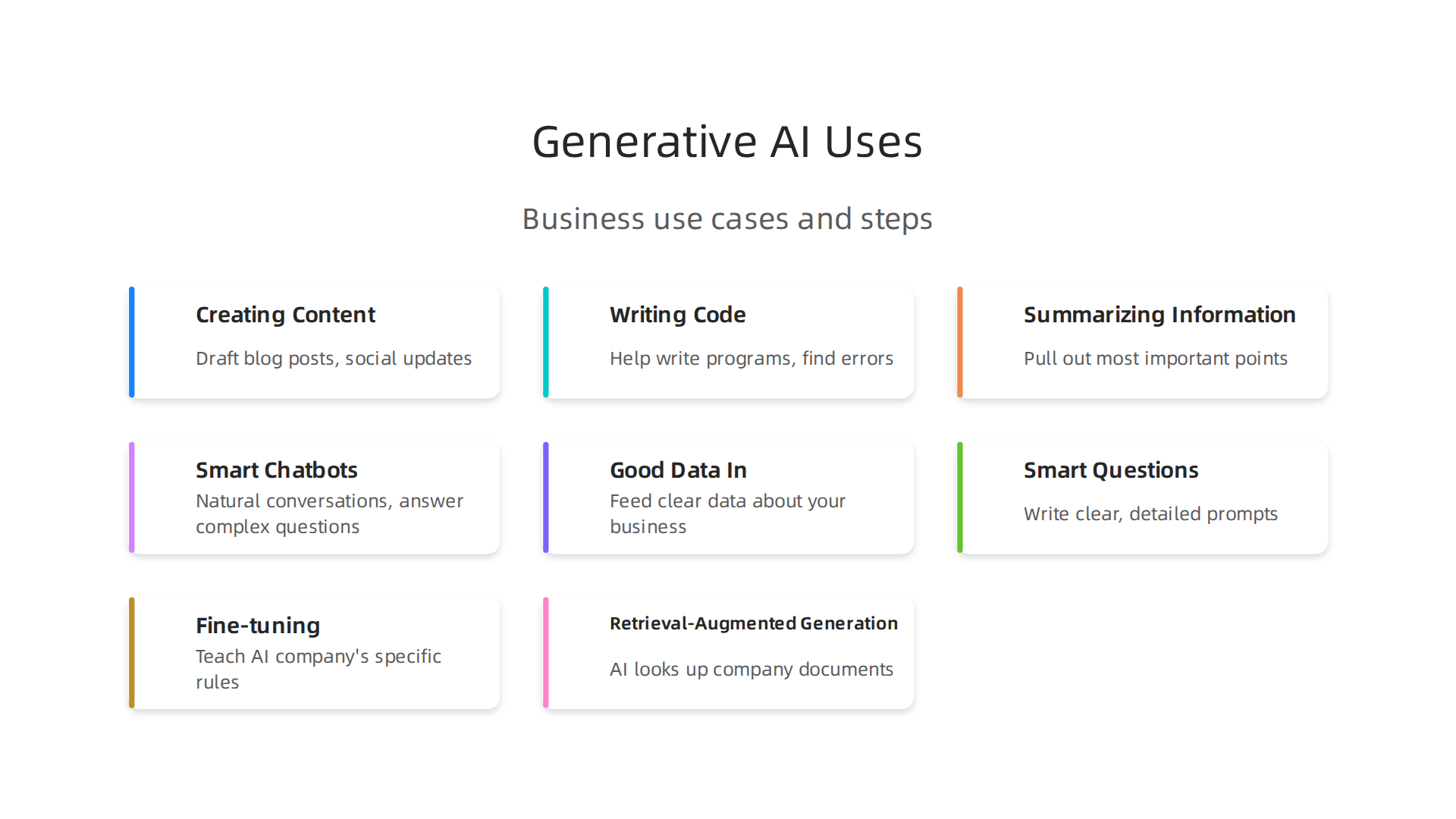
    Key ways businesses are applying Generative AI today for content, code, and customer service.

    • Creating Content: Need a blog post, social media update, or even ideas for an ad? Generative AI can quickly draft these things, saving a lot of time for marketing teams. This helps businesses keep up with the constant need for new content.
    • Writing Code: For software developers, AI can help write parts of programs or find errors. This makes coding faster and easier, speeding up how quickly new tools and apps can be made.
    • Summarizing Information: Imagine having to read long reports or many customer reviews. Generative AI can quickly go through tons of text and pull out the most important points. This helps leaders make faster decisions without getting lost in details.
    • Smart Chatbots: These aren’t like the old, simple chatbots. Today’s AI chatbots can have more natural conversations with customers, answer complex questions, and even help solve problems. This improves customer service and can save money on support staff.

    The quickest way businesses see money back (ROI) from Generative AI is by making daily tasks faster and reducing costs. For example, using AI to write first drafts of content or answer common customer questions can free up your team to focus on bigger, more complex jobs.

    How to Use Generative AI in Your Business

    Bringing Generative AI into your company doesn’t have to be hard, but there are a few things to keep in mind:
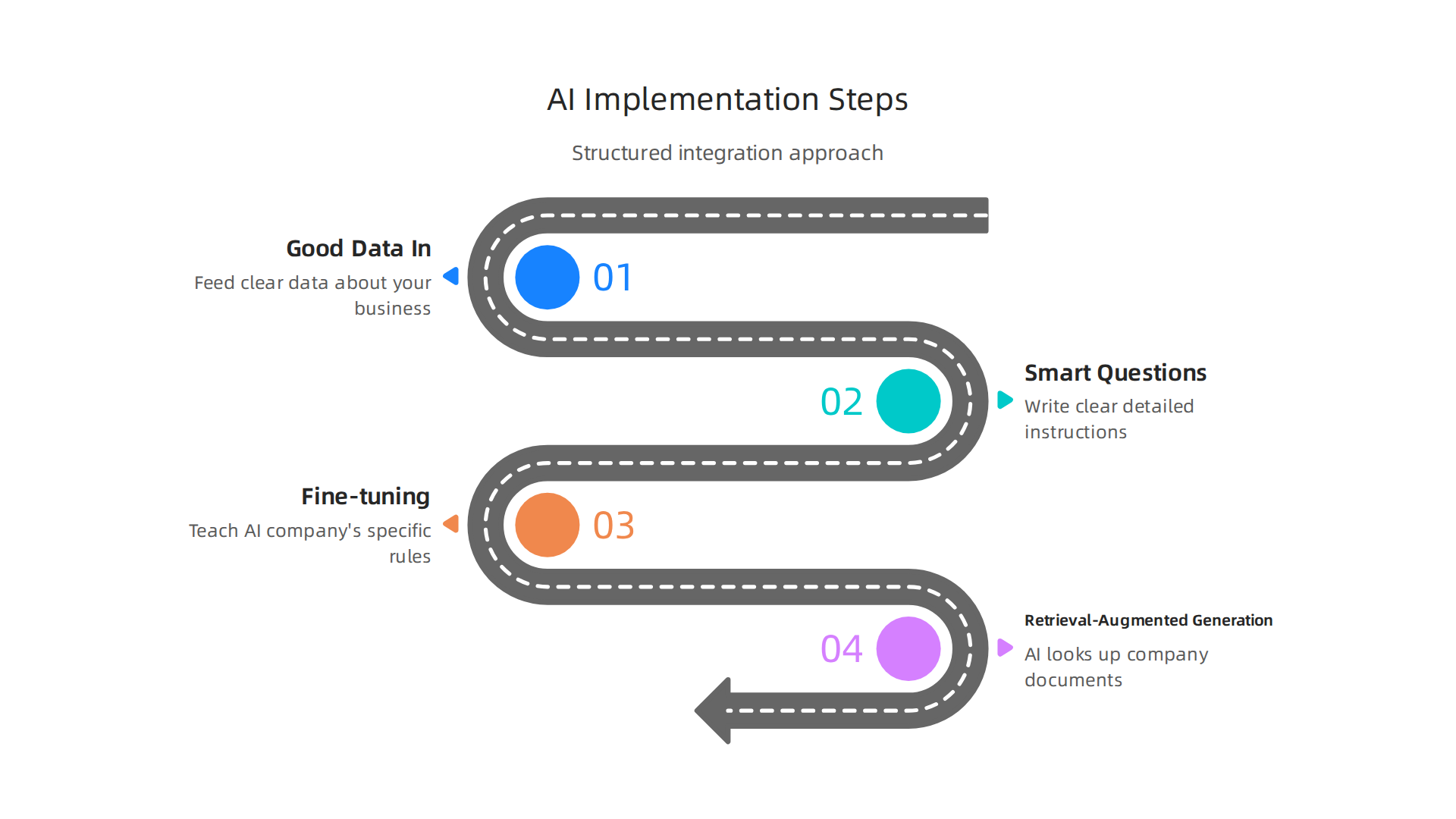
    A structured approach to successfully integrate Generative AI into business operations.

    1. Good Data In: The AI learns from information. If you feed it good, clear data about your business, it will give you better results. Think about the kind of text or examples you want it to learn from.
    2. Smart Questions (Prompts): How you ask the AI to do something is very important. Writing clear, detailed instructions, called "prompts," helps the AI understand exactly what you want it to create.
    3. Making it Smarter:
      • Fine-tuning: This is like teaching the AI about your company’s specific way of speaking or special rules. You give it more examples that are just like your business, so it learns to sound like you.
      • Retrieval-Augmented Generation (RAG): This is a fancy way of saying the AI can look up information from your own company documents before answering. So, when a customer asks a question, the AI can check your company’s knowledge base to give the most accurate, up-to-date answer. This helps it not "make things up" and use your real business data.

    By focusing on these steps, businesses can start using Generative AI to build a smart future. If you’re looking for the right tools, it’s wise to learn how to choose AI for business tools that deliver real results in 2026.

    The world of Generative AI is always moving forward. Beyond making content or code, some AI models are built to be very flexible and smart, forming the base for many different uses. These are called Foundation Models.

    Foundation Models: The Smart Base

    Think of a Foundation Model as a giant, all-purpose brain. It’s trained on a huge amount of different information, like text, images, and code from the internet. This makes it good at many tasks right out of the box. Instead of building a new AI for every little job, businesses can take one of these powerful base models and teach it a few more things specific to their needs. This helps companies, including ai startups, quickly adapt AI for their unique goals. These models are a big reason why AI is one of the top 10 technology trends in 2026. You can even find market research reports that go deep into Foundation AI Models Market Research Report 2026.

    Multimodal AI: Understanding More Than Just Words

    While many AI models mainly work with text, Multimodal AI can understand and create using many types of data at once. This includes text, pictures, sounds, and even videos. For example, a multimodal AI could look at a picture, listen to a description of it, and then write a story about what it sees and hears. This makes AI much more helpful and natural to interact with A Survey on Multimodal Foundation Models: Architectures, Training Paradigms, and Emerging Applications. It’s a huge step in the tech adoption curve because it means AI can handle more real-world situations.

    Personalization at Scale

    One of the biggest uses for these advanced AIs is making things personal for everyone.

    A person experiencing a highly personalized interaction, enabled by advanced AI models.

    Imagine an online store that knows exactly what you like, or a learning app that customizes lessons just for you. This is "personalization at scale," meaning it can be done for millions of people.

    Here’s how these models help make experiences truly personal:

    • Fine-tuning: Like we talked about before, fine-tuning teaches a general AI model your company’s special way of doing things. For personalization, you’d fine-tune it with data about your customers’ preferences, so it learns to serve them better.
    • Adapters: These are like small, extra layers added to a Foundation Model. They let you tweak the model for specific tasks or users without having to retrain the whole giant model. It’s faster and uses less computing power.
    • Embeddings: This is a smart trick where all kinds of data (text, images, user actions) are turned into simple lists of numbers. When two lists of numbers are close, it means the data they represent is similar. So, if a user’s "embedding" is close to an item’s "embedding," the AI knows that user will likely enjoy that item. This helps recommend things, search for information, and personalize experiences very quickly.

    Being Smart About Privacy and Pitfalls

    When making things personal, businesses must be very careful with customer information. Protecting privacy and using data ethically is key. It’s also important to make sure the AI doesn’t create unfair experiences because of how it was trained. Careful data handling and constant checks help avoid these common problems as we move towards a smart future.

    Want to stay ahead of these rapid changes in AI? Get the latest insights directly in your inbox.

    The AI Newsletter Worth Reading

    Learning about these new ways AI can personalize experiences is crucial for businesses. It’s all about making sure the new technology works well for everyone. To see how these tools can transform your online presence, explore how to build a futuristic website 2026 AI personalization offers.

    Moving from making things personal for each person, AI is also changing how businesses get work done. It’s not just about tailoring experiences; it’s about making whole work processes faster and smarter. This is where AI-augmented automation and hyperautomation come in.

    AI-Augmented Automation and Hyperautomation: From RPA to End-to-End Process Intelligence

    In the past, many businesses used something called Robotic Process Automation, or RPA. Think of RPA as a simple robot that does the same easy tasks over and over again, like copying data from one spreadsheet to another. It was good for basic, repeatable work.

    But now, AI has changed the game. We’re seeing a shift from simple RPA to much smarter systems. This is called "hyperautomation." With hyperautomation, AI doesn’t just do tasks; it also helps decide what tasks need doing and how best to do them. It uses AI to learn from how work is done, find problems, and even suggest better ways. This big change makes it possible for businesses to automate many more parts of their work, not just small, easy steps. In fact, AI can automate up to 70% of everyday work tasks in 2026, marking a big leap forward in how we get things done How 2026 AI Could Automate Up to 70% of Everyday Work.

    This idea of AI looking at whole workflows is called "end-to-end process intelligence." It means AI can see the big picture of how a company works, from start to finish. It helps find bottlenecks or slow spots and makes the entire process smoother. This is one of the top 10 technology trends because it helps businesses save time and money. For example, AI can help with customer support by answering common questions or with handling invoices by checking all the details quickly. Businesses are using AI in many ways, from finance to customer service, to make things work better AI Automation Use Cases 2026: 40 Proven Business.

    To figure out where AI automation can help your business, you need a plan. Here’s a simple roadmap:
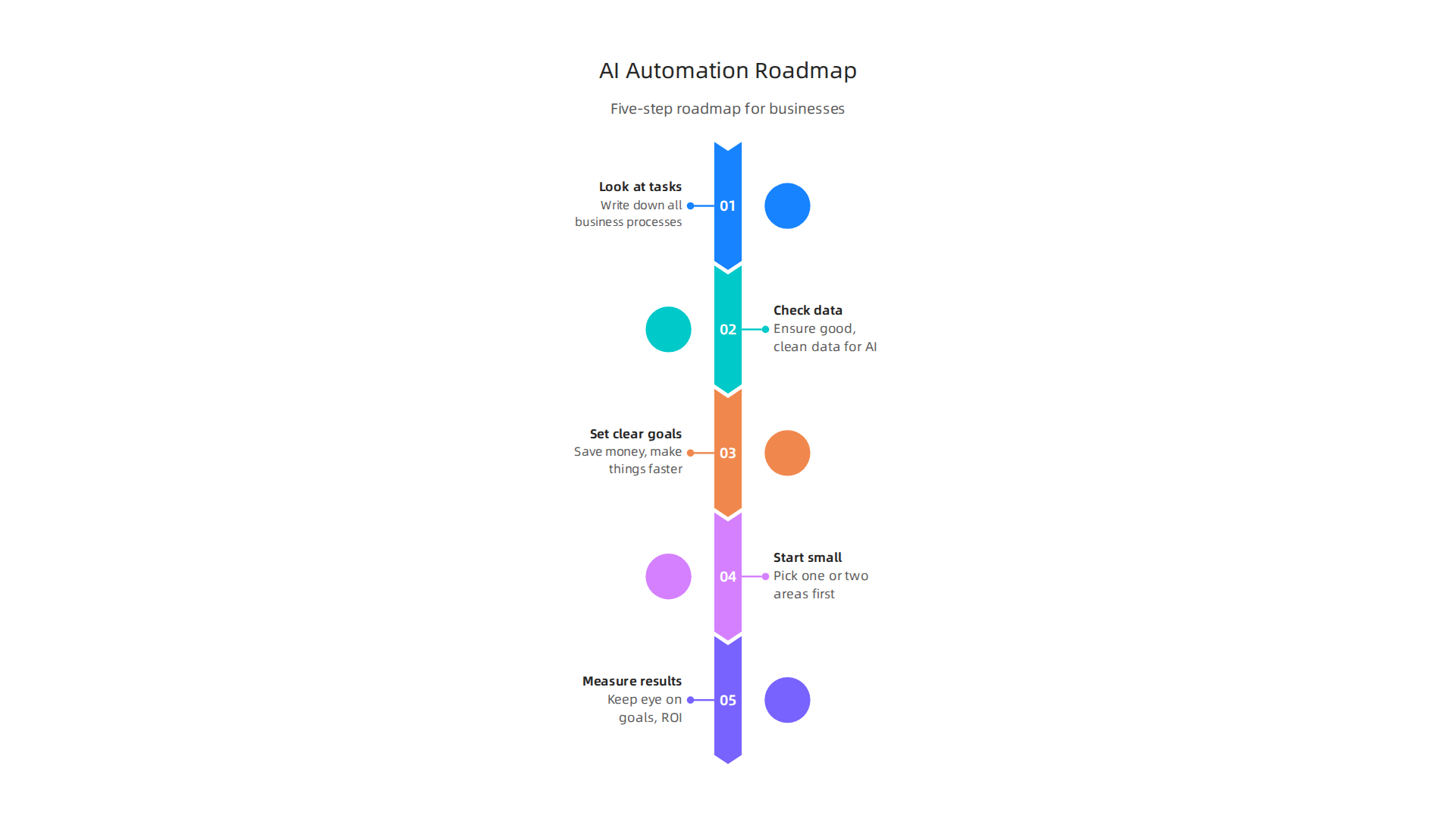
    A five-step roadmap for businesses to effectively implement AI automation.

    1. Look at your tasks: First, write down all the steps in your business processes. What jobs take a lot of time? Which ones are repetitive?
    2. Check your data: AI learns from data. Make sure you have good, clean data for the AI to use.
    3. Set clear goals: What do you want to achieve? Do you want to save money, make things faster, or improve how customers feel?
    4. Start small: Pick one or two areas to automate first. See how it works before doing more.
    5. Measure results: Keep an eye on your goals. Is the AI actually saving you money or time? Many companies are finding good returns on their AI investments Guide to Artificial Intelligence Automation Solutions 2026.

    Choosing the right tools for this kind of automation is also key. To learn more about software that can help, check out our guide on how to choose marketing automation software in 2026. You might also want to explore different Enterprise AI Platforms 2026 to find the best fit for your company.

    Moving from making things personal for each person, AI is also changing how businesses get work done. It’s not just about tailoring experiences; it’s about making whole work processes faster and smarter. This is where AI-augmented automation and hyperautomation come in.

    In the past, many businesses used something called Robotic Process Automation, or RPA. Think of RPA as a simple robot that does the same easy tasks over and over again, like copying data from one spreadsheet to another. It was good for basic, repeatable work.

    But now, AI has changed the game. We’re seeing a shift from simple RPA to much smarter systems. This is called "hyperautomation." With hyperautomation, AI doesn’t just do tasks; it also helps decide what tasks need doing and how best to do them. It uses AI to learn from how work is done, find problems, and even suggest better ways. This big change makes it possible for businesses to automate many more parts of their work, not just small, easy steps. In fact, AI can automate up to 70% of everyday work tasks in 2026, marking a big leap forward in how we get things done How 2026 AI Could Automate Up to 70% of Everyday Work.

    This idea of AI looking at whole workflows is called "end-to-end process intelligence." It means AI can see the big picture of how a company works, from start to finish. It helps find bottlenecks or slow spots and makes the entire process smoother. This is one of the top 10 technology trends because it helps businesses save time and money. For example, AI can help with customer support by answering common questions or with handling invoices by checking all the details quickly. Businesses are using AI in many ways, from finance to customer service, to make things work better AI Automation Use Cases 2026: 40 Proven Business.

    To figure out where AI automation can help your business, you need a plan. Here’s a simple roadmap:

    1. Look at your tasks: First, write down all the steps in your business processes. What jobs take a lot of time? Which ones are repetitive?
    2. Check your data: AI learns from data. Make sure you have good, clean data for the AI to use.
    3. Set clear goals: What do you want to achieve? Do you want to save money, make things faster, or improve how customers feel?
    4. Start small: Pick one or two areas to automate first. See how it works before doing more.
    5. Measure results: Keep an eye on your goals. Is the AI actually saving you money or time? Many companies are finding good returns on their AI investments Guide to Artificial Intelligence Automation Solutions 2026.

    Choosing the right tools for this kind of automation is also key. To learn more about software that can help, check out our guide on how to choose marketing automation software in 2026. You might also want to explore different Enterprise AI Platforms 2026 to find the best fit for your company.

    Edge AI and IoT: Real-Time Inference and Distributed Intelligence

    Now, let’s look at another important shift in the world of AI: Edge AI. While big cloud computers do amazing things, sometimes you need AI to work right where the action is. This is where Edge AI comes in, putting smart tech directly into devices and machines. It’s a huge step in the tech adoption curve for many companies.

    Edge AI means that AI calculations happen on the device itself, or very close to it, instead of sending all the data to a faraway cloud server. Think of a smart camera in a factory that can spot a problem instantly, or a sensor in a store that understands what’s happening without sending videos to a central hub. This is sometimes called "distributed intelligence" because the smarts are spread out.

    Why is this a big deal?

    • Speed (Low Latency): When data doesn’t have to travel far, AI can make decisions super fast. This "real-time inference" is critical for things like self-driving cars or quickly sorting items on an assembly line. Processing data locally means responses can be nearly instant, sometimes under 50 milliseconds
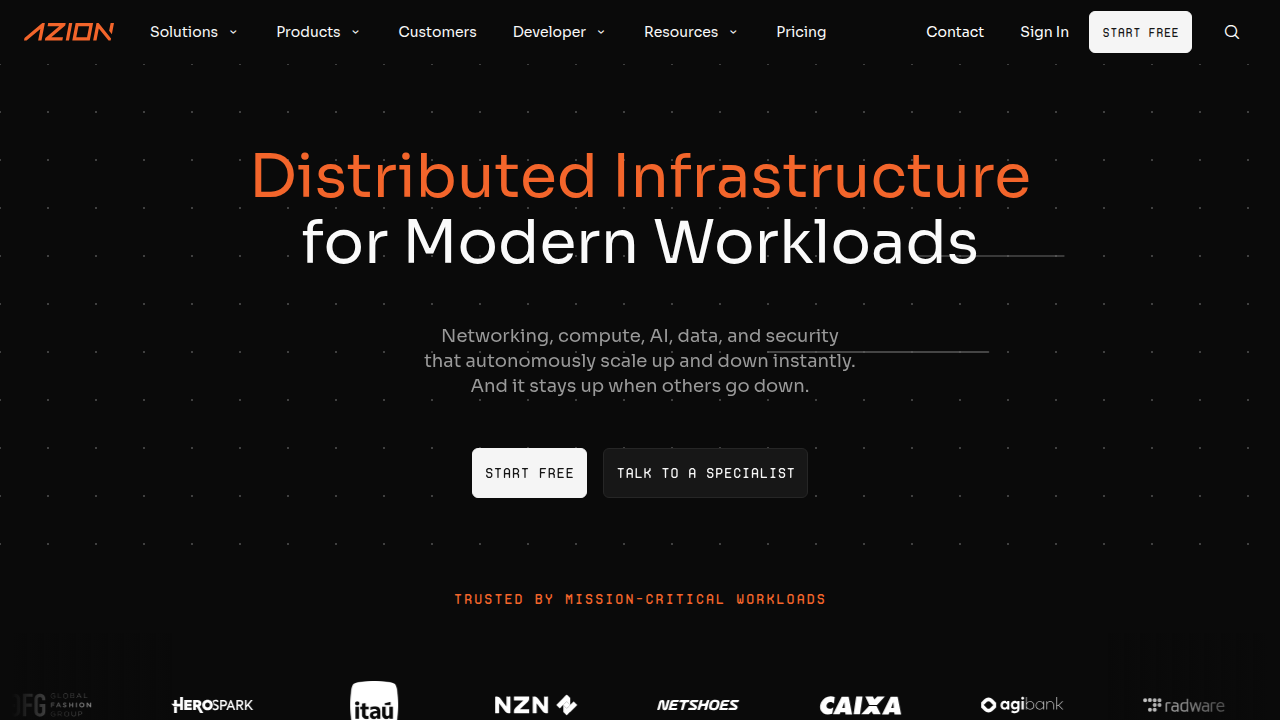
    A learning hub explaining the concept and benefits of Edge AI for real-time processing.

    What is Edge AI? | Azion.

    • Privacy: Keeping data on the device or local network means sensitive information doesn’t need to be sent over the internet to a cloud server. This is a big plus for privacy in places like retail stores or hospitals Edge AI Explained 2026: Running ML Models on Tiny Devices.
    • Cost: Sending lots of data to the cloud can be expensive. Edge AI reduces this cost by only sending small pieces of information or summaries, saving money on bandwidth.
    • Works Anywhere: Edge AI can even work when there’s no internet connection, which is great for remote locations or times when the network is down.

    This technology is a game-changer for industries like manufacturing, where machines need to react instantly to changes, or in logistics, for tracking goods efficiently. In retail, Edge AI helps with things like managing inventory or understanding customer flows in real-time. For a truly smart future, we’ll see more ai startups focusing on these on-device solutions.

    To get started with Edge AI, businesses need to think about suitable hardware, like special chips that can run AI models directly on devices. They also need to balance how much power these devices use with how well they perform. This approach is one of the top 10 technology trends that will define how we interact with technology in 2026.

    If you want to keep up with these kinds of daily changes in AI and technology, you’ll love The AI Newsletter Worth Reading.

    AI for Security, Privacy, and Trust: Defending Models and Data

    As AI gets smarter and works closer to us, like with Edge AI devices, we also need to think about keeping it safe and trustworthy. This is a big challenge and one of the top 10 technology trends for 2026. Just like you’d lock your front door, businesses must protect their AI systems and the data they use. Failing to do so can cause serious problems, from data leaks to incorrect decisions by the AI.

    One major worry is "model security." This means making sure the AI itself isn’t tricked or broken.

    • Poisoning Attacks: Imagine someone feeding bad or false information to an AI while it’s learning. This "poisoning" can make the AI learn wrong things, leading to bad decisions later.
    • Prompt Injection: This is like giving a smart AI a tricky question to make it do something it shouldn’t, like share private information or follow wrong instructions.

    These kinds of attacks are real. In fact, many companies have already faced issues. A report found that 65% of organizations had at least one cybersecurity problem in the past year because of AI agents on their networks. Also, about one in four harmful computer breaches are now caused by AI, costing companies a lot of money on average [IBM Study: One in Four Malicious Breaches are AI-Enabled …].

    Then there’s "data privacy." AI needs lots of data to work, but much of that data can be private or sensitive. Businesses need to make sure this information stays safe. Studies show that data leaks are the most common problem with AI security incidents. For example, 61% of problems involving AI agents meant sensitive data was exposed [AI Agent Security Incidents Hit 65% of Firms in 2026]. This is why protecting sensitive data is so important. Also, "Shadow AI," which is when employees use AI tools without company approval, has caused data leaks in nearly 9 out of 10 organizations in the past year [Artificial Intelligence Report 2026]. This highlights a big concern about businesses not knowing about or controlling all the AI tools being used.

    To build a truly smart future with AI, businesses need to put secure practices first. Here’s a simple checklist to help keep AI models and data safe:

    • Understand your AI: Know exactly what data your AI uses and how it makes decisions.
    • Protect your data: Make sure all data used by AI is secured with strong passwords and other safety measures. Use methods to hide or scramble sensitive data whenever possible to boost privacy [Key AI Data Privacy Statistics to Know in 2026].
    • Watch for sneaky attacks: Keep an eye out for odd behavior that might signal prompt injection or model poisoning attempts.
    • Control AI use: Make sure employees only use approved AI tools and understand the rules. Many AI security incidents are linked to using AI without proper checks [2026 AI Data Crisis: Protect Your Sensitive Information Now].
    • Regular checks: Just like checking your car’s oil, regularly review your AI systems for weaknesses.
    • Have a plan: Know what to do if an AI security problem happens, so you can fix it quickly.
    • Stay updated: The world of AI changes fast. Keep learning about new risks and ways to protect your systems.

    Making sure AI is secure, private, and trustworthy is a key part of the tech adoption curve for any company hoping to succeed with AI in 2026. This focus on safety helps build trust and makes sure AI works for us in good ways. Businesses can also get help by looking at guides for mastering the AI future standard.

    After we talk about keeping AI safe from attacks and protecting private data, the next big step is to make sure we use AI in a good, fair, and responsible way. This is called "Responsible AI and Governance." It’s one of the top 10 technology trends for 2026 because it helps businesses manage the risks of AI and follow the rules.

    Think of AI governance as setting up a clear set of guidelines for how your company uses AI. It’s about having policies in place, understanding the risks of your AI models, and making sure you follow all the necessary laws. This helps build a smart future where AI can be trusted.

    What is AI Governance?

    AI governance means putting rules in place to oversee your AI systems.

    A diverse team discussing and establishing guidelines for responsible AI governance and compliance.

    It helps you keep track of what AI you’re using, how risky it is, and if it’s doing what it’s supposed to.

    • Model Inventories: This is like a list or a map of all the AI tools your company uses. It helps you know exactly what AI is running, where it is, and what it does. This way, no AI is used without anyone knowing, which can help prevent problems like those from "Shadow AI" mentioned earlier.
    • Risk Tiers: Not all AI is equally risky. An AI that helps you choose music is very different from an AI that helps doctors make health choices. Risk tiers help you rate each AI tool based on how much harm it could cause if it goes wrong. This helps you put more attention on the most important ones.
    • Audit Trails: These are like a detailed diary of your AI’s actions. They record how and why an AI made a certain decision. If something goes wrong, an audit trail helps you understand what happened, much like tracking steps in a recipe.

    These governance structures should grow with your business and how many rules or laws you need to follow. For instance, a big company in healthcare will need much stricter rules than a small local shop. Actually, when businesses don’t have good AI governance, it can lead to bigger problems and costs, as shown by some reports [IBM 2026 Breach Report: AI Governance Failures Drive …].

    Simple Steps for Small Teams and AI Startups

    You might think that AI governance is only for big companies, but even ai startups and small teams need to start somewhere. You don’t need a huge budget or a lot of staff to begin. Here are some easy steps:

    • Start Small: Don’t try to build a perfect system all at once. Pick one or two AI tools you use often and focus on them first.
    • List Your AI Tools: Make a simple list of all the AI applications your team uses. Write down what each tool does and who is in charge of it. This is your basic model inventory. If you want to dive deeper into tracking tools, you can learn how to build a tech radar to track AI trends and tools in 2026.
    • Think About the Risks: For each tool, ask simple questions. What could go wrong if this AI makes a mistake? Could it accidentally share private info? The answers help you understand its risk level.
    • Keep Simple Records: For important AI decisions, jot down why the AI was used, what it did, and if the outcome was good or bad. This creates a basic audit trail.
    • Stay Informed: The world of AI is changing fast, and new rules for AI are coming out all the time. Keeping up with the latest trends helps you adjust your own rules. This is key to staying ahead on the tech adoption curve.

    By taking these steps, even small teams can make sure their AI use is responsible and trustworthy. It’s about being smart and thoughtful with these powerful tools.


    Get clear daily AI updates directly in your inbox.
    The AI Newsletter Worth Reading

    After putting rules in place for AI, the next step for businesses is to pick the right AI tools and plan how to use them. This means thinking about which AI products to buy or even build yourself, which is a big part of the top 10 technology trends for 2026. It’s about choosing tools that help you create a smart future for your company.

    AI-Native Product Strategies and Vendor Evaluation: Choosing the Right Tools

    When you’re ready to bring AI into your business, you need a smart plan. You’ll either buy AI tools from other companies (vendors) or create your own.

    Two business professionals engaged in a deep discussion to make strategic decisions about AI tool adoption.

    This choice depends on a few important things.

    Deciding to Build or Buy AI Tools

    • Cost: Making your own AI tools can be very expensive at first because you need to hire experts and buy special equipment. Buying ready-made tools often costs less to start.
    • Data Gravity: Think about where your important company data lives. If your data needs to stay super private or respond very quickly, you might want AI that works "at the edge." This means the AI processes data right where it is, like on your own devices or in your local office, instead of sending it all to the cloud. This helps with privacy and speed. For example, edge AI can offer much stronger privacy because data doesn’t leave your local network [The Edge AI Breakthrough: How Local Processing Is …]. It also leads to very low delays, or "latency," meaning decisions happen super fast [Edge AI Explained 2026: Running ML Models on Tiny Devices].
    • Extensibility: This is about how easily an AI tool can connect and work with other tools you already use. If you buy a tool, make sure it can talk to your existing systems. If you build it, make sure it can grow and link up with new things in the future.

    For many companies, especially ai startups, buying a ready-made solution is often the easier first step. You can always grow into building custom tools later as your needs change and you climb the tech adoption curve. To help you make these choices, it’s wise to explore how to choose AI for business tools that deliver real results in 2026.

    Testing and Growing Your AI Use

    Once you pick an AI tool, you don’t just use it everywhere all at once. You test it first.

    • Pilots: This is like a small trial run. You use the AI tool in a tiny part of your business to see how it works.
    • Proof-of-Value: After the pilot, you look at the results. Did the AI really help? Did it save time or money? Did it make things better for customers? You need clear ways to measure if the AI is actually useful.
    • Scaling to Production: If the pilot goes well and shows real value, then you can slowly start using the AI tool more widely across your company. This means putting it into "production." You’ll want to keep an eye on how well it’s working by using clear measurements, often called Key Performance Indicators (KPIs), to make sure it keeps helping your business grow. If you’re looking for broader strategies, learning how to evaluate AI companies to unlock business growth in 2026 can guide your choices.

    Summary

    This article explains why the top technology trends of 2026 matter for business leaders and how to turn them into practical advantage. It walks through Generative AI and LLM use cases, foundation and multimodal models, personalization at scale, AI-augmented automation and hyperautomation, and Edge AI for low-latency, private inference. The guide also covers critical risks—model poisoning, prompt injection, data leaks—and gives a simple security and governance checklist to manage those risks. Readers learn how to decide whether to buy or build AI tools, how to run pilots, and how to measure value so adoption scales safely. By the end you’ll have clear steps to prioritize trends, protect data, choose vendors or in-house paths, and start delivering measurable ROI from AI initiatives.

  • How to Choose AI-Ready Business Computers in 2026

    How to Choose AI-Ready Business Computers in 2026

    Artificial intelligence (AI) is changing how businesses work in 2026. From making tasks easier to helping with big decisions, AI is everywhere. Because of this, picking the right computer for your business is more important than ever. You need laptops and PCs that can handle AI tasks well, not just today, but for a long time to come. This is where "AI-readiness" truly matters.

    Many businesses make a common mistake. They often buy new computers based on exciting marketing words or big numbers on a spec sheet. But sometimes, what sounds great on paper doesn’t work so well in the real world. A computer might be advertised as "AI-ready," but that can mean different things. It’s like buying a car that says "fast" without knowing if it’s fast for city driving or only on a race track. For businesses, this mistake can lead to wasted money and slower work.

    Actually, there are different kinds of AI work, also called "workloads." In 2026, many companies are focused on what is called "inference." This is when an AI model that has already been taught uses what it learned to make predictions or answer questions. Think of it as the AI doing its job after it’s finished school. Inference tasks often need quick bursts of power, but they are not as heavy as "training" tasks, where the AI is learning from scratch AI training vs inference: the 2026 economics split. Experts like Deloitte say that by 2026, inference workloads will make up about two-thirds of all AI computing

    Explore Deloitte's insights on technology trends and AI computing forecasts for businesses.

    More compute for AI, not less. This means what a business needs in a laptop might be different from what a big AI lab needs.

    So, when you are looking at business laptops or PCs, like different thinkpad models, you shouldn’t just look at the highest numbers. You need to think about how the computer will perform day after day. Does it offer good, steady performance for the kind of AI tasks your team actually does? Is it easy for your IT team to set up and keep running? For example, a Lenovo ThinkPad X Series might be perfect for one business, while another might need a different setup entirely. Understanding these details helps you get a better return on your investment.

    Staying on top of all the new AI tools and computer tech can be tricky.


    Get clear daily AI updates from The AI Newsletter Worth Reading.


    Understand Your AI Workloads: Inference, Fine-Tuning, and Local Tooling

    It’s true that keeping up with all the new AI tools and computer technology can feel like a lot.

    A team actively engaged in learning new technological concepts and tools.

    But to pick the best computers for your business, you need to know exactly what kind of AI work your team will do.

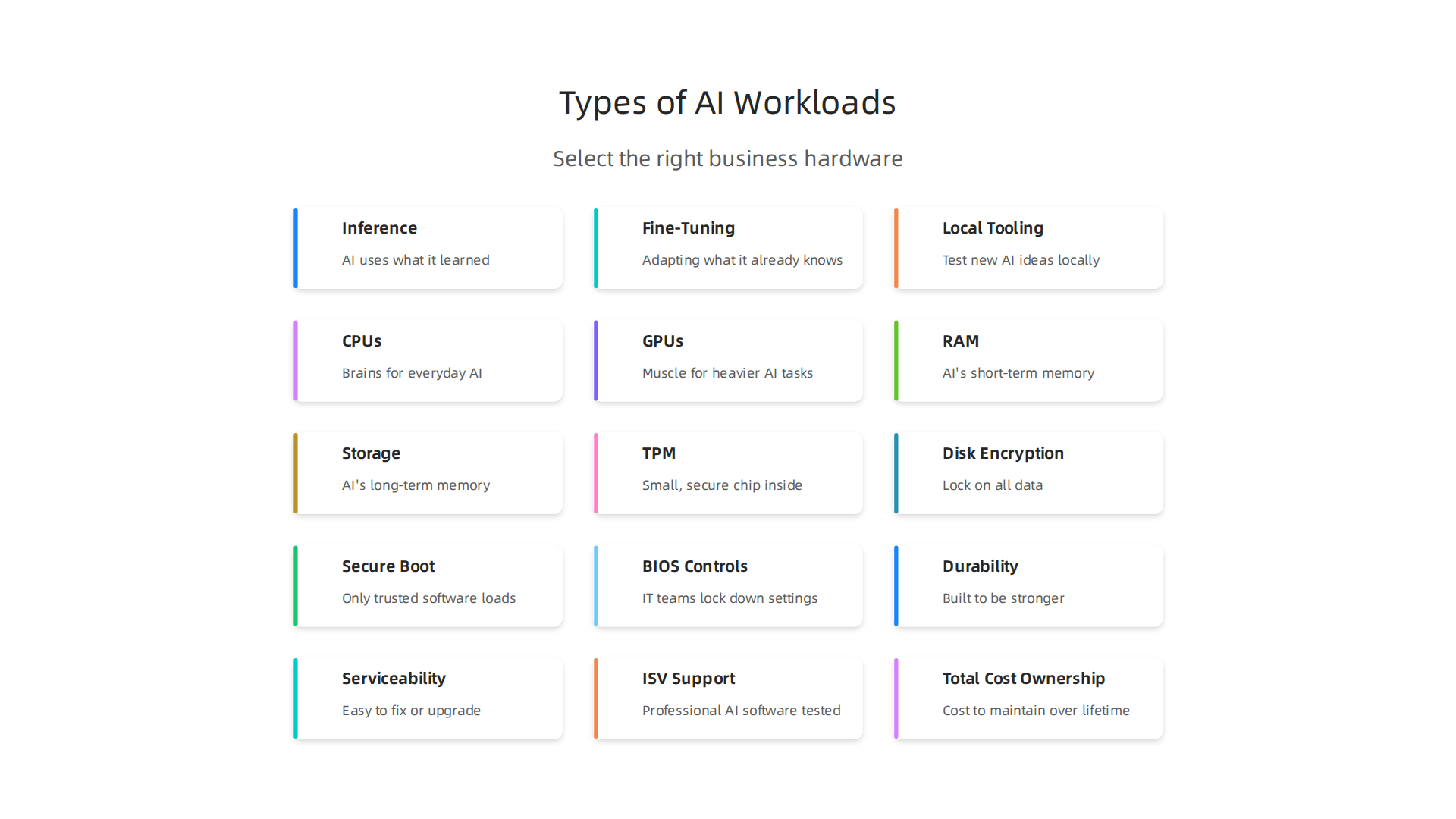
    Understanding different AI workloads helps in selecting the right business hardware.

    It’s not just about "AI" in general; it’s about the specific tasks, also called "workloads."

    We already talked about inference, which is when an AI uses what it learned to give answers or make predictions. This needs quick power bursts. But there are other important types of AI work too:

    • Fine-Tuning: Imagine you have a very smart AI model, like a big brain that knows a lot about everything. Fine-tuning is like teaching that smart brain a special new skill, using a smaller set of your own company’s information. It’s not learning from scratch, but adapting what it already knows to your exact needs. This kind of work needs more computer power than just inference, especially good memory and a strong graphics processor (GPU) 5 types of AI workloads and how to deploy them. Fine-tuning tasks often involve reading large amounts of data and doing many quick calculations.
    • Local Tooling/Experimentation: Sometimes, your team might want to test new AI ideas or use smaller AI tools right on their own computers. This is like having a small AI lab on a laptop. For these tasks, you need a computer that can handle the work quickly without relying on the internet or a big cloud service. A computer with a good built-in GPU and enough memory will help these local AI tools run smoothly.

    Different companies have different needs. A study found that businesses are using AI for many different things, not just one type of workload AI Workload Priorities Diversify as Enterprises Push Compute Beyond Training. This means there’s no single "best" computer.

    Matching Workloads to Computer Needs

    When you look at different thinkpad models or other business PCs, think about these things:

    • Latency (Speed): How fast does your AI need to give answers? For quick customer service chatbots, you need very low latency. Inference tasks often need fast responses.
    • Memory (RAM): How much information does your AI need to hold in its active "brain" at once? Fine-tuning and local experimentation can use a lot of memory.
    • Local GPU vs. Cloud Hybrid: Do you need a powerful graphics card right inside the computer (a local GPU) for heavy work, or can your computer send tasks to bigger, more powerful computers over the internet (cloud hybrid)? Many daily inference tasks can run well on laptops with newer AI-ready chips, while more intense fine-tuning might need a stronger local GPU or a mix of local and cloud power. For example, a dedicated ibuypower pc with a strong GPU might be great for local AI model experimentation, while a portable lenovo thinkpad x series or a lenovo thinkpad t14 gen 2 could handle most on-device inference tasks just fine. If you’re considering a more budget-friendly approach to local AI computing, looking into a used gaming pc for ai might be an option.

    To pick the right computer, you also need to know about the parts inside it.

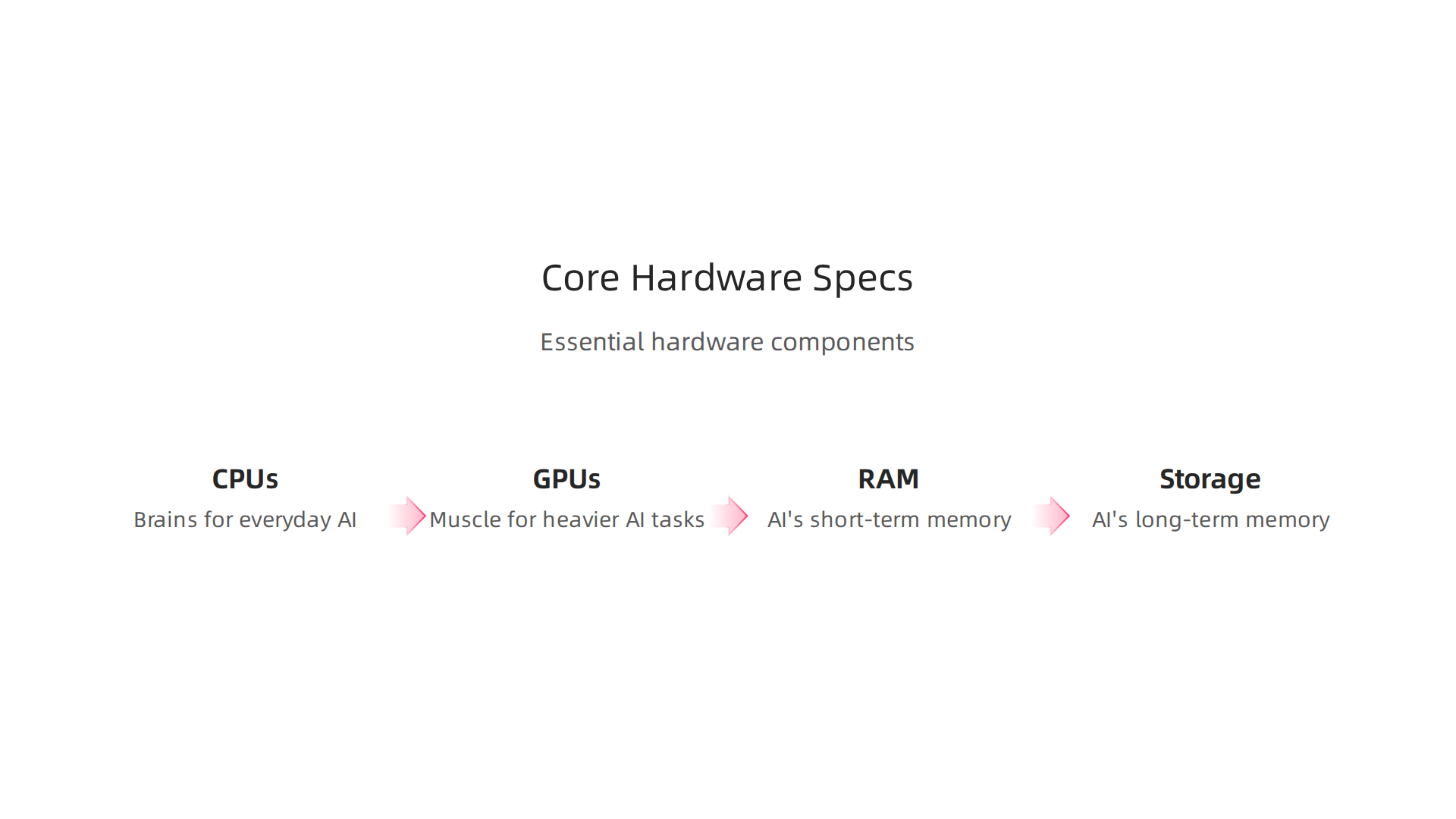
    Essential hardware components and their roles in various AI tasks.

    These parts are called hardware specs. Think of them as the engine and other important bits of a car. Each part helps with different kinds of AI work.

    CPUs: The Brains for Everyday AI

    The CPU, or Central Processing Unit, is like the main brain of your computer. For AI, how powerful your CPU needs to be depends on the task.

    • CPU Cores: CPUs have "cores," which are like mini-brains working together. More cores can help with tasks that need many things done at once.
    • Single-Thread Performance: This means how fast one of those mini-brains can work on its own. For quick AI tasks like simple searches or small actions (often called inference), fast single-thread performance is very important. Many newer thinkpad models have CPUs that are great for this kind of quick, on-the-spot AI work.
    • Platform Memory Bandwidth: This is about how fast the CPU can get information from the computer’s memory (RAM). Good bandwidth helps the CPU keep working smoothly without waiting for data. For light AI use and small learning tasks, a strong CPU is key, as it often handles many calculations that lead to the AI’s answer. Benchmarks like Cinebench help show how well a CPU performs for rendering and multi-threaded tasks, which can be similar to some AI workloads How to Use and Interpret Cinebench 2026 Results. For a deeper look into CPU performance for AI, you can explore comparisons like CPU Vs GPU In 2026: Key Differences, Use Cases, And Tips.

    GPUs: The Muscle for Heavier AI Tasks

    The GPU, or Graphics Processing Unit, is like the muscle of your computer, especially for AI. It’s really good at doing many math problems at the same time, which is exactly what AI needs for training and fine-tuning.

    • Integrated vs. Discrete GPUs:
      • Integrated GPUs are built right into the main CPU chip. They share memory with the CPU and are good for lighter AI tasks, like running a simple AI chatbot on your lenovo thinkpad x series.
      • Discrete GPUs are separate, more powerful chips with their own dedicated memory (VRAM). These are found in powerful laptops or desktop computers, like an ibuypower pc, and are much better for heavy AI work.
    • Dedicated VRAM (Video RAM): This is super important for AI. VRAM is special memory just for the GPU. The more VRAM a GPU has, the bigger and more complex AI models it can handle directly on the computer. For tasks like fine-tuning a large AI model or doing a lot of local experimentation, you’ll want a GPU with plenty of VRAM. A good example of understanding which laptop graphics card is best for various AI tasks can be found in resources like Understanding the Best Laptop Graphics Card 2026.

    RAM: The AI’s Short-Term Memory

    RAM (Random Access Memory) is where your computer keeps information that it’s actively using right now. For AI, having enough RAM is super important.

    • Holding Large Models: If you’re working with big AI models or lots of data at once, you need a lot of RAM. Fine-tuning, for example, often needs 16GB, 32GB, or even 64GB of RAM to hold the AI model and the data it’s learning from.
    • Speed Matters: The speed of your RAM also makes a difference. Faster RAM means the CPU and GPU can get the information they need more quickly. This leads to smoother and faster AI processing.

    Storage: The AI’s Long-Term Memory

    Storage is where your computer saves everything permanently, like programs and all your AI data.

    • SSD vs. HDD:
      • SSDs (Solid State Drives) are much faster than older HDDs (Hard Disk Drives). For AI, you definitely want an SSD. It allows the computer to load large AI models and datasets quickly, which speeds up both training and inference.
      • Capacity: AI models and data sets can be huge. Make sure your computer has enough storage space, usually 512GB or 1TB (terabyte) or more for serious AI work. Fast storage is crucial for AI workloads, as models can quickly read and write large files during training or fine-tuning AI Workloads Storage Architecture.

    Choosing the right mix of these hardware parts will make sure your AI tasks run smoothly. When looking at different lenovo thinkpad t14 gen 2 models or other laptops, remember to match these specs to the AI work you plan to do. For businesses exploring powerful local setups, sometimes even checking out Gaming PC Deals 2026 How AI Hardware Makes Mid-Range Systems Outperform can offer surprising value. If you’re considering MacBooks for AI, you might find valuable insights in this guide to Picking the Best MacBooks for AI for Your 2026 Projects.

    Once you know what computer parts are best for AI, there’s another big thing for businesses to think about: how safe and easy those computers are to handle. This is super important when a company buys many computers for its team, especially for sensitive AI work. Features like strong security, being able to manage many devices at once, and easy setup help save money and keep everything running smoothly.

    Security Features: Keeping AI Safe

    For businesses, especially those dealing with important AI projects, security is key.

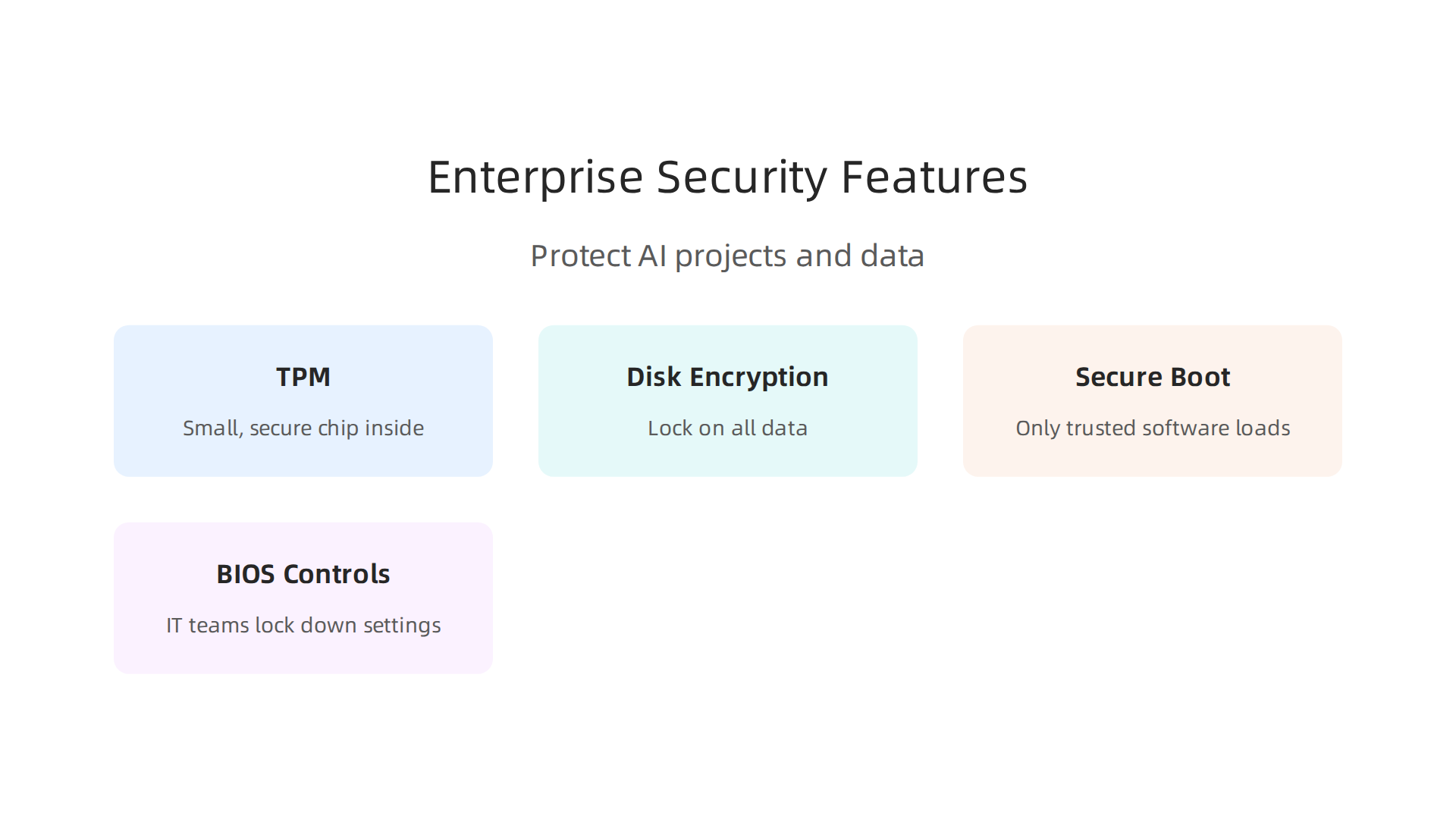
    Key security features critical for protecting business AI projects and data.

    Good thinkpad models and other business laptops come with special tools to keep your data and AI models safe.

    • Trusted Platform Module (TPM): This is a small, secure chip inside the computer. It helps make sure your computer starts up safely and that no one has changed its important software. It also helps with things like disk encryption. Many security checklists for 2026 say you need TPM for high-risk users Endpoint Security Hardening in 2026: A Practical Checklist for ….
    • Disk Encryption: Imagine putting a lock on all the data on your computer’s hard drive. That’s what disk encryption does. If a laptop like a lenovo thinkpad x series gets lost or stolen, your important AI data stays private because it’s scrambled and locked.
    • Secure Boot: This feature helps protect your computer when it first turns on. It makes sure that only trusted software loads. This stops bad software from hijacking your computer right from the start. Keeping Secure Boot enabled is a key part of protecting endpoints Guidance for Managing UEFI Secure Boot. In 2026, many companies are updating how they manage Secure Boot to keep up with new threats Secure Boot Certificate Rollout 2026: Critical Update for Windows Devices.
    • BIOS Controls: The BIOS is like the computer’s basic instruction book. Business-focused machines give IT teams special controls here. They can lock down settings to make sure users can’t change important security features, which helps keep all computers on the network just as safe.

    Manageability and Fleet Deployment: Easy for IT

    When a company has many AI-ready computers, like a fleet of lenovo thinkpad t14 gen 2 laptops, managing them all can be a big job. This is where manageability features really shine.

    • Remote Management: IT teams need to set up, update, and fix computers without being right next to them. Tools for remote management let them do this from afar. This means they can get new AI-capable computers ready quickly and push out important security updates to everyone at once.
    • Driver Updates and MDM: Keeping drivers (small programs that help hardware work) up to date is crucial for AI. Business computers often work well with special software called Mobile Device Management (MDM). MDM helps IT teams easily manage all devices, including making sure all drivers are current and secure. For anyone looking to select the right technologies to help their business grow, understanding these management systems is key Unlock Growth by Selecting the Right Smart Technologies in 2026.

    These features help businesses reduce their Total Cost of Ownership (TCO). This means they spend less money over time because their IT teams can work more efficiently. Instead of manually fixing each computer, they can manage many thinkpad x series laptops at once, saving time and money. For businesses trying to use AI to grow, picking computers with these enterprise features is a smart move.

    Even with the best parts, how a computer handles heat is super important for AI work. When a computer runs hard, it gets hot. If it gets too hot, it has to slow down to protect itself. This slowing down is called "throttling," and it can really mess up AI tasks that need to run fast for a long time.

    Short Tests vs. Long Work

    Many computer tests, called benchmarks, only show how fast a computer can go for a few seconds. They are like a quick sprint. But AI work is more like a marathon. It needs the computer to stay fast for many minutes or even hours.

    If a thinkpad models laptop or a powerful desktop like an ibuypower pc can’t keep itself cool during these long tasks, its great parts won’t perform their best. The computer will get hot, slow down, and your AI projects will take much longer to finish. This is why "sustained throughput" matters. It means the computer can keep up its speed over a long time, not just for a quick burst.

    What to Look For to Avoid Slowdowns

    When picking a computer for AI, especially models like the lenovo thinkpad x series or lenovo thinkpad t14 gen 2, here are some things to check:

    • Good Cooling Design: Look for computers that have big fans, many vents, or even special liquid cooling systems. These designs help move heat away from the important parts so they can keep working at full speed.
    • Vendor Thermal Profiles: Check what the company that makes the computer says about its cooling. Some computer brands let you pick different "thermal profiles" or modes. These can make the fans spin faster to keep things cooler, even if it means a bit more noise.
    • Independent Stress Tests: Don’t just trust the company’s numbers. Look for reviews from other websites or experts who test computers. They often run special "stress tests" that push the computer hard for a long time. These tests will show if a computer can keep its speed up or if it starts to slow down because of heat.
    • Reviews for Gaming PCs: Many gaming computers need good cooling for long play sessions. You can often learn a lot about a laptop’s cooling abilities by reading reviews focused on gaming performance, as AI tasks can be just as demanding. For budget-friendly options, consider a used gaming PC for AI to get strong cooling and graphics power.

    By looking into these details, you can pick a computer that won’t surprise you with slowdowns when you need it most.

    After thinking about how to keep your computer cool, it’s also important to pick the right type of machine from the start. Not all computers are made the same, especially when we talk about business needs. This is where different thinkpad models and other business computers come in. They are built with different things in mind, like how tough they are or how easy they are to fix.

    ThinkPad Models and Comparable Business Lines: Matching Features to Use Cases

    Choosing a computer for AI is not just about raw power. It’s also about how reliable it is, how long it will last, and if it can work well with the special software you use. Business laptops, like the various thinkpad models, are often designed with these practical needs in mind.

    Here are some key things that make business laptops different and why they matter for AI:

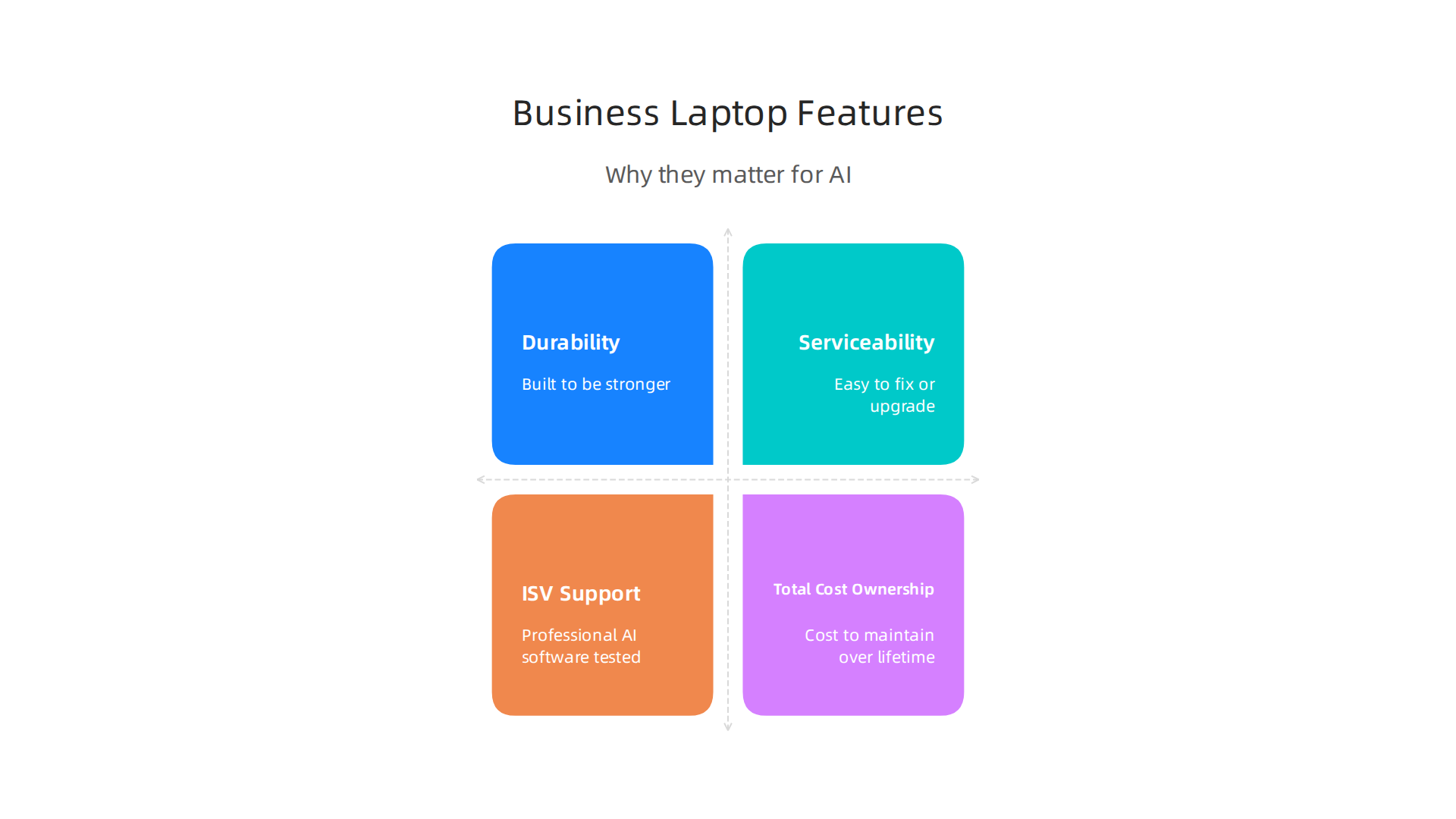
    Important features of business laptops relevant for AI work beyond raw power.

    • Durability (How Tough It Is): Business laptops are often built to be stronger. They can handle being carried around and opened many times. This is important for AI users who might take their laptop to different places. A strong laptop means fewer broken parts and less time away from your important AI projects.
    • Serviceability (How Easy to Fix): When something breaks, how easy is it to get fixed or upgraded? Business laptops are usually made so that IT teams can swap out parts like memory or storage more easily. This helps keep costs down over time. Keeping track of your business hardware lifecycle is key, as companies often refresh power-user laptops every 2 to 3 years to meet high demands, according to experts in 2026 Enterprise IT Hardware Refresh Cycles: 2026 Guide.
    • ISV Support (Software Works Right): ISV stands for "Independent Software Vendor." This means that companies making professional AI software have tested their programs on certain business laptops. When a laptop has ISV support, it’s more likely your specialized AI tools will run smoothly without unexpected problems.
    • Total Cost of Ownership (TCO): When buying a computer for business, the sticker price is just the start. You also need to think about how much it will cost to maintain, fix, and update it over its lifetime. Studies show the purchase price is only a small part of the total cost Enterprise Laptop Manufacturer Selection Guide. This is where good durability and serviceability save money.

    Picking the Right Laptop for Your AI Work

    To make a good choice, think about how you will use the computer. Here’s a simple guide to help match different business laptop families to common AI jobs:

    • Road Warrior (Someone Who Travels a Lot): If you are always on the go, you need a light laptop with a long battery life. Models like the lenovo thinkpad x series are perfect for this. They are thin, easy to carry, and reliable.
    • Data Scientist (Needs Lots of Power): For heavy AI tasks that need strong processing and lots of memory, you might look at more powerful thinkpad models, such as the lenovo thinkpad t14 gen 2 or other laptops in the T-series. These often have better cooling and can handle more demanding work. For even more power, a dedicated desktop like an ibuypower pc might be considered.
    • Developer Workstation (Building AI Tools): Similar to a data scientist, a developer needs top-notch performance. They might also need many ports to connect extra screens or devices. High-end ThinkPads or powerful custom desktops are good fits here.
    • Hybrid Worker (Mix of Home and Office): If you work both at home and in an office, you need a laptop that’s good for both. A balanced option like the lenovo thinkpad t14 gen 2 gives you good power for AI tasks while being easy to move around.

    Making smart choices about your AI hardware helps you unlock growth by selecting the right smart technologies in 2026. Stay ahead with daily AI and technology insights by signing up for The AI Newsletter Worth Reading.

    Connectivity, Expandability, and Peripherals: Building an AI-Ready Workstation

    Beyond choosing the right core computer, like a powerful thinkpad models laptop, how you connect it to other things is just as important for serious AI work. This means looking at ports, extra graphics cards, docking stations, and how your computer talks to the internet and stores files. These parts help make sure your AI tasks run smoothly and you can work without frustrating slowdowns.

    Ports: Your Computer’s Connection Points

    Modern laptops, including many lenovo thinkpad x series or the lenovo thinkpad t14 gen 2, come with different types of ports. For AI, you will want ports that are fast and versatile.

    • Thunderbolt or USB4: These are very important. They let you connect to many devices at once through a single cable. You can plug in fast external storage, multiple screens, and even an external GPU.
    • Ethernet: While Wi-Fi is common, a wired Ethernet connection is much faster and more stable. This is key for downloading large AI datasets or sending results to the cloud without interruptions.
    • Other USB Ports: Having a mix of USB-A and USB-C ports allows you to connect all your devices, from keyboards and mice to external hard drives.

    External GPU Enclosures (eGPUs): More Graphics Power

    Sometimes, even a strong laptop might not have enough graphics power for very demanding AI tasks. This is where an external GPU enclosure comes in. It’s a box that holds a desktop graphics card and connects to your laptop, usually through a Thunderbolt port. This can give your laptop a big boost in AI processing, making it almost as powerful as a desktop computer like an ibuypower pc.

    However, it’s good to know that using an eGPU can mean a small loss in performance. For instance, connecting an external GPU through Thunderbolt 4 might mean your graphics card works 15% to 30% slower than if it were inside a desktop computer My 1-Year Review of Using an External GPU (eGPU) with a Thin …. Newer connections like Thunderbolt 5 can reduce this loss to about 5% to 15% The best eGPU enclosures for Linux in 2026, from TB5 to …. For best results, it’s often better to use an external screen with your eGPU setup instead of your laptop’s built-in screen, as this can improve performance

    Explore community insights and guides on external GPU setups for enhanced performance.

    eGPU Performance: Internal vs. External Display. If you’re looking for extra power on a budget, sometimes even a used gaming PC for AI can offer a strong GPU.

    Docking Strategies: One Cable Does It All

    A docking station is a hub that connects to your laptop with one cable and lets you plug in all your other devices: monitors, keyboard, mouse, Ethernet, and external drives. This is super helpful if you move your laptop between different workspaces, making it easy to set up your full AI workstation quickly.

    Storage Tiers and Backup: Keeping Your Data Safe

    AI work often involves huge amounts of data. Having the right storage is crucial.

    • NVMe SSDs: These are the fastest storage drives, perfect for your operating system and active AI projects that need quick access to data.
    • SATA SSDs: Still very fast, but a bit slower than NVMe. Good for storing larger datasets that you don’t need to access constantly.
    • External Hard Drives: Useful for long-term storage or backups.

    Always have a backup plan for your important AI experiments and data. Losing your work due to a broken drive can set your projects back significantly. Make sure you regularly copy your data to another drive or a cloud service. This way, your local experiments are safe and you can always go back to a previous version if needed.

    After figuring out the best ways to connect your AI workstation, it’s time to think about the money side of things. For teams, buying computers like different thinkpad models for AI isn’t just about picking the fastest machine. It’s also about smart spending, making sure those computers last, and getting good value for your money. This is especially true when you’re looking at a fleet of lenovo thinkpad x series laptops or even powerful desktop ibuypower pc setups for your whole team.

    Budgeting for Your AI Team

    When you buy computers for a team, you usually think about two main ways to spend money:

    • Capital Expenses (Capex): This is when you buy something outright, like a new lenovo thinkpad t14 gen 2 laptop or an external GPU. It’s a big, one-time payment. This kind of spending is often seen as an investment that adds value over time.
    • Operating Expenses (Opex): These are the ongoing costs, like paying for software licenses each month, cloud services, or even repair services. These are smaller, regular payments that keep things running.

    Choosing between Capex and Opex depends on your team’s needs and how your company likes to manage money. For example, buying powerful workstations (Capex) might cost more upfront, but it could save you money in monthly cloud fees (Opex) if your team does a lot of AI work locally.

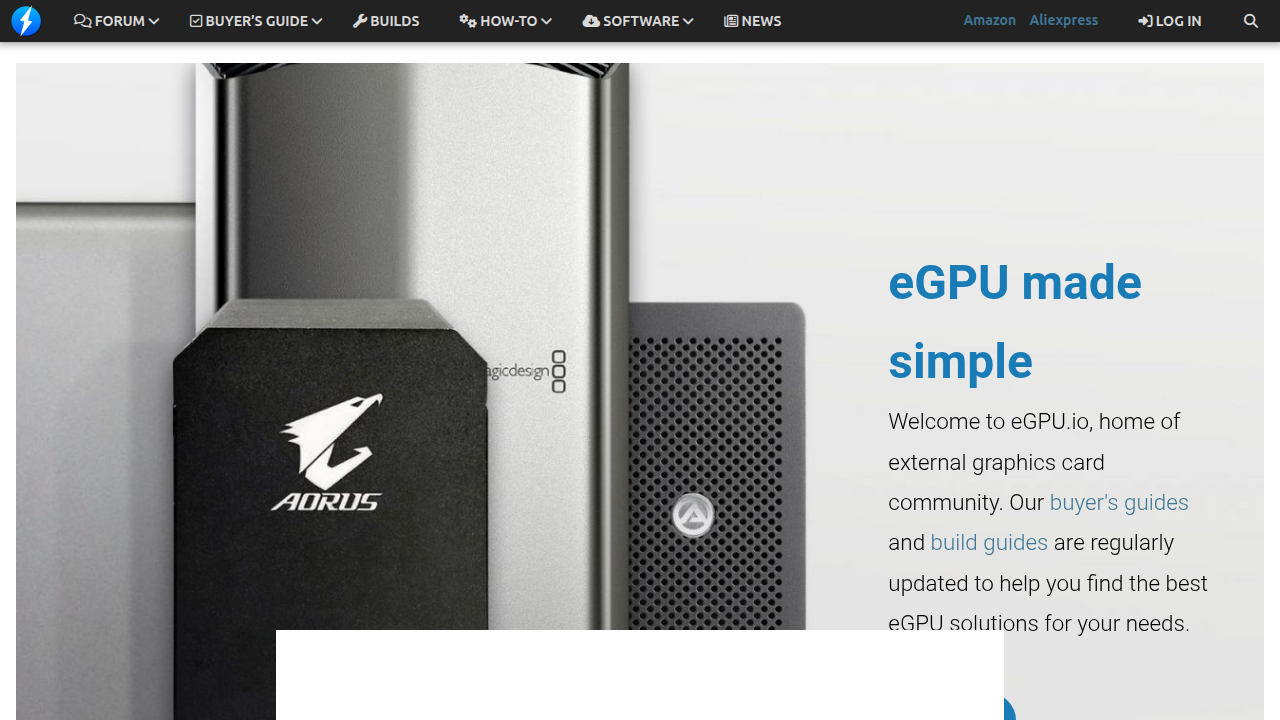
    Warranty and Service Tiers

    For businesses, a good warranty is super important. If a computer breaks down, you need to fix it fast so your team can keep working. Most manufacturers offer different warranty plans:

    • Standard Warranty: Covers basic repairs for a certain time, usually a year.
    • Extended Warranty: Gives you coverage for a longer period, like three or five years.
    • On-Site Service: This means a technician comes to your office to fix the computer, which saves time compared to sending it in.
    • Accidental Damage Protection: Covers things like spills or drops, which can be a lifesaver in a busy workplace.

    A better warranty can mean less downtime for your team, which keeps your AI projects on track.

    Expected Lifecycle of AI Machines

    How long should an AI-ready computer last? For simple office tasks, a computer might be good for five years or more. But for demanding AI work, new technologies come out quickly. A machine that’s great today might not be fast enough in three years.

    You can check how powerful a computer is using special tests called benchmarks. These tests measure how well a CPU, GPU, and NPU perform with AI tasks, giving you a good idea of its capabilities today and how long it might remain competitive Laptop AI Benchmarks 2026 — NPU TOPS & LLM tokens/sec. Paying attention to thermal management is also key to ensuring your laptops stay fast over time Why Laptop Cooling Matters More Than Ever in 2026.

    Return on Investment (ROI) Checklist for AI Tools

    Measuring ROI means looking at how much value you get back from your investment.

    Professionals analyzing financial data to determine return on investment for business decisions.

    For AI-capable computers, here’s a simple checklist:

    • Productivity Gains: How much faster can your team complete AI tasks? If a better computer cuts down project time by 20%, that’s a big win.
    • Software Licensing Costs: Factor in the price of AI software and tools. Sometimes, free or open-source tools can lower your Opex.
    • Cloud vs. Local Costs: This is a big one. Running AI models on your own powerful computers (local) means less money spent on cloud services. But if your team only needs AI power sometimes, cloud services can be cheaper. A general idea is that a gaming laptop can be 54% less costly than a desktop for similar performance, which might affect the cloud vs. local calculation too Gaming Laptop vs Desktop 2026: 54% Gap, $919 Entry.
    • Training and Learning: If your team learns how to use these powerful machines better, they become more efficient.

    By carefully planning your budget and thinking about ROI, you can make sure your team has the best tools for AI work without overspending. It helps to choose the right AI tools for business that deliver real results. For more details on smart spending, check out tips on tech for less AI operations cut costs without cutting corners in 2026. Also, understanding how to choose AI for business tools that deliver real results in 2026 can help ensure your investments pay off.

    Summary

    As AI becomes central to everyday business work in 2026, choosing the right laptops and desktops requires more than trusting marketing labels like

  • Unlock Growth by Selecting the Right Smart Technologies in 2026

    Unlock Growth by Selecting the Right Smart Technologies in 2026

    In 2026, the world of technology is moving faster than ever before. New smart technologies and AI tools are popping up all the time. This rapid change brings many new chances for businesses and people to do things better. But it also means there’s a lot of information to sort through. For leaders trying to make smart choices, it can feel like too much.

    A leader contemplates complex choices amidst a rapidly evolving technological landscape, striving to make informed decisions for their business.

    It’s tough to know which new tool is truly helpful and which is just a passing trend. How can you tell what will really make your business stronger or help your team be more fit for the future? This challenge is often called "information overload." You might feel lost trying to find the best new apps, smart devices, or ways to use augment AI. For example, over half of homes in the U.S. now use smart devices in 2026, showing how quickly these tools are becoming part of daily life [The State of Smart Home]. Also, about half of adults in the U.S. are now using AI chatbots [Americans and AI 2026: Chatbots, Smart Devices and Views on Impact]. This fast growth means everyone needs clear guidance.

    This guide is here to help you cut through the noise. We will give you simple plans and the newest facts to help you pick the best smart technologies. We’ll show you tactics to understand, choose, and use these tools well. Our goal is to help you improve your organizational tech fitness. This means your business will be strong and ready to use technology in the best way possible. By doing this, you can make sure your choices about wearable technology and other smart tools lead to real success. Staying updated on new tech can be a big job, so it helps to have reliable insights. If you want to keep up with daily changes, you should The AI Newsletter Worth Reading.

    Screenshot of The Deep View's newsletter subscription page, offering insights into AI and technology trends.

    We will show you how to truly thrive with technology, not just keep up. Understanding and using new technology well is key for any business today. This means Tracking Major Technology News for Smart Business Decisions in 2026 is more important than ever.

    The homepage of AI Tools News Today, a resource for tracking major technology news relevant to smart business decisions.

    Understanding and using new technology well is indeed key for any business today. But it’s not just about keeping up. It’s about seeing how these new tools can truly help your business grow and stay ahead. This is where smart technologies really shine, offering big benefits for your money and giving you an edge over others.

    Business impact: Why smart technologies matter for ROI and competitive edge

    Smart technologies are changing how businesses work in 2026. They help companies do things faster, better, and in ways that make customers happier. The main idea here is getting a good return on your investment (ROI) and staying competitive.

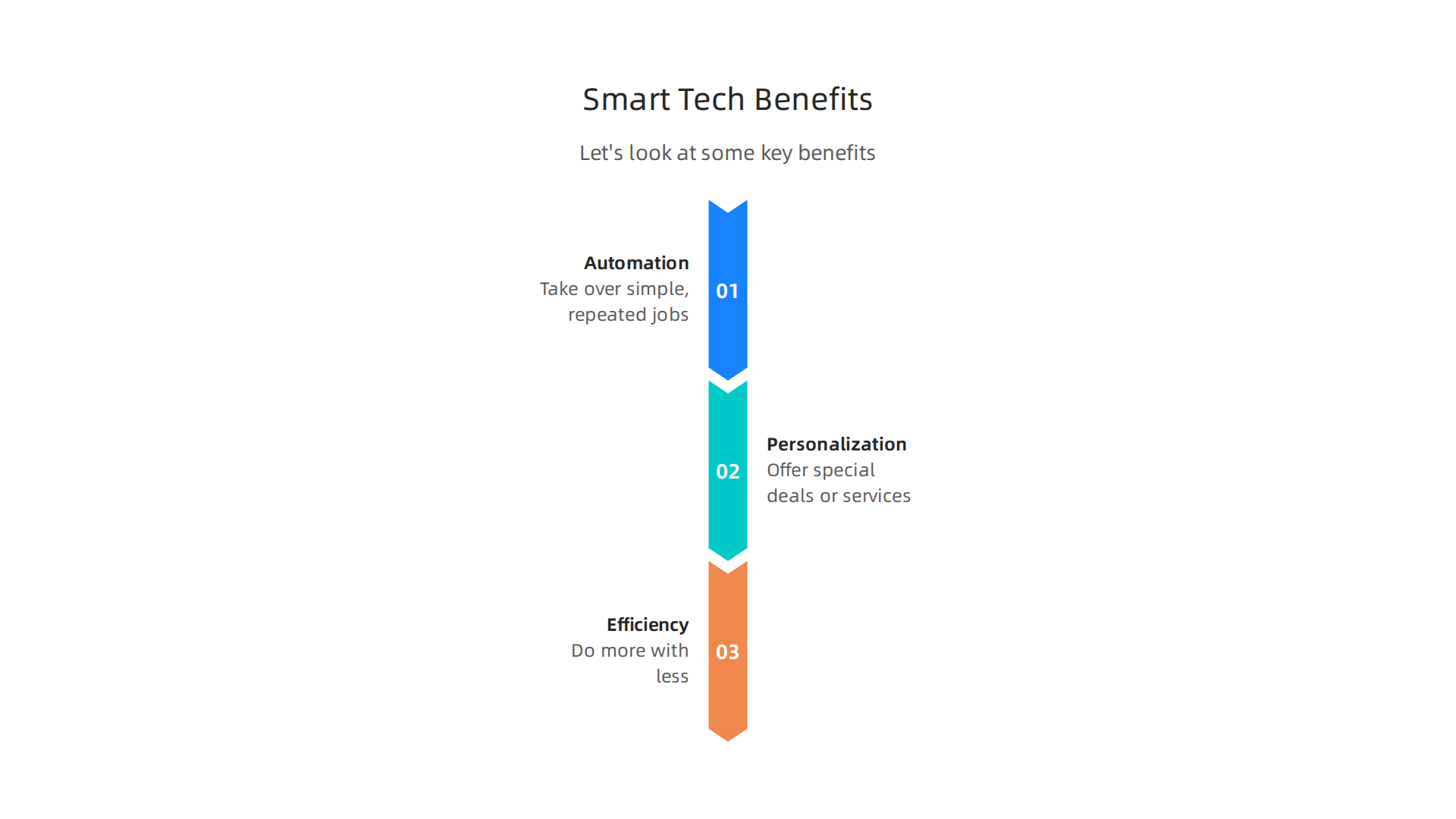
    Let’s look at some key benefits:

    Smart technologies like AI and automation can revolutionize business operations, enhancing efficiency, personalization, and overall productivity.

    • Automation: Smart tools can take over simple, repeated jobs. Think of a robot doing easy tasks in a factory, or software that answers common customer questions. This frees up your team to focus on bigger, more creative work. It saves time and money. About 72% of large businesses have put at least one AI system into use, showing how much companies rely on this for efficiency [67 AI Adoption Statistics for 2026 — Enterprise & SMB Data].
    • Personalization: Imagine if every customer felt like your business knew exactly what they wanted. Smart technologies, like those that use augment AI, can help with this. They can learn what customers like and offer them special deals or services. This makes customers happier and more likely to stick with your business.
    • Efficiency: When you use smart tools, your business can often do more with less. They can help you find problems faster, plan better, and use your resources wisely. This means you get more done in less time, making your business stronger and more able to handle new challenges. For example, using AI can help cut costs without cutting important services, leading to greater overall efficiency and profit for companies aiming for Tech For Less: AI Operations Cut Costs Without Cutting Corners in 2026.

    These benefits help your business save money and make more money. They also help you stand out. When you use the newest smart technologies wisely, you can offer better products or services, work faster than your rivals, and build stronger bonds with your customers. This is what gives you a real competitive edge.

    A team celebrates a significant business achievement, illustrating the positive outcomes of strategically adopting smart technologies for a competitive edge.

    However, bringing in new smart technologies isn’t always easy. Businesses often face hurdles like:

    • Skills: Your team might not know how to use these new tools. It takes time and training to learn.
    • Integration: New technologies need to work well with your old systems. Sometimes, they don’t talk to each other easily, which can cause problems.
    • Cost: Buying and setting up new systems can be expensive. Businesses worry if the money they spend will really pay off. For instance, concerns about data privacy, trust, and security are still top worries for many people adopting new tech in 2026 [Tech Use and Adoption Keeps Surging Among Older Adults]. High costs and system complexity are also often cited as barriers to adopting new technology [Survey: Older Adults Adopt Tech at Steady Pace].

    This is where being "tech fit" comes in. Just like being physically fit helps you handle life’s challenges, being tech fit helps your business handle new technology. It means your company is ready to learn, adapt, and make smart choices about technology. This reduces friction when bringing in new systems, makes it easier to train your team, and helps you pick the right tools that truly add value. For businesses, learning how to select the best smart technologies that align with your goals is vital, which is why it’s important to know How to Choose AI for Business Tools That Deliver Real Results in 2026.

    By focusing on tech fitness, companies can better understand the true worth of new tools, including things like wearable technology for tracking data or augment AI for decision making. This helps them move past the common problems and use technology to their full advantage, creating a path for constant growth and innovation.

    Becoming "tech fit" means more than just knowing about smart tools. It also means understanding the special kinds of new technology that are changing how businesses work in 2026. Let’s look at some key innovations and what they mean for your business.

    Explore the foundational smart technologies shaping business in 2026: Edge AI, TinyML, and Ambient Computing.

    Key technical innovations: Edge AI, TinyML, ambient computing and sensors

    These new developments in smart technologies are making things possible that were once just ideas. They help businesses get better at what they do, often in ways that save money and make customers happier.

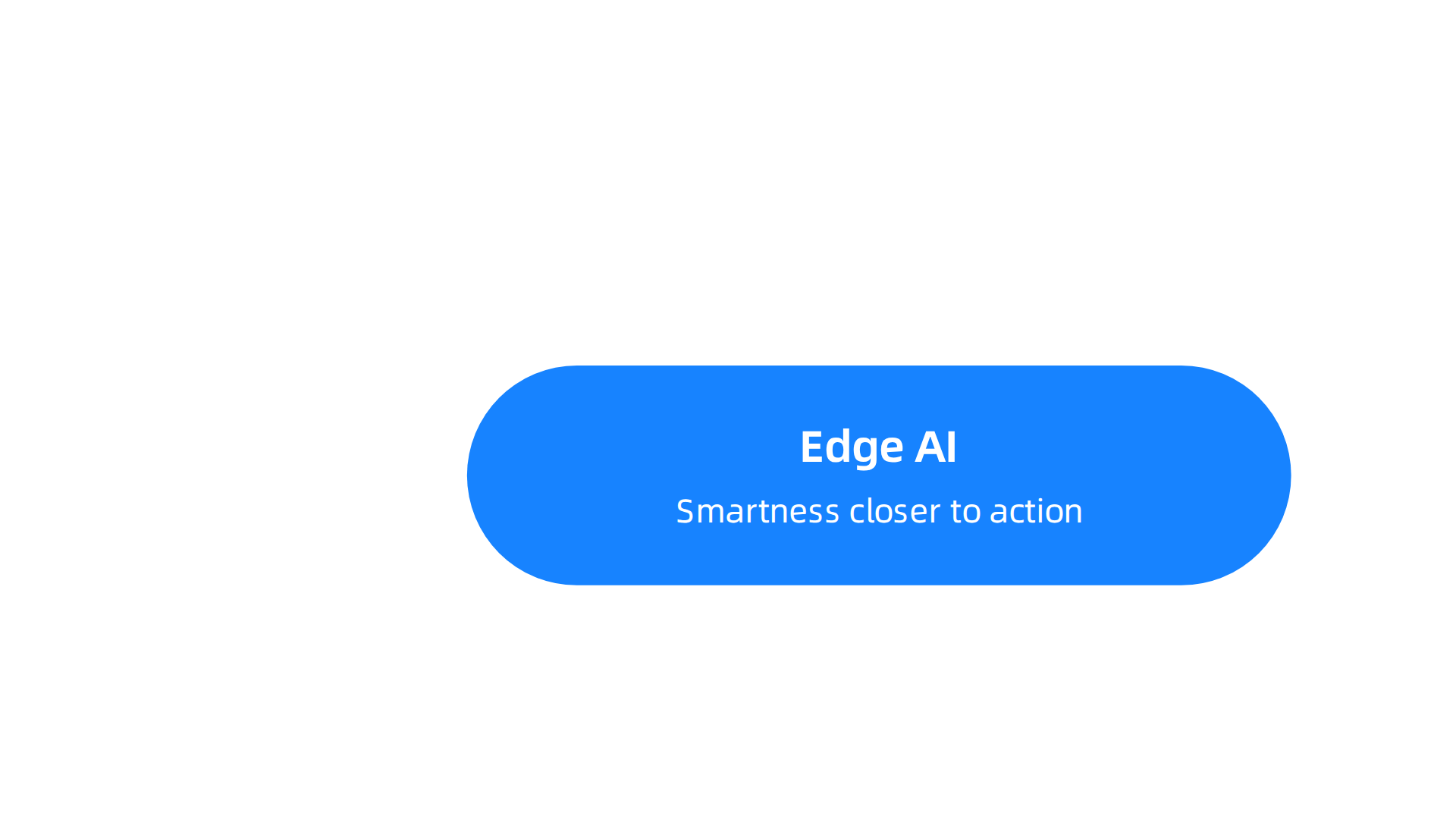
    Edge AI: Smartness on the spot

    Edge AI is about bringing artificial intelligence closer to where the action happens. Instead of sending all data to a big cloud server far away for thinking, Edge AI lets smart devices do their own thinking right there. Imagine a security camera that can tell the difference between a person and an animal instantly, without needing to ask a distant computer. This is Edge AI at work.

    This kind of smart technology offers big benefits. It makes decisions much faster because data doesn’t have to travel far. It also helps with privacy, as less sensitive information leaves the device. Plus, it can save on internet costs and power. For product teams, this means creating devices that are quicker and more private. Operations teams need to make sure these devices are secure and work well together. Edge AI is quite mature now, with many solutions ready for use, making it a top choice for those looking for Best Edge AI Solutions: Top 11 in 2026.

    Screenshot of Cloudian's website, a provider of resources and solutions related to AI infrastructure and Edge AI.

    It also helps cut down on sending too much data to the cloud, saving money and boosting speed, as processing happens locally on devices like cameras and IoT systems according to experts discussing the difference between Edge AI vs Cloud AI.

    TinyML: AI for tiny devices

    TinyML is like Edge AI’s little cousin. It’s about putting smart thinking (machine learning) into very small, low-power devices. Think of the kind of chip that might go into a smart button or a simple wearable technology device. These tiny chips can still learn and make simple decisions, even though they use very little power.

    This is super helpful for things that need to run for a long time on a small battery, like health trackers or small sensors in factories. TinyML makes it possible to add smart features to almost anything. While newer than Edge AI, TinyML is quickly gaining ground, showing strong real-world use especially when internet service is limited and quick responses are needed Tiny Machine Learning and On-Device Inference: A Survey of Applications, Challenges, and Future Directions. Companies are even working on how to properly test these systems to compare their performance, using tools like MLPerf® Tiny MLPerf Tiny: Benchmarking AI at the Edge.

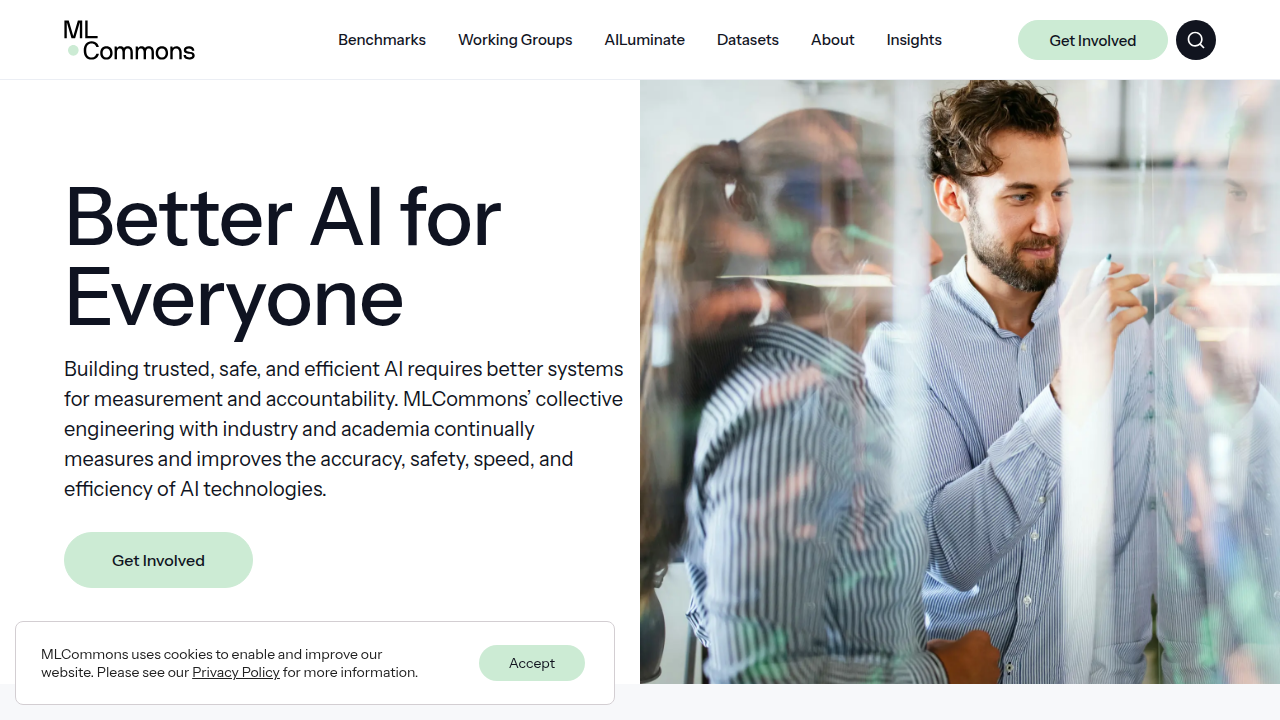
    The homepage of MLCommons, an open engineering consortium focused on accelerating machine learning innovation, including benchmarking tools like MLPerf Tiny.

    For product and operations teams, working with TinyML means learning new ways to build and manage very efficient systems that can run AI right on the device TinyML for On-Device and Edge Analytics in Wireless Networks.

    Ambient computing and sensors: Making our world smart

    Ambient computing means that technology is always around us, working in the background to make our lives easier. It’s often invisible, just like the air we breathe. Sensors are the key parts of this. They are like the eyes and ears of these smart environments. These tiny parts collect information about everything from temperature and light to movement and sound.

    Together, ambient computing and sensors create smart spaces like connected homes, clever offices, and efficient factories. For example, smart lights that turn on when you enter a room or a factory machine that signals when it needs repair are thanks to these smart technologies. Product and operations teams must think about how these sensors collect data and how it’s used safely and effectively. They also need to make sure these systems fit well with existing tools, a key part of maintaining good tech fitness. Understanding these types of new technology can help businesses innovate and grow, fitting into the larger strategy of Mastering Behavioral Tech for Business Growth and Impact.

    We just talked about how cool new smart technologies like Edge AI and TinyML are changing things. But how does a business know if it’s ready to use these new tools well? This is where "tech fitness" comes in.

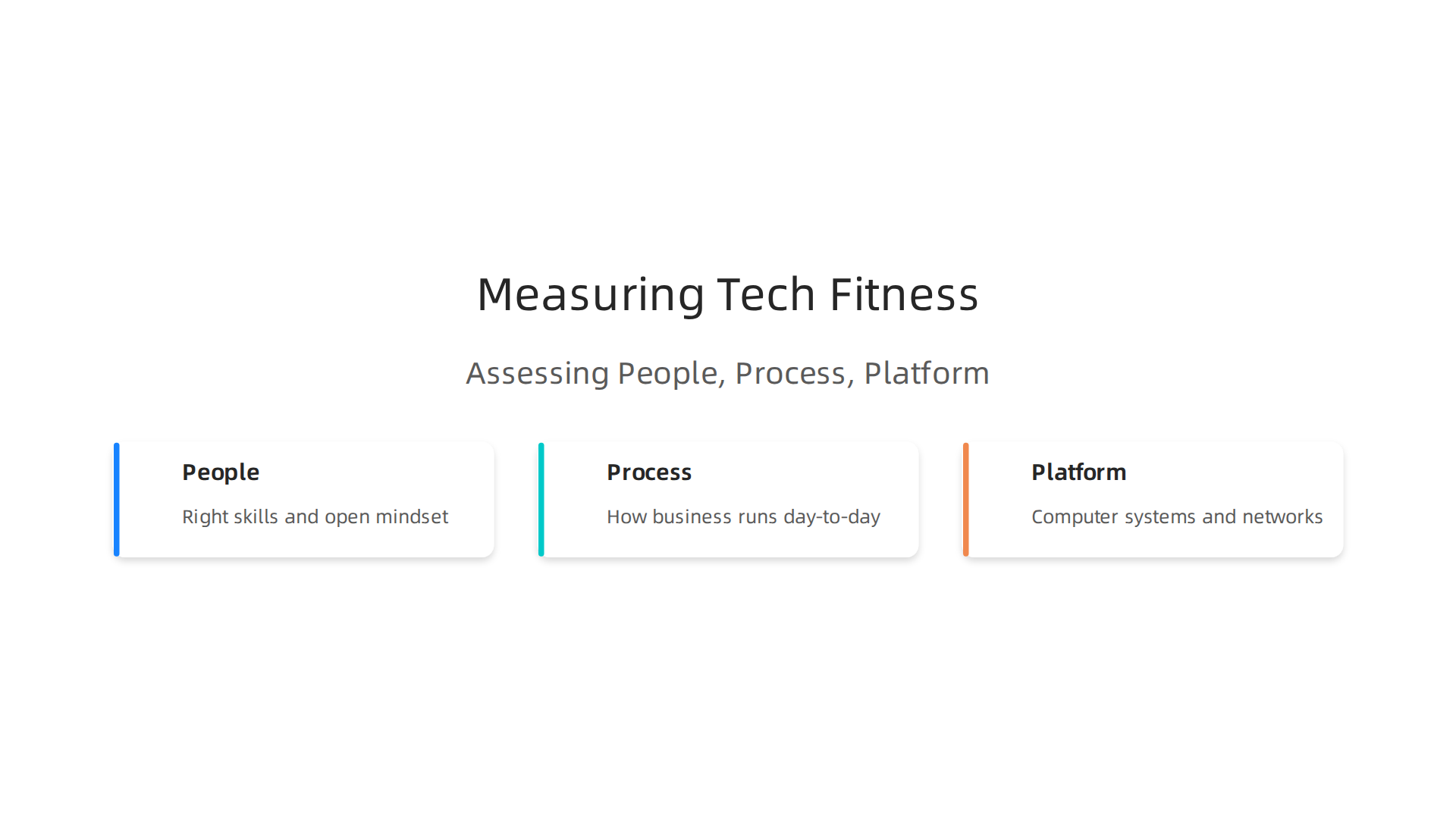
    Measuring and improving tech fitness: people, process, platform

    Think of tech fitness like being ready for a big race. It’s not just about having the latest running shoes (the smart technologies); it’s also about having strong legs, a good plan, and the right food. For a business, tech fitness is how well it can look at, bring in, and keep running smart technologies in a dependable way. It means being able to change and grow with new tech without big problems.

    To truly use smart technologies well, businesses in 2026 need to check three main areas: their people, their processes, and their platforms.

    Assessing a business's 'tech fitness' involves evaluating its People, Processes, and Platforms to ensure readiness for new smart technologies.

    A group of professionals reviews documents and discusses strategies, symbolizing the assessment of a company's readiness for new technologies.

    The people part: Do we have the right skills?

    First, think about the people who work for the business. Do they understand new smart technologies? Are they excited to learn new things? This is about having the right skills and a mindset that’s open to change. If your team doesn’t know how to use an AI tool, or how a new piece of wearable technology works, the business won’t get the full benefit. It’s like having a fancy car but no one knows how to drive it. Checking if your people are ready for change is a big step for success, as experts discuss how to assess Organizational Readiness Assessment: Your 2026 Success. Building this readiness involves clear steps to help everyone get on board with new ideas.

    The process part: How do we do things?

    Next, look at how the business runs day-to-day. This means its "processes."

    • Data Readiness: Smart technologies need good information to work. Is your business good at collecting, storing, and using data? If your data is messy or hard to find, even the smartest AI tool will struggle.
    • Rules and Safety: When using new tech, especially those that collect lots of data, you need clear rules. How will you keep information safe? Who gets to see what? Having strong rules and plans for new technology helps avoid problems and build trust. This is sometimes called "governance." Learning Understanding What is Information Technology for Business Success in 2026 is key to setting up these processes.

    The platform part: Are our systems strong?

    Finally, think about the "platforms." These are the computer systems, tools, and networks the business already uses.

    • Making New and Old Tech Work Together: Can new smart technologies easily connect with your existing systems? If they can’t, it will be hard to make them useful.
    • Staying Strong and Secure: Can your current systems handle the extra work that new tech might bring? Are they safe from hackers? Keeping systems strong and reliable is very important, especially with the rise of complex smart technologies. Having a good plan for technology and organization goes hand-in-hand to ensure success, as noted in a Planning and Readiness Framework for Organisational.

    By regularly checking these three areas, businesses can keep improving their tech fitness. It helps them choose the right tools and make sure they get real results from their investments in smart technologies.

    Measuring how ready your business is for new tech, or its "tech fitness," helps you see if you can use smart tools well. The next step is picking the right smart technologies for your business goals. It’s like picking the best tool for a job. You wouldn’t use a hammer to cut wood, right? You need to carefully look at what each new smart technology offers.

    Selecting the right smart technologies: an evaluation framework

    Choosing new smart technologies is a big deal for any business in 2026. You want to make sure the money you spend brings good results. To do this, it helps to have a clear way to check and compare different tools. Think of it as a checklist to help you make smart choices.

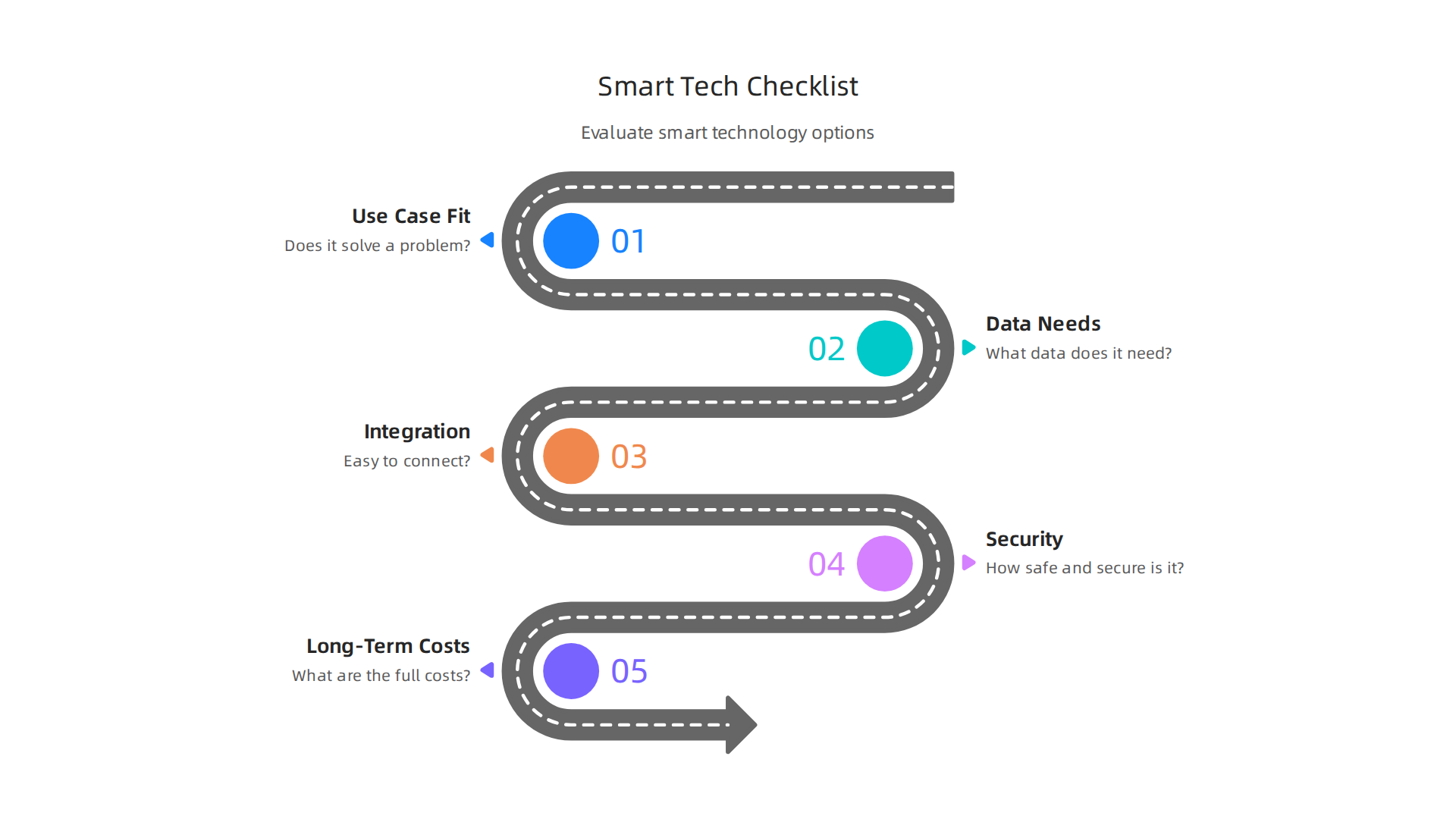
    A step-by-step framework to evaluate new smart technologies, ensuring they align with business needs and deliver value.

    1. Does it fit what you need? (Use Case Fit)

    The first thing to ask is: does this smart technology actually solve a problem for us? Or does it help us do something better? For example, if you want to track how healthy your workers are, a wearable technology that counts steps or monitors sleep might be a good fit. If you want to make a factory run smoother, an Edge AI system that watches machines could be helpful. You need to be very clear about the job you want the technology to do.

    2. What kind of data does it need? (Data Needs)

    Many smart technologies, especially those that use augment AI, need a lot of information to work. Ask yourself:

    • What data does this tool need to get started?
    • Where will that data come from?
    • How will we keep that data safe?
      If your business doesn’t have the right data, or if it’s messy, even the best smart technology won’t help much.

    3. How easy is it to connect? (Integration Complexity)

    New smart technologies usually need to work with your existing computer systems. If a new tool can’t easily connect with what you already use, it can cause a lot of headaches. It’s like trying to plug a new device into an old outlet that doesn’t fit. You want solutions that fit together smoothly without needing a lot of extra work. This helps keep things running without big interruptions.

    4. How safe and secure is it? (Security)

    When you bring in new smart technologies, you’re often dealing with important information. It’s super important to make sure this information stays safe from bad guys or accidents. Look into how the technology protects your data. What plans does the company selling the tech have to keep things secure? Security should always be a top concern.

    5. What are the full costs over time? (Long-Term Costs)

    The price you see upfront is not the only cost. You need to think about the "total cost of ownership." This includes things like:

    • Monthly or yearly fees
    • Costs to set it up
    • Costs to train your people
    • Money for ongoing support and updates
    • Hidden fees
      Making sure you understand all these costs helps you avoid surprises later on. Good IT Procurement Best Practices 2026 help businesses look at all these expenses.

    Try a small test first: Run rapid, low-cost pilots

    Before you spend a lot of money on a new smart technology, it’s a smart idea to try it out in a small way. This is called a "pilot program."

    A team collaborates around a whiteboard, sketching out plans for a new initiative, representing the careful planning of a pilot program for new technology.

    You pick a small part of your business, try the new tech there, and see how it works.

    • Start small: Don’t change everything at once. Test the technology on a small project or with a few team members.
    • Watch closely: See if it actually solves the problem you identified. Is it easy for your team to use?
    • Measure results: Did it save time? Did it save money? Did it make customers happier?

    This helps you learn if the technology is a good fit without making a huge investment. For example, testing TinyML systems often involves benchmarking their performance to see how well they work on small devices before wider use, as shown by MLPerf Tiny: Benchmarking AI at the Edge.

    By using this step-by-step checklist and trying out new tools in a small way first, your business can choose the right smart technologies and make sure they truly help you grow.

    Ready to dive deeper into the world of AI tools and how they can shape your business decisions? Stay informed and ahead of the curve.
    The AI Newsletter Worth Reading
    For more advice on finding the best solutions, explore how to choose AI for business tools that deliver real results in 2026.

    After picking the best smart technologies through careful checking, the next big step is putting them to work. This is called implementation. It sounds simple, but it can have its own set of tricky parts. Knowing these problems beforehand helps your business avoid them and make sure your new tools truly help you grow.

    Implementation strategies and common pitfalls to avoid

    Even after you pick the right smart technologies for your business in 2026, getting them up and running smoothly can be a challenge. It’s like buying a new car; you still need to learn how to drive it well and keep it maintained. Many businesses face common problems when they roll out new tech.

    What can go wrong during rollout?

    1. Data Changes (Data Drift): Smart technologies, especially those that use augment AI, learn from data. If the data changes over time, or if the way you collect it shifts, the technology might start making wrong guesses. This is like a smart system being trained on old information that no longer matches how things are now. You need to keep an eye on the quality of your data.
    2. Not Watching Closely Enough (Poor Monitoring): Once a new system is in place, it’s easy to just let it run. But you need to watch how it’s working. Is it saving time? Is it making things easier for your team? Without checking regularly, you might not notice problems until they’re big. This ongoing watch is key to making sure the tech stays helpful.
    3. People Problems (Staff Change Management): People don’t always like new things. Your team might be used to doing things a certain way. Bringing in new smart technologies can make them feel worried or confused. A study on what works and what doesn’t in technology adoption highlights the need to get people on board for success. If your staff isn’t ready or doesn’t want to use the new tools, even the best technology won’t work well. This kind of problem has been seen in cases like integrating smart tech in facility management, where employee buy-in was crucial Case Study: Successful Integration of Smart Technologies in Facility Management.

    How to make implementation smoother (Best Practices)

    To avoid these common pitfalls, follow a simple playbook:

    • Talk about it a lot: Explain why the new smart technologies are needed and how they will help everyone. Be clear about the benefits for your team, not just the business.
    • Train your team well: Provide good training so everyone knows how to use the new tools. Make sure there’s help available when they have questions. Proper training helps build confidence.
    • Roll it out slowly: Remember the "pilot program" idea from before? Don’t switch everything at once. Bring in the new tech step by step, testing and learning as you go. This helps find and fix small problems before they become big ones. Businesses often learn valuable lessons from digital transformation case studies Digital Transformation Case Studies: Lessons from Global ….
    • Listen to feedback: Ask your team what’s working and what’s not. Their ideas can help you make the smart technologies even better. This feedback loop is very important for continuous improvement.
    • Keep an eye on results: Just like with monitoring, always check if the technology is meeting your goals. If not, figure out why and make changes. This helps your business stay flexible and adapt.

    Implementing smart technologies is an ongoing journey, not a one-time event. By being prepared for challenges and following these steps, your business can successfully use new tools to keep growing in 2026 and beyond. Staying updated on the many ways businesses adopt AI for growth can also help. Check out The Innovation Line 2026 How Businesses Adopt AI For Growth for more ideas.

    Making smart technology work well is also about money. It’s important to know all the costs involved, how much good the technology will do, and how to pick the right company to buy it from. This helps your business make smart choices and see real benefits.

    Cost, ROI, and vendor considerations for smart tech investments

    When you think about bringing new smart technologies into your business, it’s not just the sticker price that matters. You need to look at the "total cost of ownership," or TCO. This means all the money you’ll spend from the start to long after you’ve bought the tech.

    Understanding the full cost of smart tech

    Think of TCO as the complete price tag. It includes a few main parts:

    • Buying the stuff (Hardware and Software): This is the upfront cost. It’s for things like new sensors, smart devices, and the software that makes them run. For example, if you’re getting wearable technology for your team, the cost of the devices themselves is part of this.
    • Making it all work together (Integration): New smart technologies often need to connect with your old systems. This can take extra work and special tools, which costs money. It’s like making sure all your new smart appliances can talk to each other.
    • Keeping data flowing (Data Operations): Smart technologies use a lot of data. You’ll need ways to store it, keep it safe, and make sure it’s always ready for use. Managing this data is an ongoing cost.
    • Fixing and updating things (Maintenance and Support): Like any tool, smart tech needs care. There will be costs for fixing problems, updating software, and getting help when things go wrong. For example, using augment AI tools means you might need experts to tune them over time.

    Experts suggest that when figuring out the total cost, you should include these main items: subscription fees, setting it up, ongoing support, and even training your team. A clear procurement guide from 2026 also points to these factors as key parts of IT procurement best practices IT Procurement Best Practices 2026.

    Getting money back (Return on Investment or ROI)

    ROI is about seeing if the money you spend brings more money or savings back. For smart technologies, this might not happen right away. You need to be realistic about how long it will take.

    To figure out your ROI for smart technologies:

    • Set clear goals: What do you want the tech to do? Save time? Make customers happier? Boost sales?
    • Measure before and after: Keep track of your goals before you put the tech in, and then see how much things improve afterward.
    • Think long-term: The real benefits of smart technologies and augment AI often show up over time, not just in the first few months. You can look at resources that explain how to get real ROI from AI Marketing Cloud in 2026 to better understand this.

    Picking the right company (Vendor Considerations)

    Choosing the right company to buy your smart technologies from is very important. It’s not just about the price they offer. You need to look at who you’re partnering with.

    Here’s a checklist for comparing vendors:

    • Service Agreements (SLAs): These are promises about how well the tech will work and how fast they’ll fix problems. Make sure they are clear.
    • Support: How easy is it to get help when you need it? Do they offer training? Good support is a must for new smart technologies.
    • Future plans (Roadmap Alignment): Does the vendor have a clear plan for making their tech better? Do their future plans match what your business needs? This is especially important for fast-changing areas like augment AI.
    • Their own stability: Is the company strong and reliable? You want a partner that will be around for a long time.

    Using a careful process to check vendors means looking at many things, not just the cost. It helps you find partners that truly fit your business goals Key Supplier Selection Criteria Every ….

    To stay on top of the latest AI and tech insights that can help your business make smart investment decisions, consider subscribing to The AI Newsletter Worth Reading. Get clear daily AI updates from The Deep View Newsletter.

    Summary

    This guide explains how businesses in 2026 can cut through technology noise and choose smart tools that actually deliver value. It describes why smart technologies—like Edge AI, TinyML, ambient computing, and wearables—matter for efficiency, personalization, and competitive advantage, while also highlighting common adoption barriers such as skills gaps, integration headaches, and hidden costs. The article lays out a practical framework to measure "tech fitness" across people, processes, and platforms, and offers a step-by-step evaluation checklist covering use-case fit, data needs, integration complexity, security, and long-term costs. It recommends running rapid pilots, monitoring for data drift, and following best practices for rollout and change management to ensure adoption. Finally, the guide covers how to calculate total cost of ownership, estimate ROI over time, and pick vendors with the right SLAs and roadmaps so your investments scale and continue to pay off.