Introduction
Have you ever wished your phone could actually do the heavy lifting for you? Not just answer questions or set timers, but really handle the boring stuff like scheduling meetings, organizing your email, or helping you create content. That’s exactly what Galaxy AI is starting to deliver in 2026.

Galaxy AI is quickly becoming a serious player in the AI assistant space. Samsung has been pushing hard to make AI more useful and personal. The Galaxy S26 series now features what Samsung calls "agentic AI." This means the AI can act on your behalf to automate workflows, handle scheduling, and much more. Samsung shared the full details at their Unpacked event in February 2026.
So what makes Galaxy AI different from other tools like HeyGen AI or Dreamina AI? A big part of it is on-device intelligence. Instead of sending all your data to the cloud, Galaxy AI processes a lot of information right on your device. This keeps your data more private and secure. Samsung has been open about how trust, security, and privacy shape the future of AI, especially during their talks at CES 2026.
For businesses, this is big news. Teams in content creation, marketing, and operations are starting to explore what Galaxy AI can do. Whether it’s helping with writing, generating ideas, or automating daily tasks, the potential is real. According to a detailed whitepaper on the Galaxy AI revolution, Samsung is leading with technologies focused on communication, creativity, productivity, and health.
In this article, we will give you a complete and practical overview of Galaxy AI. We will look at the technology behind it, how it works in real life, and whether it can actually deliver a good return on investment for your business.
If you want to stay ahead in the fast-moving world of AI, it helps to have a trusted source of news. We recommend signing up for The Deep View Newsletter. It delivers clear daily AI updates straight to your inbox so you never miss what matters.
And if you are curious about other smart tools that can boost your productivity, check out our guide on how to choose and use an AI powered research assistant. It covers practical tips for picking the right AI helper for your needs.
What is Galaxy AI? Core Architecture and Philosophy
So what actually powers Galaxy AI? It helps to understand the engine before you push the pedal.
Galaxy AI is not one single tool. It is a full suite of AI models and features built by Samsung. At the February 2026 Unpacked event, Samsung introduced what they call "agentic AI" for the Galaxy S26 series. This means the AI can act on your behalf. It can handle tasks like scheduling meetings or organizing your inbox without you needing to guide every step.
The secret to how Galaxy AI works lies in two core ideas: privacy and personalization.
First, privacy. Samsung processes a lot of the AI work directly on your device. Your photos, messages, and personal data do not have to travel to a cloud server to be analyzed. This on-device processing is a big deal. Samsung has been open about how trust and security shape the future of AI, especially during their discussions at CES 2026. You get powerful AI help without giving up control of your information.
Second, personalization. Galaxy AI learns from how you use your phone. It adapts to your habits, your tone, and your schedule. Over time, it becomes more helpful because it knows what matters to you. The system blends on-device smarts with cloud intelligence when needed. This hybrid approach means you get fast responses for simple tasks and deeper power for bigger jobs.
According to a detailed whitepaper on the Samsung Galaxy AI revolution, Samsung’s technology focuses on four main areas: communication, creativity, productivity, and health.
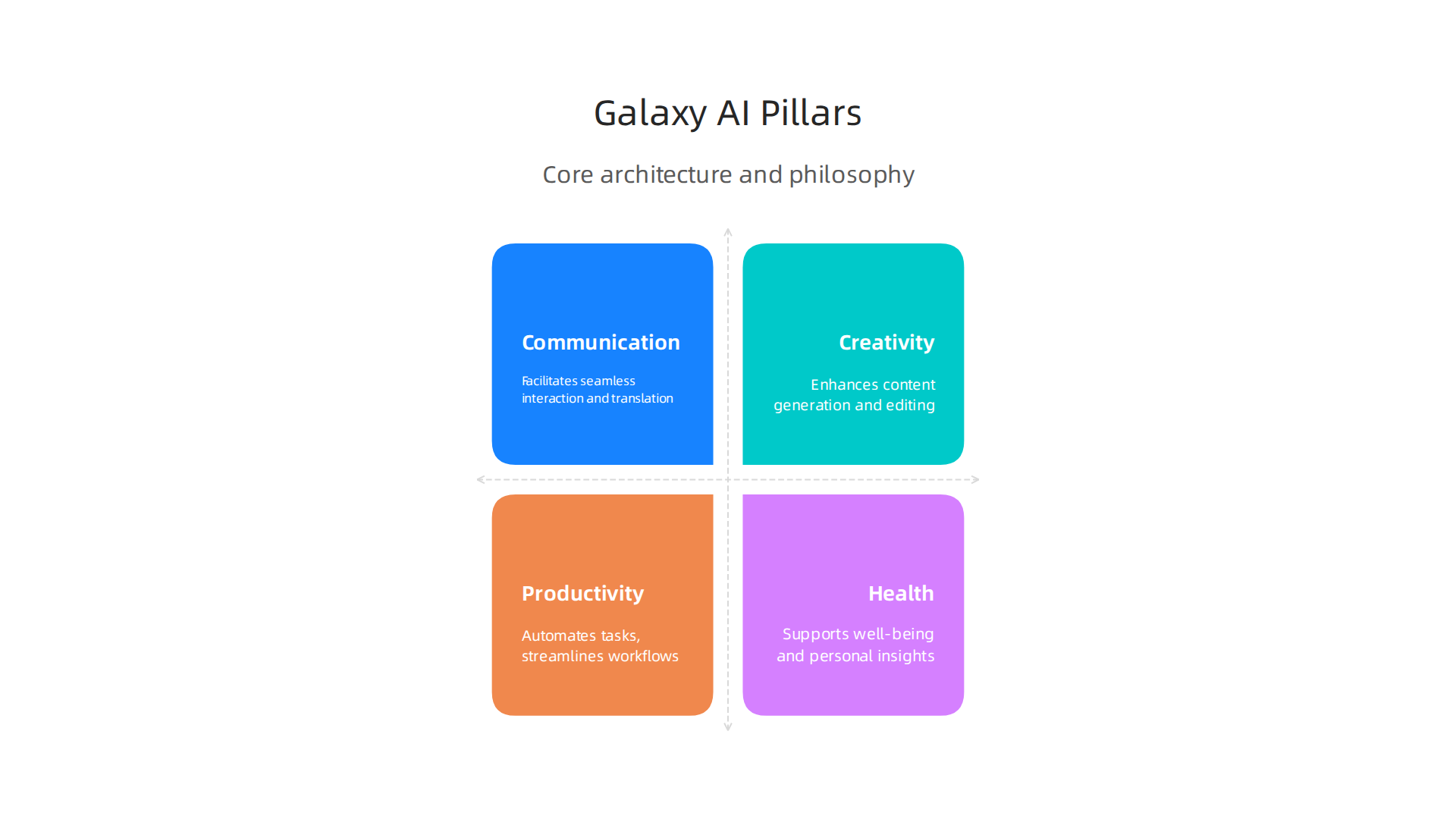
Understanding these pillars helps you know which features to use for your specific workflow.
When you know how Galaxy AI thinks about privacy and personalization, it becomes easier to pick the right tools for your day. For example, you might use on-device translation for a private chat but use cloud-powered image editing for a creative project. Knowing the architecture helps you work smarter.
If you want to explore other smart assistants that can boost your daily workflow, check out our guide on how to choose and use an AI powered research assistant. It covers practical tips for picking the right helper for your needs.
And if you want to stay updated on all things AI without the noise, subscribe to The Deep View Newsletter. It sends clear daily AI news straight to your inbox so you never miss what matters.
Galaxy AI for Content Creation: Text, Image, and Video Tools
Now that you understand the engine behind Galaxy AI, let us look at how it helps you create content. Whether you write emails, edit photos, or make short videos, Galaxy AI brings powerful tools right to your phone.

Galaxy AI includes generative text assistants that can help you write messages, summarize long articles, or translate languages in real time. This is important for professionals who need to move fast. A 2026 benchmarks report on the state of AI in marketing shows that content velocity is a top trend reshaping the industry. Having an AI powered assistant on your device means you can draft a reply, polish a post, or summarize a meeting transcript without switching apps. It keeps your flow going.
When it comes to images and video, Galaxy AI shines because it does the work right on your device. You do not need to upload your personal photos to a cloud server to edit them. This on-device processing means low latency and better privacy. You can remove objects from a video, adjust lighting in a photo, or generate a new background with just a few taps. It is like having a mini desktop editor in your pocket, but with the extra benefit of working offline.
How does this stack up against tools like ChatGPT or Adobe Firefly? Those tools are powerful, but they usually need an internet connection and a separate account. Galaxy AI is built directly into the Samsung ecosystem. It is always ready, it learns your style, and it does not send your data to a distant server. For marketers following the latest AI investments, having a mobile-first, offline-capable creation suite is a major advantage.
If you are curious about how AI creativity compares to human creativity across different platforms, check out our analysis on human or AI creativity.
The world of AI content creation is changing fast. Do not get left behind. Subscribe to The Deep View Newsletter. It sends clear daily AI updates straight to your inbox so you always know what tools actually work.
Galaxy AI for Marketing: Personalization and Campaign Automation
Content creation is just the start. The real magic happens when you use Galaxy AI to run smarter marketing campaigns. In 2026, personalization is no longer a nice to have. It is what customers expect. Galaxy AI helps you deliver it, right from your phone.

Here is how. Galaxy AI can analyze on-device data to build hyper personalized customer segments. It looks at behavior, preferences, and past interactions without sending private data to the cloud. This matters because 46% of marketers now use AI to scale creative work, according to the 2026 Digital Advertising Trends Report by Smartly.
And up to 30% of marketing budgets get wasted on generic outreach. Galaxy AI helps you stop that waste.
You can also automate repetitive campaign tasks. Galaxy AI writes ad copy variations for you. It sets up A/B tests automatically. It even integrates with major marketing platforms so your campaigns run on autopilot. This matches what the State of AI in Marketing 2026 benchmarks report calls content velocity: the ability to produce and test more content in less time. Early adopters report better conversion rates and much faster campaign setup times.
Think about what that means for your workflow. Instead of spending hours writing five versions of a Facebook ad, you let your AI powered assistant handle the first draft. You just review and tweak. It is the same approach top marketing teams use when they invest in AI for creative workflows and testing, as the Section AI article on 2026 AI investments points out.
If you want to learn more about writing copy that sounds natural and connects with people, check out our guide on how to use AI to write content that sounds human.
Personalization and automation are changing marketing fast. Galaxy AI puts these tools in your pocket. Are you ready to use them? Stay ahead of the curve by getting clear daily updates on what actually works. Subscribe to The Deep View Newsletter. It delivers practical AI insights straight to your inbox every day.
Galaxy AI for Business Operations: Workflow and Data Analysis
Marketing gets all the glory, but the real time drains in business are the boring tasks. Data entry. Report generation. Chasing down numbers from different systems. If you run a small team or wear many hats, you know exactly what I mean. Galaxy AI can take over these repetitive jobs and free up your brain for bigger decisions.

Here is how it works in practice. Galaxy AI automates many of the routine tasks that eat up your day. It can pull data from spreadsheets, fill in forms, and generate weekly reports without you touching a keyboard. This is especially useful when you think about enterprise security. Galaxy AI offers data processing and feature restrictions through the Knox Service Plugin, so you can configure Galaxy AI data processing to match your company’s security policies.
Your sensitive business data stays safe.
The feature that really changes things is natural language querying. You do not need to be a data analyst or know SQL. You just ask a question in plain English. "Show me last month’s sales by region." Or "Which products have the lowest inventory?" Galaxy AI understands your request, searches your business database, and returns the answer instantly. For non-technical team members, this is a game changer. It puts the power of data analysis into everyone’s hands.
Think of the use cases across different departments. In supply chain management, Galaxy AI can spot delays and suggest reorder points before stock runs low. In customer service, it can summarize support tickets and identify common complaints. The time savings add up fast. Instead of spending two hours pulling a report, you get the answer in seconds.
If you want to dig deeper into how AI can transform your daily research and analysis workflows, read our guide on how to choose and use an AI powered research assistant. It covers the best tools to pair with Galaxy AI for maximum efficiency.
The bottom line is this. Galaxy AI turns your phone into a business operations hub. It automates the boring stuff, answers your data questions, and helps you move faster. Ready to see what else AI can do for your business? Subscribe to The Deep View Newsletter for daily insight on the tools that actually deliver results in 2026.
Galaxy AI vs. Competitors: Feature-by-Feature Comparison
By now you have seen how Galaxy AI handles business tasks. But how does it stack up against the big cloud-based names like GPT-4, Google Gemini, and Claude? Let us break it down feature by feature.
The biggest difference comes down to where the processing happens. Most AI assistants, including GPT-4 and Gemini, rely on cloud servers to answer your questions. That means your data travels to a remote data center, gets processed, and comes back to you. Galaxy AI is different. It does a lot of work right on your device. This on-device processing is not just faster. It also means sensitive business data never leaves your phone. For industries like healthcare, law, and finance, that is a huge win.
When we look at raw benchmarks, the cloud assistants still lead in some areas. According to recent testing, GPT-5.4 scores around 93.1% on coding benchmarks, edging out Claude Opus 4.6’s 90.4%. And on general reasoning tests, models like Gemini 3.0 score in the high 80s on GPQA Diamond. But here is the thing. These scores require an internet connection and sending data to the cloud. If you are offline, those models are useless. Galaxy AI keeps working without a network.
The table below shows the key differences at a glance:
| Feature | Galaxy AI | GPT-4/Gemini/Claude |
|———|———–|———————|
| Processing location | On-device (privacy focused) | Cloud (requires internet) |
| Works offline | Yes | No |
| Data privacy | High (data stays on your phone) | Lower (data sent to cloud) |
| Coding benchmarks | Good for device tasks | Higher overall scores |
| Latency | Instant (no network delay) | Depends on connection speed |
For many business users, the privacy trade-off is worth it. You do not need the world’s best coding model to automate a report or pull up sales numbers. You need something that works fast, works offline, and keeps your data safe. Galaxy AI delivers on all three.
If you want to stay on top of how these AI tools compare, check out our guide to the top AI websites professionals trust for real news and tools. It is a great resource for finding the latest benchmarks and reviews.
Want side-by-side comparisons like this delivered to your inbox every day? Subscribe to The Deep View Newsletter for daily insight on the tools and models that actually deliver results in 2026.
Integrating Galaxy AI with Existing Tech Stacks
Now that you have seen how Galaxy AI stacks up against cloud-based tools, you might wonder: How do I actually connect this to the software my team already uses? The good news is that Galaxy AI is built to play nice with your current setup.
Galaxy AI offers a range of APIs and SDKs that let developers build custom integrations. This means your IT team can connect Galaxy AI directly to your company’s internal systems, databases, and workflows. Instead of using a separate AI dashboard, you can embed the AI powered assistant right into the apps your people use every day. For example, if you run a healthcare clinic, you could integrate Galaxy AI with your patient management system so it helps schedule appointments or answer billing questions, all without sending patient data to the cloud. Samsung’s Knox Platform for Enterprise lets you set policies for Galaxy AI data processing to meet your security requirements check Samsung Knox docs.
For teams that are not doing custom development, Galaxy AI also comes with plugins and connectors for popular business tools. You can connect it to Microsoft 365, Google Workspace, and Salesforce right out of the box. Imagine having Galaxy AI automatically generate a summary of your Google Doc or pull the latest sales numbers from Salesforce and turn them into a clean report. No extra coding needed. Your team just clicks and it works.
And if your business deals with industry-specific language, you can fine-tune Galaxy AI models to fit. A law firm could train it on legal terms and case law. A factory might teach it to recognize specific machine errors. This custom model fine-tuning makes the AI much more useful than a one-size-fits-all solution.
If you want to see how other AI tools connect to real-world workflows, check out our guide on how to choose and use an AI-powered research assistant in 2026. It gives practical tips for picking tools that fit your stack.
Ready to get the latest on AI integrations? Subscribe to The Deep View Newsletter for daily updates on the tools that actually make a difference in 2026.
Best Practices for Deploying Galaxy AI in Your Organization
You have Galaxy AI connected to your systems. Now what? Rolling out a new AI powered assistant across an entire company can feel overwhelming. But you can avoid the common pitfalls by following three simple best practices.
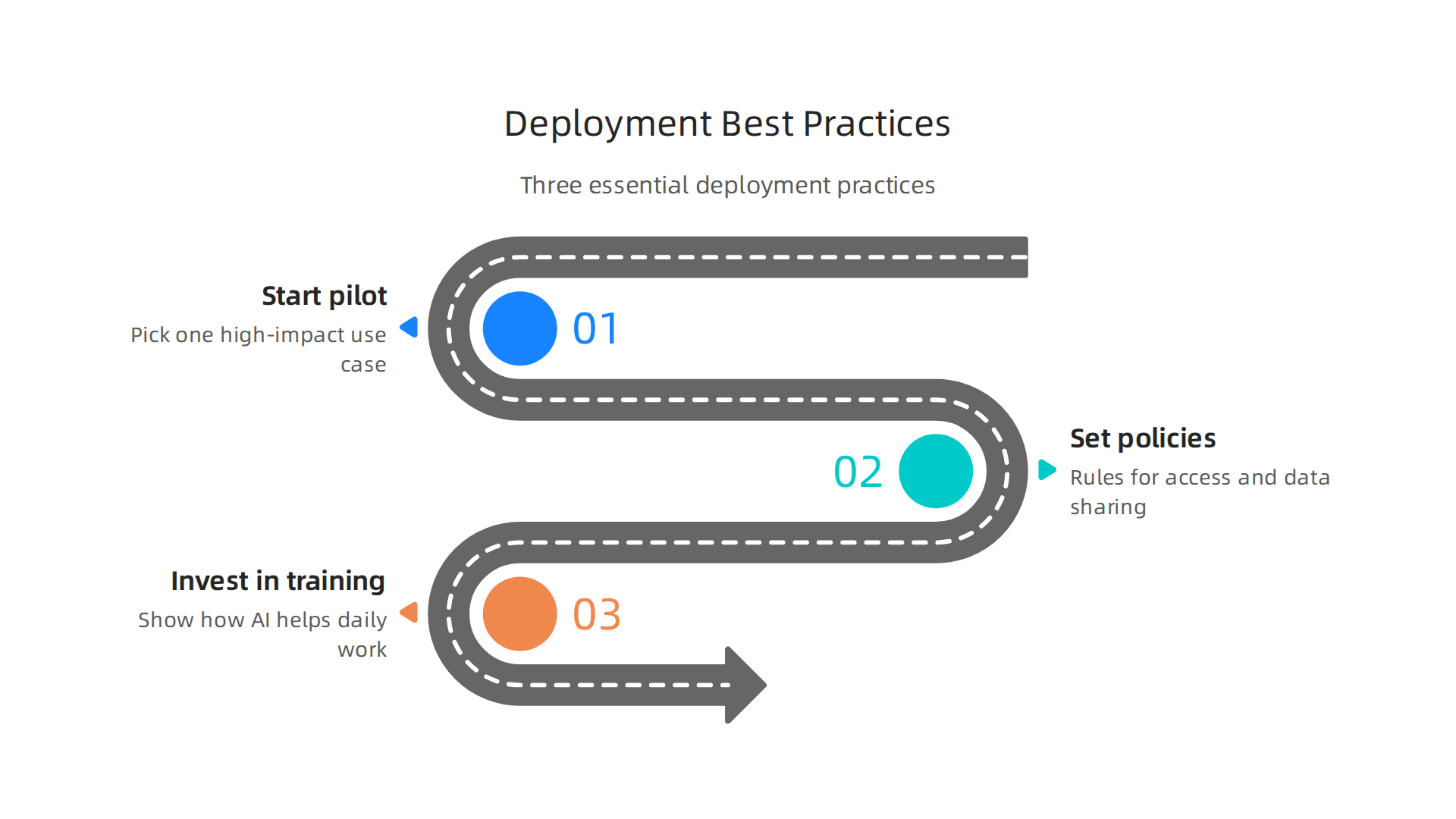
Start with a pilot project. Do not try to use Galaxy AI everywhere at once. Pick one high-impact use case. Maybe that is automating customer support replies. Or generating weekly sales reports. A small pilot lets your team learn what works without risking big disruptions. You can measure success by looking at time saved or error rates. For example, you might compare Galaxy AI’s performance against other top models on specific tasks by checking the latest benchmark results from MindStudio to see how it stacks up for coding or writing tasks.
Once you prove the value in one area, expand slowly.
Set clear governance policies. Before employees start using Galaxy AI, your organization needs rules. Who can access the AI? What data is okay to share? How do you handle privacy? Samsung Knox lets you control data processing policies, but you also need a written policy for acceptable use. This helps prevent mistakes like feeding sensitive customer information into the AI. A detailed analysis of ChatGPT versus Gemini versus Claude can show you how different models handle data, which informs your governance choices. Your policy should cover data retention, audit logs, and what happens if the AI makes a mistake.
Invest in training and change management. The best AI tool fails if nobody uses it. Your people might worry that Galaxy AI will replace them. Or they might not understand how it helps their daily work. Provide hands-on training sessions. Show real examples. Let employees practice using the AI powered assistant in a safe environment. Talk about how AI can handle boring tasks so your team can focus on creative and strategic work. For more insight into how humans and AI can work together, read our guide on human or AI creativity and what the data says about collaboration in 2026. It explains how teams that embrace AI collaboration actually become more productive and innovative.
Start small. Set clear rules. Teach your people well. That is the recipe for a smooth and successful Galaxy AI rollout.
For daily updates on the AI tools shaping business in 2026, subscribe to The Deep View Newsletter.
Measuring Success: KPIs and ROI of Galaxy AI
You have deployed Galaxy AI. But how do you know if it is working? You need clear numbers to show the value. That means tracking the right KPIs and calculating your return on investment.
Start by defining your most important KPIs. For Galaxy AI, focus on three main areas. First, productivity savings. How much time do your employees save each week? You can measure this by comparing task completion times before and after the rollout. Second, error reduction. Is the AI powered assistant making fewer mistakes than your old processes? Track error rates in customer support replies, data entry, or report generation. Third, new revenue from AI driven insights. Did Galaxy AI help your team find patterns in customer behavior that led to more sales? These three KPIs give you a solid baseline.
According to the Olakai AI ROI framework, you should also measure qualitative benefits like employee satisfaction and innovation speed. A practical guide from Olakai explains how to balance hard metrics with softer outcomes.
Another helpful resource from Tropicapp shows how CFOs at companies like Zapier measure AI ROI using five frameworks that go beyond just time saved. You can read their AI ROI frameworks from Tropicapp to see real world examples.
For the ROI calculation, add up all the costs: licensing fees, training time, integration work. Then compare that to the value of time saved and revenue gained. But do not forget the intangible wins. Employees who feel less bored by repetitive tasks tend to stay longer. That is harder to measure but just as important. A comprehensive framework from RevGen Partners outlines how to capture both tangible and intangible factors.
To set realistic expectations, look at industry benchmarks. Reports from leading analysts can show what other companies achieve with similar AI tools. For a curated list of trusted sources for AI benchmarks and news, check out our guide on the 10 top AI websites professionals trust in 2026. This will help you compare your Galaxy AI results against industry standards.
Measuring success is not a one time task. Check your KPIs monthly. Adjust your goals as you learn more. Galaxy AI can deliver big returns, but only if you track the right numbers.
Want daily updates on AI tools that boost your bottom line? Subscribe to The Deep View Newsletter for clear, actionable insights every day.
Summary
Galaxy AI is Samsung’s hybrid, agentic assistant built into the Galaxy S26 line that combines on-device intelligence with cloud power to automate tasks, create content, and protect user data. This article explains Galaxy AI’s core architecture—privacy-first on-device processing plus selective cloud use—and shows how those design choices matter for marketers, content creators, and business teams. You’ll learn practical use cases for writing, image and video editing, campaign personalization, and operations automation, plus how Galaxy AI compares with cloud-first models like GPT and Gemini. The guide also covers integration paths, rollout best practices (pilot projects, governance, training), and ways to measure KPIs and ROI so you can decide if Galaxy AI fits your workflow and security needs.