Tag: generative ai

  • Build a Tech Radar to Track AI Trends and Tools in 2026

    Build a Tech Radar to Track AI Trends and Tools in 2026

    Introduction

    The world of artificial intelligence moves at a breathtaking pace. Every week brings a new model, a fresh capability, or a surprising shift in what machines can do. For professionals and business leaders, keeping up feels less like a choice and more like a survival skill.

    Actually, the numbers back that up. According to the 2026 Artificial Intelligence Index Report from Stanford, generative AI reached nearly 53 percent population-level adoption within just three years. That is faster than the personal computer or the internet. The 2026 State of AI Agents Report shows organizations expect AI agents to spread well beyond engineering and IT in the next 12 months. The message is clear. AI is not coming. It is already here.

    Here is the challenge. With so many announcements, product launches, and trend pieces flying around, it is easy to get lost in the noise.

    A person looking thoughtfully at multiple data sources, symbolizing information overload.

    You might feel overwhelmed trying to separate real breakthroughs from hype. That is where the idea of a tech radar comes in.

    A tech radar is a structured way to monitor, filter, and prioritize emerging technologies. Instead of reacting to every headline, you build a system that helps you spot the signals that actually matter for your work. This is especially valuable in 2026, when the gap between early adopters and everyone else keeps growing wider.

    In this article, we will walk through a practical framework for building your own tech radar. You will learn how to cut through the noise, identify the most impactful AI trends, and stay ahead of the curve without burning out. Whether you are exploring the artificial intelligence series for the first time or trying to understand the different types of ai and llm ai models, this guide will give you a clear path forward. For ongoing updates, you might also want to check out our guide on AI tool discovery for 2026, which covers how to find trusted tech sources that deliver real business results. And if you want daily AI insights delivered straight to your inbox, consider The AI Newsletter Worth Reading.

    What is a Tech Radar and Why It Matters

    So what exactly is a tech radar? Think of it like a weather radar for technology. Instead of tracking storms, you track emerging tools, platforms, and practices. A tech radar gives you a clear picture of what matters right now and what might matter next year.

    The idea started with Thoughtworks. Their team created a simple visual tool to help engineers decide which technologies to use, which to try out, and which to set aside. Today, that same approach is used by organizations of all sizes to get a handle on the fast-moving AI landscape. You can explore their latest snapshot on the ThoughtWorks Technology Radar page.

    Most tech radars use a simple layout. Four quadrants group technologies into categories like Tools, Platforms, Techniques, and Languages. Around those quadrants sit four rings that show how ready each technology is. The rings are usually named Adopt, Trial, Assess, and Hold.
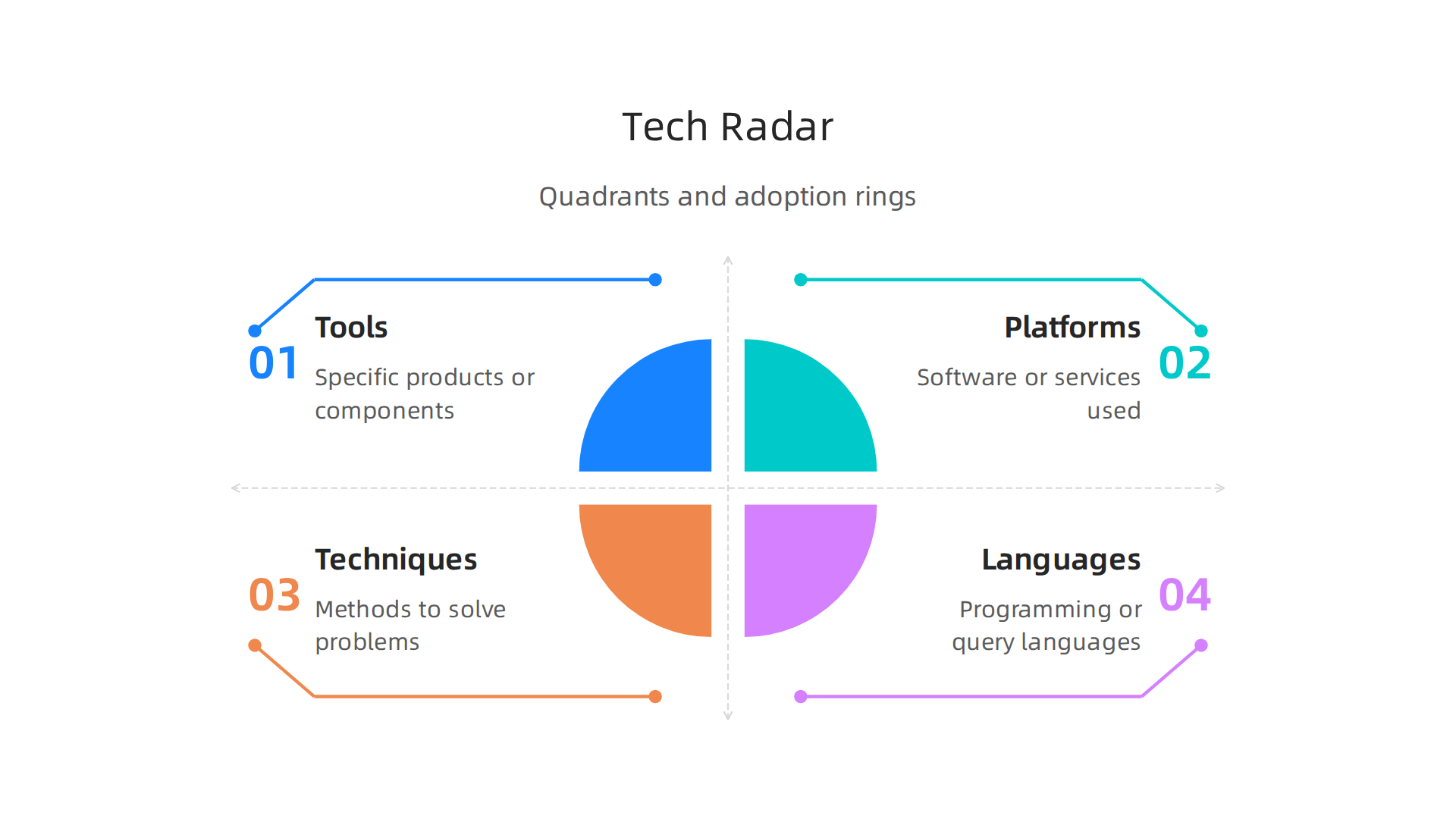
    Visual representation of a tech radar, showing four quadrants and four adoption rings.

    This structure helps you see at a glance where each piece of technology fits and what you should do with it. A great overview of this setup is available in the guide on how to create a tech radar from OneUptime.

    Why does this matter so much in 2026? Because the number of AI tools and models keeps exploding. Without a system, you spend hours chasing shiny objects. With a tech radar, you and your team agree on what deserves attention.

    A team of diverse professionals collaborating around a whiteboard, discussing strategy and making decisions.

    You stop wasting energy on tools that do not fit your goals. You focus on the ones that will actually move the needle.

    A tech radar also forces honest conversations. When your team looks at a new LLM or a different type of AI tool, you discuss where it belongs on the radar. Should you adopt it now or just assess it? That discussion alone saves months of wasted effort. For a deeper look at how this framework came to be and how to build one yourself, check out the technology radar definition and guide from ITONICS.

    Here is the bottom line. A tech radar turns noise into clarity. It helps you navigate the artificial intelligence series of updates without drowning in them. And when you couple that clarity with smart tool choices, you stay ahead. If you are still unsure about picking the right tools for your business, take a look at our guide on how to choose AI for business tools that deliver real results.

    Key AI Trends Shaping 2026

    With your tech radar ready, it is time to look at the actual trends you will want to track. The AI world is moving faster than ever, and knowing what is real versus what is just hype makes all the difference. Here are three key shifts defining 2026.
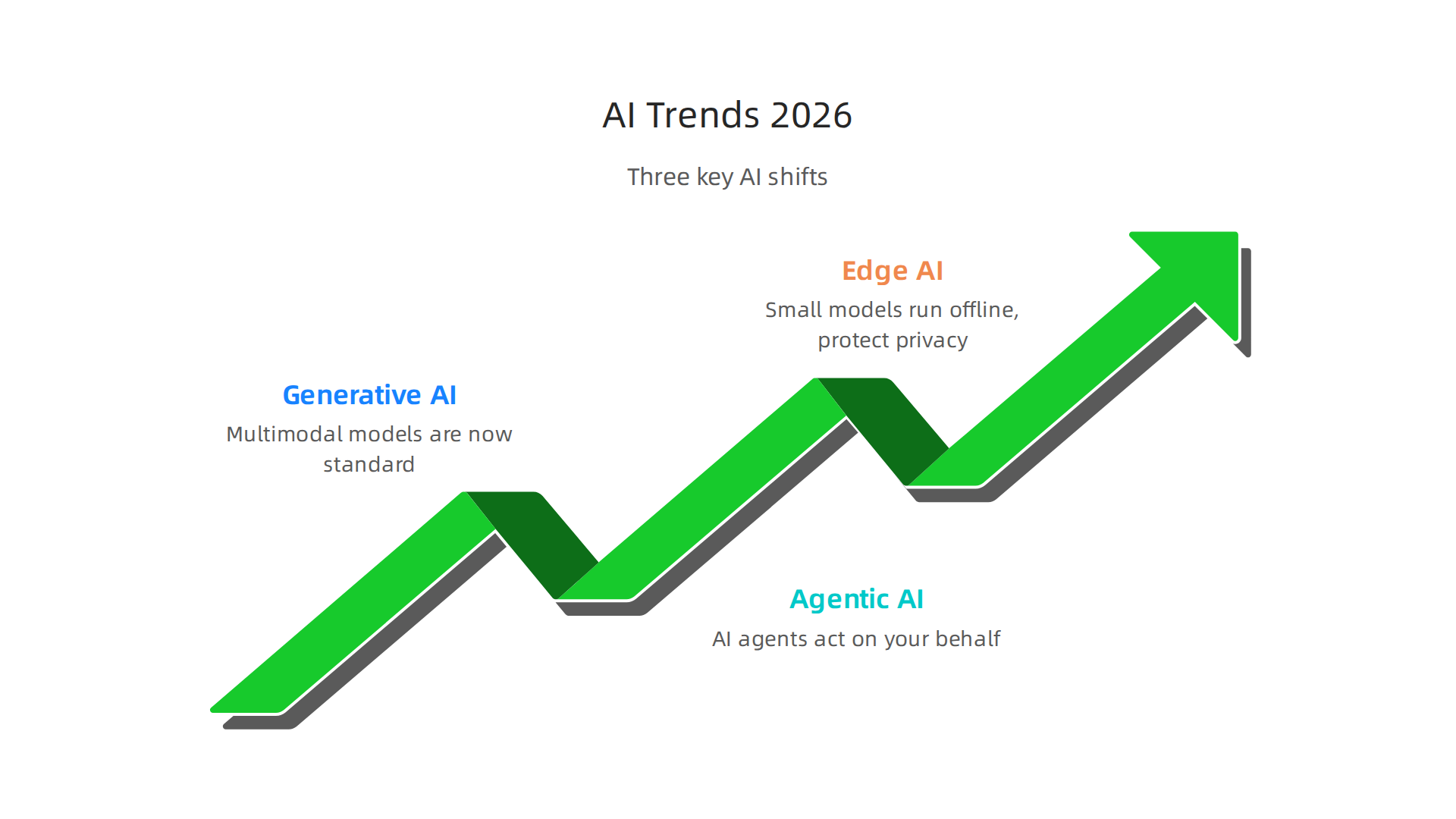
    An overview of the three major AI trends influencing the landscape in 2026.

    Generative AI has grown up. We are past the era of simple text and image generators. Multimodal models that handle text, images, audio, and video all at once are now the standard. The latest data shows generative AI adoption hit nearly 53% of the US population within three years, according to the Stanford AI Index Report 2026. That is faster than personal computers ever were. For your tech radar, this means every tool you evaluate likely includes generative features. The question is no longer if it uses AI, but how well it combines multiple types of input.

    Agentic AI is the next big wave. Instead of just generating content, AI agents can now act on your behalf. These autonomous systems book meetings, write code, manage customer inquiries, and even run parts of a business. The 2026 State of AI Agents Report found that organizations expect these agents to expand beyond IT into research, reporting, and other departments. If you have not yet placed agentic tools on your radar, this is the year to move them from Assess to Trial. For a real world example, check out our look at the Galaxy AI 2026 agentic assistant for business and content creation.

    Edge AI and small language models make AI more accessible. Not every task needs a giant model running in the cloud. Small language models that run on your phone, laptop, or even a sensor are becoming incredibly capable. This shift means AI is no longer just for companies with big budgets and data centers. It works offline, protects privacy, and costs less. The IBM trends overview for 2026 highlights how these compact models are opening up new use cases across industries. For your tech radar, pay attention to tools labeled "small" or "edge." They often deliver 80% of the value at 20% of the cost.

    So where do you start? Your tech radar should have at least one entry in each of these three categories. Keep multimodal generative tools in Adopt if they already work for your team. Put agentic platforms in Trial to test them on a small project. And place edge or small language models in Assess so you understand their limits before committing.

    These trends will shape how you build, buy, and use AI this year. Staying on top of them is not optional if you want to stay competitive. And if you want a steady stream of clear, daily updates on exactly these developments, we recommend you check out The AI Newsletter Worth Reading. It cuts through the noise so you can focus on what actually matters for your business.

    How to Build Your Own AI Tech Radar

    Now that you know the key trends shaping 2026, you need a system to keep track of them all. Building your own AI tech radar gives you a repeatable process for deciding which tools and platforms to adopt, trial, assess, or hold.

    A professional outlining a plan or strategy with notes, demonstrating focus and organization.

    Here is how to do it in three simple steps.
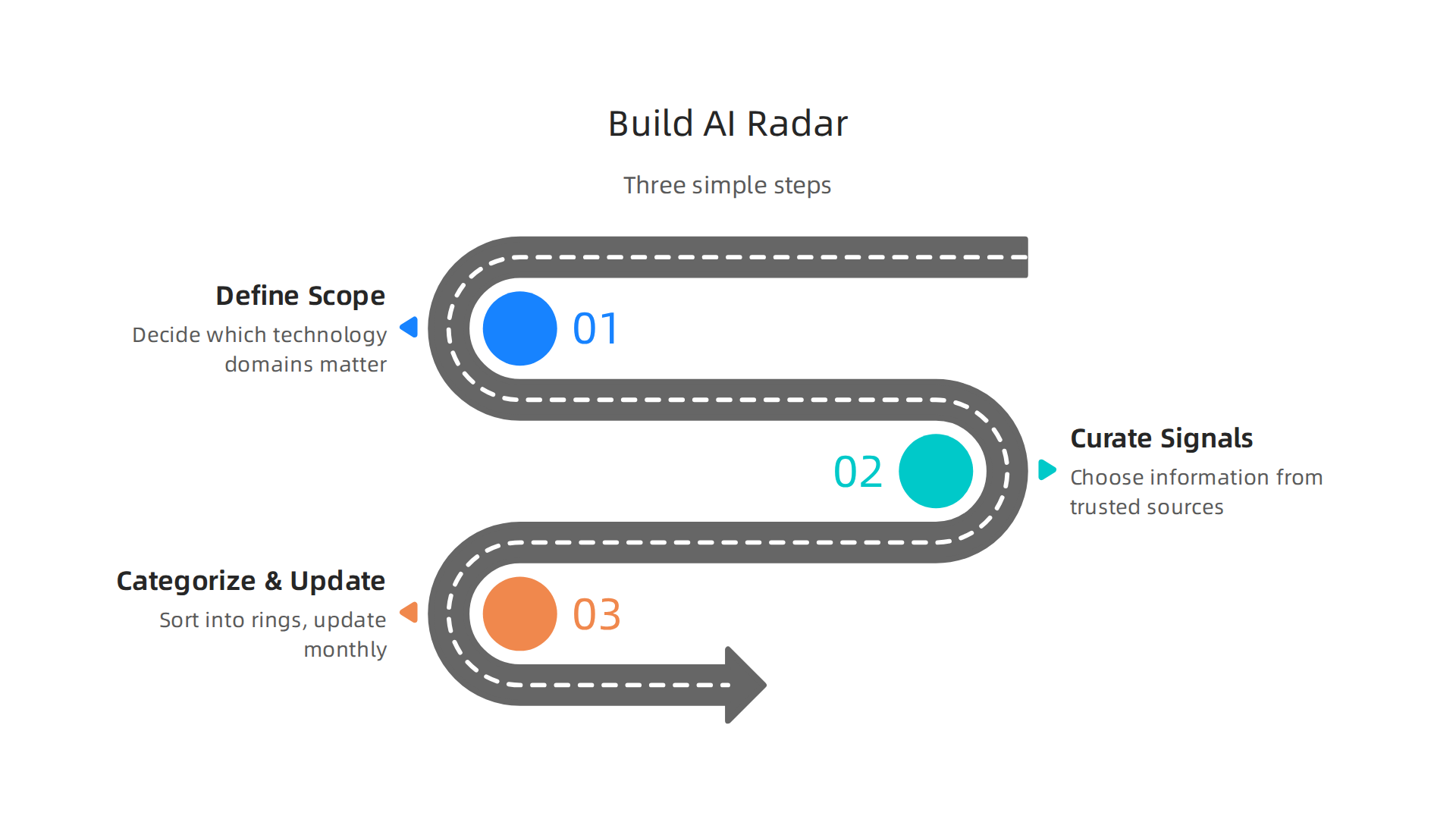
    A step-by-step guide on how to construct a personal AI tech radar.

    Step 1: Define your radar scope. Before you start tracking anything, decide which technology domains actually matter to your business. Are you focused on content creation tools? Automation platforms? Data analytics? Limit your radar to two or three areas. A focused radar beats a scattered one every time. The goal is to avoid information overload, not add to it. When you define your scope clearly, you give yourself permission to ignore the rest. For a deeper understanding of how to set up the framework, read this guide on building a technology radar that walks through scope and purpose.

    Step 2: Curate signals from trusted sources. You cannot track everything, so choose where you get your information carefully. Look for analyst reports, industry newsletters, and active communities where practitioners share what is actually working. Social media is noisy. Stick to sources that prove their value over time. For a practical approach to finding reliable AI sources that deliver real business results, check out our AI tool discovery 2026 guide. Bookmark two or three sources and check them weekly. That is enough to stay current without burning out.

    Step 3: Categorize and update regularly. Once you have a list of technologies, sort them into four rings. Adopt means use it freely for new projects. Trial means test it on a small scale. Assess means study it but do not commit yet. Hold means wait or avoid. The popular framework uses these tech radar Adopt Trial Assess Hold categories to standardize decisions across your team. Update your radar every month. Remove tools that never leave the Assess ring. Move tools from Trial to Adopt when they prove themselves. A stale radar is worthless.

    That is it. Three steps. You can set this up in an afternoon using a simple spreadsheet or a shared document. The hard part is sticking with the process. But once you do, your tech radar becomes your single source of truth for every AI decision you make this year.

    Top AI Tools to Watch in 2026

    Once your tech radar framework is ready, you need to fill it with the right candidates. Here is a look at the top AI tools to watch in 2026, grouped by how businesses are actually using them.

    Text Generation and Coding. The biggest category remains text generation. Tools like ChatGPT, Claude, and Gemini lead the pack for drafting content, brainstorming ideas, and handling customer support. On the coding side, GitHub Copilot and similar assistants have become standard for developers. These tools fall squarely into the Adopt or Trial rings of your radar depending on your team size. For a full list of options, check out this roundup of the Top 14 AI Tools for Businesses in 2026.

    Image, Video, and Data. Image and video generation tools have also matured. Midjourney and Runway ML remain strong choices for creative work. Data analysis tools like HubSpot AI and Salesforce Einstein are helping teams make sense of customer data faster. A good tech radar helps you compare these different types of AI side by side. You can learn more about how HubSpot AI streamlines business operations if marketing and sales tools are in your scope.

    Evaluating for Your Radar. The key is picking tools that offer strong ROI and fit into your existing stack. A tool that requires a massive overhaul of your workflow might belong in the Hold or Assess ring. A tool that plugs in easily and saves time immediately is a candidate for Trial or Adopt. Staying on top of all these new releases is a full time job. That is why we recommend subscribing to a trusted source that curates the best tools for you. The AI Newsletter Worth Reading delivers clear daily updates so you never miss a tool worth adding to your tech radar.

    Populating your radar with strong candidates in each category gives you a clear view of where to invest your time and budget in 2026. Update your list as new tools emerge and old ones fall behind.

    Evaluating AI Tools for Your Business

    So you have a list of promising AI tools. Now comes the harder part: figuring out which ones are worth your time and money.

    A person meticulously examining documents or data, representing careful evaluation and decision-making.

    How do you know if a tool is a good fit for your team? You need a set of clear evaluation criteria.

    Think of it like test-driving a car before you buy it. You would not sign a contract without checking the engine, the comfort, and the price. The same goes for AI tools. Here are the five main criteria to use when scoring each candidate on your tech radar.
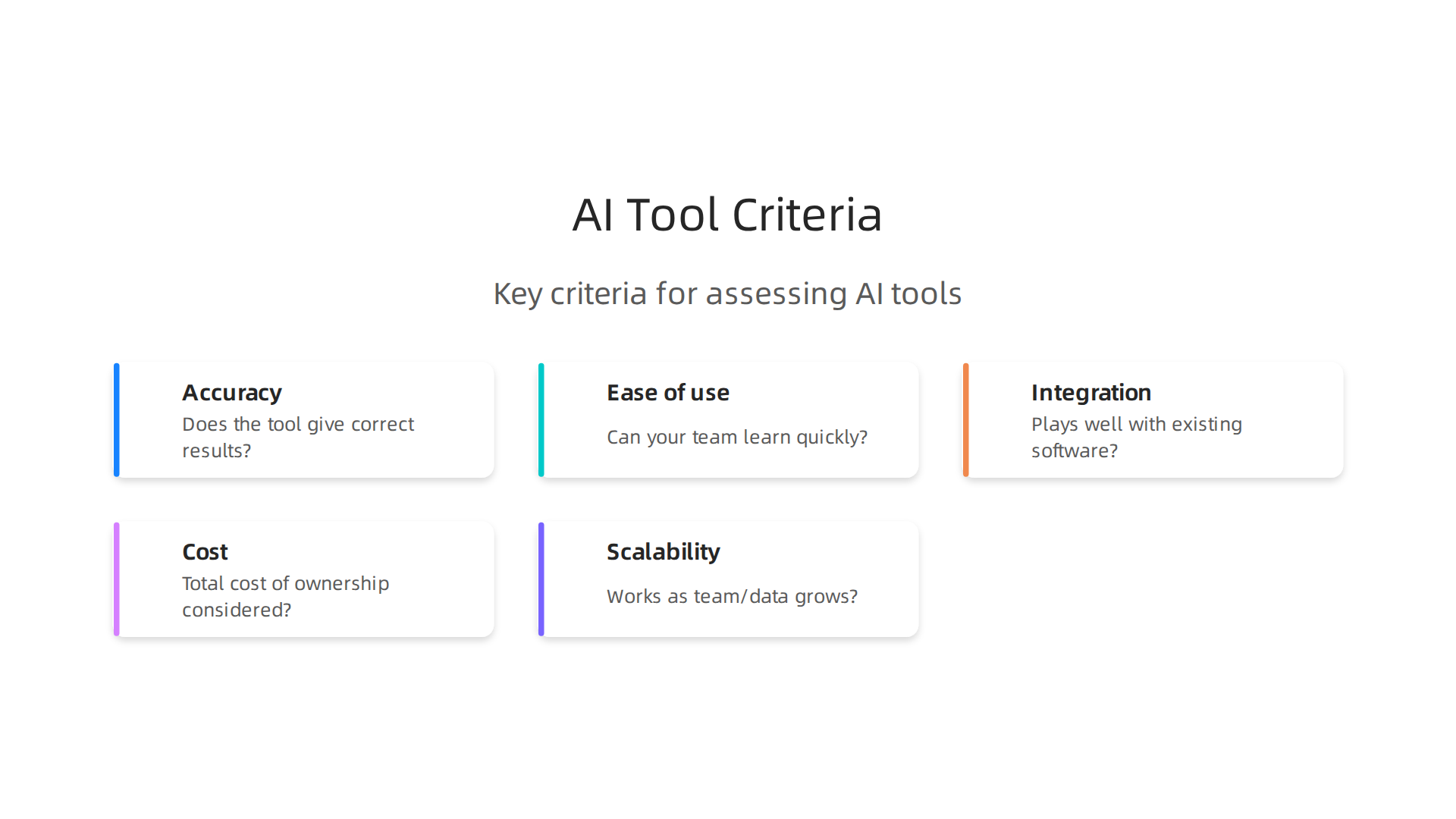
    Key criteria for assessing and scoring potential AI tools for business adoption.

    Accuracy. Does the tool give correct results most of the time? For an LLM AI chatbot helping with customer support, you need reliable answers. For a code generator like GitHub Copilot, the code should compile and run without major bugs. Test with real examples from your work.

    Ease of use. Can your team learn the tool quickly? A steep learning curve can kill adoption. Ask a few team members to try it out. If they get frustrated in the first hour, the tool might belong in the Hold ring.

    Integration. Does it play well with your existing software? Tools that connect with your CRM, project management app, or data warehouse save you from manual data entry. Check for pre-built integrations or an API. A tool that requires a custom setup might be too heavy for a quick trial.

    Cost. Look beyond the monthly subscription. Factor in training time, potential productivity dips, and any extra infrastructure you need. Calculate the total cost of ownership. For small to medium businesses, a free tier or reasonable per-seat pricing often makes sense.

    Scalability. Will the tool still work when your team grows or data volume increases? An AI tool that handles 100 users might break at 500. Ask the vendor about performance under load and look for case studies from companies your size.

    Running a formal proof of concept is the best way to test these criteria. Instead of buying a full license upfront, start with a trial period. Give a small team a real project to complete. Measure the time saved, the quality of output, and any friction points. This hands-on approach reveals issues that marketing pages never show.

    A good way to structure this is to follow a step-by-step evaluation process, similar to how companies build a tech radar for technology management. Define your scoring system, test each tool against your real use cases, and then assign it to a ring: Adopt, Trial, Assess, or Hold.

    One common dilemma is choosing between a general-purpose AI tool and a specialized one. General-purpose tools like ChatGPT or Claude handle many tasks but may lack depth. Specialized tools for legal, medical, or design work often deliver higher accuracy in their niche. The trade-off comes down to flexibility versus precision. If you need a tool that does one thing extremely well, go specialized. If you want a Swiss Army knife that your whole team can use, go general. A clear guide to choosing AI for business tools can help you weigh these options.

    Your tech radar is only as useful as the data you put into it. Take the time to evaluate each tool honestly. Update your scores as you learn more. The goal is to make informed decisions that save your business time and money, not to chase every shiny new release.

    The ROI of Early AI Adoption

    So you have placed a few tools on your tech radar. You have run trials, scored them against your criteria, and moved some into the Adopt ring. Now comes the moment of truth: What kind of return can you expect from all this effort?

    The data from 2026 is encouraging. According to The ROI of Gen AI and Agents 2026 report, 92 percent of early adopters report positive returns on their generative AI projects. Senior executives expect up to a 47 percent return on agentic investments within the next 12 months. Those numbers make a strong case for moving forward.

    But ROI is not automatic. It depends on two things: thoughtful integration and change management. If you plug an AI tool into a broken process, you just get a faster broken process. You need to clean up the workflow first. And your team needs time to learn the new tool without pressure. Rush this step, and your returns will suffer.

    Here are the three key metrics to track as you measure your tech radar investments.

    Time saved. This is the easiest win to measure. Pick a task your team does regularly. Time how long it takes before the AI tool, then measure again after adoption. A customer support team using an LLM AI chatbot might cut email response time from three hours to 45 minutes. That time adds up fast across the whole team.

    Revenue impact. Does the AI tool help you sell more or keep customers longer? For sales teams, an assistant that surfaces customer data during calls can boost close rates. For marketers, tools that help publish content faster with better targeting drive more qualified leads. Track the dollar value directly.

    Revenue impact. Does the AI tool help you sell more or keep customers longer? For sales teams, an assistant that surfaces customer data during calls can boost close rates. For marketers, tools that help publish content faster with better targeting drive more qualified leads. Track the dollar value directly.

    Customer satisfaction improvement. Faster responses, fewer errors, and personalized recommendations all improve the customer experience. Happier customers spend more and stay longer. Check your satisfaction scores before and after adoption to see the real difference.

    Your tech radar gives you a framework to track these metrics over time. When the numbers prove a tool is working, you move it deeper into Adopt. When a tool underperforms, you shift it to Hold without second guessing yourself.

    Early adoption carries some risk. But the 2026 numbers show that most businesses come out ahead. The key is to start small, measure everything, and adjust as you go. For a deeper look at applying these metrics in marketing, check out this guide on how to get real ROI from AI marketing cloud in 2026.

    Staying current with AI developments helps you make smarter choices for your tech radar. The AI Newsletter Worth Reading delivers clear daily updates that keep you informed without the noise.

    Common Pitfalls in AI Tool Selection

    Even when you understand the ROI story, picking the right tools off your tech radar can still trip you up. The 2026 data shows ai adoption is moving fast. But speed without caution leads to costly mistakes. Here are three traps that catch even smart teams.

    Information overload leads to analysis paralysis. With hundreds of AI tools launching every month, it is easy to get stuck comparing features that do not matter. You read reviews, watch demos, and subscribe to newsletters until your inbox is full. But you never actually pick one. The 2026 Stanford HAI AI Index Report shows artificial intelligence adoption has hit nearly 53 percent at the population level. That flood of options is real. To avoid paralysis, limit your research window. Give yourself two weeks to explore, then pick the top two candidates for a trial. Your tech radar is meant to speed up decisions, not slow them down.

    Over-reliance on hype without proof of concept. A tool gets buzz on social media. A competitor talks about it in a case study. But buzz is not a business case. The 2026 Virtuous Nonprofit AI Adoption Report found that while 79 percent of organizations saw small to moderate improvements from AI, only 7 percent reported major improvements. High expectations do not always match reality. Before you move any tool into the Adopt ring, run a small pilot. Test it on a real task with your data and your team. Let the results speak louder than the marketing.

    Neglecting data privacy, security, and compliance requirements. This is the one that comes back to bite you. You focus on features and price, but you forget to check where your data goes. Some LLM AI tools send prompts to external servers. Some store your customer information without clear consent. If you work in a regulated industry like healthcare or finance, a quick deployment can turn into a legal headache. Always review the vendor’s data handling policy before you sign. If the tool cannot meet your compliance standards, shift it to Hold no matter how shiny it looks.

    These pitfalls are avoidable. With a clear process and a honest look at your own needs, your tech radar stays useful. For a deeper guide on filtering the noise, check out this walkthrough on how to choose AI for business tools that deliver real results.

    Summary

    This article explains how to create and use an AI tech radar to cut through the noise of rapid AI development and make smarter technology decisions in 2026. It defines the tech radar framework (quadrants and the Adopt/Trial/Assess/Hold rings), highlights three major trends to prioritize—multimodal generative AI, agentic AI, and edge/small models—and offers a three-step process to build your own radar: set scope, curate trusted signals, and categorize/update regularly. You’ll also get practical guidance on evaluating tools with five concrete criteria (accuracy, ease of use, integration, cost, scalability), how to run trials and proofs of concept, and which metrics to track for ROI. The piece covers top tool categories to watch, common selection pitfalls like hype and privacy oversights, and how to turn the radar into a repeatable decision system your team can use month after month. After reading, you’ll know how to populate a focused radar, run meaningful pilots, measure outcomes, and avoid costly mistakes when adopting AI.


  • Meshy AI Turns Text and Images into 3D Models in Minutes

    Meshy AI Turns Text and Images into 3D Models in Minutes

    Creating 3D models has always been a challenge. You need deep technical skills, expensive software, and hours of manual work just to get one usable asset. That barrier has kept many people from jumping into game development, product design, or virtual reality.

    A diverse team enthusiastically collaborating on creative ideas, symbolizing overcoming technical barriers.

    But everything changed in 2026 with the rise of meshy ai.

    Meshy AI is a breakthrough tool for AI-powered 3D content creation. Instead of wrestling with complex modeling workflows, you can turn simple text descriptions or regular images into detailed 3D models in minutes. A recent announcement highlighted a major step forward: the Meshy AI integration with Formlabs now connects AI generation directly to professional 3D printing, closing the gap between digital creation and physical manufacturing.

    Formlabs' official website, representing their professional 3D printing technology integrating with Meshy AI.

    The platform goes well beyond basic model generation. You can start from a text prompt, upload an image, refine the topology, add textures, rig a character, and even turn the final model into a video – all inside one browser environment. This complete workflow makes it a powerful tool for both newcomers exploring emerging technologies and experienced developers who want to speed up their pipeline.

    In this guide, we will take an in-depth look at what Meshy AI offers, how it actually works, and practical strategies to use it for professional projects. Whether you are a game designer, a product engineer, or just someone curious about 3D creation, this article will give you the knowledge to get started. If you are serious about staying ahead, check out our list of 10 top AI websites professionals trust for real news and tools to keep learning.

    The homepage for AI Tools News Today, a resource for professionals seeking AI industry news and tools.

    And for daily updates on cutting-edge AI tools like Meshy, consider subscribing to The AI Newsletter Worth Reading – it delivers clear daily AI insights straight to your inbox.

    The subscription page for The AI Newsletter Worth Reading, offering daily AI insights.

    What is Meshy AI? An Overview of the Technology

    At its heart, Meshy AI relies on powerful diffusion-based AI models trained on massive datasets of 3D objects. These models learn how shapes, textures, and structures relate to words and images. When you type a prompt like "rusty fantasy sword with a glowing blue handle," the AI interprets every part of that description and builds a 3D mesh from scratch. The same process works from image inputs, where the AI analyzes a flat picture and converts it into a volumetric model with proper geometry.

    The company behind Meshy is a San Diego startup that has quietly become a leader in generative 3D. They have released multiple generations of their AI models (Meshy 1 through 6), each improving the quality of topology, edges, and surface detail. According to a detailed explanation of Meshy AI’s generation pipeline, the system validates prompts, selects the right model version, and runs a generation process that outputs watertight meshes ready for printing or game engines. This focus on practical output is what sets Meshy apart from earlier AI tools.

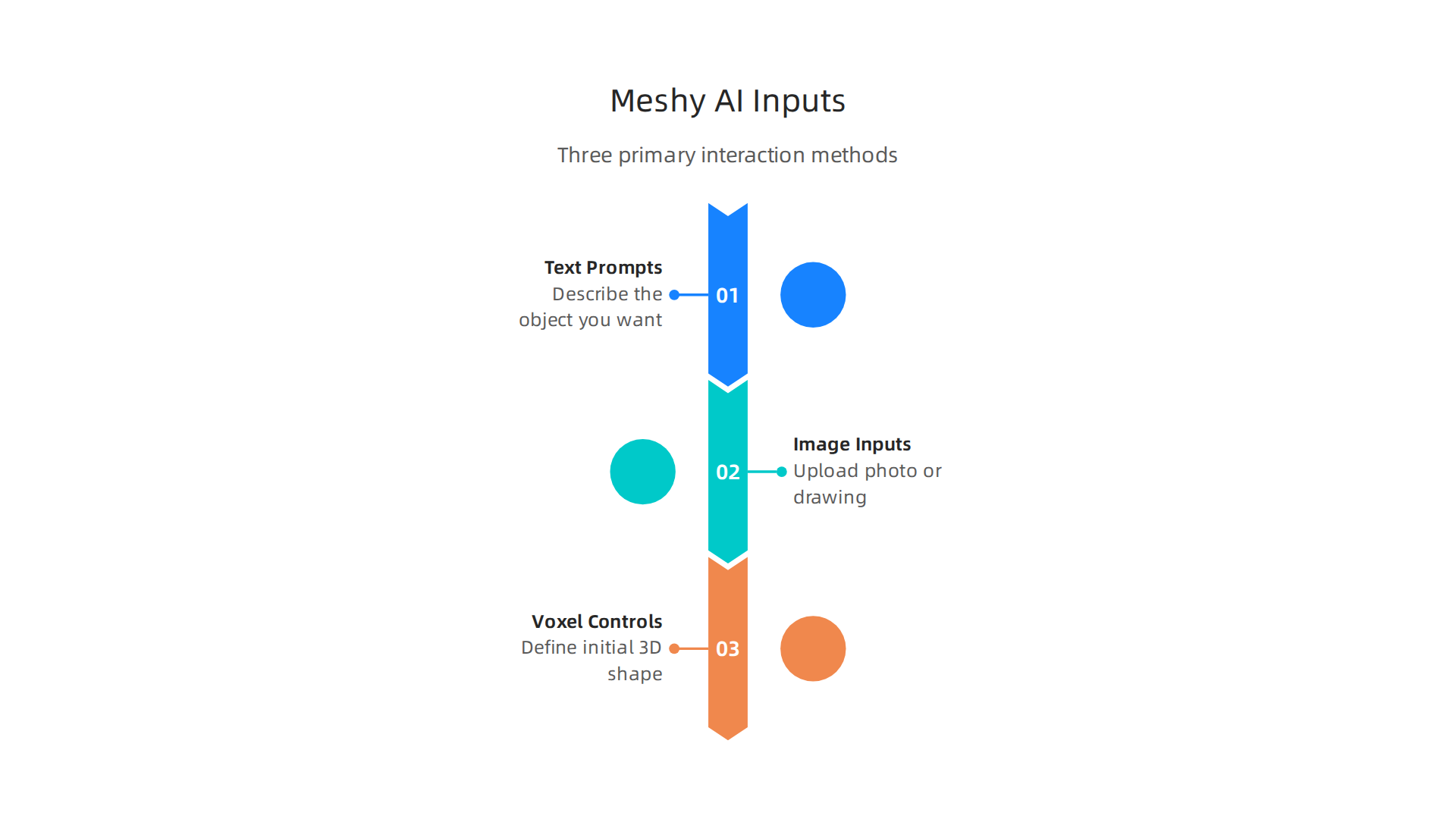
    You can interact with Meshy AI using three main input methods.

    Overview of the three primary ways users can interact with Meshy AI for 3D model generation.

    The simplest is text prompts, where you describe the object you want. The second is image inputs, where you upload a photo or drawing and the AI creates a matching 3D model. The third method uses voxel controls for more advanced users who want to define the initial shape block by block. These options make Meshy one of the top emerging technologies for 3D creation in 2026.

    For developers looking to adopt Meshy into their pipeline, the platform offers API access and exports directly to Blender, Unreal Engine, and Unity. Whether you are a game designer needing quick assets or a product engineer prototyping new ideas, Meshy AI removes the technical barriers that once made 3D modeling a specialist skill. If you want to learn AI tools that actually save time, this is a great place to start.

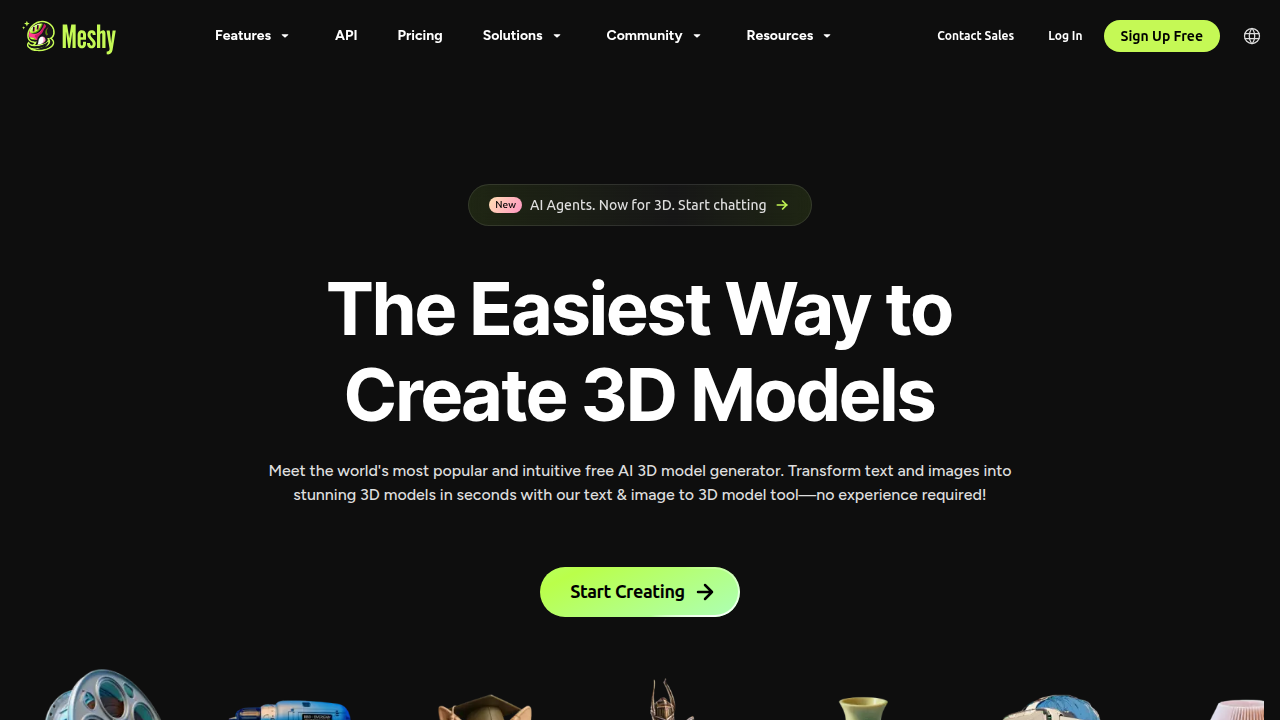
    The Meshy AI platform interface, showcasing its intuitive design for 3D content creation.

    Key Features and Capabilities: Text-to-3D, Image-to-3D, and Beyond

    So what can Meshy AI actually do? Let’s walk through the main features that make it so useful in 2026.

    Key features of Meshy AI, from 3D model generation to texturing, rigging, and export options.

    Text-to-3D generation is the flagship feature. You type a prompt like "medieval stone bridge with moss and a wooden gate" and Meshy creates a textured 3D model in about 60 seconds. The AI understands complex instructions and supports over 20 languages. With the Meshy 6 update, you can choose between "Standard" mode for high detail and "Low Poly" mode for game engines. That flexibility matters a lot when you need different levels of quality for different projects. According to a detailed Meshy AI review covering features and pricing, the system even lets you toggle mesh types and adjust polygon counts after generation, giving you real control over the final output.

    Image-to-3D conversion is just as impressive. You upload a single photo, drawing, or sketch and the AI turns it into a full 3D model with proper geometry and textures. This is different from traditional photogrammetry, which needs multiple photos from different angles and a lot of cleanup afterward. Meshy uses multi-view generation to figure out what the back and sides of your object should look like, even from just one image. It works fast, usually within one to two minutes for a finished model.

    Beyond generation, Meshy includes tools that make the models actually usable. The AI Texturing feature lets you apply PBR textures to your own existing models using only text prompts. You get base color, metallic, roughness, and normal maps without any UV unwrapping work. For character creators, the auto-rigging system supports humanoid and quadruped models, and you can apply any of 500+ built-in animation presets like walking, running, or combat moves.

    If you want to explore the latest trends in AI-powered creation, keeping up with these rapid advancements helps you stay ahead in your workflow.

    Export formats cover everything you could need: FBX, GLB, OBJ, STL, 3MF, USDZ, and BLEND. That means your models go straight into Unity, Unreal Engine, Blender, or your slicer without extra conversion steps. For 3D printing users, Meshy includes a Printability Check with a 97% slicer pass rate and one-click integration with Bambu Studio.

    To get clear daily updates on tools like this and other AI breakthroughs, subscribe to The AI Newsletter Worth Reading.

    Meshy AI vs Competitors: How It Stacks Up in 2026

    You might be wondering how Meshy AI compares to other tools out there. Let’s look at the main competitors and see where each one shines.

    Luma AI is probably Meshy’s biggest rival. As a detailed Meshy vs Luma AI comparison explains, Luma AI excels at turning real-world photos and videos into photorealistic 3D models. It uses a technology called NeRF, which creates stunningly realistic scenes from a short video clip. But it has a clear weakness: it struggles with imaginary objects. If you need a magical castle or a sci-fi weapon, Luma isn’t the right choice. Meshy, on the other hand, is built for exactly that. You type a description and get a model in about a minute. Luma takes 5 to 15 minutes per generation. For game developers, Meshy’s built-in auto-rigging and 500+ animation presets are a huge advantage. Luma lacks that pipeline.

    Tripo AI is another popular option, especially for game developers. It focuses on speed and clean topology. In a side-by-side test of five tools, Tripo produced the cleanest meshes for game engines in about 35 seconds. But it falls short on full pipeline support. You get the base model, but you have to handle texturing, rigging, and animation elsewhere. Meshy handles all of those steps in one place.

    When should you choose Meshy? Pick it when you are creating imaginary objects, game assets, or models for 3D printing. It gives you watertight meshes that slice well, as one Reddit user confirmed when they converted a logo to an STL keychain in about six minutes. Meshy also covers the full pipeline from text to rigged, animated character.

    When should you choose another tool? Go with Luma AI if you need to digitize real objects or environments with photorealistic quality. Choose Tripo if raw speed and clean base meshes are your top priority and you can handle the rest of the pipeline yourself. For hyper-realistic human avatars, Rodin AI is the specialist.

    If you want to keep learning about emerging AI tools like these, check out our guide to the 10 top AI websites professionals trust for real news and tools. It’s a great starting point for staying current in 2026.

    Practical Use Cases for Professionals and Creators

    So how are people using Meshy AI in the real world? Here are three common scenarios where it saves serious time.

    Game Development: Rapid Prototyping

    Imagine you are building an open-world game. You need dozens of environment props like rocks, trees, and ruins. With Meshy, you type what you want and get a textured model in about a minute. The detailed comparison of AI 3D tools for game assets confirms that Meshy handles the full pipeline. It creates UV maps, generates PBR textures, and even rigs characters with over 500 animation presets. You can export directly to FBX or GLB and drop the asset into Unity or Unreal Engine. No manual retopology needed for simple props.

    Product Design: Concept Visualization

    Physical product teams use Meshy for early iteration.

    A product designer presenting a visual concept to colleagues, illustrating design iteration.

    A designer working on a new chair can type "ergonomic office chair with mesh back and chrome legs" and see a 3D preview. This helps catch proportion issues before building anything real. Once the concept looks good, you can export an STL for 3D printing or share it with stakeholders. This cuts concept development from days to hours.

    Marketing: 3D Product Renders

    Marketing teams love Meshy for generating product visuals on demand. Need a high-resolution render of a new speaker for an Instagram ad? Generate the model, apply a studio background in Blender, and you have a professional image without hiring a photographer. Meshy gives full commercial rights, so you can use these models in paid ads and e-commerce listings. It is especially useful for small brands that cannot afford expensive photoshoots.

    If you want to see how AI can improve your marketing workflows, check out our guide on how to get real ROI from AI marketing cloud in 2026. And for daily updates on the tools that matter, subscribe to The AI Newsletter Worth Reading. It delivers clear, practical AI news straight to your inbox every day.

    Pricing, Plans, and Value for Money

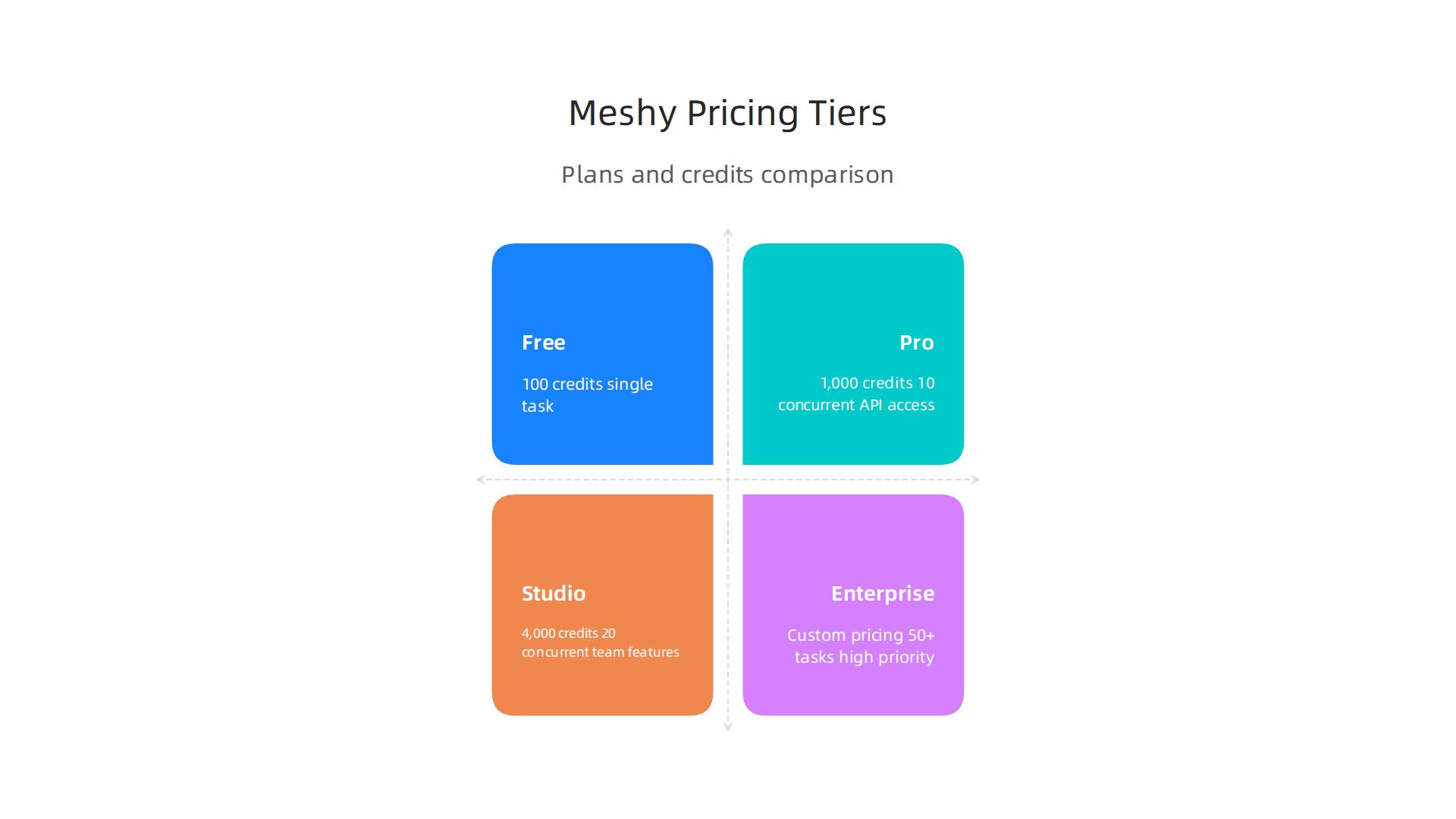
    Now that you have seen how Meshy works in the real world, let’s talk about what it costs. Meshy offers four plans: Free, Pro, Studio, and Enterprise.

    Comparison of Meshy AI's different pricing plans, outlining credits, features, and target users.

    Each one fits a different type of user. Understanding the pricing helps you decide if Meshy is worth the money for your specific needs.

    Free Plan: $0 per month
    The free tier gives you 100 credits every month. You can run one task at a time with low queue priority. The models you create come with a CC BY 4.0 license. That means you can use them in commercial projects as long as you give credit. This plan is perfect for testing the tool and learning the basics. According to the Meshy AI official pricing page, free plan credits reset each month and do not roll over.

    Pro Plan: $20 per month (or $240 per year)
    For individual creators and indie developers, the Pro plan is the sweet spot. You get 1,000 credits per month, 10 concurrent tasks, and 60 percent faster generation speed. Your assets are private and you own them completely. You also get API access for integrating Meshy into your own workflows. This plan costs about the same as a subscription to a streaming service and saves you hours of manual modeling work.

    Studio Plan: $60 per month (or $576 per year)
    Small teams and studios will like the Studio plan. It bumps credits to 4,000 per month and concurrent tasks to 20. Queue priority is higher and you get team management features. Each task also comes with 8 free retries. This works well if multiple people are generating assets at the same time.

    Enterprise Plan: Custom pricing
    Large teams with high volume needs can contact Meshy for a custom plan. You get 50 or more concurrent tasks, the highest queue priority, unlimited free retries, and a customizable credit balance.

    Is Meshy worth the money?
    For individual creators, the Pro plan at $20 per month gives excellent value. You can generate dozens of textured models each month without breaking the bank. A detailed 3D AI pricing and credits comparison shows that Meshy sits in the middle of the pack when it comes to cost per model, and its speed makes it competitive. For small teams, the Studio plan costs three times as much but gives four times the credits and double the concurrent tasks. That extra capacity can make a big difference when you are working on a deadline.

    If you are a student or educator, Meshy offers discounts. You can apply for the Meshy education plan and get Pro at just $5.99 per month.

    Overall, Meshy gives you a lot of power for the price. Whether you are a solo creator or part of a growing team, there is a plan that fits your budget. And if you want to discover more tools that deliver real results, check out our roundup of the best startup gadgets for 2026.

    Tips for Getting the Best Results with Meshy AI

    You know the pricing and the basics. Now let’s make sure you get the best possible results every time you use Meshy. A little know how goes a long way. Here are three simple tips to help you create better 3D models faster.

    An individual focused on learning and applying new skills, reflecting the pursuit of better results.

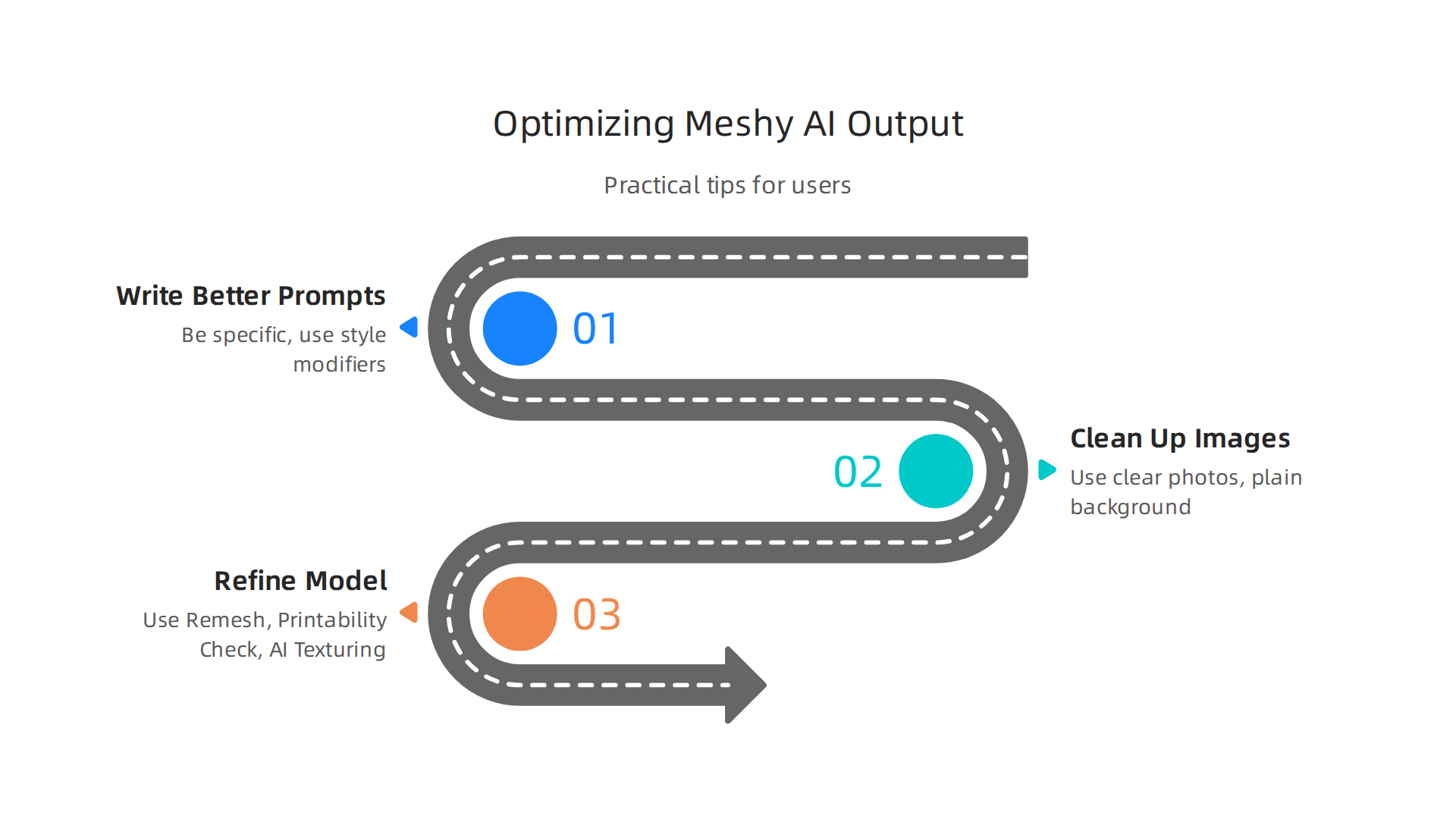
    Practical tips for users to maximize the quality and efficiency of their 3D models created with Meshy AI.

    1. Write Better Text Prompts

    The secret to great text-to-3D generation starts with your words. Be specific. Instead of typing "a chair", write "a mid century modern wooden armchair with a woven seat and brass legs". The more detail you give, the better Meshy understands what you want.

    Use style modifiers too. Words like "photorealistic", "low poly", "stylized", or "PBR textured" guide the AI toward the exact look you need. A short but specific prompt works much better than a long, vague one. According to a detailed Meshy AI feature review, the tool handles complex instructions really well and creates textured meshes in about 60 seconds.

    2. Clean Up Your Images First

    If you are using the image-to-3D feature, start with a clear photo. A single picture of an object on a plain white background works best. Avoid busy backgrounds, shadows, or reflections that confuse the AI. The tool is great at guessing the shape and texture from a single image, but it needs a clean starting point. Your final model will have better geometry and fewer strange bumps when you take two minutes to crop or clean your source image first.

    3. Refine Your Model After Generation

    The first pass is often just the start. Meshy gives you built-in tools to clean things up. Use the Remesh tool to lower the polygon count for game engines or raise it for more detail. If you plan to 3D print, run the Printability Check. Meshy’s 3D printing benchmark performance makes it a top pick for makers, but checking for small holes is still a smart habit.

    You can also use the AI Texturing feature to reapply colors and materials if the first try was not quite right. And for characters, the auto-rigging system lets you add animations from hundreds of presets in under a minute.

    If you want to keep learning about the best AI tools for creators and developers in 2026, check out our guide to the top AI websites professionals trust for daily news and practical reviews.

    Staying up to date with emerging technology is a daily habit. The AI Newsletter Worth Reading delivers clear daily AI updates straight to your inbox. It helps you learn AI tools and spot important trends without all the noise.

    Limitations and Considerations

    Even Meshy AI is impressive, it is not perfect. Knowing its limits helps you plan your projects better.

    Geometric Complexity and Organic Shapes

    Meshy does a great job with hard surface objects like furniture, buildings, or tools. But it can struggle with complex organic shapes. Things like detailed human faces, hands, or flowing cloth sometimes come out distorted. A user’s one month Meshy review mentions issues like extra fingers or strange facial features. If your project needs precise character models or intricate mechanical parts, manual 3D modeling is still the better choice.

    Output Resolution and Texture Fidelity

    The textures Meshy creates look good for most uses, but they do not match the quality of hand painted or manually crafted textures. Fine details like tiny text, logos, or subtle color gradients can be blurry. For high end game assets or product renders, you will likely need to refine the textures in another program. Meshy is a great starting point, but professional work often needs extra polish.

    Cloud Dependence and Latency

    Meshy runs on cloud servers. That means you need a stable internet connection to use it. Sometimes during peak hours, you may wait in a queue. The free plan has lower priority, so waits can be longer. If you have a deadline, this can be frustrating. Also, generating complex models takes time. You cannot use it offline, so plan accordingly.

    Understanding these limits helps you decide when to use Meshy and when to stick with traditional tools. For many creators, it saves hours of work. But knowing where human versus AI creativity works best helps you get the most out of both.

    Future Outlook for Meshy AI

    Where is Meshy AI heading next? The signs point to a much bigger role in how we create 3D content.

    Professionals engaging in a discussion about future technological advancements and innovations.

    And the changes are happening fast.

    Better Models, Faster Results

    Meshy is already working on smarter geometry and higher fidelity outputs. The team keeps improving how the AI handles complex shapes and fine textures. Early 2026 reviews show real progress in mesh quality compared to just a year ago. A video analysis of AI mesh generation in 2026 notes the technology is getting closer to production-ready quality for games and films. Speed is improving too. What used to take several minutes now takes less than two for basic models.

    Deeper Game Engine Integration

    This is where things get exciting. At the Game Developers Conference in 2026, Meshy announced a major step forward. The company launched Meshy Labs, an experimental incubator that moves AI beyond just making assets. The Meshy Labs announcement at GDC 2026 showed off a playable game called Black Box: Infinite Arsenal. In it, players type text prompts to create weapons in real time. The AI generates not just the 3D shape but the gameplay logic too. This is a big shift from "AI as a production tool" to "AI as a real time game designer."

    Expect tighter links with Unity, Unreal Engine, and Blender in the coming year. The goal is to let you go from text prompt to playable asset without leaving your game engine.

    Growing Market and Community

    The numbers back up the momentum. Meshy hit a $30 million annual recurring revenue milestone in early 2026. The company also launched a fellowship program that funds 3D AI research around the world. Announcing the 2026 Meshy Fellowship Program recipients shows a commitment to building a community of developers pushing the boundaries of what AI 3D can do.

    For creators who want to stay ahead, tracking these trends matters. The landscape of top AI companies to watch in 2026 keeps shifting fast. Meshy is one to keep an eye on.

    If you want to stay updated on tools like Meshy and other fast moving AI developments, consider subscribing to The AI Newsletter Worth Reading. It delivers clear daily updates so you never miss what matters.

    Workflow Integration and Best Practices

    Getting Meshy AI into your daily workflow takes a little setup. But once you do, it saves hours of manual modeling time.

    Plugins and API for Easy Integration

    Meshy offers an API that lets you connect it directly to your existing tools. You can use it inside game engines like Unity and Unreal Engine or with 3D software like Blender. A 2026 walkthrough shows you can integrate Meshy AI with your platforms using its API to generate models on the fly. That means less switching between apps and more time creating.

    For developers, the API is simple. You send a text prompt, and the AI returns a 3D model ready to import. It works great for prototyping and filling asset libraries fast.

    Best Practices for Managing Assets

    When you generate lots of models, versioning becomes important. Use a clear naming system: include the date, the prompt keywords, and the version number. Save your assets in a shared folder or cloud drive so teammates can find them easily. Also, always clean up the mesh geometry before final use. The AI output is close to production-ready, but a quick sweep with your modeling tool makes a big difference.

    Collaboration Features for Teams

    Meshy supports team accounts where multiple people can work on the same project. You can share generated assets and see who changed what. This makes iterating on designs much smoother. If you want to learn more about fitting AI tools into your pipeline, this guide on how to choose and use an AI-powered research assistant gives helpful tips for picking the right solutions.

    By setting these practices up early, you make Meshy AI a reliable part of your creative process. That is how you get the most out of this emerging technology without losing control over quality.

    Summary

    Meshy AI is a 2026 breakthrough for rapid, browser-based 3D model creation that turns text prompts, single images, or voxel inputs into watertight, textured meshes ready for games, rendering, or 3D printing. The article explains how Meshy’s diffusion-based models generate geometry, the main features (text-to-3D, image-to-3D, AI texturing, auto-rigging and animation presets), and the export formats that make assets drop‑in ready for Unity, Unreal, and Blender. It compares Meshy to competitors like Luma and Tripo to help you pick the right tool, shows practical use cases for game dev, product design and marketing, and walks through pricing tiers from Free to Enterprise. You’ll also get hands-on tips for better prompts, image cleanup, and post-generation refinement, plus the known limitations around organic detail, texture fidelity, and cloud dependence. Finally, the piece covers workflow integration via API/plugins, team best practices, and where Meshy is headed next as the company tightens engine integrations and improves mesh fidelity.