Tag: pillar-ai-in-business

  • Futuristic Website 2026 AI Personalization Voice Interfaces and Sustainable Performance

    Futuristic Website 2026 AI Personalization Voice Interfaces and Sustainable Performance

    Introduction

    Imagine visiting a website that changes its layout, colors, and even the products it shows you based on who you are and what you need. This is not science fiction anymore. In 2026, futuristic websites are here, and they are powered by artificial intelligence.

    Businesses today feel real pressure to keep up. Customers expect fast, personal, and smart online experiences. If your website does not deliver, you risk losing them to competitors who already use next-generation web design. The difference between a good site and a great one is no longer just about looks. It is about how well the site understands and adapts to each visitor.

    That is where this article comes in. We will explore the defining trends, tools, and strategies shaping the future of web design. You will learn how AI solution development makes invisible technologies possible. You will also discover how to apply these ideas to your own projects, whether you are building a brand new site or refreshing an old one.

    One of the biggest shifts this year is AI-driven personalization. According to the latest report on web design trends in 2026, websites are now expected to adapt in real time to each visitor. This means showing the right content, the right layout, and the right tone at the right moment. It changes everything about how we think about design.

    For a trusted list of resources to help you stay current, check out the top AI websites that professionals rely on for news and tools.

    This article will also cover practical strategies, including how to use the right marketing mix and even guerilla marketing tactics to make your futuristic website stand out. By the end, you will have a clear roadmap for building a site that feels both advanced and human.

    A confident professional smiling, reflecting the success and readiness achieved through understanding futuristic web design.

    To stay ahead of these fast-moving trends, get clear daily AI updates from the Deep View Newsletter delivered right to your inbox.

    Screenshot of The Deep View Newsletter subscription page, offering daily AI updates on emerging tools and trends.

    What Defines a Futuristic Website in 2026?

    So what exactly makes a website feel futuristic this year? It is not about flashy animations or neon colors. The real magic happens behind the scenes where invisible technologies quietly reshape every visit.

    A truly futuristic website in 2026 puts the user first. It adapts to you without you having to ask.
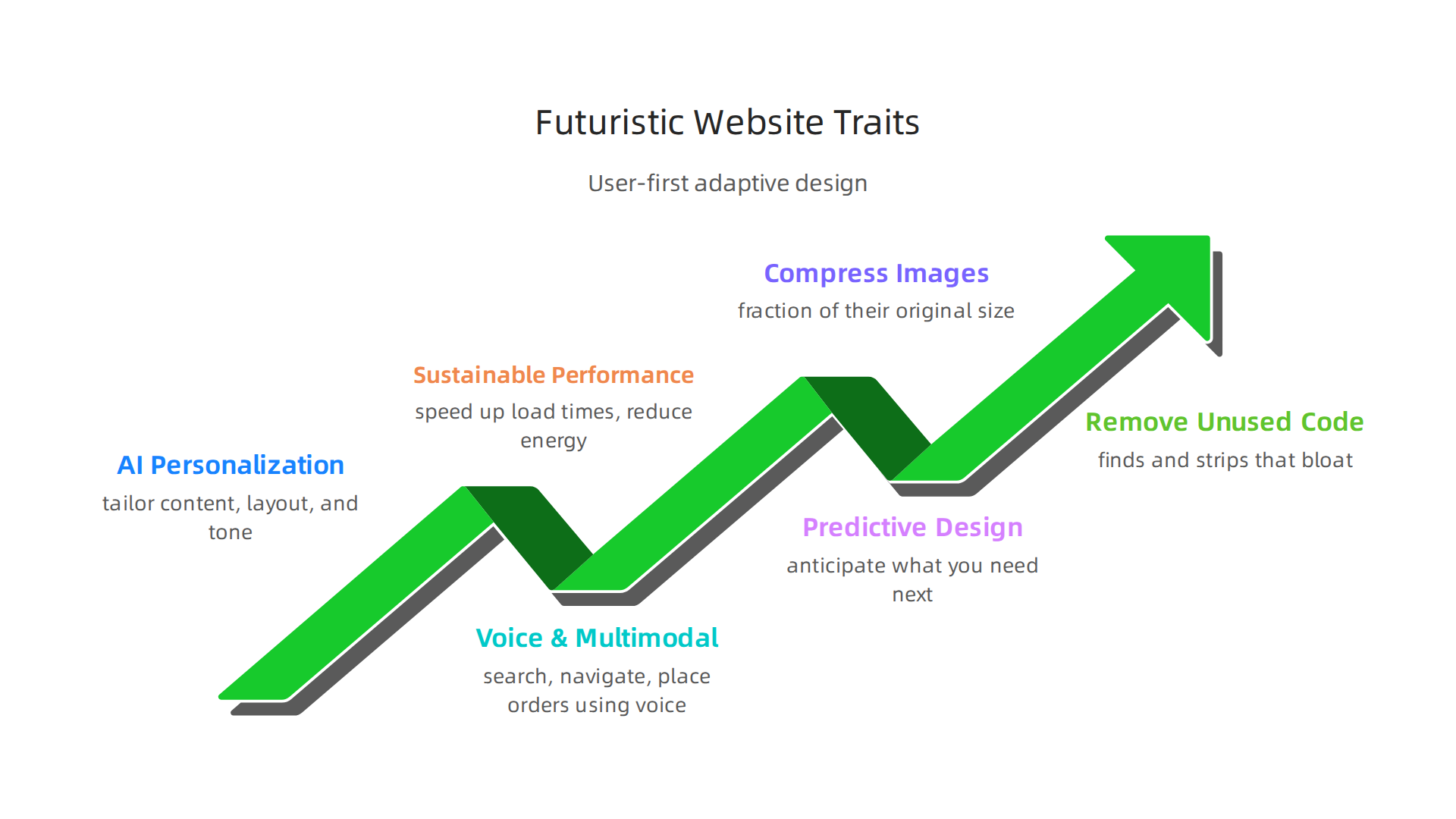
    Infographic illustrating the defining characteristics of futuristic websites in 2026, focusing on user-centric adaptation.

    Here are the key traits:

    AI-driven personalization is the new standard. Instead of showing the same page to everyone, smart sites use data to tailor content, layout, and even tone in real time. For example, if you visit an online store for the first time, the site might show you products based on your location or the time of day. According to the 2026 web design trends report, this kind of AI-powered personalization is now a core expectation, not just a nice extra.

    Voice and multimodal interfaces are becoming common. People are talking to their devices more than ever. Futuristic websites let you search, navigate, and place orders using your voice or a mix of typing, tapping, and speaking. This makes the experience feel more natural and hands-free.

    Sustainable performance matters. A fast, efficient website is not just good for users; it is good for the planet. Designers are stripping away heavy code and using lightweight layouts to speed up load times and reduce energy use. This trend is called digital sustainability, and it is a big part of futuristic design.

    Predictive design boosts engagement. Sites that anticipate what you need next see real results. For instance, a news site might recommend articles before you finish reading the current one. Industry data shows that sites using predictive design see notable jumps in how long people stay and interact.

    To build these kinds of experiences, you need smart planning and the right mix of tools. That is where AI solution development comes in. It helps you create the invisible logic that makes a website feel intuitive. And once your site is live, a solid marketing mix and a bit of guerilla marketing can help you get it in front of the right audience.

    One practical step is to explore how AI virtual assistants for businesses can handle routine tasks on your site, like answering common questions or guiding visitors through checkout. These small additions make a big difference in how futuristic your site feels.

    In short, a futuristic website in 2026 is not about how it looks. It is about how well it adapts, performs, and connects with each visitor on a personal level.

    AI-Powered Personalization: The New Baseline

    Think about the last time a website showed you exactly what you wanted. It probably felt like magic. But in 2026, that magic is just the standard.

    Personalization used to mean adding your name to an email. Now it means reshaping the entire website experience in real time. AI tools analyze every signal you send. Your location, your device, how you scroll, what you clicked before. All of it feeds into a system that decides what to show you next.

    That is how truly futuristic websites operate. They adapt silently, without asking a single question.

    According to the AI website builder trends for 2026, modern AI tools dynamically segment visitors and assemble pages on the fly. Platforms like Dynamic Yield and Optimizely use machine learning to choose the best layout, message, or product for each person.

    You do not need to be a tech expert to start. If you want to discover more great resources, check out this list of top AI websites professionals trust for real tool recommendations.

    And to stay ahead of every new release, getting a steady stream of insights is key. Subscribe to The AI Newsletter Worth Reading from The Deep View for clear daily updates on AI tools and trends.

    Hyper-Personalized User Journeys

    Every visitor to your site walks a different path. That is the real promise of hyper-personalization.

    Futuristic websites now track individual behavior to build unique journeys for each person. As you browse, dynamic content blocks shift to match your past interactions, your location, and what you seem to prefer. One visitor might see a hero image about pricing while another sees a customer story. The site makes that call in real time.

    This approach is not just clever. It works. Websites using dynamic, personalized layouts see average session duration jump by 30% or more. According to the best AI personalization tools for driving growth, platforms like VWO and Adobe Target now build these tailored experiences without requiring developers on standby.

    To make this work in your own setup, you need the right strategy and infrastructure. Learn how to get real ROI from AI marketing cloud tools to start building personalized journeys that actually convert.

    Real-Time Content Adaptation

    Imagine visiting a futuristic website that changes its main headline the moment it learns you are looking for pricing. That is real-time content adaptation in action.

    AI constantly watches live data. It sees what you click, where you came from, and what device you are using. Then it shifts headlines, buttons, and images on the fly. No manual work needed.

    Old A/B testing took weeks and lots of guesswork. Now AI runs tests in the background. It compares variations instantly and picks the winner for each visitor automatically. According to the best AI web design tools in 2026, websites using dynamic, personalized layouts see conversion rates jump 15-20%.

    This smarter approach creates more relevant experiences for every user. Click-through rates climb because each person sees the message that fits them best.

    To make this kind of real-time system work, you need tools that handle the heavy lifting behind the scenes. Pair your site with AI virtual assistants for businesses that automate these decisions without slowing down your team.

    Want to stay on top of every AI shift that changes how websites behave? The AI Newsletter Worth Reading delivers clear daily updates so you never miss a breakthrough.

    Generative AI for Layout and Design

    Another way AI powers futuristic websites is by handling layout and design from scratch. Generative AI tools can now produce complete website layouts from a short text prompt. You just describe what you need, and the AI builds the structure, chooses colors, and arranges elements for you.

    This saves hours of manual design work. Instead of starting with a blank canvas, you get a strong foundation in seconds. You can then tweak and polish until it feels right. The speed also makes rapid prototyping easy. You can test many different designs in the same time it used to take you to finish one.

    According to the top AI tools for web designers in 2026, tools like Figma AI, Adobe Firefly, and Uizard now generate UI mockups from text prompts. These AI assistants handle repetitive tasks so designers can focus on strategy and creativity.

    Still, the best approach treats AI as a creative assistant, not a replacement. You guide the vision, and the AI speeds up the execution. For more on balancing human creativity with machine help, check out this deep dive on human and AI creativity collaboration.

    Automated Wireframing and Prototyping

    AI takes wireframing from a manual chore to a fast, intelligent process.

    A team collaborates at a whiteboard, sketching out ideas for wireframes and prototypes, reflecting the planning phase of web design.

    You can describe a page layout or draw it on paper, snap a photo, and let AI turn it into a working wireframe in seconds. Tools like Adobe Firefly and Figma AI build structured, clickable prototypes from your rough ideas right away.

    The real benefit comes from iterative prototyping. AI does not stop at your first draft. It analyzes your wireframe and suggests improvements for flow, spacing, and user hierarchy. This helps you spot usability problems before you move to polished design. Many of these tools also connect directly to your existing design system, keeping everything consistent with your brand.

    For a closer look at how Adobe Firefly now generates complete UI mockups with functional components, read this guide on the best AI tools for web designers in 2026. To keep up with the fast pace of AI design tools, get clear daily updates from The AI Newsletter Worth Reading. And for more reliable sources, check out 10 top AI websites professionals trust for real news and tools.

    AI-Generated Visual Assets and Branding

    AI does not stop at layouts and prototypes. It can also create custom icons, illustrations, and even full brand kits from scratch. Instead of spending hours searching for the right stock image, you describe the style you need, and an AI tool generates unique visuals that match your brand. This speed lets you experiment with different looks while keeping everything consistent.

    Tools like Adobe Firefly and Midjourney are leading the way. For a closer look at how these platforms compare, check out this roundup of top AI tools for web designers. And if you want to understand how AI can support your creative decisions, read this guide on AI and human creativity collaboration. The result is faster brand building with less grunt work and more room for real design thinking.

    Voice, Conversational, and Multimodal Interfaces

    Futuristic websites do not just look different. They also let you talk back. Voice search and conversational AI are becoming standard on modern sites. Instead of typing a query, you speak it. The website hears you, understands you, and responds instantly. This shift is huge.

    The numbers show why. The global voice user interface market grew from $30.23 billion in 2025 to $37.04 billion in 2026, according to the latest voice user interface market report 2026. That is a 22.5% jump in a single year. And 157.1 million people in the United States alone will use voice assistants by 2026, as highlighted in these voice AI statistics for 2026.

    But voice is only part of the story. The real leap forward is multimodal interfaces. These combine voice, text, touch, and even gesture into one seamless experience. You might type a question, then speak a follow-up, and the site remembers the whole conversation. Half of consumers now prefer this kind of multimodal interaction as their primary way to communicate online, per the latest voice AI trends 2026.

    Why is this happening now? Improved natural language processing. Computers understand us better than ever. They catch our slang, our accents, and our tone. They know when we are frustrated or in a hurry. This makes interactions feel human.

    For businesses building futuristic websites, this changes everything. A customer can say "find me a red dress under 50 dollars" and get results instantly. No menus. No scrolling. Just a fast, natural conversation. If you are designing for this future, explore practical AI virtual assistant strategies for 2026 to prepare your site.

    The result is faster, more satisfying user experiences. And the technology keeps getting better. To stay ahead of these shifts, consider subscribing to a trusted source like The AI Newsletter Worth Reading for daily updates on what is coming next.

    Immersive Experiences: AR/VR and 3D Web

    Voice is not the only way futuristic websites are changing. They are also making you feel like you are inside the screen. Augmented reality and virtual reality are no longer just for gaming. In 2026, they are becoming everyday tools for shopping, learning, and exploring brands.

    Imagine you want to buy a new sofa. Instead of looking at a flat photo, you point your phone at your living room.

    A person engages with augmented reality on their smartphone, bringing digital objects like furniture into their real-world environment.

    A 3D model of that sofa appears right where you want it to go. You can walk around it, see the fabric texture, and check if it matches your wall color. That is AR in action, and it is appearing on more websites every day.

    The best part? You do not need a special app anymore. Thanks to WebXR standards, these experiences run directly in your browser. No downloads. No extra setup. Just click and enter a 3D world. This makes immersive experiences accessible to anyone with a smartphone or laptop.

    3D web graphics are also transforming how brands tell their stories. A car company can let you explore the interior of a new model from every angle. A clothing brand can show you how a jacket moves in real time. A real estate site can offer a virtual tour of a home before you ever step inside. These interactive moments create strong emotional connections that flat images simply cannot match.

    For businesses, this means higher engagement and more time spent on the site. People remember a brand that let them try before they buy. They share those experiences with friends. And because WebXR removes the app barrier, more visitors actually use these features.

    If you are building a futuristic website, think about how 3D visuals and virtual experiences fit your brand. Even a simple 3D product viewer can make your site stand out. To explore some of the tools that help create these immersive environments, check out the latest best AI avatar tools for 2026 for building lifelike characters and guides inside your 3D spaces.

    The future of the web is not flat. It is a place you step into, look around, and interact with. AR, VR, and 3D graphics are making that future real right now.

    Performance and Sustainability: AI-Optimized Load Times

    All those 3D worlds and interactive tools are amazing. But they come with a hidden cost. Rich content can make a website heavy and slow. And a slow website frustrates visitors. It also hurts your search rankings. In 2026, your futuristic websites need to be fast as well as flashy.

    That is where AI comes in. Artificial intelligence can now shrink your website’s weight without ruining the experience. AI tools look at every image, line of code, and font file. They find ways to make everything smaller and lighter.

    Here is how it works. AI can compress images to a fraction of their original size.
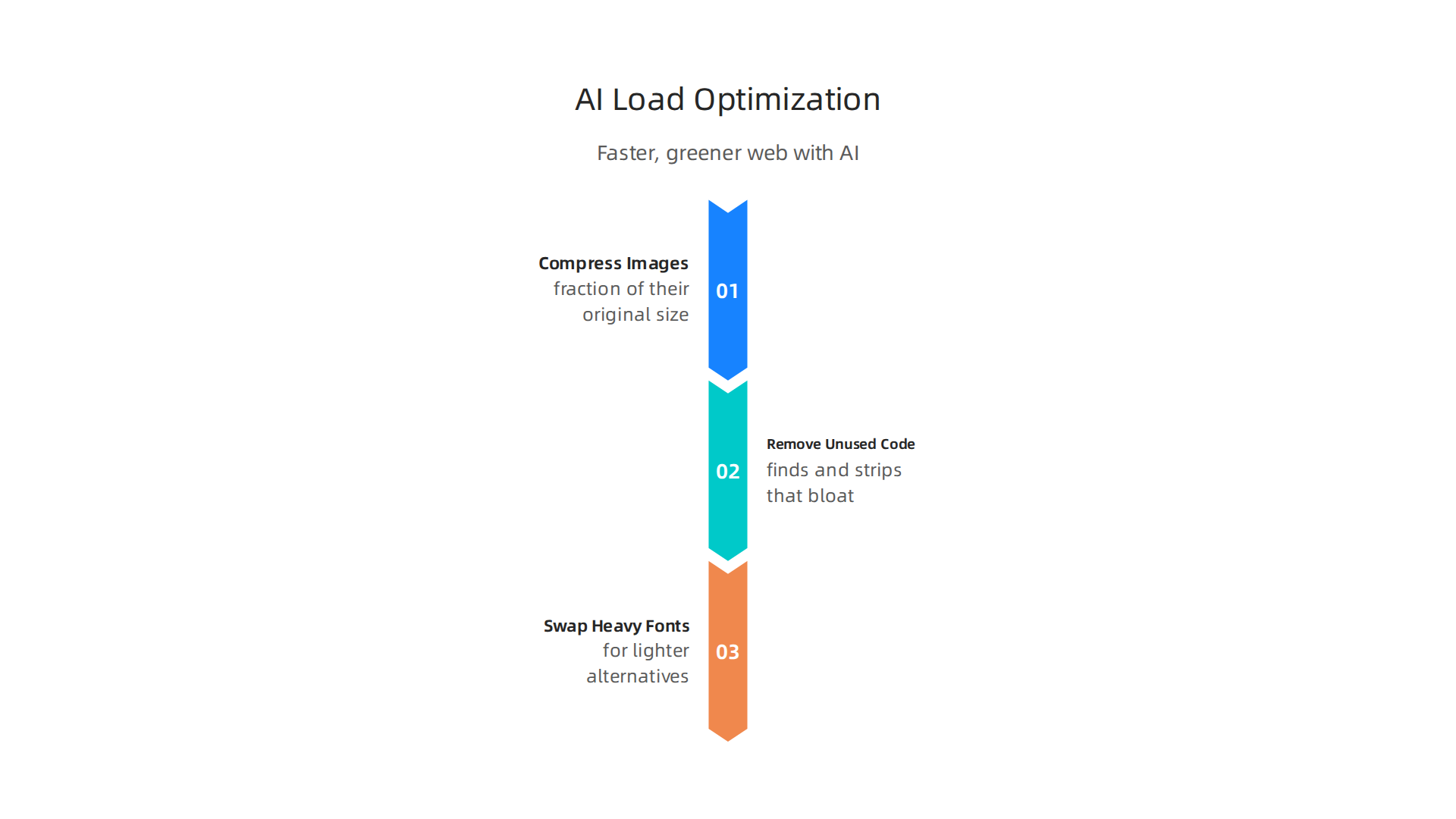
    Infographic detailing how AI optimizes website performance and reduces energy consumption for a faster, greener web.

    The human eye barely notices the difference, but the load time drops dramatically. AI can also remove unused code. Many websites load CSS and JavaScript that nobody ever uses. AI finds and strips that bloat. It can even swap out heavy fonts for lighter alternatives that look almost the same.

    The result? Pages load in under two seconds instead of five. That matters. Google uses speed as a ranking factor. And visitors are impatient. A one-second delay can cause a 20 percent drop in conversions. For futuristic websites packed with AR and 3D, AI optimization is not optional. It is essential.

    But faster load times do more than satisfy users and search engines. They also make the web greener. Every kilobyte of data that travels across the internet uses energy. Heavier pages require more server power and more bandwidth. By cutting the weight of your pages, you cut the energy cost too.

    Sustainable web design is a growing priority. The W3C has published official Web Sustainability Guidelines for 2026 that recommend optimizing files and hosting with clean energy. When AI automatically reduces page weight, it helps your site meet those green standards without extra work.

    This is a win on three fronts. Your visitors stay happy because pages load fast. Your search rankings improve. And your website uses less energy, which is better for the planet.

    If you are building futuristic websites, start thinking about AI-powered performance tools today. They can compress images, minify code, and automate much of the optimization process. To discover which tools and resources can help you build a faster, greener site, check out the list of top AI websites for finding the best performance tools.

    And if you want to stay ahead of the curve, subscribe to The Deep View Newsletter for clear daily updates on AI tools that can make your site both futuristic and fast.

    Ethical Considerations and Trust

    Speed and sustainability matter. But none of that counts if people do not trust your site. When you build futuristic websites with AI, you invite powerful technology into the lives of your visitors. That power comes with real responsibility.

    Here is the thing. Many visitors do not know when an AI is shaping what they see. Maybe the site uses AI to recommend products, personalize content, or even generate text. If people do not know, they cannot consent. And if they cannot consent, trust breaks down.

    That is where transparency comes in. The European Commission’s Ethics guidelines for trustworthy AI list seven key requirements for responsible AI. One of the most important is human agency and oversight. People should know when they are interacting with an AI. They should also have the option to understand how the system reached its conclusions. For futuristic websites, this means adding clear labels. Tell visitors when AI is at work. Explain what data the system collects and why.

    Bias is another big concern. AI learns from data. If that data contains unfair patterns, the AI can repeat and amplify them. Imagine a futuristic website that uses AI to screen job applicants or recommend loans. Biased decisions would cause real harm. The OECD AI principles emphasize that fairness and non-discrimination must be built into AI systems from the start. As a site owner, you need to test your AI tools for bias before they go live.

    Privacy also demands your attention. Laws like GDPR set strict rules about how you collect, store, and use personal data. In 2026, new AI-specific laws are rolling out around the world. Compliance is not optional. You need to review every AI tool on your site. Make sure it handles data responsibly. Give users control over their own information.

    Building trust also means being honest about limitations. No AI is perfect. Systems make mistakes. A trustworthy futuristic website admits this upfront. It provides fallback options. If an AI gives a wrong answer or makes a bad recommendation, users need a clear path to get help from a human.

    A great way to think about all of this is through the lens of AI governance. The AI governance 2026 guide from Athena Solutions recommends creating clear policies, training your team, and auditing your AI systems regularly. This is not a one-time checklist. It is an ongoing practice.

    Futuristic websites that earn trust will win in the long run. Visitors return to sites that respect them. They share those sites with others. And they feel safe sharing their data.

    If you want to dig deeper into how humans and AI can work together transparently, check out our post on human or AI creativity collaboration. It covers how to keep the human element strong even as AI takes on more tasks.

    How to Prepare Your Business for the Next Wave

    You have read about ethics and trust. Now comes the action part. Preparing your business for futuristic websites does not mean buying every shiny AI tool. It means thinking carefully about what you actually need.

    Business leaders discuss strategy and plan for implementing new AI technologies and futuristic web solutions, focusing on actual needs.

    Start with a clear strategy. Look at your business goals first, then figure out which AI features help you reach them. Do you want faster customer support? More personalized shopping? Better content? Choose one or two areas to focus on. A smart approach is to use an AI website builder for rapid prototyping, then bring in human designers and developers for the final build. That is the hybrid method that actually works in 2026. You can check out a detailed breakdown of when AI makes sense and when it does not in this AI website builder pitfalls and wins guide.

    Next, invest in your people. The best futuristic website falls flat if your team does not know how to use it. Train your staff on the AI tools you adopt. Teach them how to prompt effectively, how to check outputs for mistakes, and how to keep the human touch. At the same time, choose tools that scale with you. Modular platforms let you add new features as you grow without ripping out everything and starting over. If you need help picking the right tools for your workflows, our article on choosing and using an AI-powered research assistant offers a solid framework.

    Finally, do not try to change everything at once. Launch small experiments. Test one AI feature, like a chatbot or personalized recommendations. Measure what happens. Did engagement go up? Did sales improve? Listen to user feedback too. Then adjust and try the next thing. Iterative improvement beats a big overhaul every time.

    Keeping up with new developments is part of the job. The AI space moves fast, and what works today might be outdated next month. That is why staying informed matters. For daily updates without the noise, consider subscribing to The AI Newsletter Worth Reading. It delivers clear, practical AI news straight to your inbox so you can make smarter decisions for your futuristic website.

    Summary

    This article explains what a truly futuristic website looks like in 2026 and gives a practical roadmap for building one. It covers the core trends—AI-driven personalization, voice and multimodal interfaces, generative design, AR/VR and 3D web, plus AI-based performance and sustainability optimizations—and shows why these features matter for engagement, conversions, and brand trust. You’ll learn how AI assembles personalized pages in real time, speeds up design and prototyping, and can compress and clean code to keep sites fast and greener. The piece also calls out ethical obligations—transparency, bias testing, and data privacy—and offers a step-by-step approach: choose goals first, run small experiments, train your team, and measure ROI. After reading, you’ll have clear next steps for adding AI features that feel human, scalable tactics to test, and resources to stay current as tools evolve.

  • AI Virtual Assistants for Businesses Master Your 2026 Strategy

    AI Virtual Assistants for Businesses Master Your 2026 Strategy

    Introduction: Why AI Virtual Assistants Matter for Businesses in 2026

    The way businesses work is always changing, and in 2026, Artificial Intelligence (AI) is leading a big shift. Companies today often face challenges like too many tasks, not enough time, and needing to do more with less. Imagine having a smart helper that can handle many small jobs, letting your team focus on the big ideas. This is where AI virtual assistants come in, changing how companies get things done.

    These smart helpers are not just a futuristic idea anymore; they are a key part of how successful businesses operate right now. Many leaders, from CTOs to marketing managers and founders, are looking for ways to use AI to make their businesses better. Actually, many companies are already seeing good results. A report shows that 74% of businesses using AI say they are getting value from it KPMG Global tech report 2026.

    Screenshot of KPMG's official website, a global leader in professional services.

    Another study found that 74% of decision-makers see a positive impact from AI in their organizations AI adoption in the business world: current trends and future … – PwC.

    Screenshot of PwC's official website, a multinational professional services network.

    AI virtual assistants like Smith.ai are designed to take over repetitive tasks, like answering customer questions, scheduling meetings, or organizing data.

    Screenshot of the Smith.ai homepage, a prominent AI virtual assistant service.

    This frees up human workers to focus on creative thinking and more complex problem-solving. It’s not just about doing tasks faster; it’s about doing them smarter and often with fewer mistakes. Think about how an AI powered coding assistant can help developers write code, or how limitless ai tools are pushing the boundaries of what’s possible in automation. The goal is to boost productivity and help businesses grow.

    However, picking the right AI tool can be tricky. With so many new AI tools coming out all the time, it’s easy to feel overwhelmed. Decision-makers need to think about what their business truly needs, how easy an AI tool is to use, and if it will really help them earn more or save money.

    A person in a professional setting thoughtfully considering strategic options.

    Questions like "how to use ai" effectively or what impact tools like jace ai might have are important to consider. It’s vital to choose solutions that fit well with existing business plans and can show a clear return on investment.

    To make the best choices and stay ahead in this fast-moving world, it helps to keep learning about the latest AI trends and tools. You can find many helpful resources to guide you in using AI for your business, and one great way to do that is by reading the 10 Top AI Websites Professionals Trust for Real News and Tools.

    Staying up to date with new AI developments can be a full-time job in itself. For clear daily AI updates right to your inbox, you can subscribe to The AI Newsletter Worth Reading.

    To truly understand how AI virtual assistants can help your business, it’s important to know exactly what they are and what they can do. An AI virtual assistant is a computer program that uses Artificial Intelligence to do tasks, answer questions, and sometimes even learn from how it talks with people. Unlike simple chatbots that follow a set script, AI virtual assistants can understand more complex questions and give more helpful, human-like responses. They can even make choices based on the information they have, much like a real assistant would.

    Companies like smith ai offer services that fit this description perfectly. These tools are designed to take on jobs that usually need human thought but are also very repetitive. This means your team doesn’t have to spend time on the same tasks over and over again.

    Let’s look at some key ways businesses are using AI virtual assistants in 2026:

    An infographic illustrating key business applications of AI virtual assistants in 2026.

    • Customer Support: Imagine customers getting instant answers to common questions, any time of day or night. AI virtual assistants can handle a huge number of customer inquiries, guide users through processes, and collect information before passing a complex issue to a human agent. This makes customers happier and lets your human support staff focus on solving trickier problems.
    • Sales and Marketing: For sales teams, AI assistants can help qualify leads, schedule follow-up calls, and send personalized marketing messages. This helps make the sales process smoother and ensures potential customers don’t get missed. Understanding How to Get Real ROI from AI Marketing Cloud in 2026 is key here.
    • Operations and Administration: These assistants can manage calendars, set reminders, help with data entry, and automate many office tasks. This frees up administrative staff to do more important work. For instance, some advanced tools are acting as an ai powered coding assistant, helping developers with their daily tasks. The rise of limitless ai applications means even more complex operational tasks are becoming automated. A report shows that AI is having a big impact on professional services, helping with tasks like these across many industries 2026 AI in Professional Services Report.

    By using these smart tools, businesses are learning how to use ai to make their work much more efficient. While specific tools like jace ai might have different focuses, the main goal for all AI virtual assistants is to boost productivity and help businesses reach their goals faster and smarter.

    Security, Privacy, and Compliance Considerations for AI Assistants

    AI virtual assistants help businesses work better, but they also bring up important questions about keeping information safe. When these assistants handle customer talks or company secrets, we need to be very careful. This is about making sure private details stay private.

    Consider the data security risks. Imagine an AI virtual assistant like smith ai helping a customer. If that customer shares sensitive information, such as their account number, home address, or even personal health details, where does that information go? Is it stored in a secure place? Who has access to it? Businesses must make sure that all conversations and important credentials routed through these assistants are strongly protected. Tools like jace ai and other AI solutions also handle sensitive data, requiring the same careful approach. Even ai powered coding assistants might deal with valuable company code or intellectual property that needs to stay secret to avoid unfair competition. As AI gets more powerful, offering almost limitless ai options for automation and data processing, the amount of data handled grows. This makes security concerns even bigger, because more data means more chances for problems if not managed correctly.

    Beyond just keeping data safe, there are many rules companies must follow. These are called regulatory and compliance factors.

    A professional meticulously reviewing legal or compliance documents in an office setting.

    In 2026, there are new laws about privacy, like those passed in different US states and other countries around the world. For example, a report from this year highlights the importance of staying updated on Data Privacy, AI Regulatory, and Compliance Update: 2026. Companies also need to think about where their data is stored, which is called data residency. Some countries have laws that require data from their citizens to stay within their borders, not moved elsewhere. Different industries, like healthcare or banking, also have their own special rules about handling sensitive information. A helpful resource for understanding these broad rules is the AI Compliance Guide 2026: Global Regulations.

    Screenshot of Modulos.ai website, focusing on AI compliance and governance.

    For businesses to really know how to choose and use an AI powered research assistant in 2026 well, they must think about these rules. They need to make sure their AI tools follow all the right guidelines. This means picking the right AI solutions and setting them up carefully, with security and privacy in mind from the very start.

    Staying on top of these fast-changing rules and new AI tools can be a lot. To help you keep up, consider subscribing to The AI Newsletter Worth Reading for daily updates.

    When picking AI tools like smith ai for your business, it’s not just about keeping data safe. You also need to look closely at what each tool offers, how much it costs, and if it’s a good fit for your team. Every AI assistant is a bit different, and knowing these details helps you make the best choice.

    Key Features That Make AI Assistants Different

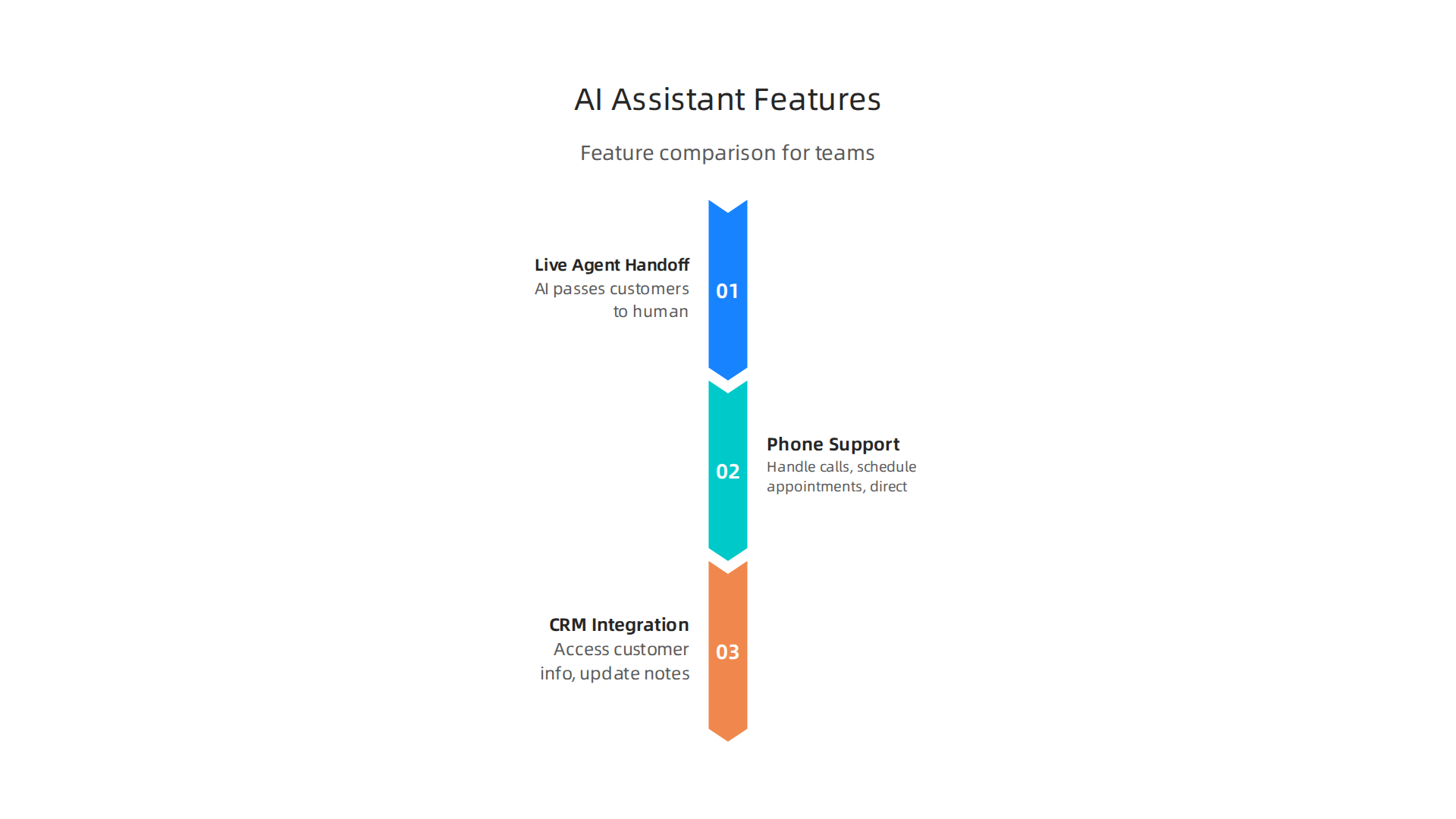
    Not all AI assistants are made the same. Some key features truly set them apart:

    An infographic detailing essential features that differentiate various AI virtual assistants.

    • Live Agent Handoff: This is super important. It means the AI can talk to customers, but if a question is too hard or sensitive, it can smoothly pass the customer to a real person. This makes sure your customers always get the help they need, mixing the speed of AI with the personal touch of a human.
    • Phone Support: Many AI assistants like smith ai can handle phone calls. They can answer common questions, schedule appointments, and even direct calls. This saves your team a lot of time and makes sure no call goes unanswered.
    • CRM Integration: For businesses, connecting your AI assistant to your Customer Relationship Management (CRM) system is a game-changer. This lets the AI access customer info, update notes, and personalize interactions, just like a human assistant would. It helps you see how to use ai to make your customer service much better.

    Other AI tools, like jace ai or ai powered coding assistants, might focus on different features specific to their tasks. For instance, coding assistants help with writing code, which is very different from managing customer calls. The world of AI is truly limitless ai in its applications, offering a wide array of options for businesses.

    Understanding Pricing Models and Total Costs

    Looking at the price of an AI assistant can be tricky because different companies charge in different ways. For smith ai and similar services, you’ll often see these pricing models in 2026:

    • Per Call Pricing: Some services charge you for each call or interaction the AI handles. For example, Smith.ai’s AI-first plans can start around $95 per month for a set number of calls, with extra charges if you go over that limit Smith.ai Review (2026): Features, Pricing, Pros and Cons.
    • Per Minute Pricing: Other services charge based on how long the AI (or a human agent, if included) spends on calls.
    • Hybrid Models: Many providers, including smith ai, offer plans that mix AI assistance with human agents. These plans usually cost more, starting from a few hundred dollars for a certain number of calls or minutes Smith.ai Pricing (2026): Plans, Costs & Fees | SchedulingKit. This can quickly add up, so it’s important to keep track of your usage.

    When picking an AI assistant, it’s not just about the monthly fee. You also need to think about the total cost of ownership. This includes:

    • Setup Fees: Some services might charge a one-time fee to get started.
    • Overage Charges: If you use more calls or minutes than your plan allows, those extra charges can increase your bill.
    • Integration Costs: If you need help connecting the AI to your existing tools, there might be fees for that too.
    • Team Training: While AI is smart, your team might need training to work well with it.

    For small and medium businesses (SMBs), comparing costs carefully is key. What looks cheap at first might become expensive if your business grows quickly or has many unexpected calls. You want an AI solution that scales with you without breaking the bank. For a broader look at what’s out there, checking a general AI Receptionist Market Comparison 2026: Who Offers the Best Value? can be helpful. Also, learning about other kinds of smart assistants, like the Galaxy AI 2026: Agentic Assistant for Business and Content Creation, can give you a better idea of the wide range of AI tools available today.

    After you pick an AI assistant, like smith ai, the next big step is making sure it can talk to all your other business tools. This important step is called integration. A good integration plan is key to truly understanding how to use ai to make your business run better and smarter.

    How AI Assistants Connect to Your Business Systems

    There are a few main ways AI tools connect with your other systems. Knowing these helps you decide the best path for your business.

    • Direct API Connections: This is like giving your AI assistant a special direct line to another software. An "API" is a set of rules that lets different computer programs talk to each other. You or a developer builds this link. It offers a lot of freedom to customize how your AI works with your other tools, allowing for truly limitless ai applications tailored just for you.
    • Integration Middleware: Sometimes, your older business programs don’t speak the same language as new AI tools. Middleware acts as a translator. It sits between your AI assistant and your existing systems, helping them share information without having to change your main, older programs. This keeps everything stable and running smoothly How to Build Enterprise AI Agents in 2026.
    • CRM Connectors: Many AI assistants, including those like jace ai or even specialized ai powered coding assistants, come with ready-made links to popular tools. A great example is connecting to your Customer Relationship Management (CRM) system. These pre-built connectors make it easy for your AI assistant to access customer details and update notes, just like a human team member would.

    Important Technical Details to Consider

    When you connect your AI assistant, there are a few technical things you need to think about to make sure it works well.

    • Speed (Latency): How quickly does your AI assistant respond and get information from your other systems? If it’s too slow, customers might get impatient, or your team might waste time waiting. You want fast, smooth interactions.
    • Keeping Data in Sync (Data Synchronization): Imagine your customer details are in two different places. If the AI updates one, the other needs to update too. If not, you’ll have wrong or old information in one place. Making sure all your data stays fresh and the same across systems is very important.
    • Keeping Records (Logging): It’s a smart idea to keep a detailed record of every action your AI assistant takes. This record, or log, helps you see how it’s working, find any mistakes, and understand what happened when you need to check things later.
    • Handling Problems (Error Handling): What happens if something goes wrong with the connection or the AI gets stuck? A good system has plans for finding errors and telling someone quickly so they can be fixed. Creating a "Master Error Log" can help you track issues and respond fast when a workflow fails Best AI & Automation Virtual Assistant | Agentic Scaling 2026. Businesses should aim to implement AI workflows without chaos Business Guide to AI Workflow Implementation in 2026.

    Getting these integration steps right means your AI assistant will work smoothly and fully with your business. This truly lets you use the power of AI to help your business grow. To stay on top of the latest AI tools and trends, it’s helpful to know where to find reliable information. Check out these 10 Top AI Websites Professionals Trust for Real News and Tools.

    Want to keep learning about AI and how it can help your business? Get clear daily AI updates from The AI Newsletter Worth Reading.

    After you put your AI assistant to work, like using a smith ai tool, it’s super important to know if it’s actually helping your business. This means looking at how much value it brings back for the money and effort you put in. We call this "Measuring ROI and KPIs" which stands for Return on Investment and Key Performance Indicators. It helps you understand how to use ai to truly make things better.

    Which Key Numbers Matter for Your Virtual Assistant?

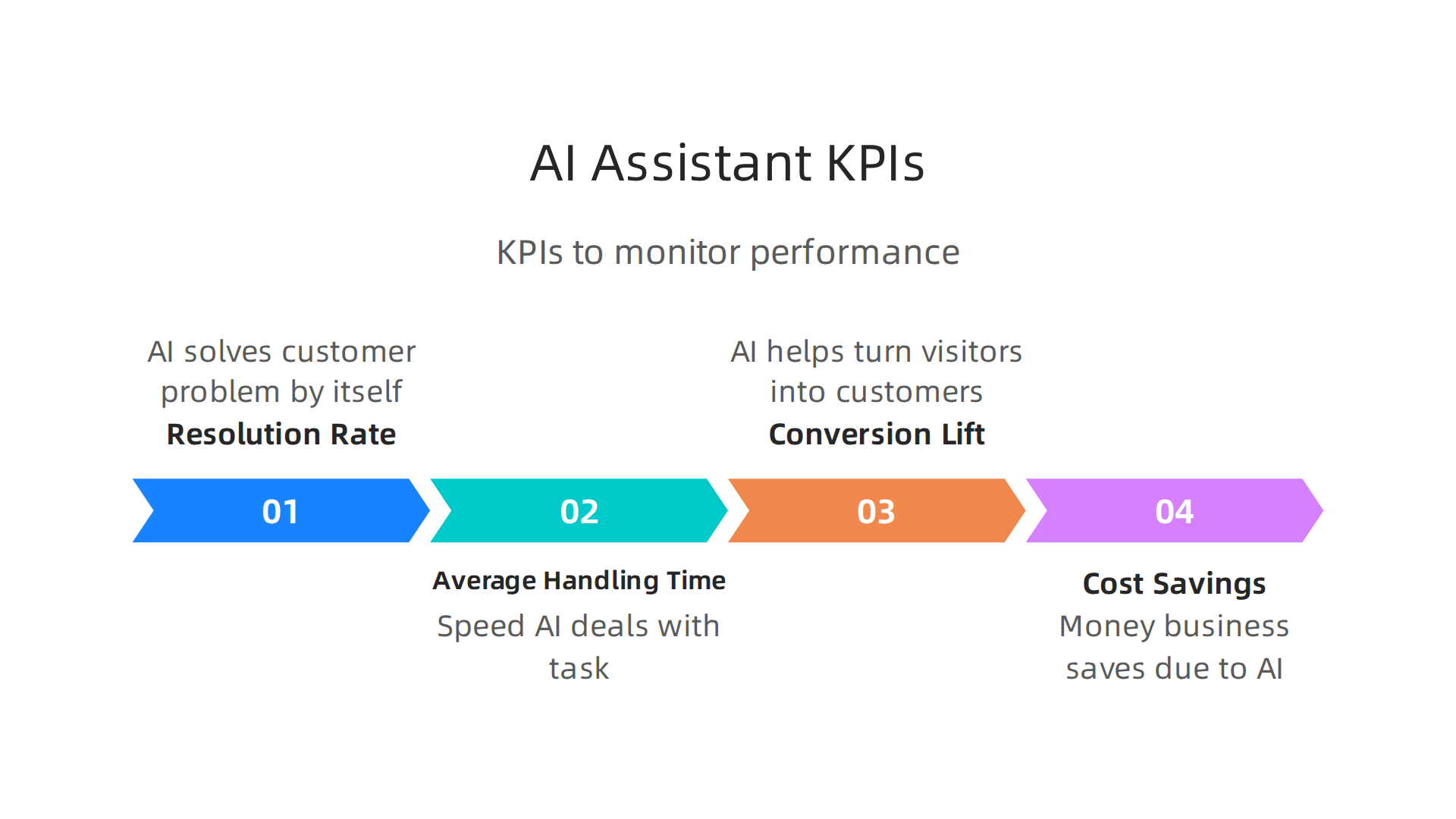
    When you set up an AI assistant, you want to see real results. Here are some key numbers, or KPIs, to keep an eye on:

    An infographic showcasing important KPIs to measure the performance and ROI of AI virtual assistants.

    • Resolution Rate: This measures how often your AI assistant, whether it’s a general tool or a specific ai powered coding assistants, can solve a customer’s problem all by itself. A high rate means less work for your human team.
    • Average Handling Time: How fast does your AI assistant deal with a task or customer question? If it’s quicker than a human, it saves time and keeps customers happy.
    • Conversion Lift: Sometimes an AI assistant can help turn a website visitor into a paying customer. Measuring "conversion lift" shows if the AI is helping more people buy your products or services.
    • Cost Savings: This is about how much money your business saves because of the AI. Maybe you need fewer staff for simple tasks, or the AI helps you avoid mistakes that cost money.

    Many businesses in 2026 are seeing big gains from using AI. In fact, a report from early 2026 showed that business use of AI for return on investment (ROI) increased greatly in 2024 across all major regions AI Adoption & Return on Investment (ROI) business use of AI rose sharply in 2024. This shows that watching these numbers really helps.

    Testing Your AI and Making a Strong Case for More

    You don’t have to roll out an AI assistant to your whole company all at once. A smart way to start is with a "pilot evaluation." This means trying out the AI, perhaps a jace ai assistant, with a small group or for a specific task.

    1. Start Small: Pick one area of your business where an AI assistant could help. For example, answer common customer questions, or help process simple forms.
    2. Gather Data: Use the KPIs mentioned above to track how well the AI does during this test phase. Is it solving problems fast? Is it saving money?
    3. Show the Proof: If the pilot goes well, you’ll have clear numbers to show how much the AI helps. This is how you "build a business case" for using the AI more widely. It helps you prove that a limitless ai approach can be valuable.

    By carefully measuring these things, you can make sure your AI investments are truly working for you. If you want to dive deeper into getting great results from AI, learn more about How to Get Real ROI from AI Marketing Cloud in 2026.

    After you carefully measure how well your AI tools are working, there’s another very important step to make sure they actually succeed. It’s all about the people using these tools. Even the best ai powered coding assistants or a clever smith ai setup won’t help much if your team doesn’t know how to use ai well or doesn’t want to use it. This is why "Change Management, Training, and Adoption Best Practices" are so important. It’s more than just having the right tech; it’s about making sure everyone is ready and willing to embrace it.

    Why People Matter More Than Just Tech

    Think about it: you can buy a super-fast new car, but if no one learns to drive it or is scared to, it just sits in the garage. The same goes for AI tools. Many businesses find that getting people trained and excited about AI is often harder than the technical setup itself. When everyone understands the benefits and feels comfortable, they’re much more likely to use a jace ai assistant or any new AI tool to its fullest. This kind of "internal buy-in" means everyone believes the AI will help them, not replace them.

    Practical Steps for AI Adoption

    So, how do you get your team ready? Here are some simple steps:

    • Training for Each Job: Not everyone needs to know everything about AI. Train people on the parts that directly help their jobs. For example, a customer service team needs to know how their new AI assistant helps answer questions quickly,

    A team actively collaborating on a shared plan or project using a whiteboard.

    while a marketing team needs to learn how an AI helps them create content. This is called "role-based training."

    • Easy-to-Understand Guides: Make simple instructions and guides. Think of them like a quick-start manual for a new toy.
    • Let People Try It Out: Give your team chances to play with the AI in a safe space. This helps them get comfortable and see how it works firsthand.
    • Listen to Feedback: Create easy ways for people to share what they like and don’t like about the AI. What’s working? What’s confusing? Using this feedback to make small improvements helps everyone feel heard and makes the tool better. Many companies in 2026 are focused on building strong AI governance to ensure fair and responsible use of these tools, and user feedback is a big part of that AI Compliance Guide 2026: Global Regulations.
    • Show Success Stories: When someone uses the AI to do something great, share that story with the team. It inspires others and shows them the real-world benefits.

    By focusing on these people-centered steps, you can help your team easily adopt new AI tools, making sure your investment really pays off. If you’re looking for more ways to lead your company successfully with new technology, check out how to use Master Raptor Technologies for IT Leadership Success.

    Staying updated on the latest AI trends and best practices is also key to smooth adoption. Get clear daily AI updates from The AI Newsletter Worth Reading.

    After getting your team ready and excited about new AI tools, the next big step is picking the right tool and making a plan to use it well. It’s like having a great crew for a journey; now you need to pick the best map and vehicle. This is where a careful "Vendor Selection Checklist and Implementation Roadmap" comes in handy. It helps you choose smart and set up for success, whether you’re looking at smith ai for customer service or an ai powered coding assistants for your tech team.

    Vendor Selection Checklist and Implementation Roadmap

    Choosing an AI tool isn’t just about finding the flashiest one. It’s about finding the one that fits your needs like a glove. Here’s a simple checklist to help you pick the best AI vendor:

    • What Can It Do? (Technical Fit): Does the AI tool solve your specific problem? If you need a virtual receptionist, does the smith ai system handle calls and messages the way you want? Does it work with the other tools you already use? For instance, some businesses use AI to automate tasks, which can be explored in articles about AI productivity use cases in 2026.
    • Is It Safe? (Security and Privacy): Will the AI keep your company’s and customers’ information safe? Make sure the vendor has strong rules about protecting data.
    • How Easy Is It to Use? (Operational Simplicity): Can your team learn how to use ai quickly? Is the support good if you run into problems? A tool like jace ai or limitless ai might offer a great feature set, but if it’s too hard to operate, it won’t be used. Many companies find that checking reviews, like this Smith.ai Review (2026): Features, Pricing, Pros and Cons, helps understand real-world ease of use.
    • What Does It Cost? (Commercial Evaluation): Look beyond the basic price. Are there hidden fees for extra features, more users, or higher usage? Compare different plans, like those mentioned in a Smith.ai pricing guide, to avoid surprises.

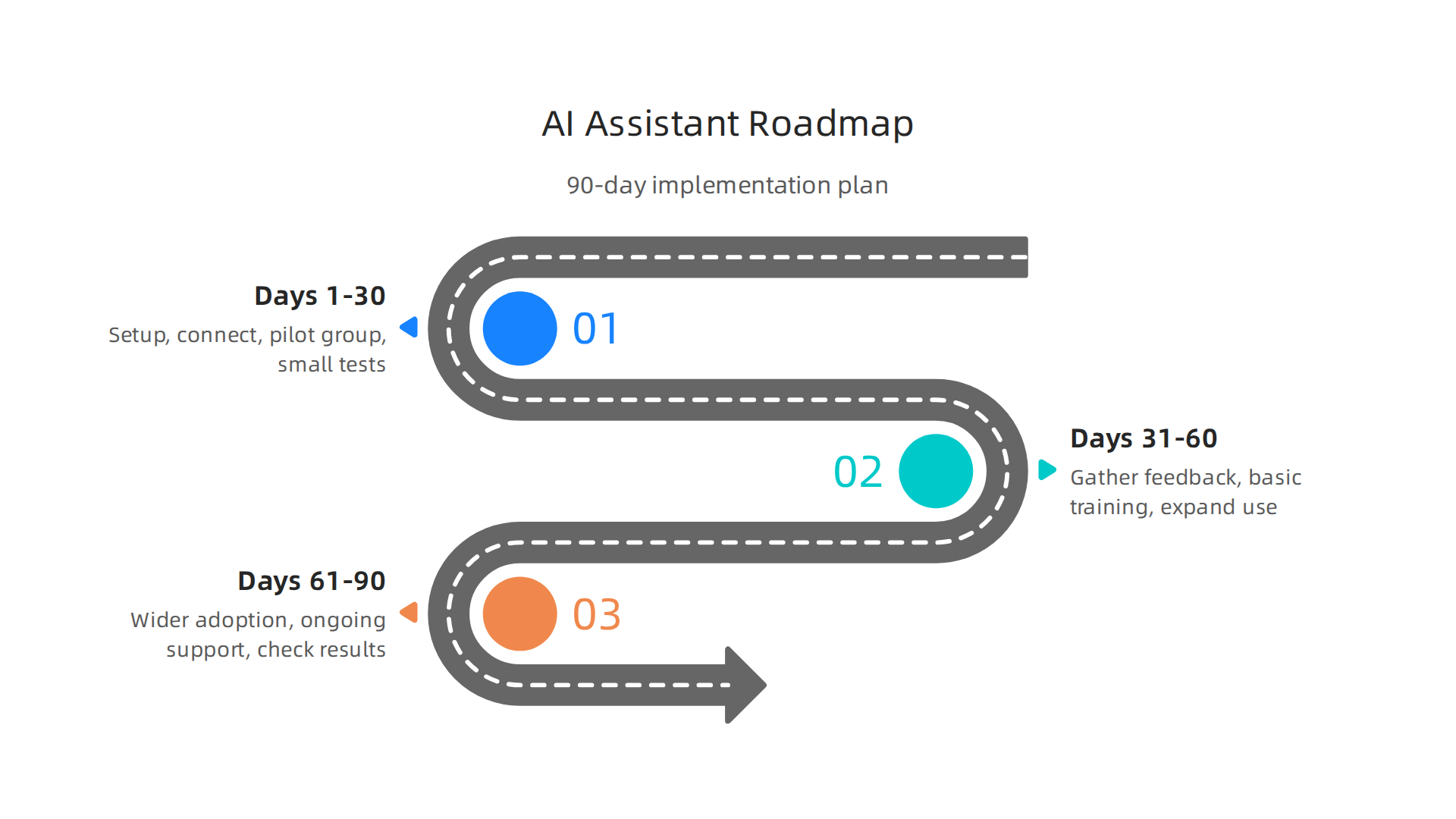
    Your 90-Day Implementation Roadmap

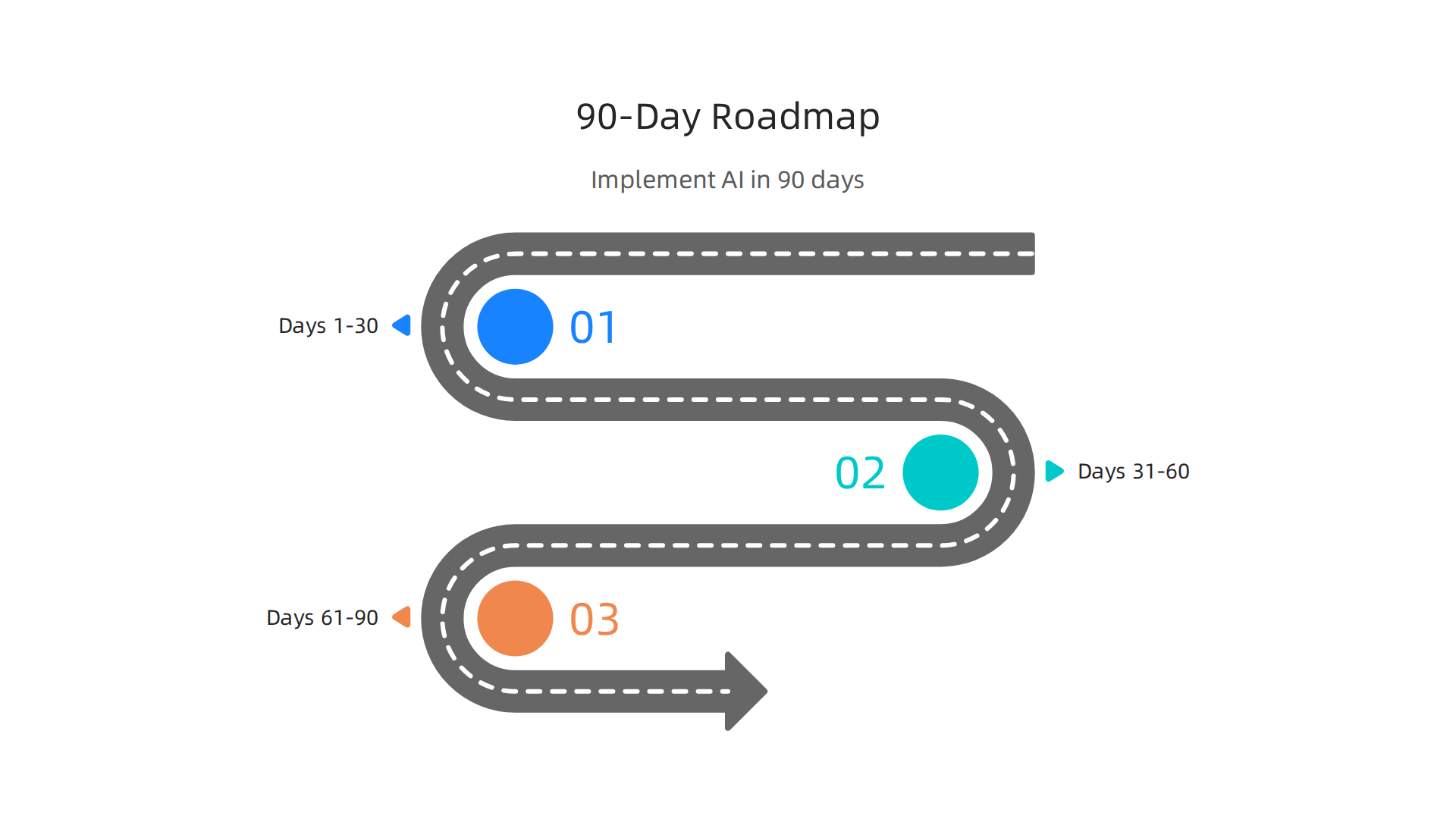
    Once you pick an AI tool, you need a clear plan to bring it into your daily work. Here’s a basic roadmap for small to medium-sized businesses and internal teams:

    An infographic outlining a 90-day roadmap for implementing AI tools in a business.

    • Days 1-30: Set Up and Small Tests
      • Get Ready: Install the AI tool and get it connected to your existing systems.
      • Pilot Group: Pick a small group of enthusiastic team members to try it out first. They can be your "AI champions."
      • First Tasks: Give them simple tasks to complete with the AI. For example, if it’s an ai powered coding assistants, have them try it on a small code snippet.
    • Days 31-60: Train and Expand
      • Gather Feedback: Ask your pilot group what worked well and what was confusing. Use this to make small fixes and improve how you teach others.
      • Basic Training: Start training more team members, focusing on the simple guides and hands-on practice you prepared.
      • Expand Use: Slowly introduce the AI to more common tasks, allowing people to get comfortable. Learning how to choose and use an AI-powered research assistant is a great example of a skill that can be developed in this phase.
    • Days 61-90: Full Rollout and Review
      • Wider Adoption: Encourage everyone who needs to use the AI to start using it regularly for their work.
      • Ongoing Support: Make sure there’s always someone to answer questions and help with problems.
      • Check Results: After 90 days, look at how the AI has helped. Is it saving time? Making things easier? Use these findings to celebrate success and plan for the future.

    A team of professionals collaboratively analyzing performance data on a large screen.

    By following this step-by-step approach, you can make sure your new AI tools are chosen wisely and used effectively, helping your business grow.

    Summary

    This article explains how AI virtual assistants have become essential business tools in 2026, handling repetitive tasks like customer support, scheduling, and data entry so teams can focus on higher-value work. It covers real-world uses across customer service, sales, marketing, and operations, while flagging security, privacy, and regulatory risks such as data residency and industry-specific rules. You’ll learn which features matter (live agent handoff, phone support, CRM integration), common pricing models (per-call, per-minute, hybrid) and the components of total cost of ownership. The piece outlines practical integration methods—direct APIs, middleware, and pre-built connectors—and technical checks for latency, data sync, logging, and error handling. It also shows how to measure success with KPIs like resolution rate, handling time, conversion lift and cost savings, and recommends a 90-day pilot-to-rollout roadmap. Finally, the article emphasizes people-centered adoption: role-based training, feedback loops, and governance, and offers a vendor checklist to help you choose and implement the right AI assistant for your business.

  • Master Raptor Technologies for IT Leadership Success

    Master Raptor Technologies for IT Leadership Success

    Why IT leaders need to understand Raptor Technologies now

    In 2026, technology changes faster than ever. For leaders in IT, keeping up with new tools is a big part of the job. One important group of these fast-moving advancements is what we call raptor technologies. This term helps us think about powerful, cutting-edge solutions that are quickly changing how businesses work.

    An IT leader contemplates the strategic implications of adopting new and powerful technologies.

    These are not just small updates; they are big shifts that can make a company much stronger or leave it behind.

    So, what exactly are raptor technologies? Think of them as the most advanced, often smart, systems that help businesses do things better, faster, and sometimes even safer. This includes areas like smart automation, advanced data analysis, and new ways to protect information. For example, understanding how these technologies can assess risks is key for IT security. The Raptor Innovation Summit 2025 Exploring Approaches to Threat and Risk Assessment showed how important it is to use new ways to keep systems safe.

    NewEagle specializes in control system development, relevant to advanced technology solutions mentioned in the article.

    Companies like DXC Technology and BM Technologies are always looking for these kinds of advancements.

    Many IT teams today face big problems. It’s hard to find the right tools, make them work with old systems, and ensure they are safe from threats. Some chinese ai companies are bringing new ideas to the table, which means IT leaders need to be smart about what they choose and how they use it. It’s all about making sure these new technologies actually help the business grow and solve real problems, not just create new headaches. For IT leaders looking at strategic growth, understanding the impact of key tech players like those covered in Palantir Technologies 2026 Growth Products and Impact on Business Strategy is vital.

    This article will help you understand these raptor technologies better. We will give you simple, clear advice on how to look at them, pick the best ones for your company, and put them into action. Our goal is to make it easier for you to make smart choices that help your business shine in the rapidly changing world of 2026.

    To keep up with the daily fast-paced changes in AI and technology, consider subscribing to The AI Newsletter Worth Reading.

    The Deep View Newsletter offers daily updates on AI and technology, helping IT leaders stay informed.

    Defining Raptor Technologies: architecture, components, and variants

    Now that we know why understanding raptor technologies is so important for IT leaders, let’s dig a little deeper into what these powerful systems are truly made of. Think of raptor technologies not as a single tool, but as a special way of building advanced tech solutions.

    Every raptor technology system has a clear structure, or "architecture." This means how its different parts are put together to work well. For example, some of these systems are built with new ideas about how technology routes are planned, which helps them handle lots of information quickly in 2026. You can find more details about these important system structures in technical routes, architecture, and enabling technologies. The main "components" of raptor technologies often include smart AI programs, ways to collect and analyze data, and tools to connect different systems. Companies like DXC Technology and BM Technologies are often at the front of creating or using these complex parts.

    Different companies often take their own paths when building these systems. Some focus on keeping everything in the cloud, while others make sure parts of the technology work right on the spot where they are needed. When we talk about chinese ai companies, it’s key for IT leaders to be careful. Some of these companies have been linked to hidden networks that could pose risks. For businesses, it’s wise to be aware of reports like Defending against China-nexus covert networks of compromised to protect their data and systems.

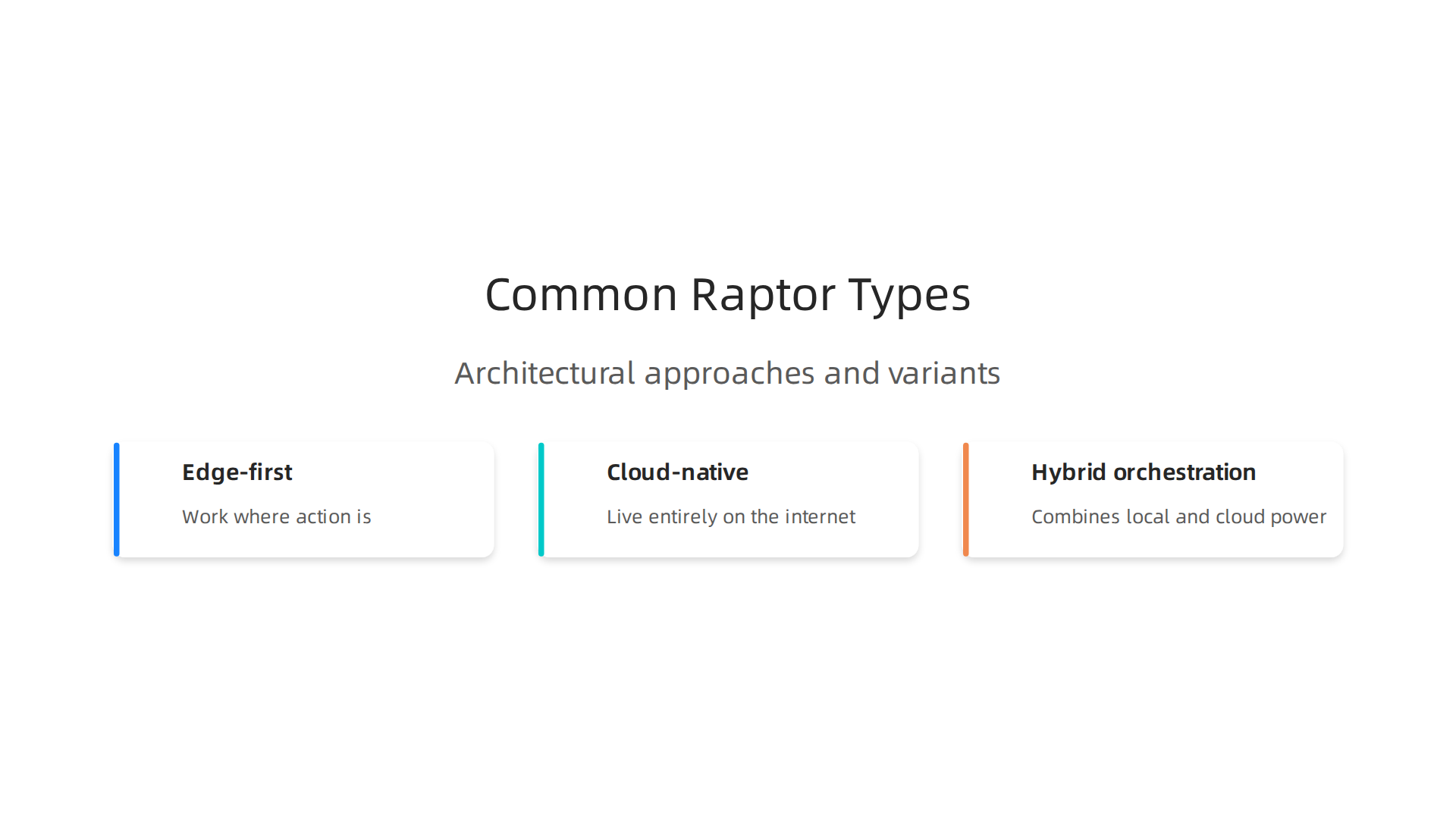
    Here are some common types of raptor technologies:

    An overview of the distinct architectural approaches within Raptor Technologies.

    • Edge-first: These systems do most of their smart work right where the action is. Imagine a smart camera at a store. It processes video on the spot instead of sending everything to a distant computer. This makes things super fast.
    • Cloud-native: These systems live entirely on the internet, using big data centers to run their programs. They are very flexible, can grow easily, and handle huge amounts of information from anywhere.
    • Hybrid orchestration: This type combines the best of both worlds. Some parts work locally, and some use the power of the cloud. It’s like having quick helpers nearby and a powerful brain in the sky, all working together perfectly.

    For IT teams looking at these systems, there are important technical abilities to check. You want to know if a system offers "observability," meaning you can easily see how it’s working. "Model management" is also key, which means how easy it is to update and improve the smart parts of the system. And "orchestration" helps ensure all the different pieces of the technology work together smoothly, like a well-tuned orchestra. Knowing about these details helps businesses choose the right tools. If you are looking for more places to find good information about AI tools, you might want to check out these 10 Top AI Websites Professionals Trust for Real News and Tools.

    Once businesses pick the right raptor technologies tools with good observability and orchestration, they can put them to work in many powerful ways.

    A team collaborates, discussing ideas to leverage new technologies for business solutions.

    These systems are changing how companies operate in 2026, making things safer, smarter, and faster.

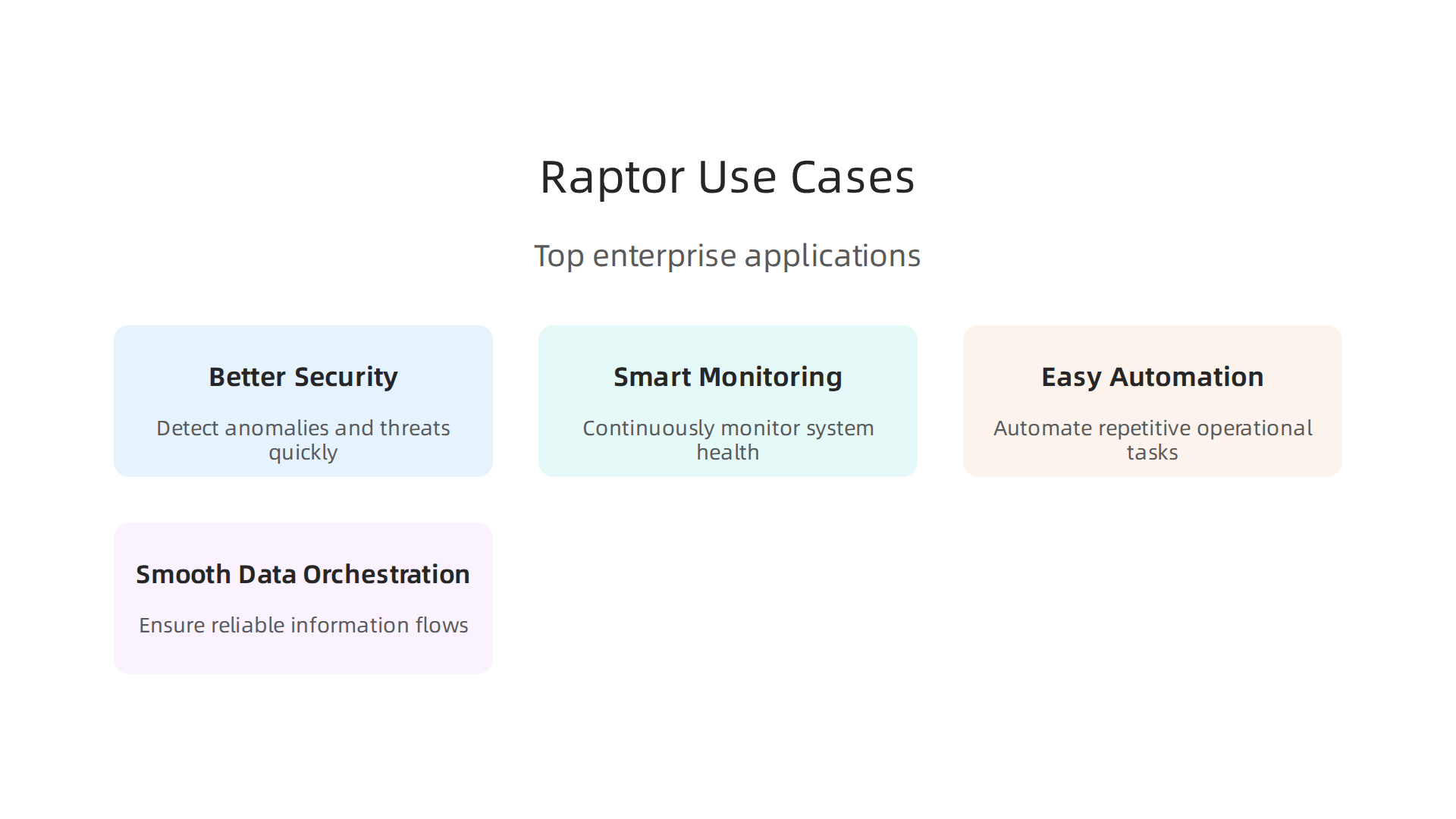
    Let’s look at some key ways businesses use raptor technologies:

    Key areas where businesses apply Raptor Technologies for enhanced operations.

    • Better Security: Raptor technologies are like super smart guards for your company’s data. They can watch for anything unusual, spot threats right away, and help stop attacks before they cause real harm. This means your important information stays safe.
    • Smart Monitoring: Imagine having eyes everywhere in your digital systems. These technologies constantly check how everything is running. If something slows down or breaks, they can tell you quickly, often before people even notice. This helps teams fix problems fast.
    • Easy Automation: Many everyday tasks can be boring and take a lot of time. Raptor technologies can take over these tasks, like moving data from one place to another or setting up new software. This frees up your employees to do more important, creative work. It’s all part of the push toward more automated and smart systems in business today, as highlighted in current Enterprise AI trends in 2026: Sovereign, agentic, edge, AI factories.
    • Smooth Data Orchestration: In big companies, data comes from many different places. Raptor technologies help manage all this information, making sure it flows correctly and is ready when needed. This helps businesses make better decisions because they have the right data at the right time.

    Who Benefits Most?

    Many parts of a business get big value from raptor technologies. These include:

    • IT Operations (IT Ops) Teams: They manage all the company’s tech. Raptor technologies help them keep systems running smoothly and fix issues faster.
    • Development Operations (DevOps) Teams: These teams build and update software. The technologies help them release new features more quickly and reliably.
    • Security Operations (SecOps) Teams: They are focused on keeping everything secure. As mentioned, raptor technologies are a powerful shield against digital threats.
    • Analytics Teams: They look at data to find insights. Raptor technologies make sure they get good, organized data to work with.

    Companies like DXC Technology and BM Technologies often help other businesses apply these advanced systems to their specific needs, ensuring they get the most out of these powerful tools.

    How to Pick Your First Project

    If your organization wants to start using raptor technologies, it’s smart to pick a pilot project first. Look for areas where:

    • There’s a clear problem that these technologies can solve.

    • Solving the problem would bring a big benefit, like saving a lot of money or making customers much happier.
    • You have a good team ready to learn and work with the new system.

    Starting small and showing clear success helps everyone understand the value before expanding to bigger projects. For businesses looking into how AI can assist with various functions, exploring tools like an Agentic Assistant for Business and Content Creation can provide practical insights into automation and efficiency gains.

    Staying updated on the latest AI and technology insights is key for any business looking to leverage raptor technologies effectively.

    Get clear daily AI updates from The AI Newsletter Worth Reading.

    Picking the right raptor technologies vendor is a very important step after you decide on your first project. You want to make sure the company you choose can truly help your business grow and stay safe. It’s like picking a good partner to work with.

    How to evaluate Raptor vendors: checklist and selection criteria

    When you look at different raptor technologies providers, it helps to have a clear list of things to check. This makes sure you pick the best fit for your company.

    Here are some key things to look at:

    Essential criteria for IT leaders to assess potential Raptor Technologies vendors.

    • How Safe Is Their System? This is called their "security posture." You need to know how they protect your data. Ask about their security rules and how they meet important standards. A good vendor will show you how they keep things safe, helping you avoid risks. Checking a vendor’s security is a must for avoiding problems later on Vendor Security Evaluation: Framework and Best Practices.

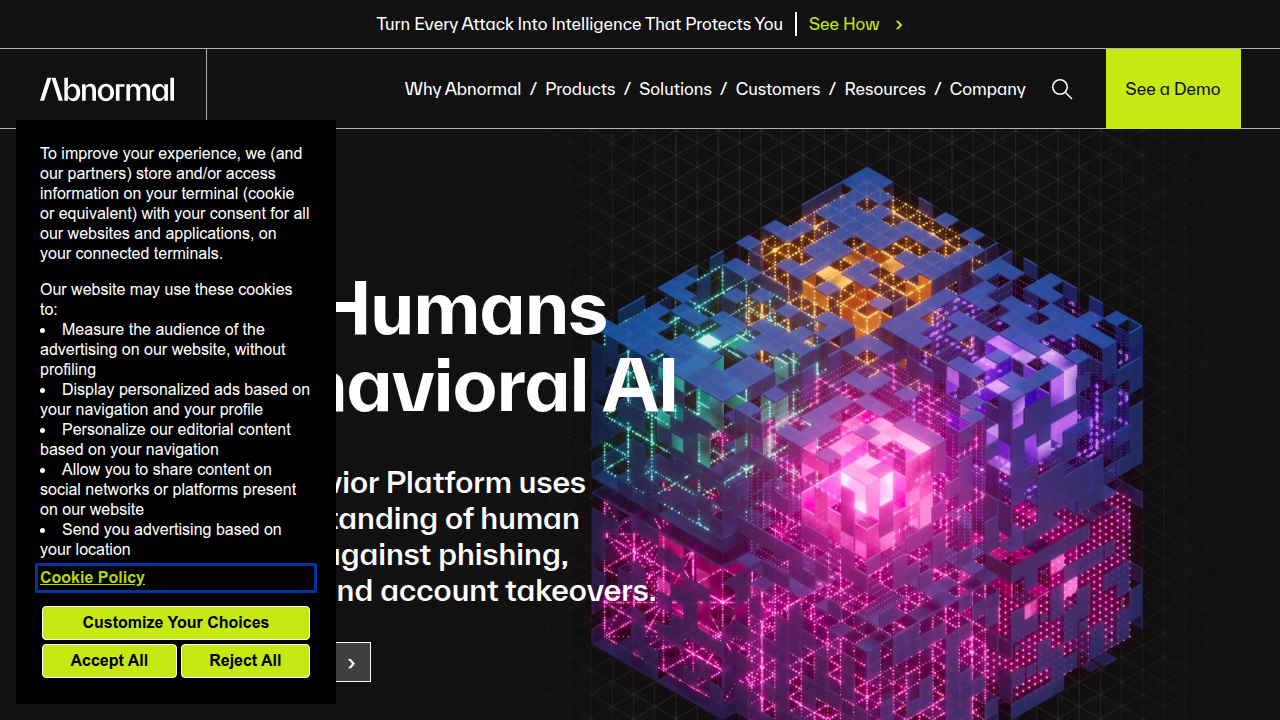
    Abnormal AI offers solutions for vendor security evaluation, a critical aspect when choosing Raptor Technologies providers.

    • Can It Connect Easily? Check their "integration APIs." This means how well their raptor technologies system can talk to other computer programs you already use. You want it to work smoothly with your current tools, not cause new headaches.
    • What Kind of Promises Do They Make? Look at their "Service Level Agreements" or SLAs. These are promises about how much time their system will be working (uptime) and how fast they will help you if something goes wrong. Clear SLAs mean you know what to expect.
    • Where Is Your Data Stored? This is "data residency." Find out where the vendor keeps your company’s important information. Sometimes, laws say that data must stay in a certain country. Make sure the vendor follows these rules.

    You’ll want to compare how each vendor stacks up across these points. Think about how well their raptor technologies fit your technical needs, how stable and reliable their company seems (operational maturity), and what kind of help they offer (support model). Services from companies like DXC Technology or BM Technologies can help you go through these steps carefully. You can also learn more about choosing the right AI tools for your business needs by checking out a guide on how to choose and use an AI-powered research assistant in 2026.

    Spotting Red Flags and Getting the Best Deal

    While looking at vendors, keep an eye out for "red flags." These are warning signs that a vendor might not be right for you. For example, if they make big promises but don’t give clear details, or if their support team seems slow to answer questions. It is important to ask good questions when you get responses from vendors Responding to vendor security assessments: Best practices & tips.

    When it’s time to talk about prices, remember that you can often negotiate. Don’t just look at the first price they give you. Think about the total cost over time, including any extra services or training you might need. A good negotiation can save your company a lot of money and help you get the best value from your raptor technologies investment.

    Now that you’ve picked the right raptor technologies vendor, the next big step is putting it to work. This means making sure the new system fits well with all your company’s existing computer tools and processes. It’s like adding a new, important part to a big machine and making sure all the gears turn smoothly together.

    Implementation patterns: integrating raptor into existing IT stacks

    Bringing raptor technologies into your company’s daily operations needs careful planning. You want to make sure it helps your business without causing new problems. There are a few main ways to connect your new raptor technologies system with what you already have.
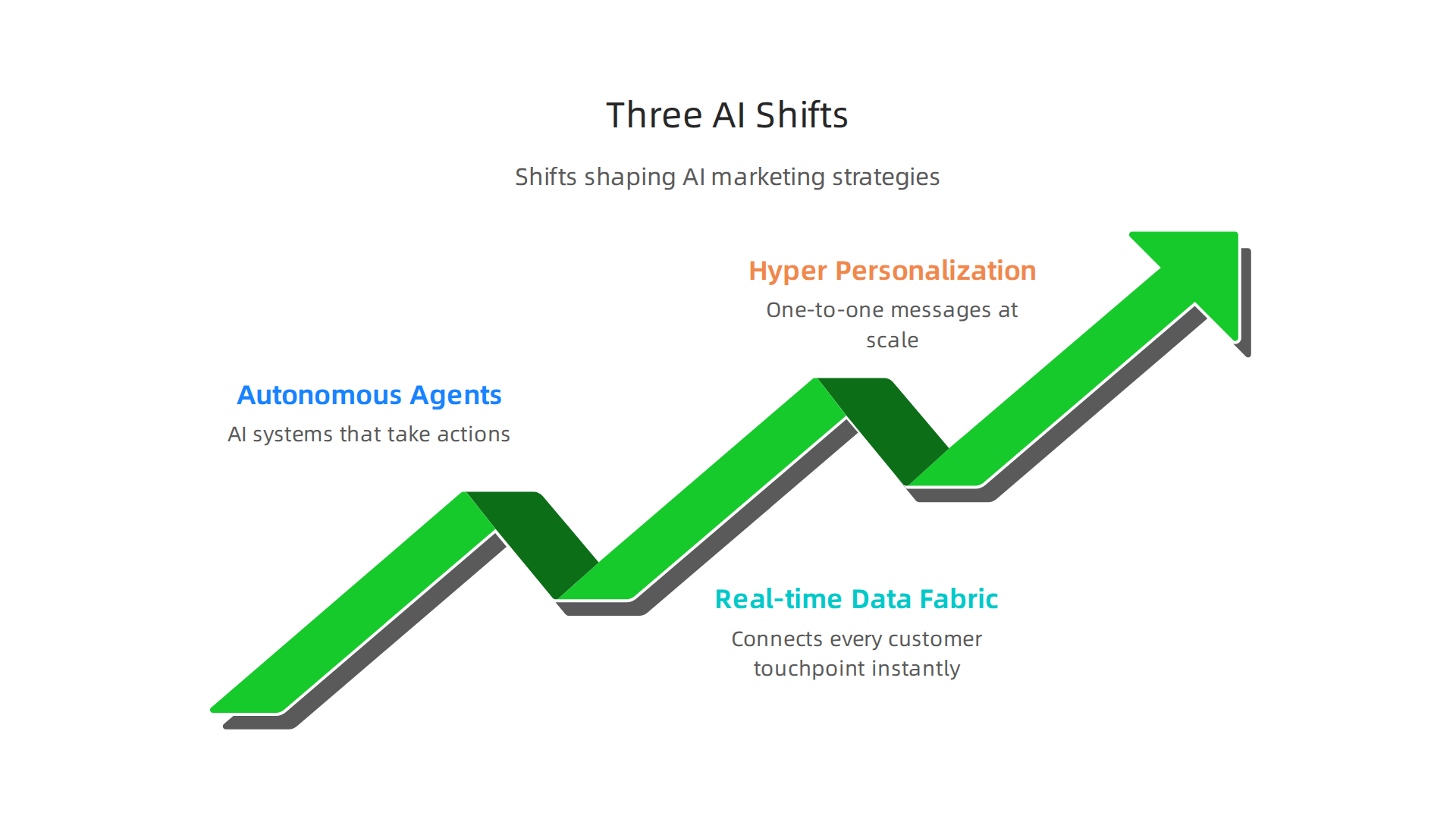
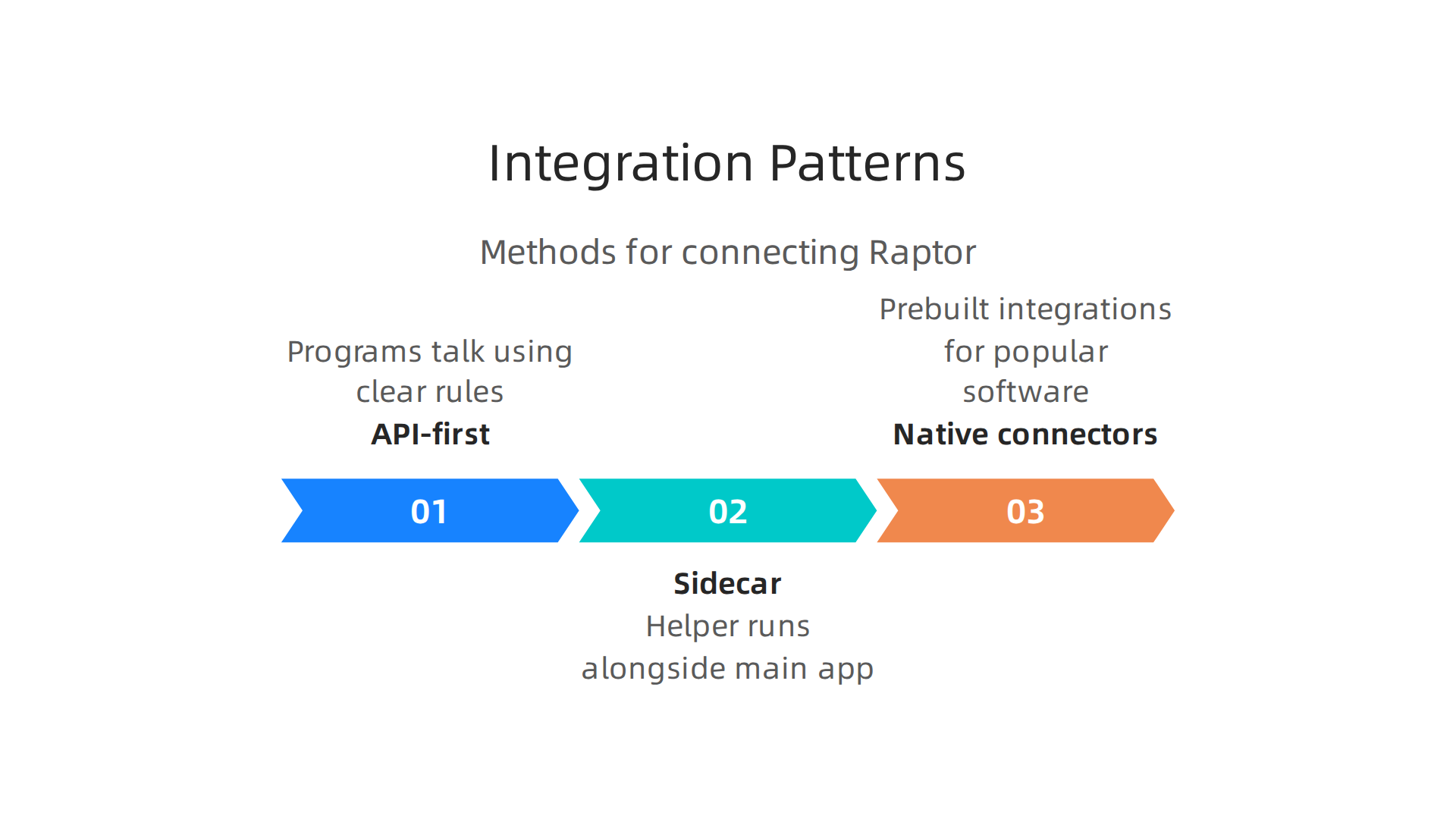
    Different methods for successfully integrating new Raptor Technologies with existing IT infrastructure.

    Common ways to connect your systems

    • API-first approach: Think of APIs as special messengers that let different computer programs talk to each other using a set of clear rules. With this approach, your raptor technologies system can send and receive information from other tools you use, making everything work together.
    • Sidecar integration: Imagine a small, helpful program that runs right alongside your main program. This "sidecar" helps the main program do certain tasks, like handling security or sending data, without changing the main program much. It’s a neat way to add new features.
    • Native connectors: Some raptor technologies come with ready-made connections for popular software. These are like plug-and-play tools that make connecting much easier, saving time and effort.

    No matter which way you connect, you’ll need to plan the "migration sequencing." This means deciding the best order to move your data and systems over to the new raptor technologies setup.

    Changes needed for new technology adoption

    When you bring in raptor technologies, a few things in your IT setup might need to change or be updated:

    • Data pipelines: This is how information flows from one part of your business to another. You’ll need to make sure your data pipelines can properly feed information to and from the new raptor technologies system. Companies often look at how to optimize their IT infrastructure for better data flow IBM Z 2026 Solutions Directory.
    • Identity and access management: This is about who gets to use the new system and what they can do with it. You’ll need clear rules to make sure only the right people have access to your raptor technologies tools and data.
    • CI/CD changes: This stands for Continuous Integration and Continuous Delivery. It’s how your company regularly builds, tests, and releases new software or updates. You’ll need to adjust these processes to include the raptor technologies system, so updates happen smoothly and quickly.

    Companies like DXC Technology and BM Technologies often help businesses navigate these technical changes. They can provide expert help to make sure your raptor technologies integrate well.

    How roles and teams will change

    Bringing in raptor technologies also means people’s jobs and how teams work might shift.
    Your IT teams and product teams will need to learn new skills and perhaps take on different tasks. For example, some team members might become experts in managing the raptor technologies system, while others focus on how it helps create new products or services. Understanding how new technologies impact business strategy is key to these changes Palantir Technologies 2026 Growth Products and Impact on Business Strategy. These "operational handoffs" and "role changes" are important for making sure everyone knows their part in using the new system effectively.

    As the world of AI and technology keeps growing in 2026, staying on top of new tools and trends is very important.

    Get clear daily AI updates from The AI Newsletter Worth Reading.

    As the world of AI and technology keeps growing in 2026, staying on top of new tools and trends is very important. But getting new tools like raptor technologies also means thinking about money. How much will it cost, and will it be worth it?

    Cost, licensing, and measuring ROI for raptor deployments

    Bringing raptor technologies into your business means you’ll need a clear plan for your budget. You want to know what you’re paying for and what you’ll get back.

    What goes into the cost

    When you set aside money for raptor technologies, here are the main things to think about:

    • Software Licenses: This is the fee you pay to use the raptor technologies software itself. These licenses can vary a lot, depending on how many people will use it or what features you need.
    • Compute Costs: Raptor technologies often needs strong computers to run, especially if it’s cloud-based. This means paying for the computing power, storage, and networking resources it uses.
    • Integration: Getting raptor technologies to talk to your existing systems isn’t always free. You might need to hire experts or buy tools to connect everything smoothly. Companies like DXC Technology and BM Technologies can help with these complex connections, but their services come with a cost.
    • Ongoing Operations: After it’s set up, you’ll still have costs for keeping raptor technologies running well. This includes updates, support, and the people who manage the system every day.

    Companies invest in platforms like raptor technologies to speed up their development and grow their services, showing the value they expect to gain from these costs Education Technology and Services April 2026.

    License models and negotiation tips

    Raptor technologies can come with different ways to pay:

    • Subscription: You pay a regular fee, like every month or year. This is common for many software tools.
    • Usage-Based: You pay based on how much you use the system, like how much data you process or how many tasks it completes.
    • Enterprise License: This is often a bigger package for large companies, covering many users or specific needs.

    When you’re ready to get a license, don’t be afraid to ask questions. You can often talk about the price or what’s included to make sure it fits your budget and needs perfectly.

    How to measure if it’s worth it (ROI)

    ROI stands for Return on Investment. It simply means checking if the money you put into raptor technologies brings you more value back. For a new system, you’ll want to:

    • Build a Simple Model: Before you fully launch, think about what success looks like. For raptor technologies, success might mean saving time, making more money, or reducing mistakes.
    • Track Key Numbers (KPIs): These are the important measures that tell you if you’re reaching your goals. For example, if raptor technologies is supposed to make your customer service faster, you’d track how quickly issues are resolved. During pilot programs, keep a close eye on these numbers.

    Understanding how to measure the real value from new technologies is super important to ensure your investment pays off. You can learn more about how to get real ROI from AI marketing cloud in 2026 to help guide your decisions.

    Understanding how to measure the real value from new technologies is super important to ensure your investment pays off. But just as important as knowing what you’ll get back, you also need to think about keeping things safe and following the rules. When you bring in advanced tools like raptor technologies, your IT team has a big job to make sure everything is handled correctly.

    Risk, compliance, and governance: what IT must control

    Using raptor technologies means thinking carefully about risks, following rules, and how your company manages these new tools. This is where your IT department steps in to keep everything running smoothly and safely.

    Key compliance areas for raptor tools

    When using raptor technologies, there are a few main areas IT needs to watch:

    • Data Privacy: Raptor technologies might handle a lot of information. IT must make sure that all private data is kept safe and used only in ways that follow the law. This means having strong rules for who can see and use certain information.
    • Model Governance: Many new tools use AI models. For raptor technologies, model governance means making sure these AI models are fair, honest, and that you can understand how they make decisions. This helps avoid unfair results or hidden problems. In 2026, many new rules are coming out to make AI more trustworthy Redefining Governance: Top Compliance Technology Trends for 2026.

    Neota focuses on compliance technology, crucial for IT leaders navigating governance and risk with new AI tools.

    • Auditability: It’s important to be able to look back and see how raptor technologies worked or why it made certain decisions. This is called auditability, and it helps show that your systems are reliable and compliant. Organizations need to put AI governance into their compliance plans Understanding IT Compliance: Key Regulations for 2026.

    Operational controls and policy changes

    Before you use raptor technologies widely, your IT team should put new rules and checks in place. These "operational controls" include things like:

    • Cybersecurity: Making sure raptor technologies is protected from online threats. This means setting up secure boundaries and checking for risks often. Experts suggest exploring approaches to threat and risk assessment for tools like Raptor Secure to keep systems safe Exploring Approaches to Threat and Risk Assessment.
    • Access Rules: Deciding who can use raptor technologies and what they can do with it. Not everyone needs to have access to everything.
    • Monitoring: Keeping an eye on how the system is being used to catch any problems early.

    These steps help prevent issues and make sure the tools are used as intended.

    Aligning vendor contracts with compliance

    When you work with outside companies for raptor technologies, like DXC Technology or BM Technologies for setup or support, their contracts must include promises about compliance and security. It’s crucial to make sure their agreements (called SLAs or Service Level Agreements) match your company’s rules.

    Be extra careful when choosing vendors, especially with global risks. For example, there’s evidence that groups linked to chinese ai companies can create hidden networks that might affect security Defending against China-nexus covert networks of compromised …. Always check your vendor’s security and compliance rules very closely. Staying informed about the latest AI news and best practices can help your IT team navigate these complex areas. You can find many great resources by exploring 10 Top AI Websites Professionals Trust for Real News and Tools.

    Keeping up with fast changes in AI and technology can be hard.
    The Deep View Newsletter provides clear daily updates on AI and technology, helping you stay ahead. Get clear daily AI updates from The AI Newsletter Worth Reading.

    Keeping up with fast changes in AI and technology can be hard. So, when you’re ready to try new tools like raptor technologies, it’s smart to have a clear plan. This plan helps you go from a small test (a pilot) to using the tools widely across your company. Think of it as a roadmap for success.

    Pilot-to-scale playbook: sample roadmap and success metrics

    Starting a new technology, especially advanced raptor technologies, often begins with a pilot project. This is a small test to see how well it works before you go big. A good plan makes sure you learn a lot from the pilot and can then grow its use smoothly.

    Step-by-step pilot design and scaling checklist

    A pilot project should be simple and focused. First, choose a small part of your business where raptor technologies can help. Set clear, simple goals for this test. For example, if raptor technologies helps with school safety, a pilot might involve testing it in just one school for a month to see if it makes visitor check-ins faster.

    After the pilot, you need to decide if it was good enough to keep going. This is where "acceptance criteria" come in. These are simple checks like:

    • Did the system save time?
    • Did people like using it?
    • Were there any big problems?

    If the pilot meets these checks, you can start thinking about expanding. Scaling up means carefully planning how to bring raptor technologies to more people or more parts of your company.

    A business executive celebrates the successful outcome of a pilot project or strategic initiative.

    This might involve training more staff or setting up the system in new locations. Big picture trends in 2026 show that companies are often looking to scale AI solutions that are "agentic" and can be deployed at the "edge" of their networks, meaning closer to where the work happens Enterprise AI trends in 2026: Sovereign, agentic, edge, AI factories.

    Success metrics to prove value and the governance gates needed at each stage

    To really know if raptor technologies is worth it, you need to measure its success. These "success metrics" are things you can count, like how much time was saved, how many errors were reduced, or how much happier employees are. For instance, if raptor technologies helps you manage visitors, a key metric could be the average time it takes for a visitor to sign in. Being able to show a real return on investment (ROI) is crucial. Learn more about how to track these benefits by reading about How To Get Real ROI From AI Marketing Cloud In 2026.

    At different stages, you’ll have "governance gates." These are checkpoints where leaders review the pilot’s results and decide if it’s safe and smart to move forward. For example, after the pilot, there’s a gate where you look at security reports and user feedback. If everything looks good, the gate opens to the next step of scaling.

    Common organizational blockers and pragmatic mitigation strategies

    Sometimes, things can get in the way of a smooth rollout. These "blockers" might include:

    • People not wanting to change: Some employees might be used to old ways and not want to learn new raptor technologies.
    • Lack of clear goals: If no one is sure what raptor technologies is supposed to do, it’s hard to make it work.
    • Not enough money or staff: Rolling out new tech costs money and needs people to manage it.

    To fix these, you can try "mitigation strategies." For people resistant to change, offer lots of training and show them how raptor technologies will make their jobs easier. Make sure everyone understands the clear goals from the start. And always plan for enough money and staff, even if you need to bring in help from companies like DXC Technology or BM Technologies to handle the workload. You might even find examples of raptor technologies at work by checking out how the system transforms school safety on YouTube How Raptor Technologies Transforms School Safety … – YouTube.

    Summary

    Raptor technologies are advanced, fast-moving systems—edge, cloud-native, and hybrid—that accelerate security, automation, monitoring, and data orchestration for businesses in 2026. This article explains their architecture, common variants, and core components like observability, model management, and orchestration, and shows how organisations can select vendors, evaluate security posture, and align contracts with compliance needs. It walks through practical integration patterns (API-first, sidecar, native connectors), the technical and organisational changes required, and how to plan pilot projects that prove value. You’ll learn a vendor-evaluation checklist (security, APIs, SLAs, data residency), cost drivers and licensing models, plus how to build simple ROI models and KPIs. The piece also covers governance—data privacy, model governance, auditability—and the operational controls and contract clauses IT must demand. Finally, it offers a pilot-to-scale playbook with acceptance criteria, governance gates, common blockers, and mitigation strategies to help leaders move from experiment to enterprise deployment.

  • How to Get Real ROI from AI Marketing Cloud in 2026

    How to Get Real ROI from AI Marketing Cloud in 2026

    Introduction

    Feeling lost in the flood of marketing cloud options in 2026? You are not alone.

    A person feeling overwhelmed by complex choices, reflecting the challenge of selecting marketing cloud options.

    The marketing cloud platform market is growing fast, with estimates showing it could hit $32.88 billion by 2033 Grand View Research. At the same time, AI is reshaping the game entirely. The AI-in-marketing market is already around $47 billion in 2026 Soku.ai. And major players like Salesforce are rebuilding their marketing cloud for the age of AI SalesforceBen.

    SalesforceBen offers insights and news on Salesforce products, including their AI-powered marketing cloud.

    But here is the thing. Most marketers struggle to cut through all the hype. You hear buzzwords like “agentic” and “predictive intelligence,” but what actually works? A recent survey found that 63% of marketers are already using generative AI Salesforce Marketing Statistics. Yet many still feel unsure about which platform will deliver real results for their business.

    That is where this guide comes in. We will give you a simple, structured framework to evaluate, implement, and get the most out of an AI-powered marketing cloud. No fluff. Just practical steps that help you make smart choices.

    Staying on top of these changes is tough. That is why we recommend the The Deep View Newsletter for clear daily AI updates that keep you informed without the noise. And if you are still figuring out where to find reliable tech news, check out our list of 10 top AI websites professionals trust for real insights.

    Let us start by looking at what a marketing cloud really is and why it matters in 2026.

    What Is a Marketing Cloud? The AI-Enhanced Foundation

    Let me paint a picture. You wake up, check your email campaign stats in one tool, jump to social media scheduling in another, then open your ad manager for PPC data, and finally pull up Google Analytics for web traffic. By the time you have connected all the dots, it is lunchtime.

    That is the old way. A marketing cloud changes everything by pulling email, social, ads, analytics, customer data, and more into a single unified platform. Instead of jumping between dashboards, you see the full picture in one place.

    What makes a marketing cloud different in 2026?

    The global marketing cloud platform market was worth $15.86 billion in 2025 and is expected to reach $32.88 billion by 2033 Grand View Research. At the same time, the AI in marketing market sits around $47 billion in 2026 and keeps climbing Soku.ai. Those numbers tell you one thing: marketing clouds are not just getting bigger. They are getting smarter.

    Today, a modern marketing cloud uses AI to orchestrate customer journeys across every channel. It learns from behavior, predicts what someone will do next, and personalizes messages at scale. Major players like Salesforce are rebuilding their marketing cloud around agentic AI, meaning the platform can act on its own to trigger the right message at the perfect moment SalesforceBen. That is a huge leap from the old batch-and-blast email days.

    How this helps small businesses and teams

    If you run a small business, a good marketing cloud acts as your digital marketing platform for small businesses. It handles everything from email nurture sequences to ad retargeting, all without needing a room full of specialists. And if you are involved in affiliate programs, many platforms now include affiliate tracking and management right inside the cloud. So you can run what is affiliate marketing campaigns alongside your other channels without extra software.

    But here is the challenge: how do you pick the right one? You need the right tech choice tools to compare features, pricing, and AI capabilities. That is where having a trusted source for AI updates really helps. For a no-nonsense daily digest on all the tech tools shaping marketing, we recommend the The Deep View Newsletter.

    The Deep View Newsletter provides daily AI updates for marketing professionals.

    It cuts through the noise and gives you practical insights you can use.

    And if you want to see how the biggest players compare, check out our roundup of 10 top AI websites professionals trust for real news and tools to sharpen your research.

    Now that you understand the AI-enhanced foundation of a marketing cloud, let us walk through the exact criteria you should use to evaluate and choose the best platform for your business.

    How AI Is Reshaping Marketing Cloud Capabilities in 2026

    So now you know what a marketing cloud is and why it matters. But the old marketing cloud from a few years ago? It is almost nothing like what you see today. AI has completely changed the game. In 2026, a modern marketing cloud is less of a tool you control and more of a smart system that works alongside you.

    A team collaborating, symbolizing the partnership between marketers and AI-powered systems.

    Predictive segmentation and real-time personalization

    One of the biggest upgrades is how AI handles customer data. Instead of manually building segments based on simple rules like "opened email last week," AI looks at thousands of data points. It predicts who is most likely to buy, who is about to churn, and what message will work best for each person. This is what Salesforce calls using AI to unify and analyze your data so you learn more about customer preferences Salesforce.

    Salesforce is a leading CRM provider, integrating AI into its marketing cloud solutions.

    That predictive power lets you send the right offer at the exact right moment, without guessing.

    Real-time personalization is another leap. As someone visits your site, the marketing cloud can adjust the next email, ad, or push notification based on what they just did. It is not batch processing anymore. It is instant. According to the Perficient team, Salesforce Marketing Cloud now uses AI tools to deliver real-time personalization and even autonomous agents that boost marketing ROI Perficient. That means less manual work and better results.

    Automated content generation and embedded AI

    AI also writes content now. Leading marketing clouds use natural language processing to generate subject lines, email body copy, social posts, and even ad headlines. You give it a few keywords and a tone, and the platform drafts multiple variations for you to test. Some platforms also include computer vision, so they can analyze images and suggest which visuals will perform best.

    These features are now built right into the core platform. For example, Salesforce Marketing Cloud includes tools like interactive email forms and data extensions, but the real magic in 2026 is how AI powers every step of the journey igmGuru. You do not need separate AI tools plugged in. It is already there.

    The big 2026 trend: agentic AI workflows

    Here is where things get really interesting. In 2026, the biggest shift is toward agentic AI. That means the marketing cloud does not just suggest actions. It takes them on its own. Campaigns can adjust themselves without you touching a thing. If a certain email subject line is underperforming, the AI swaps it for a better one. If a customer is stuck in a journey step, the system triggers a new path.

    Salesforce calls this Agentforce Marketing. The whole ecosystem is being rebuilt around this idea. As the SalesforceBen team explains, the platform follows an agentic path where AI acts independently to deliver the best experience SalesforceBen. Deloitte also notes that Salesforce’s 2026 evolution enhances core CRM with AI-driven automation and real-time data intelligence, creating unified agentic workflows Deloitte Digital. That is a huge time saver for small teams.

    If you want to stay on top of these rapid changes, getting a clear daily briefing helps. Many marketers turn to a newsletter that cuts through the hype and delivers practical AI updates. You can start with something like the The Deep View Newsletter to get actionable insights on AI tools and trends every morning.

    Now that you see how AI is reshaping marketing clouds, the next step is figuring out which platform fits your needs. We will walk through that next.

    Essential AI Features to Look for in a Marketing Cloud Platform

    So which platform is right for you? Not all marketing cloud platforms are built the same in 2026. Some are just fancy email senders. Others are smart systems that work like a co-pilot. Before you pick one, check for these three must-have features.

    Key AI capabilities that distinguish modern marketing cloud platforms in 2026.

    Predictive analytics, audience intelligence, and journey orchestration

    First, look for predictive analytics. The best platforms use AI to study your customer data and spot patterns you might miss. They predict who will buy next, who might leave, and what offer they need to see. This is what Salesforce calls using AI to unify and analyze your data so you learn more about customer preferences Salesforce. Without this, you are just guessing.

    Second, audience intelligence matters. The platform should automatically group your customers based on behavior, not just basic rules. It should tag people in real time as they browse, click, or ignore your messages.

    Third, journey orchestration. Do not settle for a tool that only builds simple email flows. You need a platform that triggers different paths based on what each person does. If someone stops engaging, the AI should switch to a new message or offer without you doing anything. That is where agentic AI truly shines. As the SalesforceBen team explains, the platform now follows an agentic path where AI acts independently to deliver the best experience SalesforceBen.

    Data privacy and compliance are non-negotiable

    In 2026, you cannot ignore privacy. Every marketing cloud you consider must include data masking and consent management features. That means the system automatically hides sensitive data and respects each customer’s opt-in choices. If a platform struggles with this, skip it. You do not want legal trouble down the road.

    Integration ability with your existing tech stack

    Finally, check how well the platform connects to your current tools. Does it work with your CRM, your ecommerce store, and your analytics software? A marketing cloud is only useful if it talks to everything else you use. If it requires a ton of custom coding to connect, that is a red flag. Choose a platform that plays nice with your stack.

    Comparing features across many tools can feel overwhelming. To help you stay informed and spot the best options, many professionals turn to reliable sources. For a great starting point, check out this list of 10 top AI websites professionals trust for real news and tools. It will point you to the right resources.

    And if you want a daily briefing that cuts through all the noise, the The Deep View Newsletter delivers practical AI updates every morning. It is a simple way to stay sharp while you shop for your next platform.

    Comparing Top Marketing Cloud Providers: AI Edition

    Now you know what to look for. But how do the big players actually compare in 2026? Here is a quick breakdown of the three main options and who they work best for.

    A comparison of top marketing cloud providers, highlighting their AI strengths and ideal use cases.

    The quick comparison table

    Provider AI Strength Best For Pricing Range
    Salesforce Marketing Cloud Agentic journey orchestration, predictive scoring Large enterprises with complex funnels High, but scalable
    Adobe Experience Cloud Deep personalization across web, email, ads Brands that need consistent multi-channel experiences High, with enterprise licensing
    HubSpot Simple AI tools for small teams, low learning curve Small to mid-size businesses that want all-in-one Mid-range, free tier available

    Salesforce Marketing Cloud: The AI power player

    Salesforce continues to lead the enterprise space. Their agentic AI features mean the system can act on its own, adjusting journeys without waiting for your team. Predictive analytics, real-time segmentation, and deep CRM integration make it a strong choice if you already use Salesforce. But the cost is high, and you often need help from a certified partner. In fact, many businesses turn to top Salesforce Marketing Cloud partners for implementation and support Cyntexa. If you have the budget and the team, this is the most advanced option.

    Adobe Experience Cloud: Personalization at scale

    Adobe is the best fit if you care about delivering the right content across every touchpoint. Its AI engine analyzes customer behavior across email, web, social, and ads. Then it personalizes everything in real time. Adobe works well for companies that already use its other products like Adobe Analytics or Adobe Commerce. But be warned: setup is complex, and pricing is not transparent. Smaller businesses might find it too much.

    HubSpot: Simple and affordable

    HubSpot is the go-to for small to mid-size businesses. Its AI features are not as deep as Salesforce or Adobe, but they are much easier to use. You get predictive lead scoring, smart email sends, and basic journey automation right out of the box. HubSpot integrates with hundreds of tools, so you do not need a developer to connect everything. For a digital marketing platform for small businesses, it is often the smartest starting point. And if you later outgrow it, you can migrate to a bigger system.

    How to pick the right one for you

    Think about these three things:

    • Your team size: Small teams love HubSpot. Big teams need Salesforce or Adobe.
    • Your budget: HubSpot has a free tier and clear plans. The other two require a bigger investment.
    • Your existing tech: If you already use Salesforce CRM or Adobe products, stick with that family.

    The best marketing cloud is the one you can actually use. Do not buy a Ferrari if you only need a reliable sedan. And do not settle for a bicycle if you are trying to win a race.

    Still unsure which tool fits your use case? Many professionals start by exploring curated lists of tech choice tools to understand what others in their industry use. For example, this guide to top AI marketing tools in 2026 breaks down real pricing and honest limitations Marketing Mary.

    And for a visual walkthrough, you can watch a comparison of top marketing automation systems on YouTube YouTube.

    One more thing: do not forget to check how each platform handles privacy. Compliance features like data masking and consent management vary a lot between these providers. Make sure yours matches your local laws.

    The quickest way to stay ahead in this fast-changing space is to keep learning. If you want a daily dose of practical AI updates delivered each morning, the The Deep View Newsletter gives you fresh insights without the noise. It is one of the best ways to keep your tech choices sharp in 2026.

    Implementing AI in Your Marketing Cloud: A Step-by-Step Roadmap

    You picked your marketing cloud. Good. But here is the thing. Choosing the platform is only half the battle. Actually making AI work inside it is where most people get stuck. If you skip the setup steps, your fancy new tool will just sit there. Or worse, it will give you bad results.

    So let us walk through a simple roadmap that works in 2026.

    A step-by-step roadmap for successfully implementing AI features in your marketing cloud platform.

    Follow these steps, and you will avoid the common traps that waste time and money.

    Step 1: Clean your data first

    AI is only as smart as the data you give it. Garbage in, garbage out. Before you turn on any AI feature, you need to clean your customer data. Remove duplicates. Fix missing fields. Standardize how you record names, emails, and purchase history. This is boring work, but it is the most important step. Many cloud providers like DigitalOcean emphasize data readiness as a foundation for AI success DigitalOcean. If your data is messy, your AI will make wrong predictions.

    Step 2: Start with one high-impact use case

    Do not try to automate everything at once. Pick one thing that will give you a quick win. Predictive lead scoring is a great start. It helps your sales team focus on the people most likely to buy. Your marketing cloud already has this feature built in. Turn it on for one audience segment. See how it performs. Then expand. The best AI marketing tools in 2026 all suggest starting small and scaling up The Smarketers. If you try to do too much too fast, you will overwhelm your team and your system.

    Step 3: Upskill your team

    Your people need to understand how the AI works and what it can do. Run training sessions. Show them real examples. Let them play in a sandbox environment. A common mistake is buying a powerful tool and assuming everyone will figure it out on their own. That never works. If you use Salesforce, many businesses hire certified partners early on to guide the team through the learning curve Cyntexa. But even without a partner, you can start with free courses and tutorials. The key is to build confidence before pushing new features live. For ongoing learning, our curated list of top AI websites professionals trust is a great starting point for your team.

    Step 4: Roll out in phases

    Launch your AI features in stages. For example, start with email personalization for one segment. Once that runs smoothly, add behavior-based triggers. Then add predictive scoring. Then add full journey automation. Each phase gives you a chance to fix issues without breaking everything. Over-customization is a real trap. Some teams try to configure every possible setting and end up with a system nobody can manage. Keep it simple at first. You can always add complexity later.

    Common pitfalls to avoid

    Change management matters. Your team might resist new AI tools if they feel threatened or confused. Explain how AI helps them work better, not replaces them. Also, watch out for over-customization. Stick to the core features before building custom integrations. And never skip the data cleanup. It will come back to haunt you.

    Keep learning as you go

    The AI landscape shifts fast. The tools you use today might look different next year. That is why staying informed matters. A daily newsletter like The Deep View gives you clear updates without the hype. It is a simple way to keep your skills sharp and your tech choices smart. If you want to stay ahead in 2026, make learning a habit The Deep View Newsletter.

    Implementation takes time. But if you follow this roadmap, you will get real results from your marketing cloud. And you will avoid the frustration that comes with rushing in.

    Measuring ROI of AI-Powered Marketing Cloud Investments

    So you followed the roadmap. Your marketing cloud is live with AI features. Good. Now comes the question everyone asks but few answer well. Is it actually working?

    A person reviewing charts and data, focused on measuring the success and ROI of initiatives.

    Here is the thing. Most businesses spend big on AI but never track whether it pays off. A 2026 study found that only 19% of content marketers track AI-specific KPIs Digital Applied. That means 81% are flying blind. Do not be one of them.

    Track the right metrics

    Measuring ROI from your marketing cloud comes down to three main numbers. First, look at your conversion rate lift. Is your AI helping more people buy? Second, watch your cost per acquisition or CPA. Good AI should lower this over time. Third, track time saved across your team. When AI handles personalization and segmentation, your people can focus on bigger strategy work The Hovi.

    Attribution is more than just sales

    Do not only look at direct revenue. AI also creates operational efficiencies. Your attribution model should capture both hard savings like lower ad spend and soft gains like faster reporting and better audience insights Kanerika. When you add those up, the real ROI is often much higher than it first appears.

    Use benchmarks to check yourself

    What is a good click rate or conversion rate? It depends on your industry. But you can use public benchmarks to set realistic goals for your digital marketing platform for small businesses or enterprise. For example, AI product recommendations lift email click rates to an average of 3.75%. Top performers see even higher numbers Klaviyo. Compare your results to these standards. If you fall short, adjust your strategy.

    Keep learning and improving

    ROI tracking is not a one-time task. The tools and benchmarks shift every few months. That is why it helps to stay connected to trustworthy sources for updates on tech choice tools and industry shifts. Our curated list of AI websites professionals trust is a solid starting point.

    For daily updates on the specific metrics that drive real ROI, without all the hype, many professionals rely on The Deep View Newsletter. It cuts through the noise so you can focus on what actually moves the needle for your business.

    Data Privacy and Compliance in AI Marketing Clouds

    Professionals discussing data security, highlighting the importance of privacy and compliance.

    All that data your marketing cloud collects? It comes with serious rules. And those rules are getting stricter every year.

    In 2026, you have to juggle regulations like the GDPR in Europe, the CCPA in California, and a growing list of AI-specific laws popping up worldwide. These laws set hard limits on how you can collect, store, and use customer data.

    Here is the challenge. Your AI marketing cloud needs data to work. But it also needs permission to use that data. That is where built-in privacy controls come in.

    A good digital marketing platform for small businesses now includes features like consent tokens and data anonymization. Consent tokens track who said yes to what. Data anonymization strips away personal details so you can still analyze patterns without risking someone’s privacy.

    Look for tech choice tools inside your marketing cloud that handle these tasks automatically. You do not want to be the person manually checking if every email address has permission.

    The real cost of ignoring compliance

    Non-compliance is not just a legal headache. It can destroy your business.

    Fines from regulators can run into the millions. But the hidden cost is worse. When customers find out you mishandled their data, they leave. Trust is hard to build and easy to lose.

    That is why staying on top of the latest regulations matters so much. The rules change fast. One of the smartest things you can do is follow reliable sources that track these shifts for you.

    For a solid starting point, check out this list of AI websites professionals trust for real updates on tech tools and compliance news.

    And if you want daily summaries on the privacy and compliance changes that actually affect your marketing cloud, many business owners rely on The Deep View Newsletter. It helps you stay informed without drowning in noise.

    Compliance is not exciting. But it keeps your business running. Build it into your AI marketing cloud from day one and you will save yourself a world of pain later.

    Future-Proofing Your Marketing Strategy with AI and Marketing Cloud

    Getting compliance right is your foundation. But a strong foundation only matters if you build something lasting on top of it. The real question is this. Is your marketing cloud ready for what is coming next?

    The pace of change in 2026 is faster than ever. Gartner predicts that by 2027, a huge 80% of enterprise marketers will use generative AI every single day. But here is the catch. Only those who keep a close eye on strategy and oversight will actually see a good return on that investment.

    So what is coming next?

    The three major shifts defining the future of AI-powered marketing cloud strategies.

    The big three shifts on the horizon

    First, we have autonomous agents. These are AI systems that do not just suggest actions. They take actions. Imagine an AI in your marketing cloud that spots a drop in email engagement, automatically adjusts the send time, rewrites the subject line, and triggers a new test campaign without you lifting a finger. Google Cloud’s latest AI agent trends report for 2026 shows this is moving from experimental to essential for businesses that want to scale.

    Second is the real-time data fabric. Your digital marketing platform for small businesses should not have to wait hours or days to process data. A data fabric connects every customer touchpoint instantly. It gives you a complete picture of your audience the moment they act, which makes your campaigns faster and more relevant.

    Third is hyper-personalization. We are past the era of just "Hi {{first_name}}." AI now studies past behavior, current context, and predicted future needs to create one-to-one messages at scale. The 2026 AI marketing trends analysis from Improvado confirms that personalization depth is now the top driver of customer loyalty.

    Why flexibility and learning matter most

    Here is the thing. No one knows exactly what the next big breakthrough will be. That is why locking yourself into a rigid stack is dangerous. You need a marketing cloud that works with modern tech choice tools and adapts as new platforms emerge.

    Building a culture of continuous learning matters just as much. The teams that win are the ones that experiment early. If you are curious about what an AI agent actually looks like in practice, check out our review of the Galaxy AI 2026 agentic assistant for business and content creation. And if you want to see how blending human intuition with machine speed creates better results, take a look at our breakdown of human or AI creativity.

    Early adopters are pulling ahead

    The data is clear on this one. Companies testing agentic workflows today are building a serious lead. According to Salesforce trends for 2026 and the Dotdigital marketing predictions, the brands that treat AI as a core team member rather than just a tool are seeing faster campaign launches and higher customer satisfaction.

    According to WSI World’s marketing predictions, "Search Everywhere" optimization and privacy-first data strategies are becoming non-negotiable for staying visible.

    How to stay ahead without burnout

    The hardest part of future-proofing is simply keeping up. Trends shift fast. New tools launch every week. You do not have time to chase every single headline.

    Want to stop guessing and start knowing what is next? The Deep View Newsletter delivers the day’s most important AI and tech updates straight to your inbox. It is the easiest way to stay ahead of the curve without the noise.

    The future of marketing belongs to the curious. Stay flexible. Keep learning. And let your marketing cloud do the heavy lifting.

    Summary

    This guide explains how AI has transformed marketing clouds in 2026 and gives a practical framework for choosing, implementing, and measuring an AI-powered marketing platform. It starts by defining a modern marketing cloud and highlights key AI capabilities—predictive segmentation, real-time personalization, automated content generation, and agentic workflows—that make platforms smarter and more autonomous. The article lays out the essential features to vet (predictive analytics, audience intelligence, journey orchestration, privacy controls, and integration ability), compares major vendors (Salesforce, Adobe, HubSpot) by use case and budget, and provides a step-by-step rollout plan focused on data cleanup, single high-impact pilots, team upskilling, and phased launches. It also shows how to track ROI with the right metrics, why compliance must be built in, and what trends (autonomous agents, real-time data fabric, hyper-personalization) will shape the next wave. Readers finish with concrete actions: what to check before buying, how to get quick wins, how to measure impact, and where to keep learning to avoid costly mistakes.