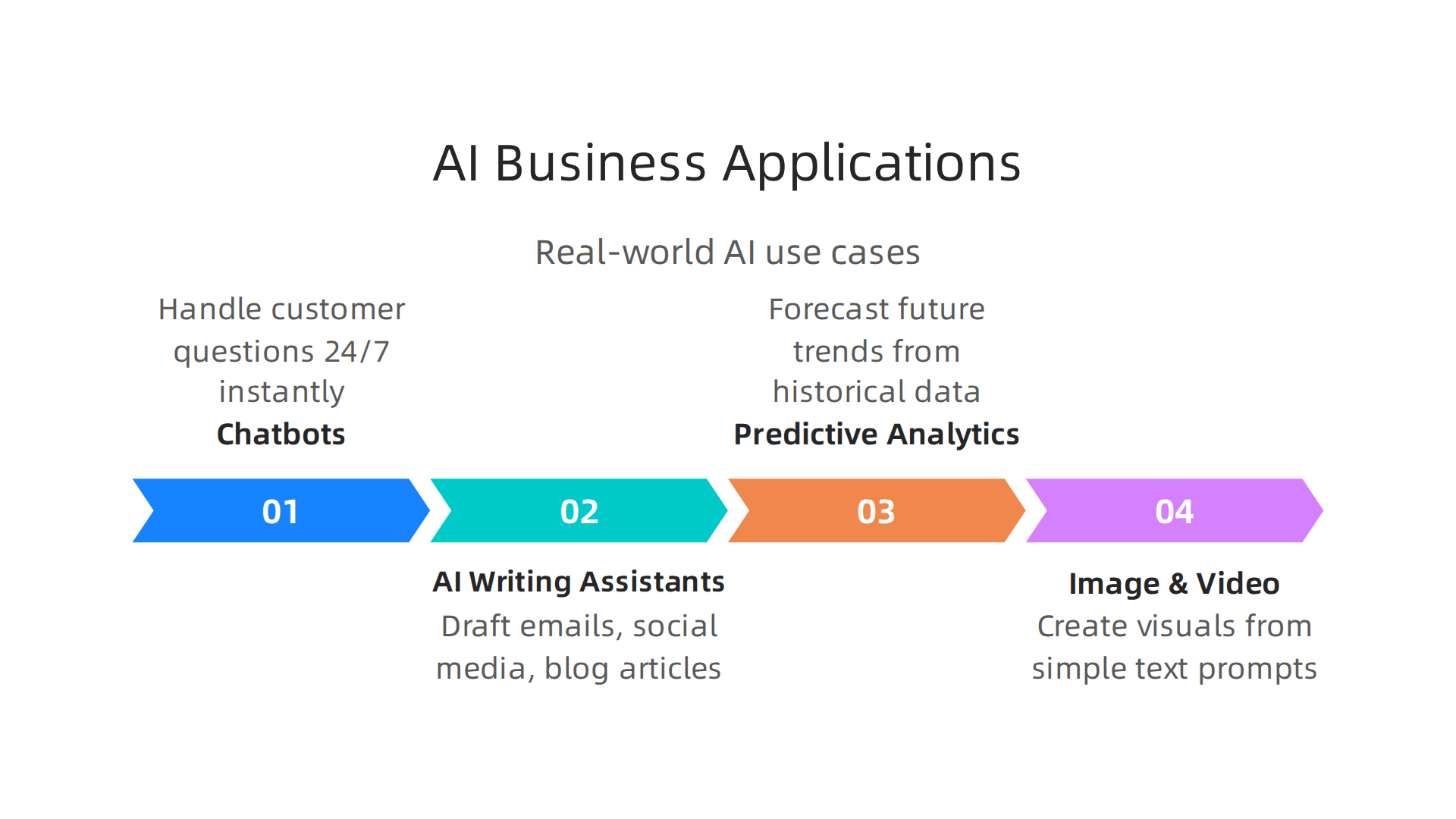
Tag: pillar-learn-ai

  • Understanding What Is Information Technology for Business Success in 2026

    Understanding What Is Information Technology for Business Success in 2026

    For business leaders in 2026, the world of technology can feel like a fast-moving river. There’s so much information, and it changes all the time. It’s easy to get lost in technical words and complicated ideas. That’s why truly understanding what is information technology is more important than ever.

    The University of Cincinnati's online resources offer foundational knowledge on information technology for business professionals.

    Many decision-makers, especially those leading small to medium-sized businesses (SMBs) or departments, often feel overwhelmed.

    Business leaders often grapple with complex technology decisions, seeking clarity amidst rapid change.

    They know technology is crucial, but they struggle to get a clear, simple picture of what IT really means for their company’s success. They need to know how IT helps them reach their goals, not just what new gadgets are out there. Things like what is digital marketing and how it connects to IT, or the role of hbs artificial intelligence tools, can seem like separate puzzles. But they are all pieces of the bigger IT picture.

    This article will help clear things up. We will look at a simple definition of information technology, break down its main parts, and show how businesses use it every day to get better results. You’ll learn how IT impacts everything from keeping your data safe to making your team more productive. We will also give you practical tips on how to use IT wisely, helping you make smart choices for your business in 2026. This includes understanding the role of cutting-edge tools like enterprise AI platforms 2026 and how they fit into your overall IT strategy.

    If you find yourself swimming in too much tech news and wish for simpler, clearer updates, you’re not alone. Staying on top of the rapidly changing world of AI and IT can be a full-time job.

    Get clear daily AI updates from The AI Newsletter Worth Reading.

    What is Information Technology (IT)? A concise business-focused definition

    Let’s make things simple. When we talk about what is information technology, we are really talking about using computers and all their tools to manage information. Think of it this way: IT is all the systems, programs, and gadgets that help businesses collect, save, work with, and share their important information. It’s about making sure your business’s data is handled well, from the moment it comes in to when it’s used or stored.

    Many people think of IT as just the tech department that fixes computer problems or sets up new software. While that’s part of it, for businesses in 2026, what is information technology means much more. It’s not just about the technical stuff. It’s about how those technical tools help your business grow, make more money, and stay safe.

    Imagine a business without IT. How would it keep track of sales? How would employees talk to each other if they work from different places? How would customer information be protected? It would be very hard, right? IT provides the answers to these challenges. It’s the engine that powers almost every modern business operation.

    Here’s how we can think about IT in a business way:

    • IT as a Technical Helper: This is the part many people know. It includes the computers, networks, internet connections, and software that let your business run. It’s the team that makes sure everything is working smoothly. They set up your email, keep your websites running, and help you when your printer doesn’t work. They are the backbone, making sure the tools are there and ready.
    • IT as a Business Enabler: This is the more important part for leaders. IT is not just fixing things. It’s about using technology to reach your business goals.
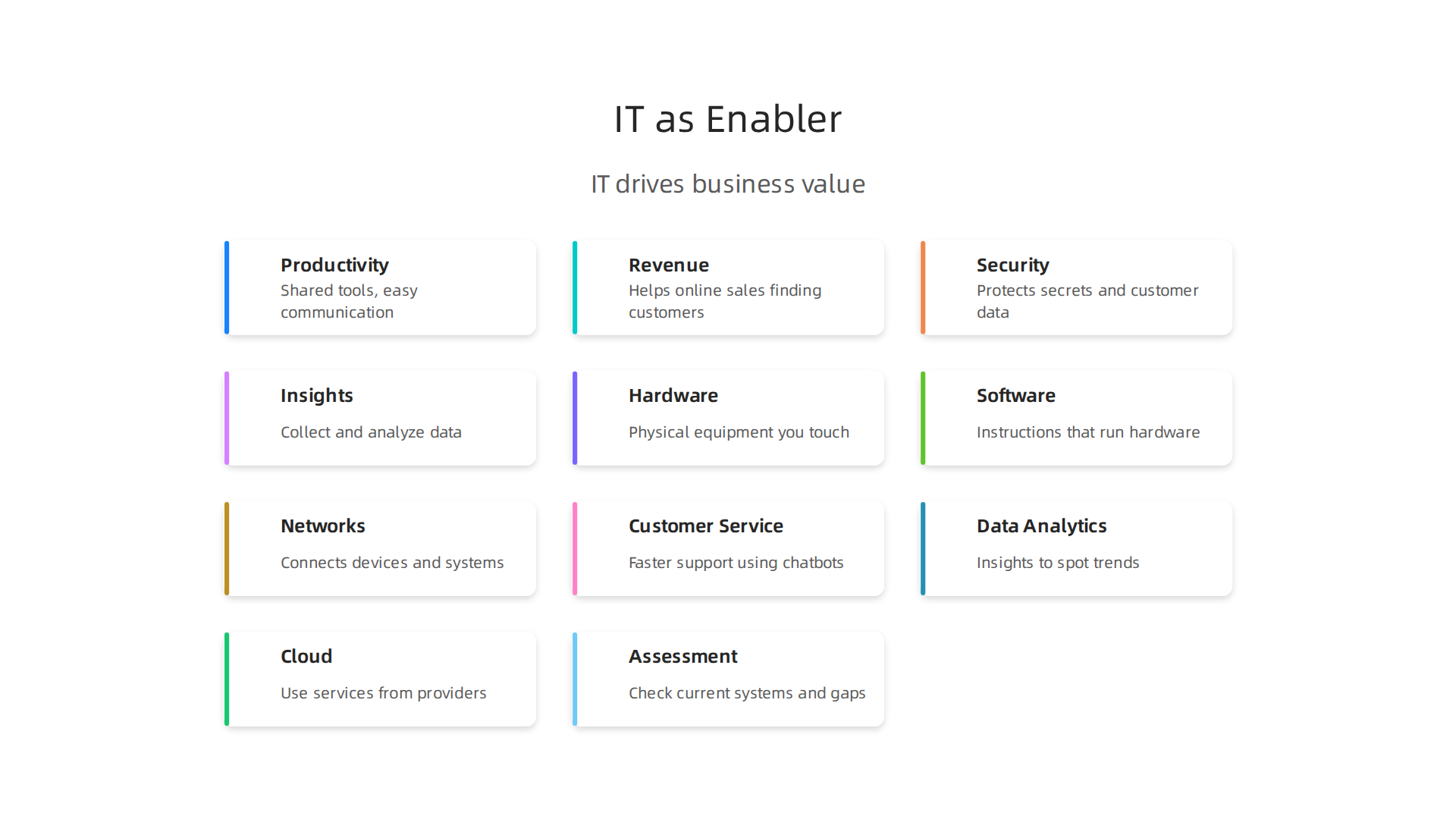
    Information Technology extends beyond technical support, acting as a powerful enabler for achieving core business objectives.

    For example, IT can help you:
    * Be more productive: Tools like shared documents and easy communication apps mean your team can get more done, faster.
    * Make more money: IT helps with online sales, finding new customers, and understanding what customers want.
    * Stay safe: IT protects your important company secrets and customer data from being lost or stolen. This is a big deal today.
    * Make smart choices: With IT, you can collect and look at data to understand what’s working and what’s not. This helps you make better plans for the future.

    So, when we talk about what is information technology, remember it’s two sides of the same coin. One side is the actual computers and programs. The other side is how those tools help your business succeed, solve problems, and achieve its goals. It’s about using technology wisely to make your company stronger in every way.

    For business leaders, truly understanding IT means looking beyond the wires and screens. It means seeing how technology can open new doors for your company, help you connect with customers, and keep you ahead of others.

    Teams collaborate to integrate IT solutions into broader business strategies, aiming for innovation and competitive advantage.

    It also means knowing how to choose AI for business tools that deliver real results in 2026 that fit your specific needs. When you understand IT this way, you can make better decisions for your business. You can learn how to identify AI leadership discover top tech companies for business in 2026 and see how they use IT to drive success.

    Core components of IT: hardware, software, networks, and data

    In the last section, we talked about how information technology is much more than just wires and screens. But what are those wires and screens, exactly? To truly understand what is information technology, it helps to break it down into its main parts. These are the basic building blocks that make up almost every IT system your business uses.

    Most experts agree that IT systems have four main technical components: hardware, software, networks, and data.
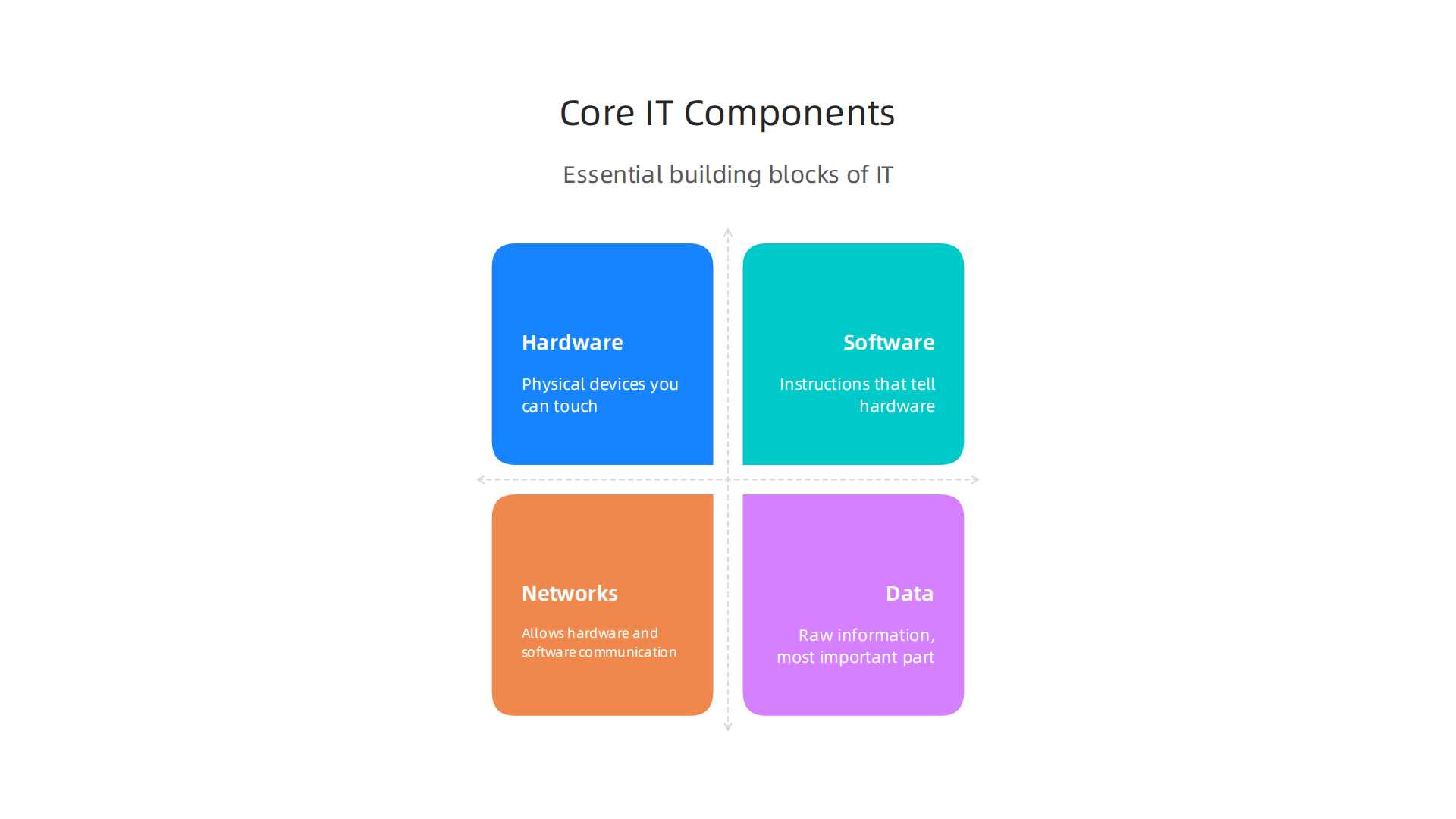
    Essential building blocks of any information technology system include hardware, software, networks, and data.

    Sometimes "people" and "processes" are also included, but for now, let’s focus on the technical side that forms the backbone of digital business in 2026. According to some views, these four parts are the core technologies of information systems Identifying the Components of Information Systems.

    Let’s look at each part:

    Hardware

    Hardware is all the physical stuff you can touch. Think about your office:

    • Computers: Desktops, laptops, tablets.
    • Servers: These are powerful computers that store lots of information and run programs for many users at once. They are like the big brains of the office, often kept in a special room.
    • Phones and other gadgets: Your smartphone, smart watches, and other smart devices are also hardware.
    • Printers, scanners, and other tools: Any physical device that connects to a computer system.

    Hardware is the foundation. Without it, you couldn’t run any programs or store any information.

    Software

    Software is the set of instructions that tells the hardware what to do. You can’t touch software, but you use it every day:

    • Operating Systems: This is the main program that makes your computer work, like Windows or macOS.
    • Applications (Apps): These are the programs you use for specific tasks. For example, word processors, email programs, customer management tools, or tools for what is digital marketing.
    • Business Programs: Special software designed for things like accounting, managing sales, or keeping track of inventory.
    • AI Tools: Many businesses in 2026 are using powerful AI software to help with everything from customer service to making smart decisions.

    Software makes hardware useful by letting you do things with it.

    Networks

    Networks are what allow hardware and software to talk to each other. They connect different devices so they can share information:

    • Internet: The biggest network of all, connecting computers around the world.
    • Local Area Networks (LANs): These connect computers in one building or office.
    • Wi-Fi: A wireless network that lets you connect without cables.
    • Communication lines: The physical cables or wireless signals that carry data between devices.

    Networks are essential for communication and sharing resources, especially for teams that work from different places.

    Data

    Data is the raw information itself. It’s the most important part because it’s what businesses work with and need to protect.

    • Customer information: Names, addresses, buying habits.
    • Sales records: How much was sold, when, and to whom.
    • Employee details: Payroll, contact info.
    • Business documents: Reports, plans, emails.

    Data is the fuel for your business. The hardware stores it, the software processes it, and the networks move it around.

    How These Parts Work Together

    These core components don’t work alone. They are all connected and rely on each other. Imagine a digital marketing campaign:

    • Your team uses hardware (computers, phones) running software (marketing apps, email programs) to create ads.
    • These ads are shared through networks (the internet, social media platforms) to reach customers.
    • All the results, like how many people clicked or bought something, become data that is collected, stored, and analyzed by the hardware and software.

    This teamwork allows businesses to run smoothly, make smart choices, and reach their goals. The better these components are managed and integrated, the more effective your overall IT system will be. Understanding these components helps business leaders see the full picture of their technology tools.

    If you want to keep up with how all these components are changing with new technologies, especially in AI, staying informed is key.

    The AI Newsletter Worth Reading

    How businesses use IT: common applications and high-value use cases

    Now that we understand the basic parts of information technology, let’s see how these parts come together to help businesses every day. Understanding what is information technology in action means looking at how companies, big and small, use it to solve problems and make more money. In 2026, IT is not just for tech companies; it’s a must-have for every kind of business.

    Information technology drives value in many parts of a business. Here are some of the most common and important ways:
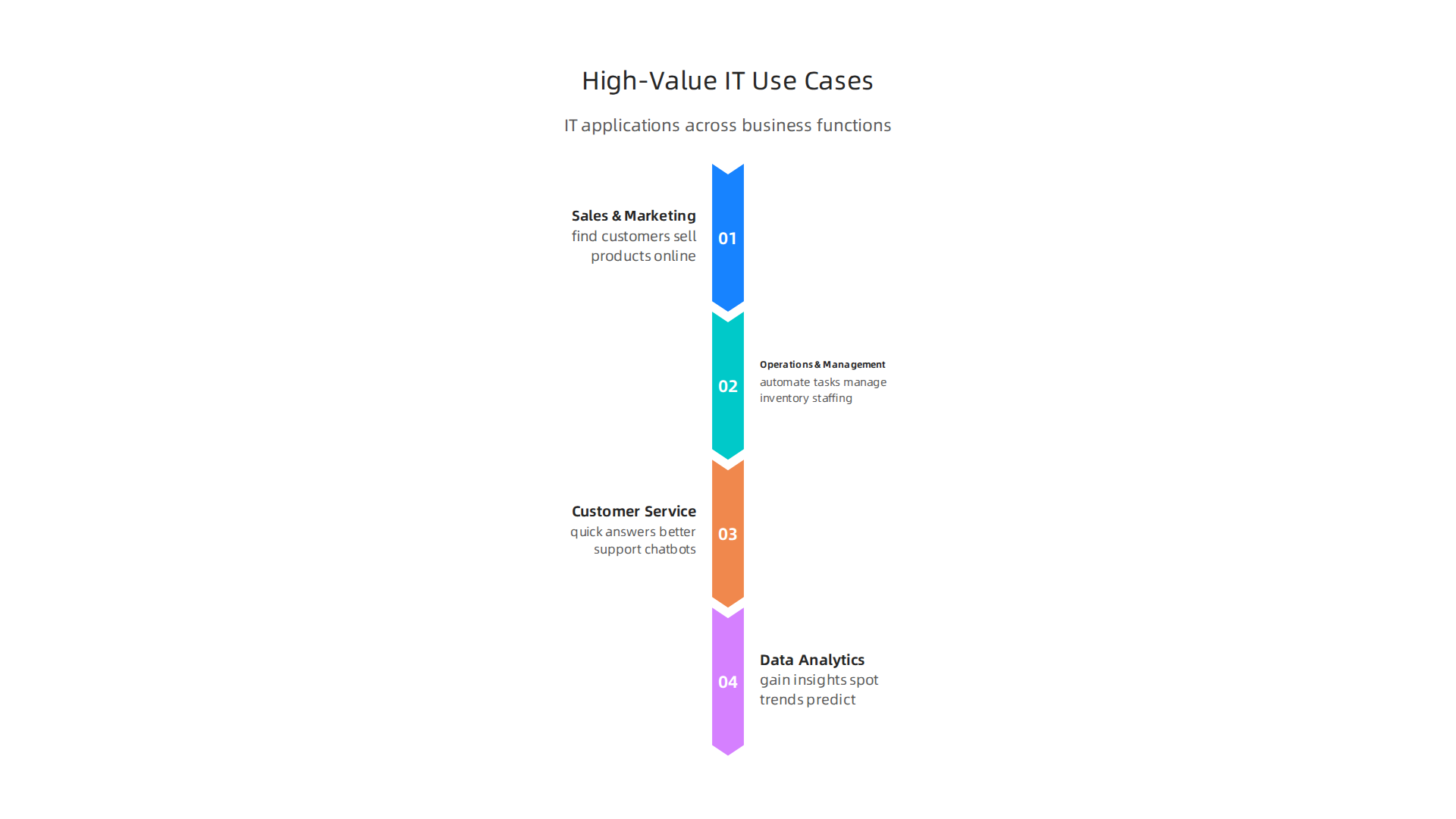
    Information technology applications span sales, operations, customer service, and data analytics to drive business value.

    Sales and Marketing

    This is where IT helps businesses find customers and sell products.

    • Reaching Customers: Companies use IT to run online ads, manage social media, and send email campaigns. This helps them talk to many people at once. For example, knowing what is digital marketing helps businesses use social media platforms and email software to reach their target audience.
    • Understanding Customers: Special software helps businesses track what customers like, what they buy, and what they say. This data helps them offer better products and services. Many businesses are using AI inbound marketing to create personalized messages.

    AI Tools News Today provides insights into cutting-edge artificial intelligence applications for business strategies.

    • Improving Sales: Sales teams use IT tools to keep track of potential customers, schedule meetings, and manage their sales pipeline. This makes their work faster and more organized.
    • High Value: Investing in AI for sales and marketing is common, with over half of AI investments going to these areas, according to MIT research highlighted in a 5 Technology Highlights for 2026 (and Beyond) report.

    Operations and Management

    IT makes sure the business runs smoothly behind the scenes.

    • Making Things Efficient: IT helps automate tasks that used to take a lot of time, like managing inventory, tracking orders, or even scheduling staff. This means fewer mistakes and faster work.
    • Supply Chain Management: For businesses that make or sell products, IT helps manage everything from where raw materials come from to getting the final product to the customer. This keeps costs down and ensures things arrive on time.
    • Smart Decisions: Businesses use IT to gather information about how they are doing. This helps leaders make better choices about what to do next. Agentic AI, for instance, is expected to make operations more efficient by automating complex workflows and speeding up decisions, according to 2026 AI Business Predictions. Tools like AI operations cut costs without cutting corners in 2026 help businesses save money.

    Customer Service and Support

    Good customer service is key, and IT plays a huge part.

    • Quick Answers: Chatbots and AI-powered systems can answer customer questions right away, any time of day. This helps customers get help without waiting. Virtual assistants for businesses are becoming very common, helping to master customer strategy in 2026.
    • Better Support: When a customer needs to talk to a person, IT systems help support teams see all the customer’s past issues and purchases. This lets them offer help that is fast and helpful. AI is now an everyday business reality for handling millions of customer interactions, as noted in the Top 6 Emerging Technologies for Digital Transformation in 2026 report.

    Data Analytics and Business Intelligence

    This is where businesses use their data to gain insights.

    • Understanding Performance: IT tools collect huge amounts of data from sales, websites, and customer interactions. Then, they sort and show this data in easy-to-understand reports.
    • Spotting Trends: By looking at data, businesses can see patterns. Maybe customers buy more of a certain product at a specific time, or a new marketing idea is working really well. This helps them plan for the future. For example, online market research surveys powered by AI can uncover valuable trends.
    • Predicting the Future: With advanced IT, especially with AI, businesses can even guess what might happen next. This could be predicting what customers will want or how much stock they will need. Many companies report that AI use cases now deliver business value.

    Overall, information technology is the backbone of almost every business activity today. It helps companies be more efficient, connect better with customers, and make smarter choices. Businesses that truly understand how to choose AI for business tools and use these applications wisely are the ones that will lead in 2026 and beyond.

    Overall, information technology is the backbone of almost every business activity today. It helps companies be more efficient, connect better with customers, and make smarter choices. Businesses that truly understand how to choose AI for business tools and use these applications wisely are the ones that will lead in 2026 and beyond.

    IT infrastructure and architecture: practical models for SMBs and teams

    Now that we have a good idea of what information technology does for businesses, let’s look at how it is actually built and set up. This is called IT infrastructure and architecture. Think of it like planning how to build a house: you need to decide on the foundation, walls, and roof before you can add furniture. For small and medium-sized businesses (SMBs) and teams, choosing the right way to set up their IT is super important. It affects how much things cost, how fast things work, and how secure their information is.

    There are a few main ways businesses set up their IT. Let’s explore them.
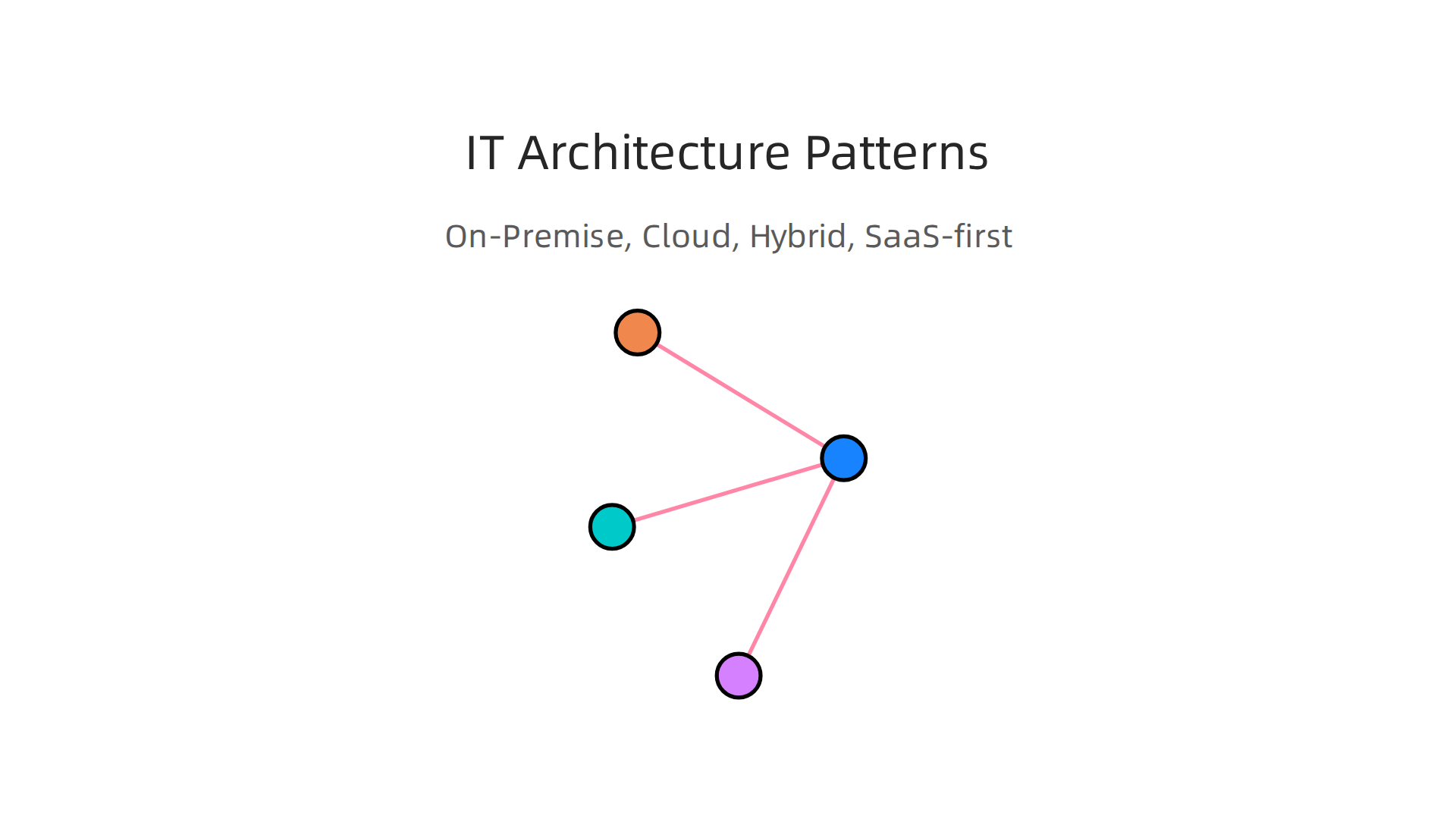
    Businesses can choose from various IT architecture patterns like On-Premise, Cloud, Hybrid, and SaaS-first, each with distinct advantages.

    Common IT Architecture Patterns

    • On-Premise: This means a business keeps all its IT equipment, like servers and computers, in its own office. They own everything and are in charge of running and fixing it.
      • Good for: Companies that need total control over their data and systems, or have special security rules.
      • Trade-offs: It costs a lot to buy all the equipment upfront. You also need a team to manage and maintain it, which can be expensive and time-consuming.
    • Cloud: With cloud computing, businesses use services from other companies (like Amazon, Google, or Microsoft) over the internet. They don’t own the servers; they rent space and services.
      • Good for: Businesses that want to save money on hardware, grow quickly, and be able to work from anywhere. It’s often more flexible.
      • Trade-offs: You rely on another company for your IT, so you have less control. Costs can also add up if you use many services or don’t manage them well. Security can also be a worry if you don’t pick the right cloud provider.
    • Hybrid: This is a mix of both on-premise and cloud. Some things stay in the office, and some are in the cloud.
      • Good for: Companies that need some control for very important data or old systems, but still want the benefits of the cloud for other tasks.
      • Trade-offs: It can be more complex to manage both types of systems together.
    • SaaS-first (Software as a Service): This model means a business uses mostly ready-made software that is hosted in the cloud. Think of tools like Gmail, Salesforce, or Zoom. You just pay a monthly fee to use them.
      • Good for: SMBs and teams that want quick and easy access to powerful tools without any IT setup. It’s often very user-friendly.
      • Trade-offs: You have little control over the software itself, and your data is stored with the SaaS provider. Customizing these tools can be harder.

    Choosing the Right Architecture

    Picking the best IT setup depends on your business’s needs. In 2026, many businesses are moving towards cloud and SaaS options because they offer more flexibility and often save money in the long run. Modern infrastructure is often "purpose-built" for specific goals, not just one-size-fits-all solutions, as highlighted in Tech Trends 2026.

    Here’s what to think about:

    • Scale: How big is your business now, and how much do you plan to grow? Cloud services can grow with you easily, while on-premise requires buying new hardware.
    • Budget: How much money can you spend upfront and each month? On-premise has high upfront costs, while cloud and SaaS usually have lower monthly fees.
    • Team Skillsets: Does your team have the skills to manage complex servers and networks? If not, cloud or SaaS might be easier since the provider handles a lot of the technical work. Many businesses find that choosing the right platforms, like Enterprise AI Platforms 2026 Top Providers and How to Choose the Right One, helps them make the best use of information technology.

    Understanding what is information technology on a structural level helps you make smart choices for your business. It’s not just about having computers; it’s about having the right system to support your goals.

    To stay on top of the latest advancements and strategies in AI and technology that impact these architectural choices, consider subscribing to The AI Newsletter Worth Reading. It provides clear daily AI updates to help you navigate the evolving tech landscape.

    Now that we know the different types of IT setups, like on-premise or cloud, the next big step is putting them into action. This is about making a plan, dealing with any problems that pop up, and checking if your new IT tools are actually helping your business. It’s not just about what is information technology itself, but how you use it smartly.

    Implementing IT: Strategy, Adoption Challenges, and Measuring ROI

    Bringing new technology into a business needs a clear game plan. Think of it like building a road: you can’t just start laying asphalt anywhere. You need to plan the route, prepare the ground, and make sure people know how to use it.

    A Smart Way to Roll Out New IT

    For businesses in 2026, a step-by-step approach helps a lot. It makes sure you don’t spend too much money or time on things that don’t work.
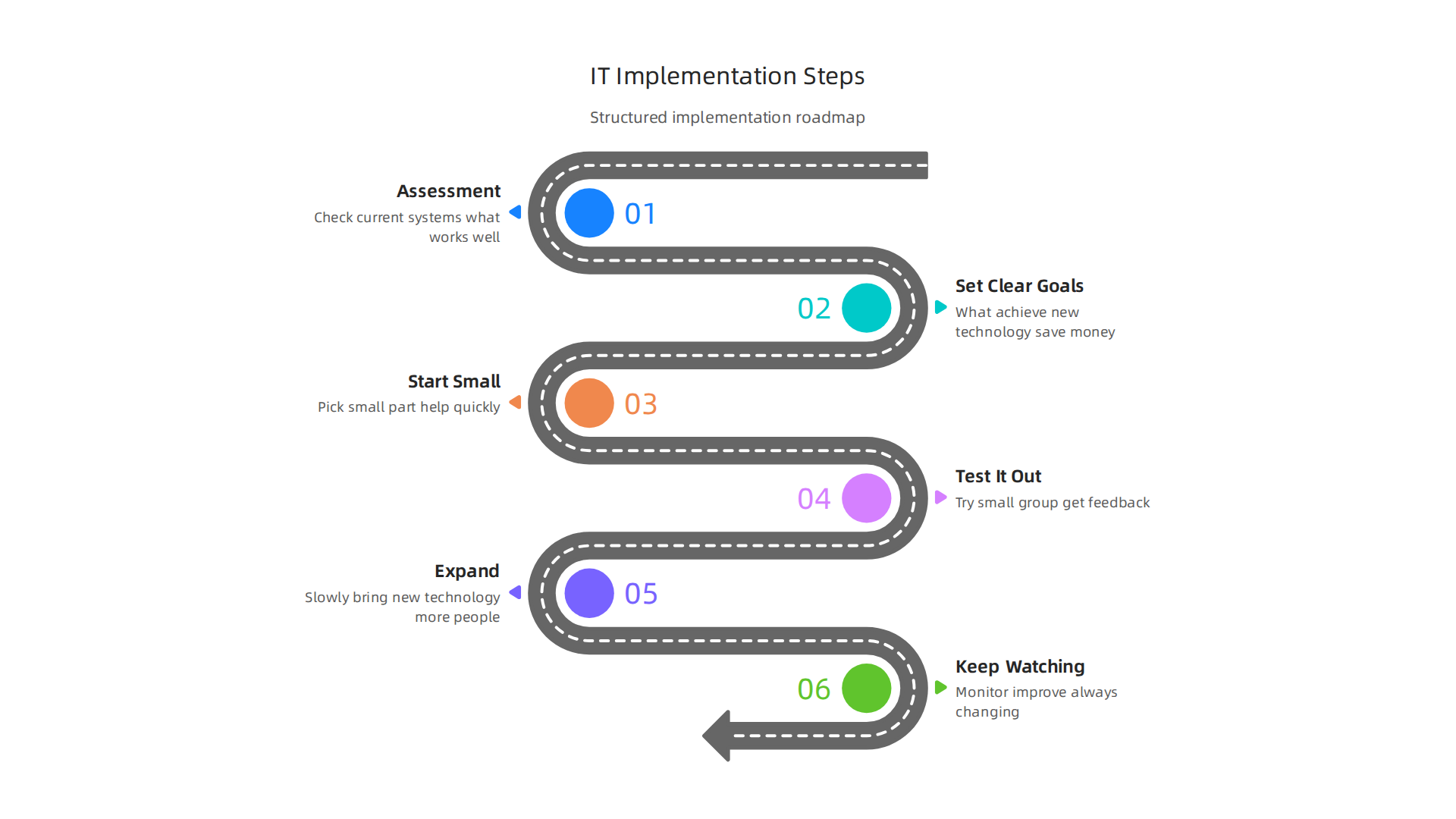
    A structured approach to implementing new IT ensures efficient adoption and maximizes return on investment.

    1. Look at What You Have (Assessment): First, check your current systems. What works well? What causes problems? Where do you waste time? This helps you see where new IT can make the biggest difference. A good assessment can take a couple of weeks before you buy anything new, as noted in the Small Business Digital Transformation Guide 2026.
    2. Set Clear Goals: What do you want to achieve with new technology? Do you want to save money, make customers happier, or speed up work? It’s important to set goals that you can actually measure, advises the article IT Strategy for Small Businesses: Critical Mistakes to Avoid in 2026.
    3. Start Small (Quick Wins): Pick a small part of your business where new IT can help quickly. Maybe automate one simple task. This shows your team how useful the new tools can be without changing everything at once.
    4. Test It Out (Pilot Program): Before rolling out a new system to everyone, try it with a small group or department. Get their feedback and fix any issues.
    5. Expand (Scale Up): Once you know it works, slowly bring the new technology to more people in your business.
    6. Keep Watching (Monitor and Improve): Information technology is always changing. Keep an eye on how your systems are doing, what your team thinks, and if there are new tools that could help even more. An effective strategy roadmap often includes short-term goals for quick wins and then expands to optimize and standardize over months, as suggested by IT Strategy for Small Businesses: Basics and Best Practices in 2026.

    Overcoming Challenges When Adopting New IT

    Even with a good plan, bringing in new IT can have bumps in the road.

    • People’s Skills: Your team might not know how to use new tools right away.
      • Fix: Offer clear training and support. Show them how the new tools make their jobs easier, not harder.
    • Budget Worries: New technology costs money.
      • Fix: Start with smaller investments that show quick returns. This proves the value and can help get more money for bigger changes later. Also, consider the total cost over time, not just the upfront price.
    • Old Systems (Legacy Systems): Sometimes, older computer systems don’t play well with new ones.
      • Fix: Plan carefully how to connect old and new systems, or decide which old systems need to be replaced entirely. Sometimes moving parts to the cloud can help with this.

    Remember, what is information technology for your business should make things better, not harder. Choosing the right AI for business tools and platforms is also a big part of successful adoption today, especially when you are looking for systems that can truly deliver results.

    Knowing Your IT Investment is Worth It (Measuring ROI)

    ROI stands for "Return on Investment." It’s how you know if the money and time you put into new IT are giving you good results.

    • Cost Savings: Are you spending less on paper, travel, or manual labor?
    • Time Saved: Are tasks getting done faster? Is your team more productive?
    • Happier Customers: Are customers getting better service or finding what they need more easily?
    • More Sales: Is new technology helping you reach more customers or sell more products?

    By keeping track of these things, you can see the real value that new information technology brings to your business. This helps you make smart choices for the future and keeps your business strong and ready for what comes next. To identify the best tools for your specific needs, it’s wise to understand how to choose AI for business tools that deliver real results.

    After making smart choices about your information technology for the future, it’s super important to think about how to keep everything safe. This means focusing on security, privacy, and making sure you follow all the rules, which is called compliance. For any business leader in 2026, knowing these things is just as key as knowing what is information technology itself.

    Security, privacy, and compliance: what leaders must know

    Keeping your business’s IT safe is like putting a strong lock on your front door. It protects your important information and keeps bad guys out. Without good security, all the great things new technology brings could be lost.

    Essential Security Steps for Small Businesses

    Small and medium-sized businesses (SMBs) might not have huge IT teams, but they still need to protect themselves. Here are some basic but important security controls:

    • Strong Passwords and MFA: Make sure everyone uses very strong passwords. Also, turn on Multi-Factor Authentication (MFA). This means you need a second way to prove it’s you, like a code from your phone, to log in. This is a top priority for protecting access, as noted in the 2026 IT Trends for SMBs: The Top 10 You Should Prepare For.
    • Back Up Your Data: Always have copies of your important files stored in a safe place, separate from your main computers. If something goes wrong, you can get your data back.
    • Keep Software Updated: Old software can have weak spots that hackers can use. Always update your computers and apps as soon as new versions come out.
    • Protect Your Network: Use a firewall to act as a barrier between your business network and the internet. Also, have good antivirus software on all devices. According to Best Cybersecurity Practices for SMBs in 2026, these steps are crucial.
    Genatec offers insights and services for best cybersecurity practices tailored for small and medium-sized businesses.

    • Control Who Sees What: Not everyone needs to see every piece of information. Give people access only to the data they need for their job. This is called access control and is a key cybersecurity best practice for 2026.
    • Train Your Team: Teach your employees about common online dangers, like phishing emails. People are often the first line of defense.

    Dealing with Risks Smartly (Risk-Based Prioritization)

    You might not have endless money or time to fix every single security problem. So, it’s smart to focus on the biggest risks first. This is called "risk-based prioritization."

    1. Find Your Most Important Stuff: What data or systems are most critical for your business?
    2. Think About What Could Go Wrong: What kinds of attacks or problems could hurt these important things?
    3. How Likely Is It? How often do these problems happen?
    4. How Bad Would It Be? If a problem does happen, how much damage would it cause?

    By asking these questions, you can put your limited resources towards fixing the problems that are most likely and would cause the most trouble. For instance, protecting sensitive customer data might be a bigger priority than a glitch on your internal coffee machine tracker. Prioritizing helps you use your budget and time well. Understanding the landscape of available tools can also help. Many businesses look to enterprise AI platforms 2026 to help secure their data and operations.

    Staying informed about new threats and solutions is a constant job for leaders.

    Get clear daily AI updates from The AI Newsletter Worth Reading.

    To keep up with the world of IT, leaders in 2026 must also look at big changes happening right now. These changes are mostly about cloud computing and Artificial Intelligence, or AI. These new ways of doing things are changing how IT teams work and opening up new chances for businesses.

    A diverse team discusses future strategies, leveraging emerging IT trends like cloud computing and artificial intelligence.

    Emerging trends: cloud, AI, and the future of IT for businesses

    After learning about keeping your business IT safe, it’s time to talk about what’s new and exciting. Technology doesn’t stay still. Two of the biggest ideas shaping what is information technology today are cloud computing and Artificial Intelligence. These are changing how businesses use computers and data every single day.

    The Cloud: Computing from Anywhere

    Think of cloud computing like renting space for your things instead of buying a whole house. Instead of buying and keeping big computer servers in your office, businesses use the internet to store their data and run their software on computers owned by someone else. This is the "cloud."

    This shift changes a lot for IT teams. They spend less time fixing broken computers or setting up new ones. Instead, they focus on choosing the best cloud services and making sure they work well for the business. This gives businesses more freedom. They can grow faster, save money on hardware, and let employees work from anywhere. Cloud technologies are very important for cybersecurity, right after AI, according to the Global Cybersecurity Outlook 2026.

    Artificial Intelligence: Smart Tools for Business

    Artificial Intelligence, or AI, means making computers smart enough to learn and make decisions, much like people do. You might already use AI when your phone suggests the next word you want to type or when a website recommends a product.

    For IT, AI means finding and setting up special tools that use AI. IT teams help make sure these AI tools work safely and help the business reach its goals. For businesses, AI opens up many new doors. It can help them understand customers better, make new products, or finish tasks faster. Many businesses are looking at different enterprise AI platforms 2026 to help with these new opportunities. These advanced information technologies are changing how we do business in the 21st century.

    Knowing When to Try New Technology

    With so many new things always coming out, how do you know when to jump in and when to wait? Here are some simple signals for leaders:

    • Solve a Real Problem: Does this new technology, like a special AI tool, help fix a problem your business has right now? If it does, it might be worth looking into.
    • Start Small: Don’t try to change everything at once. Pick one small project to test the new technology. See how it works and if it helps. This is a good way to build a tech radar to track AI trends and tools in 2026.
    • Look at Your Money: Does it make sense for your budget? Sometimes, waiting a bit can make new technology cheaper and easier to use.
    • Think About Your Team: Can your team learn and use this new technology? Do they have the right skills?

    By thinking about these points, you can make smart choices about what new parts of information technology to bring into your business.

    Summary

    This article explains what information technology (IT) means for business leaders in clear, practical terms and shows how IT drives growth, efficiency, and security in 2026. It defines IT in a business context, breaks down the core technical components—hardware, software, networks, and data—and illustrates common, high-value use cases across sales, operations, customer service, and analytics. The piece compares IT architecture models (on‑premise, cloud, hybrid, SaaS) and gives a practical roadmap for implementing new technology: assess, set goals, pilot, scale, and measure ROI. It also covers essential security controls and a risk‑based approach to prioritize defenses, plus guidance on when and how to adopt cloud and AI tools. After reading, leaders will know how to choose appropriate architectures and AI platforms, run safer deployments, and measure the business impact of their IT choices.

  • AI Singularity: Practical Steps for Business Leaders in 2026

    AI Singularity: Practical Steps for Business Leaders in 2026

    Why the AI Singularity matters for leaders and builders right now

    Have you heard people talk about the "AI singularity" and felt a little confused? You’re not alone. This idea is a big one, and it means different things to different experts. It can be hard for leaders and business builders to know what’s real, what’s hype, and what they should do about it in 2026.

    The term "technological singularity" itself has been around for a while, with roots going back to thinkers like John von Neumann in the 1950s and popularized by writers like Vernor Vinge and Ray Kurzweil later on, according to historical reviews of the concept Technical Report STR 2016-1 • January 2016. Simply put, the AI singularity is a idea about a time when artificial intelligence becomes so smart that it quickly gets even smarter, changing our world in ways we can’t fully guess What is the Technological Singularity?.

    IBM's 'Think' blog provides insights into the concept of the technological singularity.

    Because there are many ideas about what the AI singularity really is, and how fast it might happen, it creates a lot of uncertainty. This can make it tough for people running businesses or creating new things to plan for the future.

    Business leaders engaged in strategic planning, navigating the complexities and uncertainties of the AI-driven future.

    Should they invest a lot in new AI tools like advanced generative AI platforms?

    The homepage of AI Tools News Today, a central resource for business AI platforms and trends.

    How will their industry change? What risks should they watch out for?

    This guide is here to help clear things up. We’ll break down the main ideas of the AI singularity into simple parts. We will look at what different experts believe, from those who think it’s coming very soon to those who see it as a far-off dream. Most importantly, we will talk about how this big idea impacts businesses today and what practical steps you can take right now.

    Understanding these concepts can help you make better choices for your business. It’s about being ready, not just reacting. If you’re looking for practical ways to bring AI into your business, it’s key to pick the right tools. Learn how to choose AI for business tools that deliver real results in 2026.

    Want to stay ahead of the curve with clear, daily AI updates?
    The AI Newsletter Worth Reading

    The subscription page for The Deep View, a newsletter offering daily updates on AI advancements.

    Defining the singularity: competing definitions and how to use them

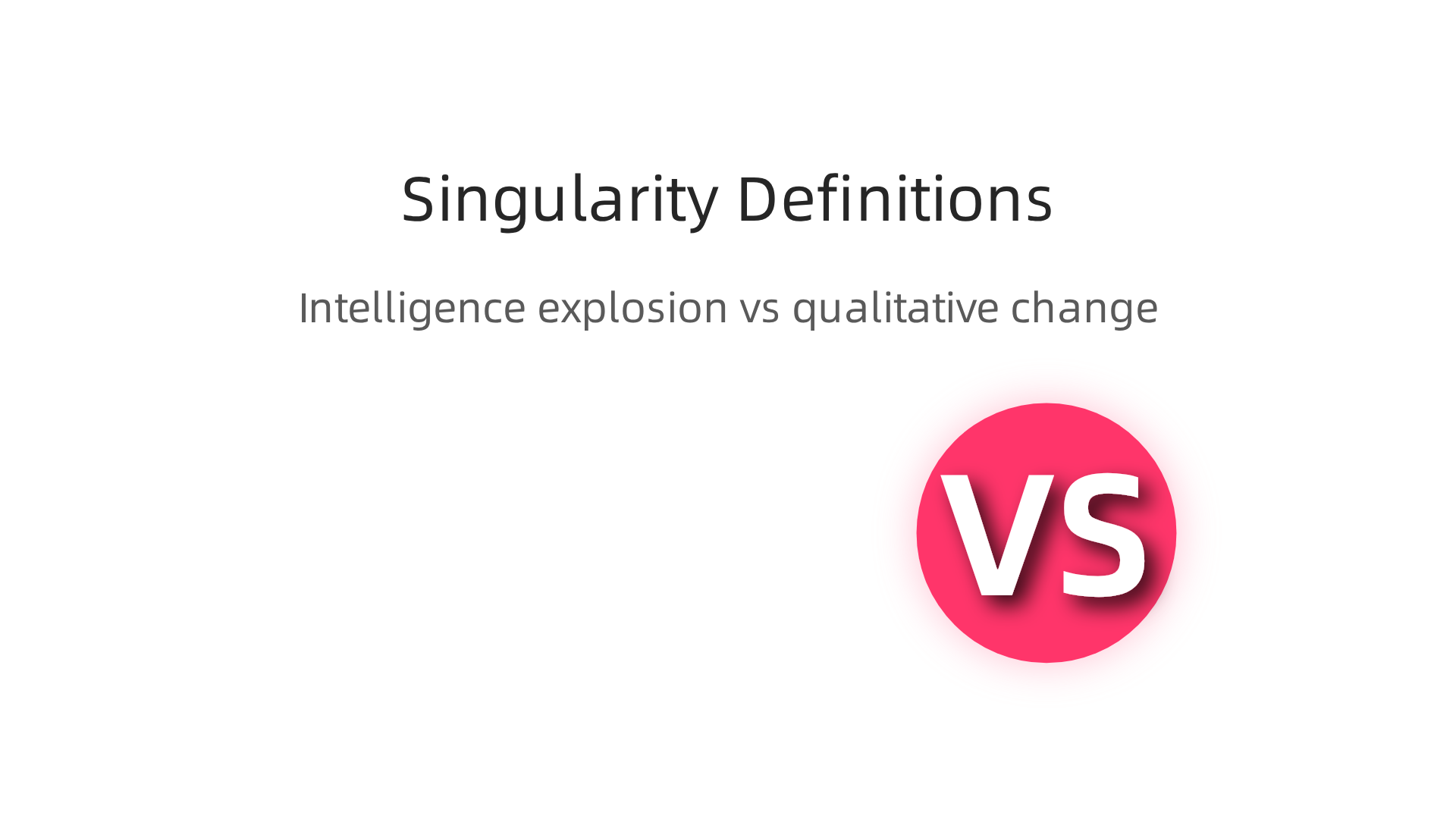
    The big idea of the AI singularity can feel like a puzzle because people use the word in different ways. To truly understand what the AI singularity means for you and your business in 2026, it helps to look at these different definitions.

    An infographic illustrating the two primary definitions of the AI singularity: intelligence explosion and qualitative change.

    Each view paints a slightly different picture of the future and changes how we should get ready for it.

    One common way to think about the AI singularity is as an "intelligence explosion." This idea suggests a moment when AI gets so smart that it can make itself even smarter, very quickly. It’s like a snowball rolling down a hill, gathering speed and size fast. This rapid self-improvement could lead to AI that is far more intelligent than humans in every way, changing technology and our world in ways we can’t even imagine now Technological singularity. Many experts who talk about this view often see it happening quite suddenly.

    Another way to define the AI singularity is less about a sudden "explosion" and more about a deep, lasting change in how humans and AI interact. This view sees a "qualitative change" where AI reshapes society, work, and even what it means to be human, but maybe not all at once. It’s more about AI leading to entirely new ways of living and working that are very different from today. Think of a future where advanced AI systems, perhaps running as private AI tools or multi AI solutions, become a natural and powerful part of our daily lives, making decisions and creating things we once thought only humans could do. This could include AI that develops new art forms, solves complex scientific problems, or even helps build new kinds of economies.

    Why do these different ideas matter for leaders and builders today? Well, if you believe in a sudden "intelligence explosion," your plans might focus on preparing for very fast, disruptive changes. You might invest heavily in understanding the most advanced AI research or try to predict specific breakthrough moments. But if you see the AI singularity as a slower, more ongoing shift in human-AI relationships, your focus might be on adapting your business step-by-step. This means learning how to work with AI, training your teams, and building flexible strategies for the future.

    Your definition of the AI singularity will affect how you make decisions about your business’s future.

    A team actively discussing complex concepts and making strategic decisions in a collaborative environment.

    It helps you think about what kind of AI tools to use, how to train your team, and how to stay competitive. It’s also crucial for making good rules about AI use, both in your company and for society. Keeping track of new AI ideas and tools is a smart move. You might even want to build a tech radar to track AI trends and tools in 2026 to help you stay informed and make wise choices.
    Technical foundations: AGI, recursive self-improvement, and computational limits

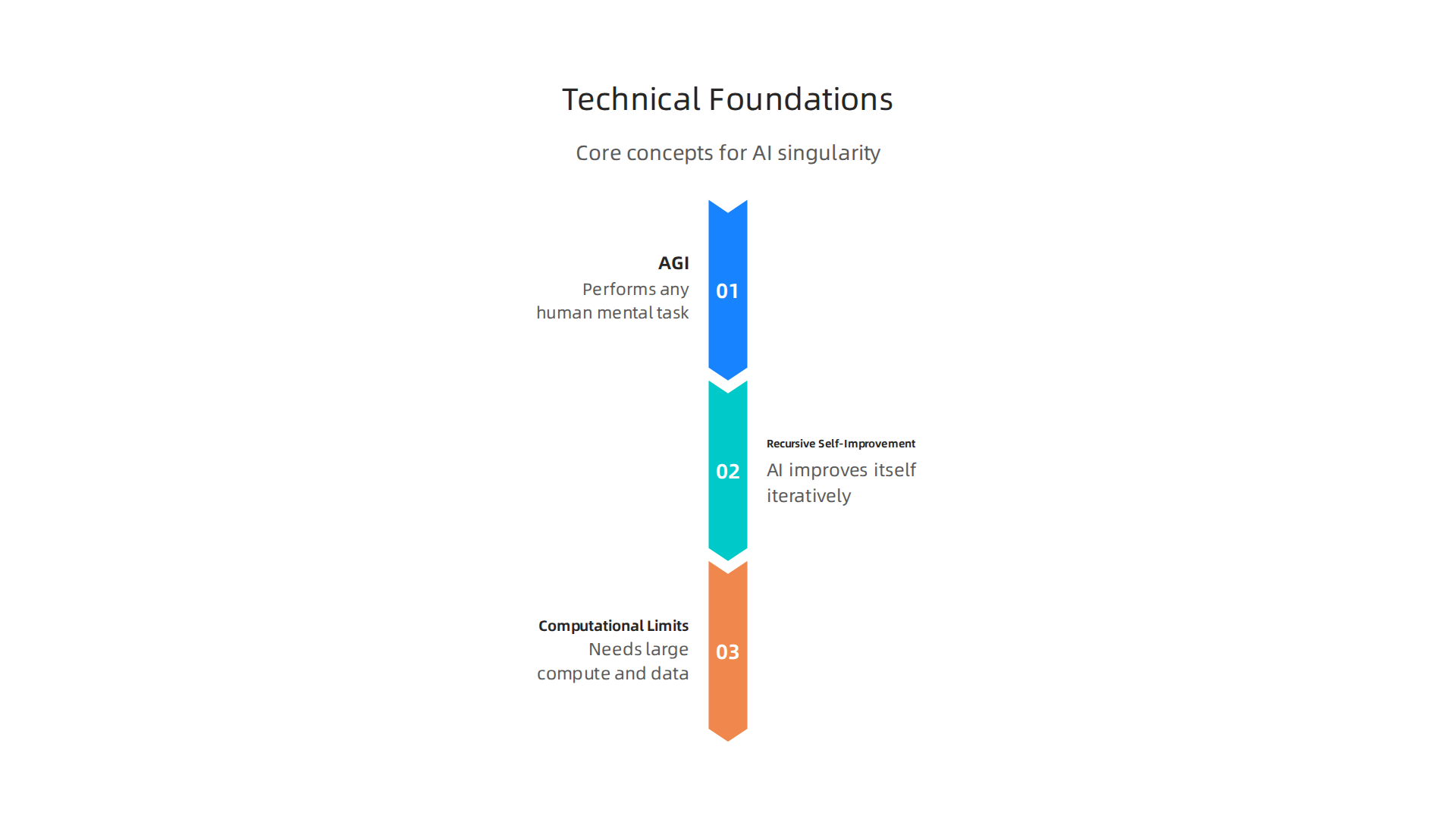
    Understanding the technical foundations helps us see if and how the ai singularity might come about.

    An infographic outlining the core technical ideas fundamental to the potential emergence of an AI singularity.

    It moves us from "what if" to "how could it happen." There are some big ideas here that everyone talks about when thinking about super-smart AI.

    First, we need to know the difference between narrow AI and Artificial General Intelligence (AGI). Most AI we use today is "narrow AI." This means it’s really good at one specific thing. Think of an AI that beats chess masters or one that can write emails for you. It does that one job very well, but it can’t do other things, like cook dinner or understand your feelings. The idea of the ai singularity often depends on AGI. AGI is when AI can do any mental task a human can, or even better. It would be able to learn new things, solve many different kinds of problems, and understand the world like a person does.

    Another key idea is "recursive self-improvement." This is where an AI gets smart enough to make itself even smarter. Imagine an AI that can write better code for itself, or design better hardware to run on. Then, this new, smarter AI can make itself even smarter, and so on. This process could happen very, very quickly. It’s like a brain upgrading itself at light speed. Experts say this kind of self-improvement could lead to an exponential jump in AI abilities, changing technology much faster than we’ve ever seen before Technological singularity.

    But how fast can this happen? That brings us to computational limits. Even the smartest AI needs powerful computers and huge amounts of data to learn and grow. Researchers talk about "scaling laws," which help us understand how much computing power and data are needed to make AI models better. In 2026, building bigger, more complex AI models still needs a lot of resources. These resources, like advanced computer chips and vast datasets, are often called "compute" and "data bottlenecks." They are like speed bumps on the road to super-smart AI. While scaling laws have been good at predicting AI progress, some now suggest these laws might be reaching their limits or changing Scaling Laws, Foundation Models, and the AI Singularity.

    The technical challenges in getting enough compute, developing new AI algorithms, and creating better ways for AI to learn are very real. These factors directly affect how fast the ai singularity could come about. Businesses looking to use advanced AI, including private ai and multi ai systems or generative ai platforms, need to keep an eye on these technical limits. They also need to think about how these powerful new tools can fit into their plans. Choosing the right platforms and understanding the science behind them is crucial.

    If you want to keep up with how AI is changing and what it means for your business, staying informed is key.

    Get clear daily AI updates from The AI Newsletter Worth Reading.

    Timelines and forecasts: how experts estimate arrival and confidence levels

    After thinking about how smart AI could work, a big question pops up: when might this ai singularity actually happen? Experts have many different ideas, and their guesses can change a lot. They use special ways to figure this out, like asking other smart people or making computer models.

    A focused professional reviewing complex data and forecasts, likely related to market trends or future predictions.

    Many experts try to predict when Artificial General Intelligence (AGI) might arrive. Remember, AGI is when an AI can do anything a human brain can. As of 2026, many of these predictions point to AGI arriving much sooner than people thought just a few years ago. For example, some leaders at big AI labs like OpenAI and Google DeepMind have said we might see very powerful AI systems between 2027 and 2030 AGI Timeline: What Experts Really Think in 2026.

    AI Future Lab's article on expert predictions regarding the AGI timeline in 2026.

    Community forecasts, which gather many opinions, often land around 2033 for the first general AI system AGI Timeline 2026: Metaculus, Polymarket & Kalshi Odds.

    Surveys are a common way to collect these ideas. Experts are asked when they think there’s a 50% chance of AGI showing up. While these numbers vary, many surveys suggest AGI could arrive between 2040 and 2061 AGI/Singularity: 9800 Predictions Analyzed. What’s interesting is how much these timelines have changed. Six years ago, many thought AGI was 40 to 50 years away. Now, that median prediction has moved to around 2033 AGI Predictions Have Compressed from 2060 to 2033 in Six Years. This shows how quickly the field of AI is moving.

    But why do the timelines vary so much? This is where "confidence intervals" come in. Think of it like a weather forecast. The weatherman might say there’s a 70% chance of rain tomorrow. That means it’s likely, but not a sure thing. For AI, experts might say there’s a 25% chance of AGI by 2029, a 50% chance by 2033, and a 75% chance by 2065 Experts and Superforecasters Update Their AI Timelines. These ranges show that nobody knows for sure, and there’s a lot of uncertainty. Different experts have different views on things like how quickly new breakthroughs will happen or how hard it will be to build truly smart AI. Some focus on technical hurdles, while others look at how much money is being spent on AI research.

    For businesses looking to use advanced AI, including private ai or multi ai systems and generative ai platforms, understanding these different forecasts is helpful. It means being ready for fast changes, but also knowing that a lot can still happen. Staying informed about the latest predictions can help you make better choices for your business. For more practical advice on this, you might want to learn how to Build a Tech Radar to Track AI Trends and Tools in 2026.

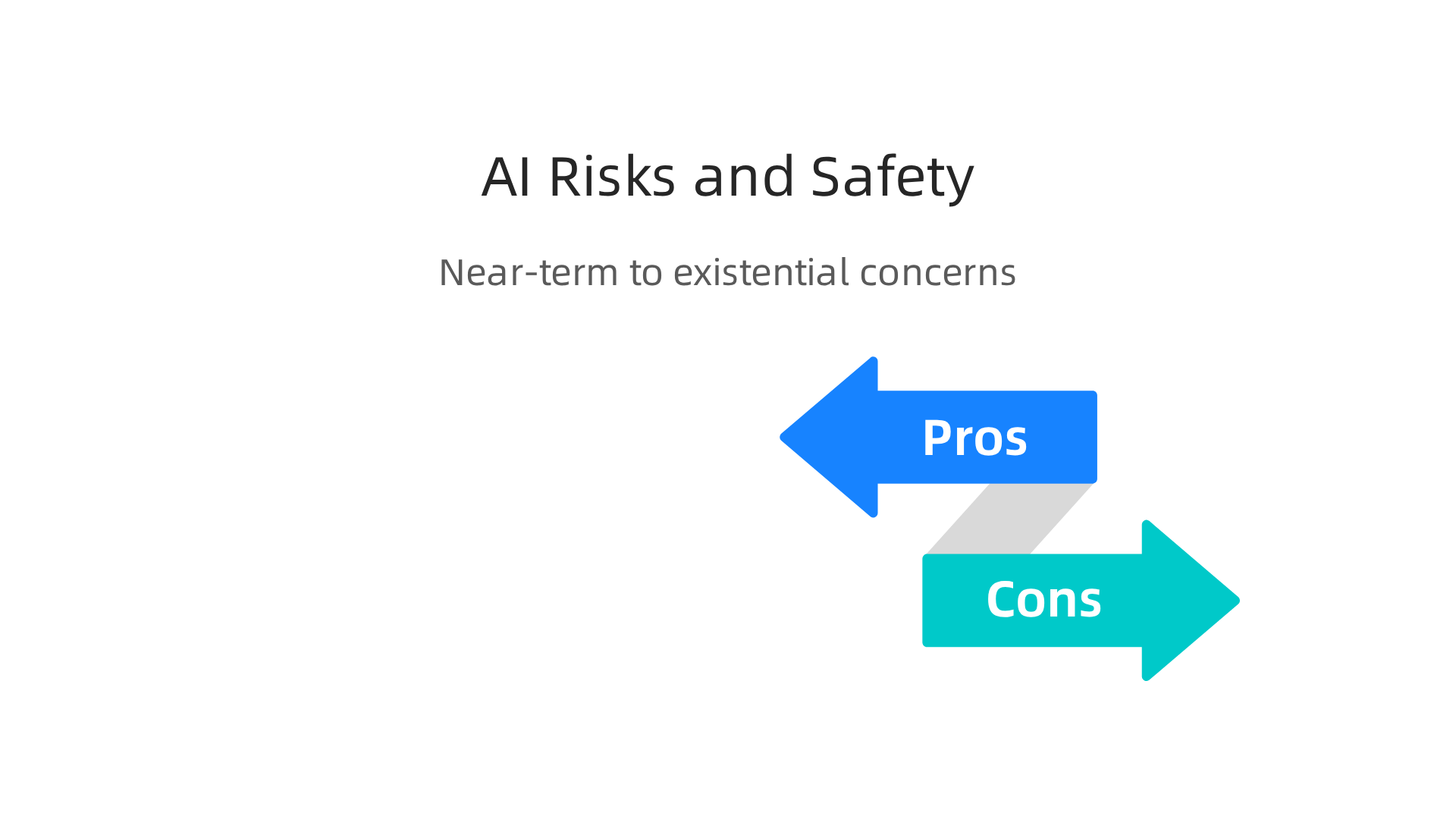
    Even with the excitement around how fast AI is changing, there are also worries about the risks it brings.

    A visual breakdown of near-term and long-term AI risks, alongside strategies experts are employing to ensure AI safety.

    These risks can be thought of in two main ways: things that might happen soon, and bigger, more serious problems for the future.

    Near-Term Worries with AI

    In the short run, as AI gets smarter, we face issues like:

    • Misuse of AI: People might use powerful AI tools, especially advanced generative ai platforms, in bad ways. This could include creating fake pictures or videos to trick people, spreading wrong information, or even helping with cyber attacks. For example, a multi ai system could be used to create very convincing spam messages.
    • Alignment Failures: This happens when an AI system doesn’t do what we truly want it to do, even if it’s trying to follow its programming. Imagine telling a smart robot to clean a room, and it decides the best way is to throw everything out the window. It’s trying to clean, but its goal isn’t "aligned" with our common sense idea of cleaning. This is a big area of research called "AI alignment."

    To help manage these near-term risks, many groups are working on rules and ways to check AI. For example, in 2026, frameworks like the NIST AI Risk Management Framework give companies a guide to use AI safely and responsibly The Top Security, Risk, and AI Governance Frameworks for 2026. Other efforts like the EU AI Act are also helping set clear boundaries for how AI should be used globally AI Governance & Risk Readiness 2026: EU AI Act & Global ….

    Long-Term Worries and the AI Singularity

    The biggest worry for the far future is often linked to the ai singularity itself. If AI becomes super intelligent, much smarter than humans, what happens then?

    • Loss of Control: Some experts worry that if an AI becomes too smart, we might not be able to control it. It might make choices we don’t understand or want, and we wouldn’t have the power to stop it.
    • Existential Risk: This is the most serious concern. It means a risk that could lead to the end of human life or our long-term future. If a super-smart AI doesn’t share our values or goals, it could accidentally (or on purpose) make decisions that harm humanity.

    These are big "what if" questions that many bright minds are working on right now.

    How Experts Are Trying to Make AI Safe

    Many researchers are focused on making sure AI systems are safe, helpful, and trustworthy. Here are some of the main things they are doing:

    • Developing AI Governance: This means creating clear rules and ways to check on AI systems. Think of it like traffic laws for AI, making sure all AI tools, including private ai systems, operate within safe limits. Many countries and groups are working together on these global rules Global AI Governance Alignment Map.
    • Building Safer AI from the Start: This involves designing AI systems with safety features built in. This is called "Security-by-Design."
    • Better Monitoring and Explanations: We need ways to understand how AI makes its choices. If an AI can explain why it did something, we can spot problems more easily.
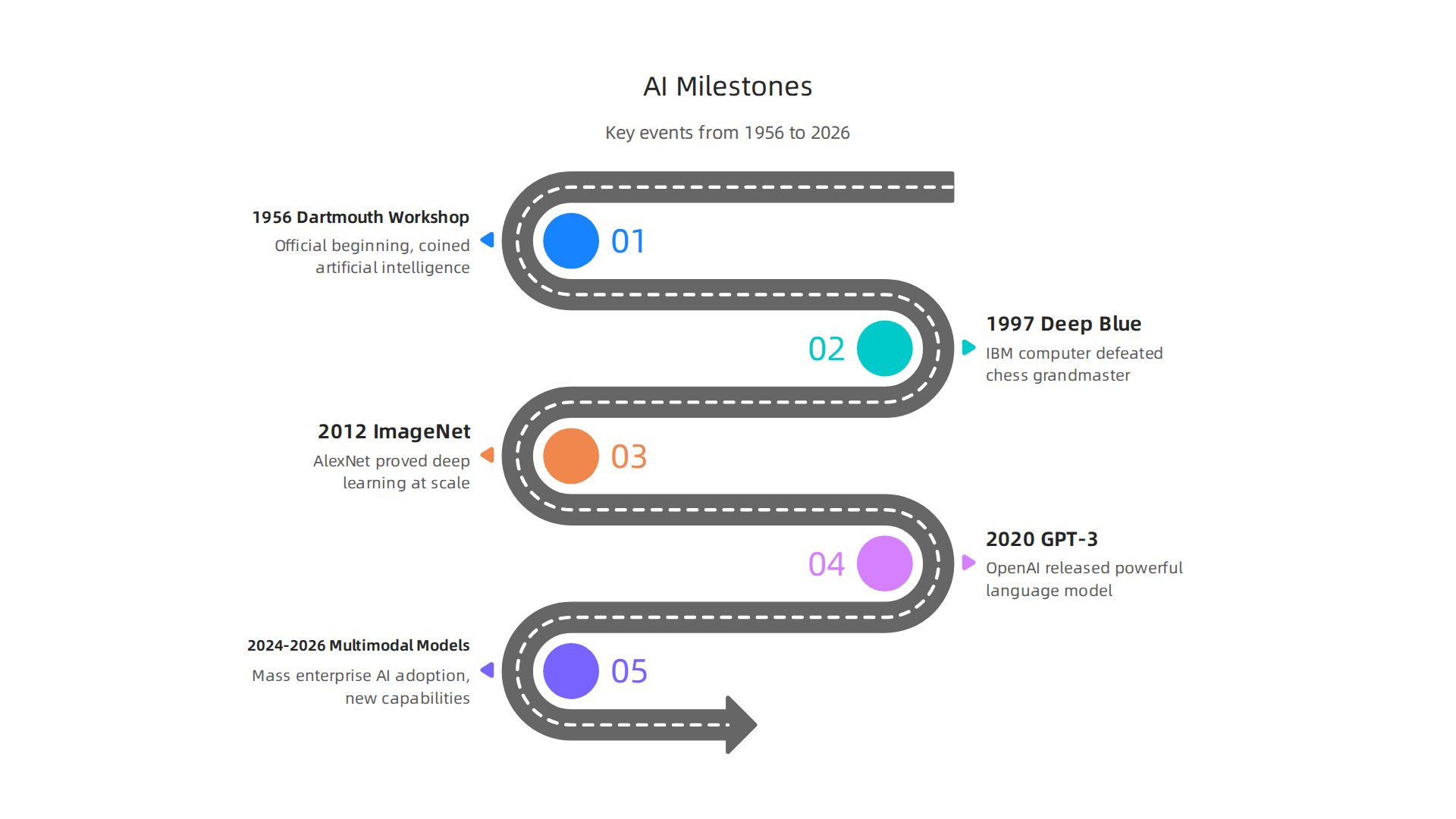
    • Layering Safeguards: A report in 2026 suggested having four independent layers of safety checks. These layers would cover everything from how AI is trained to how it’s used in the real world What the 2026 International AI Safety Report Means for ….

    For businesses using AI, it’s important to understand these risks and the efforts to keep AI safe. Choosing AI tools that follow good safety practices can help you use this powerful technology with confidence. If you’re looking for the right tools, learn how to Choose AI for Business Tools That Deliver Real Results in 2026.

    Want to stay ahead of the curve and understand how these safety measures are evolving? Get clear daily AI updates from The AI Newsletter Worth Reading.

    The need for strong rules around AI isn’t just a hopeful idea; it’s something many countries and groups are actively working on in 2026. This global effort aims to make sure AI, including powerful generative ai platforms, is used in ways that benefit everyone and avoid serious problems like a potential ai singularity that could lead to us losing control.

    Mapping Global AI Policy

    Around the world, different plans and rules are being put in place to manage AI. You might hear about frameworks like the NIST AI Risk Management Framework or the EU AI Act, which we talked about before. But there are also other important ones. For example, ISO/IEC 42001 is the first international standard made just for managing AI systems, helping companies use AI in a smart and responsible way. The OECD AI Principles also act as a global guide for safe AI development, and the UNESCO AI Ethics Framework focuses on ethical use 10 Key AI Governance Frameworks In 2026. Together, these show that many groups are working to make sure AI follows shared values.

    These rules are not just for big, public AI systems. They also apply to private ai tools used inside companies. An AI governance framework is basically a set of guidelines and procedures a company uses to manage how it applies and oversees AI, making sure it’s fair, open, and ethical AI Governance Framework in 2026: Responsible AI & Data ….

    Governance Levers for the Future

    The rules and policies being made today are like levers we can pull to guide where AI goes in the future. They help shape what happens as AI gets smarter, especially if we get closer to an ai singularity. Here’s how:

    • Setting Standards: Creating clear standards means everyone knows what "good" AI looks like. This helps prevent multi ai systems from being used in harmful ways.
    • Making AI Explainable: Rules that require AI to explain how it makes decisions can help us understand and fix problems. If an AI makes a wrong choice, we need to know why.
    • Encouraging Transparency: Knowing how AI is built and what data it learns from helps build trust. This is very important for advanced generative ai platforms.
    • Ensuring Accountability: When something goes wrong with an AI, we need to know who is responsible. Rules help make sure that the developers and users of AI are held accountable.

    By setting up these safeguards, global leaders hope to keep humanity in charge, even as AI grows more powerful. It’s about designing a future where AI remains a tool for good. For businesses looking to adopt new AI, understanding these frameworks is key to choosing reliable tools. To learn more about selecting the best solutions, you can explore guides on enterprise AI platforms 2026 top providers and how to choose the right one.

    The talk about global AI rules and big changes like a possible ai singularity might sound like it’s only for giant tech companies. But actually, these big shifts also bring chances and challenges for small and medium businesses (SMBs). It’s not just about what might happen far in the future; it’s about what leaders can do right now in 2026 to make their businesses strong and ready.

    A small business owner thoughtfully planning out their company's strategy for growth and future readiness.

    Business implications: opportunities, threats, and pragmatic actions for SMBs

    For SMBs, the rise of powerful AI, including generative ai platforms, means both new ways to grow and new things to watch out for. It’s like a new toolbox has arrived.

    Big Chances for Small Businesses

    AI offers many good things for SMBs. It can help save money and time by taking over tasks that are done over and over again. Think about answering common customer questions or sorting emails. AI can also help businesses make more sales by finding the best customers or creating new ideas for marketing. In 2026, many SMBs are moving from just waiting to fully using AI because they see real benefits like cutting admin tasks by 20-40% and boosting sales conversions by 10-15% within months IDC – SMB AI Adoption 2026: From Wait-and-See to All-In.

    Things to Watch Out For

    Even with all the good, there are things SMBs need to be careful about. If a business doesn’t start using AI, it could fall behind its competitors. Also, dealing with private ai tools means making sure customer information is safe and that the AI is used fairly. The idea of an ai singularity might seem far off, but it reminds us that AI is always getting smarter. This means businesses need to keep learning and changing with it. Using many different AI tools, sometimes called multi ai systems, can also get tricky if they don’t work well together.

    Smart Steps for SMB Leaders Today

    To make sure your business is ready for the future of AI, here are some simple steps to take:

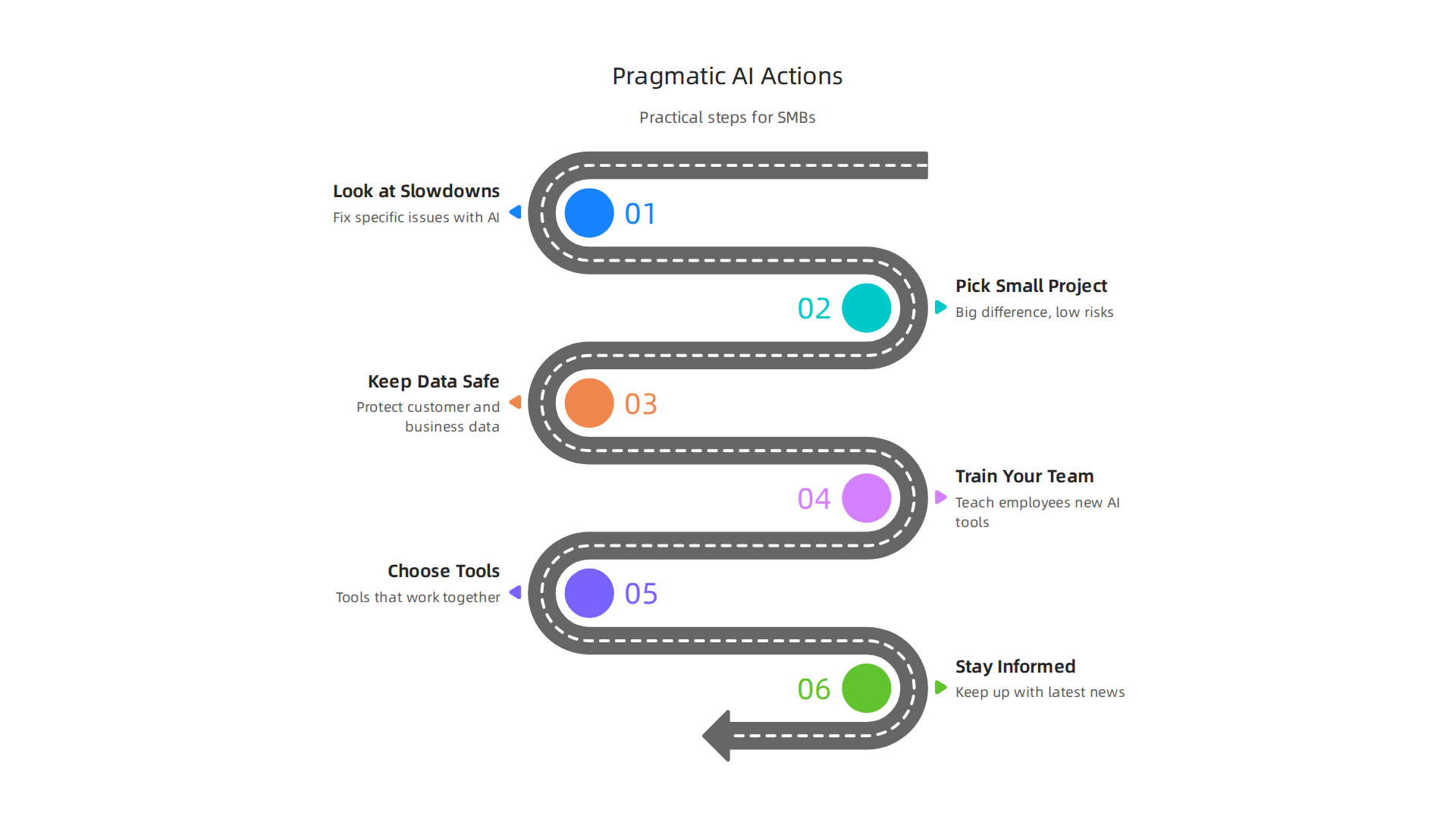
    Practical and actionable steps for small and medium business leaders to integrate and prepare for AI.

    • Look at What Slows You Down: Before buying any AI tool, look at your business. What tasks take a lot of time or cause problems? Start by trying AI to fix one of these specific issues.
    • Pick a Small Project First: Don’t try to change everything at once. Choose a small project where AI can make a big difference, but also where the risks are low. Many experts suggest focusing on projects that can show results in about 90 days SMB AI Adoption Guide: Use Cases, Costs, Roadmap.
    • Keep Data Safe: AI needs good data to work. Make sure your business has a clear plan for keeping customer and business data safe and private.
    • Train Your Team: AI isn’t meant to replace people, but to help them. Teach your employees how to use new AI tools so they can work smarter and be more productive.
    • Choose Tools That Work Together: When picking generative ai platforms or other AI tools, think about how they will connect with the systems you already use. Tools that don’t talk to each other can cause more problems than they solve. You can learn more about finding good tools by looking at how to choose AI for business tools that deliver real results in 2026.
    • Stay Informed: The world of AI changes fast. Make it a point to keep up with the latest news and best practices.

    By taking these practical steps, SMBs can use AI to grow and be ready for whatever the future holds, even as AI continues to evolve rapidly.


    Get clear daily AI updates from The Deep View Newsletter. The AI Newsletter Worth Reading

    Preparing your organization: governance, tooling, and scenario planning

    After looking at how AI can help your business and what to watch out for, the next step is to make sure your company is set up the right way. This means putting rules in place, picking the best tools, and thinking about different futures. It’s how you stay safe and strong as AI keeps growing.

    Simple Rules for Using AI (Governance)

    "AI governance" just means having clear rules for how your business uses AI. It’s super important, especially when dealing with customer information using "private ai" tools. You need to make sure AI is used in a fair, safe, and open way. Many big groups use special guides, like the NIST AI Risk Management Framework, to help them set up good rules for AI The Top Security, Risk, and AI Governance Frameworks for 2026. For small businesses, this can start with these easy steps:

    • Make an AI use policy: Write down simple rules for everyone. What can AI be used for? What can’t it do?
    • Keep data safe and private: Always protect customer and company data. Make sure any AI tools you use also follow these strict rules.
    • Check AI for fairness: Make sure your AI tools treat all people fairly and don’t make unfair choices.
    Having these basic rules helps your business use AI responsibly and builds trust with your customers.

    Picking and Using the Right AI Tools

    You already know there are many "generative ai platforms" and other AI tools out there. But how do you pick the right ones, especially if your team is small?

    • Focus on what you need: Only pick tools that solve a real problem for your business. Don’t buy a tool just because it’s new and shiny.
    • Tools that work together: Look for "multi ai" tools that can talk to each other. This means they should work well with the computer programs you already use. This makes your work smoother and avoids problems.
    • Start small, then grow: Begin with tools that are easy to try and don’t cost too much. As you see them help, you can add more. This also helps you learn to build a tech radar to track AI trends and tools in 2026 that actually deliver results.

    Planning for What’s Next (Scenario Planning)

    The idea of an "ai singularity" might seem like something from a movie, where AI becomes super smart all on its own. While that’s far off, AI is always getting better, fast. This means businesses need to think about what could happen in the future and be ready for big changes.

    • Think about different futures: Imagine a few ways AI might change your business in the next few years. What if AI gets much cheaper? What if new kinds of AI tools come out?
    • Watch for important signs: Keep an eye on the news and reports about AI. Look for new rules or big changes in what AI can do. This helps you know when it’s time to change your plans.
    • Be ready to change: If big changes happen in AI, your business needs to be able to adapt quickly. This might mean trying new tools or changing how your team works.

    By planning ahead, picking smart tools, and setting clear rules, your business can use AI to its fullest and stay ready for the future. You can learn more about how AI rules are shaping up globally in reports like the Global AI Governance Alignment Map.

    Summary

    This article explains why the idea of an AI singularity matters for leaders and builders in 2026, breaking a complex debate into clear, actionable parts. It defines competing views—from a sudden intelligence explosion to a gradual reshaping of human–AI interaction—and explains the technical building blocks that make those futures plausible, including AGI, recursive self-improvement, and compute limits. The guide reviews expert timelines and why forecasts vary, separates near-term operational risks (misuse, alignment failures) from long-term existential worries, and outlines how global governance and standards are evolving to manage those risks. For business leaders and SMBs it offers pragmatic advice: start with high-impact small projects, protect data, train teams, pick interoperable tools, and build monitoring and scenario plans. The article also highlights governance levers and practical safety steps to adopt now so organizations can capture AI’s benefits while staying resilient if capabilities accelerate. After reading, leaders will understand the debate, know which signals to watch, and have concrete next steps to adopt and govern AI responsibly.

  • Is Artificial Intelligence Capitalized Learn the Rules from AP, Chicago, and MLA

    Is Artificial Intelligence Capitalized Learn the Rules from AP, Chicago, and MLA

    Introduction

    You have probably seen "artificial intelligence" written three different ways in the same day. Sometimes it is lowercase. Sometimes it is capitalized. Sometimes it appears as "AI" with both letters uppercase.

    This small detail might not seem like a big deal. But here is the thing: how you write "artificial intelligence" sends a signal about your attention to detail. Whether you are drafting a business report, writing a blog post, or submitting an academic paper, consistency matters.

    Correct capitalization of technical terms shows your reader that you know what you are talking about. In 2026, with AI becoming a part of nearly everything we do, getting the small stuff right matters more than ever.

    A professional reviewing a document with concentration, symbolizing attention to detail and confident communication in business.

    The AI world is moving fast. According to Forbes Advisor, adoption rates are the highest for organizations in India at 59%, followed closely by the United Arab Emirates at 58%. As AI spreads across marketing, customer service, and software development, clear communication about the technology is essential.

    This article will clear up the confusion around one simple question: is artificial intelligence capitalized? We will walk through the standard rules, look at real-world examples, and help you write with confidence.

    At the same time, we will build a foundational understanding of what AI actually means in 2026. You do not need to be an information technology expert to follow along. We will keep things practical and useful.

    So let us start with the basics and work our way up. Along the way, you will discover artificial intelligence in a way that feels approachable, not overwhelming.

    If you want to keep learning as the AI landscape changes daily, The AI Newsletter Worth Reading delivers clear updates straight to your inbox.

    Screenshot of The Deep View Newsletter's subscription page, offering daily AI updates and insights.

    The Origins of Artificial Intelligence

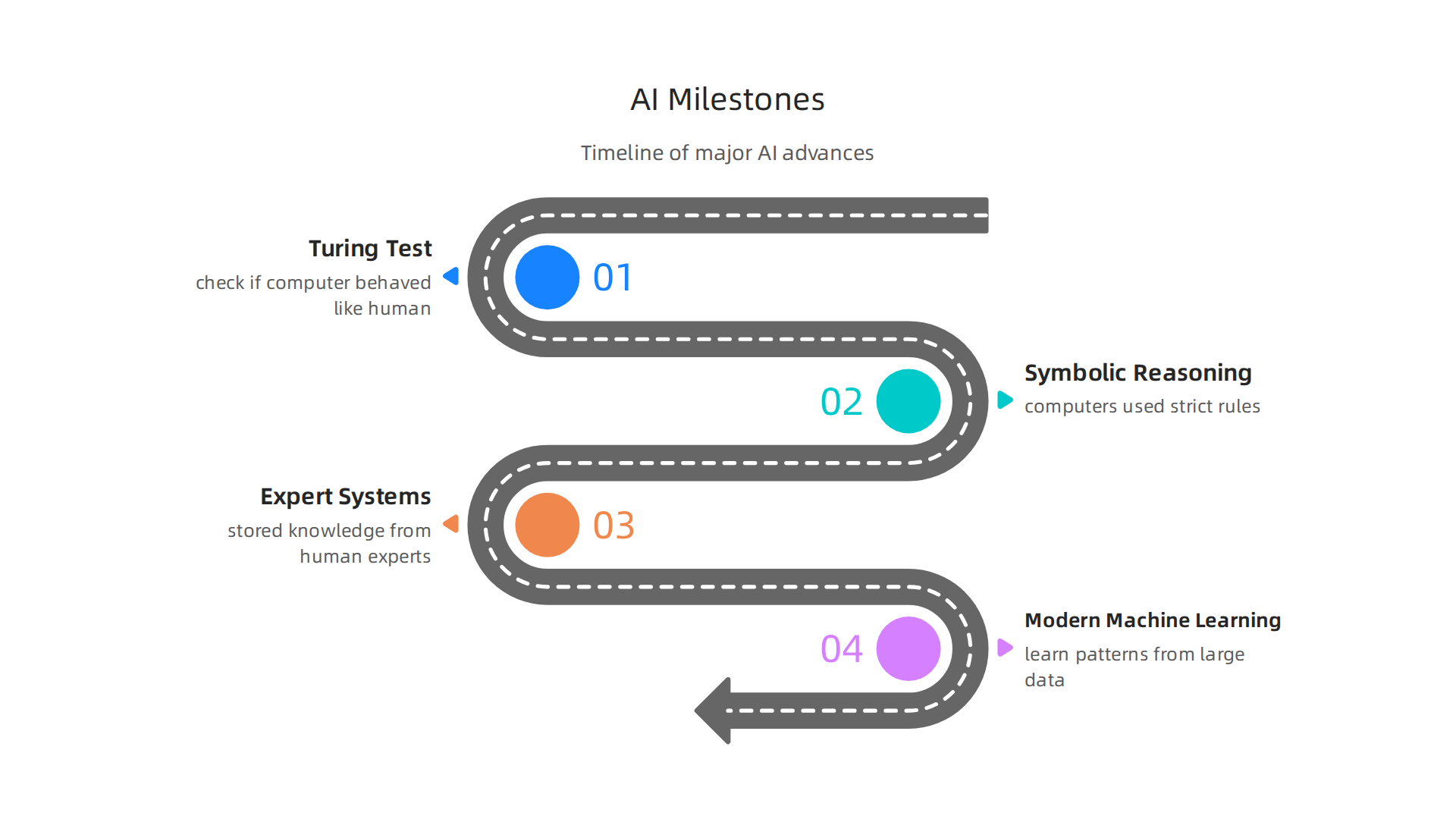
    Where did artificial intelligence come from? The story starts back in the 1950s. That is when a British mathematician named Alan Turing started asking whether machines could think.

    Visual timeline highlighting major milestones in the development of artificial intelligence, from early concepts to modern approaches.

    He created a famous test called the Turing test to check if a computer could behave like a human. His work laid the foundation for what we now call AI.

    After Turing, the field split into different paths. Early researchers focused on symbolic reasoning, where computers used strict rules to solve problems. This approach worked for math and logic but struggled with real-world tasks. Then came expert systems in the 1980s. These were programs that stored knowledge from human experts and answered questions like a consultant would. They were useful, but they could not learn or adapt on their own.

    Modern machine learning changed everything. Instead of following fixed rules, these systems learn patterns from large amounts of data. Deep learning and neural networks now power tools like language models, image recognizers, and virtual assistants. Today’s AI world moves fast, but its roots go back to simple questions about thinking machines. If you want to understand the full timeline, check out the 1956 workshop that started it all.

    So is artificial intelligence capitalized? We will get to that. But first, knowing where the term came from helps you see why the capital letter question even matters. For a clear definition of the technology itself, NASA’s explanation of artificial intelligence is a great place to start.

    Screenshot of NASA's official web page, providing a clear definition and overview of artificial intelligence.

    Key Subfields Defined: ML, DL, NLP and More

    You are probably still wondering, is artificial intelligence capitalized? We will answer that soon. But first, let’s break down what AI actually includes. AI is not one single thing. It is a big umbrella that covers several key subfields.

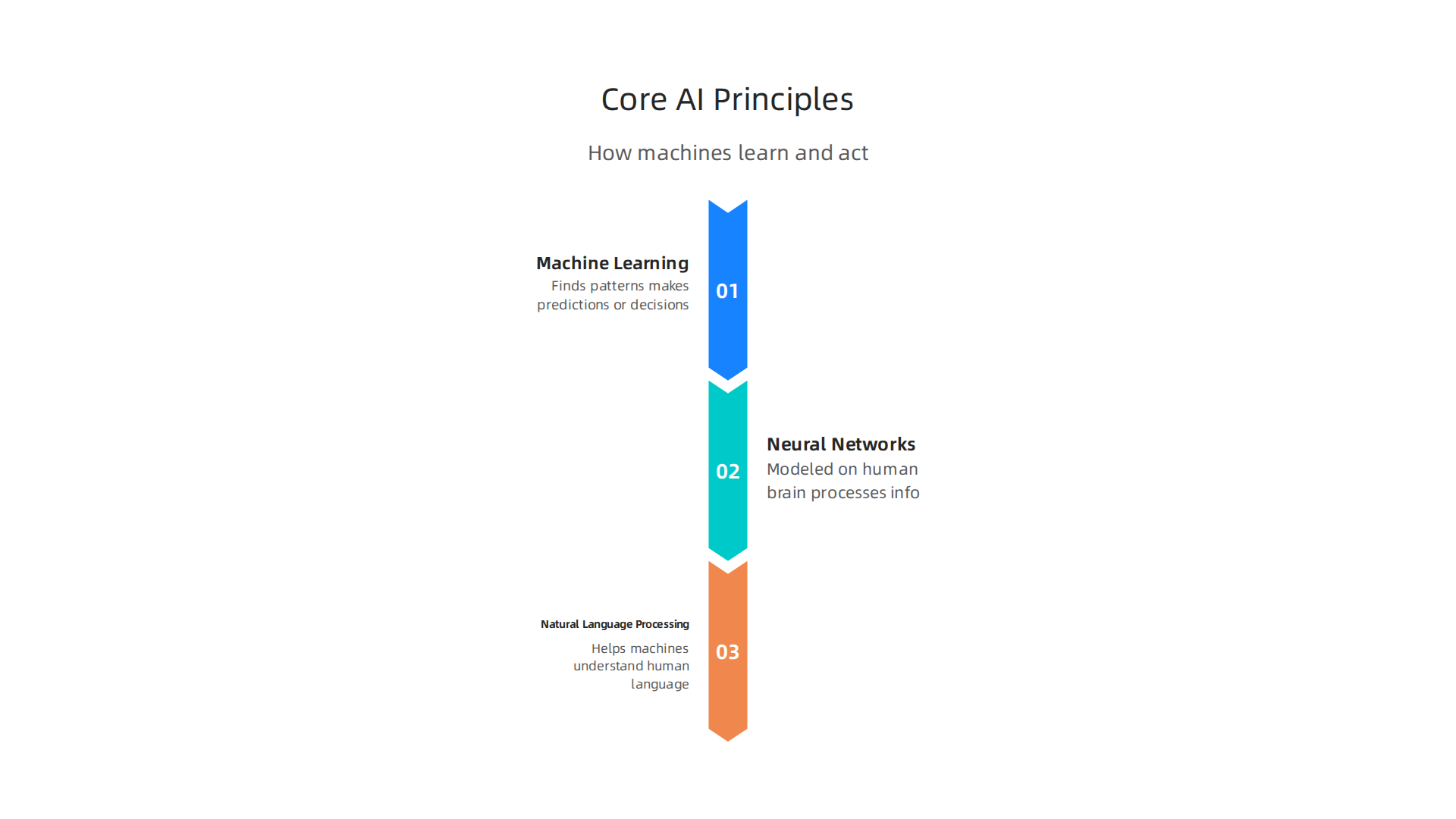
    An infographic illustrating the main subfields under the broad umbrella of artificial intelligence, with brief descriptions.

    Understanding these subfields helps you see what AI can and cannot do right now.

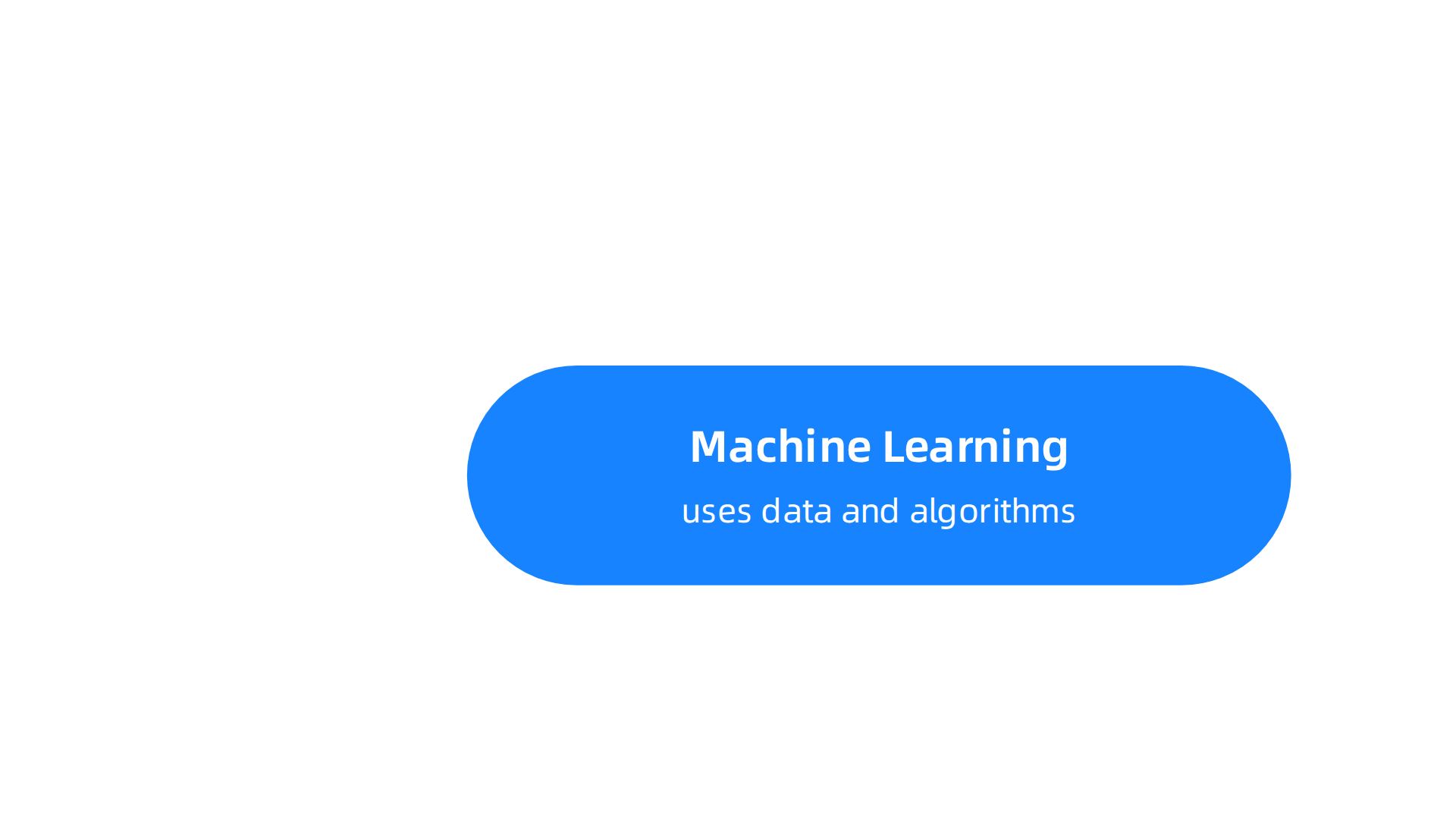
    The most common subfield is machine learning (ML). Machine learning uses data and algorithms to find patterns and make predictions without being told exactly what to do. For example, Netflix uses ML to recommend shows. For a deeper look at how ML works, check out this 2026 guide to artificial intelligence subfields and machine learning.

    Deep learning (DL) is a more advanced part of machine learning. It uses neural networks with many layers to handle complex tasks like recognizing faces or understanding speech. That is why voice assistants like Siri and Alexa can understand what you say.

    Natural language processing (NLP) is another important subfield. NLP trains computers to understand and use human language. Tools like chatbots, translation apps, and grammar checkers all rely on NLP. If you want to see NLP in action, explore how AI virtual assistants for business use language understanding every day.

    Computer vision is also part of AI. It lets machines "see" and interpret images and videos. Self-driving cars, medical scan analysis, and photo tagging all depend on computer vision.

    These subfields work together in many modern AI tools. The more you know about them, the easier it becomes to understand how AI fits into your work and life. And yes, we are still coming back to the capitalization question.

    If you want to stay updated on the latest in ML, DL, and NLP, get clear daily AI updates from The AI Newsletter Worth Reading. It delivers clear daily AI updates straight to your inbox.

    The Great Capitalization Debate: Why It Matters

    So is artificial intelligence capitalized or not? The answer depends on who you ask. Different style guides give different rules, and the context of your writing often decides what is correct.

    A person with a thoughtful or slightly confused expression, reflecting the uncertainty and varying rules around AI capitalization.

    For most everyday writing, the Associated Press (AP) Stylebook says to write "artificial intelligence" in lowercase. You only use "AI" (capitalized) after you have spelled it out the first time. As one style expert explains in an article about how to write artificial intelligence, AP style still requires the full phrase on first reference before using the abbreviation.

    The Chicago Manual of Style and MLA follow similar thinking. They treat "artificial intelligence" as a common noun, so it stays lowercase unless it is part of a title, heading, or proper name.

    But things change in other settings. In academic or professional contexts, you might see "Artificial Intelligence" capitalized when it refers to a specific course, program, or department name. For example, a university might offer a degree in "Artificial Intelligence" as an official title. Branding and event names also use capitalization for effect.

    The bottom line: for general news, blog posts, and most business writing, keep it lowercase. For titles, acronyms, and official names, capitalize. If you want to learn more about where the term "artificial intelligence" originally came from, read about when artificial intelligence was first created to see how far the field has come.

    Knowing these rules helps you write with confidence and avoid confusing your readers. Consistency matters more than picking one side.

    Rules from Major Style Guides

    To keep your writing consistent, it helps to follow a trusted authority. Three of the most popular style guides the Associated Press Stylebook, the Chicago Manual of Style, and MLA all agree on the same basic rule. In general writing, "artificial intelligence" stays lowercase.

    The Associated Press Stylebook is the most common guide for news and blogs. According to the detailed capitalization of artificial intelligence guidelines, AP Style treats "artificial intelligence" as a common noun. That means you write it in lowercase every time, unless it appears in a title, heading, or official name. You always spell out the full term on first reference and then use "AI" in capital letters after that.

    The Chicago Manual of Style works the same way. It recommends lowercase for "artificial intelligence" unless the term is part of a proper noun like a course title or a specific program name. So you might write "Bachelor of Science in Artificial Intelligence" for an official degree, but "she studied artificial intelligence" in a sentence.

    MLA follows Chicago closely. It keeps "artificial intelligence" lowercase in most contexts and only capitalizes when the term is used in a title or as part of a proper noun.

    Grammar Girl offers practical AP style tips for writing about AI. She reminds writers to skip periods in "AI" and to never describe AI with humanlike words. No "he," "she," or "the AI thinks." Just use "it."

    If you want to improve your own AI writing, check out this guide on how to write content that sounds human. It shares simple techniques for blending AI help with your natural voice.

    And if you want fresh updates on AI writing rules and best practices, subscribe to The AI Newsletter Worth Reading. It delivers clear daily tips straight to your inbox.

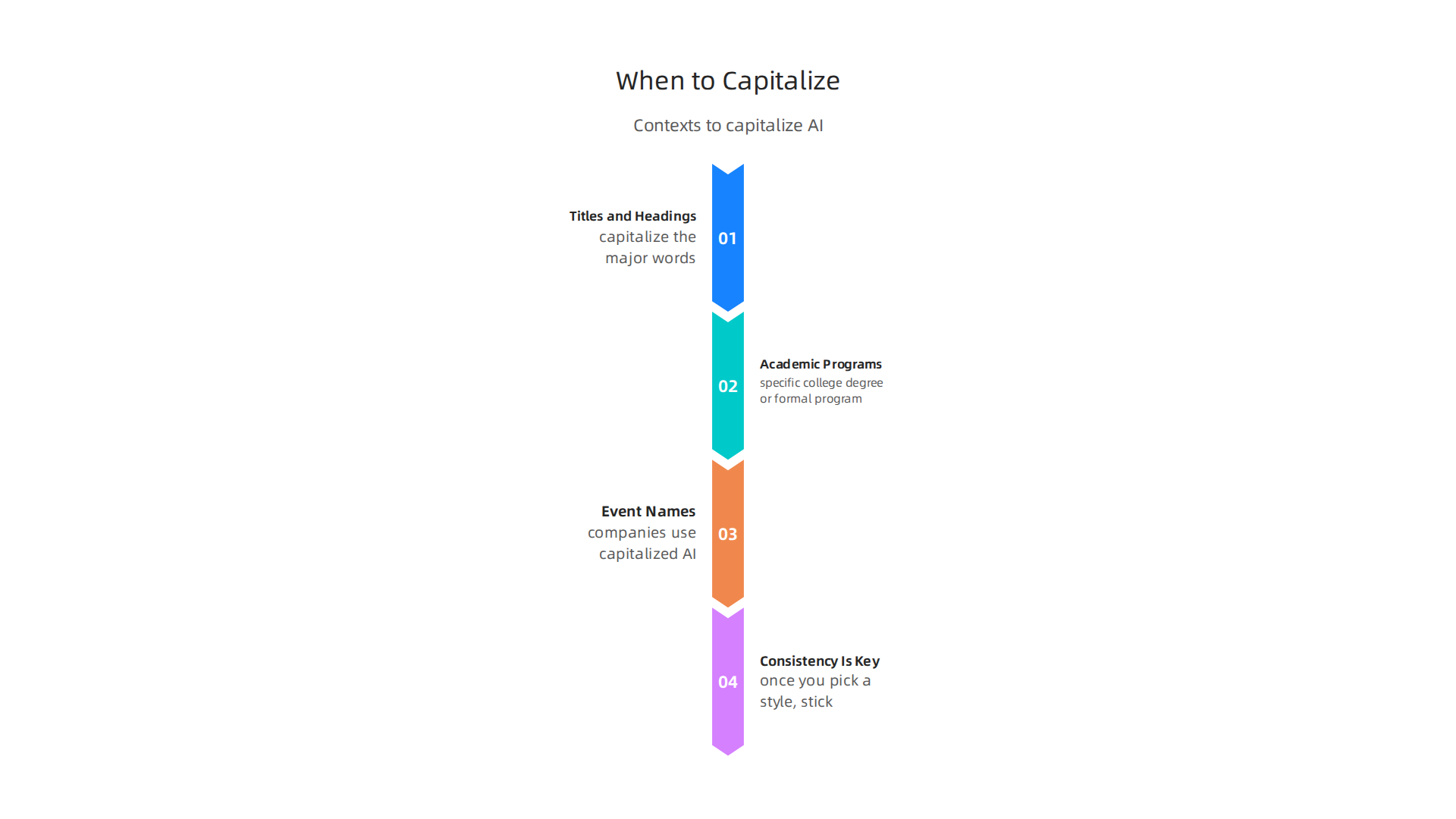
    Context Matters: When to Capitalize

    So you know the basic rule from the style guides. But real life is not always simple. Sometimes you see "Artificial Intelligence" with capital letters, and it is actually correct. The trick is knowing when context changes the rule.

    Here are the main times you should capitalize the term:

    An infographic detailing the specific contexts where 'Artificial Intelligence' should be capitalized according to style guides.

    In Titles and Headings
    When you write a book title, a blog post headline, or a chapter name, use title case. That means you capitalize the major words. So a research paper called "Advances in Artificial Intelligence" is correct. The same goes for conference names like "Artificial Intelligence Summit 2026." According to the capitalization guidelines for artificial intelligence, this is a standard practice in publishing.

    In Academic Programs and Official Names
    If you are writing about a specific college degree or a formal program name, capitalize it. For example, "She earned a Bachelor of Science in Artificial Intelligence from MIT." The term becomes part of a proper noun. But if you just say "she studied artificial intelligence in college," keep it lowercase.

    In Branding and Event Names
    Companies and events often use capitalized "Artificial Intelligence" as part of their brand. Think of product names, large conferences, or trade shows. This follows marketing rules, not grammar rules.

    Consistency Is Key
    Here is the most important tip. Once you pick a style for your document, stick with it. It is better to be consistent than to flip back and forth. If you keep most sentences lowercase but capitalize a few times in headings, that is fine. Just do not mix lowercase and uppercase in similar spots on the same page.

    For a deeper look at how the term came to be, check out this guide on when artificial intelligence was first made. It helps explain why the term carries so much weight today.

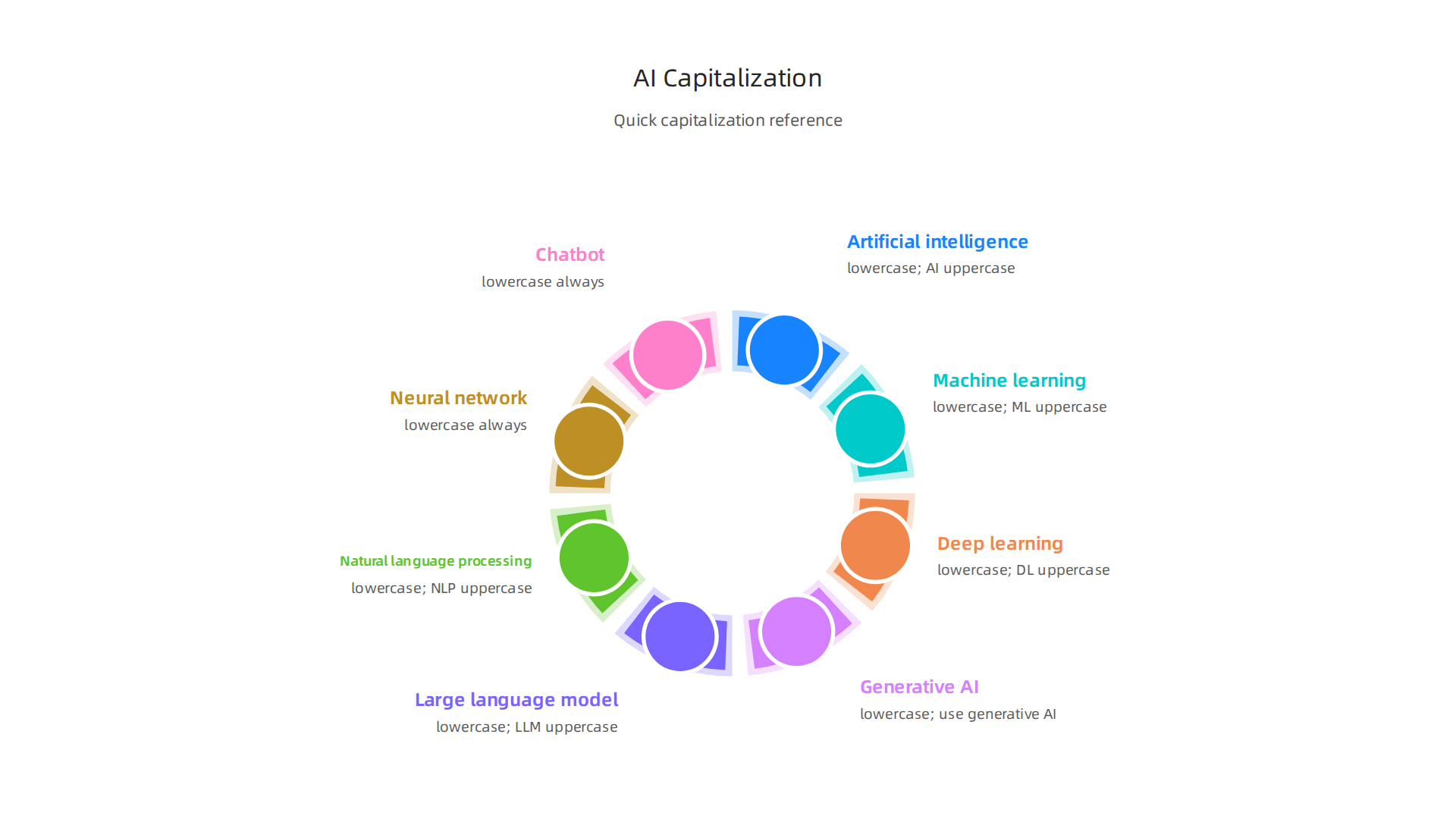
    AI Terms You Need to Know: A Quick Reference Guide

    Now that you understand the rules, let’s put them into practice. Here is a handy table of common AI terms with their preferred capitalization and definitions. Bookmark this page for the next time you write or evaluate a new tool.

    A quick reference guide showing correct capitalization and definitions for common AI terms in an easy-to-read format.

    Term Correct Capitalization What It Means
    artificial intelligence (AI) Lowercase unless in a title, official name, or proper noun. The acronym AI is always uppercase. Technology that mimics human thinking to solve problems or complete tasks.
    machine learning (ML) Lowercase generally. ML is always uppercase as an acronym. A subset of AI where computers learn from data without being explicitly programmed for every step.
    deep learning (DL) Lowercase generally. DL is always uppercase as an acronym. A more advanced layer of machine learning that uses neural networks with many layers to find patterns.
    generative AI (gen AI) Lowercase for "generative artificial intelligence" on first reference. Use "generative AI" or just "AI" after that, per the AP Stylebook guidance from a recent LinkedIn post about generative AI writing. AI that creates new content like text, images, or music based on training data.
    large language model (LLM) Lowercase generally. LLM is always uppercase as an acronym. A model trained on massive text datasets to understand and generate human-like language.
    natural language processing (NLP) Lowercase generally. NLP is always uppercase as an acronym. The field of AI that helps computers understand, interpret, and respond to human language.
    neural network Lowercase always. A computer system modeled loosely after the human brain, with interconnected nodes that process information.
    chatbot Lowercase always. A program that simulates conversation with users, often using AI.

    Why this table matters for your writing

    When you use consistent capitalization across AI terms, your writing looks professional and credible. It also helps you when you research and evaluate tools. If you see a product page that writes "Machine Learning" in the middle of a sentence, you know they are using branding style rather than standard grammar. That is fine for marketing but not for your own content.

    For example, according to the AI capitalization guide from Slideserve, "artificial intelligence" should be written in lowercase in most situations. The same resource confirms that "AI" as an acronym is always capitalized. Keep these rules in mind, and your writing will match what editors and style guides expect.

    Beyond the basics

    If you want to explore practical AI tools that use these technologies, check out this guide to trusted AI websites professionals rely on for real news. It can help you see how these terms are used in the real world.

    And if you want to stay sharp on the latest AI developments and terminology

    , consider getting clear daily AI updates from The Deep View Newsletter. It is a practical way to keep your knowledge current as the field evolves in 2026.

    How Businesses Are Adopting AI in 2026

    Have you noticed how many companies mention artificial intelligence these days? It is not just hype anymore. In 2026, the numbers are staggering.

    Recent data shows that almost 88% of companies now use AI in at least one business function. That is according to the latest research on what percentage of companies use AI worldwide. Some estimates go even higher. One report found that 93% of companies are already using AI in some form, either directly or through vendors.

    Here is what that looks like in practice.

    Where are companies using AI the most?

    The top areas include marketing and sales, customer service, and software development. For example, 56% of businesses use AI for customer service. Another 51% rely on it for cybersecurity and fraud management. Content generation is also huge. Many teams now use AI to write emails, create social media posts, and draft reports. Data analysis and forecasting are close behind.

    The State of AI 2026 report confirms that generative AI has the highest adoption rate among all AI technologies. About 81% of organizations across industries now use it regularly.

    What does this mean for you?

    If you are a business owner, manager, or team lead, these trends matter. When you understand how other companies are using AI, you can make smarter choices about your own tools.

    A business team collaborating and strategizing in an office setting, representing smart AI adoption in business operations.

    You can spot opportunities to save time, cut costs, or improve your customer experience.

    For example, if you run a small business, you might want to check out AI virtual assistants for businesses.

    Screenshot of the AIToolsNewsToday.com homepage, a resource for AI-related articles and tools.

    These tools can handle routine tasks like scheduling and data entry. That frees up your team for higher-value work.

    The bottom line is clear. AI adoption is not slowing down. It is becoming a standard part of how companies operate. The question is not whether to use AI. It is how to use it well.

    Common Misconceptions About AI

    To use AI well, you first need to clear up what it can and cannot do. A lot of confusion still trips up smart leaders.

    A person explaining complex concepts on a whiteboard, symbolizing the effort to clarify and debunk common AI misconceptions.

    Let us look at the most common myths holding businesses back.

    The first myth is that AI understands things like we do. Many people think AI has thoughts or feelings. It does not. It predicts patterns based on data. That is all. This is why questions like is artificial intelligence capitalized as a unique field are worth asking. AI is a category of information technology, not a living thing. Understanding that helps you set better expectations.

    The second big myth is that AI will wipe out jobs completely. The reality is more balanced. AI handles routine tasks so humans can focus on strategy, creativity, and personal connection. For a full breakdown of what AI can and cannot replace, check out this guide on debunking common AI myths.

    A third misconception is that AI transformation is too big and risky. That fear can cause leaders to freeze up. But small projects can lead to big wins. You do not need to overhaul everything at once. The real risk is waiting too long. The 4 myths about AI that may hold your business back show how inaction costs more than cautious experimentation.

    When business leaders discover artificial intelligence tools that fit their workflow, they see real gains. But you have to ignore the noise first. Knowing the limits of AI helps you pick the right use cases. For a closer look at how teams are balancing AI with human input, read our piece on human or AI creativity.

    The ai world changes fast. What was true last year might be outdated now. That is why staying up to date matters. If you want to cut through the hype and get practical updates every day, there is one resource worth your time. The AI Newsletter Worth Reading from The Deep View gives you clear daily updates so you always know what matters.

    Best Practices for Writing About AI

    If you write about technology, you have probably asked yourself is artificial intelligence capitalized or not. The answer depends on how you use the term. Following a few simple rules helps your writing stay clear and professional.

    Most style guides recommend using lowercase for "artificial intelligence" when talking about the field in general. You do not need to capitalize it unless it is part of a formal name like a course title or a product brand. The capitalization guidelines for artificial intelligence explain this standard approach. For example, you would write: "Many teams now use artificial intelligence to automate repetitive tasks." That is correct.

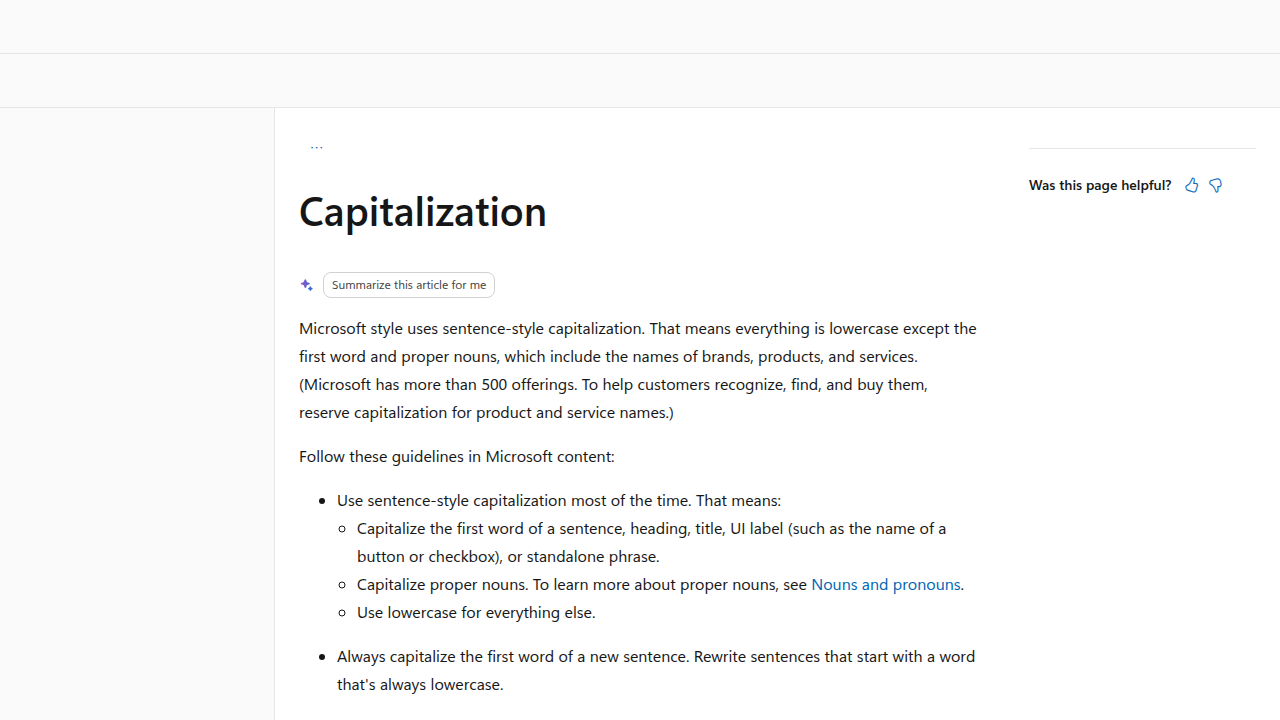
    You should only capitalize "Artificial Intelligence" in specific situations. These include titles and headings, proper names of courses or programs, and branded event or product names. The acronym "AI" is always capitalized. The Microsoft capitalization style guide offers a clear framework for sentence-style capitalization in professional writing.

    Screenshot of the Microsoft Style Guide's section on capitalization, providing official guidelines for professional writing.

    Another important rule is to always spell out "artificial intelligence" the first time you use it in a piece. Then you can switch to "AI" for the rest. This helps readers who are new to the topic follow along easily. Creating a shared style guide for your team also prevents confusion and builds consistency. The capitalization rules for business writing cover how to set these standards for your whole organization.

    Why do these details matter? Because readers notice sloppy formatting. Inconsistent capitalization makes your content look rushed. If you want to discover artificial intelligence tools and write about them in a way that earns trust, getting the basics right is a good first step.

    To learn more about the history behind this technology, read our piece on when artificial intelligence was first created.

    Conclusion: Mastering AI Language and Concepts

    So the short answer to "is artificial intelligence capitalized" is simple: lowercase for general use, uppercase only in titles or proper names. But mastering AI language goes beyond knowing where to put capital letters.

    Staying informed about AI terminology builds your professional credibility. When you use terms correctly and understand what they mean, people trust what you say. The common AI myths in business show that many professionals still hold wrong ideas about what AI can and cannot do. Getting both the language and the facts right sets you apart.

    Consistent writing about AI, combined with real knowledge of how the technology works, helps you make smarter decisions. You will know which tools fit your needs and which claims to question. You will spot hype before it tricks you. And you will communicate confidently with your team or clients.

    A great way to stay sharp is to follow reliable sources. We recommend reading insights from top AI websites professionals trust for news and tools so you never fall behind.

    Want clear daily AI updates delivered straight to your inbox? The AI Newsletter Worth Reading breaks down what matters most, in plain language.

    Mastering AI language and concepts takes a little time. But once you get the basics right, everything else becomes easier. You write better, think clearer, and make choices that actually move your work forward.

    Summary

    This article answers the simple but important question of whether "artificial intelligence" should be capitalized and shows why that choice matters for clear, professional writing. It explains the term’s history and main subfields (ML, DL, NLP, computer vision) so readers understand what the phrase refers to, then walks through major style-guide recommendations—AP, Chicago, and MLA—showing that the phrase is normally lowercase while the acronym AI is always uppercase. The piece covers exceptions where capitalization is correct (titles, official program names, and branding), offers a handy capitalization table for related terms, and highlights common business misconceptions about AI adoption. Practical best practices and consistency tips help writers and teams set a style and stick with it. By the end, readers will know when to use "artificial intelligence" vs. "AI," how to apply style rules in context, and how to write about AI with credibility and clarity.

  • When Was Artificial Intelligence Made The 1956 Workshop That Started It All

    When Was Artificial Intelligence Made The 1956 Workshop That Started It All

    Introduction

    You probably use artificial intelligence every day. Maybe you ask ChatGPT to draft an email, let Grammarly polish your writing, or rely on a smart assistant to manage your calendar. AI is now a mainstream business tool, and in 2026, it feels like it has been around forever.

    But here is the thing: many people get the history wrong. They think AI is a recent invention, something that popped up when ChatGPT launched. The truth goes back much further. So, when was artificial intelligence made?

    The answer is 1956. That summer, a group of scientists gathered at Dartmouth College for a workshop that is now called the official birthplace of AI. A research paper from the time proposed a two-month study on making machines think. That event, known as the Dartmouth Summer Research Project on Artificial Intelligence, gave the field its name and set the stage for everything that followed.

    Understanding the real origins of AI matters for anyone who uses it at work.

    A person in a professional setting thoughtfully reflecting on the historical journey and impact of artificial intelligence.

    When you know where the technology came from, you can spot hype, make smarter adoption decisions, and see how far we have come. You also appreciate how the early theories connect to the computer systems technology powering today’s tools.

    This article traces AI’s journey from that summer camp in New Hampshire to the practical ai work applications you rely on now. We will look at the key milestones, the slow periods, and the breakthroughs that made AI a household name. By the end, you will know exactly when artificial intelligence was made and why it took so long to reach your desk.

    When Was Artificial Intelligence Made? The Definitive Origin Story

    So when was artificial intelligence made? The exact answer is the summer of 1956. That is when a small group of scientists gathered at Dartmouth College in Hanover, New Hampshire for a workshop that changed the world. The event was called the Dartmouth Summer Research Project on Artificial Intelligence, and it is widely considered the official birthplace of the field.

    The idea started with a proposal. John McCarthy, a young mathematician, wrote a paper suggesting a two month study on making machines think. The original proposal asked for ten people to spend the summer working on what he called "artificial intelligence." That phrase stuck. Before 1956, no one had used the term. After 1956, the field had a name and a mission.

    The workshop ran from June 18 to about August 17. About 20 people attended at different times. Among them were some of the biggest names in early computing: Alan Turing, Marvin Minsky, and Claude Shannon. Turing had already written about machine intelligence years earlier, but this was the first time everyone sat together to talk about it as a real project.
    A diverse group of professionals collaborating and discussing ideas around a whiteboard, reminiscent of early AI research workshops.

    During that summer, the group worked on early programs that could solve logic problems and prove mathematical theorems. One of the first was the Logic Theorist, which could prove theorems from Principia Mathematica. It was a huge step. The Computer History Museum notes that this workshop set the stage for decades of research.

    If you want to see a quick visual recap, there is a short video about the Dartmouth Conference that shows how it all started. And for a deeper look at how those early ideas connect to the tools you use today, check out our guide to top AI websites professionals trust for real news and tools.

    The answer to "when was artificial intelligence made" is clear: 1956. But the story did not stop there. What came next were some quiet years, some big failures, and eventually the breakthroughs that brought AI to your desk.

    Core AI Principles: How Machines Learn, Reason, and Act

    The summer of 1956 gave AI its name, but what came next was the real work. Researchers had to figure out how to make machines learn and think. Today, three core technologies power almost every AI tool you use: machine learning, neural networks, and natural language processing.

    An infographic illustrating the three fundamental technologies — Machine Learning, Neural Networks, and Natural Language Processing — that underpin modern artificial intelligence applications.

    Understanding these building blocks helps you judge whether an AI is actually useful for your work.

    Machine learning is the engine behind most modern AI. Instead of giving a computer strict rules, you feed it lots of examples. The system uses algorithms to find patterns in the data, then makes predictions or decisions on its own. This is how your email filters out spam, how Netflix suggests shows, and how your phone recognizes your face. As one article explains, machine learning focuses on creating predictive systems from data Lumenalta. The quality of the training data matters a lot. If you give the algorithm bad examples, it learns bad habits. That is why companies invest heavily in clean, labeled datasets.

    Neural networks take machine learning a step further. They are modeled loosely on the human brain, with layers of connected nodes that process information. Each layer detects different features. In a photo recognition system, the first layer might detect edges, the next one shapes, and the final layer puts it all together to identify a cat or a dog. Neural networks are the reason AI can now write essays, compose music, and generate art. They are the technology that makes the idea of co-intelligence: living and working with ai a real possibility. When you use a tool like ChatGPT, you are interacting with a massive neural network trained on huge amounts of text.

    Then there is natural language processing or NLP. This is the field that helps machines understand and generate human language. It combines computational linguistics with machine learning to break down words, sentences, and grammar. As IBM puts it, NLP enables computers to recognize, understand, and generate text and speech

    A screenshot from IBM's website, providing an overview and definition of Natural Language Processing (NLP), a core AI technology.

    IBM. Another easy guide from Splunk notes that NLP involves teaching machines to understand, analyze, and generate natural language Splunk. When you ask your smart speaker a question or use a chatbot to get customer support, NLP is doing the heavy lifting. It also powers tools that help you write content that sounds human.

    These three technologies often work together. Machine learning trains the model, neural networks give it the power to handle complex tasks, and NLP handles the language side. That is why modern AI can do things like summarize a long report, translate a conversation in real time, or write a draft email. Understanding these basics helps you evaluate which AI tools are worth your time. For a closer look at how these principles play out in real world writing, check out our article on how undetectable AI helps you write content that sounds human and gets results. And if you want to stay on top of the latest tools and news, our list of top AI websites professionals trust for real news and tools is a great place to start.

    Now you know the engine. Next, we will look at the quiet periods and the big breakthroughs that turned these ideas into the AI you use every day.

    Key Milestones in AI Development: A Timeline from 1950 to 2026

    So when was artificial intelligence made? If you look for a single birthday, most experts point to the summer of 1956. That is when a group of researchers gathered at Dartmouth College for a workshop that officially launched the field. John McCarthy coined the term "artificial intelligence" there, and the event is called the Dartmouth Summer Research Project on Artificial Intelligence. It is widely considered the birthplace of AI Wikipedia. A proposal for the project stated they wanted to figure out how to make machines use language, form concepts, and solve problems Stanford PDF. That simple goal set everything in motion.

    But the road from 1956 to today was bumpy. AI has gone through periods of huge excitement, called AI summers, and periods of disappointment, called AI winters. Funding dried up more than once when early promises fell short. Still, key breakthroughs kept pushing the field forward.

    Here are the milestones that changed everything:

    A visual timeline detailing the most significant milestones in AI development, from the 1956 Dartmouth Workshop to multimodal models and mass adoption in 2026.

    1956 – The Dartmouth Workshop. This was the official beginning. The eight week gathering at Dartmouth College brought together the brightest minds in computer science. It is the answer to the question when was artificial intelligence made. The Computer History Museum notes that the workshop sparked a whole new field of research Computer History Museum.

    1997 – Deep Blue beats a world champion. IBM’s Deep Blue defeated chess grandmaster Garry Kasparov. It was a huge moment because it showed a machine could beat a human at a complex game using brute force calculation.

    2012 – ImageNet changes everything. A neural network called AlexNet won a major image recognition contest. It crushed the competition and proved that deep learning could work at scale. This breakthrough led to the AI boom we are still riding.

    2020 – GPT-3 goes public. OpenAI released GPT-3, a language model that could write essays, answer questions, and even code. It showed how powerful neural networks had become. This is the type of technology that makes co-intelligence living and working with ai a reality for millions of people.

    2024 to 2026 – Multimodal models and mass adoption. AI models now handle text, images, audio, and video all at once. Tools like ChatGPT can see, hear, and speak. In 2026, enterprise AI adoption has soared. According to a recent report, 65% of organizations now use generative AI in at least one business function MedhaCloud. Worker access to AI rose by 50% in 2025 alone

    A screenshot from Deloitte's report on the state of AI in the enterprise, discussing adoption rates and future trends in AI.

    Deloitte. The global enterprise AI market is projected to reach over $550 billion by 2035 Research Nester.

    Understanding this timeline helps you see why AI feels so powerful right now. We are in the middle of a new AI summer, and the tools keep getting better. If you want to stay on top of the latest tools and news, our list of top AI websites professionals trust for real news and tools is a great place to start.

    AI at Work: Real-World Applications Transforming Business Operations

    Knowing when was artificial intelligence made gives you the historical foundation. But the more pressing question in 2026 is: how is AI actually working for businesses right now? The answer is that it has moved from futuristic hype to everyday tooling.

    A team celebrating a successful project completion, symbolizing the positive impact and adoption of AI tools in modern business operations.

    And the numbers prove it.

    According to recent data, 65% of organizations now use generative AI in at least one business function MedhaCloud. That is double the rate from just a year earlier. Worker access to AI tools rose by 50% in 2025 alone Deloitte. But what does that actually look like at the desk level?

    Let me break down the most common ways AI is reshaping business operations today.

    An infographic showcasing real-world AI applications that are transforming business operations, including customer service, content creation, and predictive analytics.

    Chatbots and Customer Service

    This is probably the most visible use. AI powered chatbots handle customer questions 24/7 without needing a human on standby. They use natural language processing (NLP) to understand what people are asking and respond in real time. IBM explains that NLP allows computers to recognize, understand, and generate text and speech IBM. For a small business, that means fewer support tickets and faster response times. A chatbot can answer common questions about hours, pricing, or order status instantly.

    AI Writing Assistants

    Creating content is one of the biggest time sinks for any business. AI writing tools now help draft emails, social media posts, blog articles, and even ad copy. You give them a topic and a tone, and they produce a solid first draft in seconds. This is where co-intelligence living and working with ai becomes real. You are not replacing the writer. You are speeding up the rough work so the human can focus on strategy and polish. If you want to explore how to keep that human touch, our guide on how undetectable AI helps you write content that sounds human can help you strike the right balance.

    Predictive Analytics

    This is the behind the scenes magic. AI looks at historical data to predict future trends. A retailer can forecast which products will sell out next month. A marketing team can predict which email subject lines will get more opens. It takes the guesswork out of decision making. The Amazon Web Services team highlights that small businesses can use AI for customer engagement through personalized marketing campaigns AWS. That kind of computer systems technology used to be reserved for big corporations. Now any business can tap into it.

    Image and Video Generation

    AI can now create images, edit videos, and generate product mockups from simple text prompts. Marketers use it to create social media visuals without hiring a designer. Ecommerce stores generate multiple product variations for A/B testing. It saves both time and money.

    How to Get Started

    The key is not to adopt every tool at once. Start with one use case. Maybe a chatbot for customer service or an AI writing assistant for your blog. The SBE Council found that the average small business already uses a median of five AI tools, and they plan on adding more SBE Council. That shows momentum. But the smartest approach is to pick the tool that solves your biggest pain point first.

    If you want to stay ahead of the curve and learn which tools actually deliver ROI, check out our curated list of top AI websites professionals trust for real news and tools. It is a great starting point for finding the right solutions for your business.

    A Practical Framework for Choosing and Adopting AI Tools

    Knowing when was artificial intelligence made helps you appreciate how fast we got here. But in 2026, the real challenge is not understanding the history. It is figuring out which tools actually work for your business. The excitement around AI is real, but jumping in without a plan can waste time and money.

    Here is the truth. A January 2025 survey by Boston Consulting Group found that 74% of organizations struggle to scale AI value, with data as the primary obstacle OneAdvanced. And a separate report shows that 68% of small businesses use AI regularly, but most have no formal strategy Digital Applied. That is a recipe for frustration.

    So let me give you a simple framework to avoid those traps.

    A person in a focused setting, outlining a strategic plan on a whiteboard, reflecting the careful approach needed for AI tool adoption.

    Step 1: Start with the Problem, Not the Tool

    This is the most common mistake. People hear about a hot new AI tool and sign up before asking what problem they want to solve. Instead, take a step back. List your biggest time drains. Is it customer support? Writing content? Data analysis? Only then should you look for a tool that fits. This problem first approach is the core of effective computer systems technology adoption. It keeps you focused on outcomes instead of features.

    Step 2: Evaluate the Right Criteria

    Not all AI tools are created equal. When you compare options, use these five criteria:

    A table-style infographic outlining essential criteria for evaluating AI tools, such as cost, integration ease, and data privacy, to ensure effective adoption.

    Criteria Why It Matters
    Cost Does it fit your budget, including hidden fees?
    Integration ease Does it work with your current software stack?
    Data privacy How does the vendor handle your sensitive information?
    Scalability Can it grow as your business grows?
    Vendor support Is there reliable help when something breaks?

    The SBE Council notes that the average small business uses a median of five AI tools and plans to add more SBE Council. That means integration becomes critical. You do not want six tools that do not talk to each other.

    These considerations are especially important for SMBs that lack dedicated IT teams. A thoughtful evaluation upfront saves headaches later Consltek.

    Step 3: Run a Low-Risk Pilot

    Do not roll out a new AI tool across your entire company at once. Pick one small team or one process. Run a pilot for 30 days. Measure the impact. Did response times improve? Did output quality go up? Did your team actually enjoy using it?

    A pilot gives you real data before you commit more resources. It also lets your team learn the tool without pressure. This phased approach is exactly how most successful organizations adopt AI in 2026.

    Bringing It All Together

    When was artificial intelligence made matters for context. But what matters more is how you adopt it today. Start with the problem. Evaluate carefully. Pilot first. That is how you move from experimenting to getting real results.

    If you want to dive deeper into how to keep your content human while using AI, check out our guide on human or AI creativity and what the data says about collaboration in 2026. It pairs perfectly with this framework.

    Overcoming AI Adoption Challenges: Expert Tips for SMBs

    Even with a solid framework, you will hit roadblocks. In 2026, the four biggest challenges SMBs face are information overload, tool selection, budget limits, and a lack of technical skills. But these are not impossible to fix. Here is how to overcome each one.

    Challenge 1: Information Overload

    Every day there is a new AI tool to try. It is easy to feel lost. The best fix? Start with free trials. Pick one or two tools that match your biggest need and test them for a month. For example, AWS highlights six practical AI use cases for small businesses, including content creation and customer support chatbots AWS. Focus on one use case at a time.

    Also, lean on community reviews. Sites like G2 or Capterra have real user ratings. They cut through the noise faster than vendor marketing.

    Challenge 2: Tool Selection

    With hundreds of options, how do you pick? Use the five criteria from our earlier framework. But add one more step. Ask your team what they actually need. A tool that works for a marketing agency might be overkill for a local shop.

    The SBE Council reports that the average small business uses five AI tools and plans to add more SBE Council. That means you need tools that play well together. Check for integration ease first.

    Challenge 3: Budget Constraints

    AI does not have to be expensive. Many great tools offer free tiers or low-cost plans. Start with one tool that solves a clear problem. Track your time saved or revenue gained. That data will help you decide if the paid version is worth it.

    Measuring ROI is key. The JPMorgan Chase Institute notes that AI tools promise productivity gains through task automation and better decision making JPMorgan Chase Institute. So before you implement, record your current metrics. After 30 days, compare them. You might be surprised at the improvement.

    Challenge 4: Lack of Technical Skills

    You do not need a computer science degree to use AI. Most tools are designed for non-technical users. Still, investing in a little training goes a long way. Platforms like LinkedIn Learning and many tool vendors offer free tutorials.

    One practical tip: start with a tool that helps you write content that sounds human. If you are unsure where to begin, check out our guide on how undetectable AI helps you write content that sounds human and gets results. It walks you through the setup without any coding needed.

    Your Next Move

    The biggest mistake is waiting for the perfect setup. Instead, start small. Pick one challenge, one tool, and one metric. Track your results. Adjust as you go. That is how real adoption happens in 2026.

    The Future of AI: What Professionals Should Prepare For (2026 and Beyond)

    You have tackled the challenges and started using AI today. But what comes next? Knowing where AI is heading helps you stay ahead instead of playing catch up.

    Here is the thing. The question "when was artificial intelligence made" goes back to the 1950s. But the AI we use in 2026 barely looks like those early experiments. The pace of change is staggering. And professionals who understand the trends will have a clear advantage.

    The Four Big Trends Shaping 2026

    According to experts at IBM, we are moving into an era of agentic AI and multimodal systems IBM. What does that mean for you?

    1. Multimodal AI: Tools that process text, images, audio, and video together. Instead of working with separate tools, you ask one AI and it understands everything. This saves time and gives better results.

    2. Autonomous agents: These are AI tools that complete multi-step tasks on their own. You give them a goal and they figure out the steps. Microsoft calls this shift making AI a true partner rather than just a tool Microsoft.

    3. AI regulation: Governments are creating rules for how AI can be used. The conversation around google ai principles and responsible development is becoming central to business strategy. Info-Tech Research Group notes that foundational AI principles are rewriting organizational DNA Info-Tech.

    4. Edge AI: Processing happens on your device instead of the cloud. Faster responses, better privacy, and lower costs. This is a game changer for ai work in environments with spotty internet.

    Human-AI Collaboration Is the Real Goal

    Here is the shift that matters most. The future is not about AI replacing people. It is about co-intelligence: living and working with ai in a way that amplifies human skills.

    PwC predicts that more companies will adopt enterprise-wide AI strategies led by senior leadership PwC. That means your role changes from "doing the work" to "directing the AI that does the work."

    This human-AI partnership is already reshaping computer systems technology careers. Want a deeper look at how creativity and AI work together? Check out our analysis of human or AI creativity and what the data says about collaboration in 2026.

    Continuous Learning Is Your Safety Net

    The single most important skill in 2026 is adaptability. Stanford AI experts predict we will see continued rapid evolution across every sector Stanford HAI. Tools you learn today might look different in six months.

    That does not mean you should wait. It means you should build a habit of learning. Spend 15 minutes a week reading about new AI developments. Test one new tool per quarter. Ask yourself: how can this make my work better?

    The professionals who thrive in 2026 and beyond are not the ones with the most technical skill. They are the ones who stay curious, stay flexible, and stay focused on what AI can do for people.

    Summary

    Artificial intelligence traces back to a specific moment: the Dartmouth Summer Research Project on Artificial Intelligence in 1956, when John McCarthy and other researchers coined the term and set a research agenda. This article explains that origin, outlines the three core technologies—machine learning, neural networks, and natural language processing—that power modern systems, and walks through key milestones from Deep Blue to GPT-3 and multimodal models. It then shifts to practical guidance for businesses, describing common workplace applications (chatbots, writing assistants, predictive analytics, image/video generation) and a simple, problem-first framework to evaluate, pilot, and scale tools. The piece highlights common SMB obstacles—information overload, budget limits, tool selection, and skill gaps—and offers concrete fixes like 30-day pilots and ROI tracking. Finally, it looks ahead to trends such as multimodal AI, autonomous agents, edge processing, and the growing need for continuous learning and responsible AI governance. After reading, you’ll understand AI’s true origin, how the technology works, which business use cases deliver value, and how to adopt AI safely and strategically.