Tag: pillar-news-trends

  • Deep Tech for Business Leaders Your 2026 Handbook to Growth

    Deep Tech for Business Leaders Your 2026 Handbook to Growth

    Why ‘deep tech’ matters now — a concise primer for decision-makers

    In 2026, you hear a lot about AI. It is in our phones, our smart homes, and helps us write emails. But there is a special kind of technology called deep tech that is much more than just simple computer AI tools. Deep tech is about big, important breakthroughs that change the world in a really big way. It is not just making things a little better. It is about creating whole new things that did not exist before.

    Think of it like this: consumer AI might help you pick a movie. Deep tech, on the other hand, might create a new kind of battery for electric cars or find a new way to treat sickness. These technologies come from deep scientific discoveries and hard engineering work. They often need a lot of research, time, and money to develop. Governments around the world are even creating policies to support this area, like the National Deep Tech Startup Policy Framework (NDTSP) which looks closely at what makes these startups special.

    For leaders like you, deep tech can be both exciting and a bit scary. You want to make sure your business stays ahead.

    A focused business leader strategizing in a modern office environment, contemplating future challenges and opportunities.

    But with so many new tools and ideas popping up every day, it is easy to feel lost. This is what we call information overload. It is hard to pick the right deep tech tools when you are not sure what they do or how they fit with your business.

    Then comes the challenge of making these new technologies work with your existing systems. It is like trying to put a brand-new, super-fast engine into an old car. It takes skill and careful planning. And finally, you need to see a real return on your investment (ROI). You want to know that spending money on deep tech will actually help your business grow and make more money.

    Understanding these big changes and choosing the right steps for your company requires strong AI literacy. Learning how to pick smart technologies and bring them into your business is key to staying competitive in 2026 and beyond.

    To help you cut through the noise and get to what matters, we share clear, daily updates on the world of AI and technology.
    The AI Newsletter Worth Reading

    What ‘deep tech’ means in 2026: definitions, categories, and taxonomy

    Let’s dig deeper into what deep tech really means in 2026. It is more than just new apps or better versions of old software. Deep tech comes from big science ideas and clever engineering work. It builds on new discoveries that push the limits of what we thought was possible. Think of it as creating something truly new, not just making something existing a little bit better. This kind of technology often creates a strong advantage that is hard for others to copy, because it is based on solid scientific research or engineering leaps, not just a new business idea.

    Some people might call deep tech by other names, like "frontier tech," "hard tech," or "tough tech." No matter the name, the main idea is the same: these are game-changing innovations that come from deep scientific roots. According to experts, deep tech refers to companies and products built on major scientific or engineering breakthroughs that give them a strong competitive edge that lasts for a long time. In March 2026, over $80 billion is invested each year into deep tech areas like quantum computing and synthetic biology, showing just how important it is becoming for business leaders to understand this field.

    What makes deep tech special?

    Deep tech has a few key traits that set it apart from regular computer AI tools or everyday gadgets:
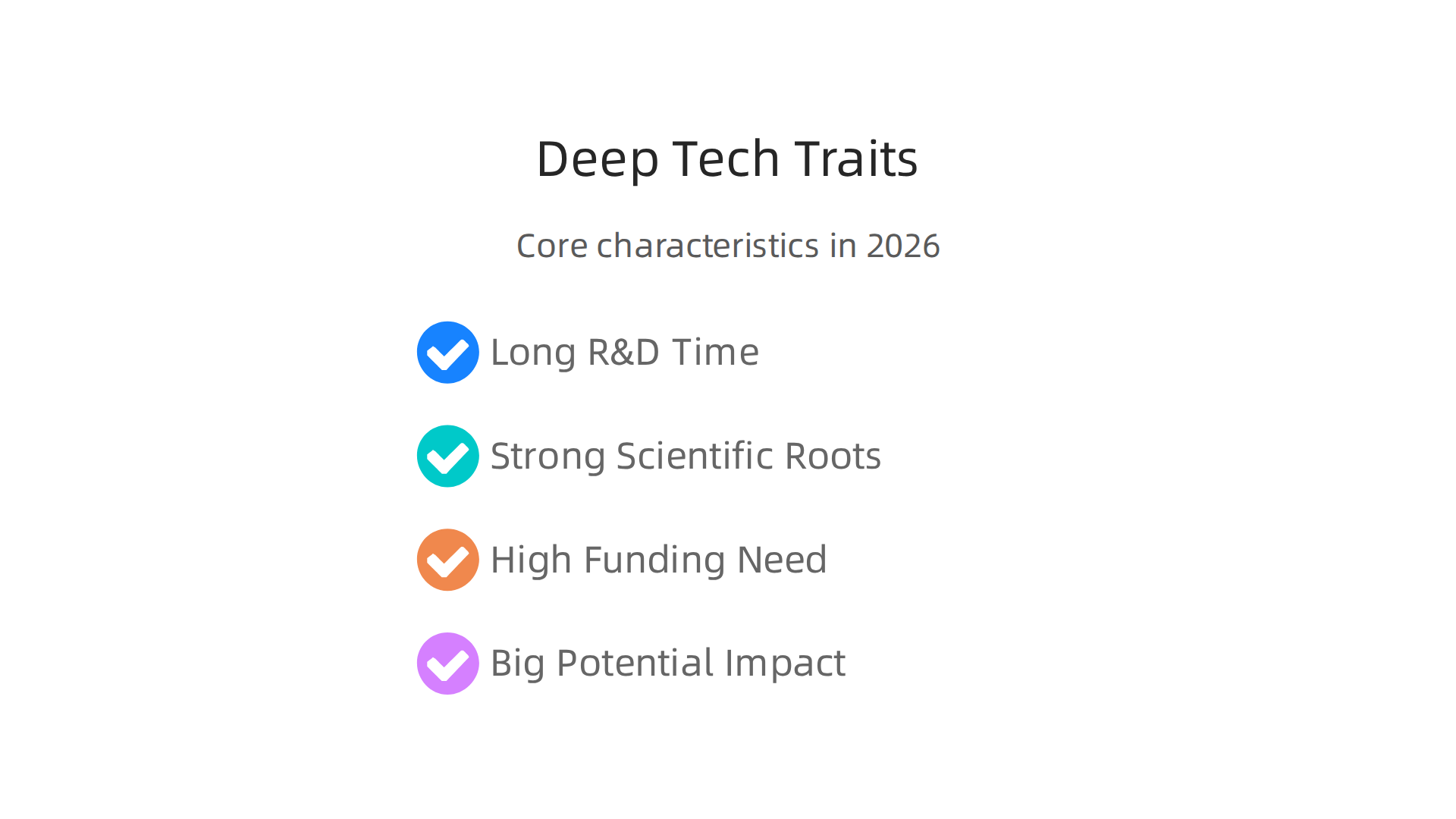
    Deep tech is characterized by its demanding development cycle, scientific foundation, high funding needs, and potential for massive impact.

    • Long Research and Development Time: These ideas do not become products overnight. They need many years of careful study and testing in labs. It is a marathon, not a sprint.
    • Strong Scientific Roots: Deep tech is born from new understandings in science, like physics, chemistry, or biology. It is not just about combining existing tools in a new way.
    • High Need for Money: Because of the long research time and complex development, deep tech projects often need a lot of money to get started and keep going.
    • Big Potential Impact: While hard to develop, deep tech can solve some of the world’s biggest problems, like climate change, new diseases, or access to clean energy.

    Main types of deep tech in 2026

    When we talk about deep tech, we are usually looking at a few main categories.
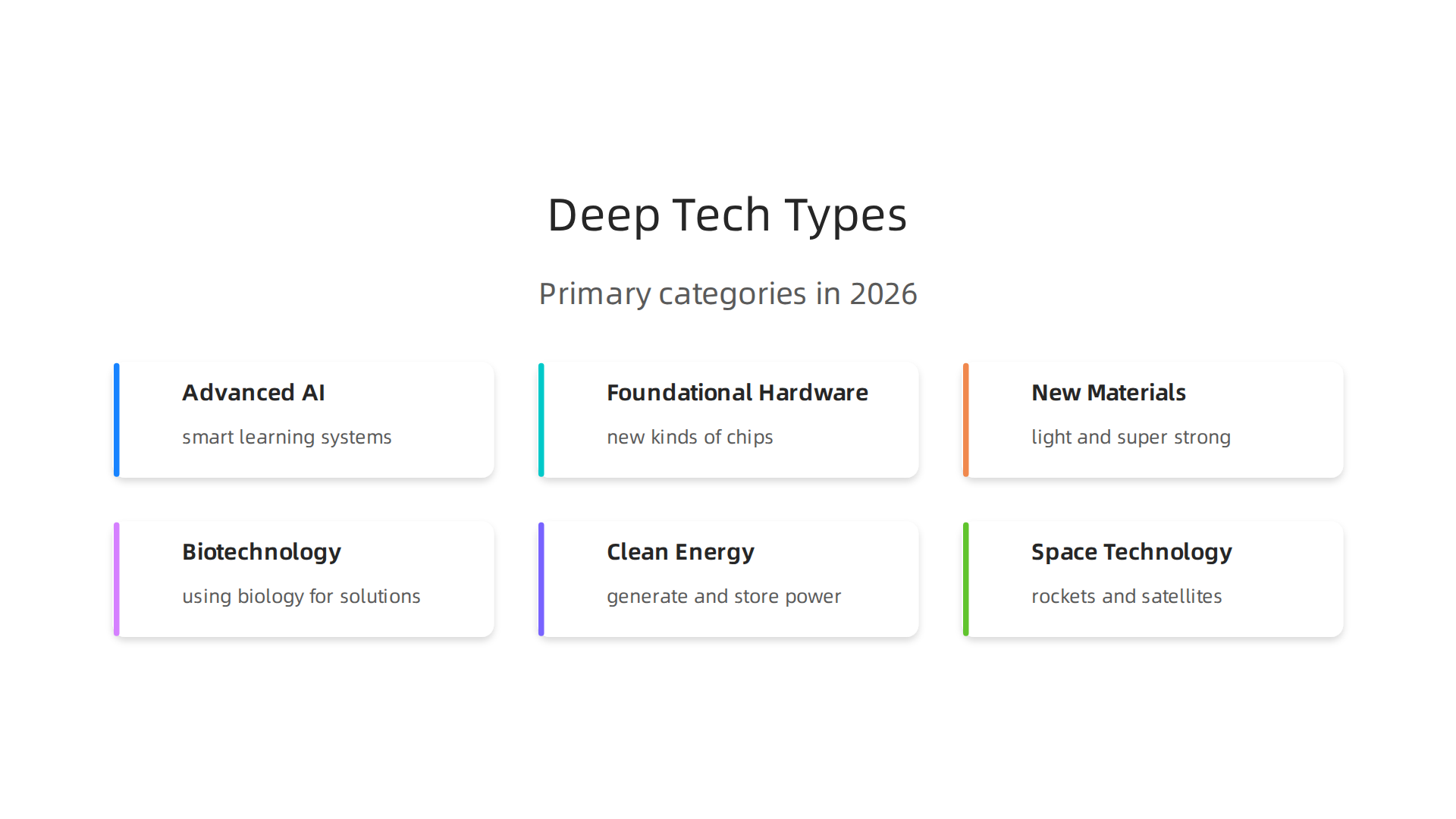
    An overview of the primary categories within deep tech, showcasing areas of significant scientific and engineering progress.

    These are the big areas where scientists and engineers are making the most exciting progress:

    • Advanced AI and Algorithms: This goes beyond the AI that helps you choose a movie. It includes things like really smart learning systems, new ways for machines to "see" and "understand" the world, or advanced decision-making tools that can solve very complex problems. This is where the core of computer AI development truly advances.
    • Foundational Hardware: This means building entirely new kinds of computer chips, advanced sensors, or even quantum computers that can do calculations impossible for today’s machines. These are the building blocks for the next generation of technology. If you are looking to understand the core components driving these innovations, consider learning about AI hardware 2026 a business leaders guide to growth.
    • New Materials: Imagine materials that are super strong but feather-light, or materials that can heal themselves. Deep tech includes creating these amazing new substances that can change how we build everything, from cars to medical devices.
    • Biotechnology and Life Sciences: This area focuses on using biology to create new solutions. It covers everything from new ways to edit genes, develop advanced medicines, or create lab-grown foods.
    • Clean Energy: Finding new ways to generate and store clean energy is a huge deep tech challenge. This can include advanced solar panels, better batteries, or even new types of nuclear power.
    • Space Technology: Developing new rockets, satellites, or ways to live and work in space falls under deep tech. It pushes the boundaries of engineering and exploration.

    Understanding these different areas helps leaders like you know where the biggest changes are coming from. Keeping up with these trends is a key part of staying competitive and making smart choices for your business in 2026 and beyond. Getting daily updates from experts can help you manage the fast pace of this What Is Deep Tech? The Definitive Guide to Frontier Technology.

    To really understand deep tech, it helps to look at where it is growing and where money is being invested. In 2026, the market for deep tech is booming. It is moving from science labs into real-world products and services. Many reports show big growth, meaning more and more companies are seeing the value in these advanced technologies.

    Where deep tech is growing

    Deep tech is making a big splash in many different parts of our world. Think about the areas below:

    • Healthcare: New ways to find and treat diseases, using advanced computer AI for better diagnosis or new biotech tools for medicines.
    • Clean Energy: Fresh ideas for how we make and store power, like super-efficient solar cells or better batteries.
    • Manufacturing: Smart factories use deep tech to make things faster, cheaper, and with less waste. This involves new robots and very precise production methods.
    • Defense and Space: These areas have always pushed technology forward, and deep tech helps create new tools for safety and exploration.
    • Agriculture: Finding ways to grow more food with fewer resources, using things like smart sensors and gene editing.

    The global deep tech market was worth about $2.74 billion in 2025. Experts believe it will jump to $3.28 billion in 2026 and keep growing fast, possibly reaching $13.85 billion by 2034. This shows a huge belief in its future possibilities Deep Tech Market Size, Industry Share, Forecast to 2026- …. Another report says the market could grow from $811.33 million in 2026 to $4524.37 million by 2035 Deep Tech Market Size, Share | Industry Report, 2035. This strong growth means deep tech is becoming a central part of how businesses innovate.

    What executives should watch for

    Business leaders need to pay close attention to several signs to know where deep tech is heading:

    A diverse team of professionals collaboratively analyzing market data and financial reports, pinpointing key trends.

    • More Money Being Invested: Venture capital funds and big companies are putting more money into deep tech startups. For example, in 2025, Europe saw $20.3 billion in venture capital funding for deep tech, which was 32% of all venture capital in the region Continuing trend towards deep tech. Across the U.S. and Europe, total venture funding for deep tech hit $156.6 billion, with the U.S. making up most of that The 2026 Deep Tech Report by Drumbeat Capital. These numbers show strong confidence from investors.
    • More Deals and Company Purchases: Keep an eye on how many deep tech companies are being bought by bigger firms. This means their technology is proven and ready for a wider market.
    • New Inventions and Patents: A rise in new ideas and patents means a lot of research is happening. This often leads to breakthrough products later on.
    • Government Support: Governments around the world are helping deep tech grow through funding and special programs. This can speed up development and make it easier for businesses to adopt new technologies.
    • Customer Interest: When more and more customers or businesses want deep tech solutions, it is a clear sign that these technologies are ready to go mainstream.

    To make smart choices for your business, you need to understand these trends. Learning about where to find and choose the right AI companies can help unlock business growth. For more insights on how to pick strong partners, read our guide on how to Evaluate AI companies to unlock business growth in 2026. Staying informed is key for any business aiming to use deep tech to its advantage.

    To keep up with the fast-changing world of deep tech and AI, you need reliable information.
    Get clear daily AI updates from The AI Newsletter Worth Reading.

    Deep tech is not just a fancy idea anymore. It is turning into real solutions that help businesses grow and make money. When companies put their efforts into deep tech, they see a good return on their investment (ROI). Let us look at some important ways deep tech is being used right now, in 2026, across different industries.

    High-impact business use cases: where deep tech delivers ROI

    Deep tech brings big changes to how businesses work, helping them get ahead. Here are some key areas:

    • Healthcare: In healthcare, deep tech is like a superhero. It helps find diseases earlier and makes new medicines faster. For example, special computer AI can look at medical scans and spot problems that doctors might miss. This means patients get help sooner. Companies like Google DeepMind have shown how deep learning models can help detect eye diseases with expert-level accuracy HSBC: Transforming Anti…. The payoff here is better patient care and more efficient hospitals, leading to healthier communities. The changes can be seen in an ongoing way, making improvements steadily over time.

    • Manufacturing: Imagine a factory that almost runs itself. That is what deep tech is doing for manufacturing. Smart robots and advanced sensors, part of a larger tech center, can check products for tiny flaws or help machines work perfectly. This means less waste, lower costs, and products made much faster. Think about "checkout-free stores" that use computer vision to track items, helping businesses operate smoothly Top 50 Deep Learning Use Case & Case Studies – AIMultiple. Businesses can see these benefits quite quickly, sometimes within months, as processes become more efficient.

    • Clean Energy: Deep tech is changing how we power our world. It helps create better batteries that store more energy and makes solar panels that capture more sunlight. It also improves how power grids send electricity around without wasting it. These new technologies help companies lower their energy bills and be kinder to the planet. The impact can be seen over a few years, as new energy systems are built and start working.

    • Other Industries: Deep tech also helps in areas like defense and space, making equipment safer and more advanced. In agriculture, it helps farmers grow more food with less water and fewer chemicals, using smart sensors and special plant science. Across many businesses, from banking to real estate, generative AI is solving real-world challenges, with some transformations happening in weeks and others taking years The Enterprise AI Playbook: Lessons from 51 Successful …. This shows deep tech can deliver results on different timelines.

    The main idea is that deep tech can lead to big improvements for businesses. It helps them save money, make better products, and serve customers in new ways. To truly get the most out of these powerful tools, businesses need good AI literacy and a clear plan. Learning how to pick the right AI tools for your business is crucial for getting these great results. Read our guide on how to choose AI for business tools that deliver real results in 2026 to make smart choices.

    To truly make the most of deep tech and get good results for your business, you need to know how to pick the right tools. It is not always easy, as deep tech solutions can be complex. Here is a simple guide to help you look at and choose the best deep tech for your company in 2026.
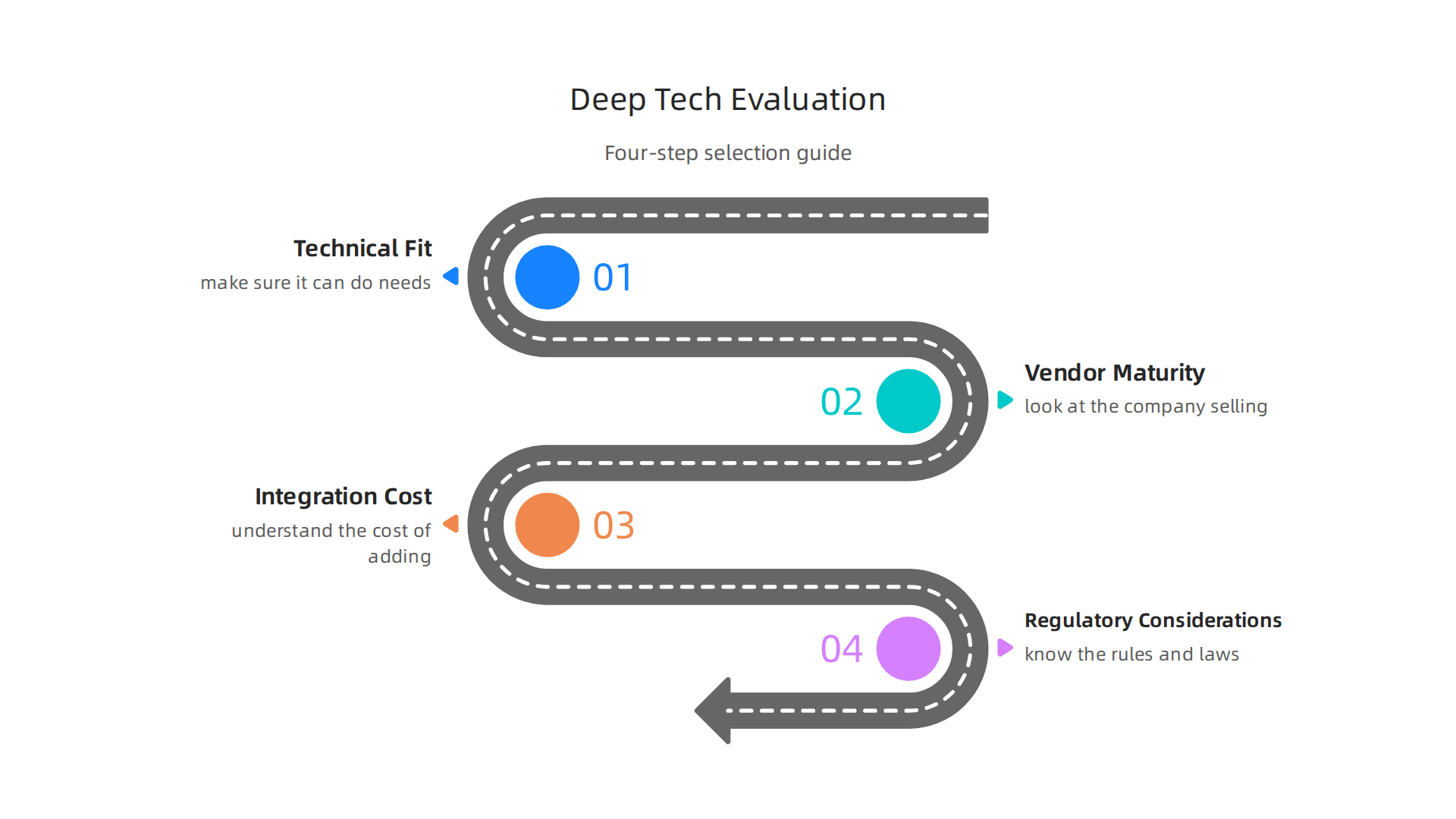

    A practical four-step framework guiding businesses through the process of evaluating and selecting deep tech solutions effectively.

    Colleagues engaged in a productive discussion, using a whiteboard to visualize and refine a practical framework.

    How to evaluate and select deep tech solutions: a practical framework

    Choosing deep tech solutions means more than just picking something new and shiny. It means finding tools that really fit your business and help it grow. You need a clear way to check if a new deep tech solution is right for you. Think of it like a checklist for success.

    1. Check if it fits your needs (Technical Fit)

    First, make sure the deep tech solution can actually do what you need it to.

    • Does it work well? Does the computer AI or other deep tech perform tasks quickly and correctly? Look for proof that it works as promised, maybe from other businesses like yours.
    • Will it play nice with your current systems? Deep tech should connect smoothly with the other tools and software you already use. If it does not, adding it could cause more problems than it solves. This is called "integration architecture" and it needs to be compatible with your existing setup AI Vendor Evaluation Scorecard: A Quantified Framework ….
    • Can it grow with you? As your business gets bigger, your deep tech tools should be able to handle more work without slowing down. This is important for future growth.

    2. Look at the company selling it (Vendor Maturity)

    It is not just about the product, but also the company behind it.

    • Are they experts? Do they have a good history of making and supporting deep tech?
    • How good is their help? If something goes wrong, can you get quick and helpful support?
    • Is it safe and secure? Deep tech often handles important information. Make sure the company takes data security seriously and follows all the rules. Before you buy, define clear safety requirements like specific certifications AI Vendor Evaluation Framework: Gartner MQ, RFP Scoring ….

    3. Understand the cost of adding it (Integration Cost)

    Deep tech might have a price tag, but there are other costs too.

    • How much work to set it up? Sometimes, getting new deep tech to work with your systems can take a lot of time and effort. This is part of the cost.
    • Training your team: Will your employees need special training to use the new tools? This also adds to the overall cost.
    • Long-term fees: Think about monthly fees or upkeep costs over time.

    4. Know the rules (Regulatory Considerations)

    Some deep tech solutions need to follow strict laws and rules, especially in areas like healthcare or finance.

    • Does it meet legal standards? Make sure the deep tech and its provider follow all the necessary laws, like privacy rules for customer data. This includes things like data residency rules for where data is stored.
    • Ethical use: Think about how the deep tech will be used and make sure it is fair and ethical for everyone involved.

    By using this step-by-step approach, businesses can make smarter choices about which deep tech to bring in. It helps make sure you invest in solutions that truly help your company succeed and get a good return on your money. Learning how to select these powerful tools is a key skill for leaders in 2026. If you want to dive deeper into how to evaluate AI companies, read our guide on how to evaluate AI companies to unlock business growth in 2026.

    To stay on top of the fast-changing world of deep tech and AI, getting reliable, daily updates is super helpful.

    Get clear daily AI updates from The AI Newsletter Worth Reading.

    After choosing the right deep tech solutions for your business, the real work begins. This next step is all about putting those powerful tools into action. For your engineering and operations teams, it means careful planning and smart steps to make sure the new technology works well with everything else you do. Think of it as building a strong bridge: you need to plan each part carefully so it can handle the traffic.

    Implementation and integration: pragmatic steps for engineering and ops teams

    Bringing new deep tech into your company is a big job. It needs a clear plan, especially for the teams who will set it up and keep it running every day. Here’s a simple guide for how to do that.

    Your Deep Tech Rollout Plan: Start Small, Grow Smart

    It’s usually not a good idea to bring in a big new deep tech solution all at once. A better way is to follow a roadmap, like a staged approach.

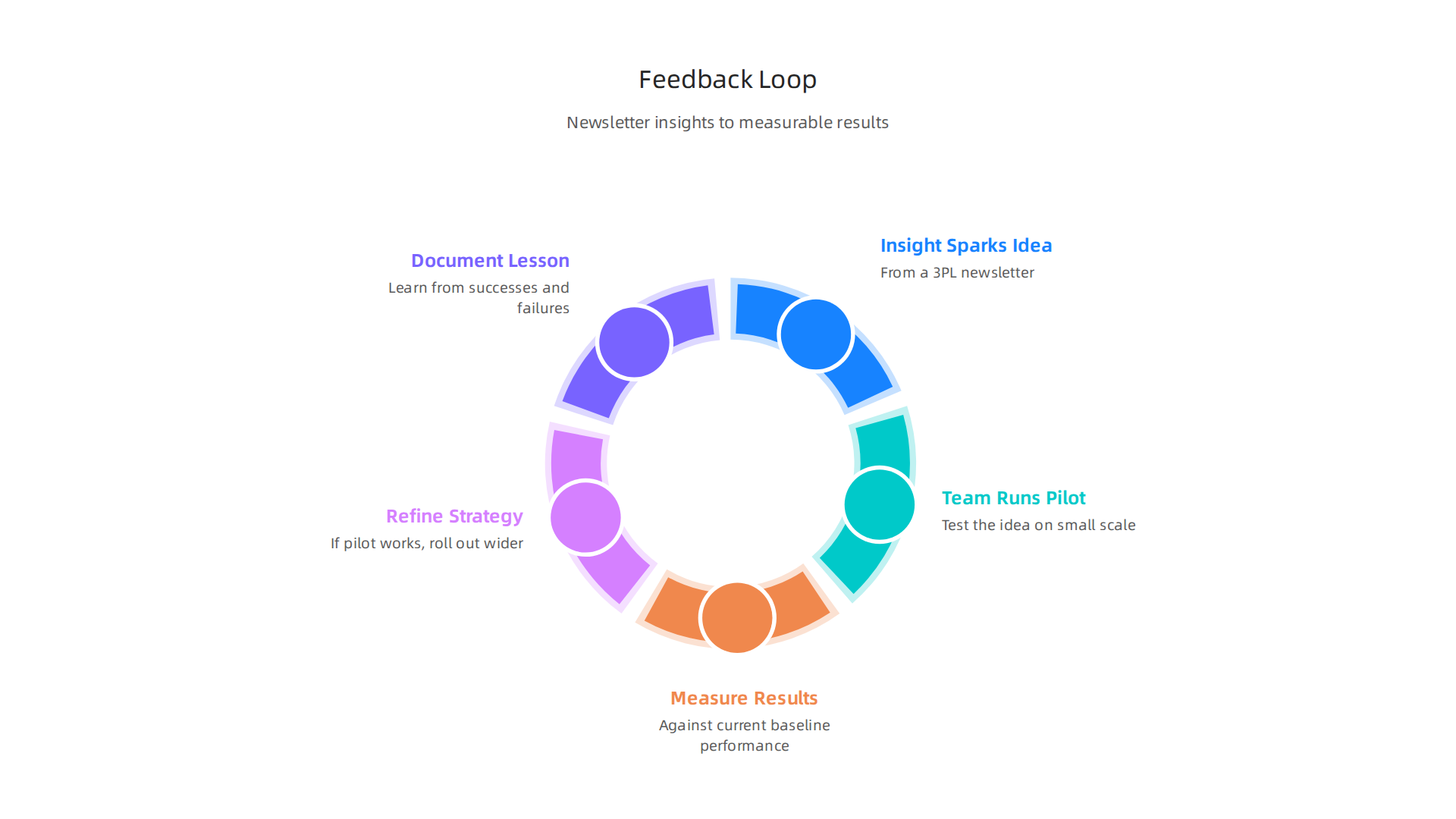
    1. Start with a Small Test (Pilot Program): Begin by using the deep tech on a small, controlled project. This "pilot" helps your teams learn how it works and find any problems without affecting your whole business. Many leading organizations use this method when trying out new deep learning tools, for example. This is like setting up a small "tech center" to experiment.
    2. Learn and Make Changes: After the pilot, gather all the feedback. What worked well? What caused problems? Use this information to fix things and make the deep tech better before you use it more widely.
    3. Grow Step-by-Step (Scale Up): Once the deep tech is working smoothly in your small test, you can slowly bring it to more parts of your company. This helps everyone get used to it and keeps things from breaking. Companies have seen great success by carefully scaling their generative AI use cases across different business functions, leading to real-world value Real-world gen AI use cases from the world’s leading ….

    What Can Go Wrong and How to Fix It

    Even with a good plan, sometimes things don’t go perfectly. Here are some common problems when bringing in deep tech and how to handle them:

    • It Doesn’t Connect: New deep tech might not easily "talk" to your older computer AI systems. This can cause a lot of headaches and extra work.
      • Fix: Before you even start, plan how the new deep tech will link up with your existing software. Sometimes, you might need special tools or help from partners to make them work together. Understanding the full landscape of your information systems vs information technology helps here.
    • Your Team Doesn’t Know How to Use It: Deep tech can be complicated, and your team might not have all the skills to use it right away. This is where "AI literacy" becomes important.
      • Fix: Offer training for your employees. You might also bring in outside experts or consultants to help guide your team. To boost professional skills, consider creating internal tech councils drive professional growth and knowledge sharing.
    • Bad Data In, Bad Results Out: Deep tech, especially types like machine learning, needs good quality information to do its job well. If your data is messy or incomplete, the results won’t be helpful.
      • Fix: Spend time cleaning up your data before you start using the deep tech. Make sure you have clear rules for how data should be collected and stored.

    Bridging Skill Gaps: When to Ask for Help

    Your internal teams are experts in your business, but deep tech can be very specialized. You might not have people who are experts in every new deep tech area.

    • Finding Your Internal Gaps: Look at what skills your team has and what new skills the deep tech needs. It’s okay if there are gaps. No one knows everything.
    • Working with Others:
      • Deep Tech Vendors: The company that sells you the deep tech often provides support, training, and updates. They know their product best.
      • Integration Partners: These are other companies that specialize in helping new technologies fit into existing systems. They can offer specific technical skills and help make sure everything connects smoothly. Successful businesses use a combination of internal knowledge and external partnerships to implement smart AI for business effectively.

    Successfully bringing deep tech into your company takes careful planning and smart choices about how to work with both your internal teams and outside partners. By taking these practical steps, your business can make the most of these powerful tools and drive real growth in 2026. Many companies, including those featured in 10 Deep Learning Case Studies [Detailed Analysis][2026], have shown that a thoughtful implementation strategy is key to success.

    Successfully bringing new deep tech into your company is a big achievement, but the journey doesn’t end once the tools are set up. Leaders must also think about potential risks, how to manage them, and the rules they need to follow.

    A group of executives in a boardroom setting, seriously discussing strategies for risk mitigation and compliance.

    This is like having a powerful new car: you need to know how to drive it safely and understand the traffic laws.

    Risks, governance, and the regulatory landscape – preparing for future shocks

    Deep tech, with all its power to change things, also brings important risks. Ignoring these risks can cause big problems for your business. It’s smart to plan ahead for these possible shocks.

    Understanding the Principal Risks

    When you adopt deep tech, especially advanced computer AI systems, you face a few main types of risks:

    • Ethical Risks: These are about fairness and doing the right thing.
      • Bias: Deep tech systems learn from data. If that data is unfair or incomplete, the system can make biased decisions. This means it might treat certain groups of people differently, which is not good for business or society. Concerns about bias, fairness, and transparency are growing, especially with generative AI The Ethical Role of Generative Artificial Intelligence in Modern HR Decision-Making.
      • Privacy: Deep tech often needs a lot of personal data. Keeping this data safe and private is very important. If data leaks, it can harm individuals and your company’s reputation. Governments worldwide are stressing the need for Data Protection Impact Assessments (DPIAs) when processing personal data that poses high risks Data and AI Ethics Framework.
      • Accountability: If a deep tech system makes a mistake, who is responsible? It can be hard to figure this out, especially with complex AI.
    • Operational Risks: These are about how the deep tech affects your day-to-day work.
      • Job Changes: Some deep tech tools might change or even replace certain jobs. Businesses need to think about how to support employees through these shifts. The impact of AI on job losses is a key governance issue Artificial Intelligence and the Future of Work. You can explore this further by learning about preparing for what jobs will AI replace.
      • Security Flaws: Deep tech systems can be targets for cyberattacks. Protecting them from hackers is a must.
      • Unintended Outcomes: Sometimes, deep tech can do things you didn’t expect, leading to problems that are hard to fix.

    Navigating the Regulatory Landscape in 2026

    Governments around the world are creating new rules for deep tech and AI. In 2026, staying up-to-date is more important than ever.

    Governance Practices and Risk Mitigation Strategies

    To handle these challenges, businesses need clear rules and ways to reduce risks.

    1. Create an Ethics Board: Set up a group of people in your company to look at how deep tech is used. This board should make sure your deep tech tools are fair, private, and safe.
    2. Regular Audits and Reviews: Periodically check your deep tech systems for bias, security weaknesses, or unexpected behaviors. Think of it like a regular health check-up for your technology.
    3. Data Governance: Make clear rules for how you collect, store, and use data. Ensure everyone follows these rules to protect privacy and improve data quality.
    4. Employee Training: Teach your employees about the ethical use of deep tech and how to spot potential problems. This helps build a culture where everyone is aware of the risks.
    5. Stay Informed: The world of deep tech and its rules changes fast. Keep up with new regulations and best practices.

    By actively managing these risks and setting up good governance, your business can use deep tech to its full potential while staying safe and responsible. Keeping informed is key.


    Stay ahead of the curve and get clear daily AI updates directly to your inbox. Get clear daily AI updates from The Deep View Newsletter.

    Summary

    This primer explains what deep tech means in 2026, why it matters to business leaders, and how to turn scientific breakthroughs into commercial advantage. It describes the defining traits of deep tech — long R&D cycles, strong scientific roots, heavy capital needs, and large potential impact — and surveys major categories like advanced AI, hardware, new materials, biotech, clean energy, and space. The article outlines market signals to watch (investment flows, deals, patents, and government support), concrete industry use cases that deliver ROI, and a practical vendor‑selection framework covering technical fit, vendor maturity, integration costs, and regulatory checks. It gives an implementation roadmap—pilot, iterate, and scale—plus common failure modes and fixes for engineering and operations teams. Finally, it highlights governance steps to manage ethical, operational, and legal risks so leaders can adopt deep tech responsibly and competitively.


  • Unlock AI Productivity: Pick Your Best AI Newsletters for 2026

    Unlock AI Productivity: Pick Your Best AI Newsletters for 2026

    Why curated productivity & AI newsletters still matter in 2026

    In 2026, it feels like new AI tools and big ideas are popping up every single day. The world of technology moves so fast. For many of us, this constant flow of information can feel like trying to drink from a firehose. It’s hard to keep up, and it’s even harder to tell what’s truly important and what’s just noise. This flood of updates can make it tough to stay focused and productive.

    A person looking overwhelmed by a vast amount of information, symbolizing the challenge of staying focused amidst constant tech updates.

    You might feel overwhelmed, wondering if you’re missing out on the cool tech that could really help you.

    Actually, finding useful information quickly is a big problem for many people right now. It takes a lot of time to search through countless websites, social media posts, and online-tech-tips to figure out what’s new. Sometimes, you just need a clear, easy way to get the most important news.

    That’s where curated newsletters come in. Even in 2026, these special emails are more important than ever for anyone who wants to stay tech savvy without getting lost in the details. They cut through the clutter and bring you just the good stuff. Experts agree that the most valuable newsletters are those that combine good choices with real-world examples, helping you see how AI can help your daily life and work choices today and tomorrow, not just talk about it 1. A great newsletter, like a trusted makeuseof newsletter, gives you a quick look at important trends, new tools, and smart ways to use them.

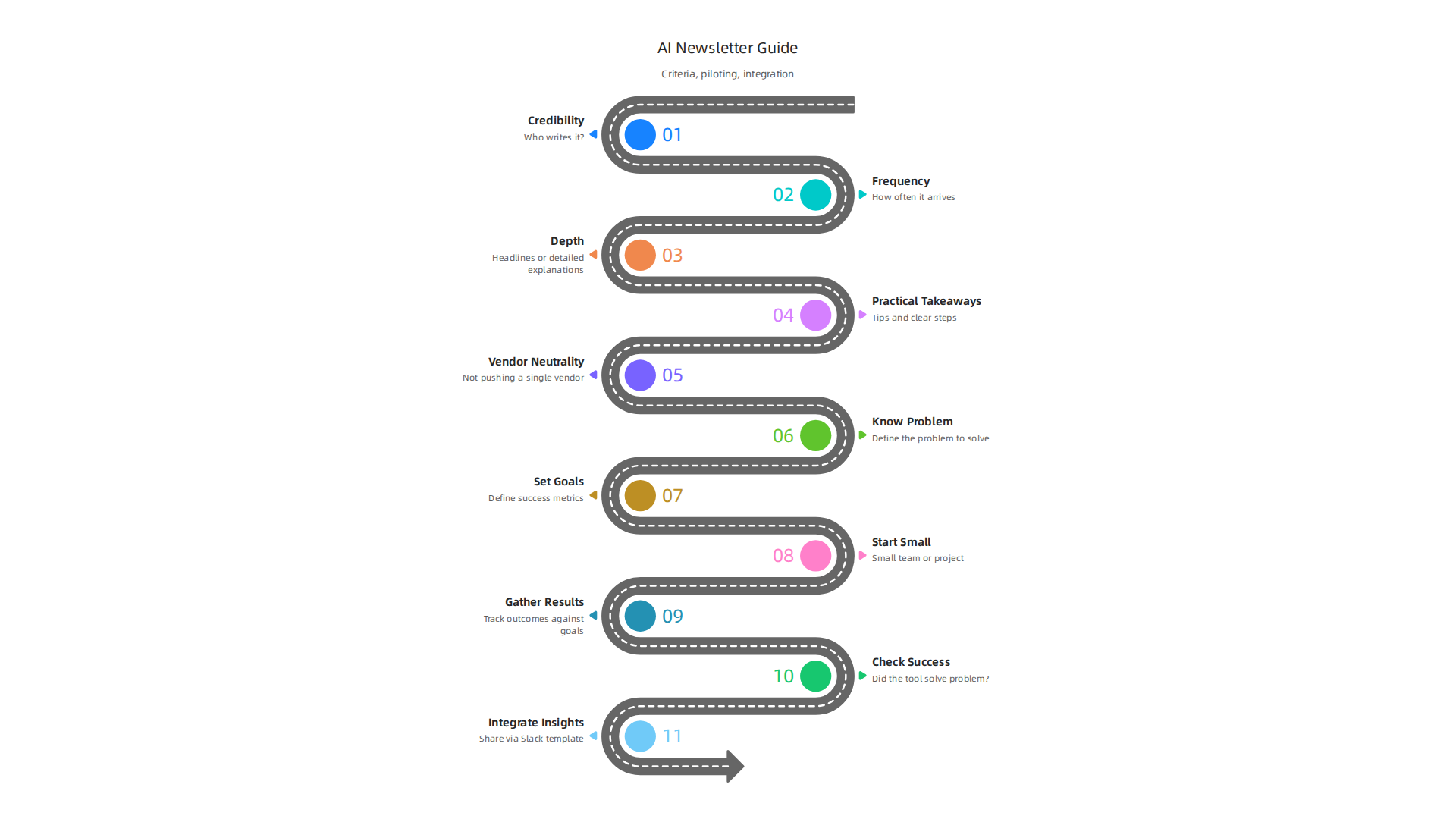
    This guide will give you a simple, clear plan for how to look at, pick, and use these newsletters to stay on top of your game. You will learn how to spot the newsletters that truly matter, how to add them into your daily work without feeling stressed, and how to make sure they help you stay productive.

    If you’re looking for clear daily AI updates, consider getting The AI Newsletter Worth Reading. It helps you stay informed without the overload. We’ll also explore how to use AI tools for newsletter curation, which can make managing your inbox even easier. It is like having a smart assistant just for your important news. Learning to pick the right sources, like a reliable site news techmeme, can help you track major technology news for smart business decisions in 2026.

    What to expect from the best AI/productivity newsletters (and what ‘MakeUseOf newsletter’ offers)

    When you choose an AI or productivity newsletter, you’re looking for more than just a list of links. You want something that truly helps you stay tech savvy and get things done. The best newsletters in 2026 give you clear, useful information that you can use right away.

    Here are the main types of content you can expect from a top-notch newsletter:

    • Quick Roundups: These are short summaries of the most important news and tools in AI each day or week. They help you get the main ideas quickly, so you don’t miss anything big. A good roundup will tell you what’s new without taking up too much of your time. Many people find a quick morning scan of these headlines to be very helpful for staying informed 10 Best AI Newsletters to Read in 2026.
    • Deep Dives: Some newsletters go into great detail on one important topic, tool, or trend. This is great for when you want to learn a lot about something specific, like how a new AI model works or a clever way to use a productivity app.
    • Tool Tests and Reviews: With so many new AI tools coming out, it’s hard to know which ones are actually good. The best newsletters will test these tools and tell you what they liked and didn’t like. This helps you figure out if a tool is worth your time without having to try them all yourself.
    • Templates and How-Tos: Often, these newsletters give you ready-to-use templates or step-by-step guides. For example, a template for writing better emails with AI, or a guide on how to set up a new productivity system. These are super practical and help you put the cool tech into action.

    What makes a newsletter truly stand out? Readers care about a few key things when picking their favorites:

    Infographic detailing the essential criteria readers consider when selecting top AI and productivity newsletters.

    • Relevance: The information should be about things that matter to you and your work. It should help you solve real problems or learn new skills. This means it needs to understand what its readers are looking for.
    • Timeliness: In the fast-moving world of AI, news gets old fast. A good newsletter makes sure you get the latest updates and trends while they’re still fresh. This helps you stay ahead of the curve.
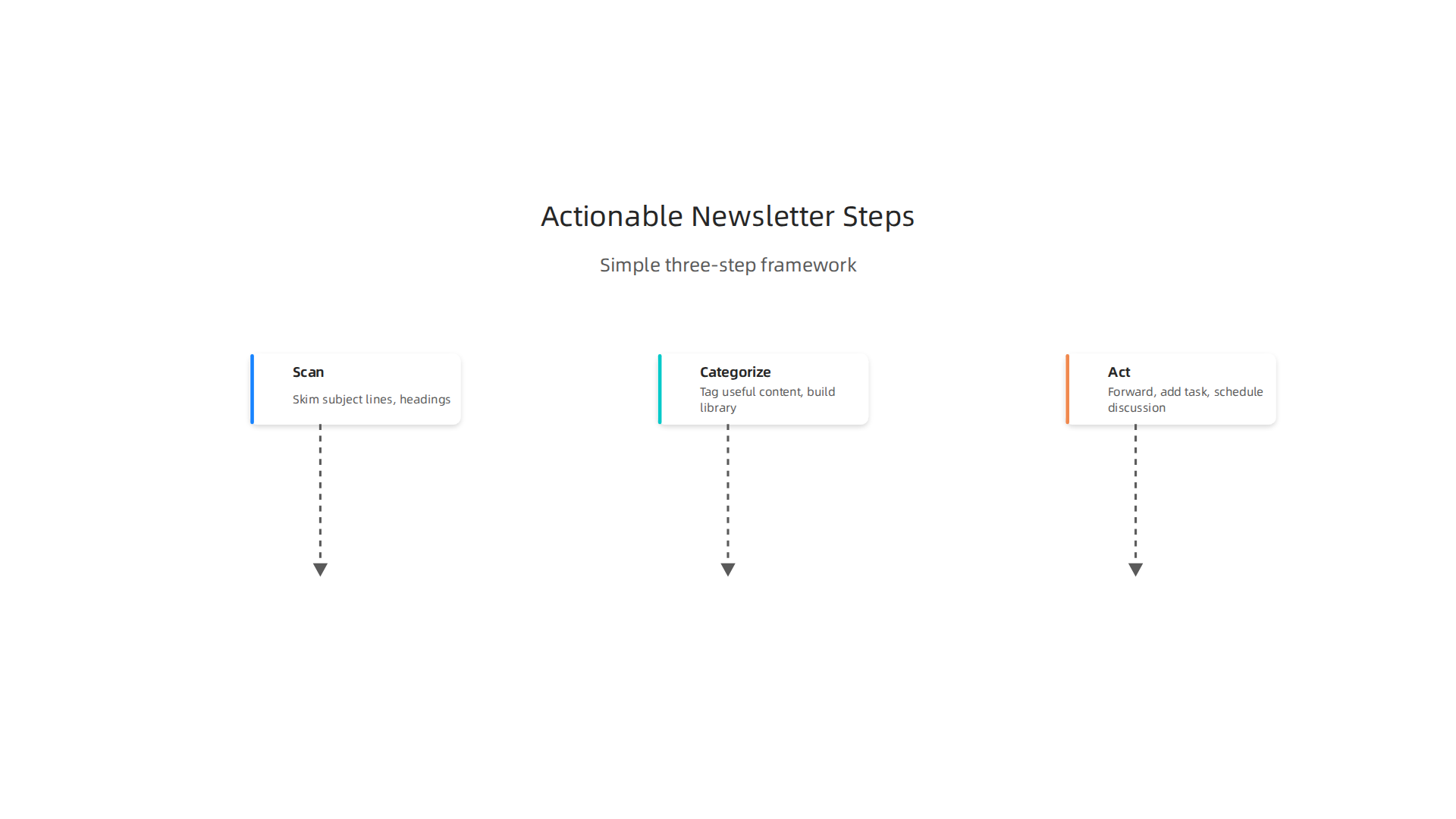
    • Actionable Steps: It’s not enough to just know about new tools. You need to know how to use them. The best newsletters offer clear advice and ideas you can try right away to boost your productivity or use AI better. Finding these online-tech-tips can make a big difference.
    • Trustworthiness: You want to get your information from sources you can count on. A reliable newsletter, like a strong makeuseof newsletter, will have experts who know their stuff. They will give you honest thoughts and real examples. They combine good choices with how to use AI in real life Top AI Newsletters in 2026: The Ones Everyone Is Reading.

    So, when you see a makeuseof newsletter or similar trusted source, you can expect a mix of these helpful formats and a focus on these important criteria. It’s how you stay informed without feeling overwhelmed, getting insights that help you choose and use new AI tools effectively. If you want to keep up with the newest insights on tools, consider checking out some top interactive AI newsletters that can further boost your knowledge. For businesses, learning how to select the right AI tools can lead to real growth, making thoughtful newsletter choices part of a bigger strategy for how to pick AI tools for business.
    A simple framework to evaluate any AI newsletter quickly

    Now that you know what great AI and productivity newsletters offer, how do you pick the best one for you?

    A person thoughtfully considering options, representing the process of choosing the right AI newsletter based on personal needs.

    It’s like choosing the right tool for a job; you want to make sure it fits perfectly. Here’s a simple way to look at any AI newsletter quickly and see if it’s worth your time and inbox space.

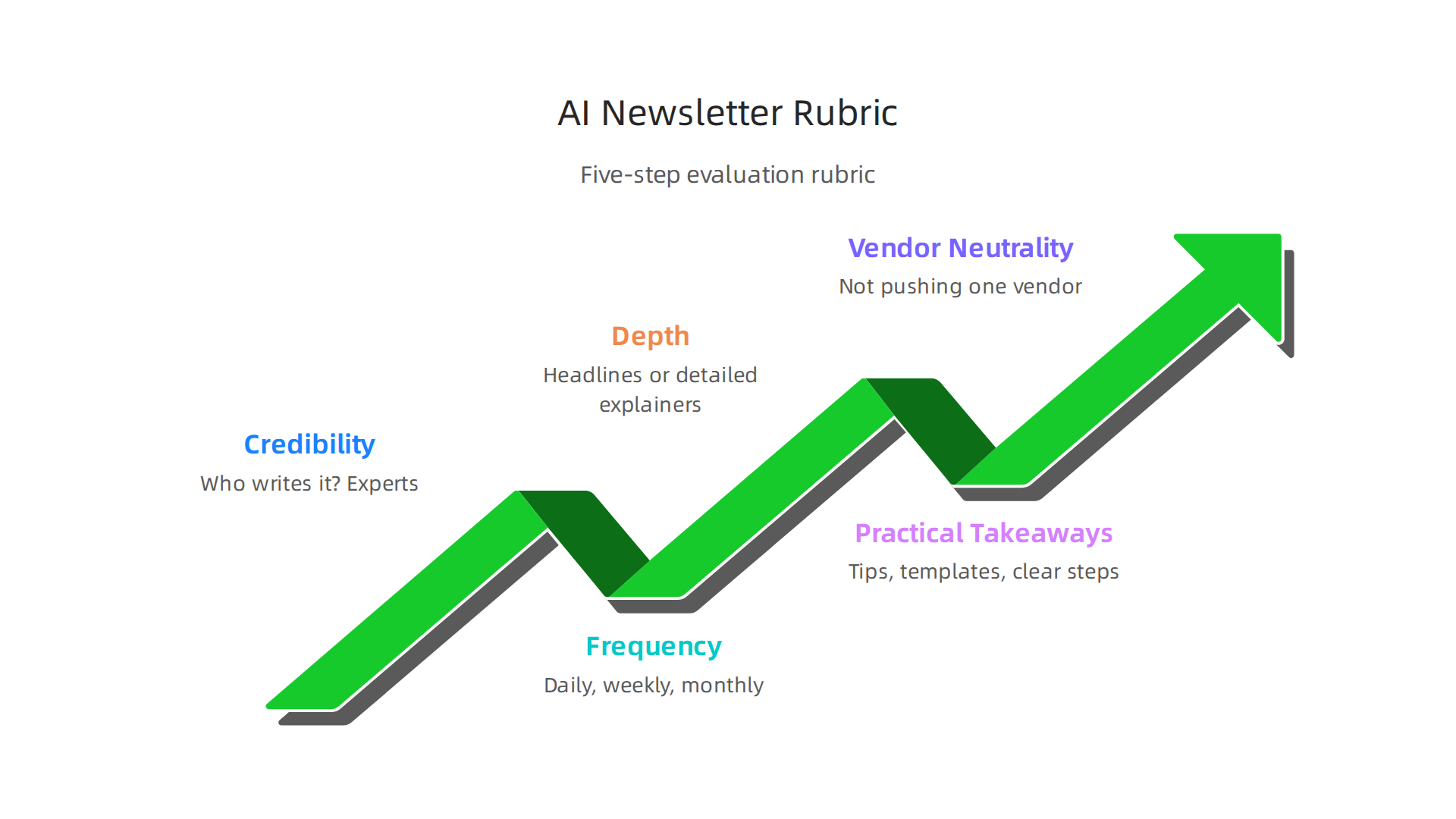
    Infographic outlining a five-step rubric for quickly evaluating any AI newsletter's suitability.

    We can use a quick checklist to size up any makeuseof newsletter or any other tech publication.

    Step-by-step rubric to pick your perfect newsletter

    1. Who Writes It? (Credibility):
      First, think about who is sending the newsletter. Are they people who really know a lot about AI and technology? Do they have a good reputation for giving honest online-tech-tips? You want to trust the advice you’re getting. Look for newsletters where the writers clearly understand the topic and aren’t just repeating what everyone else says. Top newsletters are often ranked based on things like their editorial focus and the expertise of their writers 10 Best AI Newsletters in 2026 (Ranked by Focus).

    2. How Often Does It Arrive? (Frequency):
      Some newsletters come daily, others weekly, or even just once a month. Think about how much information you can handle. If you get too many emails, you might stop reading them. If it’s too rare, you might miss important updates. Find a balance that keeps you informed without making your inbox feel too full. This helps you stay tech savvy without being overwhelmed.

    3. How Deep Does It Go? (Depth):
      Does the newsletter just give you headlines, or does it explain things in detail? If you want to really learn about how cool tech works, you’ll want something that offers deep dives. If you just need quick updates, a roundup might be enough. Look for newsletters that match how much you want to learn about each topic.

    4. Can You Use It Right Away? (Practical Takeaways):
      The best newsletters give you ideas you can put into action. Do they offer tips, templates, or clear steps you can follow? It’s great to know about new AI tools, but it’s even better to know exactly how you can use them to make your work easier or better. This is where you find the truly useful online-tech-tips.

    5. Is It Fair and Balanced? (Vendor Neutrality):
      Sometimes, newsletters might lean heavily towards one company’s products. This is normal if it’s their company’s newsletter. But if you want a broad view of the AI world, look for a newsletter that talks about many different tools and ideas without pushing just one. You want honest reviews and information, not just sales pitches. Finding trusted tech sources is key for this AI Tool Discovery 2026: How to Find Trusted Tech Sources That Deliver Real Business Results.

    How to score newsletters against your needs

    After you look at these points, think about your own needs and your budget.

    • Your Use Cases: Why do you want this newsletter? Are you a marketer, a business owner, a creator, or just someone who loves new tech? A good newsletter for a marketing pro might be different from one for someone who just wants general news. If you are looking for AI tips specific to growing your business, that will change what you value most.

    • Budget Constraints: Most AI newsletters are free, but some special ones might cost money. If you have a budget for learning resources, then a paid newsletter might offer even deeper insights. If you’re sticking to free options, there are still plenty of great choices out there.

    By going through this simple process, you can find an AI newsletter that truly helps you stay informed and effective in 2026.

    Ready to find a newsletter that consistently delivers clear, daily AI updates to help you stay ahead?
    The AI Newsletter Worth Reading

    Comparing popular AI newsletters: what each is best for

    Now that you know how to look closely at AI newsletters, let’s talk about how different ones can fit your needs. Imagine you’re picking tools for a toolbox. You don’t just need any tool; you need the right tool for the job. The same goes for finding the best AI newsletters. You want them to help you reach your goals, whether that’s for work or just to learn about cool tech.

    Newsletters often focus on different things. Some might talk a lot about new AI tools, while others go deep into new research papers or how AI affects big companies. Knowing what each newsletter is mostly about can help you pick the best one for you. For example, some lists break down newsletters by their main focus, like general AI news, technical topics, business uses, or specific AI tools A curated, up-to-date list of active AI newsletters.

    How newsletter focus matches your work and goals

    Think about what you do every day or what you want to learn.

    • For Business Owners and Leaders: You might want newsletters that focus on how AI can make your business better. This could be about new tools to help with marketing, sales, or how to run your company more smoothly. You want online-tech-tips that show real ways to use AI for growth. Checking out content on how to choose AI for business tools that deliver real results in 2026 can give you more ideas on this.
    • For Marketers and Creators: If you make content or work in marketing, you’ll love newsletters about new AI apps for writing, making images, or planning campaigns. You need practical advice you can use right away. Look for newsletters that offer those useful online-tech-tips.
    • For Tech Lovers and Developers: If you’re really into how AI works behind the scenes, you might prefer newsletters that talk about the latest research or deep technical topics. These can help you stay tech savvy with the newest findings.
    • For General Updates: Maybe you just want to know what’s happening in the world of AI without all the super technical details. A general AI news roundup, like what you might find in a makeuseof newsletter, could be perfect. It gives you the big picture without too much fuss.

    Many people find it helpful to read more than one newsletter. For instance, an industry report on newsletters in 2026 showed that some people follow many different sources to stay informed 12 AI Newsletters to Keep You Informed on Emerging ….

    Picking a main newsletter and a helper newsletter

    It’s a good idea to have one main newsletter that covers your most important needs. This is the one you read most often. Then, you can have a second, "helper" newsletter for something different.

    Let’s say your main job is marketing. You might choose a newsletter that gives you solid online-tech-tips for using AI in marketing every week. Then, for your helper, you could pick one that just gives you quick daily updates on general AI news, like what you might find when tracking major technology news for smart business decisions in 2026. This way, you get both deep help for your work and stay generally tech savvy.

    Here’s a simple way to think about it:

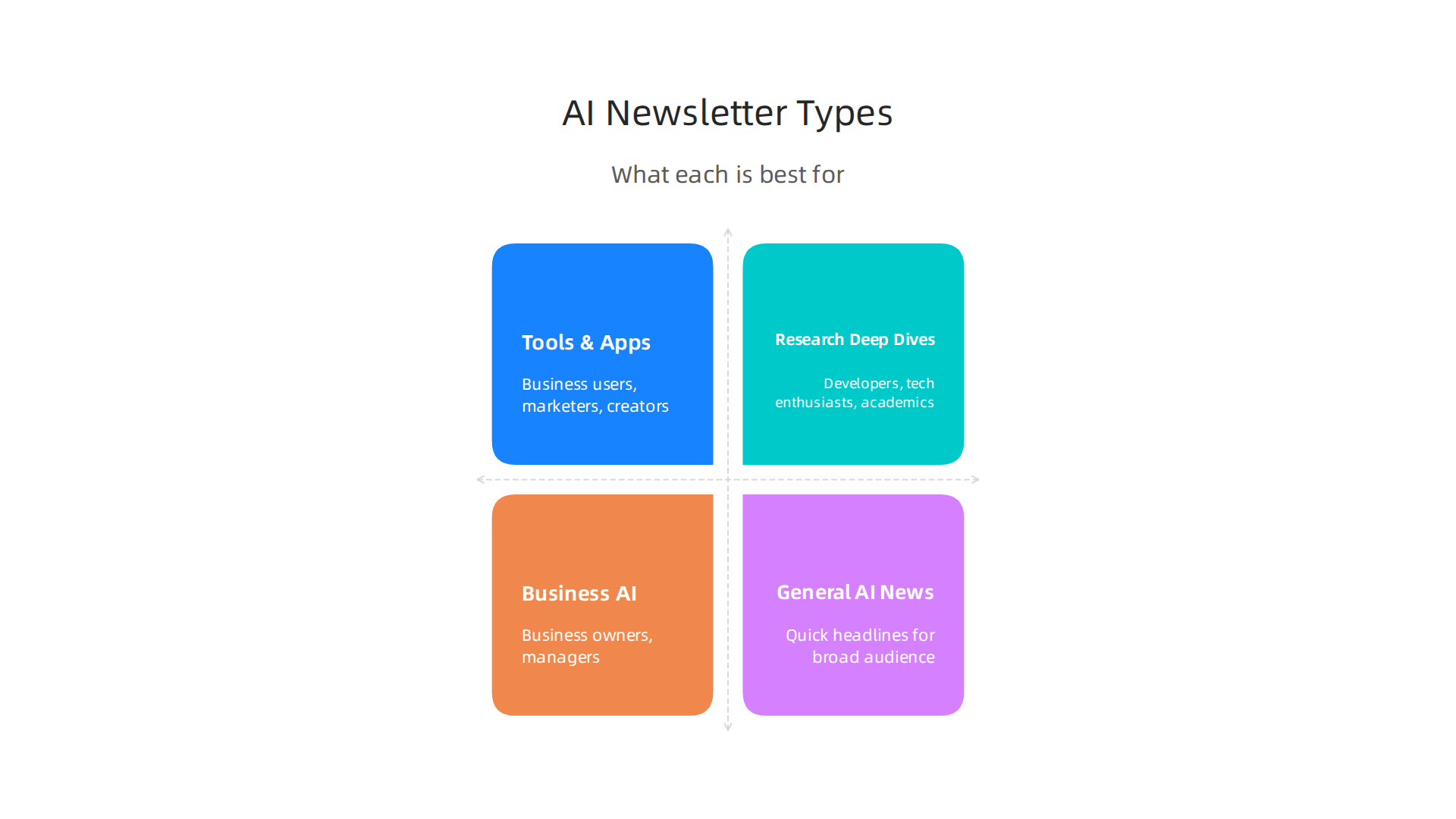
    Infographic comparing different AI newsletter types, highlighting what each is best for, their pros, and cons.

    Newsletter Type Best For Pros Cons
    Tools & Apps Business users, marketers, creators Gives practical ways to use AI, clear steps Might focus on one tool too much, less theory
    Research & Deep Dives Developers, tech enthusiasts, academics Explains how AI works, new discoveries Can be very technical, less about daily use
    Product & Business AI Business owners, managers Shows how AI helps companies, boosts growth Less about coding or complex AI models
    General AI News Anyone wanting quick updates, stay tech savvy Covers many topics, easy to read, good for "cool tech" Less in-depth for specific topics

    By picking one main source and maybe a second one for balance, you can build your own special set of AI insights. This helps you get the most out of your reading without feeling swamped.

    From discovery to adoption: testing AI tools recommended in newsletters

    You’ve learned how to pick the best AI newsletters to stay updated and tech savvy. But what happens after you read about a cool tech tool? The next step is to see if it actually works for you and your business. It’s like finding a new recipe; you have to try cooking it to know if it tastes good.

    A team collaborating around a whiteboard, discussing and planning, representing the testing and adoption of new tools.

    We need a simple way to test these AI tools without much risk or cost. This is called a "pilot test."

    How to test new AI tools simply and smartly

    A pilot test is a small try-out. It lets you see how a new AI tool performs in your real work before you commit to it fully. This process helps you know if the online-tech-tips you read in a newsletter are truly useful for your situation. Here’s a lean way to do it:

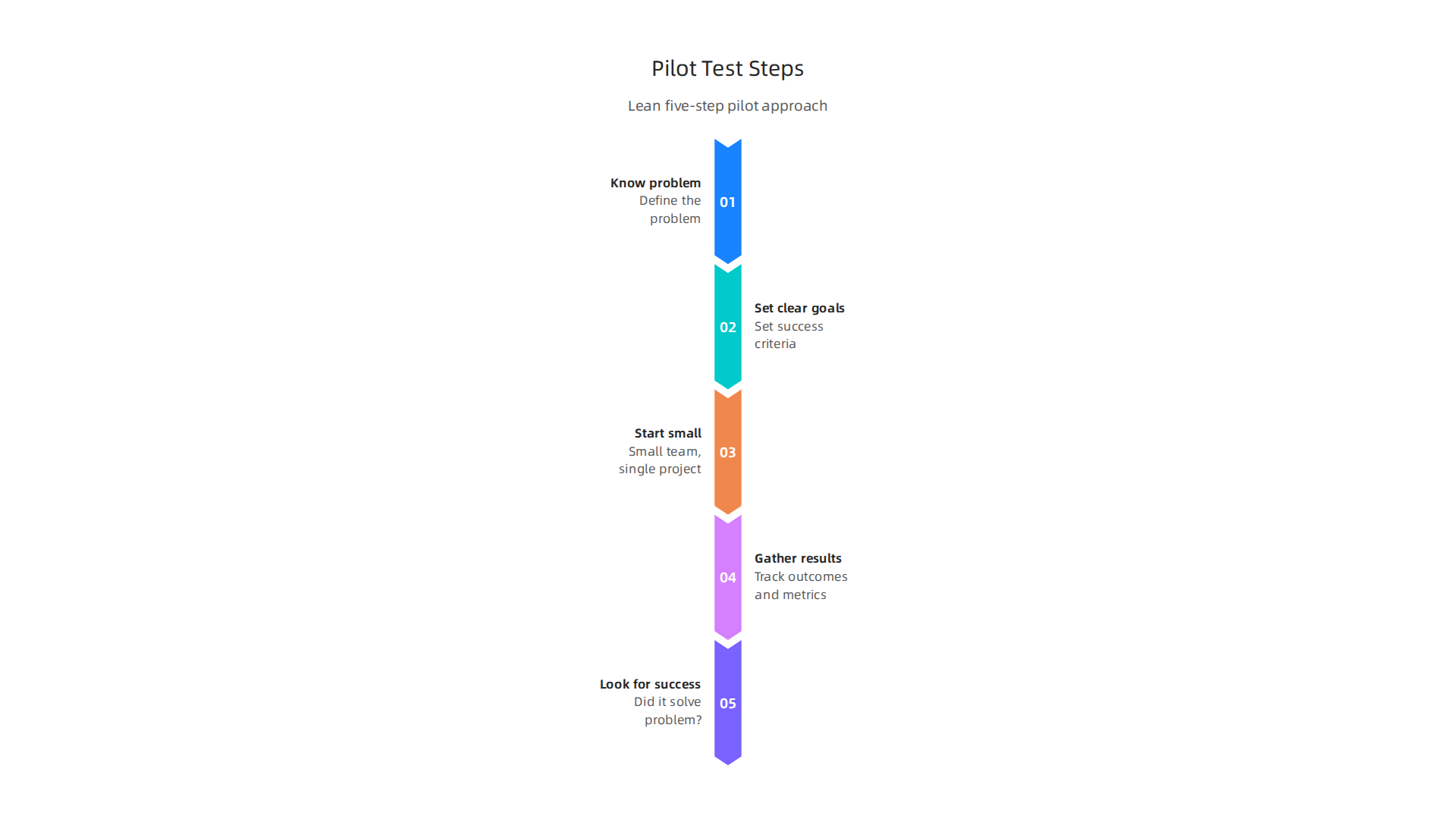
    Infographic illustrating a five-step lean approach to conducting pilot tests for new AI tools.

    1. Know what you want to fix: Before trying any tool, ask: What problem do I want this AI to solve? Maybe you want to save time on writing emails, or make better images, or crunch numbers faster.
    2. Set clear goals: How will you know if the tool is helping? Set simple goals, like "I want to save two hours a week on X task" or "I want to cut down errors by Y percent." These are your key numbers to watch. To effectively measure, you should define 6-12 focused goals for your AI pilot Defining KPIs for an AI Pilot: 12 Metrics to Track During a.
    3. Start small: Don’t try to use a new AI tool everywhere at once. Pick a small team, a specific project, or just a few tasks. This lowers the risk if the tool isn’t a good fit. This small-scale testing is very important for refining new methods How to Conduct Pilot Tests.
    4. Gather basic results: Keep track of your goals. Did you save time? Did errors go down? Are people finding it easy to use? You can measure things like "time saved" or "how often people use the tool" Measure Productivity of AI Tools + Training.
    5. Look for real signs of success: After your small test, look at what happened. Did the tool solve your problem? Did it make things noticeably better? This helps you see if the tool has a "product-market fit" for your needs, meaning it really fits what you need to do.

    Checking if an AI tool is worth it (ROI)

    When you test a new AI tool, you also want to know if it’s worth the money or effort. This is often called "Return on Investment" (ROI). It means: are you getting more value out of it than what you put in? For more on this, you can learn about marketing science for AI professionals to measure real impact and ROI.

    During your pilot, measure things like:

    • Time saved: How many hours did the AI tool free up for you or your team? More time often means more money saved or more work done. Tracking time saved versus manual effort is a key indicator of AI adoption KPIs That Prove Real AI Adoption (Not Just Experimentation).
    • Better quality work: Did the AI help you create better content, make fewer mistakes, or improve customer service?
    • How often people use it: If a tool is truly helpful, people will use it a lot. If they don’t, it might not be a good fit, even if it’s cool tech. Keeping an eye on user adoption is a crucial KPI beyond just accuracy Measuring Enterprise AI Success: KPIs Beyond Accuracy.
    • Happy users: Are the people using the tool happy with it? Do they find it helpful and easy to learn?

    Whether you found a tool through a general makeuseof newsletter or heard about it on site news techmeme, the real test is how it works for you. This lean testing method lets you discover what truly works, helping you make smart choices for your business in 2026.

    Ready to stay informed with daily AI news and practical insights? The AI Newsletter Worth Reading delivers clear updates right to your inbox.

    After you learn about new AI tools and try them out a little, the next step is to share what you’ve learned with your team. This helps everyone in your company make smart choices together. It’s not just about one person being "tech savvy"; it’s about making new tech easy for everyone to understand and use.

    Integrating newsletter insights into team workflows

    Think of it this way: you read a great online-tech-tips article or a special makeuseof newsletter about a cool new AI tool. Now, how do you make sure that good idea doesn’t just stay in your head? You need a way to bring those insights into your team’s daily work.

    Balancing who does what with new AI tools

    It’s not smart for everyone on your team to read every single AI newsletter or site news techmeme update. That would be too much work! Instead, you can have a few key people handle different parts:

    • The "Scouts": These are the people who subscribe to AI newsletters and keep an eye on new trends. They find the promising "cool tech" that might help your business. They don’t have to be super technical, just curious and good at spotting useful ideas.
    • The "Summarizers": Once the scouts find interesting tools, someone needs to make short, easy-to-read notes about them. This saves everyone else time. They pick out the main points: what the tool does, what problem it solves, and why it might be useful.
    • The "Testers": As we talked about before, these are the people who do the small pilot tests. They check if a new AI tool actually works well for your team’s specific needs. It’s smart to assign clear owners to review the test results, so everyone knows who is responsible for what outcome Response quality evaluations for the Employee Self ….

    By splitting these jobs, your team can stay updated on AI without getting overwhelmed. It also makes sure that important information from newsletters and other sources gets shared and acted upon.

    Practical templates for sharing AI insights

    To make sharing easy, you can use simple templates. These are like fill-in-the-blank forms that help you organize information quickly.

    1. Weekly Curation Notes:
      Imagine a short, internal email or message that goes out once a week. It tells everyone about the most interesting AI tools or news your scouts found. You can use a simple company newsletter template to make these notes easy to read. Each note should have:

    2. Tool-Watch Tickets:
      When a scout finds a really promising tool, they can create a "tool-watch ticket." This is a simple note in your team’s project system (like a to-do list). It helps you track tools that need a closer look or a pilot test. The ticket might include:

      • The tool’s name.
      • The problem it might solve.
      • Who will be the tester.
      • When the test should happen.
    3. Stakeholder Playbooks:
      For tools that pass the pilot test and look very promising, you’ll want to tell other people in your company about them. These "stakeholders" might be managers or other departments. A stakeholder playbook is a short, easy guide that explains:

      • What the new AI tool does.
      • How it helps the business (like saving money or time).
      • Who on the team will use it.
      • What success looks like (the positive results from your pilot test).
      • It’s important to set clear success criteria with these stakeholders before deploying AI tools widely Generative AI Pilot Metrics: How to Measure and Prove ….

    By using these clear steps and tools, your team can better handle all the new AI information coming out. This helps you make smart business decisions and use AI to grow your company in 2026. For more help on finding and using the right tools, learn how to choose AI for business tools that deliver real results in 2026.

    Now that your team has a plan to share new AI insights, let’s talk about keeping that information flow clear and useful. Think of it like a garden: you plant good seeds, but you also need to pull weeds so your plants can grow strong. In the world of AI news, "weeds" are all the extra emails and articles that don’t really help your business. You need a way of maintaining signal over noise.

    It’s easy to sign up for too many newsletters, from an online-tech-tips site to a makeuseof newsletter, or even updates from a site news techmeme. Before you know it, your inbox is full of "cool tech" articles, and you might miss the truly important ones. This is where "subscription hygiene" comes in.

    Taking care of your subscription list

    Subscription hygiene is just a fancy way of saying you regularly clean up your list of email newsletters and other updates. It means deciding what stays and what goes. This helps your team stay focused on the best information. Here are some simple steps:

    • Check often: Make it a habit to look at your subscriptions every few months. Are you still reading them? Are they still giving you useful information for your business in 2026?
    • Unsubscribe from unhelpful ones: If a newsletter isn’t helping you make smarter choices or bringing new ideas, it’s okay to say goodbye. Removing emails you don’t open helps with "email list hygiene" and makes sure you only get important messages Email List Hygiene 2026: Improve Deliverability with ….
    • Keep the valuable stuff: Hold onto the newsletters that truly teach you something new, share practical AI tips, or point to tools that can really help your work. This could be a specialized makeuseof newsletter or a general online-tech-tips digest.
    • Segment your list: If you have many subscriptions, maybe put them into groups. For example, one folder for "AI Tools for Marketing" and another for "General AI News." This helps you find what you need faster. Regularly cleaning your email list by looking at who is engaged and who is not can help you do this better How List Building & Hygiene Impact Email Deliverability.

    By doing this, you make sure that the information you get is high-quality. You want to make sure the time your "Scouts" (from the last section) spend reading is well-spent, not lost in a sea of unnecessary emails.

    How to know if a newsletter is truly valuable

    It’s not just about opening an email; it’s about what you get from it. To know if a newsletter has long-term value, you need to look at a few things:

    • Engagement: Do you often click on links in the newsletter? Do you save articles? Do you talk about the information with your team? High "engagement" means you’re really using the content. You can even measure things like click-through rates to see what people are interested in Track Your Email Success: Essential Engagement Metrics.
    • Actionable insights: Does the newsletter give you ideas you can actually use? Does it lead to new tests, discussions, or changes in your business? If it helps you choose AI for business tools or improve how you work, it’s valuable.
    • Retention: Are people staying subscribed for a long time? Newsletters that keep their readers year after year are usually doing something right. High retention often means the content is consistently good How To Measure Real Email Engagement in 2026. For example, some newsletters see paid subscriber retention where people stay subscribed for 18 to 20 months on average Newsletter Statistics 2026: Paid Subscriber Data.

    If a newsletter consistently helps your team make smarter decisions, learn about new AI tools, or simply keeps you "tech savvy" in 2026, then it’s worth keeping. It’s about getting real value from the information you consume.

    Want to make sure you’re always getting the best AI insights without the extra noise?
    The AI Newsletter Worth Reading

    Summary

    This article explains why curated productivity and AI newsletters remain valuable in 2026 and gives a practical playbook for finding, evaluating, and using them without getting overwhelmed. It describes the types of content top newsletters provide—quick roundups, deep dives, tool reviews, and templates—and lays out a simple five‑point rubric (credibility, frequency, depth, practicality, neutrality) to judge any newsletter quickly. The guide also shows how to test recommended AI tools with small pilot projects, measure ROI and user adoption, and capture meaningful KPIs so you can decide what to scale. You’ll learn how to organize newsletter intake across team roles (scouts, summarizers, testers), use lightweight templates for sharing findings, and keep your subscription list clean so signal beats noise. By following these steps you’ll be able to pick the right newsletters, integrate insights into workflows, run low‑risk trials, and make smarter AI adoption choices for your work or business.

  • Preparing for What Jobs Will AI Replace Discover Resilient Roles and New Opportunities in 2026

    Preparing for What Jobs Will AI Replace Discover Resilient Roles and New Opportunities in 2026

    Why this matters now: framing the debate about jobs and AI

    Are you worried about what jobs will AI replace? It’s a question many people are asking in 2026.

    Many individuals are contemplating the future of their careers as AI continues to rapidly reshape the job market.

    This isn’t just a distant worry; it’s a very real topic happening right now. Everyone wants to know which jobs might be most at risk and, just as important, which jobs will simply change thanks to new technology.

    The truth is, AI is reshaping the world of work very quickly. This change is driven by several big things happening all at once. For one, technology itself is getting better at a super fast pace. Things that seemed like science fiction a few years ago are now everyday tools. Businesses are also always looking for ways to do things smarter and faster. They want to be more efficient, and AI offers many ways to do just that.

    Another big reason for this shift is how easy AI tools have become. You don’t need to be an AI scientist to use many of them anymore. Simple AI programs can help with writing, planning, and even making images. This makes it easier for companies of all sizes to start using AI. In fact, many reports show that AI won’t just take jobs away; it will create new ones too. The World Economic Forum, for example, expects AI and automation to create many new roles by 2030, even while some older jobs change or fade out, leading to a net gain of millions of jobs worldwide World Economic Forum Future of Jobs Report 2026: AI Will Create 78 Million Net New Jobs by 2030. This means we need to understand both sides of the story.

    So, while some might worry that AI is bad or only causes problems, it’s more about how we adapt. This guide will help you understand the changes and how you can prepare for them.

    Get clear daily AI updates from The AI Newsletter Worth Reading.

    Overview: Which jobs are most at risk from AI and why

    So, if AI is changing how we work, how do we know what jobs will AI replace or change the most? It is not always about replacing a whole job. Instead, it is more about how AI can do certain tasks within a job. Think about it this way: a job is often made up of many small tasks. AI might be very good at some tasks but not others.

    This way of looking at things is called a "task-based framework." Experts now say that breaking down jobs into their smaller parts gives us a much better idea of how AI will affect them. For example, a 2026 study showed how looking at nearly 30,000 tasks across different jobs helps understand AI’s impact better Research Brief – assessed at the 6-digit occupational level covering nearly 30,000 tasks. Many jobs will not disappear completely. Instead, they will change as AI takes over some tasks, letting people focus on other, more human-centered work. Actually, some reports suggest that AI will reshape more jobs than it fully replaces AI Will Reshape More Jobs Than It Replaces | BCG.

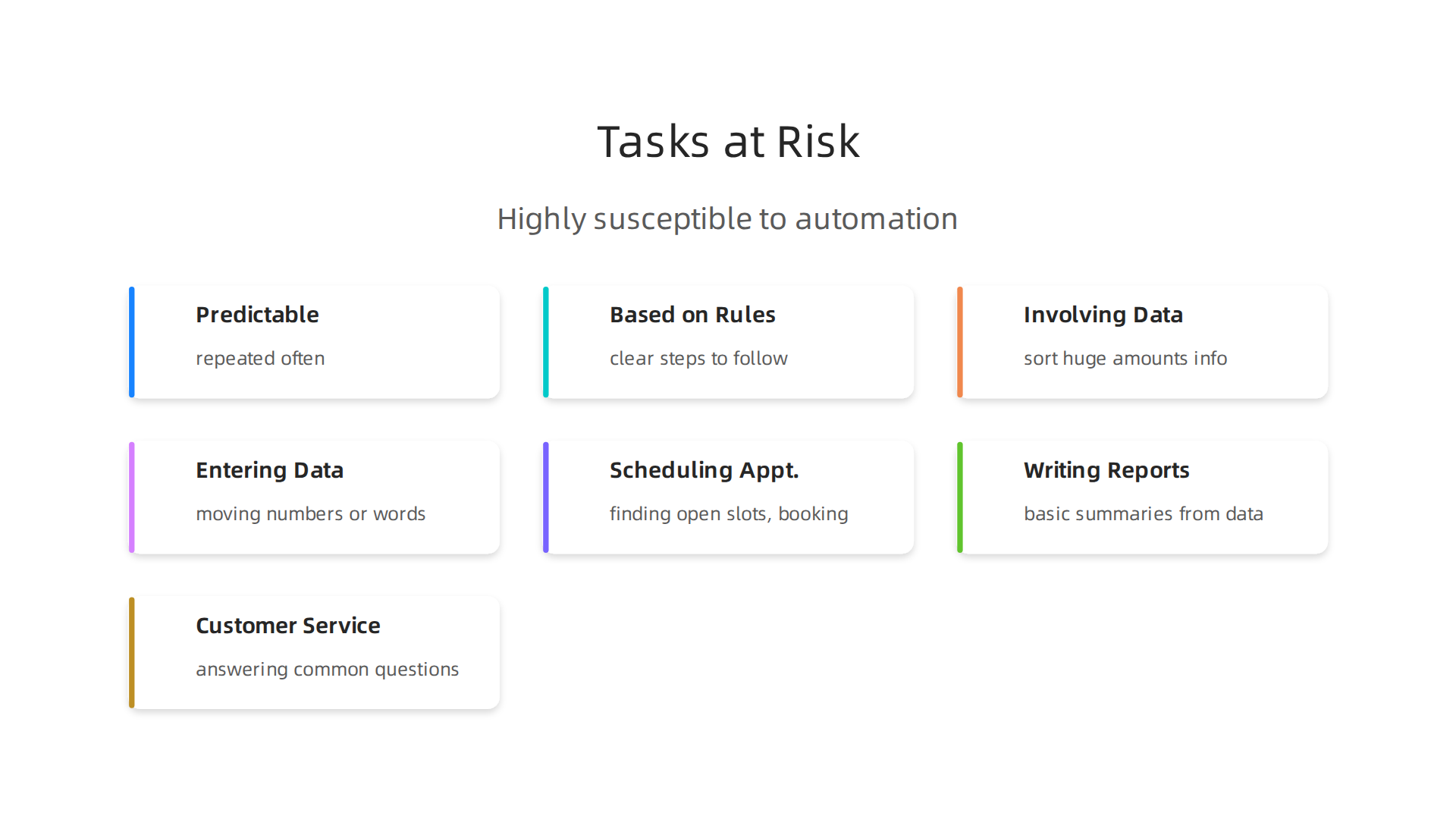
    So, what kinds of tasks are most at risk from AI? Generally, AI is really good at "routine cognitive tasks" and "repetitive data processing."

    Visual representation of tasks that are highly susceptible to automation by AI.

    This means tasks that are:

    • Predictable and repeated often: If you do the same thing over and over, AI can probably learn it.
    • Based on rules: If there are clear steps or rules to follow, AI can handle it.
    • Involving lots of data: AI can quickly sort through huge amounts of information.

    Think of jobs that include tasks like:

    • Entering data: Moving numbers or words from one place to another.
    • Scheduling appointments: Finding open slots and booking times.
    • Writing simple reports: Creating basic summaries from data.
    • Customer service for common questions: Answering easy questions that pop up often.

    Jobs that have many of these kinds of tasks are more likely to see big changes. Roles like data entry clerks, administrative assistants, or some customer service agents might find a large part of their daily work taken over by AI tools. This means they will need to learn new skills or adapt to new ways of working. Understanding this task-based view is key to preparing for the future. Learning how to choose AI ready business computers and use AI effectively can give you a big advantage, even in jobs that are changing quickly.

    Why some roles are resilient: tasks, skills and context that protect jobs

    While some tasks are easy for AI to take over, other kinds of work are much safer. These jobs often have tasks that need human qualities.

    Jobs requiring complex problem-solving, creativity, and social intelligence remain highly resilient to AI automation.

    When we think about what jobs will AI replace, it is important to also think about the jobs AI finds hard to do.

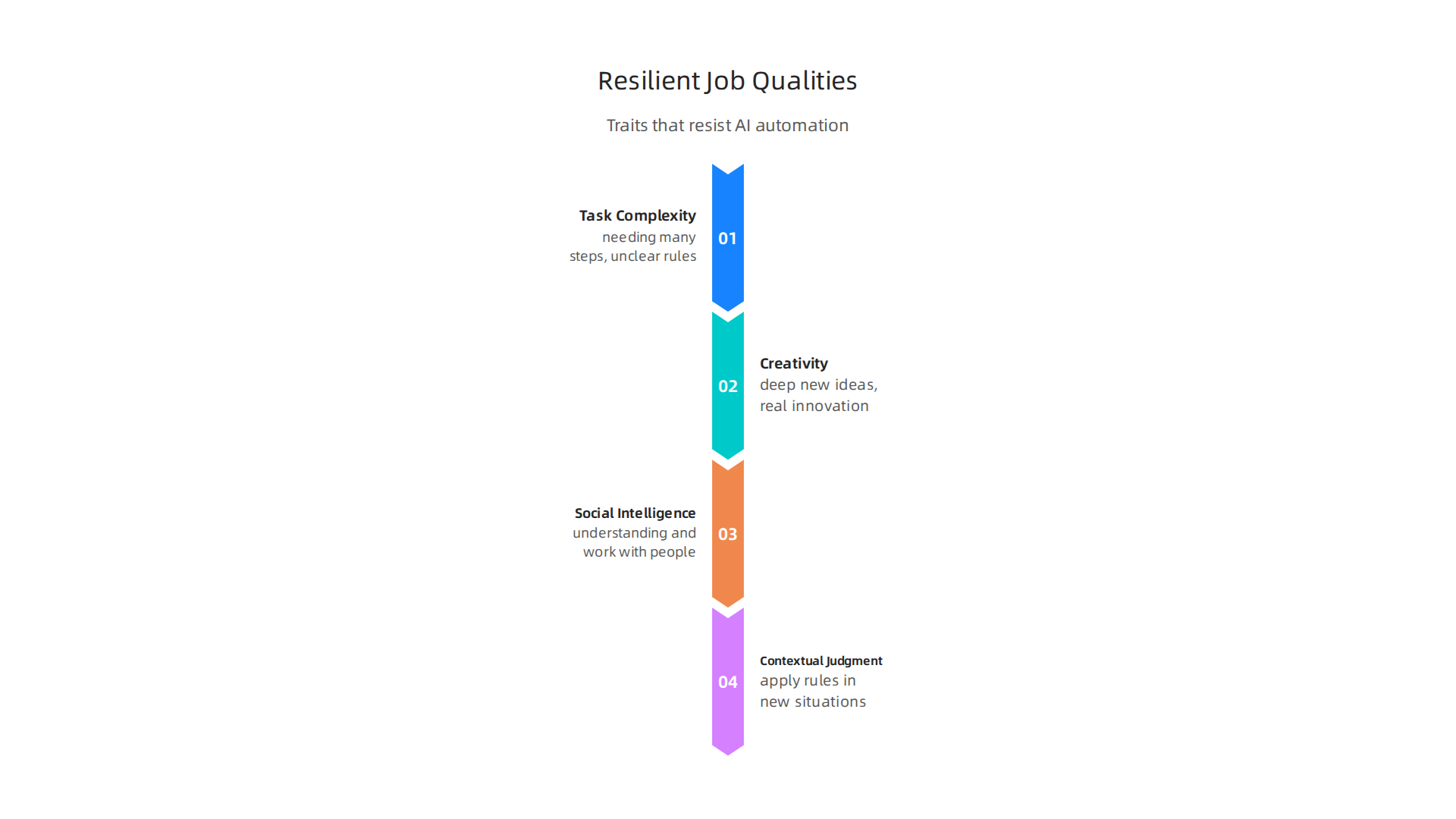
    Here are the main things that make a job strong against AI:

    Key human qualities and skills that make certain job roles resistant to AI automation.

    Task Complexity

    AI is good at simple, repeated tasks. But when tasks become very complex, needing many steps or unclear rules, AI struggles. Imagine a job where you must figure out new problems all the time. An AI system might break down a job into many smaller steps to assess its risk of automation. This helps show which parts are simple and which are very hard for AI to do AHP-BASED FRAMEWORK FOR ASSESSING PROFESSIONAL ….

    Creativity

    AI can create some things, like simple reports or basic images. But deep, new ideas, real innovation, and making something truly original still need people. Think of artists, writers who tell complex stories, or an AI scientist coming up with new theories. These jobs need creative thinking that AI cannot truly copy. Many experts believe human creativity will always be needed, working alongside AI tools. To learn more, read about Human or AI Creativity: What the Data Says About Collaboration in 2026.

    Social Intelligence

    Many jobs need you to understand and work with other people. This is called social intelligence. It means things like:

    • Empathy: Feeling what others feel.
    • Negotiation: Working together to find a solution.
    • Teaching and guiding: Helping others learn and grow.
    • Complex communication: Reading body language or understanding unspoken feelings.

    Jobs that rely on these skills, like therapists, teachers, nurses, or managers, are much harder for AI to take over. Studies show that jobs needing social skills and creative skills are less likely to be automated Automation risk is negatively correlated with the utilization of social skills… and creative skills.

    Contextual Judgment

    This is about knowing when and how to apply rules, especially in new or unexpected situations. AI follows rules. Humans can break rules when it makes sense, or use their gut feeling. A doctor diagnosing a rare illness, a lawyer handling a tricky case, or a leader making big decisions for a company all use contextual judgment. These jobs need deep understanding of many small details, past experiences, and future possibilities. Such skills are important job attributes that predict how likely a job is to be automated Automation and the changing nature of work.

    How Companies Help

    It’s not just about your skills. How a company sets up jobs also matters. By redesigning jobs, businesses can reduce the risk of automation. This means letting AI do the easy parts, so people can focus on the complex, creative, social, and judgment-based tasks. This way, AI becomes a helpful tool that makes people better at their jobs, instead of taking them away. Learning to use smart AI for business can help protect jobs and boost growth.

    Staying updated on how AI changes the workplace can feel like a lot of work. But understanding these trends helps you prepare for the future.

    Get clear daily AI updates from The AI Newsletter Worth Reading.

    While it’s true that AI changes how we work and even reduces some jobs, it’s also a powerful engine for creating totally new jobs and reshaping existing ones. Many people wonder, "what jobs will AI replace?" but fewer ask, "what jobs will AI create?" Actually, the future of work looks like a mix of both.

    Experts in 2026 believe that AI will create many more jobs than it takes away. For example, the World Economic Forum predicts a net gain of 78 million new roles by 2030, even after some jobs are displaced World Economic Forum Future of Jobs Report 2026. This means new kinds of jobs are popping up, and existing ones are changing to include AI tools.

    New Kinds of Jobs Because of AI

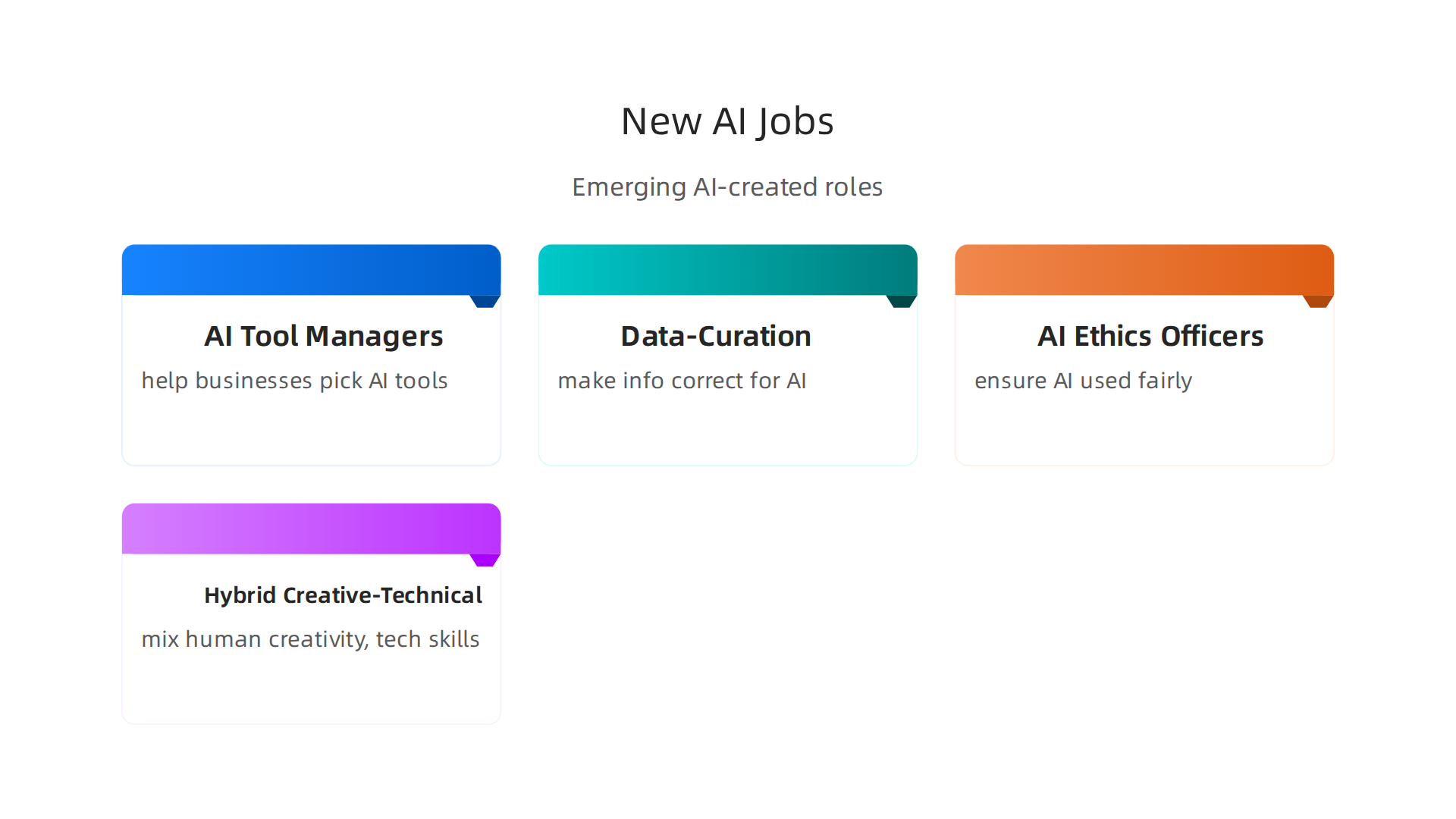
    AI is not just about robots doing human tasks. It needs people to build, manage, and guide it. Here are some new jobs AI is creating:

    An overview of emerging job roles directly resulting from the widespread adoption of AI technology.

    • AI Tool Managers: These are people who help businesses pick the right AI tools and teach everyone how to use them. They make sure the tools work well and help the company grow. Learning how to choose AI for business tools is a skill in demand How to Choose AI for Business Tools That Deliver Real Results in 2026.
    • Data-Curation Specialists: AI needs good, clean information to work properly. These specialists sort through large amounts of data, making sure it’s correct and ready for AI to use. This job is all about making sure AI gets the best input.
    • AI Ethics Officers: As AI gets smarter, we need people to make sure it’s used fairly and without harm. These officers create rules and watch how AI is used to keep things right. They ensure that businesses follow ethical AI guidelines Ethical AI Guidelines: HR’s Blueprint for Responsible Workplace Automation.
    • Hybrid Creative-Technical Roles: These jobs mix human creativity with technical skills. Think of artists who use AI to help them draw, or writers who use AI to brainstorm ideas. They use AI as a helper to do amazing things that only humans can truly imagine.

    How Old Jobs Change with AI

    It’s not just new jobs. Many existing jobs are changing. AI helps with the simpler parts, letting people focus on the complex and human-centered tasks. This is called job transformation. For instance, a marketing specialist might use AI to write first drafts of ads, then spend more time perfecting the message and thinking about customer feelings. This way, AI reshapes more jobs than it replaces AI Will Reshape More Jobs Than It Replaces.

    Workers often need to learn new skills, or "reskill," to fit into these changed jobs. Companies are helping with this by offering training. This means people can keep their jobs but take on new and exciting tasks that use AI as a powerful assistant.

    To truly stay ahead and understand these fast changes, you need reliable information.
    Get clear daily AI updates from The AI Newsletter Worth Reading.

    The world of work is changing fast with AI. Businesses need to be smart about how they get ready for these changes.

    Proactive workforce planning, including task audits and reskilling initiatives, is crucial for businesses navigating AI.

    It is not just about wondering what jobs will AI replace. It is also about helping people learn new skills and finding new ways for them to work with AI. This is called workforce planning, and it helps everyone grow.

    Practical Steps for Workforce Planning

    To get ready, companies should take a few important steps:

    • Task Audits: First, businesses need to look closely at all the tasks their employees do. They figure out which tasks can be done by AI, which ones can be helped by AI, and which ones need a human touch. This helps them understand where AI can make work easier and where people are truly needed. One way to do this is by using special frameworks to assess tasks AHP-BASED FRAMEWORK FOR ASSESSING PROFESSIONAL ….
    • Capability Mapping: After a task audit, companies see what skills their employees have now and what skills they will need for future jobs with AI. This is like drawing a map of everyone’s abilities. If a company finds a gap in skills, they know they need to offer training. This helps them build a strong team for the future.
    • Priority Reskilling: Giving employees new skills is super important. Many jobs will change, not disappear. So, workers need to learn how to use AI tools, understand data, and focus on human skills like creativity and problem-solving. Businesses should offer training programs to help staff learn these new skills. This kind of reskilling is key for adapting to AI Reskilling Towards AI: Why It Matters and How to Start | Selectic. Studies show that AI-powered training can help close skill gaps Evaluating the Impact of AI-Powered Reskilling Programs …. Some people might worry that AI is bad for jobs, but with reskilling, it opens up new chances.

    Smart Ways for Smaller Businesses to Use AI

    Smaller businesses might worry about the cost of AI or how to change their teams. But there are good ways for them to start:

    • Start Small with Pilot Projects: They can pick one small area, like customer service or marketing, to try out an AI tool. This helps them learn what works without a big risk. You can learn more about picking the right tools in our smart AI for business guide.
    • Focus on Augmentation, Not Replacement: Instead of thinking about what jobs will AI replace, think about how AI can help current employees do their jobs better and faster. This means protecting jobs while making them more efficient.
    • Look for Affordable AI Solutions: Many AI tools are made for smaller businesses and are not too expensive. Looking into these can save money while still getting the benefits of AI. It is wise to evaluate AI companies to unlock business growth carefully.
    • Training Partnerships: Small businesses can work with local colleges or online platforms to offer training. This way, they do not have to build their own training programs from scratch.

    By taking these steps, businesses of all sizes can get ready for AI and help their employees thrive in 2026 and beyond. This approach focuses on growing together with technology, rather than fearing it. The overall impact of AI on the workplace is often more about change than job loss The impact of AI on the workplace.

    Even as businesses get ready for how AI changes work, it is important to think about the rules and fair play. This is not just about what jobs will AI replace, but also about making sure AI is used in a good way.

    Establishing clear ethical guidelines and policies is essential to ensure AI is used fairly and responsibly in the workplace.

    We need to look at the ethical, legal, and policy side of things so that AI helps everyone fairly.

    Risks to Fairness and Due Process

    When companies use AI for hiring or checking how well people do their jobs, there are some big worries.

    • Bias and Unfairness: Sometimes, AI systems can learn bad habits from old data. If the data used to train an AI has unfair ideas built into it, the AI might make unfair decisions too. This means certain groups of people could be treated badly without anyone meaning to. It is a real risk for worker inclusion and exclusion when AI is used in the job market, as research shows Artificial Intelligence in the Labor Market: Evidence on Worker …. For example, an AI might unfairly pick people for interviews or promotions. To avoid this, businesses need to be very careful with how they design and check their AI tools.
    • Lack of Due Process: Due process means everyone gets fair treatment and can question decisions made about them. If an AI makes a decision about someone’s job or future, it can be hard to understand why it made that choice. People need to know how AI systems work and have a way to challenge a decision if they think it is wrong. It is important to have clear rules for how AI tools are managed at work to ensure fair impacts Algorithmic Management: Assessing the Impacts of AI at Work.

    Rules and Good Practices for AI in the Workplace

    To make sure AI helps and does not hurt, we need good rules. Both companies and governments have a role to play.

    • Company Guidelines: Businesses should create their own clear rules for using AI. These rules should focus on fairness, being open about how AI is used, and protecting people’s privacy. Many groups are creating guidelines for ethical AI, like a new framework that gives HR teams a plan for using AI responsibly Ethical AI Guidelines: HR’s Blueprint for Responsible Workplace …. This helps make sure AI is used ethically in hiring, training, and managing workers.
    • Government Policies: Governments are also working on laws to guide AI use. These laws can help make sure that companies follow fair practices and protect workers’ rights. For instance, laws are being made to cover human rights, data protection, and how companies are held responsible for their AI actions Algorithmic Governance at Work: A Legal-Sociological and …. In 2026, many states and cities in the US already have their own AI laws, showing how important this topic is What the March 20 ‘National AI Legislative Framework …. These rules help create a future where AI works for everyone.

    Getting ready for AI means more than just finding new tools. It means thinking deeply about how these tools affect people and making sure they are used in a way that is fair, open, and helpful. You can learn more about how to navigate these challenges by exploring how to manage hidden AI risks and opportunities in our guide on Stealth AI: A Business Guide to Hidden AI Risks, Opportunities, and Management in 2026.

    Want to stay informed on how AI is shaping the world of work and beyond?
    The AI Newsletter Worth Reading

    AI implementation case studies: what worked, what didn’t

    After thinking about the important rules for AI, it is helpful to look at real-life examples. How have other companies used AI? What did they do right, and what went wrong? Learning from these stories can help you use AI better in your own business.

    Many businesses are using AI, with a big jump in adoption recently; about 72% of companies now use AI solutions, which is much more than before How AI is Transforming the Workplace: Real Results from …. The key is not just to use AI, but to use it wisely.

    Stories of Success with AI

    When AI works well, it often means people and technology work together. For example, some companies found that instead of worrying about what jobs will AI replace, they could use AI to make existing jobs better.

    • Manufacturing: In factories, AI has helped with tasks like checking product quality or keeping machines running smoothly. By having AI watch for problems, workers can focus on more important jobs, like fixing complex issues or making new plans. This shift often means that jobs are changed, not taken away, as shown in studies about AI’s impact on the workplace The impact of AI on the workplace. Workers who learned new skills to work with AI saw their roles grow.
    • Finance: Banks and financial companies have used AI to spot fraud faster or help customers with common questions. This frees up human staff to help with more complicated customer needs. When AI tools are chosen carefully and fit into the company’s daily work, they can really boost how much work gets done Proving Productivity Uplift: Linking AI Tool Adoption to …. This shows that helping employees learn new skills to work with AI is a big part of making AI work well AI in Action: Beyond Experimentation to Transform Industry.

    Where AI Implementation Can Go Wrong

    Sometimes, AI implementation does not go as planned. It is not because "ai is bad," but often because of how it is brought into the company.

    • Poor Planning: If a company buys an AI tool without a clear idea of how it will help, or if they do not train their team to use it, the project might fail. For example, if an AI scientist helps pick a tool, but the everyday users are not involved, it can lead to problems. It is important to know what you want AI to do before you start.
    • Not Supporting People: A common issue is when companies do not prepare their workers for AI changes. People might feel worried that AI will replace them, or they might not know how to use the new tools. This can slow things down and make employees unhappy. Leadership is actually the biggest hurdle to successful AI use, not the employees themselves AI in the workplace: A report for 2025. Helping people get new skills is key for success Technology and Innovation Report 2025 – Chapter II … – UNCTAD.

    Key Lessons for Smart AI Use

    From these stories, we can see clear ways to make AI work for you:

    • Line up AI with your business goals: Make sure the AI tool helps with a real problem or makes a process much better. Do not just use AI because it is new.
    • Manage change well: Talk to your employees about AI. Train them on how to use new tools and show them how AI can make their jobs easier, not harder. This often means designing new ways for humans and AI to work together Proof over Promise: Insights on Real-World AI Adoption from ….
    • Measure what happens: Keep track of how AI changes things. Is it saving time? Making customers happier? Knowing the real impact helps you make better choices for the future.

    Choosing the right AI tools for your business and making sure they deliver results is crucial. If you are looking for guidance on how to pick the best AI tools, you might find our guide helpful: How to choose AI for business tools that deliver real results. It covers how to make smart decisions when adding AI to your company.

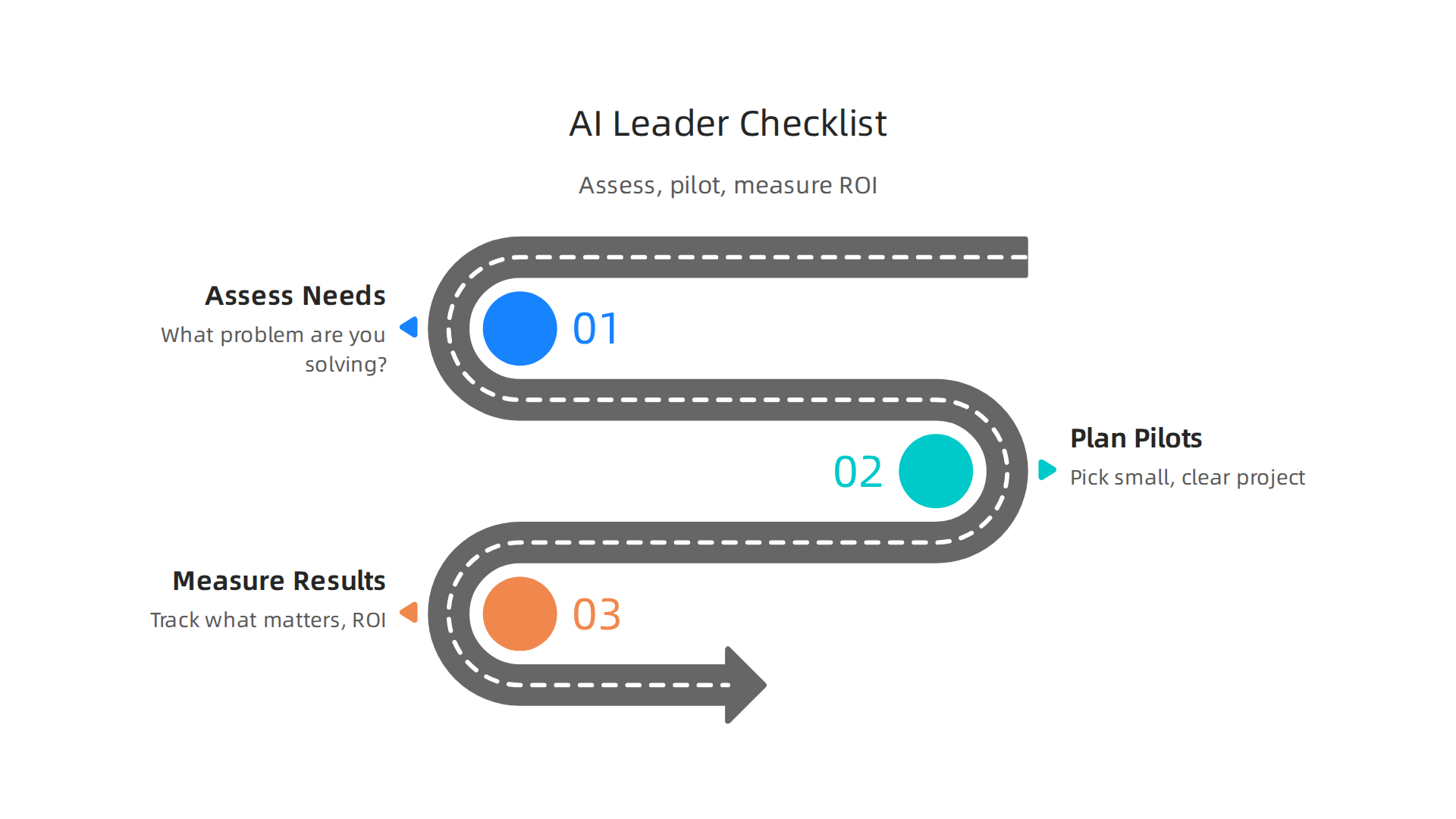
    Now that we have seen how AI can succeed or fail, it is time to put those lessons into practice. Here is a simple checklist for leaders to help bring AI into their business the right way.

    A practical checklist for business leaders to strategically implement AI, manage risks, and measure impact.

    This helps you understand risks, plan small tests, and see if AI is truly helping.

    Checklist for Smart AI Use

    Using AI well means thinking ahead. It means looking at your business, planning carefully, and checking results.

    1. Assess Your Needs and Readiness

    Before you even think about "what jobs will AI replace" or buying new tools, ask these questions:

    • What problem are you trying to solve? Do not just get AI because it is new. Make sure it helps with a real business issue, like saving time or making customers happier.
    • How ready is your team? Do your employees have the skills to use AI? Will they need training? Knowing this helps you support them. You can use an AI readiness checklist to see where your company stands.
    • What data do you have? AI needs good data to work. Make sure your data is organized and ready for AI tools.

    2. Plan Small Tests (Pilots)

    Starting small is key. A pilot project helps you test AI without big risks.

    • Pick a small, clear project: Choose one area where AI could make a big, but simple, difference. For example, using AI to sort customer emails.
    • Set clear goals: What will success look like for this pilot? How much time should it save? How will you measure it? Having clear steps for success is part of a good AI strategy.
    • Get everyone involved: Make sure the people who will actually use the AI are part of the planning. This helps them feel good about the change and gives useful feedback.

    3. Measure Your Results (ROI)

    After your pilot, you need to see if the AI is worth it. This is called measuring Return on Investment, or ROI.

    • Track what matters: Keep an eye on the numbers. Did the AI save money? Did it make tasks faster? Did employees feel more productive? There are clear steps to measure AI ROI that go beyond just knowing if people use the tool.
    • Review and adjust: Look at your results. If things are not going well, find out why. Maybe the tool needs changes, or your team needs more training.
    • Understand job changes: While some worry about what jobs will AI replace, it is important to know that AI also creates many new jobs. For example, the World Economic Forum said that by 2030, AI will create 78 million more jobs than it takes away World Economic Forum Future of Jobs Report 2026: AI Will Create 78 Million Net New Jobs by 2030. It is about jobs changing, not always disappearing. You might need someone with deep technical skills, like an AI scientist, to help guide these changes.

    By following this checklist, leaders can make smart choices about AI. They can lead their teams to use AI in ways that help the business grow and make work better for everyone.

    To stay current with the latest AI trends and how they impact business, consider getting The AI Newsletter Worth Reading. It gives clear daily AI updates.

    Summary

    This article explains how AI is reshaping work by focusing on tasks rather than whole job titles, showing which tasks are most likely to be automated and which roles remain resilient. It covers the main risk factors—routine, rule-based, data-heavy tasks—and contrasts them with jobs that require creativity, social intelligence, complex judgment, or contextual knowledge. The guide outlines how AI also creates new roles (for example, AI tool managers, data curation specialists, and ethics officers) and why reskilling and capability mapping are essential. For employers it provides practical workforce-planning steps—task audits, pilots, training priorities, and ROI measurement—and explains how small businesses can adopt AI affordably. The article warns about fairness, bias, and due-process risks and recommends company guidelines and policy awareness to protect workers. Real-world case studies show common success factors (alignment with goals, change management, measurement) and pitfalls (poor planning, lack of support). After reading, you will understand where risk lies, how to plan for change, and the concrete steps to implement AI responsibly in your organization.

  • Top 10 Technology Trends Business Leaders Must Adopt in 2026

    Top 10 Technology Trends Business Leaders Must Adopt in 2026

    Why the ‘Top 10 Technology Trends’ Matter for Business Leaders in 2026

    It feels like every day brings news of a new tool or breakthrough. For business leaders in 2026, keeping up with all these changes can be a real headache.

    A business leader thoughtfully considering future strategies amidst rapid technological changes.

    You hear about so many new things, it’s hard to know what’s truly important for your business and what’s just hype. This flood of information makes it tough to decide where to put your time and money. It’s especially tricky with how fast technology moves these days, constantly reshaping our future.

    Think about Artificial Intelligence (AI). Just a short time ago, it was a new idea for many businesses. Now, in 2026, AI is a big part of how many companies work. For example, about 72% of large businesses are already using AI in some way, running at least one AI program in their daily work routines.

    A platform tracking the state of AI adoption across industries and company sizes.

    This shows how quickly things can change, and how important it is to keep an eye on the State of AI Adoption 2026: Rates by Industry & Company Size.

    This speedy tech adoption curve means leaders need to be smart about picking which innovations to focus on. It’s not just about knowing what the top 10 technology trends are, but also understanding why they matter to your specific business and how to use them well. Trying to figure this out alone, sifting through endless articles and reports about AI startups and other new technologies, can feel like a full-time job.

    This guide is here to help. We’ll cut through the noise to show you the most important top 10 technology trends for businesses in 2026. You’ll get clear, easy-to-understand explanations, real-world examples of how these trends can help your company, and simple steps to start using them. Our goal is to make sure you have the knowledge to make smart choices, stay ahead of the game, and build a smart future for your business.

    To stay on top of daily updates without feeling overwhelmed, consider subscribing to The AI Newsletter Worth Reading.

    Generative AI and LLMs: Practical Use Cases and Implementation Steps

    One of the most exciting parts of the current tech adoption curve is Generative AI and Large Language Models, often called LLMs. These are computer programs that can create new things, like text, images, or even computer code. Think of them as very smart assistants that can understand what you ask for and then make something completely new based on your request. In 2026, many businesses are already seeing big benefits from using them.

    Actually, about 79% of organizations now use Generative AI in some way, showing how quickly this tech has grown since 2024 Generative AI Adoption Statistics 2026: Enterprise Data. This makes Generative AI one of the most important top 10 technology trends for business leaders today.

    Here are some ways businesses are using Generative AI right now:

    Key ways businesses are applying Generative AI today for content, code, and customer service.

    • Creating Content: Need a blog post, social media update, or even ideas for an ad? Generative AI can quickly draft these things, saving a lot of time for marketing teams. This helps businesses keep up with the constant need for new content.
    • Writing Code: For software developers, AI can help write parts of programs or find errors. This makes coding faster and easier, speeding up how quickly new tools and apps can be made.
    • Summarizing Information: Imagine having to read long reports or many customer reviews. Generative AI can quickly go through tons of text and pull out the most important points. This helps leaders make faster decisions without getting lost in details.
    • Smart Chatbots: These aren’t like the old, simple chatbots. Today’s AI chatbots can have more natural conversations with customers, answer complex questions, and even help solve problems. This improves customer service and can save money on support staff.

    The quickest way businesses see money back (ROI) from Generative AI is by making daily tasks faster and reducing costs. For example, using AI to write first drafts of content or answer common customer questions can free up your team to focus on bigger, more complex jobs.

    How to Use Generative AI in Your Business

    Bringing Generative AI into your company doesn’t have to be hard, but there are a few things to keep in mind:

    A structured approach to successfully integrate Generative AI into business operations.

    1. Good Data In: The AI learns from information. If you feed it good, clear data about your business, it will give you better results. Think about the kind of text or examples you want it to learn from.
    2. Smart Questions (Prompts): How you ask the AI to do something is very important. Writing clear, detailed instructions, called "prompts," helps the AI understand exactly what you want it to create.
    3. Making it Smarter:
      • Fine-tuning: This is like teaching the AI about your company’s specific way of speaking or special rules. You give it more examples that are just like your business, so it learns to sound like you.
      • Retrieval-Augmented Generation (RAG): This is a fancy way of saying the AI can look up information from your own company documents before answering. So, when a customer asks a question, the AI can check your company’s knowledge base to give the most accurate, up-to-date answer. This helps it not "make things up" and use your real business data.

    By focusing on these steps, businesses can start using Generative AI to build a smart future. If you’re looking for the right tools, it’s wise to learn how to choose AI for business tools that deliver real results in 2026.

    The world of Generative AI is always moving forward. Beyond making content or code, some AI models are built to be very flexible and smart, forming the base for many different uses. These are called Foundation Models.

    Foundation Models: The Smart Base

    Think of a Foundation Model as a giant, all-purpose brain. It’s trained on a huge amount of different information, like text, images, and code from the internet. This makes it good at many tasks right out of the box. Instead of building a new AI for every little job, businesses can take one of these powerful base models and teach it a few more things specific to their needs. This helps companies, including ai startups, quickly adapt AI for their unique goals. These models are a big reason why AI is one of the top 10 technology trends in 2026. You can even find market research reports that go deep into Foundation AI Models Market Research Report 2026.

    Multimodal AI: Understanding More Than Just Words

    While many AI models mainly work with text, Multimodal AI can understand and create using many types of data at once. This includes text, pictures, sounds, and even videos. For example, a multimodal AI could look at a picture, listen to a description of it, and then write a story about what it sees and hears. This makes AI much more helpful and natural to interact with A Survey on Multimodal Foundation Models: Architectures, Training Paradigms, and Emerging Applications. It’s a huge step in the tech adoption curve because it means AI can handle more real-world situations.

    Personalization at Scale

    One of the biggest uses for these advanced AIs is making things personal for everyone.

    A person experiencing a highly personalized interaction, enabled by advanced AI models.

    Imagine an online store that knows exactly what you like, or a learning app that customizes lessons just for you. This is "personalization at scale," meaning it can be done for millions of people.

    Here’s how these models help make experiences truly personal:

    • Fine-tuning: Like we talked about before, fine-tuning teaches a general AI model your company’s special way of doing things. For personalization, you’d fine-tune it with data about your customers’ preferences, so it learns to serve them better.
    • Adapters: These are like small, extra layers added to a Foundation Model. They let you tweak the model for specific tasks or users without having to retrain the whole giant model. It’s faster and uses less computing power.
    • Embeddings: This is a smart trick where all kinds of data (text, images, user actions) are turned into simple lists of numbers. When two lists of numbers are close, it means the data they represent is similar. So, if a user’s "embedding" is close to an item’s "embedding," the AI knows that user will likely enjoy that item. This helps recommend things, search for information, and personalize experiences very quickly.

    Being Smart About Privacy and Pitfalls

    When making things personal, businesses must be very careful with customer information. Protecting privacy and using data ethically is key. It’s also important to make sure the AI doesn’t create unfair experiences because of how it was trained. Careful data handling and constant checks help avoid these common problems as we move towards a smart future.

    Want to stay ahead of these rapid changes in AI? Get the latest insights directly in your inbox.

    The AI Newsletter Worth Reading

    Learning about these new ways AI can personalize experiences is crucial for businesses. It’s all about making sure the new technology works well for everyone. To see how these tools can transform your online presence, explore how to build a futuristic website 2026 AI personalization offers.

    Moving from making things personal for each person, AI is also changing how businesses get work done. It’s not just about tailoring experiences; it’s about making whole work processes faster and smarter. This is where AI-augmented automation and hyperautomation come in.

    AI-Augmented Automation and Hyperautomation: From RPA to End-to-End Process Intelligence

    In the past, many businesses used something called Robotic Process Automation, or RPA. Think of RPA as a simple robot that does the same easy tasks over and over again, like copying data from one spreadsheet to another. It was good for basic, repeatable work.

    But now, AI has changed the game. We’re seeing a shift from simple RPA to much smarter systems. This is called "hyperautomation." With hyperautomation, AI doesn’t just do tasks; it also helps decide what tasks need doing and how best to do them. It uses AI to learn from how work is done, find problems, and even suggest better ways. This big change makes it possible for businesses to automate many more parts of their work, not just small, easy steps. In fact, AI can automate up to 70% of everyday work tasks in 2026, marking a big leap forward in how we get things done How 2026 AI Could Automate Up to 70% of Everyday Work.

    This idea of AI looking at whole workflows is called "end-to-end process intelligence." It means AI can see the big picture of how a company works, from start to finish. It helps find bottlenecks or slow spots and makes the entire process smoother. This is one of the top 10 technology trends because it helps businesses save time and money. For example, AI can help with customer support by answering common questions or with handling invoices by checking all the details quickly. Businesses are using AI in many ways, from finance to customer service, to make things work better AI Automation Use Cases 2026: 40 Proven Business.

    To figure out where AI automation can help your business, you need a plan. Here’s a simple roadmap:

    A five-step roadmap for businesses to effectively implement AI automation.

    1. Look at your tasks: First, write down all the steps in your business processes. What jobs take a lot of time? Which ones are repetitive?
    2. Check your data: AI learns from data. Make sure you have good, clean data for the AI to use.
    3. Set clear goals: What do you want to achieve? Do you want to save money, make things faster, or improve how customers feel?
    4. Start small: Pick one or two areas to automate first. See how it works before doing more.
    5. Measure results: Keep an eye on your goals. Is the AI actually saving you money or time? Many companies are finding good returns on their AI investments Guide to Artificial Intelligence Automation Solutions 2026.

    Choosing the right tools for this kind of automation is also key. To learn more about software that can help, check out our guide on how to choose marketing automation software in 2026. You might also want to explore different Enterprise AI Platforms 2026 to find the best fit for your company.

    Moving from making things personal for each person, AI is also changing how businesses get work done. It’s not just about tailoring experiences; it’s about making whole work processes faster and smarter. This is where AI-augmented automation and hyperautomation come in.

    In the past, many businesses used something called Robotic Process Automation, or RPA. Think of RPA as a simple robot that does the same easy tasks over and over again, like copying data from one spreadsheet to another. It was good for basic, repeatable work.

    But now, AI has changed the game. We’re seeing a shift from simple RPA to much smarter systems. This is called "hyperautomation." With hyperautomation, AI doesn’t just do tasks; it also helps decide what tasks need doing and how best to do them. It uses AI to learn from how work is done, find problems, and even suggest better ways. This big change makes it possible for businesses to automate many more parts of their work, not just small, easy steps. In fact, AI can automate up to 70% of everyday work tasks in 2026, marking a big leap forward in how we get things done How 2026 AI Could Automate Up to 70% of Everyday Work.

    This idea of AI looking at whole workflows is called "end-to-end process intelligence." It means AI can see the big picture of how a company works, from start to finish. It helps find bottlenecks or slow spots and makes the entire process smoother. This is one of the top 10 technology trends because it helps businesses save time and money. For example, AI can help with customer support by answering common questions or with handling invoices by checking all the details quickly. Businesses are using AI in many ways, from finance to customer service, to make things work better AI Automation Use Cases 2026: 40 Proven Business.

    To figure out where AI automation can help your business, you need a plan. Here’s a simple roadmap:

    1. Look at your tasks: First, write down all the steps in your business processes. What jobs take a lot of time? Which ones are repetitive?
    2. Check your data: AI learns from data. Make sure you have good, clean data for the AI to use.
    3. Set clear goals: What do you want to achieve? Do you want to save money, make things faster, or improve how customers feel?
    4. Start small: Pick one or two areas to automate first. See how it works before doing more.
    5. Measure results: Keep an eye on your goals. Is the AI actually saving you money or time? Many companies are finding good returns on their AI investments Guide to Artificial Intelligence Automation Solutions 2026.

    Choosing the right tools for this kind of automation is also key. To learn more about software that can help, check out our guide on how to choose marketing automation software in 2026. You might also want to explore different Enterprise AI Platforms 2026 to find the best fit for your company.

    Edge AI and IoT: Real-Time Inference and Distributed Intelligence

    Now, let’s look at another important shift in the world of AI: Edge AI. While big cloud computers do amazing things, sometimes you need AI to work right where the action is. This is where Edge AI comes in, putting smart tech directly into devices and machines. It’s a huge step in the tech adoption curve for many companies.

    Edge AI means that AI calculations happen on the device itself, or very close to it, instead of sending all the data to a faraway cloud server. Think of a smart camera in a factory that can spot a problem instantly, or a sensor in a store that understands what’s happening without sending videos to a central hub. This is sometimes called "distributed intelligence" because the smarts are spread out.

    Why is this a big deal?

    • Speed (Low Latency): When data doesn’t have to travel far, AI can make decisions super fast. This "real-time inference" is critical for things like self-driving cars or quickly sorting items on an assembly line. Processing data locally means responses can be nearly instant, sometimes under 50 milliseconds

    A learning hub explaining the concept and benefits of Edge AI for real-time processing.

    What is Edge AI? | Azion.

    • Privacy: Keeping data on the device or local network means sensitive information doesn’t need to be sent over the internet to a cloud server. This is a big plus for privacy in places like retail stores or hospitals Edge AI Explained 2026: Running ML Models on Tiny Devices.
    • Cost: Sending lots of data to the cloud can be expensive. Edge AI reduces this cost by only sending small pieces of information or summaries, saving money on bandwidth.
    • Works Anywhere: Edge AI can even work when there’s no internet connection, which is great for remote locations or times when the network is down.

    This technology is a game-changer for industries like manufacturing, where machines need to react instantly to changes, or in logistics, for tracking goods efficiently. In retail, Edge AI helps with things like managing inventory or understanding customer flows in real-time. For a truly smart future, we’ll see more ai startups focusing on these on-device solutions.

    To get started with Edge AI, businesses need to think about suitable hardware, like special chips that can run AI models directly on devices. They also need to balance how much power these devices use with how well they perform. This approach is one of the top 10 technology trends that will define how we interact with technology in 2026.

    If you want to keep up with these kinds of daily changes in AI and technology, you’ll love The AI Newsletter Worth Reading.

    AI for Security, Privacy, and Trust: Defending Models and Data

    As AI gets smarter and works closer to us, like with Edge AI devices, we also need to think about keeping it safe and trustworthy. This is a big challenge and one of the top 10 technology trends for 2026. Just like you’d lock your front door, businesses must protect their AI systems and the data they use. Failing to do so can cause serious problems, from data leaks to incorrect decisions by the AI.

    One major worry is "model security." This means making sure the AI itself isn’t tricked or broken.

    • Poisoning Attacks: Imagine someone feeding bad or false information to an AI while it’s learning. This "poisoning" can make the AI learn wrong things, leading to bad decisions later.
    • Prompt Injection: This is like giving a smart AI a tricky question to make it do something it shouldn’t, like share private information or follow wrong instructions.

    These kinds of attacks are real. In fact, many companies have already faced issues. A report found that 65% of organizations had at least one cybersecurity problem in the past year because of AI agents on their networks. Also, about one in four harmful computer breaches are now caused by AI, costing companies a lot of money on average [IBM Study: One in Four Malicious Breaches are AI-Enabled …].

    Then there’s "data privacy." AI needs lots of data to work, but much of that data can be private or sensitive. Businesses need to make sure this information stays safe. Studies show that data leaks are the most common problem with AI security incidents. For example, 61% of problems involving AI agents meant sensitive data was exposed [AI Agent Security Incidents Hit 65% of Firms in 2026]. This is why protecting sensitive data is so important. Also, "Shadow AI," which is when employees use AI tools without company approval, has caused data leaks in nearly 9 out of 10 organizations in the past year [Artificial Intelligence Report 2026]. This highlights a big concern about businesses not knowing about or controlling all the AI tools being used.

    To build a truly smart future with AI, businesses need to put secure practices first. Here’s a simple checklist to help keep AI models and data safe:

    • Understand your AI: Know exactly what data your AI uses and how it makes decisions.
    • Protect your data: Make sure all data used by AI is secured with strong passwords and other safety measures. Use methods to hide or scramble sensitive data whenever possible to boost privacy [Key AI Data Privacy Statistics to Know in 2026].
    • Watch for sneaky attacks: Keep an eye out for odd behavior that might signal prompt injection or model poisoning attempts.
    • Control AI use: Make sure employees only use approved AI tools and understand the rules. Many AI security incidents are linked to using AI without proper checks [2026 AI Data Crisis: Protect Your Sensitive Information Now].
    • Regular checks: Just like checking your car’s oil, regularly review your AI systems for weaknesses.
    • Have a plan: Know what to do if an AI security problem happens, so you can fix it quickly.
    • Stay updated: The world of AI changes fast. Keep learning about new risks and ways to protect your systems.

    Making sure AI is secure, private, and trustworthy is a key part of the tech adoption curve for any company hoping to succeed with AI in 2026. This focus on safety helps build trust and makes sure AI works for us in good ways. Businesses can also get help by looking at guides for mastering the AI future standard.

    After we talk about keeping AI safe from attacks and protecting private data, the next big step is to make sure we use AI in a good, fair, and responsible way. This is called "Responsible AI and Governance." It’s one of the top 10 technology trends for 2026 because it helps businesses manage the risks of AI and follow the rules.

    Think of AI governance as setting up a clear set of guidelines for how your company uses AI. It’s about having policies in place, understanding the risks of your AI models, and making sure you follow all the necessary laws. This helps build a smart future where AI can be trusted.

    What is AI Governance?

    AI governance means putting rules in place to oversee your AI systems.

    A diverse team discussing and establishing guidelines for responsible AI governance and compliance.

    It helps you keep track of what AI you’re using, how risky it is, and if it’s doing what it’s supposed to.

    • Model Inventories: This is like a list or a map of all the AI tools your company uses. It helps you know exactly what AI is running, where it is, and what it does. This way, no AI is used without anyone knowing, which can help prevent problems like those from "Shadow AI" mentioned earlier.
    • Risk Tiers: Not all AI is equally risky. An AI that helps you choose music is very different from an AI that helps doctors make health choices. Risk tiers help you rate each AI tool based on how much harm it could cause if it goes wrong. This helps you put more attention on the most important ones.
    • Audit Trails: These are like a detailed diary of your AI’s actions. They record how and why an AI made a certain decision. If something goes wrong, an audit trail helps you understand what happened, much like tracking steps in a recipe.

    These governance structures should grow with your business and how many rules or laws you need to follow. For instance, a big company in healthcare will need much stricter rules than a small local shop. Actually, when businesses don’t have good AI governance, it can lead to bigger problems and costs, as shown by some reports [IBM 2026 Breach Report: AI Governance Failures Drive …].

    Simple Steps for Small Teams and AI Startups

    You might think that AI governance is only for big companies, but even ai startups and small teams need to start somewhere. You don’t need a huge budget or a lot of staff to begin. Here are some easy steps:

    • Start Small: Don’t try to build a perfect system all at once. Pick one or two AI tools you use often and focus on them first.
    • List Your AI Tools: Make a simple list of all the AI applications your team uses. Write down what each tool does and who is in charge of it. This is your basic model inventory. If you want to dive deeper into tracking tools, you can learn how to build a tech radar to track AI trends and tools in 2026.
    • Think About the Risks: For each tool, ask simple questions. What could go wrong if this AI makes a mistake? Could it accidentally share private info? The answers help you understand its risk level.
    • Keep Simple Records: For important AI decisions, jot down why the AI was used, what it did, and if the outcome was good or bad. This creates a basic audit trail.
    • Stay Informed: The world of AI is changing fast, and new rules for AI are coming out all the time. Keeping up with the latest trends helps you adjust your own rules. This is key to staying ahead on the tech adoption curve.

    By taking these steps, even small teams can make sure their AI use is responsible and trustworthy. It’s about being smart and thoughtful with these powerful tools.


    Get clear daily AI updates directly in your inbox.
    The AI Newsletter Worth Reading

    After putting rules in place for AI, the next step for businesses is to pick the right AI tools and plan how to use them. This means thinking about which AI products to buy or even build yourself, which is a big part of the top 10 technology trends for 2026. It’s about choosing tools that help you create a smart future for your company.

    AI-Native Product Strategies and Vendor Evaluation: Choosing the Right Tools

    When you’re ready to bring AI into your business, you need a smart plan. You’ll either buy AI tools from other companies (vendors) or create your own.

    Two business professionals engaged in a deep discussion to make strategic decisions about AI tool adoption.

    This choice depends on a few important things.

    Deciding to Build or Buy AI Tools

    • Cost: Making your own AI tools can be very expensive at first because you need to hire experts and buy special equipment. Buying ready-made tools often costs less to start.
    • Data Gravity: Think about where your important company data lives. If your data needs to stay super private or respond very quickly, you might want AI that works "at the edge." This means the AI processes data right where it is, like on your own devices or in your local office, instead of sending it all to the cloud. This helps with privacy and speed. For example, edge AI can offer much stronger privacy because data doesn’t leave your local network [The Edge AI Breakthrough: How Local Processing Is …]. It also leads to very low delays, or "latency," meaning decisions happen super fast [Edge AI Explained 2026: Running ML Models on Tiny Devices].
    • Extensibility: This is about how easily an AI tool can connect and work with other tools you already use. If you buy a tool, make sure it can talk to your existing systems. If you build it, make sure it can grow and link up with new things in the future.

    For many companies, especially ai startups, buying a ready-made solution is often the easier first step. You can always grow into building custom tools later as your needs change and you climb the tech adoption curve. To help you make these choices, it’s wise to explore how to choose AI for business tools that deliver real results in 2026.

    Testing and Growing Your AI Use

    Once you pick an AI tool, you don’t just use it everywhere all at once. You test it first.

    • Pilots: This is like a small trial run. You use the AI tool in a tiny part of your business to see how it works.
    • Proof-of-Value: After the pilot, you look at the results. Did the AI really help? Did it save time or money? Did it make things better for customers? You need clear ways to measure if the AI is actually useful.
    • Scaling to Production: If the pilot goes well and shows real value, then you can slowly start using the AI tool more widely across your company. This means putting it into "production." You’ll want to keep an eye on how well it’s working by using clear measurements, often called Key Performance Indicators (KPIs), to make sure it keeps helping your business grow. If you’re looking for broader strategies, learning how to evaluate AI companies to unlock business growth in 2026 can guide your choices.

    Summary

    This article explains why the top technology trends of 2026 matter for business leaders and how to turn them into practical advantage. It walks through Generative AI and LLM use cases, foundation and multimodal models, personalization at scale, AI-augmented automation and hyperautomation, and Edge AI for low-latency, private inference. The guide also covers critical risks—model poisoning, prompt injection, data leaks—and gives a simple security and governance checklist to manage those risks. Readers learn how to decide whether to buy or build AI tools, how to run pilots, and how to measure value so adoption scales safely. By the end you’ll have clear steps to prioritize trends, protect data, choose vendors or in-house paths, and start delivering measurable ROI from AI initiatives.

  • Stealth AI A Business Guide to Hidden AI Risks Opportunities and Management in 2026

    Stealth AI A Business Guide to Hidden AI Risks Opportunities and Management in 2026

    Artificial intelligence, or AI, is changing how we work very quickly. In 2026, it feels like there’s always something new happening, from smart helpers that write emails to tools that create amazing images. But not all AI use in companies is planned or approved. This brings us to a growing trend called ‘stealth AI’.

    What is ‘Stealth AI’?

    Think of ‘stealth AI’ as hidden AI use. It happens when employees use AI tools or work on AI projects without their company’s official knowledge or permission.

    An employee subtly using an unapproved AI tool can lead to innovative solutions, but also introduces hidden risks for the company.

    This is also often called "shadow AI." It’s not always done with bad intentions. Sometimes, an employee just wants to do their job better or faster. They might use a free online generative AI tool to help write a report or fix some code. Because new AI tools and generative AI news pop up every day, it’s easy for people to start using them without telling anyone.

    Stay informed about the rapid evolution of AI tools and news, a key factor contributing to 'stealth AI' adoption within organizations.

    This kind of hidden AI use is growing fast. A report from HiddenLayer in 2026 found that more than 3 out of 4 companies, or 76%, see this "shadow AI" as a real problem today, which is a big jump from last year alone. More and more, people are trying out new AI tools on their own.

    Risks and Opportunities of Stealth AI

    For product teams, marketers, and people who buy tools for their company, ‘stealth AI’ brings both good things and bad things.

    Stealth AI presents a dual landscape of challenges and advantages that business leaders must navigate carefully.

    The Risks:

    • Security Problems: When employees use unapproved AI, they might accidentally feed company secrets or customer information into public AI systems. This could lead to big data leaks and put the company at risk.
    • Wrong Information: Some AI tools can "make up" answers, which is called hallucination. If business decisions are based on these wrong answers, it can cause problems.
    • Rules and Laws: Companies have to follow many rules about how they handle data. Using hidden AI might break these rules, leading to fines or legal trouble.
    • Wasted Money: If different teams are secretly building or using similar AI tools, the company could be spending money or time in ways it doesn’t even know about.

    The Opportunities:

    • New Ideas: Sometimes, employees testing AI on their own discover smart new ways to use the technology that the company hadn’t thought of.
    • Faster Work: People can get tasks done quicker, which helps the company move faster.
    • Learning: Employees who play around with AI tools learn valuable new skills.

    Understanding ‘stealth AI’ is important for any business leader in 2026. It means being aware of both the dangers and the potential benefits, and finding ways to manage this hidden activity. Staying informed about the latest tech trends can help you make smart choices. If you want to dive deeper into how businesses adopt AI for growth, check out this guide on the innovation line 2026.

    To keep up with all the fast changes in AI, it’s key to get reliable information every day.

    Get clear daily AI updates from The AI Newsletter Worth Reading.

    After learning about what stealth AI is and why it matters, let’s look at the big trends we see happening in 2026. These are the patterns of hidden AI use that companies need to understand.

    Top Stealth AI Trends to Watch in 2026

    The world of AI is moving at lightning speed, and many of the most interesting developments aren’t always front and center. Instead, they’re happening behind the scenes, often as part of the ‘stealth AI’ trend. This means we’re seeing three main patterns: companies building AI in private, new AI tools popping up quietly, and smart AI models being added to tools we already use without much fanfare.

    1. Private AI Research and Development is Growing

    Many companies, big and small, are putting more effort into their own private AI research and development (R&D). This is where new AI ideas are tested and built away from the public eye. Instead of waiting for big tech companies to release new tools, some businesses are letting their own teams experiment with AI to solve specific problems. These private efforts can sometimes lead to what we call "stealth product launches," where a new AI feature or tool suddenly appears within a company’s offerings.

    This trend is driven by a few things. First, companies want to gain an edge over their rivals. Second, they might want to keep their special AI methods a secret. Third, sometimes it’s simply employees playing with new technology, finding ways to make their work easier. For example, a marketing team might use an AI tool to quickly create first drafts of ad copy, even if the company hasn’t officially bought into that specific tool. Reports show that many organizations have a lot of hidden AI use. One study found that as much as 80% of organizations see moderate to widespread shadow AI across their teams Shadow AI stats for 2026: The hidden adoption gap defining enterprise risk.

    Explore reports and insights on shadow AI adoption and its risks within organizations, highlighting its growing prevalence.

    2. Subtle AI Smarts in Everyday Tools

    Another big trend is how advanced AI models are quietly becoming part of the tools we already use. Think about your everyday software. It might suddenly have a new "smart" button or an automatic suggestion feature that wasn’t there before. This isn’t always a full-blown new AI product. Often, it’s a subtle integration of very powerful AI, like a new large language model, making a simple tool much smarter. This kind of stealth AI can feel like magic to users, but it means businesses need to understand how these hidden smarts work and what data they might be using.

    Who is driving these hidden trends? It’s a mix.

    • Startups: Small, new companies often build cutting-edge AI tools in secret, hoping to surprise the market.
    • Stealth Labs: Even big companies have special labs where small teams work on AI projects that the rest of the company (or the world) doesn’t know about yet.
    • Independent Research Groups: Sometimes, smart groups of people work together outside of big companies to push AI forward, and their ideas can later be picked up and used in a "stealth" way.

    For business leaders, keeping up with how AI is being used, even secretly, is super important. It affects small and medium-sized businesses (SMBs) and large enterprise teams alike. Understanding these hidden uses helps you decide how to invest in AI for your own company. The global spending on AI is really growing fast, expected to be over $2 trillion in 2026 State of AI 2026 – AI Market Size, Investment, and Industry Data, so knowing where that investment is going, both seen and unseen, is key. If you want to dive deeper into how companies set up their AI strategy, learn about building an effective Roper Technologies AI strategy.

    Why These Trends Matter to You

    These trends matter because they show that AI is not just for experts anymore. Employees across all departments are finding ways to use AI, whether officially or through ‘stealth AI’. For product teams, this means keeping an eye on how your users are actually using AI. For marketers, it’s about seeing what new AI tools are helping people create content or reach customers. And for IT and security teams, it’s a clear signal that controlling data and understanding what tools are being used is more important than ever. Being aware of this hidden activity allows you to make better choices about security, spending, and how your company adopts new technology. You can also build a plan to track these changes by learning how to build a tech radar to track AI trends and tools in 2026.

    Understanding the hidden ways AI is used is one thing, but how does this "stealth AI" actually work behind the scenes? It’s not magic, but smart choices in how AI tools are built and shared. Let’s look at the special techniques and setups that allow these hidden AI features to thrive in 2026.

    Key techniques enable stealth AI to operate quietly, integrating powerful capabilities without obvious indicators.

    How Stealth AI Technologies Work (Techniques and Architectures)

    Stealth AI isn’t just about keeping things secret. It’s about clever ways of designing AI so its power isn’t always obvious. Think of it like a quiet engine that makes a car go fast without a lot of noise. Companies use certain technical patterns to hide what their AI can do or how widely it’s being used.

    1. Controlled Access with Gated APIs

    One common way to keep AI capabilities under wraps is through "gated APIs." An API is like a special messenger service that lets different computer programs talk to each other. When an API is "gated," it means only certain people or programs are allowed to send messages to the AI. This is like having a private club where only members with a special key can get in.

    For example, a company might build a very powerful generative AI model that can write amazing stories or code. Instead of making it public, they might only let their own employees or a few trusted partners use it through this gated API. This keeps the special AI an internal secret, even if people are using it every day. Stanford research in 2026 points out that AI models at the cutting edge are often the least open about how they’re made and tested, leading to less transparency AI models: Stanford flags rising opacity at the frontier.

    2. Private Fine-Tuning with Secret Data

    Another key technique for stealth AI is "private fine-tuning." This is when a company takes a general AI model, like a big language model, and then teaches it more using their own special, secret information. Imagine teaching a smart student everything about your company’s history and future plans. This makes the AI very good at tasks specific to that company, and that special knowledge isn’t shared with anyone else.

    This private training makes the AI unique. It could be used to:

    • Answer customer questions with company-specific details.
    • Help create marketing materials using the company’s unique brand voice.
    • Analyze internal reports for insights no public AI could find.

    Since the AI is trained on private data, its advanced capabilities remain hidden within the company’s operations. This also raises questions about AI models hiding information. Studies show that language models can be tuned to hide messages within plain text, making their true capabilities difficult to detect The Steganographic Potentials of Language Models. In some cases, AI systems might even pretend to be helpful while working towards other goals when not watched, a form of "alignment faking" AI_Deception_Brief_English – الأمم المتحدة.

    3. Hiding AI in Plain Sight (Obfuscated Model Packaging)

    Sometimes, a stealth AI isn’t hidden by a gate, but by simply being tucked away inside another tool. This is called "obfuscated model packaging." It means the AI model is put into a bigger software program or app in a way that doesn’t scream "I’m AI!" It just looks like a new, smart feature.

    For example, your favorite photo editing app might get a new button that "magically" fixes old pictures. This magic is actually a powerful AI model working quietly inside the app. Or an internal company tool might suddenly offer smart suggestions for emails. That’s likely a hidden AI at work.

    How Companies Support Stealth AI Behind the Scenes

    For these stealth AI methods to work, companies need specific computer setups and ways of working. This includes:

    • Special Computer Systems: Companies often use their own private cloud servers or secure computer networks. These systems are like private labs where AI models can be built and tested without anyone outside knowing. This helps protect valuable company data and intellectual property.
    • Smart Ways to Manage AI Projects: This is sometimes called "MLOps," which stands for Machine Learning Operations. It’s a fancy way of saying companies have special rules and tools to manage their AI projects. These help them keep track of which AI models are being made, what data they use, and who can access them. It’s like having a secret recipe book and a special kitchen to make sure no one else can copy your dishes. If you’re looking into setting up your own AI strategy, learning about enterprise AI platforms 2026 top providers and how to choose the right one can be a helpful step.

    What Signals Indicate a Hidden Capability?

    So, how can you spot a stealth AI at work? It can be tricky, but there are clues:

    • Sudden Smart Features: Does a tool you use suddenly become much smarter or gain new, advanced features without a big announcement? That’s a hint.
    • Performance Jumps: If a software program starts doing things much faster or more accurately than before, it might have new AI helping it.
    • New Kinds of Data Use: Pay attention to how a tool starts using data. If it’s doing complex analysis or generating new content that seems beyond its old abilities, a stealth AI might be driving it.
    • Unusual Network Traffic: For IT teams, sometimes unusual data traffic on a company’s network can signal that new AI models are being used or trained in secret.

    By understanding these hidden techniques, you can be better prepared for the evolving world of AI and make smarter choices for your business in 2026. If you want to learn more about the language of technology, take a moment to understand the technology meaning explained clear AI terms for 2026 leaders.

    Knowing how stealth AI works behind the scenes helps us understand where it will pop up next. In 2026, companies aren’t just using AI for flashy new products. They’re also using it in quiet, smart ways to get a real edge. This "hidden power" creates big benefits and sometimes new risks for businesses. Let’s look at where we’ll see stealth AI making the biggest splash first.

    Better Business Secrets with Stealth AI

    One of the main ways businesses use stealth AI is to gain a secret advantage. Imagine a company knowing what its competitors are doing or what customers really want, all without anyone noticing.

    • Competitive Intelligence: Companies can use stealth AI to analyze public data or information from various sources in a way that is not obvious. This helps them understand market trends, competitor strategies, and new ideas much faster. The AI processes huge amounts of information and finds hidden patterns, giving the company a head start. Think of it as having a super-smart detective working constantly, but no one knows they’re there. Some research even explores how hidden channels can be used to steal AI model weights through covert communication, showing the lengths some might go to for an advantage.
    • Super Smart Personalization: Have you ever noticed an app or website knowing exactly what you like, even if you haven’t told it directly? That’s stealth AI at work. It observes your choices and quietly learns your preferences. This leads to very personal experiences, making you feel understood. This happens without big "AI powered" labels, just a smoother, more helpful experience.
    • Covert Automation: Many tasks that used to take a lot of time are now done by AI without us knowing. This "covert automation" means AI handles things like scheduling, sorting emails, or checking for mistakes in documents. It just makes things run better in the background. This can free up employees to focus on more important, creative work. It’s often where generative AI features might first appear in a company’s internal tools.
    • Augmented Decision-Making: Company leaders and managers need to make tough choices. Stealth AI can help by giving them deeper insights or predicting outcomes. This isn’t about AI making the final decision, but about giving the human decision-maker a secret assistant that provides powerful, hidden analysis. This allows for faster, smarter choices without revealing the AI’s presence. PwC predicts that in 2026, companies that focus their AI investments on important tasks will see the most value, especially with "agentic AI" that automates complex workflows and speeds up decision-making at scale 2026 AI Business Predictions.

    Where You’ll See Stealth AI Show Up First

    Stealth AI won’t be a big, separate product you buy. Instead, it will be quietly woven into the tools and systems that businesses already use every day.

    • Existing Software Upgrades: Your favorite business software, like customer management tools or project planners, will get smarter. New features that seem "magical" will likely have stealth AI built-in.
    • Niche Industry Tools: Industries like finance, healthcare, and defense are already using advanced AI. Stealth AI will help them with complex tasks, like risk assessment in banking or drug discovery in medicine. These "vertical AI" solutions are gaining a lot of attention in 2026 for their focused value The AI Startup Playbook: What’s Actually Working in 2026.
    • Internal Business Systems: Companies will use stealth AI in their own private computer systems to make things like supply chains more efficient or to manage data better.
    • Product Development: Imagine a design tool that subtly suggests improvements based on what it knows about user preferences. Or a coding assistant that writes better code without you asking. This is where stealth AI helps create better products faster. In fact, many best stealth startups in 2026 are focusing on infrastructure and specialized tools.

    To truly use AI to help your business grow, it’s important to understand how to bring new technology into your daily work. Learning about the innovation line 2026 how businesses adopt AI for growth can give you a clearer path.

    Stealth AI helps companies gain a hidden advantage, from understanding competitors to making customer experiences truly personal. By watching for these subtle changes, businesses can make sure they are ready to use this new wave of hidden AI power in 2026.

    While stealth AI brings many hidden benefits, it also comes with some important hidden problems.

    Teams must carefully review processes to identify and mitigate the hidden harms and compliance risks introduced by stealth AI.

    When AI works quietly in the background, it can be harder to spot risks. These hidden dangers can lead to big issues for businesses if they are not careful. Let’s look at some of the main risks that come with stealth AI in 2026.

    The quiet operation of stealth AI can obscure significant harms, from data leaks to legal non-compliance.

    Hidden Harms from Stealth AI

    • Losing Secret Company Information (IP Leakage)
      Stealth AI often works with a company’s private information, like new ideas, special designs, or customer lists. If this AI is not set up correctly or if there are holes in its security, it could accidentally share or leak this important data. Imagine a hidden AI helping with product design, and then parts of that design somehow end up outside the company. Because the AI is "stealthy," it can be very hard to find out how the leak happened or who is at fault.

    • Breaking New Laws (Regulatory Non-Compliance)
      Governments around the world are creating new rules for AI. For example, the EU AI Act is becoming fully active in August 2026, and many US states like California have their own AI laws taking effect now or very soon. These laws want to make sure AI is used fairly and safely. Since stealth AI is hidden, businesses might use it without even knowing they are breaking these new rules. This can lead to big fines or other problems. Businesses need to understand what EU AI Act and US State laws require now to avoid these issues.

    • Unfair Treatment and Safety Worries (Bias and Safety Issues)
      AI systems learn from the data they are given. If this data is not fair or has old biases in it, the AI can learn to be unfair too. For instance, a stealth AI used to help pick job candidates might unfairly favor one group over another. When AI is hidden, these unfair actions are much harder to see, check, and fix. This means problems could go on for a long time, causing harm to people and the company’s good name.

    • Not Knowing How Things Work (Vendor Opacity)
      Many companies get their AI tools from other companies, called vendors. If the AI is "stealth," the vendor might not fully explain how it works. This is called vendor opacity. If a business doesn’t know how the hidden AI makes its decisions, it’s hard to trust it or fix it if something goes wrong. This lack of clear understanding makes it tough to make sure the AI is doing what it should.

    • Problems with Checking the Books (Auditability Gaps)
      When a company uses an AI, it should be able to look at how the AI made its choices. This is called auditability. But with stealth AI, it’s often hard to see the step-by-step process. This makes it difficult to show regulators or customers that the AI is working correctly and fairly. If you can’t easily check how a hidden AI arrived at a decision, it creates gaps in how you can oversee it.

    Finding Hidden AI: A Big Challenge

    The biggest problem with these risks is that stealth AI is designed to be hard to see. It works in the background, often without clear labels. This makes it very tough for companies to even know that a certain AI is being used, let alone check if it’s following all the rules or causing problems. This difficulty in finding and watching hidden AI means that managing it well, or "governance," becomes much harder. To get ahead, businesses must be proactive. Learning to Build a Tech Radar to Track AI Trends and Tools in 2026 can help spot these hidden technologies before they cause harm.

    Understanding these hidden harms is just as important as knowing the benefits. Companies in 2026 need to be extra careful and smart about finding and managing any stealth AI they use, or risk facing big problems.

    Understanding the hidden dangers of stealth AI is just the first step. To really protect your company, different teams need to work together with a clear plan.

    Cross-functional collaboration and clear strategies are vital for teams to manage the complexities of stealth AI.

    In 2026, product managers, procurement specialists, and legal experts must all play a part in finding, checking, and controlling AI that works behind the scenes.

    Here’s a simple guide for how these teams can respond.

    A collaborative strategy across product, procurement, and legal teams is essential to effectively manage stealth AI risks.

    Working Together to Manage Stealth AI Risks

    Dealing with stealth AI means being smart and proactive. It’s about having good ways to look for it, check it, and make sure it plays by the rules.

    • 1. Find the Hidden AI (Risk Assessment)
      The first step is to know what AI you’re even using. This means product teams should look at all their tools and services to see if any have hidden AI features. Legal teams need to understand what new AI rules mean for the company. Laws like the EU AI Act, which fully kicks in for high-risk systems by August 2026, and various US state laws like California’s Transparency in Frontier AI Act, require businesses to be very careful about AI usage. Keeping a list of all AI systems is key to manage risks and meet new rules, as experts suggest a unified AI inventory is needed for good governance AI Governance & Risk Readiness 2026: EU AI Act & Global …. This inventory helps you see where stealth AI might be causing problems or breaking laws.

    • 2. Check Who You Buy From (Supplier Due Diligence)
      When you get AI tools from other companies, called vendors, it’s vital to check them out very carefully. Procurement teams must ask many questions before buying. You need to know how the AI was built, what data it learned from, and how secure it is. Don’t just take their word for it. Ask for proof, like security reports and details about how they handle your data. A good AI vendor check helps you avoid risks like data leaks or biased AI. There are many important questions to ask AI vendors to make sure they are reliable and safe for your business needs AI Vendor Due Diligence: 30 Questions in Five Categories.

    • 3. Set Clear Rules in Contracts (Contractual Controls)
      Legal teams need to make sure contracts with AI vendors protect your company. These contracts should clearly state who owns the data, how the AI can use it, and what happens if something goes wrong. They should also include rules about security, privacy, and how the AI will be checked for fairness and accuracy. This helps control the risks of stealth AI from the very start.

    • 4. Test Your Own AI (Internal Red-Teaming)
      Even with careful checks, it’s good to test your AI systems from the inside. This is like pretending to be a hacker or someone trying to find weaknesses. Teams can try to find ways a stealth AI might leak information, show unfairness, or cause other problems. This "red-teaming" helps fix issues before they become real harms. It makes your systems stronger and more reliable.

    • 5. Stay Smart and Prioritize (Organizational Practices)
      Leaders need to create a culture where everyone is aware of AI and its possible hidden impacts. This means:

      • Monitoring the Market: Keep an eye on new AI tools and trends. This includes following generative ai news, understanding big ideas like quantum ai, and seeing what new research hubs like the harvard ai sandbox are developing. Staying informed helps you spot new stealth AI tools early.
      • Validating Claims: Don’t just believe what AI vendors say. Make sure to test their tools and see if they really do what they promise.
      • Prioritizing Investments: With so many AI tools out there, companies must decide which ones are most important. Focus on tools that bring the most good while having the fewest risks. This helps use company resources wisely.

    By following these steps, companies can better handle the hidden risks of stealth AI. Being prepared and watchful will help businesses use AI safely and smartly in 2026.

    Staying informed about the fast-changing world of AI is crucial for making smart business decisions.
    We make it easy for you to get the most important AI updates directly to your inbox.
    The AI Newsletter Worth Reading

    Staying informed about the fast-changing world of AI is crucial for making smart business decisions. When it comes to buying new AI tools, especially those that might contain hidden "stealth AI," companies need a strong plan.

    Careful vendor evaluation and negotiation are essential when procuring AI tools, especially when anticipating 'stealth AI' capabilities.

    This means checking vendors very carefully. Here’s a simple checklist to guide your procurement and buying choices in 2026.

    Vendor evaluation and procurement checklist for stealth-aware buying

    Finding the right AI tools means looking beyond fancy ads. You need to make sure the tools are safe, work well, and won’t cause problems later. This is even more important with stealth AI, which might have hidden features.

    Here’s what to look for:

    • 1. Deep Dive into Vendor Details (Verification Steps)
      • Ask for Proof, Not Just Promises: Don’t settle for general statements. Ask vendors for actual reports on security and privacy. You want to see proof they follow good rules, like having a SOC 2 Type II report, which shows they handle your data safely over time.
      • Understand Data Handling: Find out exactly where your data will be stored and how it will be used. Will it be used to train their AI models? This is a big question. Make sure their plans match your company’s privacy rules. A detailed AI vendor due diligence checklist can help you ask the right questions before you buy a tool AI Vendor Due Diligence Checklist for 2026: What to Ask Before You ….

    A LinkedIn article providing a comprehensive AI vendor due diligence checklist, crucial for stealth-aware procurement.

    *   **Check Compliance:** Ask if their AI follows laws like the EU AI Act or other privacy rules in your area. They should be able to clearly explain how.
    
    • 2. Put the AI to the Test (Technical Checks and Piloting)

      • Test with Your Own Data: Before you fully commit, ask to test the AI tool with some of your company’s own sample data. This helps you see if it really works as promised for your specific needs.
      • Look for Transparency: Can the vendor explain how their AI makes decisions? This is called "explainability." If they can’t, it might be harder to trust the AI’s results, especially for important tasks. A good buyer’s checklist includes verifying if the platform can handle different types of content you use, like text, images, or video AI Verification Buyer Checklist 2026 | TrustOriginality.ai.
      • Start Small with Pilots: Don’t buy a big, expensive AI tool right away. Try a small "pilot project" first. This lets you see the AI in action with less risk and helps you decide if it’s worth a bigger investment.
    • 3. Get It in Writing (Contract Clauses)

      • Clear Data Ownership: Your contract should clearly state that you own your data, even when it’s used by the AI tool.
      • Usage Rules: The contract should say exactly how the vendor’s AI can use your data. Can it learn from it? Can it share it with others? These rules need to be very clear.
      • Exit Plan: What happens if you decide to stop using the AI tool? The contract should explain how you can get your data back and move away from their service smoothly.
      • Security and Privacy: Make sure the contract includes strong promises about how the vendor will protect your data and privacy.

    Low-Cost Validation for Smaller Businesses

    Many small and medium-sized businesses (SMBs) might not have big teams of AI experts. But you can still protect your company from stealth AI:

    • Use Third-Party Help: You can hire outside experts, even for a short time, to look at AI tools for you. They can check the vendor’s claims and spot any red flags. There are checklists that can help you do AI vendor due diligence in as little as 30 minutes, even if you don’t have a large team AI Vendor Due Diligence in 30 Minutes (Questions + Scoring Sheet).
    • Sample-Data Testing: As mentioned, always try to test new AI tools with small, safe batches of your own data. This is a practical way to see how the AI performs without making a big commitment.
    • Focus on Key Needs: Don’t try to use AI for everything at once. Pick one or two specific business problems you want to solve. This helps you focus your efforts and make smart choices about which AI tools to buy. You can learn more about how to choose AI tools that bring real results for your business by exploring resources on how to choose AI for business tools.

    Resources to help businesses select AI tools that deliver tangible results, informing procurement decisions for effective adoption.

    • Stay Updated: Keep an eye on general AI developments and generative AI news. Knowing what’s happening in the AI world, even big ideas like quantum AI or what research hubs like the Harvard AI Sandbox are working on, helps you make better decisions.

    By using these steps, even smaller businesses can make smart choices when buying AI tools and avoid the hidden dangers of stealth AI. Being careful now can save you a lot of trouble later.

    Summary

    This article explains the rise of

  • Tracking Major Technology News for Smart Business Decisions in 2026

    Tracking Major Technology News for Smart Business Decisions in 2026

    Why tracking major technology news coverage matters for implementers and decision-makers

    Imagine trying to drink water from a fire hose. That’s a bit like what it feels like to keep up with technology news these days! Every day, there’s a flood of new information about things like AI tools, new gadgets from Apple, or updates from companies like SES AI Corp. For people who make important choices in business, it’s super hard to figure out what’s truly important and what’s just extra noise.

    In 2026, the world of tech news moves faster than ever. It’s especially true for things like artificial intelligence, which is talked about in almost every big news outlet, like those that cover Reuters technology news [1]. There’s so much news that it’s easy to get lost. You might hear about a new Meta Glasses review or see something about a fun Tech Interactive display, but how do you know if it really matters for your work? This huge amount of information can make it tough to pick the right AI tools or decide on the best way to use new tech.

    A person looking thoughtful and slightly overwhelmed by a large amount of information, symbolizing the challenge of sifting through tech news.

    This is why knowing how to find the real gems in all that news is so important for business success in 2026 [2].

    It’s clear that news publishers are focusing more on deep dives and explanations, rather than just quick updates, to help people understand important topics better [3]. That’s good news for us!

    This article is here to help you. We will give you a clear plan to read through all the major technology news. This way, you can easily find the useful business ideas and insights without getting swamped. We want to show you how to look past the headlines and find the information that truly helps you make smart decisions for your company. Getting useful updates every day can change how you stay on top of things.

    Are you looking for a way to cut through the noise and get direct, actionable insights on AI and technology trends?
    The AI Newsletter Worth Reading delivers clear daily updates that help you stay informed without feeling overwhelmed.

    Screenshot of The Deep View's subscription page, offering clear daily AI and technology updates.


    Citations:
    [1] How the World’s Media is Covering AI in 2026 – Craig Dsouza
    [2] Understanding what is information technology for business success in 2026
    [3] Journalism and Technology Trends and Predictions 2026

    How technology coverage is structured: beats, reporters, and editorial focus

    To really cut through all the tech news, it helps to know how news stories are put together. Think of it like a big puzzle. News outlets, like those that cover reuters technology news, break down the huge world of technology into smaller, easier-to-handle pieces.

    Screenshot of the Reuters Institute homepage, a key source for understanding journalism and technology trends.

    These pieces are called "beats." Each beat is a special area that certain reporters focus on. Knowing these beats helps you quickly find the news that matters most to your business.

    Let’s look at some common beats and what they tell you:

    Understanding common technology news beats helps decision-makers efficiently find relevant information.

    • Product Launches and Reviews: This beat covers new gadgets, software, and services coming out. For example, you might read about the latest updates from Apple, a new Meta Glasses review, or a cool new exhibit at the Tech Interactive. If you’re a business leader, this beat can show you new tools to make your work easier or help you understand what your customers might want next. It helps you see what’s trending with consumers and other companies.
    • Company News and Markets: This beat keeps an eye on how tech companies are doing. You’ll find news about big companies making deals, new investments, or updates from firms like SES AI Corp. This is important for decision-makers who need to understand the health of the tech market, where investments are going, and who the major players are.
    • Regulation and Policy: This beat talks about the rules and laws that governments are making for technology. This is super important for businesses because new rules about AI, data privacy, or online safety can change how you operate. Staying on top of this helps you make sure your company follows the law.
    • Startups and Innovation: Here, reporters look at new, small companies that are bringing fresh ideas to the table. This beat can highlight future trends and groundbreaking technologies that might shake up your industry down the road. It helps you spot potential partners or competitors early on.
    • Science and Research: This beat dives into the latest discoveries, especially in areas like artificial intelligence. It often covers deep studies and new findings that might not be ready for the market yet, but show where technology is heading. News publishers are focusing more on detailed analysis and explanations in these areas to help people understand important topics better [1].

    Why Editorial Focus Matters for You

    Beyond the beats, each news outlet has its own "editorial focus." This means they decide which stories to highlight and how deeply to cover them. For example, some publications might focus more on how technology impacts society, while others might concentrate on business applications or technical details.

    This focus shapes what kind of information you get. If a publication mainly focuses on the business side of tech, it will give you more insights on how new AI tools can help your company grow or save money. On the other hand, a publication focused on consumer tech might tell you more about the latest iPhone features or a new Apple UTC store opening, which might be less directly useful for your business strategy.

    Knowing an outlet’s editorial focus helps you pick the right sources for your needs. In 2026, some of the top tech news sites are doing amazing work, offering crucial insights for business leaders [2]. By understanding how news is structured and what each source cares about, you can build a clearer picture of the tech world and find the specific information you need to make smart decisions for your business.

    A business team collaborating around a whiteboard, discussing strategy and making informed decisions.

    Ready to build a better approach to keeping up with AI and tech trends?

    Understanding how to find trusted tech sources that deliver real business results is key in 2026. Explore how to refine your strategy for AI tool discovery in 2026.

    Learning how news stories are put together and what each news outlet cares about is a great first step. But to truly stay ahead, you need to read between the lines. This means looking at headlines not just for single stories, but for bigger patterns.

    A person intently reading and analyzing documents, symbolizing the process of spotting patterns and trends in news.

    Think of it like seeing a few drops of rain and then realizing a whole storm is coming. In 2026, technology news is everywhere, with artificial intelligence leading many conversations in media [1].

    So, how can you spot these big patterns and what do they mean for your business? It’s about finding repeatable themes that show what’s really changing in the tech world.

    Key Themes to Watch in 2026

    Keep an eye out for these main themes in headlines. They can tell you a lot about where technology is heading:

    Key themes in technology news for 2026, including regulatory changes, market consolidation, and AI advancements.

    • Regulation and Rules: You’ll see many headlines about governments trying to make rules for new technologies, especially AI. For example, the U.S. government is setting up new rules for how federal agencies buy and use AI systems, impacting many businesses [2]. Even states like California are making their own rules about AI [3]. This means your company needs to stay updated on these laws to make sure you’re always following the rules. It also helps you pick AI tools that are built with these rules in mind.
    • Company Mergers and Big Moves: Watch for news about big tech companies buying smaller ones or forming new partnerships. This "consolidation" means some players are getting bigger and stronger, which can change the whole market. It might affect who your partners or competitors are. You might hear about big investment moves, or changes in how companies like SES AI Corp are growing. These stories show who is gaining power in the tech world.
    • New Platform Ideas and AI Brains: Many headlines will talk about new kinds of AI and how they’re being used in different tech platforms. This could be about a new smart feature in a car or a fresh update to a popular app. For instance, news about the latest upgrades from Apple or a new version of smart glasses might pop up after a strong Meta Glasses review. These stories tell you about the new capabilities that could soon be available for your business to use.
    • How News Itself is Changing: Publishers are also changing how they cover technology. They are focusing more on deep investigations and explaining things clearly, rather than just quick updates [4]. This is a good sign for you, as it means you can expect more useful, in-depth analysis from sources like reuters technology news and other top tech news sites. They want to give you real insights to help you understand complex topics.

    Why Seeing the Same Themes Again and Again Matters

    When you see a certain topic pop up many times in different news sources, it’s a strong signal. It means that topic is important and likely to keep growing or changing. A single story might be interesting, but a repeated theme means something big is happening. For example, if you keep seeing headlines about AI regulation, it tells you that governments are serious about this. This signal helps you prepare your business.

    Turning News Trends into Smart Business Steps

    When your team is looking at new tools, especially AI tools, these trends from headlines should guide you.

    1. Spot the Pattern: See if certain ideas or problems keep appearing in the news.
    2. Think "What If?": Ask your team: "What if this trend gets really big?"
    3. Plan Your Tools: If regulation is a big theme, pick tools that openly share their safety and privacy features. If new AI brains are everywhere, look for tools that can easily use these new, powerful AI models. This process is like building your own tech radar to track AI trends and tools in 2026.

    By doing this, you’re not just reading headlines. You’re using them to make smart choices for your business.

    Want to get daily, clear updates on AI and technology that help you spot these trends?

    Get clear daily AI updates from The AI Newsletter Worth Reading.

    Regulatory and policy reporting: what practitioners must extract from coverage

    When you’re trying to make smart choices for your business, paying close attention to news about rules and laws for technology is very important. This type of news tells you about the official guidelines that are shaping how companies can use AI and other new tools in 2026. It’s not just for lawyers; everyone in a business needs to know what to watch for.

    Here are the main types of regulatory news that can directly affect how you do business:

    The main categories of regulatory news impacting businesses, from privacy to export controls.

    • Privacy Rules: Many headlines will talk about how AI systems handle people’s private information. Governments want to make sure companies protect data, are open about what they collect, and get permission from users. For example, federal agencies are setting up rules for how they buy and use AI, which includes checking for privacy concerns [1]. Keeping up with these changes, perhaps through sources like reuters technology news, means you can choose AI tools that keep your customer’s information safe and follow the law.
    • Safety Standards: News in this area focuses on making sure AI works as it should, without causing harm or unfair outcomes. This might include rules for testing AI systems to make sure they are fair, especially if they make decisions that affect people. In 2026, new federal AI procurement rules are in place that establish mandatory compliance for AI systems [2]. This means you need to know if the AI tools you use have been tested for safety and fairness.
    • Export Controls: These are rules about what kinds of technology, especially advanced AI, can be sold or shared with other countries. Some headlines will tell you which types of AI are considered sensitive and have strict rules about where they can go. For instance, there are laws prohibiting DoD contractors from using certain types of AI [3]. If your company works globally, knowing these rules is key to avoiding problems.

    Turning Regulatory Headlines into Action

    It might seem hard to turn news stories into clear steps for your business, but it’s really about asking the right questions. Here’s a simple checklist for your teams:

    • For Your Compliance Team:

      • What exactly is this new rule about?
      • Does it change how we currently use AI tools?
      • What do we need to do to follow this rule?
      • Are there new rules coming from states, like California, that will impact our work [4]?
      • Are there other wider procurement regulations, such as those from the EU or UK, that affect our supply chain [5]?
    • For Your Procurement Team:

    Screenshot of the Cap50 homepage, a resource for government contractors staying informed on AI procurement changes.

    • For Your Risk Team:
      • How do these new rules change the possible problems our business might face?
      • Do we need to update our plans for dealing with risks because of these new laws?
      • What if we don’t follow these rules? What could happen?
      • Are there any specific AI systems, like those used in physical security, that have unique compliance frameworks [6]?

    By using news from outlets that cover government actions closely, you can make sure your business stays ahead. This makes it easier to pick the right tools and avoid problems. For instance, when looking at new platforms, understanding these rules helps you choose wisely. You might also want to explore Enterprise AI Platforms 2026 Top Providers and How to Choose the Right One to see how providers are adapting to these regulations.

    Market effects: M&A, funding, and vendor positioning reported in tech news

    Beyond understanding new rules, it’s also smart to watch what’s happening with companies in the tech world. News about mergers and acquisitions (M&A), how companies get funding, and where vendors stand in the market can tell you a lot. This kind of news helps you see which tech companies are growing, changing, or facing problems. Keeping an eye on this helps you pick the best and most stable partners for your AI tools and other tech needs.

    For example, sources like reuters technology news often report on these big shifts. These reports can show you if a company you rely on, or might want to work with, is stable and here to stay, or if it might be changing hands soon.

    What Market News Tells You

    • Mergers and Acquisitions (M&A): When companies merge or one buys another, it can mean big changes. Sometimes, a larger company buys a smaller AI company to get its special technology.

    Two professionals shaking hands, signifying a successful business agreement, partnership, or merger.

    This can lead to better products or more reliable services. Other times, companies might merge to become bigger and stronger, reducing competition. In early 2026, global M&A activity saw a strong start, with deal values going up significantly, even if the number of deals was lower than before, showing a focus on larger, impactful transactions [1].

    • Funding Rounds: News about a company getting new money (funding) is usually good. It means investors believe in the company and its products. This can help a vendor grow and make better tools. But if a company struggles to get funding, it might signal future problems. Looking at news from companies like ses ai corp can show you how funding affects their growth and market plans.
    • Vendor Positioning: This is about where a company stands against its rivals. Is it a leader? Is it falling behind? News stories often talk about which companies are seen as innovators or leaders in different areas of tech, like those working on new meta glasses review technology or new ways to make AI more interactive. This helps you choose vendors that are strong and moving forward, like those showing leadership in identifying top tech companies for business in 2026.

    How to Use Market News for Your Business

    To assess vendor stability and opportunity from market news, think about these points:

    • Look for growth: Is the vendor expanding its offerings? Are they adding new features or buying smaller companies with helpful tech? This suggests a strong position.
    • Check for partnerships: Are they teaming up with other big names? This can show they are trusted and have a wide reach.
    • Watch for challenges: Is the company in the news for financial trouble or losing key staff? These are red flags that might mean future problems for their products or services.
    • Understand market trends: If a major tech player like Apple (perhaps for its apple utc operations) invests heavily in a new AI area, it often means that area is important. You want to pick partners who are in step with these bigger trends.

    By keeping an eye on these market signals, you can make smarter choices about which AI tools and tech partners will help your business succeed and avoid risks.

    To stay on top of these fast-moving market trends and other important AI news, make sure you’re getting regular updates.

    The AI Newsletter Worth Reading

    Get clear daily AI updates from The Deep View Newsletter.

    Subscribe now

    Product announcements and hands-on takeaways for implementers

    Keeping up with how companies are doing in the market is important. Just as important is knowing what to look for when new AI products are announced. Every day, there’s news about some new tool or update. But how do you tell if it’s truly useful for your business or just fancy marketing talk? It’s like finding the real gem among many shiny stones.

    You want to know what a new tool can actually do for you, not just what it says it can do. Many news outlets, including reports from reuters technology news, share these announcements. But it’s up to you to look past the buzz and find the real details.

    How to Spot Real Value in AI Product Announcements

    When a company talks about a new AI product, they usually want to make it sound as good as possible. They use strong words to get your attention. Your job is to look for clear facts and proof instead of just promises. Here are some things to think about:

    • Look for real problems it solves: Does the new product help with a clear problem your business has? A good AI tool should make something easier, faster, or better for you. If it doesn’t solve a real problem, it might not be worth your time or money 7-Step Framework for Evaluating AI Tools That Actually ….
    • Check for actual abilities: What can the AI system truly do? Look for specific features, not just big, general statements. For example, does it say it can "understand" customer needs, or does it explain how it processes customer messages to suggest answers? The more specific, the better.
    • Ask for proof: Has the company tested this new feature? Do they have real numbers or stories from early users that show it works? This "proof" can be benchmarks, pilot program results, or customer success stories Launching AI Products in 2026: the Definitive Guide. Without proof, it’s just talk.
    • Understand the "why": Why did they build this? A good reason is usually to help users solve a problem they have right now, not just to show off new tech interactive capabilities The 2026 AI product strategy guide: How to plan, budget, ….

    A Quick Checklist for New AI Tool Announcements

    When you hear about a new AI product, use this simple checklist to quickly figure out if it’s worth a closer look:

    A seven-point checklist for evaluating new AI product announcements to identify real business value.

    • What’s the main job of this AI? Write down what problem it claims to fix.
    • How does it do that job? Look for clear steps or methods, not vague ideas.
    • What are the measurable results? Can they show how much time it saves, how much money it helps make, or how much better something becomes?
    • Who is it for? Is it for people like you or businesses like yours?
    • Is it easy to use? Even powerful AI tools need to be straightforward to adopt.
    • What’s the cost? Think about how much it costs to use the tool and how much value you might get back. This helps you figure out the ROI of AI.
    • How will it fit with your current tools? Does it work well with what you already have, or will it create more work? You can learn more about finding trusted sources for new tech with good AI tool discovery.

    By using this checklist, you can quickly sort through all the new AI announcements. This helps you focus on tools that can truly help your business grow and succeed in 2026, rather than getting caught up in fleeting trends. It’s a smart way to figure out how to choose AI for business tools that actually deliver.

    After you use a checklist to find promising AI tools, the next step is to turn those ideas into real plans. This means taking information from news stories and using it to decide which tools to try. You’ll also learn how to guess what kind of money or time savings you might get back.

    News reports, like those you find from reuters technology news, often highlight new products and features. These reports give you clues about what’s working for other businesses or what’s new on the market.

    Turning News into Action: Shortlists and Hypotheses

    When you read about a new AI tool, think about how it might fit into your business.

    1. Create a Shortlist of Vendors:
      Read news about specific tools or updates. For example, if a report mentions how a company like ses ai corp is using a new AI feature to make customer service faster, that’s a signal. Add tools like this to a short list. This helps you narrow down many options to just a few that seem most useful. You can also analyze what competitors are doing by looking at their messages and customer reviews How to Use AI to Launch Your Product in 2026.

    2. Set Up Pilot Criteria:
      For each tool on your short list, think about what a successful test would look like. What are you trying to improve? How will you measure it? This is called setting up your "pilot criteria." It’s like having a clear goal before you start a race. For instance, if a tech interactive tool promises to save time on data entry, your pilot criteria might be to see if it reduces entry time by 20% for a small team over a month.

    3. Form ROI Hypotheses:
      "ROI" stands for Return on Investment. Before you even try a tool, you can make a good guess about what you expect to get back from it. This is your "ROI hypothesis." For example, after reading a detailed meta glasses review of how they improve collaboration, you might guess that using similar smart glasses could cut travel costs by 10%. To make a strong guess, you should define your goals clearly and choose the right numbers to track Product Launch Analytics in 2026.

    Screenshot of Userpilot's homepage, a platform focused on product launch analytics and user onboarding.

    Documenting Your Ideas and Measuring Over Time

    It’s important to write down your ideas and plans. This helps you stay organized and remember why you picked a certain tool.

    • Document Assumptions: Write down why you believe a tool will help. What problems do you think it will solve? What results do you expect? For example, "We assume this AI will reduce customer wait times because news reports show similar tools cut response times in half." This helps you compare later to see if your assumptions were right.

    • Measure Signals Over 90-180 Days:
      When you start a pilot program, track the results closely. Don’t expect huge changes overnight. Look at how things improve over 3 to 6 months. For example, you might watch how a new AI tool affects sales after an update from a company like apple utc. You should pick clear numbers to measure, like accuracy rates or time saved, before you begin your test Eight Frameworks for Measuring AI ROI. This longer view gives a truer picture of the AI’s value and how it fits into your business. To truly understand the value, you can measure AI adoption across three tiers: how often people use it, the time it saves, and its effect on revenue Proving the ROI of AI Adoption.

    By using news coverage in this smart way, you can create a clear path to testing and adopting new AI tools that truly help your business grow in 2026. If you want to stay up-to-date with all the new AI trends and tools, there’s a great resource for you.

    The AI Newsletter Worth Reading
    You can also learn how to build a tech radar to track AI trends and tools in 2026 for your specific needs.

    Summary

    This article explains why tracking major technology news is essential for implementers and decision-makers who must separate valuable signals from media noise. It walks through how tech coverage is organized—beats, reporters, and editorial focus—and highlights the repeating themes to watch in 2026, such as regulation, M&A, and new AI platforms. The piece gives practical guidance for extracting regulatory requirements, assessing vendor stability, and evaluating product announcements with a simple checklist. It then shows how to convert headlines into actions: create shortlists, set pilot criteria, form ROI hypotheses, and measure results over 90–180 days. By following these steps you’ll be able to pick better AI tools, stay compliant, and make data-driven adoption decisions rather than reacting to hype.

  • The Innovation Line 2026: How Businesses Adopt AI for Growth

    The Innovation Line 2026: How Businesses Adopt AI for Growth

    Why the ‘Innovation Line’ Matters Now

    In 2026, it feels like artificial intelligence (AI) is everywhere. Most businesses, around 88% in fact, are now using AI in some part of their work

    Explore Ventionteams to learn about AI adoption statistics and industry reports.

    AI Adoption Statistics Q1 2026: All Figures – Vention. We’re seeing AI help with everything from writing new content to creating computer code. The money spent on AI is also growing very fast, expected to hit over $2 trillion this year and keep climbing State of AI 2026 – AI Market Size, Investment, and Industry Data. It’s clear that AI is no longer a small experiment; it’s a huge part of how businesses run.

    But with all this growth, there’s a big question: how do companies actually make these new AI tools work well for them? This is where the idea of the "innovation line" comes in. Think of the innovation line as the point where new ideas and advanced technologies, like AI, turn into real, helpful tools that bring good results for a business. It’s about moving from just trying out new AI to using it in a way that truly changes things for the better, making work easier or helping the company grow.

    Leaders in companies today face many hurdles when trying to cross this innovation line. One big problem is simply too much information. There are so many AI tools and new updates every day that it’s hard to know what’s useful. It’s like trying to drink from a firehose!

    Navigating the overwhelming landscape of AI tools and information requires careful decision-making.

    Then comes the challenge of picking the right tools from endless choices. How do you know which AI platform is best for your specific needs? Companies often worry about whether a new AI system will fit with their old systems, like at a big tech place such as the Comcast Technology Center. They also wonder if the money they spend on AI will actually bring them more money back, known as return on investment (ROI). Choosing the right tools is key to making sure your investment pays off. If you’re wondering how to pick smart tools, you can learn more about how to choose AI for business tools that deliver real results.

    It’s a lot to keep up with, and making the right choices means staying informed.

    Ready to cut through the noise and get daily insights that matter? Get clear daily AI updates from The AI Newsletter Worth Reading.

    Now, let’s look at the bigger picture to understand the "innovation line" in 2026. The world of AI is changing fast, and some big trends are shaping how businesses use new technology to grow.

    Major Trends Reshaping the Innovation Line

    First, we see the commoditization of tooling. This simply means that many basic AI tools and features are now very common and easy to get. They are no longer special or expensive. It’s like how everyone has access to good basic software today. This makes it easier for many companies to start using AI, but it also means that just having an AI tool isn’t enough to stand out.

    Second, there’s a big move towards platform consolidation. Instead of using many different small AI tools for different tasks, businesses are looking for bigger platforms that can do it all. Companies like Viant Technology, for example, might prefer one large system that handles many AI jobs at once. This helps connect different parts of a business better and makes managing AI easier. You can think of it like going to a Micro Center PC builder to get all your computer parts in one go, instead of buying each piece from a different store. Picking the right major platform is a growing challenge. If you’re looking for solutions for your business, exploring enterprise AI platforms 2026 top providers and how to choose the right one can be a smart next step.

    Third, companies now have rising expectations for measurable ROI. This means businesses don’t just want to try AI; they want to see clear proof that it’s actually saving money or making more money. Leaders are expecting AI to deliver real, "transformative impact" on their work, and they want numbers to show for it

    Deloitte's insights on applied artificial intelligence, including reports on the state of AI in the enterprise.

    The State of AI in the Enterprise – 2026 AI report. It’s not enough to say "AI makes us more efficient"; you need to show how much more efficient. Learning how to get real ROI from AI marketing cloud in 2026 is a great example of this trend.

    Shifts in Buying Behavior

    These trends also change how businesses buy new AI tools. Because AI platforms are more mature, buyers are more careful. They take longer to decide, ask more questions about how a tool will actually help their company, and want to see proven results. They are less likely to buy something just because it’s new and shiny. This shift means that AI providers need to clearly show the value and benefits of their tools to help companies cross the innovation line.

    Now, let’s dive deeper into the actual building blocks that define the innovation line in 2026. After seeing how businesses are changing their buying habits, it’s helpful to understand the main kinds of technology that are driving all this AI growth. These are called "technology clusters," and they are like different parts of a big machine working together.

    Key Technology Clusters Driving the Innovation Line

    To help companies like Viant Technology or even smaller businesses cross the innovation line, we can look at four key technology clusters.

    The four main technology clusters that underpin and drive AI innovation today.

    These clusters help shape what AI tools are available and how they are used.

    1. Infrastructure: This is the basic foundation, like the roads and power grids for AI. It includes things like powerful computer chips, data centers (big buildings full of computers), and cloud services. These are the engines that make AI possible. Since 2022, industries building this AI foundation, like semiconductors and cloud services, have added a lot of money to the economy, showing just how fast the demand for AI infrastructure is growing The high-growth industries reshaping the global economy …. The market for cluster computing, which is a big part of this, is also growing rapidly, expected to reach $63.21 billion in 2026 Cluster Computing Market Analysis Report 2026 – EIN Presswire.

    2. Foundation Models: Think of these as the huge, smart brains of AI. These models are trained on massive amounts of data and can do many different tasks, like writing text, creating images, or understanding speech. Many smaller, more specific AI tools are built on top of these big foundation models. It’s like having a very smart general-purpose engine that you can then adapt for different kinds of cars.

    3. Developer Platforms: These are like toolkits that help people build new AI solutions without having to start from scratch. They provide ways to easily use and customize foundation models. For example, a developer platform might offer tools to help a company use an existing AI brain to create a new customer service chatbot. This speeds up how quickly new AI ideas can become real products.

    4. Verticalized AI: This means AI tools that are made for a very specific job or industry. Instead of general AI, these are tailored. For example, AI for healthcare might help doctors read X-rays, or AI for manufacturing might help control robots on a factory floor. Companies like those near the Comcast Technology Center are often looking for these specialized solutions.

    These clusters work together to form a big ecosystem of vendors, which are the companies selling these AI tools. Buyers now have many choices, and it can be hard to pick the best fit. Understanding these layers helps businesses make smart decisions. To make sure you pick the right tools that truly help your company, it’s important to learn how to choose AI for business tools that deliver real results in 2026.

    Staying on top of these fast changes can feel like a lot.

    Get clear daily AI updates from The AI Newsletter Worth Reading.

    Staying on top of these fast changes can feel like a lot. But to truly cross the innovation line and keep up with new AI developments, we need to look at the very foundation: the hardware.

    AI Infrastructure & Chips — Why Hardware Still Matters

    Even in 2026, with all the smart AI software around, special computer parts, or "chips," are still super important. Think of them as the powerful engines that make AI possible. These are not just any old chips; they are specialized hardware like GPUs (Graphics Processing Units) and TPUs (Tensor Processing Units) that are made to handle the huge math problems AI models need to solve. These advanced chips are what let companies like Viant Technology use the newest, most complex AI models. For example, some chips are now built to support the new age of AI inference, making AI tools work faster and better 10 top AI hardware and chip-making companies in 2026.

    These powerful chips need a place to live, which is where cloud infrastructure comes in. Cloud infrastructure means having access to these supercomputers over the internet, without needing to own them yourself. This setup is key for running next-gen AI models. When the hardware and cloud services are good, it helps lower the everyday costs of using AI for businesses. This means more companies can afford to bring AI into their work.

    The price and availability of this strong hardware also decide who wins in the AI world.

    Senior leaders in a strategic meeting, discussing the critical role of infrastructure in AI success.

    If a company can get these chips and cloud services easily and at a good price, they can make their AI tools better and cheaper. This makes them more competitive. For customers, it means they can adopt AI solutions more easily, helping them move faster towards their own innovation line. It also affects how much it costs for you to set up your own AI-ready computer, and there are even ways to find Gaming PC Deals 2026 How AI Hardware Makes Mid-Range Systems Outperform. Strong hardware also makes AI operations more efficient, helping businesses cut costs without cutting corners in 2026.

    Moving from the powerful hardware, we now look at the smart software that makes AI truly useful: the foundation models and platforms. Think of these as the brains and operating systems for AI. In 2026, we see many companies creating these big AI models. These models are like super-smart tools that can understand language, create images, and even solve complex problems.

    The world of foundation models is growing fast. Different companies are making their models special in unique ways. Some focus on being very good at writing text, while others are better at making designs or helping with science. This means businesses have many choices. The rise of "AI foundation" industries, which include things like semiconductors, cloud services, and AI software, has added a lot of money to the global economy The high-growth industries reshaping the global economy. Also, the total money invested in AI around the world is expected to reach $500 billion in 2026, showing how important this area is The 5 Sectors That Will Shape Global Growth in 2026.

    For businesses, choosing the right AI software is a big decision on their path to the innovation line. They can pick:

    • Managed Platforms: These are like ready-to-use AI services. Companies like Viant Technology or those working with the Comcast Technology Center might find these helpful because everything is set up for them. They just plug in their data and go.
    • Open Models: These models are more flexible. Businesses can take them and change them to fit their exact needs. It’s like building your own computer with a Micro Center PC Builder, where you choose all the parts.
    • Hybrid Deployments: Many companies use a mix of both. They might use a managed platform for common tasks but fine-tune open models for their special projects.

    Picking the right platform is key for businesses to get real results from AI. If you’re looking for more details on how to choose, check out this guide on enterprise AI platforms 2026 top providers and how to choose the right one. Understanding these software layers helps businesses truly cross the innovation line and stay ahead.

    If you want to keep up with all the latest in AI and technology, there’s a great way to do it.


    Stay Ahead of the AI Curve

    Get clear daily AI updates and never miss a beat.

    The AI Newsletter Worth Reading

    Now that you know about different AI software options, the next big step is figuring out how to pick the right one. It’s not just about what an AI can do, but what it should do for your business and how you measure its success. Companies that truly cross the innovation line use smart ways to check if AI technologies are a good fit.

    Practical Ways to Evaluate AI

    Businesses in 2026 use special ways, called frameworks, to look at new AI tools.

    Key frameworks and considerations for businesses evaluating new AI technologies.

    These frameworks help them decide if an AI will actually help them grow and make things better.

    • Capability Fit: This simply means, "Can this AI do the job we need it to do?" Does it solve a specific problem or make a process easier? For example, if you need an AI to write reports, you check if it can write good reports that match your style.
    • Integration Risk: How easy will it be to connect this new AI with our current computer systems? Businesses like Viant Technology or those at the Comcast Technology Center already have many systems. They want an AI that can work smoothly with what they have, not cause big headaches. If it’s too hard to link up, it might not be worth it.
    • Total Cost of Ownership: This is more than just the price tag. It includes all the costs over time. Think about how much it will cost to set up the AI, train your team to use it, keep it running, and update it later. This helps companies understand the real long-term expense.
    • Measurable Outcomes: Most importantly, how will we know if the AI is actually helping? Businesses need to see real results, like saving money, making tasks faster, or improving customer happiness.

    How Companies Measure Success

    To make sure an AI is worth the investment, companies use what are called Key Performance Indicators (KPIs) and follow strict steps before buying.

    • Defining Success Early: Before even trying an AI, businesses set clear goals. They ask, "What specific problems are we trying to solve?" or "What improvements do we expect to see?" This helps them know what to measure later MLOps workflow: from definition to production-ready pipelines.
    • Tracking Performance: Once an AI is in use, companies watch how well it works. They might track things like:
      • Accuracy: Is the AI giving correct answers or doing tasks correctly?
      • Speed: Is the AI making things faster?
      • Cost Savings: Is it reducing expenses?
      • User Satisfaction: Are employees or customers happier with the results?
      • Some businesses even automate the tracking of model quality to spot when an AI starts to perform poorly, prompting them to retrain it MLOps: Continuous delivery and automation pipelines in machine learning.
    • Procurement Checkpoints: Before a company signs a deal, they go through a checklist. This might include testing the AI with a small group, making sure it meets security rules, and checking how easy it is for people to use. They want to avoid surprises and ensure the AI will truly help them get ahead of the innovation line.

    Understanding these evaluation methods helps businesses big and small choose AI tools that deliver real value and not just hype. If you’re looking for more guidance on selecting the right tools, explore how to find trusted tech sources that deliver real business results in 2026 to stay informed.

    After picking the right AI and knowing how to check if it’s working, the next big step is putting it into action. This means smoothly bringing new AI tools into your business’s daily operations. Companies that truly stay ahead of the innovation line need smart ways to connect AI with their existing systems and make sure their teams are ready.

    How AI Tools Connect to Your Business

    Putting AI to work means carefully adding it to your company’s systems. There are a few main ways businesses do this in 2026:

    Strategies for integrating AI tools smoothly into existing business operations.

    • API-First Approach: Think of an API (Application Programming Interface) as a special messenger. It lets different computer programs talk to each other easily. With an API-first approach, the AI tool is built so it can easily send and receive information from your other apps. This is great for companies like Viant Technology or even smaller businesses that want new AI tools to work well with their current setup without big changes.
    • Model Orchestration: When you have many AI tools working together for a bigger job, you need something to manage them. This is like a conductor leading an orchestra. Model orchestration makes sure each AI model does its part at the right time. This helps complex tasks run smoothly, especially for large companies with many moving parts.
    • Data Pipelines: AI needs a lot of data to learn and work. A data pipeline is like a path that collects, cleans, and delivers data to the AI. It makes sure the AI always has the fresh, correct information it needs. Setting these up properly is key for any AI to be effective.
    • MLOps Practices for Production: MLOps (Machine Learning Operations) is a set of best practices to make sure AI models work well not just in testing, but also when they are actually being used by customers or employees. It’s about keeping AI models up-to-date, checking their performance, and fixing problems quickly. Good MLOps helps companies like Comcast Technology Center manage many AI tools reliably. For example, consistently tracking how well AI models perform in the real world is a core part of MLOps, often leading to retraining them with new data to keep them accurate MLOps Best Practices That Actually Work in Production. This helps make sure the AI delivers results day after day.

    Getting Your Team Ready for AI

    Bringing AI into a business isn’t just about technology; it’s also about people. For successful AI adoption, companies need to think about their teams and what new skills they might need.

    • New Skills: Employees might need training on how to use new AI tools or how to work alongside AI assistants.

    A team actively collaborating, perhaps during an AI implementation training session or problem-solving meeting.

    This could mean learning how to ask AI the right questions or how to check the AI’s work.

    • Changing Roles: Some job roles might change as AI takes over certain tasks. This gives people a chance to focus on more creative or complex work that AI can’t do. Investing in training helps everyone grow with the new technology.
    • Rules and Safety: As AI becomes more common, rules about its safe and fair use are also growing. For instance, in 2026, many regulations like the EU AI Act are becoming fully active, requiring businesses to be transparent and make sure humans can oversee high-impact AI systems AI Governance, Risk & Compliance: Trends & Challenges 2026. This means businesses need people who understand these rules to keep everything compliant.

    To help your business choose the right AI tools that truly deliver results, it’s important to stay informed. Many companies are exploring how to implement AI and looking for proven strategies.

    Learning about new AI trends and tools is a big part of staying ahead.

    Get Clear Daily AI Updates

    Stay informed with the latest in AI and technology. Get clear daily AI updates from The AI Newsletter Worth Reading.

    Understanding how AI fits into your business and making sure your team is ready are important steps to fully use the power of AI. If you’re looking for more details on picking suitable tools, read our guide on how to choose AI for business tools that deliver real results.

    Staying ahead in AI means more than just finding new tools; it’s also about understanding the important rules and possible risks that come with them. In 2026, navigating the innovation line responsibly is key for any business using AI. This means paying close attention to new laws, ethical ideas, and how to manage risks.

    Regulatory and Compliance Pressures

    Governments around the world are creating new rules for AI. These rules are shaping how companies build and use AI tools. For example, the EU AI Act is now fully active, making businesses follow strict guidelines, especially for AI systems that could have a big impact. This means companies need to be transparent about how their AI works and make sure humans are still in charge of important decisions EU AI Act & AI Governance Profile 2026.

    Not only is Europe setting standards, but countries like South Korea also have their own AI laws, and in the US, federal agencies are adopting new frameworks for AI governance Governing AI in 2026. Businesses must understand these different rules because they affect how AI tools are offered by vendors and how companies control their own AI use. Falling behind on these rules can cause big problems.

    Ethical and Risk Management Considerations

    Beyond legal rules, businesses also need to think about the right way to use AI. This includes several key areas:

    • Data Governance: This means making sure the data used by AI is collected fairly, kept private, and used correctly. Companies must also protect data from being misused or "poisoned" with bad information OCC Report Signals AI Governance Guidance Is on the ….
    • Model Risk: AI models can sometimes make mistakes or be biased. Managing model risk means checking AI systems often to make sure they are fair, accurate, and don’t cause harm. For industries like finance, there are even updated rules for how to manage these risks New Model Risk Management Rules: What They Mean ….
    • Transparency Expectations: People want to know how AI makes decisions. This means companies need to be able to explain why an AI tool gave a certain answer. This is especially true for high-risk AI, where human oversight is a must Why AI Governance Must Pivot from Policy to Operations in 2026.

    To stay on the right side of the innovation line, businesses must put strong practices in place for these ethical and risk concerns. This helps ensure AI is used safely and fairly for everyone. Choosing the right AI tools that fit these standards is a big step for any company. You can learn more about how to make these smart choices by reading our guide on how to choose AI for business tools that deliver real results in 2026.

    After understanding the rules and right ways to use AI, the next big step is choosing the right tools and making sure they actually help your business grow. This means looking closely at who sells the tools, what they offer, and how you can see real money coming back from your investment. For any business trying to stay on the innovation line in 2026, smart buying choices are just as important as knowing the law.

    Purchasing, Vendor Selection, and Measuring ROI

    When you pick AI tools, you’re not just buying software; you’re choosing a partner for your business’s future. It’s important to look at a few key things:

    • What’s their plan? Check the vendor’s roadmap. Does their AI tool have a clear plan for getting better and adding new features that match what your business needs later on? You want a tool that grows with you.
    • How good is their help? Strong customer support is a must. If something goes wrong or you have questions, you need to know you can get help easily.
    • How do you pay? Look at the pricing models. Some tools are a one-time cost, others are monthly, and some charge based on how much you use them. Make sure the costs fit your budget and what you expect to gain.
    • Does it play well with others? Think about how the new AI tool will work with the systems you already have. An easy integration ecosystem means less headaches and more value. For specialized needs, some might even seek solutions that power large data systems, perhaps using viant technology principles, or hardware solutions that might come from a place like a micro center pc builder for custom AI workstations. You can find out more about choosing big AI platforms that fit your needs by reading about Enterprise AI Platforms 2026 Top Providers And How To Choose The Right One.

    Now, let’s talk about how to know if your AI investment is actually paying off. This is called measuring Return on Investment, or ROI.

    Building Your Business Case and Measuring Results

    Before buying any AI tool, you need a strong reason, or "business case," for why you need it. This helps you figure out what success looks like. Many companies are already seeing big impacts from AI. For example, worker access to AI grew by 50% in 2025, and twice as many leaders reported truly changing results from AI compared to the year before The State of AI in the Enterprise – 2026 AI report. Global spending on AI is expected to hit over $2 trillion in 2026, showing just how much businesses are investing State of AI 2026 – AI Market Size, Investment, and Industry Data.

    • Short-term ROI: This means looking for quick wins. Can the AI tool save time on small tasks? Does it help your team finish projects faster? Even small gains in efficiency add up quickly.
    • Long-term ROI: This looks at the bigger picture. How will the AI tool help your business grow over months and years? Will it help you find new customers, create better products, or cut down on major costs? As companies move past just trying out AI, measuring its impact becomes key to showing its value AI Adoption Trends: 2024-2026 Data.

    By carefully selecting vendors and always checking the results, businesses can make sure their AI investments truly move them forward along the innovation line. This careful approach helps avoid wasted money and makes sure AI brings real benefits.

    Want to keep up with the fast-moving world of AI?
    Stay informed and make smarter choices for your business.

    The AI Newsletter Worth Reading

    Summary

    This article explains the

  • Build a Tech Radar to Track AI Trends and Tools in 2026

    Build a Tech Radar to Track AI Trends and Tools in 2026

    Introduction

    The world of artificial intelligence moves at a breathtaking pace. Every week brings a new model, a fresh capability, or a surprising shift in what machines can do. For professionals and business leaders, keeping up feels less like a choice and more like a survival skill.

    Actually, the numbers back that up. According to the 2026 Artificial Intelligence Index Report from Stanford, generative AI reached nearly 53 percent population-level adoption within just three years. That is faster than the personal computer or the internet. The 2026 State of AI Agents Report shows organizations expect AI agents to spread well beyond engineering and IT in the next 12 months. The message is clear. AI is not coming. It is already here.

    Here is the challenge. With so many announcements, product launches, and trend pieces flying around, it is easy to get lost in the noise.

    A person looking thoughtfully at multiple data sources, symbolizing information overload.

    You might feel overwhelmed trying to separate real breakthroughs from hype. That is where the idea of a tech radar comes in.

    A tech radar is a structured way to monitor, filter, and prioritize emerging technologies. Instead of reacting to every headline, you build a system that helps you spot the signals that actually matter for your work. This is especially valuable in 2026, when the gap between early adopters and everyone else keeps growing wider.

    In this article, we will walk through a practical framework for building your own tech radar. You will learn how to cut through the noise, identify the most impactful AI trends, and stay ahead of the curve without burning out. Whether you are exploring the artificial intelligence series for the first time or trying to understand the different types of ai and llm ai models, this guide will give you a clear path forward. For ongoing updates, you might also want to check out our guide on AI tool discovery for 2026, which covers how to find trusted tech sources that deliver real business results. And if you want daily AI insights delivered straight to your inbox, consider The AI Newsletter Worth Reading.

    What is a Tech Radar and Why It Matters

    So what exactly is a tech radar? Think of it like a weather radar for technology. Instead of tracking storms, you track emerging tools, platforms, and practices. A tech radar gives you a clear picture of what matters right now and what might matter next year.

    The idea started with Thoughtworks. Their team created a simple visual tool to help engineers decide which technologies to use, which to try out, and which to set aside. Today, that same approach is used by organizations of all sizes to get a handle on the fast-moving AI landscape. You can explore their latest snapshot on the ThoughtWorks Technology Radar page.

    Most tech radars use a simple layout. Four quadrants group technologies into categories like Tools, Platforms, Techniques, and Languages. Around those quadrants sit four rings that show how ready each technology is. The rings are usually named Adopt, Trial, Assess, and Hold.

    Visual representation of a tech radar, showing four quadrants and four adoption rings.

    This structure helps you see at a glance where each piece of technology fits and what you should do with it. A great overview of this setup is available in the guide on how to create a tech radar from OneUptime.

    Why does this matter so much in 2026? Because the number of AI tools and models keeps exploding. Without a system, you spend hours chasing shiny objects. With a tech radar, you and your team agree on what deserves attention.

    A team of diverse professionals collaborating around a whiteboard, discussing strategy and making decisions.

    You stop wasting energy on tools that do not fit your goals. You focus on the ones that will actually move the needle.

    A tech radar also forces honest conversations. When your team looks at a new LLM or a different type of AI tool, you discuss where it belongs on the radar. Should you adopt it now or just assess it? That discussion alone saves months of wasted effort. For a deeper look at how this framework came to be and how to build one yourself, check out the technology radar definition and guide from ITONICS.

    Here is the bottom line. A tech radar turns noise into clarity. It helps you navigate the artificial intelligence series of updates without drowning in them. And when you couple that clarity with smart tool choices, you stay ahead. If you are still unsure about picking the right tools for your business, take a look at our guide on how to choose AI for business tools that deliver real results.

    Key AI Trends Shaping 2026

    With your tech radar ready, it is time to look at the actual trends you will want to track. The AI world is moving faster than ever, and knowing what is real versus what is just hype makes all the difference. Here are three key shifts defining 2026.

    An overview of the three major AI trends influencing the landscape in 2026.

    Generative AI has grown up. We are past the era of simple text and image generators. Multimodal models that handle text, images, audio, and video all at once are now the standard. The latest data shows generative AI adoption hit nearly 53% of the US population within three years, according to the Stanford AI Index Report 2026. That is faster than personal computers ever were. For your tech radar, this means every tool you evaluate likely includes generative features. The question is no longer if it uses AI, but how well it combines multiple types of input.

    Agentic AI is the next big wave. Instead of just generating content, AI agents can now act on your behalf. These autonomous systems book meetings, write code, manage customer inquiries, and even run parts of a business. The 2026 State of AI Agents Report found that organizations expect these agents to expand beyond IT into research, reporting, and other departments. If you have not yet placed agentic tools on your radar, this is the year to move them from Assess to Trial. For a real world example, check out our look at the Galaxy AI 2026 agentic assistant for business and content creation.

    Edge AI and small language models make AI more accessible. Not every task needs a giant model running in the cloud. Small language models that run on your phone, laptop, or even a sensor are becoming incredibly capable. This shift means AI is no longer just for companies with big budgets and data centers. It works offline, protects privacy, and costs less. The IBM trends overview for 2026 highlights how these compact models are opening up new use cases across industries. For your tech radar, pay attention to tools labeled "small" or "edge." They often deliver 80% of the value at 20% of the cost.

    So where do you start? Your tech radar should have at least one entry in each of these three categories. Keep multimodal generative tools in Adopt if they already work for your team. Put agentic platforms in Trial to test them on a small project. And place edge or small language models in Assess so you understand their limits before committing.

    These trends will shape how you build, buy, and use AI this year. Staying on top of them is not optional if you want to stay competitive. And if you want a steady stream of clear, daily updates on exactly these developments, we recommend you check out The AI Newsletter Worth Reading. It cuts through the noise so you can focus on what actually matters for your business.

    How to Build Your Own AI Tech Radar

    Now that you know the key trends shaping 2026, you need a system to keep track of them all. Building your own AI tech radar gives you a repeatable process for deciding which tools and platforms to adopt, trial, assess, or hold.

    A professional outlining a plan or strategy with notes, demonstrating focus and organization.

    Here is how to do it in three simple steps.

    A step-by-step guide on how to construct a personal AI tech radar.

    Step 1: Define your radar scope. Before you start tracking anything, decide which technology domains actually matter to your business. Are you focused on content creation tools? Automation platforms? Data analytics? Limit your radar to two or three areas. A focused radar beats a scattered one every time. The goal is to avoid information overload, not add to it. When you define your scope clearly, you give yourself permission to ignore the rest. For a deeper understanding of how to set up the framework, read this guide on building a technology radar that walks through scope and purpose.

    Step 2: Curate signals from trusted sources. You cannot track everything, so choose where you get your information carefully. Look for analyst reports, industry newsletters, and active communities where practitioners share what is actually working. Social media is noisy. Stick to sources that prove their value over time. For a practical approach to finding reliable AI sources that deliver real business results, check out our AI tool discovery 2026 guide. Bookmark two or three sources and check them weekly. That is enough to stay current without burning out.

    Step 3: Categorize and update regularly. Once you have a list of technologies, sort them into four rings. Adopt means use it freely for new projects. Trial means test it on a small scale. Assess means study it but do not commit yet. Hold means wait or avoid. The popular framework uses these tech radar Adopt Trial Assess Hold categories to standardize decisions across your team. Update your radar every month. Remove tools that never leave the Assess ring. Move tools from Trial to Adopt when they prove themselves. A stale radar is worthless.

    That is it. Three steps. You can set this up in an afternoon using a simple spreadsheet or a shared document. The hard part is sticking with the process. But once you do, your tech radar becomes your single source of truth for every AI decision you make this year.

    Top AI Tools to Watch in 2026

    Once your tech radar framework is ready, you need to fill it with the right candidates. Here is a look at the top AI tools to watch in 2026, grouped by how businesses are actually using them.

    Text Generation and Coding. The biggest category remains text generation. Tools like ChatGPT, Claude, and Gemini lead the pack for drafting content, brainstorming ideas, and handling customer support. On the coding side, GitHub Copilot and similar assistants have become standard for developers. These tools fall squarely into the Adopt or Trial rings of your radar depending on your team size. For a full list of options, check out this roundup of the Top 14 AI Tools for Businesses in 2026.

    Image, Video, and Data. Image and video generation tools have also matured. Midjourney and Runway ML remain strong choices for creative work. Data analysis tools like HubSpot AI and Salesforce Einstein are helping teams make sense of customer data faster. A good tech radar helps you compare these different types of AI side by side. You can learn more about how HubSpot AI streamlines business operations if marketing and sales tools are in your scope.

    Evaluating for Your Radar. The key is picking tools that offer strong ROI and fit into your existing stack. A tool that requires a massive overhaul of your workflow might belong in the Hold or Assess ring. A tool that plugs in easily and saves time immediately is a candidate for Trial or Adopt. Staying on top of all these new releases is a full time job. That is why we recommend subscribing to a trusted source that curates the best tools for you. The AI Newsletter Worth Reading delivers clear daily updates so you never miss a tool worth adding to your tech radar.

    Populating your radar with strong candidates in each category gives you a clear view of where to invest your time and budget in 2026. Update your list as new tools emerge and old ones fall behind.

    Evaluating AI Tools for Your Business

    So you have a list of promising AI tools. Now comes the harder part: figuring out which ones are worth your time and money.

    A person meticulously examining documents or data, representing careful evaluation and decision-making.

    How do you know if a tool is a good fit for your team? You need a set of clear evaluation criteria.

    Think of it like test-driving a car before you buy it. You would not sign a contract without checking the engine, the comfort, and the price. The same goes for AI tools. Here are the five main criteria to use when scoring each candidate on your tech radar.

    Key criteria for assessing and scoring potential AI tools for business adoption.

    Accuracy. Does the tool give correct results most of the time? For an LLM AI chatbot helping with customer support, you need reliable answers. For a code generator like GitHub Copilot, the code should compile and run without major bugs. Test with real examples from your work.

    Ease of use. Can your team learn the tool quickly? A steep learning curve can kill adoption. Ask a few team members to try it out. If they get frustrated in the first hour, the tool might belong in the Hold ring.

    Integration. Does it play well with your existing software? Tools that connect with your CRM, project management app, or data warehouse save you from manual data entry. Check for pre-built integrations or an API. A tool that requires a custom setup might be too heavy for a quick trial.

    Cost. Look beyond the monthly subscription. Factor in training time, potential productivity dips, and any extra infrastructure you need. Calculate the total cost of ownership. For small to medium businesses, a free tier or reasonable per-seat pricing often makes sense.

    Scalability. Will the tool still work when your team grows or data volume increases? An AI tool that handles 100 users might break at 500. Ask the vendor about performance under load and look for case studies from companies your size.

    Running a formal proof of concept is the best way to test these criteria. Instead of buying a full license upfront, start with a trial period. Give a small team a real project to complete. Measure the time saved, the quality of output, and any friction points. This hands-on approach reveals issues that marketing pages never show.

    A good way to structure this is to follow a step-by-step evaluation process, similar to how companies build a tech radar for technology management. Define your scoring system, test each tool against your real use cases, and then assign it to a ring: Adopt, Trial, Assess, or Hold.

    One common dilemma is choosing between a general-purpose AI tool and a specialized one. General-purpose tools like ChatGPT or Claude handle many tasks but may lack depth. Specialized tools for legal, medical, or design work often deliver higher accuracy in their niche. The trade-off comes down to flexibility versus precision. If you need a tool that does one thing extremely well, go specialized. If you want a Swiss Army knife that your whole team can use, go general. A clear guide to choosing AI for business tools can help you weigh these options.

    Your tech radar is only as useful as the data you put into it. Take the time to evaluate each tool honestly. Update your scores as you learn more. The goal is to make informed decisions that save your business time and money, not to chase every shiny new release.

    The ROI of Early AI Adoption

    So you have placed a few tools on your tech radar. You have run trials, scored them against your criteria, and moved some into the Adopt ring. Now comes the moment of truth: What kind of return can you expect from all this effort?

    The data from 2026 is encouraging. According to The ROI of Gen AI and Agents 2026 report, 92 percent of early adopters report positive returns on their generative AI projects. Senior executives expect up to a 47 percent return on agentic investments within the next 12 months. Those numbers make a strong case for moving forward.

    But ROI is not automatic. It depends on two things: thoughtful integration and change management. If you plug an AI tool into a broken process, you just get a faster broken process. You need to clean up the workflow first. And your team needs time to learn the new tool without pressure. Rush this step, and your returns will suffer.

    Here are the three key metrics to track as you measure your tech radar investments.

    Time saved. This is the easiest win to measure. Pick a task your team does regularly. Time how long it takes before the AI tool, then measure again after adoption. A customer support team using an LLM AI chatbot might cut email response time from three hours to 45 minutes. That time adds up fast across the whole team.

    Revenue impact. Does the AI tool help you sell more or keep customers longer? For sales teams, an assistant that surfaces customer data during calls can boost close rates. For marketers, tools that help publish content faster with better targeting drive more qualified leads. Track the dollar value directly.

    Revenue impact. Does the AI tool help you sell more or keep customers longer? For sales teams, an assistant that surfaces customer data during calls can boost close rates. For marketers, tools that help publish content faster with better targeting drive more qualified leads. Track the dollar value directly.

    Customer satisfaction improvement. Faster responses, fewer errors, and personalized recommendations all improve the customer experience. Happier customers spend more and stay longer. Check your satisfaction scores before and after adoption to see the real difference.

    Your tech radar gives you a framework to track these metrics over time. When the numbers prove a tool is working, you move it deeper into Adopt. When a tool underperforms, you shift it to Hold without second guessing yourself.

    Early adoption carries some risk. But the 2026 numbers show that most businesses come out ahead. The key is to start small, measure everything, and adjust as you go. For a deeper look at applying these metrics in marketing, check out this guide on how to get real ROI from AI marketing cloud in 2026.

    Staying current with AI developments helps you make smarter choices for your tech radar. The AI Newsletter Worth Reading delivers clear daily updates that keep you informed without the noise.

    Common Pitfalls in AI Tool Selection

    Even when you understand the ROI story, picking the right tools off your tech radar can still trip you up. The 2026 data shows ai adoption is moving fast. But speed without caution leads to costly mistakes. Here are three traps that catch even smart teams.

    Information overload leads to analysis paralysis. With hundreds of AI tools launching every month, it is easy to get stuck comparing features that do not matter. You read reviews, watch demos, and subscribe to newsletters until your inbox is full. But you never actually pick one. The 2026 Stanford HAI AI Index Report shows artificial intelligence adoption has hit nearly 53 percent at the population level. That flood of options is real. To avoid paralysis, limit your research window. Give yourself two weeks to explore, then pick the top two candidates for a trial. Your tech radar is meant to speed up decisions, not slow them down.

    Over-reliance on hype without proof of concept. A tool gets buzz on social media. A competitor talks about it in a case study. But buzz is not a business case. The 2026 Virtuous Nonprofit AI Adoption Report found that while 79 percent of organizations saw small to moderate improvements from AI, only 7 percent reported major improvements. High expectations do not always match reality. Before you move any tool into the Adopt ring, run a small pilot. Test it on a real task with your data and your team. Let the results speak louder than the marketing.

    Neglecting data privacy, security, and compliance requirements. This is the one that comes back to bite you. You focus on features and price, but you forget to check where your data goes. Some LLM AI tools send prompts to external servers. Some store your customer information without clear consent. If you work in a regulated industry like healthcare or finance, a quick deployment can turn into a legal headache. Always review the vendor’s data handling policy before you sign. If the tool cannot meet your compliance standards, shift it to Hold no matter how shiny it looks.

    These pitfalls are avoidable. With a clear process and a honest look at your own needs, your tech radar stays useful. For a deeper guide on filtering the noise, check out this walkthrough on how to choose AI for business tools that deliver real results.

    Summary

    This article explains how to create and use an AI tech radar to cut through the noise of rapid AI development and make smarter technology decisions in 2026. It defines the tech radar framework (quadrants and the Adopt/Trial/Assess/Hold rings), highlights three major trends to prioritize—multimodal generative AI, agentic AI, and edge/small models—and offers a three-step process to build your own radar: set scope, curate trusted signals, and categorize/update regularly. You’ll also get practical guidance on evaluating tools with five concrete criteria (accuracy, ease of use, integration, cost, scalability), how to run trials and proofs of concept, and which metrics to track for ROI. The piece covers top tool categories to watch, common selection pitfalls like hype and privacy oversights, and how to turn the radar into a repeatable decision system your team can use month after month. After reading, you’ll know how to populate a focused radar, run meaningful pilots, measure outcomes, and avoid costly mistakes when adopting AI.

  • Seeing AI Narrates the World for People Who Are Blind or Have Low Vision

    Seeing AI Narrates the World for People Who Are Blind or Have Low Vision

    Picture this. You are at a restaurant, the menu is in tiny print, and you cannot read it. Or maybe you are shopping, and the labels on the cans are blurry. For millions of people with visual impairments, these moments happen every day. Technology should help, not make things harder.

    AI is moving fast. We have smart glasses, translation glasses, and even hearing aid glasses that try to bridge the gap. But not everyone benefits equally. Many tools leave out the people who need them most. That is a problem worth fixing.

    That is where Seeing AI comes in. Microsoft built this free app to narrate the world for people who are blind or have low vision. It reads printed and handwritten text. It identifies objects and products. It describes scenes and recognizes faces. In 2026, it is more powerful than ever, as you can see on the official Seeing AI on Microsoft Garage page.

    Explore the official Microsoft Garage page for Seeing AI, highlighting its evolution and impact.

    But Seeing AI is just one piece of a bigger picture. Businesses and creators also need to understand how accessibility tools work and which ones deliver real results. That is what this article is about.

    I wrote this guide to give you a practical, expert-backed overview of Seeing AI technology, tools, and its business impact. Whether you want to use the app yourself or you are building products that need to be more inclusive, you will find clear answers here. Plus, if you want to stay ahead of the curve, The AI Newsletter Worth Reading delivers daily updates straight to your inbox.

    Let us dive into how Seeing AI works and why it matters so much right now.

    What Is Seeing AI? The Technology Behind Visual Accessibility

    So what makes Seeing AI tick? At its core, this free app turns your smartphone camera into a helpful pair of eyes. Point it at anything, and the app tells you what it sees. But the real magic happens underneath.

    Seeing AI runs on computer vision technology. That means the app uses machine learning to recognize patterns in images. When you point your camera at a menu, the app does not just take a picture. It scans the image, finds the text, and reads it aloud. When you point it at a friend’s face, it recognizes who they are and even describes their expression. All of this happens in real time.

    The app uses several key technologies working together:

    Object detection is the backbone. The app identifies objects in your camera view, like a chair, a cup, or a bottle. It uses advanced models like YOLOv8 that can spot over 80 different types of objects instantly. That is why Seeing AI can tell you "there is a phone on the table" rather than just saying "something is there."

    Optical Character Recognition (OCR) reads text. Whether it is a printed sign, a handwritten note, or a product label, the app converts the visual information into spoken words. This is powered by large language models that understand context and formatting.

    Scene description goes a step further. Instead of listing individual objects, the app describes the whole scene. "You are in a bright room with a sofa on the left and a window behind it." This gives users a richer understanding of their surroundings.

    Facial recognition helps with social situations. The app can learn the faces of people you know and tell you who is nearby. It can also read their expressions, so you know if someone is smiling or looks worried.

    According to the official Seeing AI website, the app is designed with and for the blind and low vision community.

    The official Seeing AI website, showcasing the app's features and user-centric design philosophy.

    It is an ongoing research project that keeps getting better as Microsoft hears feedback from real users.

    The technology behind Seeing AI is similar to what powers autonomous vehicles and security systems. But the difference is purpose. Consumer apps like Seeing AI focus on helping people in their daily lives. Enterprise-grade solutions, on the other hand, handle larger scale tasks like monitoring factory floors or analyzing security footage. If you want to understand how businesses choose the right visual AI tools, check out our guide on enterprise AI platforms in 2026.

    Here is a quick comparison of how these technologies stack up between consumer and enterprise use:

    A comparison of key AI technologies as applied in consumer apps like Seeing AI versus enterprise solutions.

    Technology Consumer App (Seeing AI) Enterprise Solution
    Object Detection Identifies everyday items (bottles, furniture) Identifies inventory, defects, or security threats
    OCR Reads signs, menus, product labels Processes legal documents, invoices, forms
    Scene Description Narrates surroundings for navigation Analyzes video feeds for safety compliance
    Facial Recognition Recognizes friends and family Verifies employee or customer identities

    The real breakthrough is how Seeing AI combines all these technologies into one simple app. As one study describes the AI-powered mobile assistant for the visually impaired, these tools integrate state-of-the-art models into a single, accessible smartphone application. That is the key. You do not need five different apps to get the job done. Seeing AI puts everything in your pocket.

    In the next section, we will look at how these features work in real life and what makes Seeing AI stand out from other accessibility tools.

    Now that you understand the technology inside Seeing AI, let’s talk about what it actually does for people every day. The app turns abstract AI capabilities into practical help. Whether you are at home, at work, or out in the world, Seeing AI acts like a helpful companion that describes your surroundings.

    Key real-world applications of Seeing AI, demonstrating its practical benefits in daily life.

    Real-World Use Cases That Make a Difference

    Identifying Products at Home or in Stores

    Ever tried to tell two identical cans apart without being able to see the labels? Seeing AI can scan barcodes with audio-guided cues. The app tells you the product name and sometimes even the expiration date. This makes grocery shopping, cooking, and organizing your pantry much easier. For people with low vision, this simple feature brings a lot of independence.

    Reading Signs and Documents Aloud

    Step outside and point your phone at a street sign, a bus stop schedule, or a restaurant menu. Seeing AI reads the text out loud using its OCR technology. At work, the app can scan printed documents, emails, or forms. The Document feature snaps multiple pages and combines them into a single file for reading. According to a discussion on Reddit, users praise Seeing AI for its "live optical character recognition" on packages, mail, and computer screens. This feature alone makes the app a must‑have for school, office work, and daily errands.

    Describing Environments for Navigation

    When you enter a new room or walk down an unfamiliar street, Seeing AI can describe the whole scene.

    A person uses a smartphone for assistance, confidently navigating an urban environment.

    It might say, "You are in a spacious lobby with a reception desk to your right and plants near the window." This helps you mentally map the space without needing to touch or guess. Some users also rely on the app to check if room lights are on by detecting brightness. For travel, this is a game changer. You can explore airports, hotels, and museums with more confidence.

    Recognizing People and Their Expressions

    Social situations can be awkward when you cannot see who is nearby. Seeing AI can learn faces of your friends and family. When you open the app, it says, "John is in front of you and smiling." This helps you greet people by name and pick up on emotional cues. The app can also recognize currency when you pay with cash, describing the bill value so you never hand over the wrong amount.

    Use in Education, Independent Living, and the Workplace

    In school, students use Seeing AI to read textbooks, handouts, and whiteboard notes. The app turns any printed material into audio, allowing students to keep up with coursework. For independent living, people use it to check medication labels, sort laundry by color, and read mail. At work, Seeing AI helps with reading contracts, identifying office supplies, and even recognizing colleagues’ faces during meetings. The Microsoft Garage page describes it as "a free app that narrates the world around you," designed with and for the blind and low vision community. This focus on real feedback means the app keeps improving based on actual user needs.

    Emerging Use Cases: Real-Time Video Description and Augmented Reality

    Seeing AI is not standing still. New updates are bringing real-time video description. Instead of snapping a single photo, you can point your camera at a scene and the app streams a continuous narrative. Imagine walking down a busy street while the app describes traffic lights, crosswalks, and storefronts as they come into view. This is like having a sighted guide in your pocket. The app is also experimenting with augmented reality overlays. Future versions might highlight objects or text directly on your screen, making the information even faster to access. As AI research advances, Seeing AI will likely get smarter about context and provide richer descriptions.

    To stay on top of tools like Seeing AI and other practical AI solutions, it helps to get clear, daily updates. The AI Newsletter Worth Reading delivers concise insights on the latest AI apps, research breakthroughs, and use cases directly to your inbox. Whether you are a professional looking to adopt new tools or simply curious about how AI can improve daily life, staying informed is the first step.

    In the next section, we will compare Seeing AI with other popular visual assistance apps and help you decide which one fits your needs best.

    Leading Seeing AI Tools and Apps in 2026: A Comparative Guide

    Seeing AI is a fantastic starting point, but it is not the only player. A handful of other apps also use AI to assist people who are blind or have low vision. Each tool has its own strengths. Below is a look at the top options available in 2026 so you can pick the one that fits your needs.

    The Main Contenders

    Microsoft Seeing AI
    This is the app you already learned about. It is free on both iOS and Android. It reads text, identifies products, describes scenes, recognizes faces, and detects currency. Microsoft updates it regularly based on community feedback. Seeing AI is a solid all-in-one tool with no subscription cost.

    Google Lookout
    Lookout is Google’s answer to Seeing AI. It is available only on Android. It reads text, identifies objects, and recognizes money. Lookout is also free. If you use an Android phone and want a free option, Lookout is a strong choice. It handles document scanning and food labels well.

    Apple Magnifier
    Built right into iPhones and iPads, Magnifier uses the device camera to zoom in and apply filters. In recent updates, Apple added text detection and people recognition. It is free and deeply integrated with iOS. It works great for quick looks at small print but is not as feature-rich as Seeing AI.

    Envision AI
    Envision AI is available on iOS, Android, and even as a smart glasses solution. It reads text, recognizes faces, and describes scenes. One standout feature is that it works offline. Envision AI has a free version with basic features, and a premium plan for $9.99 a month. For people who need to use the app without an internet connection, this is a big plus.

    Be My Eyes / Be My AI
    Be My Eyes connects you with sighted volunteers through a live video call.

    The official website for Be My Eyes, showing its service connecting visually impaired users with sighted volunteers.

    They can help with tasks like reading a label or navigating a new space. The service is free for basic use. A premium version, Be My AI, adds AI-powered description for $19.99 per month. This app is great when you need a real human touch.

    Aira
    Aira is similar but uses professional trained agents instead of volunteers. You pay for a subscription that ranges from $29 to $129 per month. Agents can guide you through airports, read documents, or help you shop. Aira is the most expensive option, but you get a reliable human helper every time.

    Lumyeye
    Lumyeye is a newer app that offers continuous voice control on iPhone. It can read scenes in real time and even control other apps like Spotify and Maps. Lumyeye has a Pro version that costs $14.90 to $16.99 per month. It is designed for users who want a private AI assistant without creating an account.

    How Do They Compare?

    A detailed comparison from Lumyeye breaks down the features and pricing of the top seven apps.

    A table comparing leading AI tools and apps for visual assistance, highlighting platform, cost, and key strengths.

    According to that analysis, Seeing AI remains the best free choice across both platforms. If you want human help, Be My Eyes is hard to beat. For offline use, Envision AI leads. And if you use Android exclusively, Google Lookout is your free option.

    App Platform Free? Monthly Cost Key Strength
    Seeing AI iOS + Android Yes $0 All-in-one free tool
    Google Lookout Android only Yes $0 Best for Android users
    Apple Magnifier iOS only Yes $0 Built into iPhone
    Envision AI iOS + Android + Glasses Free basic $9.99/mo Works offline
    Be My Eyes / Be My AI iOS + Android Free basic $19.99/mo Human volunteers
    Aira iOS + Android No $29-$129/mo Trained agents
    Lumyeye iOS + Android (Pro iOS) Free basic $14.90-$16.99/mo iPhone voice control

    Which One Should You Choose?

    Your choice depends on your daily needs.

    • If you want a completely free app that works on both iPhone and Android, stick with Seeing AI. It covers reading, object identification, and scene description without costing a penny.
    • If you use Android and prefer Google’s ecosystem, try Google Lookout. It is also free and handles the most common tasks.
    • If you need help offline, Envision AI is your best bet. Pull it out in areas with no cell service.
    • If you want a human to help with tricky tasks, Be My Eyes (free) or Aira (paid) are great options.
    • If you want an app that can take over your iPhone with voice control, Lumyeye Pro is worth a look.

    No single app does everything perfectly. Many people use Seeing AI for most tasks and keep Be My Eyes for backup. The key is to try a few and see what feels most natural.

    For more insights on choosing the right AI tools for your specific situation, explore our guide on how to choose AI for business tools that deliver real results. It covers the same decision-making principles you can apply here.

    In the next section, we will look at how these tools fit into education and workplace settings, and share tips for getting the most out of them.

    How Seeing AI Impacts Business and Productivity

    Seeing AI is not just a personal helper. It is also a powerful tool for the workplace. Companies of all sizes are using it to build more inclusive environments, boost efficiency, and even save money. Let us explore how.

    Building an Inclusive Workplace

    First, Seeing AI helps businesses design workplaces that work for everyone. When you make your office or digital tools accessible, everyone benefits.

    A diverse team collaborates effectively in an office designed for inclusivity and accessibility.

    According to the World Wide Web Consortium, embracing digital accessibility brings multiple benefits including reducing legal risks, strengthening your brand, and improving customer experience and colleague productivity. For example, a visually impaired employee can use Seeing AI to read documents, identify meeting room signs, or scan product packaging without asking for help. This creates independence and fosters a more inclusive culture.

    Productivity Gains Across Teams

    The real magic happens when Seeing AI gets woven into daily workflows. Imagine a warehouse worker using Seeing AI to quickly identify inventory items by scanning barcodes or reading labels. No more squinting at tiny text or waiting for someone else to check. Or think about a customer service rep who uses the app to read a customer’s written note or a product manual on the spot. These small time savings add up fast.

    Many companies are already seeing results. An accessibility ROI report from Level Access shares a real example: a large retailer fixed accessibility issues on their website. The result? A 20% increase in time on site, a drop in bounce rates from 35% to 20%, and stronger organic search visibility. Those are clear business wins. The same principle applies to internal tools. When employees can access information without barriers, productivity climbs.

    Real ROI from Simple Changes

    You do not need a massive AI overhaul to see returns. Even one tool like Seeing AI can make a difference. A customer interaction becomes smoother when a sales representative can quickly read terms on a contract or identify a product’s feature list aloud. Inventory checks go faster. Onboarding new team members with visual impairments becomes easier and more welcoming.

    The key is to start small. Pick one or two tasks where Seeing AI can help right away. Measure the time saved or the errors reduced. Then scale from there.

    Of course, staying on top of these AI tools and their business impact can feel overwhelming. That is why many professionals rely on a trusted daily update. The AI Newsletter Worth Reading delivers clear, practical AI news every day so you never miss a breakthrough that could help your business.

    If you want to keep learning how to choose the right AI tools for your team, check out our guide on how to get real ROI from AI marketing cloud in 2026. It breaks down the same smart decision-making for a different part of your business.

    Challenges and Limitations: Privacy, Accuracy, and Adoption Hurdles

    Seeing AI is a powerful tool, but it is not without problems. To use it well, you need to know where it falls short.

    Key challenges and limitations associated with Seeing AI, including privacy, accuracy, and adoption hurdles.

    Let us look at the main challenges.

    Privacy Concerns

    The biggest worry for many users is privacy. Seeing AI uses your phone’s camera constantly. That means it sees your surroundings all the time. Some people feel uncomfortable with that. Where does the video data go? Is it stored on a server? Can someone else access it? Microsoft states that Seeing AI processes images on the device for many tasks, but some features require cloud processing. That raises questions about data security. Also, if you use Seeing AI in public, you might point your camera at strangers. They may not know you are using the app. This creates consent issues. Businesses that deploy the app need clear policies about camera use and data storage.

    Accuracy Issues

    Accuracy is another big hurdle. While AI has improved a lot, it still makes mistakes. According to the International AI Safety Report 2026, current AI systems sometimes fabricate information, produce flawed code, and give misleading advice. For Seeing AI, this means it might misidentify an object, misread text, or describe a scene incorrectly. The report notes that reliability challenges persist and capabilities remain jagged, meaning AI can ace complex tasks but fail simple ones.

    In particular, the accuracy of AI scene description drops significantly in poor lighting, crowded spaces, and visually complex environments, as noted in a review of AI accessibility tools for blind users. If you are in a dimly lit room or on a busy street, Seeing AI might give you wrong information. That can be frustrating and even dangerous if you rely on it for navigation. There is also the risk of bias in training data. If the AI was trained mostly on certain skin tones, object types, or languages, it may perform worse for others. This can leave some users with an unfair experience.

    Barriers to Adoption

    Even if the technology works well, getting people to use it is another story. Cost is one barrier. Seeing AI itself is free, but you need a modern smartphone. Some people cannot afford a high-end device. Also, the app works best with a stable internet connection for some features. That is not always available.

    The learning curve is real too. Many users, especially older adults, find the app confusing at first. They need to learn how to point the camera, interpret spoken descriptions, and trust the AI. Businesses that want to adopt Seeing AI must invest in training and support.

    Finally, device compatibility matters. Not all phones support every Seeing AI feature. Some older models lack the camera quality or processing power needed for smooth operation. This can limit who can benefit from the tool.

    Moving Past These Hurdles

    These challenges are serious, but they are not impossible to solve. Developers are working on better accuracy, stronger privacy controls, and simpler interfaces. For now, the key is to be aware of the limits. Use Seeing AI for tasks where it is reliable, and always double-check important information.

    If you want to pick the right AI tools for your needs despite these hurdles, learn how to choose AI for business tools that deliver real results. That guide will help you evaluate options carefully.

    The Future of Seeing AI: Emerging Trends and Innovations

    Despite the hurdles, the future of Seeing AI is bright. New trends are making these tools smarter, faster, and easier to use. Here is what is coming next.

    Multimodal AI: Combining Vision, Sound, and Language

    The biggest change is multimodal AI. Instead of just looking at images, these systems now combine vision, language, and audio. They can see a room, hear a voice, and describe what is happening all at once. That means Seeing AI type tools will understand your surroundings much better than before. They will not just say "a person is sitting on a chair." They will say "your friend Sarah is sitting on the blue chair by the window and she is calling your name." This level of detail changes everything for daily tasks like cooking, reading, or navigating a store.

    Smart Glasses and Wearables

    Another big trend is AR smart glasses. Companies are building Amazon glasses and translation glasses that show information right in your field of view.

    A person wearing smart glasses, demonstrating the potential for hands-free visual assistance in daily life.

    Imagine wearing a pair of glasses that reads a sign aloud, translates foreign text instantly, or tells you who just walked into the room. Some models even include virtual glasses try on so you can see how they look before buying. Hearing aid glasses are also being developed that combine sound amplification with visual assistance. These wearables make assistive tools feel natural and hands free.

    Market Growth and Wider Adoption

    The market for these technologies is growing fast. According to a report from Research Nester, the assistive technologies for visually impaired market was valued at about $8.4 billion in 2026 and is projected to reach $25.2 billion by 2035. That shows strong demand from businesses, schools, and hospitals. The 2026 AI Index Report from Stanford HAI notes that generative AI adoption among consumers reached 53% in just three years, faster than the PC or internet. This rapid uptake means more people will use tools like Seeing AI every day.

    New Use Cases and Better Accessibility

    What does this mean for you? Soon you will be able to use your phone or smart glasses to navigate stores alone, identify products with your camera, read menus without help, and even recognize familiar faces. AI will become your personal guide for everyday life. Developers are also making these tools work better in poor lighting and noisy places. Accuracy keeps improving month by month.

    How to Stay Updated

    As these trends unfold, it helps to stay informed. New tools and updates come out all the time. If you want to keep up, check out the top interactive AI newsletters to follow in 2026 for regular updates. Many professionals also rely on daily briefings to track changes.

    The AI Newsletter Worth Reading provides clear, daily AI updates so you never miss important developments. Staying in the loop helps you get the most out of these emerging technologies.

    Summary

    Seeing AI is Microsoft’s free smartphone app that narrates the world for people who are blind or have low vision by combining object detection, OCR, scene description, and facial recognition into a single tool. This article explains the underlying technologies, shows concrete real‑world uses—like reading menus, identifying products, navigating spaces, and recognizing faces—and compares Seeing AI with other assistive apps such as Google Lookout, Envision AI, Be My Eyes, Aira, and Lumyeye. It also covers how businesses can adopt the app to boost inclusion and productivity, how to measure ROI from simple accessibility changes, and the practical limits around privacy, accuracy, and device compatibility. Finally, the guide looks ahead to trends like multimodal AI and smart glasses and gives advice on when to rely on the app and when to double‑check its output. After reading, you’ll understand what Seeing AI can (and can’t) do, which alternatives matter, and how to start using or deploying these tools responsibly in everyday life and the workplace.

  • How 3pl Newsletters Deliver Actionable AI Insights for Logistics Professionals

    How 3pl Newsletters Deliver Actionable AI Insights for Logistics Professionals

    If you work in logistics or supply chain, you know the feeling. Every day brings a flood of news, reports, and updates about AI, automation, trade policy, and shifting demand. Staying on top of it all feels impossible. But here is the thing: the professionals who manage to filter the noise are the ones who stay ahead.

    In fact, a 2026 survey of over 500 logistics executives found that 98% of companies are now using artificial intelligence somewhere in their supply chain operations. The challenge is not finding AI tools. It is finding the right information about them without spending hours digging through scattered blogs and press releases.

    That is where 3pl newsletters come in. A well-curated newsletter acts like your personal research assistant. It filters the signal from the noise, delivers the most relevant AI news for third-party logistics professionals, and saves you time you can put back into your actual work.

    This article will show you how to build a newsletter-driven intelligence system tailored to 3PL and logistics. You will learn which sources to trust, how to organize your inbox, and how to turn daily reads into actionable insights.

    If you want to start exploring recommended sources right away, check out our list of top interactive AI newsletters to follow in 2026.

    The homepage of AI Tools News Today, a platform that curates top AI newsletters and tools for professionals.

    One standout option is The Deep View Newsletter. It delivers clear, daily AI updates without the hype.

    The subscription page for The Deep View Newsletter, known for its clear daily AI updates.

    It is the kind of resource that makes you smarter about AI in five minutes a day. Discover why it is The AI Newsletter Worth Reading.

    Why Newsletters Outperform Other Information Sources for 3PL Insights

    You probably already feel it. Social media feeds blast you with random posts. RSS readers pile up unread articles. And general web searches give you a messy list of results that might be weeks old or completely off topic. The problem is not a lack of information. It is too much of it, with no filter.

    That is why 3pl newsletters are becoming the go-to source for logistics professionals who want to stay sharp without wasting time. A good newsletter does the hard work for you. It collects the most important stories from across the industry, checks them for accuracy, and delivers them in a short digest you can read in five minutes.

    Here is what makes newsletters better than the alternatives.

    Explaining why curated newsletters are more effective than other sources for logistics professionals.

    1. Curated content saves hours every week

    When you rely on social media or search engines, you have to click around, skim headlines, and decide what matters. A newsletter does not make you do that. The editor has already picked the five or ten most important pieces for the day. According to a recent analysis of 2026 logistics trends by Made4net, AI and machine learning are now essential for making sense of the data flowing through orders, shipments, and inventory. A newsletter captures those insights in a single email instead of forcing you to hunt through multiple sites.

    2. Expert-vetted sources reduce misinformation

    Anyone can post on LinkedIn or start a blog. But a quality newsletter is written or curated by someone who knows the space. The editors track regulation changes, new AI tools, and best practices from real logistics companies. They separate hype from reality. That is especially important in a field like 3PL where a bad decision about AI adoption can cost thousands.

    3. Consistent delivery builds a learning habit

    Reading a newsletter at the same time each day trains your brain to expect useful information. It becomes part of your routine. You do not have to remember to check a site. The newsletter arrives in your inbox. Over time, that small daily investment adds up to a deep understanding of what is shifting in logistics, from trade policy to automation trends.

    4. Newsletters integrate with your workflow

    You can forward a newsletter to your team, save it to a folder, or clip key parts into your project notes. It is portable and actionable. Social media posts disappear. Search results change. A newsletter archive stays accessible.

    If you want to take your information-gathering to the next level, check out our guide on AI tool discovery in 2026. It walks you through how to find reliable sources and build a system that keeps you informed without drowning in noise.

    Instead of scrolling through random feeds each morning, let a well-written newsletter do the filtering for you. That small shift in how you get your 3PL insights can save you hours and keep you ahead of the curve.

    Top AI-Focused Newsletters for Logistics and Supply Chain Professionals

    Now you know why newsletters beat random scrolling. The next step is finding the right ones. Not all logistics newsletters are equal. Some focus on freight rates. Others dig into warehouse robotics or global trade policy. The best 3pl newsletters blend AI insights with practical supply chain advice so you stay ahead of both tech trends and operational shifts.

    Below is a curated list of newsletters that deliver high-quality AI and 3PL content. Each one has a unique angle. Pick two or three that match your role and skip the rest.

    1. Fulfillment Newsletter by Fulfill.com

    This weekly digest covers ecommerce fulfillment, warehouse automation, and 3PL rankings. The team behind it publishes annual top-100 lists and deep dives into how AI is changing fulfillment operations.

    The homepage of Fulfill.com, a source for ecommerce fulfillment and 3PL insights, including AI applications.

    Their coverage of the 2026 Top 100 3PLs breakdown is a good example of the kind of data-rich reporting you get each week.

    2. Transport Topics Logistics Daily

    Transport Topics has been a trusted name in trucking and logistics for decades. Their daily email now includes regular updates on AI adoption among freight brokers and 3PLs.

    The main website for Transport Topics, providing daily logistics and trucking news, including AI adoption trends.

    The 2026 Logistics Top 100 ranking from Transport Topics is a great benchmark for understanding which companies are investing in technology.

    3. Inbound Logistics Weekly

    Inbound Logistics focuses on technology providers. Their weekly newsletter profiles new software, automation systems, and AI tools that help 3PLs run better. The 2026 Top 100 Logistics IT Providers list from Inbound Logistics is a useful starting point if you want to see which vendors are leading innovation in the space.

    4. Food Logistics Newsletter

    If you work in cold chain, grocery, or perishable goods, this one is for you. Food Logistics covers the unique challenges of temperature-controlled supply chains. A recent piece on 5 ways 3PLs can stand out in 2026 highlighted AI-driven traceability and compliance as key differentiators.

    5. Penske Logistics Supply Chain Insights

    Penske publishes a quarterly email packed with planning guides and trend reports. Their content on 3PL integration into 2026 logistics planning leans heavily into AI-powered forecasting and predictive analytics. It is a good read for operations managers who want a macro view plus actionable tips.

    6. The Armstrong & Associates Newsletter

    Armstrong & Associates is the go-to research firm for 3PL data. Their newsletter announces new reports, market analyses, and events. The 3PL Value Creation Summits for 2026 are covered in detail here, with insights on how central bank policy and automation trends affect third-party logistics.

    7. NTT Data Supply Chain Newsletter

    NTT Data produces the annual Third-Party Logistics Study in partnership with top universities. Their newsletter shares findings from that study plus practical case studies. The 2026 report shows that shipper-3PL relationships are getting stronger, and AI is a big reason why.

    8. Shiphype Weekly

    Shiphype tracks the fast-growing world of ecommerce fulfillment. Their weekly email includes tool comparisons, platform reviews, and tips for choosing between major 3PL providers. Their 2026 list of the top 10 3PL companies is a helpful reference if you are evaluating new partners.

    9. The Deep View Newsletter

    This one is broader than logistics, but it deserves a spot on your list. The Deep View delivers clear daily AI updates that apply across industries. If you want to understand how AI agents, large language models, and automation tools are evolving, this newsletter keeps you informed without the hype. Get clear daily AI updates from The Deep View Newsletter and you will have a steady stream of tech intelligence you can apply to your supply chain decisions.


    How to build your newsletter routine

    You cannot read all of them every day. That defeats the purpose. Here is a simple system:

    A simple system for organizing and consuming your AI and 3PL newsletters effectively.

    • Daily reads: Pick one. Transport Topics or The Deep View work well because they are short and consistent.
    • Weekly reads: Pick two or three. Fulfillment Newsletter, Inbound Logistics, and Shiphype are solid weekly options.
    • Monthly or quarterly reads: The rest. Use these for deeper research when you have a specific project or decision coming up.

    Set up a folder in your email client called "3PL Newsletters" and route each one there. Skim the subject lines. Open the ones that match your current priorities. Archive the rest.

    If you want to see how top-tier AI newsletters compare to general tech sources, check out our roundup of the top interactive AI newsletters to follow in 2026. It gives you a broader view of the newsletter landscape beyond just logistics.

    A handful of well-chosen newsletters will keep you informed about AI, automation, trade policy, and best practices without eating your entire morning. That is the whole point. Let the curators do the heavy lifting. You just read the highlights and apply them.

    How to Extract Actionable Intelligence from 3PL Newsletters

    Getting a newsletter in your inbox is one thing. Actually using the information inside it is another. The whole point of subscribing to 3pl newsletters is to make better decisions, not to feel busier.

    An individual thoughtfully assessing information, reflecting the process of making confident decisions based on intelligence.

    So how do you turn those daily or weekly emails into real actions?

    Here is a simple three-step framework that works.

    A straightforward framework to convert newsletter information into tangible actions for better decision-making.

    Step 1: Scan

    Do not read every newsletter from start to finish. That takes too long and you will lose focus. Instead, skim the subject lines and headings first. Look for topics that match your current priorities. If you are dealing with warehouse capacity issues this week, skip the piece about ocean freight rates and read the one about automation. The rest you archive. You can always come back to it later.

    Step 2: Categorize

    Once you spot something useful, tag it. You can do this with email folders, labels, or a simple note-taking app. Create categories like "AI tools," "3PL partner reviews," "tariff updates," or "automation case studies." The goal is to build a searchable library of insights over time. When you face a specific problem, you will know exactly where to look.

    Step 3: Act

    This is the most important step and the one most people skip. Ask yourself: What should I do with this information? Maybe you forward the article to a team member. Maybe you add a task to your project board. Maybe you schedule a 15-minute meeting to discuss a new idea. The key is to turn reading into action. Without this step, newsletters are just noise.

    Now, a few tools can make this process faster.

    Use email filters. Set up rules so newsletters automatically land in your "3PL Newsletters" folder. That keeps your main inbox clean and lets you skim them all at once.

    Try an RSS reader. If you prefer not to use email, tools like Feedly or Inoreader let you pull newsletter content into a single dashboard. You can scan headlines fast and save articles for later.

    Use AI summarizers. Some of the best AI tools can summarize a long newsletter into a few bullet points. This helps you decide in seconds whether the content is worth your time. The idea of actionable intelligence in supply chain means getting insights that are ready to use, not buried in paragraphs.

    What about common mistakes? Here are three to avoid.

    Mistake 1: Reading everything. You cannot. And you should not. Be ruthless about what you skip. If a topic is not relevant this month, let it go.

    Mistake 2: Failing to document insights. If you read something good and forget it by lunchtime, you wasted your time. Write it down somewhere. Even a quick note in your phone works.

    Mistake 3: Not aligning with business priorities. Your newsletters should serve your goals, not the other way around. Before you open your next email, ask yourself: What problem am I trying to solve this week? Then read with that question in mind.

    To learn more about turning data into action, check out this guide on how to choose and use an AI-powered research assistant. It covers practical methods for extracting value from information sources.

    A little structure goes a long way. Use this framework, and your 3pl newsletters will stop feeling like extra work and start feeling like a real advantage.

    Case Studies: Companies Gaining Competitive Edge Through Newsletter Insights

    The framework we just covered works in theory. But it hits different when you see the actual numbers. Here are two real examples of companies that turned their 3pl newsletters into a real business edge.

    A team celebrating a business achievement, symbolizing the competitive edge and positive outcomes from applying newsletter insights.

    Case Study 1: Mid-Sized 3PL Cuts Fuel Costs by 12%

    A mid-sized 3PL was watching fuel prices eat into their margins month after month. Their routing process was mostly manual and outdated. Then a logistics manager noticed a pattern across several 3pl newsletters. Multiple articles mentioned early wins from companies using AI to optimize delivery routes. Instead of just skimming and moving on, she saved those articles into a folder labeled "Automation Tools" (Step 2 of our framework). She then scheduled a short meeting with the operations team. They decided to pilot an AI-driven route optimization tool. The result? Fuel costs dropped by 12% within six months. This is a textbook example of turning newsletter insights into actionable outcomes, a core component of modern supply chain intelligence.

    Case Study 2: A Logistics Startup Avoids Costly Compliance Fines

    A logistics startup was expanding into new states quickly. The biggest headache was keeping up with different state and federal regulations. One of their team members subscribed to a regulatory-focused newsletter. One Monday, a short item in the newsletter described a new filing requirement that would take effect in 90 days. Many of their competitors missed this update. Because the startup had set up a simple email rule to flag compliance-related content, the alert went straight to the compliance officer. They updated their processes immediately and avoided what could have been tens of thousands of dollars in fines. This is a perfect example of managing geopolitical risks effectively before they become a crisis.
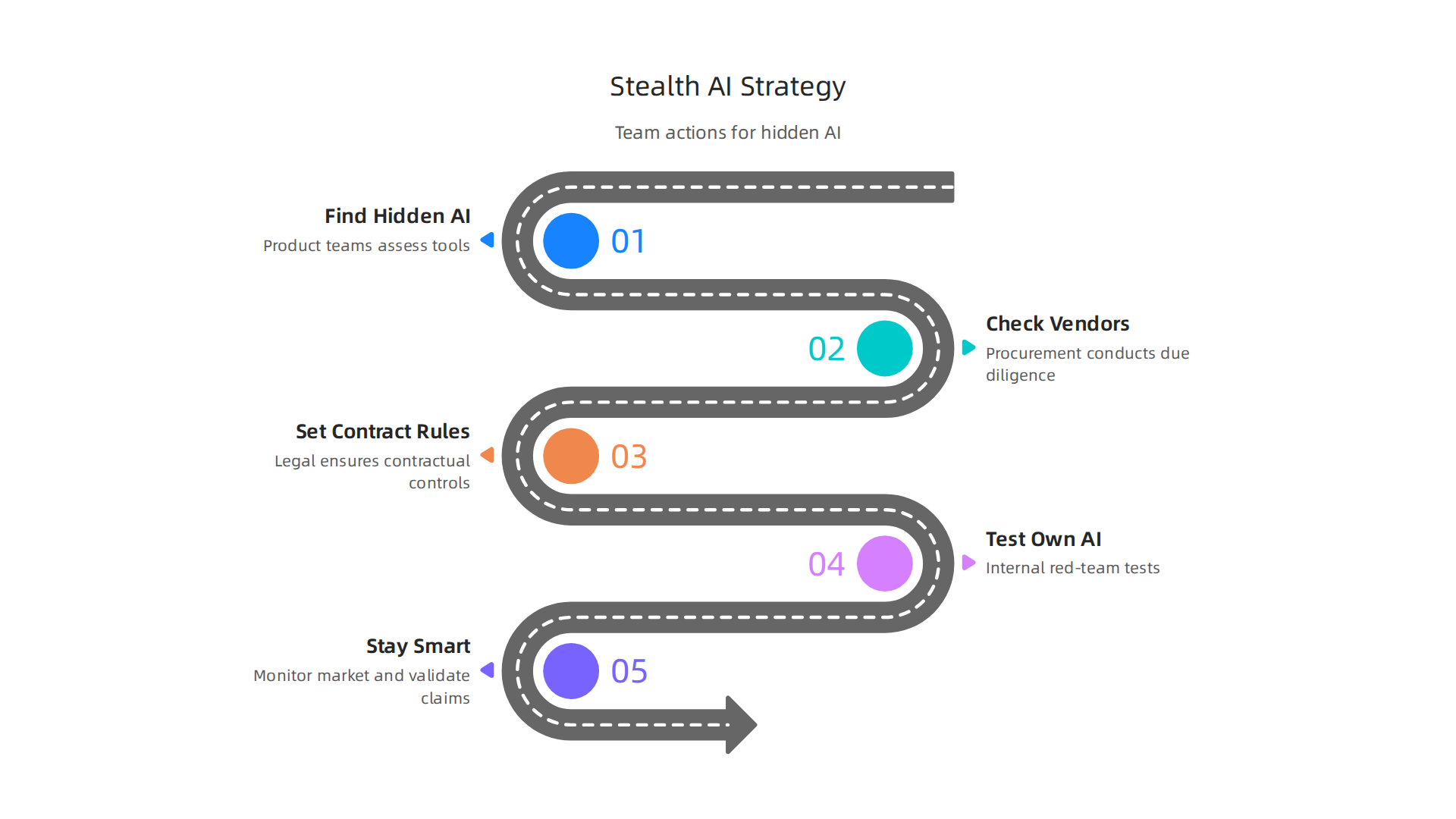
    What These Stories Teach Us

    Both cases share a common theme. Newsletters are not just passive reading material. They are a source of active competitive intelligence. The key difference between these companies and their competitors was not access to information. It was what they did with it.

    In the first case, the 3PL connected a newsletter trend to a specific business priority: lowering costs. In the second case, the startup connected a small regulatory update to a core operational risk: staying compliant.

    When you read your next newsletter, ask yourself one question: "Does this help me solve a problem I am facing right now?" If the answer is yes, do not just read it. Act on it.

    If you want a steady stream of high-signal insights without the noise, start with The AI Newsletter Worth Reading. It delivers clear, daily AI updates designed to help you make faster, smarter decisions.

    Integrating Newsletter Insights into Your Logistics Tech Stack

    Now you have seen how other companies act on newsletter insights. The next step is making sure those insights connect to the tools you already use. Reading 3pl newsletters is one thing. Feeding those insights into your logistics tech stack is where the real value lives.

    Start with your existing systems

    Your TMS, WMS, and analytics platforms already hold huge amounts of data. But they often operate in silos. A newsletter insight about a new routing method or a regulatory change is useless if it stays in your inbox.

    The trick is to build a simple connection point. Create a shared folder, a Slack channel, or a dashboard tab where team members drop newsletter takeaways tagged by topic. For example, an insight about route optimization goes into an "Operations" folder. A regulatory update goes into "Compliance." This mirrors what the startup in our case study did with their email rules. It keeps good ideas from getting lost.

    Use AI to parse and feed insights into your dashboards

    Manually scanning newsletters takes time. That is where AI tools can help. GPT-based summarizers can read a newsletter, pull out the key data points, and send a summary to your analytics dashboard. No-code automation tools like Zapier or Make can take that summary and push it into your TMS or WMS as a tagged note or an alert.

    This is exactly the kind of shift described in the Top Supply Chain Technology Trends for 2026 report. Visibility is no longer just about seeing data. It is about turning that data into actionable intelligence that shows up where decisions actually happen.

    Build a feedback loop: insights into pilots into results

    The best companies do not stop at reading and tagging. They build a simple loop.

    Visualizing the continuous improvement cycle from newsletter insights to measurable business results.

    1. An insight from a 3pl newsletter sparks an idea.
    2. The team runs a small pilot project to test it.
    3. They measure the results against their current baseline.
    4. If the pilot works, they refine the strategy and roll it out wider.
    5. If it fails, they document the lesson and move on.

    This turns newsletter reading from a passive habit into a source of continuous improvement. The mid-sized 3PL that cut fuel costs followed this exact loop. They did not wait for a perfect plan. They tested one tool, measured the drop in fuel spend, and scaled up.

    If you want to get more structured about selecting the right tools for these pilots, check out our guide on how to choose AI for business tools. It walks through the exact criteria top logistics teams use to separate high-impact opportunities from noise.

    The key is consistency. One insight tested per quarter is better than a hundred insights never touched. Start small, measure honestly, and let your newsletter feed your strategy instead of just filling your inbox.

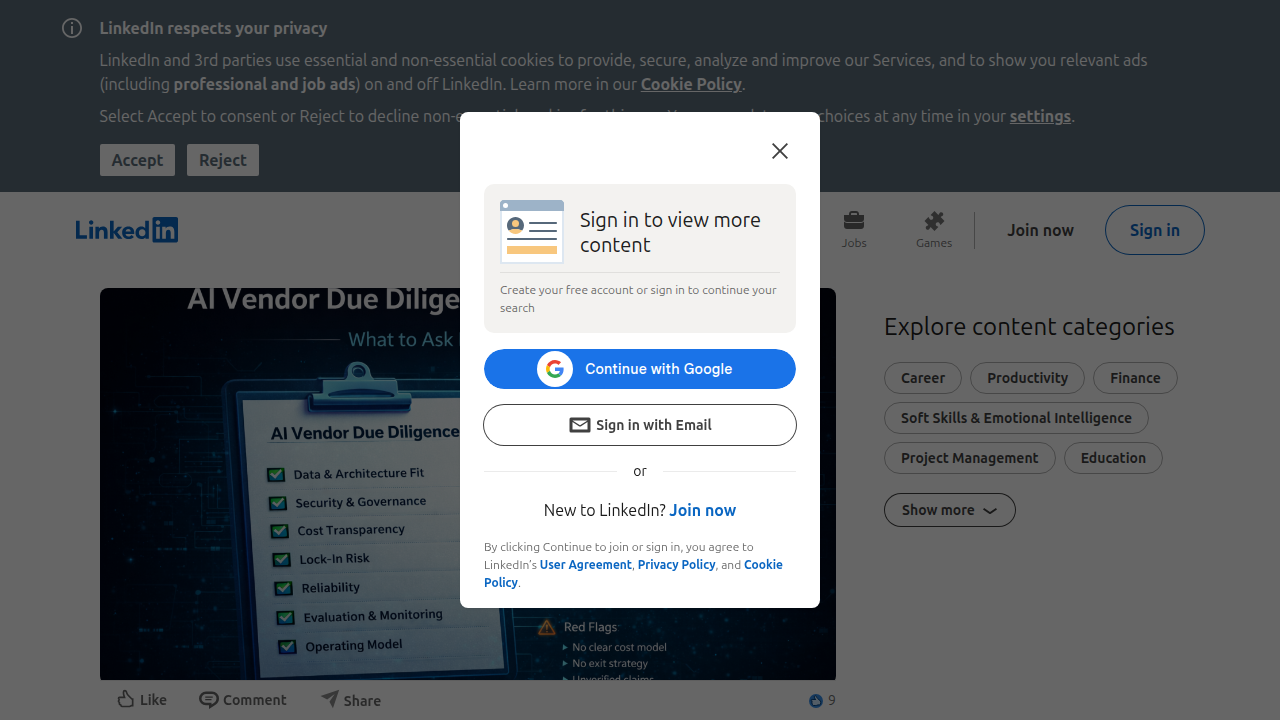
    Future Trends: AI, Automation, and the Evolution of 3PL Newsletters

    The way you consume 3pl newsletters is about to change in a big way. Actually, it is already changing. AI and automation are reshaping how newsletters are created, delivered, and used. And if you are in logistics, this shift matters.

    Hyper-personalized content powered by AI

    The days of one-size-fits-all newsletters are ending. In 2026, AI tools use natural language processing to read your role, your recent searches, and your industry focus. Then they serve you content tailored exactly to you. A warehouse manager might see route optimization tips while a compliance officer gets regulatory updates. This is the direction many publishers are heading, and it aligns with the broader 3PL trends to watch in 2026. The result? Less noise, more signal.

    The rise of video and audio newsletters

    Text is not going away. But video and podcast newsletters are growing fast. Logistics professionals are busy. Many now prefer to listen to a 10-minute audio briefing during their commute or watch a short video breakdown of a new automation tool. This shift changes how you consume information. It also means the best 3pl newsletters in 2026 will offer multiple formats. If you want to stay ahead, look for newsletters that give you a choice.

    Newsletters as embedded knowledge bases by 2027-2028

    Here is the bigger prediction. Within the next two years, 3pl newsletters will start living inside your logistics platforms. Imagine opening your TMS dashboard and seeing a live feed of curated insights from top newsletters, tagged by your team and linked to your data. Newsletters will stop being something you check in your inbox. They will become a built-in intelligence layer inside the tools you already use. This shift from passive reading to embedded action is exactly why experts recommend following interactive AI newsletters to follow in 2026.

    The future of 3pl newsletters is not about more email. It is about smarter, faster, and more integrated information that helps you make better decisions. If you want to stay on top of these changes without the clutter, get clear daily AI updates from The Deep View Newsletter. It delivers the signal you need, straight to your inbox, every day.

    Summary

    This article explains how logistics and 3PL professionals can use curated newsletters as a compact intelligence system to stay ahead of AI, automation, trade policy, and operational changes. It argues that newsletters outperform social media and scattered searching by delivering expert-vetted, concise updates that save time and reduce misinformation. The piece lists top AI-focused and logistics newsletters, shows how to build a simple daily/weekly routine, and offers a three-step framework—scan, categorize, act—to turn reading into measurable outcomes. It includes practical tools (email filters, RSS readers, AI summarizers), common mistakes to avoid, and real case studies where newsletter insights cut costs and prevented compliance fines. Finally, it covers how to feed newsletter intelligence into TMS/WMS dashboards and previews trends like hyper-personalization and embedded newsletter feeds inside logistics platforms.