
In 2026, running advanced AI tools is key for many professionals and small businesses. But getting the latest tech can be very expensive. This often leaves people wondering how to get powerful computers for AI tasks without spending too much. Finding that sweet spot between cost and strong performance is a big puzzle.
That’s why an Apple Certified Refurbished MacBook Air can be such a smart choice. These aren’t just used computers. Apple takes them, makes sure they are like new, and then sells them at a lower price. Every Apple Certified Refurbished product goes through a full testing process to ensure everything works perfectly. You get a device with real Apple parts if any were needed, and it’s thoroughly cleaned and checked. This means you can save up to 15% while still getting a quality Apple product Why Refurbished. Plus, they come with a standard one-year warranty, just like new products.
For those wanting to use AI-driven workflows, a well-equipped MacBook Air can handle many tasks surprisingly well, thanks to Apple’s powerful chips. It’s an excellent way for tech-savvy people and business leaders to get great performance without the top-tier price tag.
This article will help you understand if an apple certified refurbished macbook air is the right fit for your needs in 2026. We will walk you through a clear buying checklist and look at how these machines perform with AI applications. We will also dive into the costs and what kind of return on your money you can expect, share helpful setup tips, and even explore other options. By the end, you’ll know exactly how to make an informed decision for your AI-powered work.
To learn more about selecting the right systems for your tasks, check out our guide on how to choose AI-ready business computers in 2026.
Want to stay informed about the latest AI breakthroughs every day? Get clear daily AI updates from The Deep View Newsletter.
At-a-glance: What ‘Apple certified refurbished’ means for buyers
When you see "Apple Certified Refurbished," it means much more than simply "used." It’s a special label from Apple itself, telling you that the product has gone through a very strict process to make it almost like new again. This is a big difference from buying a used MacBook from just any seller or a refurbished one from a third-party company.
Here’s how it works: Apple takes a product that someone returned or used as a demo.
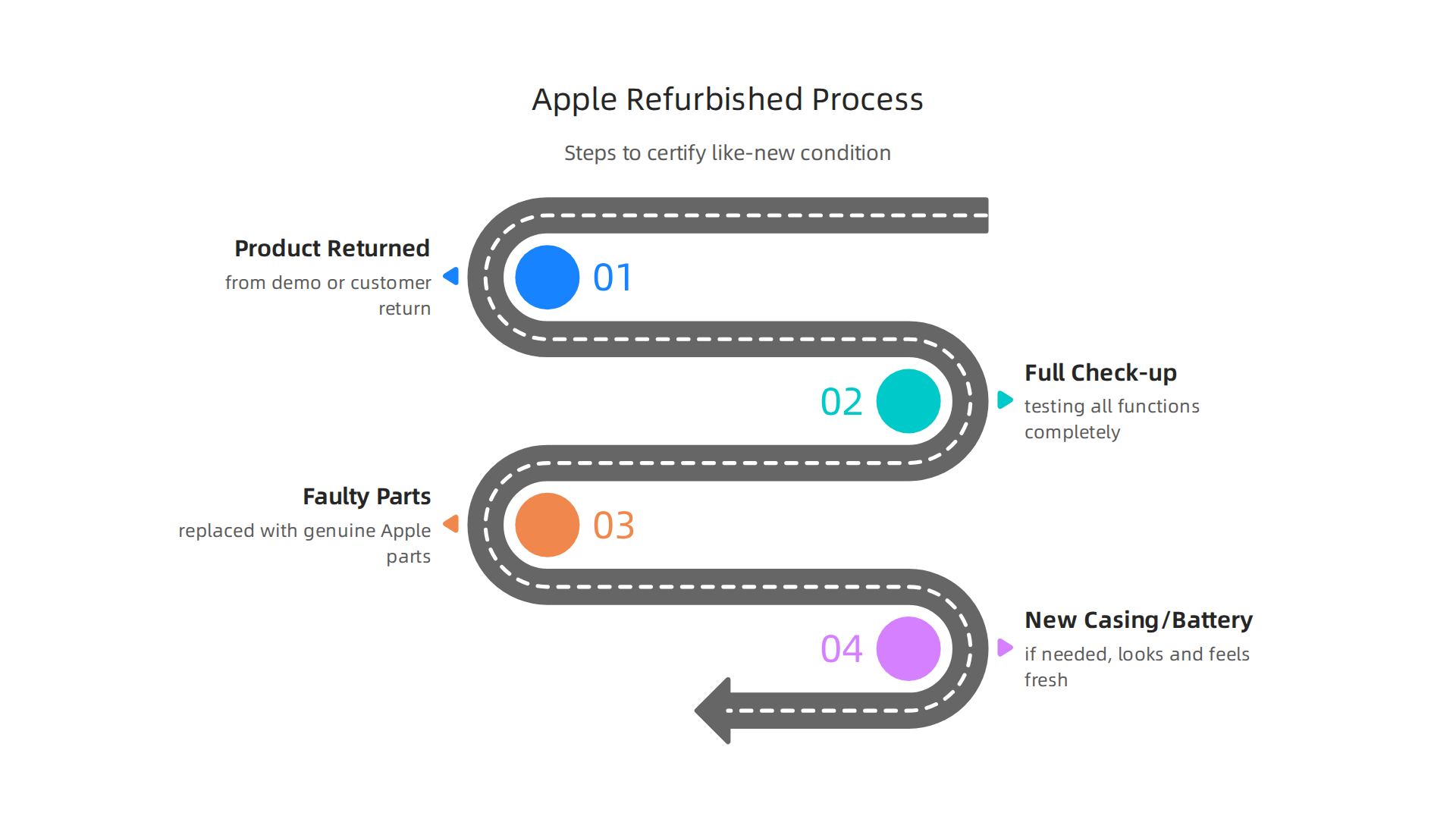
Instead of just cleaning it up, they do a full check-up. This includes testing all its functions completely. If any parts are faulty, Apple replaces them with genuine Apple parts. They also clean the device thoroughly and put a new outer casing and battery in it if needed, so it looks and feels fresh Apple Certified Refurbished Products. This careful process makes sure that an apple certified refurbished macbook air meets Apple’s high standards.
One of the best parts for buyers, especially for businesses, is the warranty. Every Apple Certified Refurbished product comes with a standard one-year limited warranty, just like a brand new Apple product would Certified Refurbished Products. This gives you peace of mind that your investment is protected. If you want even more coverage, you can also buy AppleCare for these devices, extending your warranty and support options AppleCare for a refurbished Mac.
The return policy for a refurbished Apple product is also the same as for new items. You usually get a 14-day window to return it if it doesn’t meet your needs. This is helpful when you’re making a big purchase for your AI-driven workflows. When you receive your refurbished MacBook Air, it will be in a plain white box, making it clear it’s refurbished, but the product inside will look and work like new.
For those considering an upgrade or joining the apple upgrade program in the future, understanding this certification is key. It means you’re getting a reliable machine with Apple’s backing, not just a used computer with unknown history. This way, you can trust that your chosen apple certified refurbished macbook air will be ready for demanding tasks in 2026 without the top new price.
Understanding M-series performance for AI tasks on MacBook Air
After learning about what "Apple Certified Refurbished" means, you might wonder how these machines handle today’s smart tasks. Specifically, an apple certified refurbished macbook air with an M-series chip is surprisingly good for many AI jobs in 2026. Apple’s own chips, like the M1, M2, M3, and the newest M5, are built in a special way that helps them do AI work very well.
How Apple Silicon Helps with AI
Apple’s M-series chips have a part called the Neural Engine. Think of it as a special brain inside the computer that’s just for AI tasks. This makes many AI workflows much faster and more energy-efficient than older computer chips.
Here’s how an apple certified refurbished macbook air handles common AI tasks:
- Model Inference: This is when an AI model makes a prediction or decision. For example, if you use AI to guess what a picture shows, your MacBook Air can do this quickly. The M-series chips are very good at this, making everyday AI tools run smoothly.
- Local LLMs (Large Language Models): These are like AI chatbots that run right on your computer without needing the internet. Many people like using tools like Ollama to run these models. Macs with M-series chips are getting better at handling these. In 2026, you can run many popular LLMs on a MacBook Air, especially smaller ones or "quantized" models which take up less space Best LLM for MacBook (2026). For example, an M1 MacBook Air with 8GB RAM can handle a model like Phi-3 Mini quite well
- ML Libraries: If you work with special programs like TensorFlow or PyTorch, the M-series chips can speed them up. They use a special feature called Metal Performance Shaders (MPS) to make the graphics part of the chip help with AI calculations Running AI Models on Your Mac.
- Batching: This is like giving the AI many tasks to do at once. M-series chips are good at handling these bursts of work, especially with their unified memory that lets the CPU and GPU share data fast. For more on what Macs are best for AI, check out this guide on picking the best MacBooks for AI for your 2026 projects.
Limits of the MacBook Air for Heavy AI Work
While the MacBook Air is powerful, it has some limits compared to a MacBook Pro, especially for very intense, long-lasting AI tasks.
- Thermal Constraints: The MacBook Air is very thin and light. It does not have a fan to cool itself down in many models. If you push it too hard for a long time, like training a big AI model for hours, it can get hot. When it gets hot, the chip slows down to prevent damage. This is called "thermal throttling."
- Sustained Workloads: For quick AI tasks or running small models, a MacBook Air works great. But for very heavy, continuous AI work, like running huge LLMs or training complex models from scratch for many hours, a MacBook Pro with its cooling fans and often more powerful chips (like the M3 Max or M5 Max) will perform better for longer periods Best Mac for Local AI 2026.
Still, for many business users and creators, an apple certified refurbished macbook air offers a fantastic balance of power, portability, and value for AI tasks in 2026. It’s perfect for exploring AI, running local chatbots, and using AI-powered apps every day. Keeping up with the latest in AI can be tough.
Stay informed with daily updates and insights into the rapidly evolving AI landscape.
The AI Newsletter Worth Reading
While the MacBook Air works well for many AI tasks, picking the right model and features makes a big difference. Think of it like choosing a tool for a specific job. An apple certified refurbished macbook air can be a smart choice if you know what specs matter most for AI work.
Here’s what to look for when choosing an Apple Certified Refurbished MacBook Air for AI in 2026:
Key Specs for AI Performance
When buying a MacBook Air for AI, focus on these main parts:
- Unified Memory (RAM): This is the most important part. AI models, especially large language models (LLMs), need a lot of memory to run. Unlike older computers, Apple’s M-series chips share memory between the main processor (CPU) and the graphics processor (GPU). This "unified memory" is super fast.
- For basic AI tasks or running smaller LLMs, 16GB of unified memory is a good starting point. Many popular LLMs need at least 16GB of RAM to run well on Apple Silicon chips Local LLMs Apple Silicon Mac 2026 | M1 M2 M3 Guide.
- For more serious AI work, like running bigger chatbots or doing some light AI model training, 24GB or even 32GB of unified memory will give you much more room to work. You can see how different chips perform with various LLMs by checking out the Apple Silicon LLM Benchmarks 2026.
- Neural Engine Generation: Every M-series chip has a special part called the Neural Engine, built just for AI tasks. Newer chips like the M3 or M5 have more powerful and faster Neural Engines. This means they can handle AI tasks more quickly. For example, a MacBook Air with an M5 chip shows strong performance in AI tests MacBook Air (15-inch, M5, 2026)/M5 – Geekbench. If your budget allows, a newer M-series chip will give you better AI speed.
- GPU Cores: The GPU (Graphics Processing Unit) also helps a lot with AI. More GPU cores mean faster calculations for many AI tasks, like image processing or speeding up LLMs. While MacBook Air models don’t have as many GPU cores as MacBook Pros, newer Airs with M3 or M5 chips offer more cores than older M1 or M2 models. This can make a noticeable difference in how fast your AI apps run.
- SSD Storage Size: AI models can be very large. If you plan to download and run many local AI models, you’ll need plenty of storage space. A 512GB SSD is a good minimum, but 1TB or more is better if you’re a serious AI user. You don’t want to run out of space when trying out new tools.
Choosing for Different AI Users
Your best apple certified refurbished macbook air depends on what you plan to do:
- For the Everyday Business User or Marketer: If you mainly use AI for writing help, creating images, or running small local chatbots, an M1 or M2 MacBook Air with 16GB of unified memory and 512GB SSD is often enough. This setup provides good speed for common AI apps without breaking the bank. It’s a great way to choose AI for business tools that deliver real results in 2026.
- For the AI Analyst or Aspiring Developer: If you want to experiment with larger LLMs, do more complex data analysis with AI tools, or start light AI development, you should aim for an M3 or M5 MacBook Air with 24GB or 32GB of unified memory and at least 1TB SSD. This gives you more power and flexibility for growing AI tasks. You can compare how different M-series chips perform for LLMs using an Apple Silicon AI Calculator.
Trade-offs: Price vs. Power
Going for higher RAM, a newer chip, or more storage will cost more. An apple certified refurbished macbook air helps here by offering these better specs at a lower price than a brand-new machine. You’ll get more power for your money. Remember that while a MacBook Pro might offer even more power for heavy AI tasks, a well-chosen MacBook Air still provides excellent value for many everyday and even advanced AI uses. For more insights on how to pick the right computer, you might want to read our guide on how to choose AI ready business computers in 2026.
After picking out the right features for your AI tasks, the next step is making sure the actual apple certified refurbished macbook air you buy is in great condition. It’s smart to have a plan for what to check both before and after you make the purchase. This way, you can be sure you’re getting a good deal and a reliable machine for your AI work.
Here is a practical checklist to guide you:
Before You Buy Your Apple Certified Refurbished MacBook Air
When you are thinking about buying an apple certified refurbished macbook air, do these checks first:
- Check the Serial Number: Always get the serial number of the MacBook Air and enter it on Apple’s official website. This lets you confirm the model details, when it was first bought, and its warranty status. This is a very important step to make sure you’re getting a real Apple product and not a fake or stolen one Buying a Used MacBook ? Here are 10 checks to do.
- Confirm Warranty and Return Policy: Even refurbished items from Apple usually come with a warranty. Make sure you know how long the warranty lasts. Also, understand the seller’s return policy. What if you find a problem a few days later? A good return window gives you peace of mind.
- Inspect the Look and Feel: Look closely at the MacBook Air. Check for any big dents or deep scratches on the body. Open and close the lid to see if the hinges feel strong. Look at the screen very carefully for dead pixels, weird colors, or bright spots Your Essential Physical Inspection Checklist for Buying a …. Test every key on the keyboard and click the trackpad.
- Test All the Ports: Bring a USB stick or another device and plug it into every port (USB-C, headphone jack, etc.) to make sure they all work correctly.
After You Get Your MacBook Air
Once your apple certified refurbished macbook air is in your hands, take these steps:
- Run Apple Diagnostics: This is a built-in tool that checks your Mac’s hardware for problems. To use it, disconnect everything from your Mac, then turn it on while holding down the "D" key. It will run tests to find any issues with the hardware Second-hand MacBook buying guide: 10 things to check. This can help you catch problems early.
- Update the Operating System: Make sure your MacBook Air is running the latest version of macOS. Updates often fix bugs, improve security, and can even boost performance, which is great for running AI tools.
- Check for Previous Accounts: Ensure that no old iCloud accounts are linked to the device and that "Find My Mac" is turned off. This prevents any issues with activation locks later on.
- Perform Performance Checks: Run some of your usual AI apps or benchmarks. Does it feel as fast as you expected based on the specs? If you notice any lag or problems, it might be worth looking into further or using the return policy. This confirms that the machine is truly "AI-ready" for your needs.
Taking these steps will help you get the most out out of your apple certified refurbished macbook air for AI tasks, ensuring it runs smoothly for your projects.
Staying updated on the latest AI advancements is crucial for making the most of your tech. The AI Newsletter Worth Reading delivers clear daily AI updates directly to your inbox.
After learning how to check a refurbished MacBook Air inside and out, the next big question is often about the money. How much can you really save, and is it truly a smart choice for your AI work? Let’s look at the costs, savings, and what you get back from your investment.

Cost, Savings, and ROI: Refurbished vs New MacBook Air for AI Productivity
Choosing between an apple certified refurbished macbook air and a brand-new one comes down to your budget and how much power you need for AI. In 2026, prices for refurbished MacBook Air models can be much lower than new ones. For example, some refurbished models can be 10% to 15% cheaper if you buy directly from Apple’s own refurbished store, giving you a machine that’s almost like new Refurbished MacBook Air 2026: Price Comparison Guide.
However, if you look at other trusted sellers like Back Market or RefurbMe, you can find even bigger savings. Discounts often range from 20% to 40% compared to new prices, sometimes even more for older chips like the M1 or M2. For instance, an M1 MacBook Air might cost around $365 refurbished, while newer M4 models start closer to $791 Refurbished MacBook Air: Best Deals & Models 2026. This means you could save hundreds of dollars.
When does buying an apple certified refurbished macbook air make the most sense for AI tasks?
- Refurbished is a Clear Win: If you or your team use AI tools for lighter tasks, like writing assistance, simple image generation, or managing data, a refurbished MacBook Air is likely a great deal. The savings are huge, and the performance from an M1 or M2 chip is still very good for these kinds of jobs. This helps small businesses and teams save money without losing too much performance. For everyday AI use, a refurbished model can give you excellent value for your money.
- When Buying New Yields Long-Term Savings: For heavy AI work, such as complex machine learning, training large models, or intense video editing with AI features, a brand new MacBook Air with the latest chip might be a better choice. Newer chips like the M4 or future ones offer more speed and power, which means your work gets done faster. While the upfront cost is higher, a new machine might last longer and handle tougher tasks for more years. This can actually save you money in the long run because you won’t need to upgrade as soon. You might also consider the apple upgrade program if you always want the newest tech. Keeping an eye on the next apple event can help you decide when to buy new models.
In short, a refurbished MacBook Air can save you a lot of money and still be powerful enough for many AI tasks. But for the most demanding work, a new model might offer better long-term performance. Thinking about what kind of AI work you do will help you pick the best option.
Now that you have thought about which MacBook Air is best for your AI tasks, let’s look at how to set it up so it works its very best. Getting your apple certified refurbished macbook air ready for AI means more than just turning it on. You want to make sure every part is working hard for you.
Setup and optimization tips to get the most AI productivity from a MacBook Air
To make your MacBook Air great for AI, you need to set up its software and choose the right tools. Here are some simple steps:
macOS Settings for Better AI Work
First, let’s tune your computer’s brain, called macOS.
- Update Your System: Always make sure your MacBook Air has the newest macOS. Newer versions often have better ways to handle AI tasks. In 2026, keeping up with updates helps your computer run smoother and faster.
- Manage Power: For heavy AI work, your MacBook Air needs all its power. Go to System Settings, then Battery. Pick the "High Power Mode" if your model has it, or simply choose "Optimized for performance" when plugged in. For lighter tasks, "Low Power Mode" can save battery.
- Clear the Clutter: Close apps you are not using. Each open app uses up some of your computer’s memory and power, which your AI tasks need. Turn off many notifications too, as they can distract you and slow things down a little.
Use Apple Silicon’s Special Power
Apple’s M-series chips in your MacBook Air are great for AI because they have special parts that speed up AI calculations.
- Metal Performance Shaders (MPS): This is a fancy name for Apple’s own way of making AI run fast. When you use AI programs, make sure they are set up to use MPS. This helps your MacBook Air’s chip work smarter, not just harder. For a deeper look into running AI models on your Mac, you can check out a comprehensive guide to running AI models.
- Unified Memory: MacBook Airs have "unified memory," which means the chip and memory work very closely together. This is a big plus for AI, especially for running big language models. The more unified memory your MacBook Air has, the more complex AI tasks it can handle.
Simple Tools for AI on Your Mac
You don’t always need super expensive tools for AI.
- Ollama: This is a great, easy-to-use tool to run many AI models right on your MacBook Air. It lets you download and try different AI brains, like ones that write text, without needing the internet all the time. Setting up local AI on your Mac in 2026 is simple with tools like Ollama How to Run Local AI on a Mac in 2026: Setup Guide.
- Cloud for Heavy Lifting: If you have a very big AI task that your MacBook Air can’t handle alone, you can use "cloud inference." This means your MacBook Air sends the tough work to powerful computers on the internet. It’s like having a supercomputer helper when you need it.
Making sure your MacBook Air is set up correctly helps you get the most out of it for your AI work, whether you chose a new or an apple certified refurbished macbook air. This way, you can achieve great AI productivity and make smart business choices. To learn more about picking the right computer for your AI needs, consider reading about picking the best MacBooks for AI for your 2026 projects.
For a daily dose of AI insights and trends, make sure to stay informed.
The AI Newsletter Worth Reading
Now, while a MacBook Air is a powerful machine for many AI tasks, there are times when you might need something even stronger. It’s smart to know when another Apple device would be a better choice for your AI work.
When to choose other Apple devices or configurations instead
Even with all the great setup tips, sometimes a MacBook Air just isn’t enough. If your AI tasks are very big or need a lot of power for a long time, you might want to look at other Apple devices.
For Very Heavy AI Workloads
Think of your MacBook Air as a fast, smart car for daily driving. But if you need to tow a huge trailer, you need a bigger truck. For AI, that means:
- MacBook Pro: This is like the bigger, stronger brother to the Air. MacBook Pro models have more powerful M-series chips (like M1 Pro, M1 Max, M2 Pro, M2 Max, and so on) with more "cores" for running many tasks at once. They also have better cooling systems. This means they can work harder for longer without slowing down, which is key for training complex AI models or running huge datasets. If you’re comparing a refurbished MacBook Pro to an
apple certified refurbished macbook air, the Pro often offers a significant jump in power for serious AI work, even if it costs more. For example, a refurbished MacBook Pro can be a smart buy in 2026 if you need that extra power, often at a good price compared to new models, as one comparison showed
Is a refurbished MacBook worth buying in 2026? I did the ….
- Mac mini, Mac Studio, or Mac Pro: These are desktop computers. They are not portable like a MacBook Air, but they offer even more power. They have even better cooling and can have much more unified memory. This makes them perfect for AI pros who do a lot of research or develop very big AI programs. They are like powerful supercomputers for your desk. Choosing the right machine is all about balancing your needs with your budget.
Thinking About Team Work and Growth
If you are part of a team, or if your AI work will grow bigger over time, you need to think about how your devices can grow with you.

- Scaling Up: You might start with an
apple certified refurbished macbook airfor basic AI tasks, but later need more powerful machines for bigger projects. Consider anapple upgrade programthat lets you trade in your old device for a newer, stronger one. - Hybrid Plans: Sometimes, a mix of local and cloud power works best. You can use your MacBook Air for quick AI tasks on your computer and send the really heavy work to cloud services. This way, you get the best of both worlds.
- Choosing for Your Business: For businesses, picking the right computers for AI is a big decision. It involves looking at cost, power, and how easy they are to use. You can learn more about how to make these choices for your company with guidance on how to choose AI ready business computers in 2026.
Knowing when to pick a MacBook Air and when to choose a more powerful Apple device will help you make smart decisions for your AI projects, now and in the future.
Summary
This article explains why an Apple Certified Refurbished MacBook Air can be a smart, cost-effective choice for AI work in 2026, and walks you through what the certification means, real-world M-series performance, and practical buying advice. It covers how Apple refurbishes devices, the included one-year warranty and return window, and how M-series chips and the Neural Engine enable solid inference and local LLM use. You’ll learn which specs matter most—unified memory, Neural Engine generation, GPU cores, and SSD size—and get concrete recommendations for everyday users, analysts, and developers. The guide also offers a hands-on pre-purchase and post-purchase checklist, tips to optimize macOS and MPS for AI, and cost comparisons that show typical savings from Apple and third-party refurbished sellers. Thermal limits and sustained workload trade-offs are explained so you can decide when a MacBook Pro or desktop makes more sense. By the end you’ll know how to pick, test, set up, and get the best ROI from a refurbished MacBook Air for AI tasks.