Tag: workflow optimization

  • MacBook Touch Bar: Why It Still Matters for Professionals in 2026

    MacBook Touch Bar: Why It Still Matters for Professionals in 2026

    Why the Touch Bar still matters for professional workflows (and when to skip it)

    The MacBook Touch Bar. Perhaps you remember it from its earlier days, or maybe you’re looking at an older MacBook Pro model in 2026 and wondering what this unique feature is all about. This slim, touch-sensitive strip replaced the usual function keys above the keyboard on many Apple laptops for a time. Even though newer models, like those with the MacBook Air M2 chip or the latest MacBook Air M3 chip, no longer include it, the MacBook Touch Bar can still be a powerful tool for certain types of work.

    First, let’s understand what the Touch Bar is. It was an OLED display that changed what it showed based on the app you were using. This meant you could see different buttons and sliders that were most helpful at that moment. It also included Touch ID for secure logins and quick purchases. The Touch Bar was a main feature on many MacBook Pro models from 2016 through some 2020 versions, with a few different sizes available during those years, as explained in a guide to which MacBooks have a Touch Bar.

    For professionals, the main promise of the Touch Bar was to make your work faster and smoother.

    A professional concentrating on their work, embodying efficiency and smooth task execution.

    Imagine you’re deep into a project. Instead of moving your mouse to click on menus, you could tap a custom button or slide a finger to adjust a setting directly on the Touch Bar. This helps with faster context switching. It means less time searching for tools and more time actually doing your work. These small, quick actions add up, making frequent tasks much more efficient.

    So, which professionals truly benefit most from the MacBook Touch Bar? If you work a lot with creative apps like video editing software, photo editors, or music production tools, the Touch Bar can be very useful. For example, a video editor might see a timeline scrubber to quickly jump through footage. A graphic designer could get instant access to color palettes or brush sizes. These app-specific shortcuts help micro-optimize your workflow. They bring the most important controls right to your fingertips without cluttering your main screen.

    In 2026, if you’re thinking about getting a MacBook Pro with a Touch Bar, it’s good to know what to expect. While new apps might not build features specifically for it anymore, many older, established professional apps still support it well. The macOS operating system also continues to support the Touch Bar on compatible models. Just be sure that any used MacBook you consider is in good shape and running a recent enough version of macOS for your needs. Remember to protect your tech investment with a good MacBook cover to keep it safe.

    Staying up to date on technology, especially AI, is crucial for professionals. For clear, daily insights, consider subscribing to The AI Newsletter Worth Reading.

    The MacBook Touch Bar, at its heart, was an advanced narrow screen right above the keyboard. It was designed to be a dynamic control panel, meaning what you saw on it changed depending on what you were doing on your computer. This clever strip was actually an OLED Retina display, offering clear, bright controls at your fingertips Touch Bar | OLED panel, T2, Discontinued. Think of it like a mini touchscreen that showed you the most useful buttons for the app you had open. It even had its own small computer chip, called the T1, and ran a special version of Apple’s WatchOS system Apple’s new MacBook Pro Touch Bar is powered by a variant of WatchOS.

    The Touch Bar took the place of the old physical function keys (F1, F2, F3, etc.). Instead of fixed buttons, it showed things like volume sliders, brightness controls, or even emojis when you were typing. For apps like photo editors, it might show tools for cropping or changing colors. This made the controls always seem to be in the right place at the right time. Users could also change what appeared on their Touch Bar through System Settings, making it truly their own. Developers could add support for the Touch Bar into their own apps, giving users more ways to interact Here’s How Devs Will Use MacBook Pro Touch Bar.

    Apple first brought out the MacBook Touch Bar in late 2016 with new MacBook Pro models MacBook Pro. For several years, it was a standout feature on most 13-inch, 15-inch, and 16-inch MacBook Pros until about 2020. You can find a full history of which models included it in guides like Which Macbook Pro Has The Touch Bar?. The very last Mac to have a Touch Bar was the 13-inch MacBook Pro with the M2 chip. After that, Apple moved away from the Touch Bar. Newer MacBooks, like those with the MacBook Air M3 chip, do not have this feature.

    By 2026, the Touch Bar is no longer found on new MacBooks. People often found that they missed the feel of physical keys, especially for important buttons like the Escape key The Touch Bar was supposed to be the future MacBooks. Nakonec it became one of the biggest mistakes Apple. This meant users often had to look down at the Touch Bar to make sure they were pressing the right spot, which could slow things down. However, for those buying older MacBook Pro models, understanding what the Touch Bar is and how it works can help you decide if a used model is right for your needs. If you are considering an older model, you might want to learn more about picking the best MacBooks for AI for your 2026 projects. While the Touch Bar may be a thing of the past for new devices, it still offers unique ways to work on compatible MacBooks.

    Even though new computers today, like the latest MacBooks, do not have the Touch Bar, it still has special uses for those who own older models. This small, helpful screen can make certain tasks much faster. It’s especially good for jobs where you do the same small things over and over.
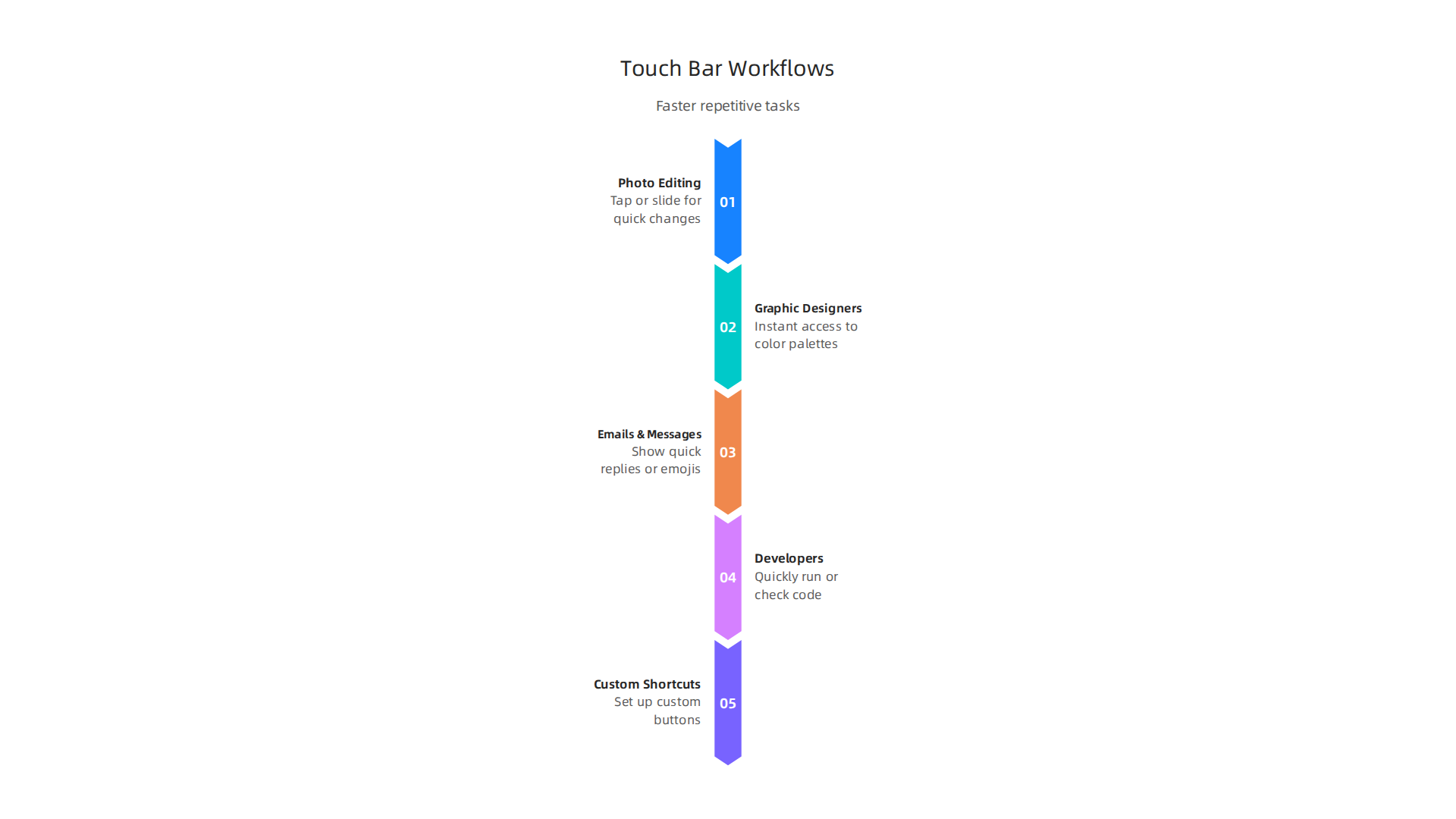
    Visualizing the professional workflows that gain significant speed and efficiency from the MacBook Touch Bar's dynamic controls.

    Faster Work for Editors and Creators

    Imagine you are editing photos or videos. Normally, you might click through menus to find tools like brushes, color sliders, or crop buttons.
    A graphic designer or video editor immersed in a creative project, utilizing tools to bring their vision to life.

    With the MacBook Touch Bar, these tools can pop up right on the bar. This means you don’t have to move your mouse around as much. Instead, you can tap or slide on the Touch Bar to make quick changes. This can really speed up your work. For example, if you’re a designer, the Touch Bar could show you all your favorite colors or fonts at a glance. Even though touchscreens sometimes take a little longer for certain tasks than a mouse, having the right tools instantly available can be a big help for creative apps To Touch or not to Touch.

    Smart Shortcuts for Everyone

    The Touch Bar is also great for other daily tasks. If you spend a lot of time writing emails or messages, it can show you quick replies or even your most-used emojis. This makes talking to people faster. For developers, some found the Touch Bar very useful for quickly running code or checking different parts of their programs Touch Bar MacBooks In 2026: Developer Verdict. In fact, about half of surveyed individuals said they use the Touch Bar on their Mac, and for those who own a MacBook Pro, that number goes up to three out of four Will anyone miss the Touch Bar?.

    You can even make the Touch Bar do exactly what you want it to for different apps. Tools like BetterTouchTool let you set up custom shortcuts, showing only the few most important things you need for each program Customize Your Mac’s Touch Bar with BetterTouchTool. This kind of smart setup can save a lot of time for individuals and small teams. It turns the Touch Bar into your own special control panel, helping you get more done.

    If you are looking for ways to boost how much work you can do, choosing the right tools is key. Learning how to use features like the MacBook Touch Bar smartly, or finding the right accessories like a good MacBook cover or a MacBook Air sleeve for protection, can make a difference. Staying informed about technology trends, even older ones, helps you make the best choices for your needs.

    Staying updated on the latest tech, including how older features can still be useful, is important for smart business decisions.

    The AI Newsletter Worth Reading

    Get clear daily AI updates from The Deep View Newsletter.
    Subscribe to The Deep View Newsletter

    Top apps and Touch Bar customizations for professionals

    Even though the MacBook Touch Bar might seem like a small feature, for many professionals, it’s a powerful tool when set up correctly.
    Illustrating key applications and customization methods that maximize the utility of the MacBook Touch Bar for various professional roles.

    This little screen can make a big difference in how fast you work, especially in creative jobs, coding, and talking with others.

    Apps That Work Best with the Touch Bar

    For people who create things, like graphic designers or video editors, the Touch Bar is very handy. Programs like Final Cut Pro can show you quick buttons for editing tasks right on the bar. This means you can cut clips, change colors, or adjust sounds without digging through menus. Having these controls at your fingertips speeds up the whole process Best Touch Bar Apps for MacBook Pro. It’s all about making your workflow smoother and saving precious time.

    Developers also found special uses for the Touch Bar. Imagine you’re writing computer code; the Touch Bar can show you shortcuts to run your code, move between parts of your program, or even help you find errors faster. Tools like those listed on various tech forums help coders set up their Touch Bar for very specific coding needs Best apps to get the best out of Touch Bar? : r/macbookpro.

    For daily communication, some apps can put your favorite emojis or quick response phrases on the Touch Bar. This makes sending messages or emails much quicker, helping you stay in touch without slowing down.

    Making the Touch Bar Your Own

    The real power of the Touch Bar for professionals comes from making it do exactly what you need. You can create your own special buttons and shortcuts. For example, if you always do a set of actions in an app, you can create a single "macro" button on the Touch Bar to do all of them at once. This is like having a super shortcut.

    Apps like BetterTouchTool are famous for letting you customize your MacBook Touch Bar to an amazing degree BetterTouchTool is the best app for the MacBook Pro Touch Bar. You can set up "context-aware" controls. This means the buttons on your Touch Bar change depending on what you’re doing in an app. If you’re drawing, you might see brush sizes. If you’re writing, you might see formatting tools. This kind of smart setup helps you always have the right tools ready.

    You can even make app-specific "palettes" for the Touch Bar. These are groups of buttons that only show up when you’re using a certain program. For instance, a video editor could have one palette for cutting, another for color correction, and another for sound mixing. It’s about bringing your most used actions closer to you. You can even find community-made lists of apps and settings to explore, helping you unlock even more potential for your MacBook Touch Bar PCVD’s ultimate lists of Touch Bar app/ softwares curated from github , product hunt etc..

    Getting the most out of your MacBook Touch Bar means taking the time to set it up for your specific tasks. Tools for customization are key. To learn more about how to choose the right technology for your professional projects, check out our guide on picking the best MacBooks for AI for your 2026 projects.

    Building on basic Touch Bar setups, professionals can go even further by creating smart shortcuts and automations. This means less repetitive clicking and more focus on your actual work.

    Smart Automations for Your MacBook Touch Bar

    Imagine making your MacBook Touch Bar do complex tasks with just one tap. This is possible through smart automations.

    A team collaborating on a complex project, symbolizing streamlined workflows and smart automations for efficiency.

    You can map common system shortcuts to the Touch Bar, like saving files, undoing mistakes, or even opening your most used folders. This keeps your hands on the keyboard and speeds up your workflow. Studies show that well-designed touch interfaces can make tasks faster, though care must be taken to avoid errors Investigating a multi-touch user interface for three-dimensional CAD operations.

    You can also link your Touch Bar to automation tools on your Mac, like AppleScript or Automator. For example, a single button on your Touch Bar could trigger a script that resizes all your images, uploads them to a cloud service, and then sends you a notification. For developers, this can mean quickly running code or switching between important parts of their programs. In fact, many developers in 2026 rely on custom Touch Bar key bindings for tasks like building and running code Touch Bar MacBooks In 2026: Developer Verdict. This deep integration turns your Touch Bar into a personal control center, making your macbook touch bar even more powerful.

    Third-Party Tools for Next-Level Customization

    While BetterTouchTool (mentioned before) is a great starting point, other tools let you get even more out of your Touch Bar. These utilities offer powerful ways to truly make the Touch Bar your own, boosting your daily productivity.

    For example, apps like Pock turn your Touch Bar into a small dock, showing you active apps and widgets right on the bar Pock: Widgets manager for MacBook Touch Bar. This frees up screen space on your main display and puts important controls in easy reach. Another open-source tool, MTMR (My TouchBar My Rules), lets you create custom buttons and scripts for almost anything you can imagine, even letting you use community-made plugins Toxblh/MTMR: 🌟 [My TouchBar My rules]. The Touch Bar …. These tools allow for incredible levels of customization and can save valuable time, making tasks more efficient Customize Your Mac’s Touch Bar with BetterTouchTool – LifeTips.

    For teams, some advanced tools even let you create and share Touch Bar profiles. This means a whole team can use the same specialized shortcuts for their projects, ensuring everyone works faster and in the same way. When choosing any tech gadget for business, especially one that boosts productivity, it’s good to think about how it fits into your daily tasks. Learn more in our guide on how to choose tech gadgets for business productivity in 2026.

    Staying up to date on all the latest tech and AI trends can be tricky, but it’s important for keeping your business smart and effective.

    Get clear daily AI updates from The AI Newsletter Worth Reading.

    Limitations, compatibility concerns, and alternatives

    Even with all the cool ways to customize the Touch Bar, it also has some clear downsides.
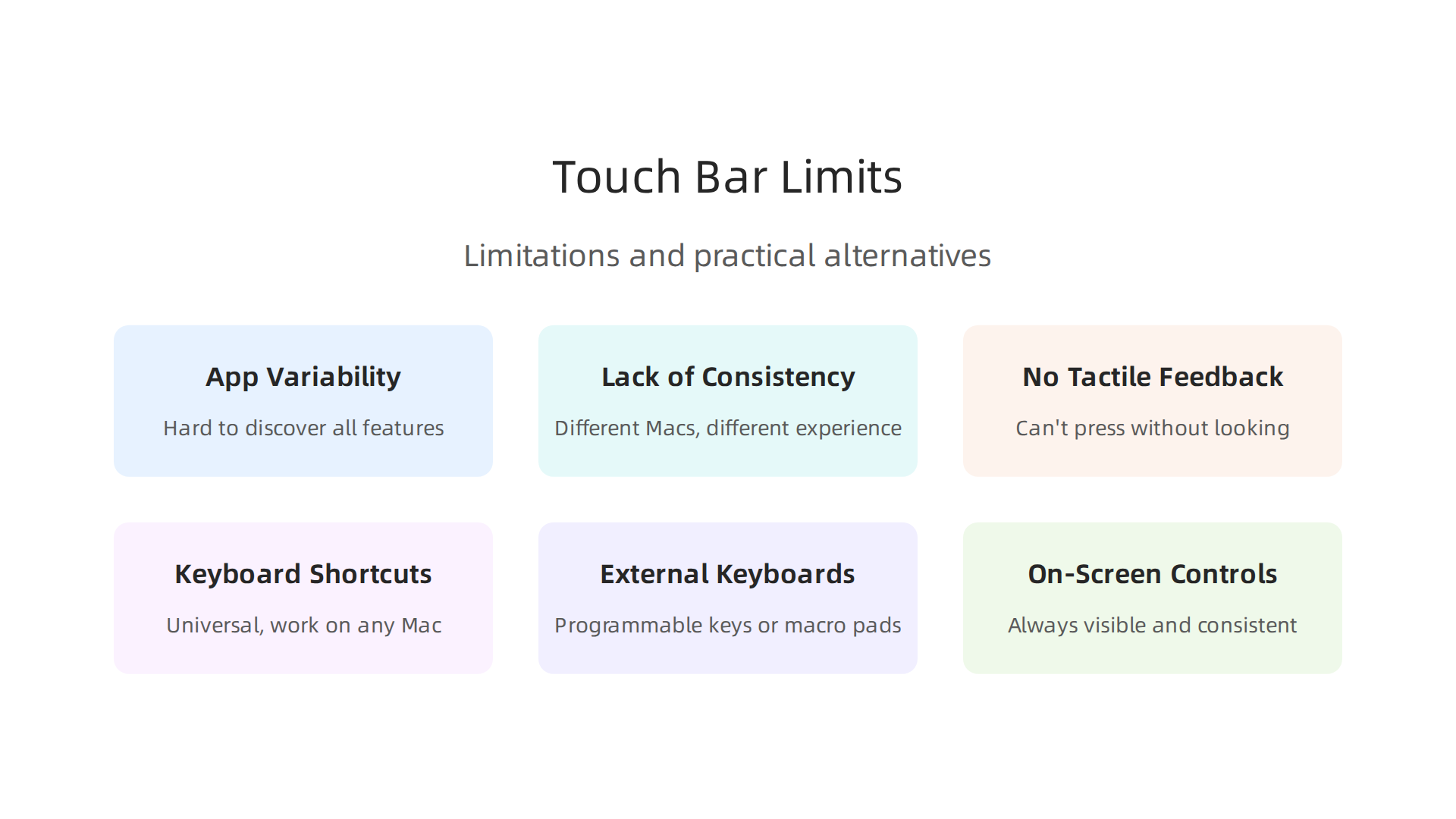
    An overview of the MacBook Touch Bar's limitations and practical alternatives for achieving similar productivity benefits.

    For one, knowing what the macbook touch bar can do changes from app to app. This makes it hard for people to discover all its features, or even remember what buttons might pop up at any given time. It’s not always obvious where to look for controls, which can slow you down instead of speeding you up.

    Another big concern is how the Touch Bar works across different Macs. Not all MacBook models have it. For example, newer models like the MacBook Air M2 chip don’t have a Touch Bar at all. In fact, Apple stopped putting the Touch Bar in its latest MacBook Pro models around 2021, and the last 13-inch model with it was released in 2022 Did Apple stop making MacBook Pro with TouchBar?. This means if you use different Macs for your work, the experience won’t be the same on all of them. This lack of consistency can be frustrating and make it harder to switch between devices smoothly.

    Accessibility is another point of worry. Since the Touch Bar is a flat, smooth strip, it doesn’t give you the same clicky feel as a real button. This lack of "tactile feedback" means you can’t press a button without looking at it. For users with visual impairments, this is a big problem, as they might not be able to easily tell which button they’re touching Apple’s New Touch Bar May Present Usability Challenges For Blind Users. Also, many users, especially coders, found it hard to live without a physical Escape key, which the Touch Bar often replaced The Problem With the Touch Bar.

    So, what if your MacBook doesn’t have a Touch Bar, or you simply prefer other ways to work? There are great alternatives that give you similar speed boosts.

    • Keyboard Shortcuts: The simplest way to speed things up is to learn your app’s built-in keyboard shortcuts. These are universal and work on any Mac, no matter the model.
    • External Keyboards: Many professionals use external keyboards, some of which have extra programmable keys or macro pads. These can give you even more customization than the Touch Bar, with the added benefit of physical buttons. When considering options for your setup, it’s wise to think about picking the best MacBooks for AI for your 2026 projects, as well as compatible accessories.
    • On-Screen Controls: You can also use on-screen menus and toolbars. While they might take an extra click, they are always visible and consistent. Some apps even let you customize these on-screen controls.

    Ultimately, whether you have a MacBook with a Touch Bar or are looking for alternatives, the goal is to make your computer work for you. There are many ways to make your daily tasks faster and easier, ensuring you stay productive in 2026.

    Buying, setup, and calculating ROI for teams

    When you’re thinking about buying new computers for your team, figuring out if a MacBook with a Touch Bar is right for everyone can be tricky.

    Business professionals engaged in a strategic discussion, weighing investment decisions for their team's technology.

    Since Apple has mostly moved away from the Touch Bar in newer models like those with the MacBook Air M3 chip or even recent MacBook Pros, it’s wise to think about consistency. Having different models with and without a Touch Bar can make things confusing for your team.

    For teams still using MacBooks with a Touch Bar, customization tools can make a big difference. Apps like BetterTouchTool let users change their Touch Bar to fit exactly what they do, which can be super helpful for getting tasks done faster. You can make custom buttons and shortcuts for specific apps, making the macbook touch bar much more useful than its basic settings How to Customize the MacBook’s Touch Bar with BetterTouchTool. This kind of personalization can really speed up workflows for specific roles, like designers or coders.

    A Smart Way to Think About Your Team’s Investment

    To decide if the Touch Bar (or any tech feature) is a good investment, think about its "Return on Investment," or ROI. For a team, ROI means how much benefit you get back compared to what you spend.

    Here’s a simple way to look at it:

    • Time Saved: How many minutes or hours does a new tool or feature save each person each week?
    • Team Size: How many people on your team will use this feature and save that time?
    • Frequency: How often will they use it?

    Let’s say a special Touch Bar setup saves a designer 10 minutes a day on a task they do every day. Over a week, that’s 50 minutes. If you have 5 designers, that’s 250 minutes saved per week, or over 4 hours. Over a year, this adds up to many hours, which can mean big savings for the company. This shows that even small time savings can make a big difference when many people use a tool often.

    Studies have shown that Macs, in general, can offer a great return for businesses. Companies report benefits like employees saving 100 minutes per month on productive tasks and needing less IT support The Total Economic Impact™ Of Apple Mac At Work. Another study found that Macs could save organizations hundreds of dollars per device over a few years, mainly through lower support costs and better employee performance The $543 Question: What If Skipping Macs Is Actually ….

    Piloting New Workflows

    If you’re unsure about a new piece of tech like the macbook touch bar or even a new macbook cover for protecting devices, try it out with a small group first. This is called a pilot program.
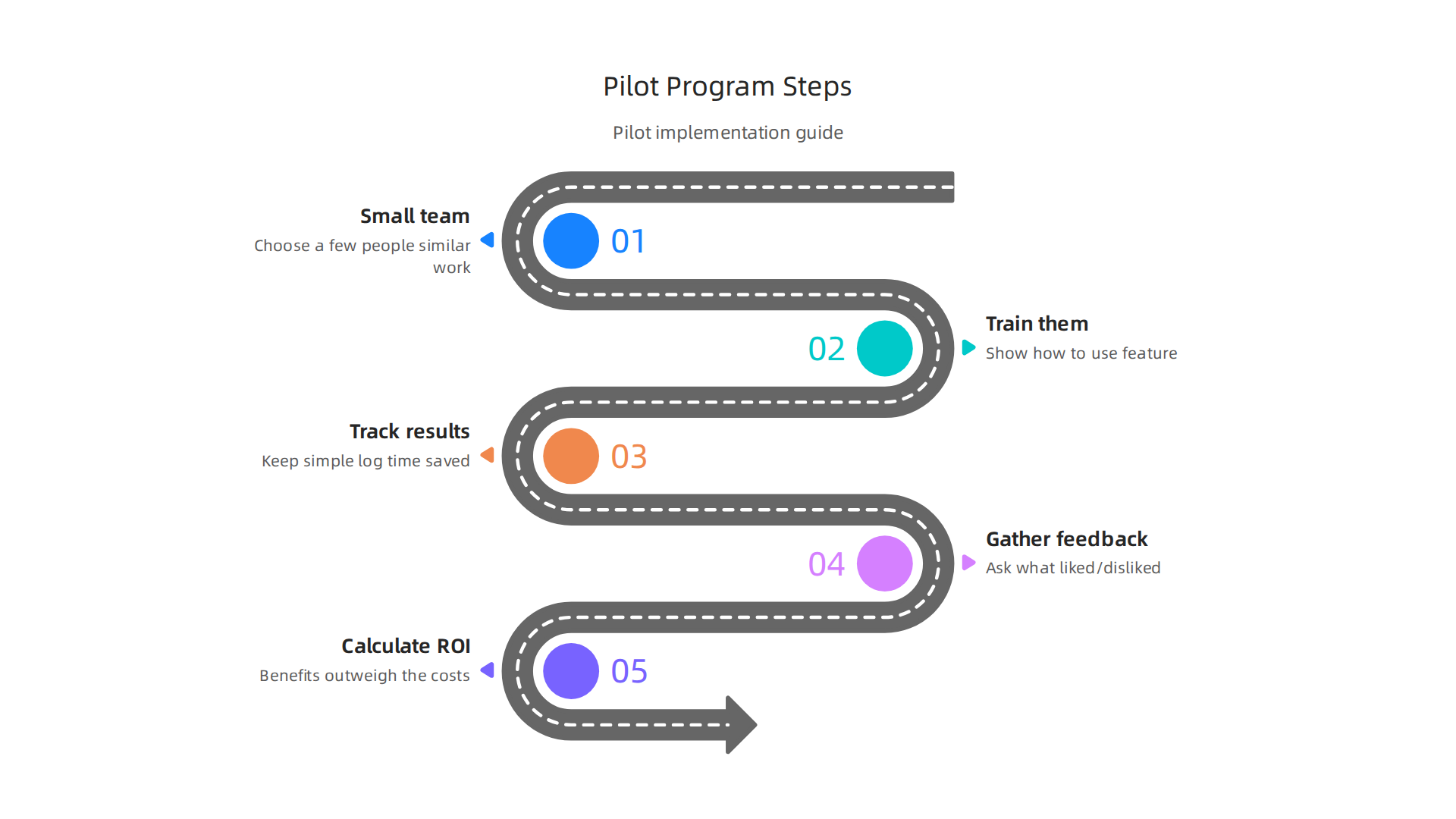
    A step-by-step guide for implementing a pilot program to evaluate new technology or workflows within a team.

    1. Pick a small team: Choose a few people who do similar work.
    2. Train them: Show them how to use the new feature or tool, like customizing the Touch Bar or learning new shortcuts.
    3. Track results: Have them keep a simple log of how much time they feel they are saving or if their work feels easier.
    4. Gather feedback: Ask them what they liked and disliked.
    5. Calculate ROI: Use the time-saved method to see if the benefits outweigh the costs.

    This way, you can make smart choices about your team’s tech. Investing in the right tools, whether it’s a specific MacBook model or simply how to how to choose tech gadgets for business productivity, helps everyone work better and faster in 2026.

    If you want to stay ahead with the latest tools and insights for business productivity,
    The AI Newsletter Worth Reading offers clear daily updates.

    Summary

    This article explains what the MacBook Touch Bar is, why it mattered for professional workflows, and when it still makes sense to use one in 2026. It covers the Touch Bar’s history, how the OLED strip adapted to apps, and which users — especially video editors, designers, music producers, and some developers — gain the biggest speedups. You’ll learn practical ways to customize the bar with tools like BetterTouchTool and MTMR, build automations and macros, and pick apps that return the most value. The piece also outlines clear limitations (tactile feedback, cross‑device consistency, and accessibility), how to evaluate alternatives, and a simple ROI method to decide for teams. Finally, it gives buying, setup and pilot recommendations so you can decide whether an older Touch Bar MacBook fits your workflows or if shortcuts and external keyboards are better options.

  • How Google XR Glasses Transform Business Operations

    How Google XR Glasses Transform Business Operations

    The world is changing fast, and new technology is here to help businesses work smarter.

    A business leader confidently embraces new technology for smarter operations.

    We are now in a time of "spatial computing" and "wearable AI." This simply means that computers are no longer stuck on your desk or in your pocket. Instead, they are becoming part of the world around you, and you can wear them. This is where Google XR Glasses come in, offering a big chance for businesses to do things better.

    Think about how much easier tasks could be if you had smart help right in front of your eyes. Google XR Glasses are a new kind of device that mixes the real world with helpful computer information. They let you see digital things like instructions or data layered onto your actual view. This means you can get instant help for complex jobs, train staff in new ways, or connect with co-workers without missing a beat. These best smart glasses are quickly becoming important for how businesses operate. In fact, shipments of AI smart glasses are expected to go past 10 million units in 2026 alone, showing how fast this area is growing Technology – 2026 Outlook.

    Explore insights and market analysis on technology trends relevant to business growth.

    This guide will show business leaders like you how Google XR Glasses can make a real difference. We will look at what these glasses can actually do for your company and how they improve daily workflows with smooth flow tech. We’ll also cover important things to think about when choosing vendors and the steps you need to take to bring these new tools into your business. You might be wondering how gaming glasses compare, but our focus here is on practical business uses, not just entertainment. Staying updated on these new tools is key for smart business decisions in 2026. For more ways to keep up with important tech trends, consider tracking major technology news for smart business decisions in 2026.

    Stay informed with the latest news and guides on AI tools and their business applications.

    This article will help you understand all the ins and outs, so you can make good choices about bringing this exciting technology into your operations.


    Get clear daily AI updates from The AI Newsletter Worth Reading.

    To really understand how Google XR Glasses can help your business, it’s good to know a little about what’s inside them. These best smart glasses are packed with clever parts that work together to bring digital information right into your view.

    What’s Inside Google XR Glasses

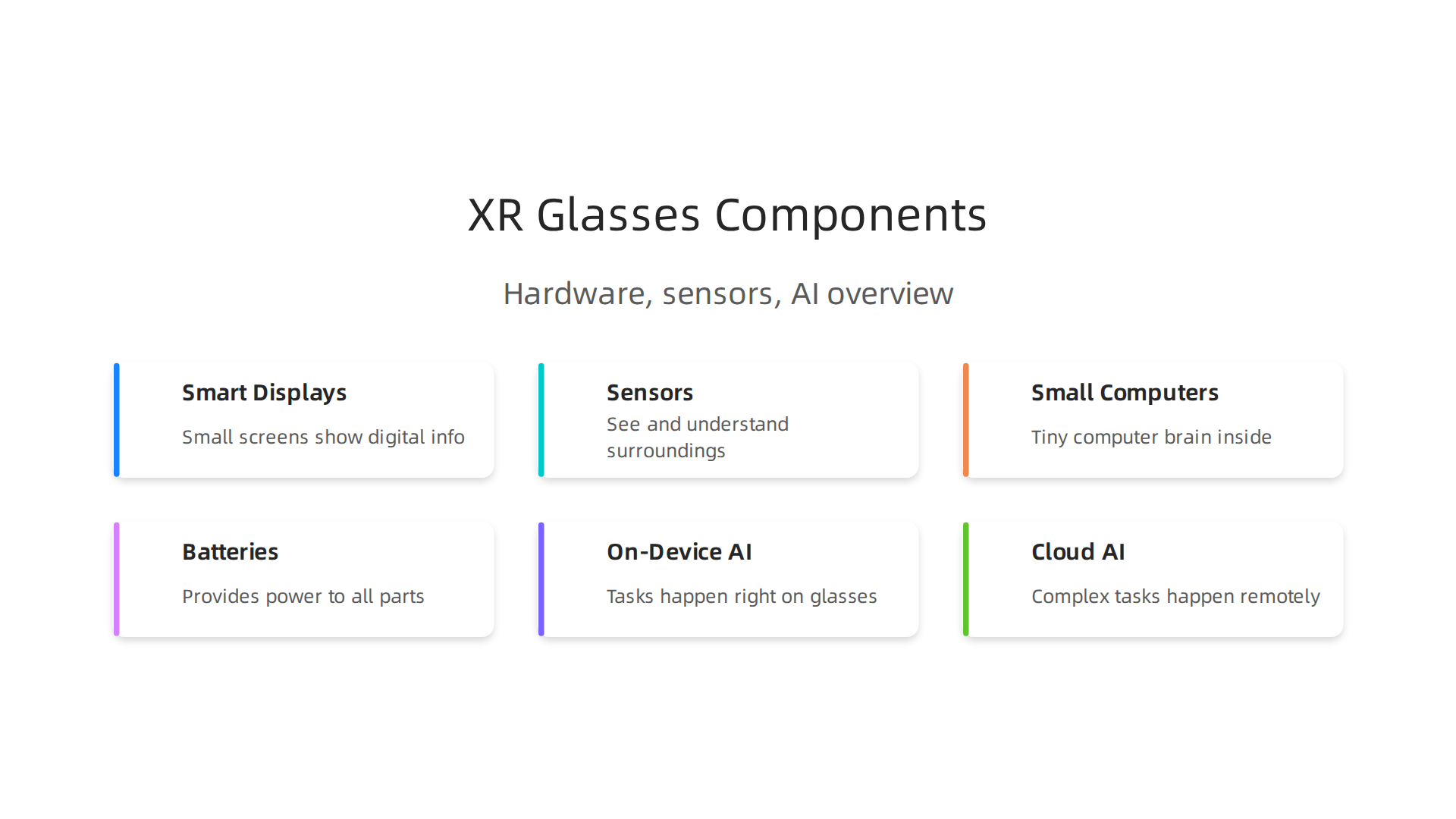
    Think of these glasses as tiny, powerful computers that you wear. They have a few main parts that make them special:

    An overview of the key hardware and software components powering Google XR Glasses.

    • Smart Displays: These are the small screens that sit in front of your eyes. They show you digital info, like directions or data, right over what you see in the real world. For example, some new Android XR glasses, like XREAL AURA, offer a wide 70-degree field of view, making the digital picture feel very big and clear.

    Discover the newest gadgets and technology reviews shaping the consumer and business markets.

    This kind of display helps you get useful information without looking away from your task.

    • Sensors that See and Understand: Google XR glasses have many tiny sensors. Cameras are like eyes, taking in what’s around you. Other sensors, called IMUs, track how your head moves. Depth sensors help the glasses understand distances and shapes in the real world. This mix of sensors allows the glasses to know where you are, what you’re looking at, and how to place digital items correctly. Some new models even have powerful cameras, like a 12-megapixel Sony IMX sensor, to get a very clear picture of your surroundings.
    • Small Computers and Batteries: Each pair of google xr glasses has a tiny computer brain inside. This brain often uses powerful chips, like those from Snapdragon, to run apps and make everything work smoothly. For example, Project Aura, designed for Android XR, uses a Snapdragon chip to power its features Google I/O 2026: The Smart Glasses Reveals Everyone’s …. All these parts need power, so there’s also a small battery. Some glasses might even need to be connected by a wire to a power pack in your pocket to work for a long time, as seen with some early Android XR glasses in 2026 XREAL’s Android XR glasses can only be used wired, 2026 launch.

    Keep up with daily news, rumors, and reviews related to Google and Android products.

    AI: On the Glasses or in the Cloud?

    A big part of what makes google xr glasses smart is their Artificial Intelligence (AI). AI helps the glasses understand what you’re doing and give you the right information at the right time. There are two main ways this AI works:

    • On-Device AI (AI on the glasses): Some AI tasks happen right on the glasses themselves. This is good for things that need to be super fast, like understanding a quick hand gesture or recognizing a simple object right in front of you. It also keeps your information more private because it doesn’t need to leave the glasses. Google’s Gemini AI is built into these glasses to help with such tasks, letting them understand what they see in real-time Google to launch Gemini AI smart glasses in 2026. This is great for smooth flow tech where you need instant responses.
    • Cloud AI (AI on the internet): Other, more complex AI tasks might happen in the "cloud," which means on big computers far away that you connect to through the internet. This is needed for things like translating a whole conversation, doing very detailed searches, or running complicated programs. Using cloud AI means the glasses can be lighter and use less battery, but they need a good internet connection to work fully. Google’s Android XR platform supports this by connecting to powerful cloud services. For those interested in how different AI tools compare, learning about general enterprise AI platforms 2026 can be helpful.

    The choice between on-device and cloud AI affects how fast the glasses respond, how much privacy you have, and if you always need Wi-Fi. Google is starting with an "AI-first" plan, meaning the glasses are designed to be smart even without a constant cloud connection Google’s Android XR Plan Makes 2026 the Turning Point. This means a lot of smart functions happen right there on your face, making the glasses more useful in more places. Unlike simple gaming glasses, these tools are built for serious work, combining powerful hardware with smart AI to create truly helpful business tools. If you’re looking for advanced processing power in other devices, you might also find our guide on Macbook Air M2 Chip real world performance interesting.

    As we saw, Google is putting AI right at the heart of its google xr glasses, whether the smarts are built-in or linked to the cloud. This "AI-first" thinking means these best smart glasses aren’t just fancy screens. They are tools designed to understand and help you in many ways, offering powerful features for everyone, especially those who build new apps.

    Core AI Features and Developer Platform: What Developers Can Build

    Google XR Glasses and the Android XR platform come with many smart features that help them blend digital info with the real world. Think of them as having a deep understanding of what’s around you, all thanks to advanced AI.

    • Seeing and Understanding the World (Spatial Mapping and Computer Vision): These glasses are really good at mapping out your space in 3D. They know where walls, tables, and other objects are. This "spatial mapping" helps digital items look like they truly belong in your real world. Plus, with "real-time computer vision," the glasses can instantly recognize objects, faces, and even gestures. This is powered by systems like Google’s Gemini AI, letting the glasses understand what they see as it happens, which is key for smooth flow tech interactions.
    • Bringing Digital to Life (AR/VR Rendering): Developers can use the platform to create amazing visual experiences. This includes Augmented Reality (AR), where digital pictures are laid over your real view, and Virtual Reality (VR), where you are fully immersed in a digital world. The tools make it easy to show clear, detailed graphics that react to your movements and the environment.
    • Talking and Listening (Voice and Contextual AI): Google XR glasses don’t just see; they listen and understand. Voice AI allows you to speak commands naturally, and the glasses can understand what you mean based on your surroundings and what you’re doing. This "contextual AI" means the glasses can give you helpful information without you even asking, anticipating your needs in different situations.

    Building New Worlds: The Developer Ecosystem

    Google wants many people to create new and useful apps for these glasses. That’s why they’ve built a strong set of tools for developers.

    A team of developers collaborates, brainstorming new applications for XR technology.

    • Easy-to-Use Tools (SDKs and APIs): Google offers the Android XR SDK (Software Development Kit) and various APIs (Application Programming Interfaces). These are like instruction manuals and toolboxes that let app makers create software that runs on the google xr glasses. In 2026, the Developer Preview 4 of the Android XR SDK is available, which helps developers get started quickly with building for these devices and other XR platforms 2026. This platform is designed to be open and well-documented for every developer Android XR for developers: SDK, app model & distribution (2026).
    • Support for Popular Engines: To make it easier for developers who already build games or interactive experiences, Android XR officially supports popular game engines like Unreal Engine and Godot, alongside Unity Android XR SDK Developer Preview 4 Adds Unreal, Godot …. This means many existing apps can be brought over to the new glasses, or new ones can be built using familiar tools.
    • Smart AI Tools for the Glasses (Edge ML Toolchains): Developers can also use special tools that help them make AI programs run directly on the glasses. This is important for tasks that need very fast responses and more privacy. For businesses, this means creating powerful google xr glasses apps that can connect with existing systems, offering new ways to work and get things done. If you are looking to bring AI tools into your business, it’s essential to understand How to Choose AI for Business Tools That Deliver Real Results.

    With these features and tools, google xr glasses are much more than just gaming glasses. They are a powerful platform for innovation, allowing businesses to create solutions that make work faster, smarter, and more connected. Staying informed about these developments is key.

    If you want to keep up with the latest in AI and tech, you should consider getting The AI Newsletter Worth Reading. It provides clear daily AI updates from The Deep View Newsletter.

    Privacy, Security, and Regulatory Considerations for Wearable AI

    While Google XR Glasses promise many exciting new ways to work and play, it’s also very important to think about privacy and security. Because these google xr glasses are always on and always looking at your world, they bring new kinds of challenges. For businesses especially, understanding these risks and the rules that come with them is key.

    Understanding the Privacy and Security Risks

    When you wear smart glasses, they gather a lot of personal information. This can create some big risks:

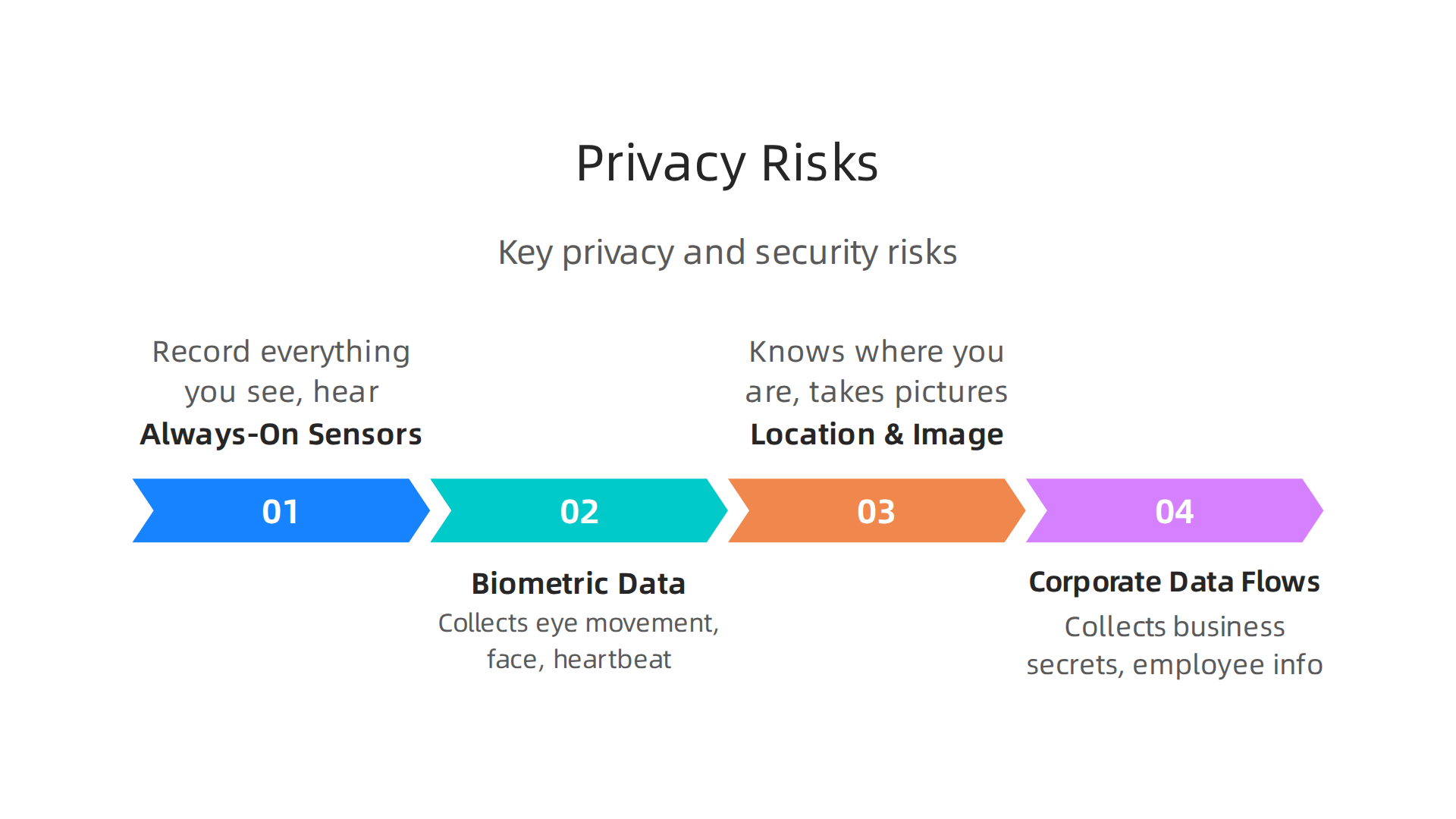
    Key privacy and security risks associated with the use of wearable AI devices like Google XR Glasses.

    • Always-On Sensors: Imagine glasses with cameras and microphones that are always working. They can record everything you see and hear. This means private conversations or sensitive moments could be captured without anyone knowing. It raises questions about who sees and hears what you do.
    • Biometric Data: Your google xr glasses might collect data about you, like how your eyes move, your face, or even your heartbeat. This type of information is called biometric data, and it’s very personal. There’s a big need to protect this kind of sensitive data, and some experts are calling for broader legal frameworks for mental privacy beyond just neural data Beyond Neural Data: Cognitive Biometrics and Mental Privacy. Companies should also commit to erasing this body-based data when it is no longer needed Reality Check: How to Protect Human Rights in the 3D Immersive Web.
    • Location and Image Capture: These best smart glasses know exactly where you are and can take pictures or videos of your surroundings. If this location data or visual information falls into the wrong hands, it could be used in ways you don’t want.
    • Corporate Data Flows: For companies using google xr glasses in the workplace, the glasses could collect important business secrets or employee information. Making sure this data stays safe and private is a huge task. Businesses need to understand the hidden risks and how to manage them, a topic covered well in a guide to Stealth AI: A Business Guide to Hidden AI Risks, Opportunities, and Management in 2026.

    Rules and Regulations for Wearable AI

    In 2026, the world is still catching up with how quickly AI and wearable tech like google xr glasses are changing. There aren’t many specific rules just for smart glasses yet Smart Glasses: Potential Legal Pitfalls of an Up-and-Coming ….

    For companies looking to use google xr glasses, it’s very important to stay informed about these changing rules. Making smart choices about privacy and security now will help avoid problems later and build trust with employees and customers.

    After learning about the important privacy and security parts of google xr glasses, let’s now look at all the exciting ways businesses can use these smart devices. These aren’t just for fun; they are powerful tools that can change how work gets done in many different fields. In 2026, many companies are already seeing big benefits.

    The market for smart glasses and other XR technology is growing fast. Reports show that the global XR market was already a big $20.43 billion in 2025 and is expected to grow to over $85 billion by 2030 XR & Smart Glasses Market Statistics Report (2026). This shows just how much value these tools bring to businesses.

    High-Value Business Uses for Google XR Glasses

    These best smart glasses can help businesses in many practical ways:

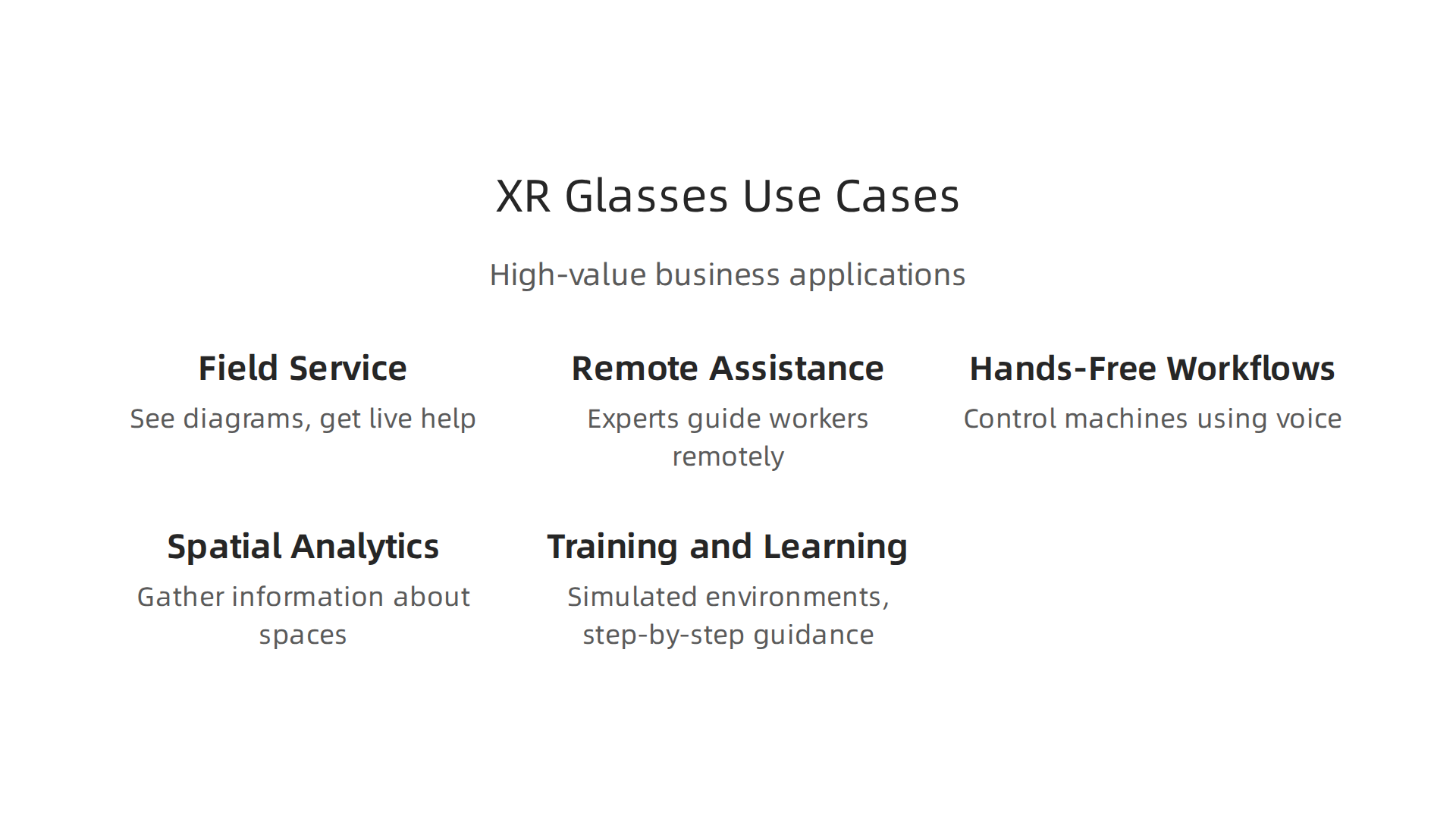
    Practical applications of Google XR Glasses across various industries and business functions.

    • Field Service: Imagine a repair person out in the field. With google xr glasses, they can see diagrams or repair steps right in front of their eyes.

    A field service technician receives remote assistance and visual instructions through smart glasses.

    This leaves their hands free to do the actual work. They can even get live help from an expert back at the office, who can see what they see. This makes repairs faster and more accurate.

    • Remote Assistance: Experts can guide workers anywhere in the world. For example, a doctor could help a nurse perform a complex procedure in a distant clinic by seeing through the nurse’s best smart glasses and giving real-time instructions.
    • Hands-Free Workflows: Many jobs need workers to use their hands a lot, like in factories or warehouses. Google XR Glasses allow these workers to get information, check lists, or even control machines using just their voice or a glance. This improves efficiency and makes work flow smoothly, much like "flow tech" helps systems run better.
    • Spatial Analytics: Businesses can use the glasses to gather information about physical spaces. For example, in a retail store, managers could see how customers move around the store or where they spend the most time. This helps them arrange products better or improve store layouts.
    • Training and Learning: New employees can learn skills faster and more safely with interactive training. Instead of just reading a manual, they can experience a task in a simulated environment, getting step-by-step guidance right through their smart glasses.

    How Businesses Integrate Google XR Glasses

    Bringing google xr glasses into a business needs smart planning. Here are some ways companies are connecting this new technology:

    • Edge-Cloud Hybrid Processing: This is a fancy way of saying some tasks are handled right on the glasses (at the "edge"), while bigger, more complex tasks are sent to powerful computers in the cloud. This makes sure the glasses work fast when needed, but still have access to lots of data and processing power. Companies can build custom apps using the Android XR SDK, which offers tools for development.
    • Identity and Access Management: It’s super important to control who can use the google xr glasses and what data they can see or record. Businesses need good systems to make sure only authorized people have access, keeping information safe and private. If you’re looking for guidance on using AI tools in your business, understanding how to choose the right ones is key, as discussed in our guide on how to choose AI for business tools that deliver real results in 2026.
    • Data Pipelines: When best smart glasses collect information, it needs to flow smoothly into a company’s existing systems, like databases or project management tools. Setting up these "data pipelines" helps businesses use the information gathered by the glasses to make better decisions. For larger-scale AI integration, you might want to explore Enterprise AI Platforms 2026: Top Providers and How to Choose the Right One.

    By carefully planning these integrations, businesses can get the most out of google xr glasses, making their work easier, faster, and smarter.

    Want to stay informed about the latest AI trends and how they impact business?
    The AI Newsletter Worth Reading
    Get clear daily AI updates from The Deep View Newsletter.

    By carefully planning these integrations, businesses can get the most out of google xr glasses, making their work easier, faster, and smarter. But bringing in new technology always has its challenges. Businesses need to think about how to pay for these devices and make sure they actually help the company grow.

    Adoption, Pricing, and Calculating ROI for XR Deployments

    Even though google xr glasses offer many benefits, companies often face some hurdles when bringing them into their daily work. It is not just about buying the devices; there are bigger steps to consider.

    Common Hurdles for Adopting Google XR Glasses

    • The Cost: The first thing many businesses look at is the price tag. Smart glasses can be a big investment, especially if a company needs many units for its employees. For example, some advanced XR glasses can cost around $549, as seen with models like the VR Beast in 2026 Is This the Best XR glasses in 2026. This initial cost can be a barrier for some businesses.
    • Getting People on Board: Workers might not be used to wearing best smart glasses or using new tools. It takes time and effort to train staff and help them feel comfortable with the new way of working. Studies have shown that even though people like the idea of smart glasses, companies need to address concerns about how easy they are to use before putting them into practice Applications and User Perceptions of Smart Glasses in Emergency.
    • Comfort and Feeling: Some people might find wearing smart glasses for a long time uncomfortable. Issues like visual tiredness, muscle strain, or even feeling too much mental load can happen Long-Term Experiences From Working with Extended Reality. Making sure the glasses are comfortable and well-designed is key for workers to actually want to use them every day. The look and feel of the glasses, along with how much they cost, are very important for people to choose to adopt them AR and smart glasses become more prominent.
    • Finding the Right Developers: Creating special apps for google xr glasses needs skilled people. Not all businesses have these experts ready to go. This means they might need to hire new staff or work with outside companies, which adds to the overall effort and cost.
    • Connecting Everything Together: As mentioned before, connecting the glasses to a company’s existing computer systems can be tricky. This "integration overhead" means making sure data flows correctly and securely, which takes planning and technical work. Businesses can learn more about how other companies successfully adopt new tech by reading about the innovation line for business growth.

    How to Calculate the Return on Investment (ROI) for XR Tools

    For any big investment, businesses want to know if they will get more back than they put in. This is called Return on Investment, or ROI. Here is how companies can figure out if google xr glasses are a good deal:

    • Start Small and Measure: Don’t try to change everything at once. Pick one small project or team to try out the best smart glasses. For example, measure how much faster repairs are or how many fewer mistakes happen during training. Businesses that succeed with smart glasses often start with clear goals and focus on measuring small steps Why You Need AR Smart Glasses in 2026: The Business Case.
    • Look at the Total Cost: Think beyond just the price of the glasses. Include costs for:
      • The devices themselves
      • Software licenses or custom app development
      • Training for employees
      • Ongoing support and maintenance
      • Any needed upgrades to Wi-Fi or other infrastructure
        This "Total Cost of Ownership" (TCO) gives a full picture of the investment.
    • Understand When You Will See Results: Real change takes time. Some benefits, like faster training, might show up quickly. Others, like better decision-making from spatial analytics, might take longer to really make a difference. It’s important to set realistic timelines for when you expect to see the value from your google xr glasses investment. Exploring how to reduce overall tech spending can also help manage the financial impact of new tools. You can find useful tips on how to cut costs without cutting corners.

    By facing these challenges head-on and carefully measuring the benefits, businesses can make smart choices about using google xr glasses to improve their work and bottom line.

    Bringing new technology like google xr glasses into a business is exciting, but it also needs careful planning. After looking at the costs and how to measure if it’s a good investment, the next big step is to set up a clear plan for putting these devices into action. This plan helps make sure everything goes smoothly for both the IT team and the people using the glasses every day.

    Deployment Checklist and Best Practices for IT and Operations

    Getting google xr glasses ready for your team involves more than just unboxing them. It requires a thoughtful approach to make sure they work well with your current systems and that your employees are happy to use them.

    Starting Your Google XR Glasses Journey

    Here’s a checklist for IT and operations teams to follow:

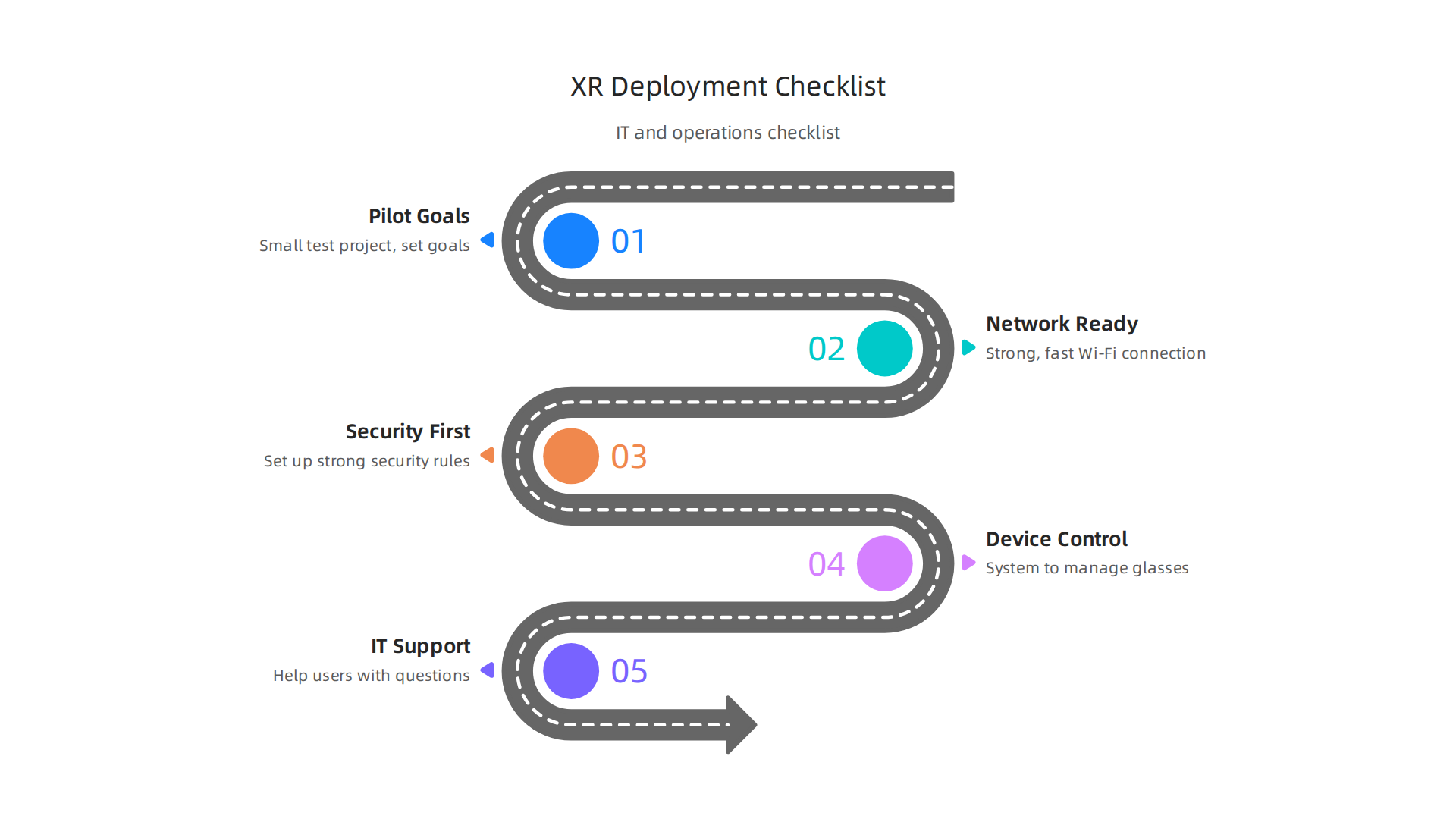
    A checklist for IT and operations teams to ensure smooth deployment of Google XR Glasses.

    • Pilot Goals: Begin with a small test project. Pick a specific task or team and set clear goals. For example, aim to reduce training time by 20% or improve task accuracy by 15%. This helps you learn what works best before a bigger rollout.
    • Network Ready: Google XR glasses need a strong and fast Wi-Fi connection to work their best. Make sure your network can handle many devices sending and receiving data at the same time. Think about upgrading your Wi-Fi if needed to ensure a smooth "flow tech" experience.
    • Security First: These best smart glasses collect a lot of information, from what users see to how they move. Keeping this data safe is super important. Businesses need to set up strong security rules to protect user information and company secrets. There are many steps to take for securing XR systems, including making sure privacy policies are followed and user data is protected Ensuring Privacy Policy Compliance of Wearables with IoT …. It’s also wise to think about the bigger picture of privacy in extended reality to avoid issues Extended Privacy for Extended Reality: Xr Technology has 99 Problems and Privacy is Several of Them. Learning about potential hidden risks of AI in tech can help you better manage these new tools safely. You can find out more in this guide on Stealth AI: A Business Guide to Hidden AI Risks, Opportunities, and Management in 2026.
    • Device Control: If you have many pairs of google xr glasses, you will need a system to manage them. This includes updating software, checking battery levels, and making sure the glasses are working correctly.
    • IT Support Plan: Decide how your IT team will help users when they have questions or problems with their smart glasses. Having a clear support plan helps users feel confident and reduces frustration. For a deeper understanding of IT operations, consider this resource: Understanding What Is Information Technology for Business Success in 2026.

    Helping Your Team Adopt New Smart Glasses

    Even the best google xr glasses won’t help if people don’t want to use them. Change management and good training are key.

    • Training Made Easy: Keep training simple and hands-on. Let employees try out the glasses themselves in a relaxed setting. Show them how the new smart glasses can make their jobs easier, rather than just telling them.

    Employees engage in hands-on training, familiarizing themselves with new smart glasses technology.

    • Show, Don’t Just Tell: Find champions within your company who are excited about the new technology. Let them show others how the google xr glasses improve tasks or solve problems. Seeing is believing, and this can inspire others to give the tech a real try.
    • Get Feedback: Ask your team what they like and don’t like about the glasses. Use their ideas to make things better. When people feel heard, they are more likely to accept new tools.
    • Choose the Right Tools: With many choices for best smart glasses and development platforms like Android XR, picking the right solutions is important for success. Knowing how to pick the right tools that truly benefit your business is a skill. Get insights into this process by exploring How to Choose AI for Business Tools That Deliver Real Results in 2026.

    By following these steps, businesses can smoothly bring google xr glasses into their daily work, making sure both the technology and the people thrive.

    Want to stay on top of the latest tech trends and make informed decisions for your business? Get clear daily AI updates from The AI Newsletter Worth Reading.

    Summary

    This article explains how Google XR Glasses and Android XR turn wearable AI into a practical business tool by blending digital information with the real world. It walks through the hardware—displays, cameras, sensors, chips and batteries—and shows how AI can run either on the device for instant, private responses or in the cloud for heavier tasks. You’ll learn what developers can build using Android XR SDKs, supported engines, and edge ML toolchains, plus the high-value business uses such as field service, remote assistance, hands-free workflows, spatial analytics and training. The guide also covers the new privacy and security risks these always-on devices introduce, relevant regulatory gaps, and recommended safeguards. For leaders evaluating adoption, it outlines common hurdles, TCO items to include, ROI measurement tips, and practical deployment steps for IT and operations. After reading, you’ll have a clear sense of what to ask vendors, how to pilot XR projects, and how to integrate smart glasses into secure, measurable workflows.