Tag: pillar-ai-hardware

  • MacBook Air 2022 AI Workloads Guide Benchmarks and Workflows

    MacBook Air 2022 AI Workloads Guide Benchmarks and Workflows

    Introduction

    You just got your MacBook Air 2022. It is sleek, light, and fast. But here is the real question: Can it handle your AI workload?

    If you are like most professionals in 2026, you are juggling AI tools every day. Maybe you use ChatGPT for drafting emails. Maybe you run local models for image generation. Or maybe you are drowning in AI newsletters, tool reviews, and workflow tutorials that all promise the same thing.

    That overwhelm is real. According to the latest AI Productivity Guide for 2026, professionals who use AI tools effectively are saving an entire workday every week. But getting there means cutting through the noise first.

    That is where the MacBook Air 2022 shines.

    With its M2 chip, this laptop delivers surprising power in a thin frame. It is not the most expensive Apple desktop replacement. It is not a gaming rig. But it offers something rare: true portability paired with enough processing muscle to run modern AI applications without breaking a sweat.

    So why does this matter for you?

    Because the right hardware is only half the equation. You also need practical workflows, real benchmarks, and honest tips that turn your machine into an actual productivity hub. That is exactly what this guide delivers.

    We will cover how the MacBook Air 2022 handles real-world AI tasks. We will compare it to other options like the best mini PC setups and show you how to avoid common mistakes. And we will share strategies to keep your workflow smooth, even when things go wrong.

    If you have been wondering whether your Apple MacBook trade in was worth it or how to get the most out of your current machine, you are in the right place.

    Let us start with something simple. If you want daily AI updates that actually help, consider checking out The AI Newsletter Worth Reading.

    Screenshot of The Deep View's newsletter subscription page, offering practical AI insights.

    It delivers clear, practical insights without the fluff.

    1. Why the M2 Chip Matters for AI Tasks

    The M2 chip is the engine that makes the MacBook Air 2022 work well with AI. Without it, this thin laptop would struggle. With it, things just run smoothly.

    Two things make this possible.

    First, the 16-core Neural Engine. This part of the chip is built just for machine learning. When you run an AI model, the Neural Engine handles the hard work. Your main processor stays free for other tasks. This means less lag.

    Second, the unified memory. Instead of separate memory spots for different parts of the chip, everything shares one fast pool. Data moves faster because nothing needs to copy itself around. For AI jobs like running LLMs or making images, this matters a lot.

    The numbers back this up. According to Apple M2 Processor Benchmarks and Specs from Notebookcheck, the M2 runs 18% faster than the M1 at the same power level.
    Screenshot of Notebookcheck's homepage, a resource for laptop and processor benchmarks.

    Compared to older Intel MacBooks, the jump is even bigger. Some AI tasks run up to 40% faster.

    Real-world tests show the same story. The MacBook Air 2022 runs mid-sized language models and image tools smoothly. It is not a desktop computer for heavy work. But for daily AI tasks, it holds up well.

    If you want to see how the M2 stacks up against newer chips, the Apple Silicon for AI M4 vs M3 vs M2 Comparison guide breaks it down with clear numbers.

    And if your AI workflow ever crashes, learning how to report a problem to Apple when your AI workflow crashes can help you fix things fast.

    2. Maximizing RAM and Storage for AI Models

    Your MacBook Air 2022 has unified memory. That means the AI model and the processor share the same pool of memory. No copying data back and forth. This is great for speed, but it means you need enough memory to hold the entire model.

    For small AI tools, 8GB works okay. But for bigger language models or image generators, you want more. A good rule is 16GB at minimum. If you plan to run heavy AI tasks daily, get 24GB if your budget allows.
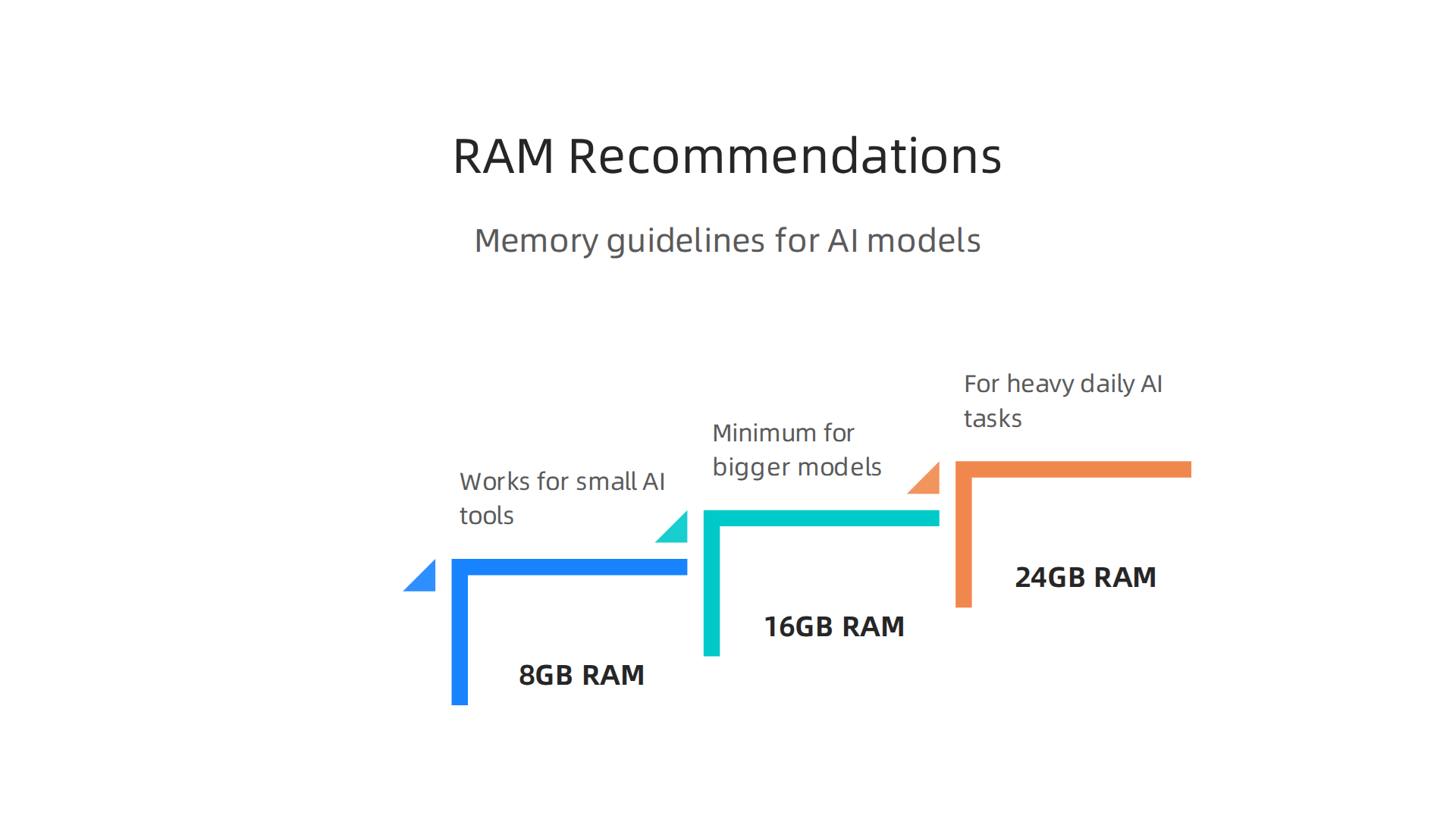
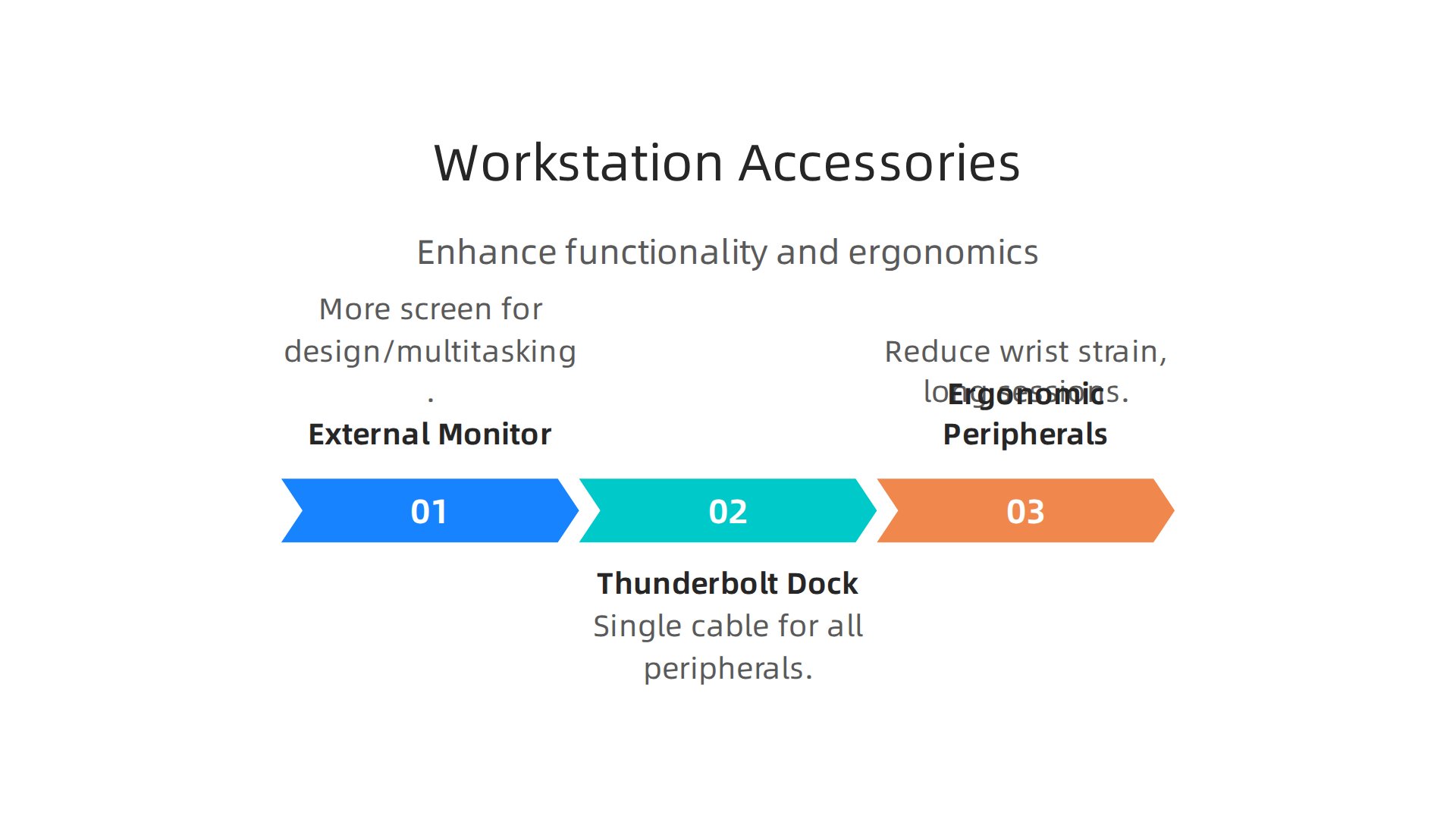
    Memory guidelines for running various AI models effectively on your MacBook Air 2022.

    The M2 chip supports up to 24GB of unified memory.

    Here is why memory matters more than you think. When your model runs out of RAM, the system starts using your SSD as virtual memory. This is called swapping. It slows everything down. A lot. Apple’s own announcement of the M2 chip explains how the unified memory architecture makes this possible. You can check that Apple M2 breakthrough performance and capabilities page for the full details.
    Screenshot of the Apple Newsroom homepage, where official announcements and product details are released.

    Now about storage. The MacBook Air 2022 comes with SSDs up to 2TB. A fast SSD matters because it loads your AI models and checkpoints faster. But here is the trick: if you have to choose between more RAM and more storage, pick RAM every time. You can always add an external drive later. You cannot add more RAM after purchase.

    If you are still deciding which model fits your work, check out this picking the best MacBooks for AI guide. It compares options across the whole lineup.

    Staying current on AI tools helps you make the most of your MacBook. Want the latest AI news and tips delivered daily? Get clear updates from The AI Newsletter Worth Reading and stay ahead.

    3. Top AI Apps Optimized for MacBook Air 2022

    Now that your MacBook Air 2022 has enough RAM and fast storage, it’s time to load it with AI apps that actually use the M2 chip’s power. The unified memory and Neural Engine make many AI tools run surprisingly fast on this laptop. Here are five apps that feel like they were made for your machine.

    1. ChatGPT for Mac – The official desktop app is lightweight and uses your Mac’s GPU for faster responses. It works great for writing, brainstorming, and coding help.
    2. MacWhisper – This native macOS app turns audio into text using OpenAI’s Whisper model. It runs completely offline and handles long recordings without slowing down.
    3. DiffusionBee – An image generator that runs locally on Apple Silicon. No cloud needed. You can create AI art right from your MacBook Air 2022 in seconds.
    4. LM Studio – Lets you download and run open-source language models like Llama and Mistral. It’s fully offline and optimized for M2 chips.
    5. Raycast – A keyboard launcher with built-in AI features. You can ask questions, summarize text, or control your Mac with natural language.

    All these apps take advantage of the M2’s efficiency. That means your battery stays strong while you work.

    For a full list of tools that perform well on Apple Silicon, take a look at this roundup of best AI apps for Mac from MacHow2.

    If you’re still figuring out which AI tools deserve your time, this guide on finding trusted AI sources can help you cut through the noise.

    4. Using Shortcuts and Automations for AI Workflows

    Once you have the right apps installed, the next step is making them work together automatically. Your MacBook Air 2022 comes with the Shortcuts app built in. This tool lets you chain AI prompts and outputs across different apps without touching the keyboard.

    For example, you can set up a daily AI briefing. Shortcuts grabs the top news headlines, sends them to ChatGPT for a one-paragraph summary, and reads it aloud through your speakers while you make coffee. All in one click.

    Another powerful automation is image generation from clipboard. Copy an image to your clipboard, run a shortcut that sends it to DiffusionBee, and get a variation or upscale in seconds. No manual importing required.

    Text summarization is equally simple. Highlight any text, trigger a shortcut, and have Raycast or ChatGPT summarize it instantly. You can then save the summary to a note or send it to your email.

    For people who want more control, third-party tools like Keyboard Maestro and BetterTouchTool take automations further. They add custom triggers, complex conditions, and deeper integration with system events. You can create workflows that run AI models based on file changes, time schedules, or even mouse gestures.

    A well-designed AI workflow saves you minutes every day. And minutes add up fast.

    A person focused on streamlining their workflow with tools, representing the benefit of automation.

    If you ever run into problems with automations going wrong, this guide on troubleshooting AI workflow crashes with Apple support can help you get back on track.

    To get the most out of these automations, you need to keep up with the latest AI tools and updates. The Deep View Newsletter delivers clear daily AI news straight to your inbox, so you never miss a new workflow opportunity. The AI Newsletter Worth Reading is a great way to stay sharp.

    5. Multitasking with AI Tools: Split View, Spaces, Stage Manager

    Now that your shortcuts and automations are running smoothly, you need a way to juggle multiple AI tools without getting lost in a mess of windows. The MacBook Air 2022 has three built-in features that make this easy: Split View, Spaces, and Stage Manager.

    Stage Manager groups your apps into sets on the left side of the screen. Click one set, and your AI writing tool, image generator, and chatbot all appear together. Click another, and you see your research notes, email, and planner. It cuts down clutter instantly.

    Spaces lets you create separate full-screen desktops. You can dedicate one desktop to your coding environment, another to your LLM chat, and a third to your output viewer. Swipe between them with three fingers on the trackpad. No alt-tabbing through a stack of windows.

    Split View is perfect when you need to see two apps side by side. Drag one window to the left edge and another to the right edge. Now you can tweak your AI prompt in one pane and watch the output update in real time.

    Here is a real-world example. A developer using the MacBook Air 2022 sets up Space 1 with VS Code for writing code. Space 2 holds ChatGPT for asking questions about the code. Space 3 shows a live preview of the app they are building. The developer switches between spaces in a heartbeat. No slowdowns. No confusion.

    These multitasking tools turn your MacBook Air 2022 into a command center for AI work.

    A professional demonstrating efficient multitasking across several virtual workspaces.

    For more tips on getting the most from your setup, check out this guide on picking the best MacBooks for AI for your 2026 projects. It covers which models handle heavy multitasking best.

    6. Local vs Cloud AI Processing: When to Use Which

    Now that your multitasking setup is ready, the next question is where to run your AI workloads. Your MacBook Air 2022 can handle some models right on the device. But other jobs are better sent to the cloud. Here is how to decide which approach fits each task.

    The M2 chip inside the MacBook Air 2022 has a 16-core Neural Engine that can run about 15.8 trillion operations per second. That is enough power for lightweight models like small language assistants, text summarizers, and basic image editing tools. Running these locally means zero latency. No waiting for an internet request. No monthly fees. You just open the app and go.

    But heavier models need more muscle. Large language models like GPT-4, video generators, or advanced image upscalers require cloud servers. The MacBook Air 2022 has a unified memory limit of 8GB or 16GB. That is not enough for models that need 32GB or more of VRAM. Offloading these to the cloud costs money per request, but you get professional-grade results instantly.

    Here is a simple strategy. Use local processing for quick edits, small drafts, and personal assistants. Use cloud processing for complex analysis, full content generation, and media creation.
    Deciding whether to run AI tasks locally on your MacBook Air or leverage cloud resources.

    The blend gives you speed when you need it and power when you must have it.

    For a deeper look at how different setups compare, check out this guide on enterprise AI platforms for 2026. It helps you match processing type to your workload.

    If you want to stay on top of which AI models run best locally versus in the cloud, The AI Newsletter Worth Reading delivers daily updates straight to your inbox. No fluff, just practical AI news.

    7. Battery Life Management for Heavy AI Workloads

    Now that you know when to run AI locally versus in the cloud, let’s talk about what happens to your battery when you push the MacBook Air 2022 with local models. The M2 chip has special efficiency cores that keep power draw lower during sustained AI inference. That is a big help. But running AI models still eats energy fast.

    Here is the honest truth. If you use your MacBook Air 2022 for normal tasks like web browsing and writing, you might get 15 hours or more. Apple’s newer MacBook Air with M5 shows up to 18 hours for video playback in Apple’s official battery ratings for MacBook Air. But when you start running continuous AI inference, that number drops hard. Expect about 3 to 4 hours of steady AI work on a full charge.

    Do not panic. You can stretch that battery further with a few simple habits. First, lower your screen brightness. The display is a big power hog. Second, close every app you are not using. Background apps fight for system resources and drain your battery. Third, turn on optimized energy settings. Go to System Settings and select Low Power Mode. That caps performance slightly but gives you more runtime.

    Also, avoid running multiple AI models at the same time. The MacBook Air 2022 handles one local model fine. Piling on two or three will drain your battery in under two hours. Stick to one task at a time.

    If you want to upgrade your hardware for longer AI sessions, check out this guide on best MacBooks for AI projects. It compares battery performance across different models.

    8. Integrating AI with macOS Native Features (Spotlight, Siri, Quick Look)

    Your MacBook Air 2022 already comes with tools you can use for AI work. You probably use Spotlight to find files or Siri to set reminders. But these native features can also help you run AI tasks faster. Here is how to make them work for you.

    Use Spotlight as a quick launchpad for AI scripts and tools. Press Command + Space and type the name of an AI app or script. For example, if you have a local text generation model saved as a shortcut, Spotlight finds it in seconds. You do not need to dig through folders every time.

    Siri shortcuts can trigger complex AI workflows with voice commands. Open the Shortcuts app on your Mac. Create a shortcut that runs an AI model or opens a set of tools. Then say "Hey Siri" followed by the shortcut name. Siri runs it without you touching the keyboard. This is great when you need to start a long AI task while you step away.

    Quick Look previews of AI-generated images and documents save time. Select a file and press the Space bar. You see the image or document content without opening any app. This works for AI output like generated pictures, text files, or CSV exports. You check results fast and move on.

    Newer MacBook models include even deeper AI features, as shown in The best MacBooks of 2026. But your MacBook Air 2022 already handles these tricks well.

    If you want to stay updated on more AI tips like this, The AI Newsletter Worth Reading delivers clear daily updates straight to your inbox.

    These small habits turn your everyday Mac features into AI helpers. No extra software needed.

    9. Security and Privacy Considerations for AI on MacBook Air

    Using AI on your MacBook Air 2022 is exciting, but it also raises important questions about safety. Here is the good news: running AI locally on your machine keeps your sensitive data off third-party servers. When you use a local AI model instead of a cloud service, your private information never leaves your laptop. That alone reduces a lot of risk.

    Your MacBook Air already comes with strong built-in protections. FileVault encrypts your entire drive so that even if someone gets physical access to your computer, they cannot read your files.

    A person thinking about or implementing data security measures for their digital work.

    Gatekeeper checks that every app you run has been verified by Apple. And the T2 security chip in your MacBook Air handles encrypted storage and secure boot processes. These features protect both your AI tools and the data they process.

    Here are a few best practices to keep your AI work safe:

    Sandbox your AI apps. When you download a new AI tool, run it in a separate user account or a container. This limits what the app can access if something goes wrong.

    Vet your models carefully. Only download AI models from trusted sources. Bad actors can hide malware in fake model files. Check reviews and community feedback before running anything unfamiliar on your MacBook Air.

    Use encrypted containers for sensitive AI data. Tools like VeraCrypt let you create a secure folder that locks with a password. Store your training datasets and AI outputs there when you are not using them.

    Apple has been paying closer attention to AI security too. In 2026, the company started accelerating security updates in response to AI-powered hacking risks. This means your MacBook Air gets fixes faster when new threats appear.

    If you run into security issues with your AI workflow, you can learn how to report a problem to Apple when your AI workflow crashes. Getting fast help keeps your projects moving without putting your data at risk.

    Staying safe does not have to be hard. A few small habits make a big difference when you are exploring AI on your MacBook Air 2022.

    10. Future-Proofing Your MacBook Air for Emerging AI Tech

    Building on that foundation of safety, let us talk about how to keep your MacBook Air 2022 ready for the AI tools of tomorrow. The good news is that Apple designed this laptop with future AI features in mind.

    The M2 chip inside your MacBook Air includes a 16-core Neural Engine built specifically for machine learning tasks. As Apple rolls out more on-device AI features in future macOS updates, that Neural Engine will become even more useful. Your machine is already set up to handle those improvements without needing new hardware.

    But to really get the most out of your laptop for years to come, you need the right configuration. If you are buying new or upgrading, aim for at least 16GB of RAM and a 512GB SSD. These specs give your MacBook Air the memory and storage space to handle larger AI models and bigger datasets without slowing down. That upfront investment will extend your laptop’s useful life by several years.

    Staying ahead also means keeping an eye on Apple’s machine learning framework updates and community optimizations. The AI space moves fast, and new techniques can make older models run faster on the same hardware. Following these changes helps you squeeze every bit of performance from your MacBook Air 2022. You can find more guidance on picking the best MacBooks for AI if you are considering other options.

    Apple is also adapting its overall approach to keep users safe as AI evolves, with accelerated security updates in response to AI-powered threats becoming the new normal. That level of commitment means your MacBook Air will keep getting better protection over time.

    To stay on top of all the AI tools and updates that matter for your workflow, get clear daily AI updates from The AI Newsletter Worth Reading. It helps you keep your MacBook Air ready for whatever comes next.

    Summary

    This guide explains how the MacBook Air 2022 with Apple’s M2 chip performs as an everyday AI machine and how to get the most from it. It breaks down why the 16‑core Neural Engine and unified memory matter, recommends RAM and storage configurations, and gives practical rules of thumb for running local models versus sending jobs to the cloud. You’ll find a curated list of apps that run well on Apple Silicon, step‑by‑step ideas for automations and multitasking, and concrete tips to stretch battery life during sustained inference. The article also covers macOS integrations like Shortcuts, Spotlight and Siri, plus security practices to keep data safe when using AI tools. Finally, it shows how to future‑proof your setup with the right specs and update strategies so your MacBook Air stays useful as AI evolves. After reading, you’ll know which workloads your Air can handle, how to configure it for speed and safety, and when to offload heavier tasks to cloud services.
  • How to Report a Problem to Apple When Your AI Workflow Crashes

    How to Report a Problem to Apple When Your AI Workflow Crashes

    Introduction

    Your AI model just crashed mid-training. Or that machine learning script keeps freezing your MacBook. You need to get help from Apple fast, but the support process feels like a maze. Sound familiar?

    If you work with artificial intelligence, you probably push your Apple devices harder than most users. Heavy processing loads, constant software updates, and complex dependencies can create unique problems that standard troubleshooting guides don’t cover. And when something goes wrong, knowing how to report a problem Apple support can actually understand becomes critical.

    The truth is, Apple’s support system works well once you know the right channels. But many AI professionals waste hours waiting on hold or sending emails into a void. Some users report waiting over 30 minutes to speak with a representative, according to discussions on the Apple Support Community. Others find that support tickets go unanswered for days or even weeks.

    This guide is built for people like you. Whether you are a developer, researcher, or tech enthusiast, you need practical steps that get results. We will cover exactly how to contact Apple, what information to prepare beforehand, and how to speed up your support experience.

    Knowing your Apple serial number and understanding what support options exist can save you hours of frustration. We will also look at how the tech ladies community and applied tech resources can help you troubleshoot common AI workflow issues. And with so many new tools relying on ui ai integration, having a solid support strategy is more important than ever in 2026.

    Ready to take control of your Apple support experience? Let’s start with the basics of getting through to the right person on the first try.

    If you want to stay ahead of the latest AI tools that work seamlessly with Apple hardware, The AI Newsletter Worth Reading delivers clear daily updates to your inbox.

    Why AI Users Face Unique Apple Support Challenges

    Your MacBook Pro is getting hot enough to fry an egg. Your training run keeps crashing with a kernel panic. And when you finally try to report a problem Apple support might actually understand, you hit a wall.

    Here is the thing. AI workloads push Apple hardware in ways everyday use does not. That is why standard support can feel useless for people building or running machine learning models in 2026.

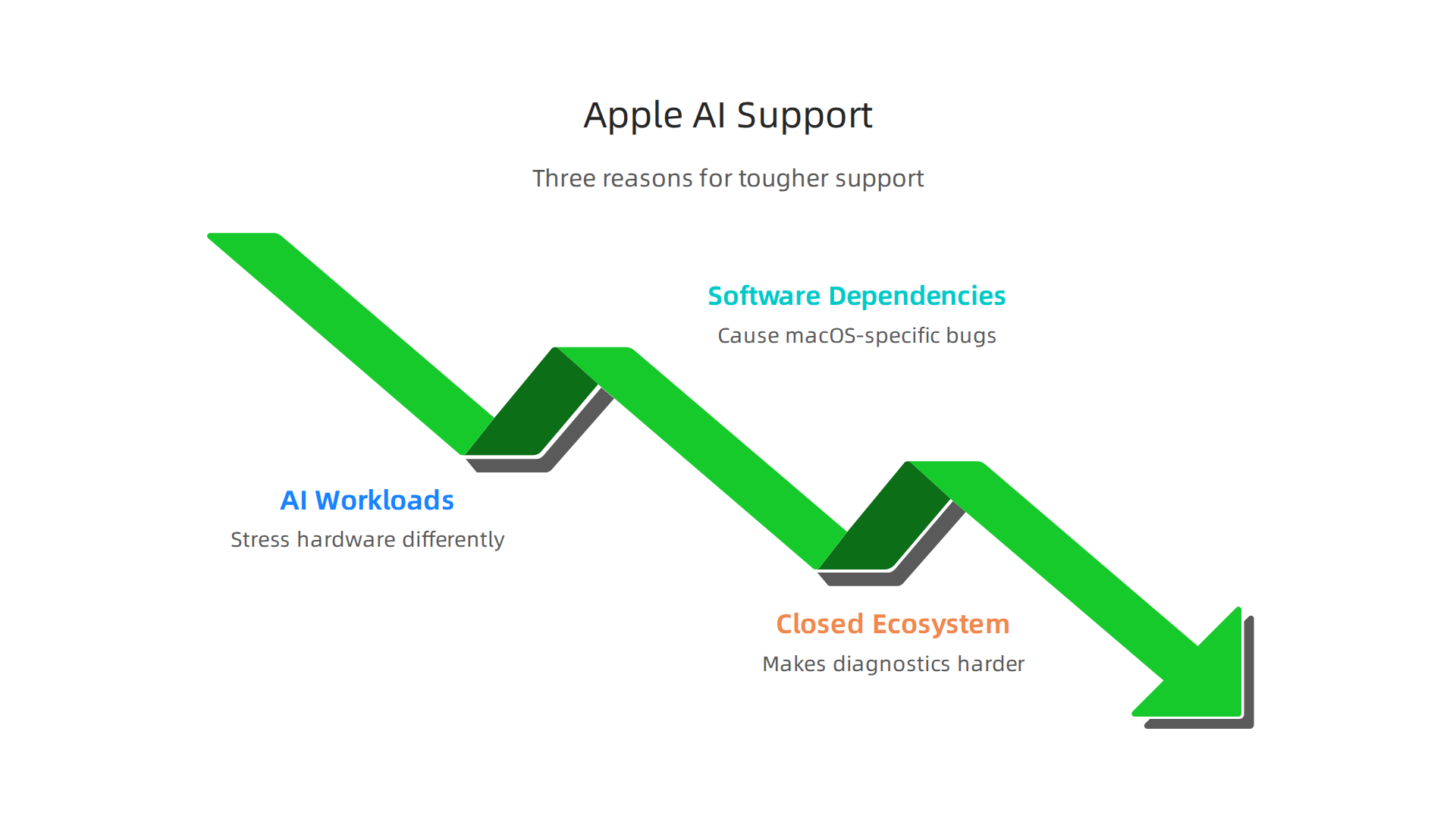
    Let us break down the three main reasons your Apple support experience is tougher than average.

    Understanding why AI users encounter specific challenges when seeking Apple support due to unique hardware and software demands.

    AI workloads stress hardware differently

    Training a model or running inference on a large dataset makes your CPU and GPU work hard for long periods. This causes thermal throttling, where the system slows itself down to avoid overheating. Memory pressure builds up. And GPU-related crashes become more common.

    Standard Apple support agents are trained for typical problems like "my screen is cracked" or "my battery drains fast." They do not always know how to diagnose issues caused by high sustained loads.

    A team collaborating to solve a complex technical problem, reflecting the need for specialized knowledge beyond standard support.

    Even for simple problems, getting through can be slow. Some users report waiting over 30 minutes on hold before speaking to anyone, as shared on the Apple Support Community.

    Software dependencies create macOS-specific bugs

    If you use TensorFlow, PyTorch, or Core ML, you know the pain. A library works fine on Linux, then breaks on macOS Monterey or Sequoia. Maybe it is a permission issue with the Metal Performance Shaders backend. Or a bug in the latest Xcode version.

    Apple’s support team may not have deep knowledge of these third-party frameworks. They might tell you to reinstall macOS or reset the NVRAM, which rarely helps. That is why the tech ladies community and applied tech forums have become go-to places for AI pros. They share fixes for ui ai integration issues that Apple’s own documentation barely mentions.

    The closed ecosystem makes diagnostics harder

    On a PC, you can run detailed hardware logs or swap out components. On a Mac, you need specialized tools like sysdiagnose and the Activity Monitor’s memory pressure graph. Apple also limits access to certain diagnostic data unless you are an Apple Store technician.

    Before you call support, you should gather your apple serial number and any crash logs. That saves you from repeating basic steps. For a deeper look at DIY troubleshooting, check out this guide on how to be your own Apple Home Advisor and troubleshoot like a pro.

    The bottom line: AI users need a different support strategy. In the next section, we will walk through the exact channels you should use to get fast, useful help from Apple.

    Understanding Apple’s Support Channels: Which One Works Best for AI Issues?

    So you have a crashing training script or a weird GPU bug on your Mac. Where do you even start with Apple? The answer depends a lot on what kind of problem you are facing.

    Apple gives you several ways to report a problem Apple might actually fix. Each channel has different wait times and different levels of technical depth. Let me break them down so you know exactly where to go.

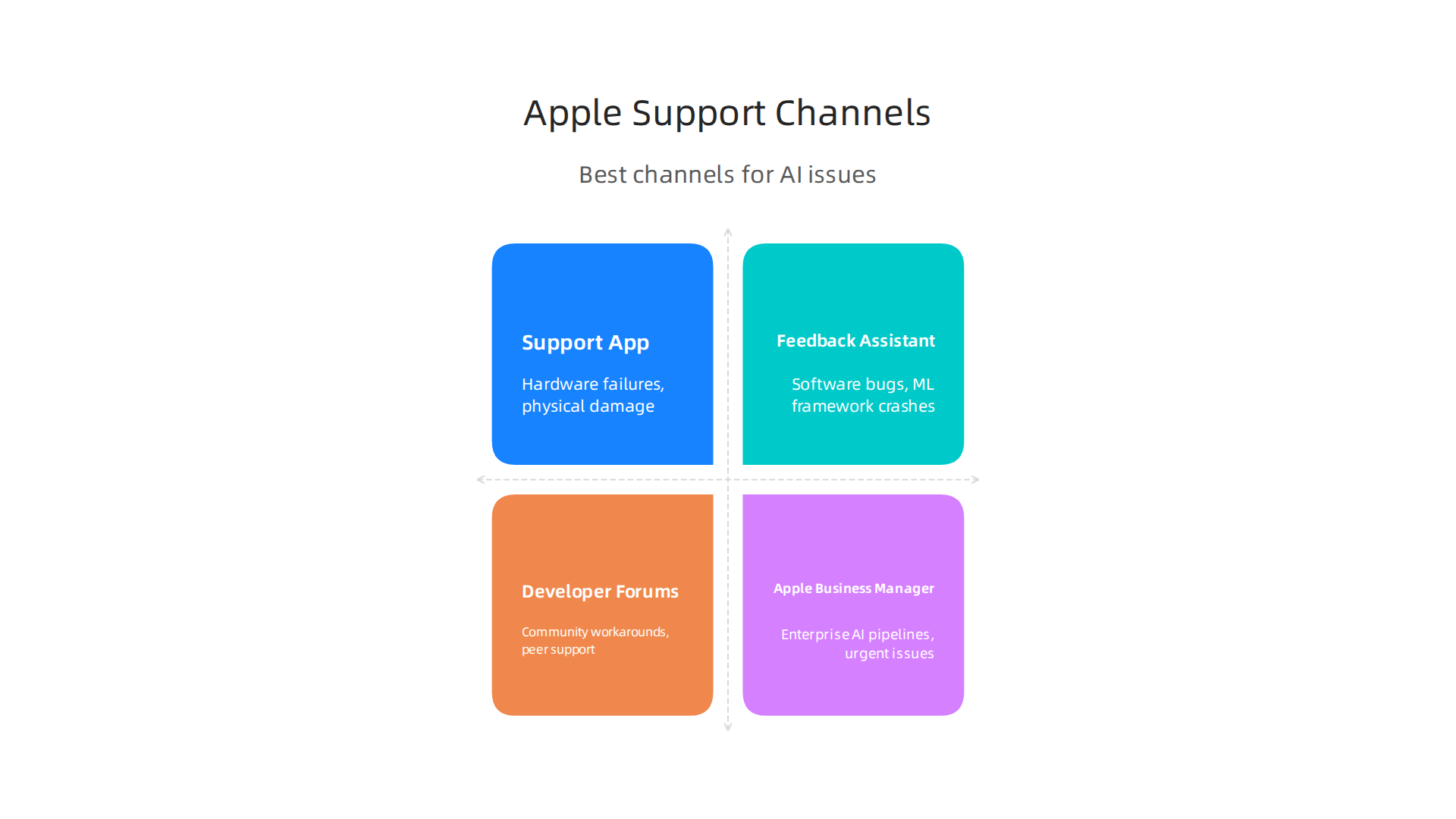
    The Support App and AppleCare (Phone and Chat)

    This is the most common route. You call 1-800-MY-APPLE or use the Support app on your device. For hardware problems like a dead battery or a broken screen, this works fine. But for AI-specific bugs? It can be hit or miss. Some users report hold times of 35 minutes or more, as noted in the Apple Support Community. The agents are generalists. They do not always understand terms like "Metal Performance Shaders" or "CUDA" (well, Apple does not have CUDA, but you get the idea). Use this channel if your Mac physically broke or if you need a replacement. Do not use it for software bugs related to machine learning frameworks.

    Feedback Assistant

    This is Apple’s official tool for reporting bugs and suggesting improvements. It is designed for developers, which makes it a much better fit for AI issues.

    Screenshot of the Apple Feedback Assistant web interface, the primary tool for developers to report bugs and suggest improvements.

    When you send feedback through the app, it automatically collects logs and system data that help Apple’s engineers diagnose the problem. The best part? You can include sysdiagnose files, screen recordings, and detailed reproduction steps. According to Apple’s own guidance, filing one issue per report with a clear title and steps to reproduce gives your bug the best chance of getting fixed. This channel is ideal for AI bugs like kernel panics during training or broken Metal backends in PyTorch.

    Apple Developer Forums

    If you want to talk to other developers who face the same AI problems, the forums are your spot. Apple engineers do monitor these boards, especially during beta seasons. You can search for existing threads about your specific issue and often find workarounds before Apple ships a fix. This is also where the tech ladies community and applied tech experts share real-world fixes for tricky ui ai integration problems. For a broader look at finding trusted sources for AI tools, check out our guide on how to find trusted tech sources.

    Apple Business Manager

    If you are running AI workloads for a company or an educational institution, this channel moves faster. Business and enterprise customers typically get shorter wait times and more senior support staff. If your organization has a volume purchasing agreement, you can often get escalated directly to engineering teams. That matters when a critical training pipeline is down.

    Which channel should you pick for AI issues?

    Here is a quick cheat sheet:

    A quick guide to Apple's support channels, indicating which one is best suited for various AI-related problems and typical response times.

    Channel Best For Response Time
    Support App / AppleCare Hardware failures, physical damage 30 to 45 minutes on average
    Feedback Assistant Software bugs, ML framework crashes Days to weeks (sometimes no reply)
    Apple Developer Forums Community workarounds, peer support Hours to days
    Apple Business Manager Enterprise AI pipelines, urgent issues Same day or faster

    For the vast majority of AI bugs, start with Feedback Assistant. Then post on the Developer Forums to see if others have found a fix. Save AppleCare for when your Mac actually stops turning on.

    Getting daily AI updates and community insights can also help you stay ahead of Apple-specific issues. That is why many AI professionals subscribe to a dedicated newsletter for practical, daily tech news. If you want clear, no-fluff updates on AI tools and Apple developments, check out The AI Newsletter Worth Reading.

    Step-by-Step: How to ‘Report a Problem’ on Apple (Tailored for AI)

    You already know that Feedback Assistant is the best channel for AI bugs. But knowing that and actually filing a report that gets fixed are two different things. Here is a step-by-step walkthrough designed specifically for AI professionals.

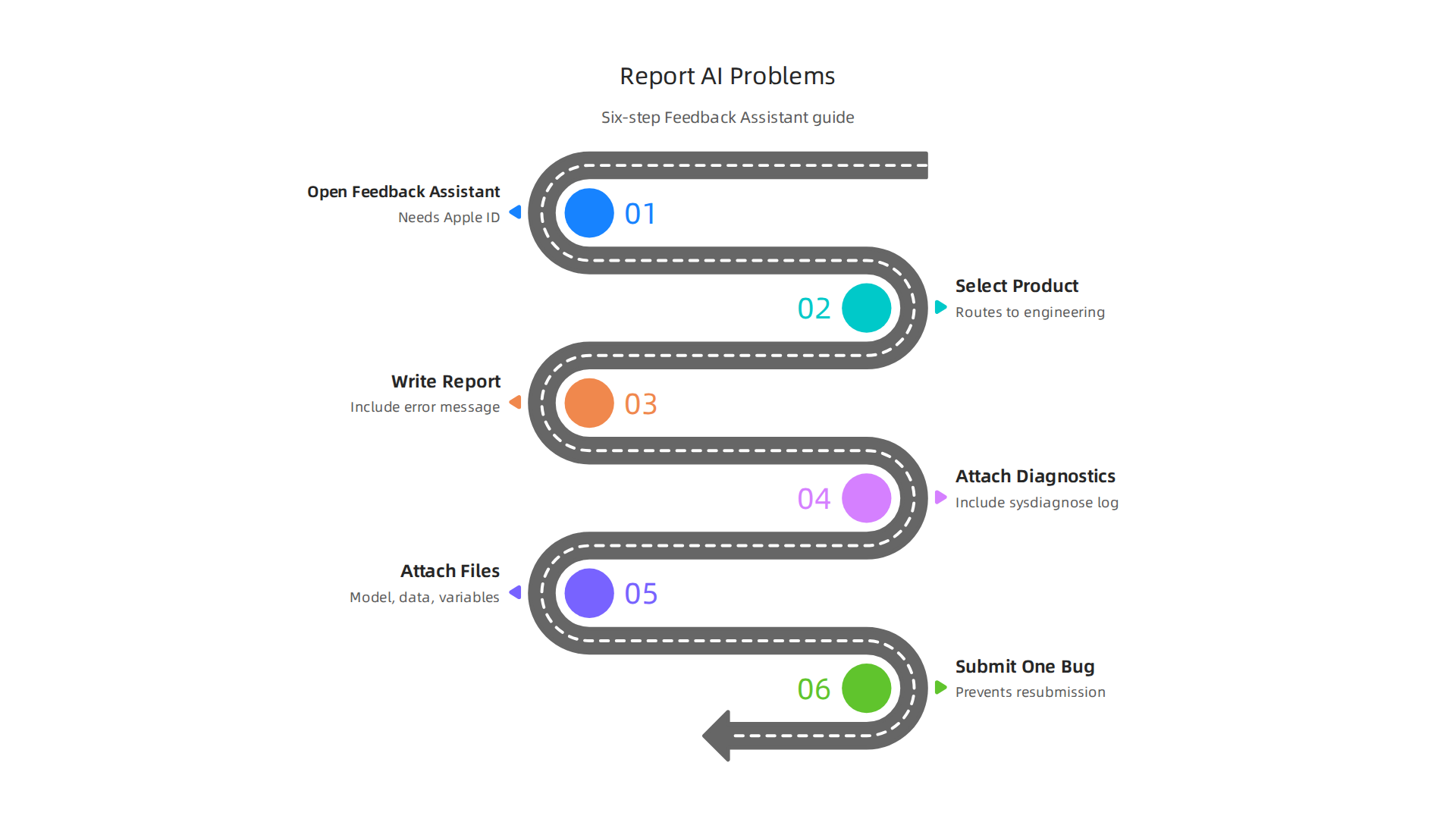
    A six-step guide on effectively reporting AI-related issues to Apple via Feedback Assistant, tailored for developers.

    Step 1: Download and open Feedback Assistant

    On a Mac running a beta version of macOS, the app is pre-installed. If you are on a public release, go to feedback.apple.com in Safari. You need to be signed in with your Apple ID. If you are part of the Apple Developer Program, that is even better. The app automatically collects time-sensitive system data when you submit, which saves you a step.

    Step 2: Pick the right product area

    This matters more than you think. Apple’s internal bug tracking system, Radar, routes your report to a specific engineering team based on the category you choose. If you pick the wrong one, your bug might sit in the wrong queue for weeks. For AI issues, look for categories related to Machine Learning, Metal, or Core ML. If nothing quite matches, pick the closest one. According to experienced developers, the team that gets your bug will likely reassign it if needed, but it helps to be as accurate as possible.

    Step 3: Write a clear, tight title and description

    Apple’s own guidance says your title should be short but specific. Something like "PyTorch MPS backend crashes on M4 Mac when using batch size greater than 32 during training" is much better than "AI training crash." Include the software versions and the exact error message in the description. Write a step-by-step list of how to reproduce the bug. Pretend the engineer reading it has never seen your project before.

    Field Good Example Bad Example
    Title Metal kernel panic in PyTorch 2.5 on macOS 16 beta AI crash
    Description Step 1: Install PyTorch 2.5. Step 2: Run python train.py --batch-size 64. Step 3: Observe kernel panic after 10 minutes. It crashes sometimes.

    Step 4: Attach detailed diagnostics

    This is where AI bugs are special. The Feedback Assistant app automatically includes a sysdiagnose. But you should also manually trigger one right after the crash happens. On your Mac, press Shift + Control + Option + Command + Period to generate a sysdiagnose log. The file gets saved to /var/tmp/. Include it in your report. The Apple Developer Forums recommend triggering the sysdiagnose as soon as possible after the problem occurs so it captures the relevant state.

    Also grab Console logs for the crash time window. Open the Console app, filter for "kernel" or your app name, and export the relevant lines. For UI issues like a frozen training dashboard, take a screen recording.

    Step 5: For AI workflows, include extra files

    Standard advice says to include crash logs. For AI bugs, go further. Attach a small version of your model file, a sample of your dataset (just a few rows), and a text file listing your environment variables. This helps the engineer reproduce your exact setup. If your bug involves a specific Python package version, list those too.

    Step 6: File one bug per issue

    This one is critical. If your training script crashes and your inference pipeline also has a weird GPU bug, file two separate reports. Reports that list multiple issues are often returned for resubmission. Reference one bug number in the other so Apple’s team can link them.

    For more guidance on finding trusted sources for AI tools and troubleshooting, check out our guide on how to find trusted tech sources.

    Getting these small details right is what separates a fix that ships in two weeks from a report that sits in the queue for months. If you want daily updates on AI tools and Apple developments to stay ahead of common bugs, sign up for The AI Newsletter Worth Reading.

    Creating a High-Impact Bug Report for AI Software and Hardware

    Knowing the steps to file a report is one thing. Writing a report that actually gets the attention of Apple’s engineering teams is another. In 2026, as AI workloads on Apple Silicon grow more complex, engineers rely on clean, detailed bug reports to isolate problems fast.

    A professional presenting a detailed technical report, symbolizing the effort required to create a high-impact bug report.

    Here is how to structure your report so it stands out.

    Start with a strong title and summary.

    Apple’s own guidance on filing great bug reports says your title should be clear and include key details like the technology, platform, and version. For AI bugs, that means something like "Core ML model conversion fails on M4 Ultra with macOS 16 beta 3." The summary should state the problem in one or two sentences. Do not bury the lead. Say upfront that your training run crashes or your inference pipeline returns wrong results.

    List your environment completely.

    This is where AI bugs differ from regular software bugs. You need to specify:

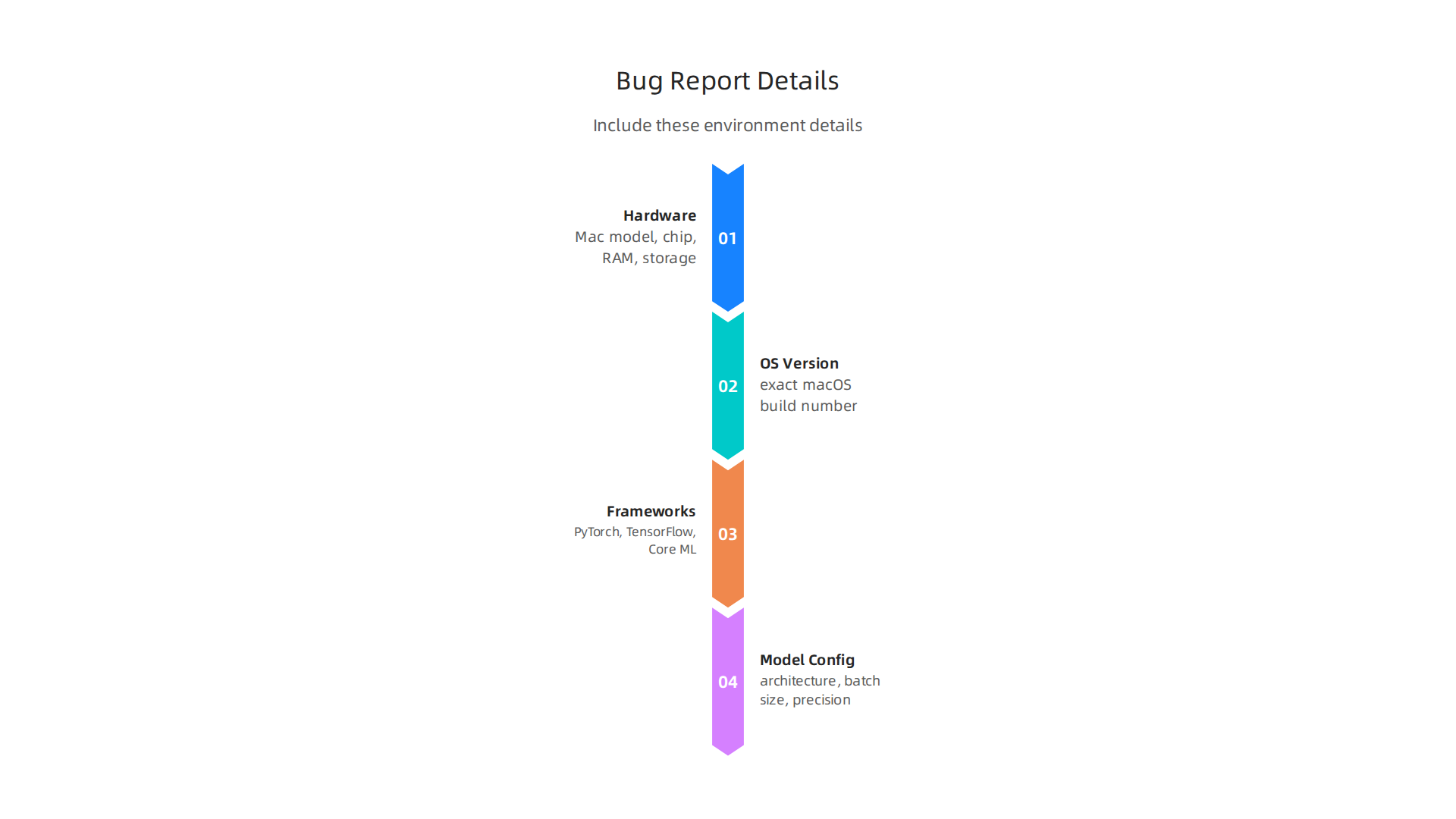
    Essential environment details to include in an AI bug report to ensure Apple's engineering teams can effectively diagnose the issue.

    • Hardware: Mac model, chip type (M3, M4, M4 Max, M4 Ultra), RAM, and storage.
    • OS version: Include the exact macOS build number.
    • Framework versions: PyTorch, TensorFlow, Core ML, or Metal version numbers.
    • Model configuration: Model architecture, batch size, precision (FP16, FP32), and any custom layers.

    Getting this right matters because a bug on an M4 Ultra with 128 GB of RAM might not reproduce on an M3 with 16 GB. If you are working with picking the best macbooks for ai, knowing your exact specs helps the team match your setup.

    Write clear steps to reproduce.

    This is the most important part. Number each step. Start with a clean state. For example:

    1. Install PyTorch 2.6 with MPS support.
    2. Load the model file resnet50-fp16.pt.
    3. Run inference on a batch of 32 images.
    4. Observe the crash after step 3.

    Pretend the engineer has never seen your project. Also include your expected result and the actual result side by side.

    Attach everything that helps.

    A sysdiagnose is required. But for AI bugs, also include:

    • A small version of your model file or a script that recreates it.
    • Sample data (just a few rows or images).
    • Console logs filtered for the crash time window.

    For UI issues in an AI training dashboard, take a screen recording. Visuals help a lot.

    Avoid these common mistakes.

    First, do not omit log files. Engineers cannot debug what they cannot see. Second, always test with a minimal reproduction. Strip away everything except the code that triggers the bug. Third, never write vague descriptions like "training is slow." Say "training with batch size 64 on M4 Max takes 3x longer than on an M2 Ultra."

    Many tech ladies and applied tech professionals also forget to include the Apple serial number of their device. This helps Apple match your hardware configuration to internal testing units. Add it in the environment section.

    Finally, for UI AI bugs, be extra specific. Describe exactly what the user sees and what they expect to see. A screenshot with annotations can save days of back and forth.

    Leveraging Developer Tools: Radar, Feedback Assistant, and Community Forums

    You wrote a detailed bug report following the steps above. Now comes the big question where do you actually send it? Apple gives developers several ways to report problems. Picking the right channel can mean the difference between a fix in weeks or a ticket that sits unanswered.

    Feedback Assistant is your main tool.

    For most AI bugs on Apple Silicon, Feedback Assistant is the right place. This tool is available on iPhone, iPad, Mac, and the web. It collects time-sensitive diagnostic info automatically when you submit a report. The official guidance from the Apple Developer Feedback Assistant page says to start your feedback as early as possible. When you run into an issue with a beta version of macOS or a new Core ML feature, file it right away. The earlier you submit, the more likely engineers will address it before the public release.

    Here is a tip that many tech ladies and applied tech professionals miss: always file one issue per report. If your training pipeline crashes AND your inference results are wrong, create two separate reports. Apple says reports covering multiple issues are not actionable and may get sent back.

    Apple Developer Forums offer faster help.

    For peer-to-peer support, the Apple Developer Forums are a hidden gem. If you are stuck on an AI-specific problem like a Metal Performance Shaders error or a model conversion glitch, someone else has probably hit the same wall. The Apple Developer Forums let you search past discussions and start new threads. Apple engineers and other developers often reply within days. For quick workarounds, this beats waiting on a formal bug report response.

    When you search the forums, include details like your chip type and framework version. A post that says "MPS crash on M4 Ultra with PyTorch 2.6" gets answers faster than one that says "my model crashes."

    Radar and AppleCare for critical issues.

    Radar is the older bug tracking system that still runs behind the scenes. Many developers submit through Feedback Assistant, which feeds directly into Radar. For production-blocking issues that halt your deployment, Apple Developer Technical Support (DTS) is your best bet. You can submit a code-level support request through the Code-level Support page. Include your Feedback Assistant ID, a sample project, and clear steps. This gets you direct access to engineers who can escalate urgent bugs.

    Stay ahead of the AI curve.

    The AI landscape on Apple platforms changes fast. Getting your bug reports seen is only half the battle. You also need to stay informed about new frameworks, updates, and workarounds as they release. That is why keeping up with daily AI news matters for your workflow. If you want clear, practical updates delivered to your inbox, The AI Newsletter Worth Reading gives you the signal without the noise.

    What to Expect: Apple’s Response Times and Escalation Paths for AI-Related Issues

    Once you file your report through Feedback Assistant, the waiting game begins.

    A person patiently waiting, symbolizing the varying response times after submitting a bug report to Apple.

    Knowing what to expect helps you plan your next steps without checking your inbox every hour.

    Response times vary a lot by channel.

    If you need immediate help, Apple phone chat or live support is your fastest option. You can expect a reply in minutes. For Feedback Assistant, the timeline is much looser. Many tech ladies and applied tech professionals report that it takes a few days, sometimes weeks, to get a response. One Reddit user shared that response times from Feedback Assistant can take days or even weeks, and some reports never get a direct reply at all. AppleCare tickets typically get a response within one to two business days, but that can stretch during busy periods like beta season.

    Escalation paths exist for critical bugs.

    If your AI workflow is completely blocked, you have options. Developer Technical Support (DTS) lets you submit a code-level support request with your Feedback Assistant ID, a sample project, and reproduction steps. This route connects you directly with an Apple engineer who can escalate the issue. For enterprise teams, AppleCare Enterprise offers a path to request senior engineer involvement and faster resolution.

    AI-related issues often get priority.

    Apple knows that bugs in Core ML, Metal Performance Shaders, or UI AI frameworks affect many developers at once. If your issue involves a critical framework that impacts model training or inference, mention that in your title and description. Including your device details like your apple serial number and chip type helps engineers reproduce the problem faster. Bugs reported during beta cycles, especially those with clear reproduction steps and sysdiagnose logs, are more likely to be escalated quickly.

    If you are working on AI projects that rely on specific Apple Silicon hardware, choosing the right machine matters. A guide on picking the best MacBooks for AI can help you understand which models handle your workloads best.

    The bottom line: set realistic expectations, use the right channel, and provide complete information. That combination gives your bug report the best chance of getting fixed.

    Pro Tips: Proactively Preventing Apple Support Needs for Your AI Workflow

    The best bug report is the one you never have to file. Taking a few smart steps ahead of time keeps your AI workflow running smoothly and reduces the chances you will need to report a problem apple support channel at all.

    A person confidently planning, representing proactive steps to prevent future issues and reduce reliance on support.

    Stay on top of system maintenance.

    Your Mac needs regular care just like any powerful tool. Always install macOS updates as soon as they are available. Apple actively patches security holes and bugs that affect AI frameworks. In fact, Apple recently released emergency updates to address AI cybersecurity concerns, as reported by Reuters. Beyond updates, keep an eye on your machine’s thermal and memory health. Heavy AI workloads push your hardware hard. If your fans run at full speed often, consider closing unused apps and clearing memory hogs. Also keep at least 20 percent of your storage free. Low disk space can cause model training to fail or slow down dramatically.

    Choose software versions wisely.

    For production AI work, stick with stable macOS releases. Beta software can introduce new bugs or break APIs that your workflow depends on. If you want to test upcoming features, run betas on a separate partition or an external drive. That way, if something breaks, your main setup stays safe. Apple recommends filing feedback early during beta cycles and reporting each issue separately. Following that advice helps Apple fix problems before the public release.

    Build a solid backup routine.

    Time Machine is your friend. Set it up to back up daily to an external drive. Also create a bootable clone of your system drive using tools like SuperDuper or Carbon Copy Cloner. If a crash hits, you can be back online in minutes instead of days. Document your system configuration too. Write down your device details, including your apple serial number, installed software versions, and any custom environment variables. This documentation makes recovery fast and helps tech ladies and applied tech teams on your side diagnose issues quickly.

    For an extra layer of protection, keep your toolbox ready. A guide on troubleshooting Apple issues like a pro can help you handle small problems before they become big support tickets.

    And to stay ahead of AI changes that affect your setup, getting clear daily AI updates from The Deep View Newsletter helps you spot potential issues before they hit your workflow.

    Screenshot of The Deep View, an AI newsletter, highlighting its role in keeping users informed about developments.

    That kind of knowledge keeps you in control.

    Prevention takes a little time upfront. But it saves you from the waiting and frustration of a support ticket later.

    Summary

    This article explains how AI developers and researchers should report problems to Apple so their issues get diagnosed and fixed faster. It covers why AI workloads create unique hardware and software issues on macOS, the pros and cons of support channels (AppleCare, Feedback Assistant, Developer Forums, and enterprise support), and a practical, step-by-step process for filing a high-quality Feedback Assistant report. You will learn what product area to pick, how to write a tight title and reproducible steps, and exactly which diagnostics to attach (sysdiagnose, Console logs, sample models, environment details, and your Apple serial number). The guide also shows how to escalate critical production-blocking bugs, what response times to expect, and best practices to prevent problems in the first place. Following these recommendations will help you cut waiting time, get engineers to reproduce your issue, and reduce the likelihood of support back-and-forth. The article is written for AI professionals who need fast, actionable help when Macs behave differently under heavy ML workloads.

  • Be Your Own Apple Home Advisor and Troubleshoot Like a Pro

    Be Your Own Apple Home Advisor and Troubleshoot Like a Pro

    Introduction: Why Apple Home Advisor Matters Now

    A smart home should make life easier.

    Experience the ease and convenience of a well-integrated smart home that simplifies daily life.

    But in 2026, with so many devices and apps, getting everything to work together can feel like a job. You have lights, locks, cameras, and speakers. You just want them to talk to each other. This is where being your own apple home advisor becomes a superpower. Instead of hiring a consultant, you can learn the tricks to make your Apple ecosystem sing. And if something breaks, knowing how to quickly apple report a problem can save you hours of frustration.

    Apple’s smart home ecosystem is more connected than ever this year. But things are also changing fast. Apple is discontinuing support for the older Home architecture in February 2026. If you have not upgraded yet, now is the time. According to a detailed report from Apple Insider, users who upgrade get features like guest access and robotic vacuum integration. Staying on top of these updates is key to being a great apple home advisor for your own home.

    We wrote this guide to cut through the noise. We combined real-world experience with expert insights to help you get the most out of your Apple smart home setup. Whether you are starting from scratch or fixing a tricky setup, this is your playbook.

    Staying ahead in tech requires the right information. If you want to keep up with the latest AI and tech news that impacts your home and work, you need a trusted source. That is why we recommend The AI Newsletter Worth Reading. It delivers clear daily updates so you never miss a beat.

    As you automate your home, you might wonder how AI fits into the bigger picture. Check out our guide on AI virtual assistants for businesses to see how these technologies work together.

    What Is Apple Home Advisor? The Central Hub Explained

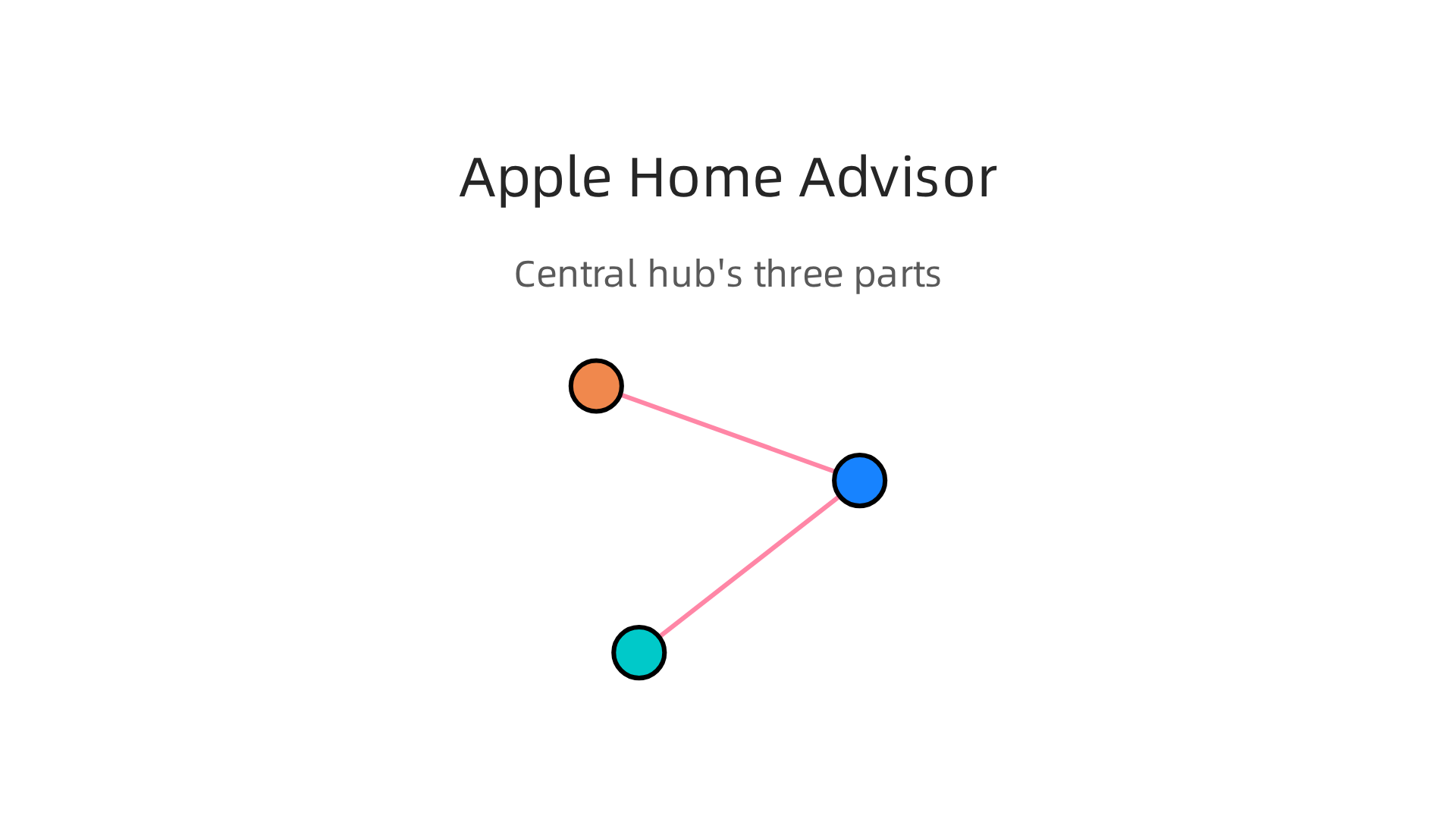
    When we talk about being your own apple home advisor, we are not talking about a job title. We are talking about the central brain of your smart home. Think of it as the command center that brings every HomeKit device into one place. Instead of opening five different apps to control your lights, lock, thermostat, and camera, you open the Home app. That is the apple home advisor at work.

    The system has three main parts.

    Understand the three essential components that form the central brain of your Apple smart home ecosystem.

    First, the Home app itself lives on your iPhone, iPad, or Mac. It is the screen where you see every accessory, create scenes (like "Goodnight" that turns off lights and locks the door), and set automations (like turning on a lamp at sunset). Apple’s official guide to add a smart home accessory to the Home app walks you through exactly how this works.

    Second, there is Siri. You can say "Hey Siri, turn off the living room lights" and the command travels from your voice to your home hub and then to the light. No tapping needed.

    Third, you need a home hub. That is either a HomePod, HomePod mini, or Apple TV 4K. The hub stays connected to your home network so you can control devices when you are away, run automations, and enable features like Adaptive Lighting.

    In 2026, the apple home advisor system got smarter. The new version of Apple Home (which you must upgrade to before February 10, 2026, or your old setup will stop working) now learns your habits. If you always dim the lights at 8 p.m., the system might suggest automating that. If your motion sensor detects you walking into the kitchen, it can turn on the under-cabinet lights automatically. These are called proactive suggestions, and they are based on your routines and sensor data.

    The whole idea is simple: one app, one voice, one brain for all your smart home gear. Once you understand that, you can start building a setup that truly works for you.

    If you are looking for more gadgets to complete your smart home, check out our list of the best startup gadgets for 2026 to see what is new and worth trying.

    Deep Integration: How Apple Home Advisor Works with iPhone, iPad, and Mac

    Imagine you set a "Goodnight" scene on your iPhone before bed. The lights dim, the thermostat drops, and the doors lock. Then you walk to your home office and want to check your front door camera. You grab your Mac and open the Home app. The exact same controls are right there. That is the power of deep integration.

    Your apple home advisor system connects every Apple device you own.

    Experience seamless control of your smart home across all your Apple devices.

    It does not matter if you start an automation on your iPhone, check a sensor on your iPad, or adjust the thermostat from your Mac. The Home app looks and works the same on every screen. Apple’s Continuity features make all of this possible. You can use Universal Control to move your mouse from your Mac to your iPad and adjust smart lights without touching a trackpad. AirPlay lets you send audio from your iPhone to a HomePod in another room. These features tie your smart home together with your daily workflow.

    The Home app itself is built into every modern iPhone, iPad, Mac, and Apple Watch. You can open it, see all your devices, and make changes instantly. The official Home app page from Apple explains how it keeps your data secure while giving you full control.

    Explore the features and security aspects of Apple's Home app on its official product page.

    Because all your devices stay signed into the same Apple Account, your home configuration syncs automatically. Add a new smart bulb from your iPad, and it appears on your Mac moments later.

    This deep integration would not mean much without support for a wide range of gadgets. That is where Matter and HomeKit come in. Apple Home works with thousands of devices from brands like Philips, Eve, and Nanoleaf. With Matter, you can buy a smart plug from one company and a motion sensor from another, and they talk to each other seamlessly. Apple’s Matter support documentation shows how iOS 16.1 and later include the Matter standard, so you can pair accessories from different ecosystems right from the Home app. You do not need separate hubs or apps for every brand.

    In 2026, this cross-device control is getting even smarter. WWDC 2026 hinted that Apple Intelligence will let you search camera events across brands from your iPhone, all in one place. That means you can ask "Show me the package delivery around 2 PM" and see clips from any compatible camera, no matter who made it. This kind of integration saves time and reduces confusion.

    If you spend a lot of time working from your Mac, picking the best MacBooks for AI projects can help you get the most out of your smart home setup, especially if you run automations or edit camera clips.

    Getting clear, daily updates on AI and smart home trends can help you stay ahead. The AI Newsletter Worth Reading delivers practical insights straight to your inbox. It is a simple way to keep learning as your home gets smarter.

    Siri’s AI Leap: Automating Your Home with Intelligence

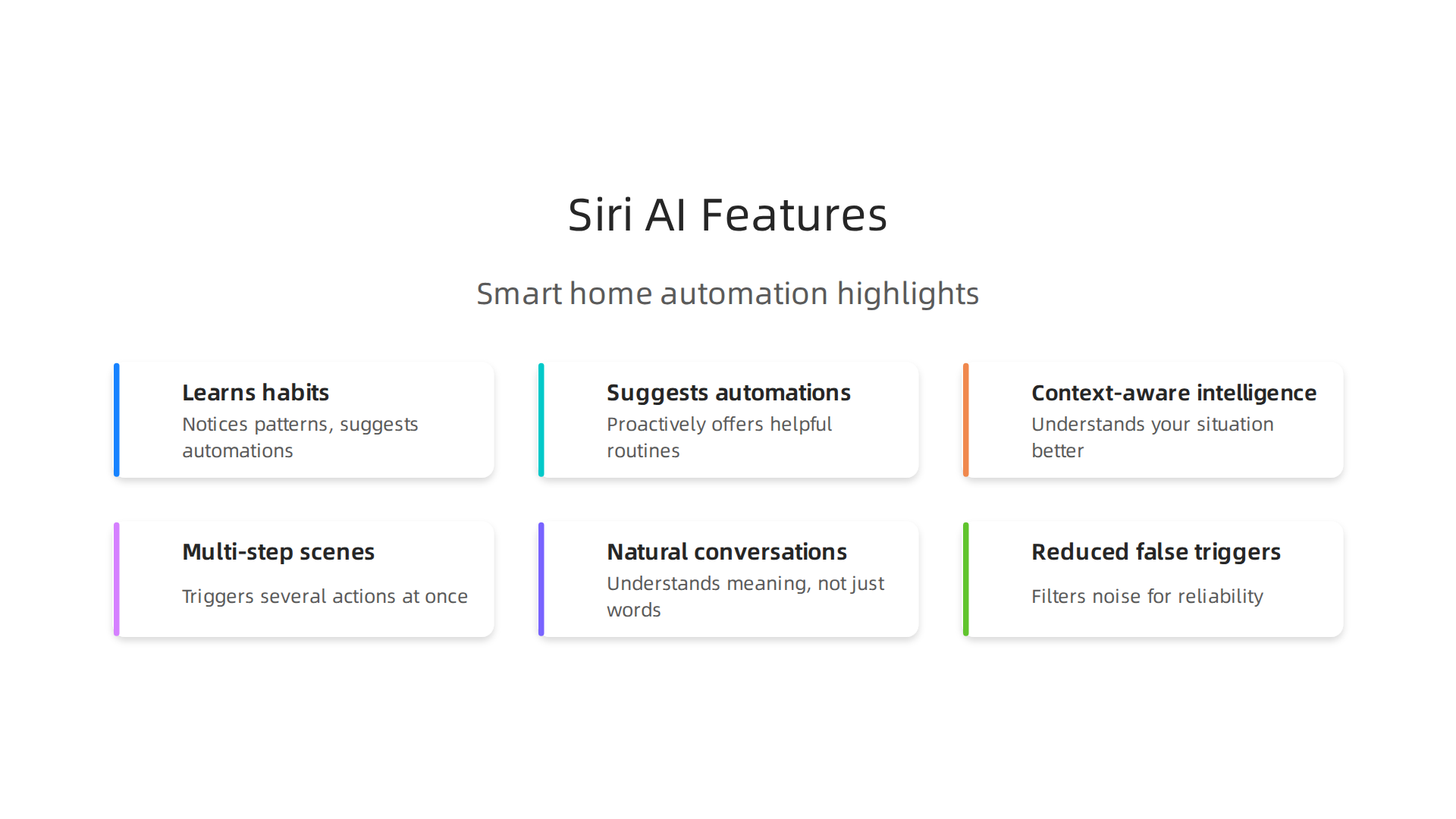
    Siri now takes that learning a step further. With Apple Intelligence, Siri does not just respond to your voice. It learns your habits and suggests automations before you even ask.

    Experience the convenience of an intelligent voice assistant that anticipates your needs and automates your home.

    Imagine arriving home from work. Every evening around 6 PM, you unlock the door, turn on the living room lights, and lower the thermostat. After a week, Siri notices this pattern. It suggests a new automation: "When I arrive home, set the lights to 50 percent and adjust the thermostat to 72 degrees." You tap Accept. Now it happens automatically.

    This is the kind of context-aware intelligence that makes your apple home advisor setup feel alive. Siri can trigger multi-step scenes with a single command. Say "Good Night" and your HomePod locks the front door, dims the lights, sets the thermostat to 68, and arms your security cameras. No separate taps for each device.

    In 2026, these capabilities have grown much stronger. Apple redesigned Siri from the ground up. The new Siri AI can hold natural conversations and understand what you mean, not just what you say.

    Discover how Siri's enhanced AI capabilities transform home automation with proactive suggestions and natural interactions.

    If you tell it "I’m leaving now," it can lock the door, turn off the lights, and start your vacuum all at once. It even remembers your preferences across devices, so you never have to repeat yourself.

    One of the biggest improvements is reduced false triggers. Older Siri sometimes thought you said "Hey Siri" when you were just talking to someone. Now on-device machine learning filters out noise and only activates when you really need it. This makes voice commands much more reliable, especially in a busy home with kids or pets.

    The official Siri AI capabilities from Apple show how the assistant now understands personal context. It can look at your past messages, photos, and calendar events to give better answers. For home automation, this means Siri knows when you usually leave for work, what temperature you prefer in each room, and which lights you want on during the evening.

    If you want to learn more about how AI assistants can streamline your daily workflow, check out our guide on AI virtual assistants for businesses. The same principles that make Siri smarter at home also apply to your work life.

    With Siri learning your routines and handling complex scenes automatically, your home truly starts to take care of itself. You spend less time tapping buttons and more time enjoying your space.

    Privacy First: How Apple Protects Your Smart Home Data

    All that convenience raises a big question: What about your privacy? With cameras, locks, and sensors gathering data around your home, you want to know that information stays safe. Apple designed its smart home system with privacy at the core.

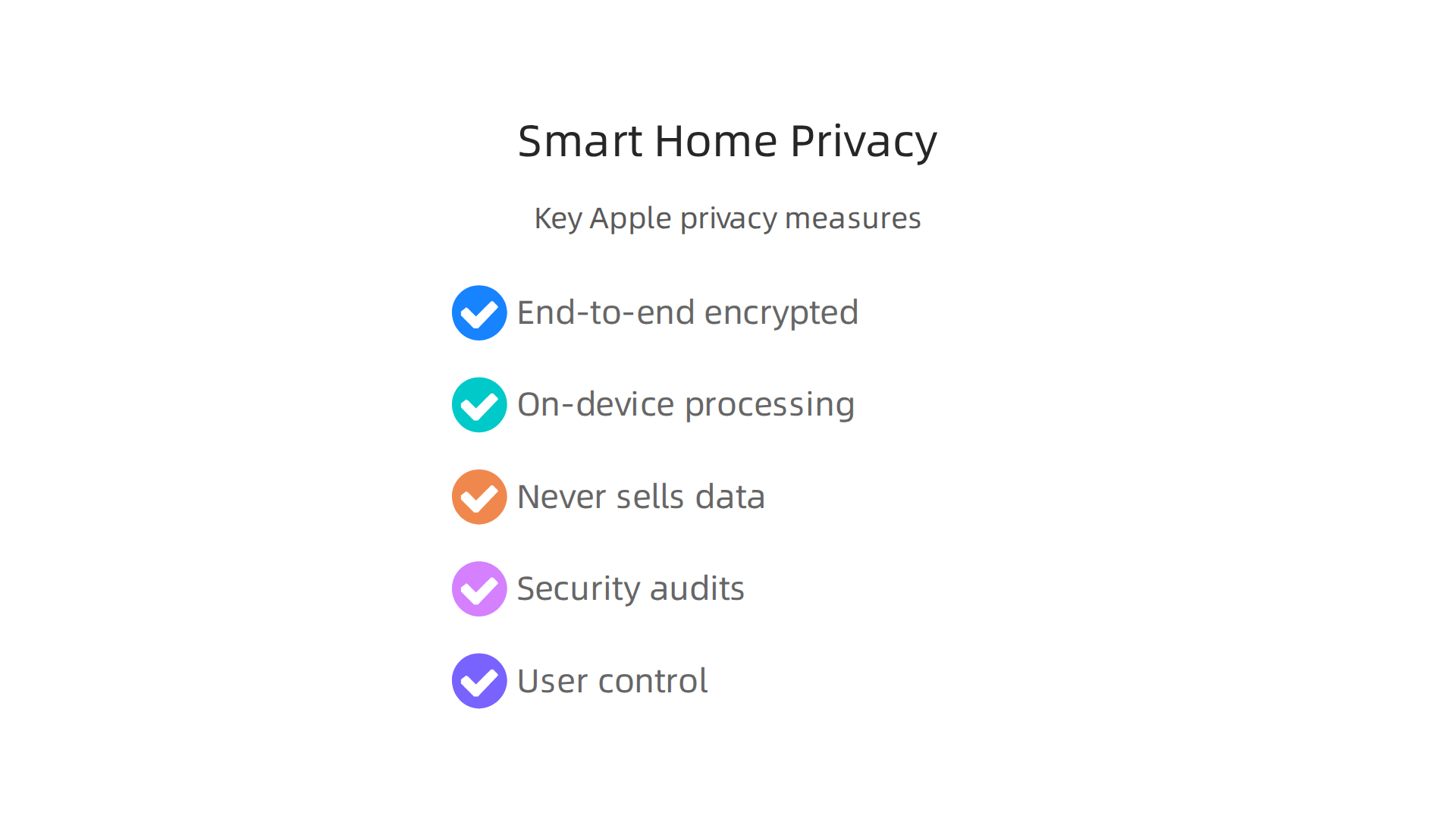
    Key measures Apple implements to safeguard your personal data within the HomeKit ecosystem.

    Every piece of HomeKit data is end to end encrypted. When you tell Siri to lock the front door or adjust the thermostat, the command is scrambled from your device to the accessory. No one else can read it, not even Apple. According to Apple’s detailed breakdown of their privacy features, data related to your home is encrypted and stored in a way that Apple itself cannot read it. It stays protected both in transit and at rest.

    Apple also processes as much data as possible right on your device. Your iPhone or HomePod analyzes camera footage locally before sending anything to the cloud. This is especially important for HomeKit Secure Video. Cameras record motion events, but the analysis happens on your home hub, not on a remote server. Only encrypted clips are saved to iCloud. So your family’s comings and goings stay private.

    Apple never sells your personal information. The company builds its business on hardware and services, not on selling your data. When you use an apple home advisor setup, you control exactly which accessories share data and how. You can grant temporary access to a guest or limit a child’s permissions. And you can revoke that access anytime.

    Regular security audits keep the system safe. Apple releases frequent updates to patch any vulnerabilities. For example, the security releases page shows that Apple pushes updates regularly for macOS, tvOS, watchOS, and more. These updates keep your smart home protected against new threats.

    If you want to stay updated on how AI and smart home technology are evolving, and how to protect your privacy along the way, consider subscribing to a trusted daily source. The The AI Newsletter Worth Reading delivers clear daily AI updates that help you make informed choices. And for more guidance on finding reliable tech sources, check out our list of top AI websites professionals trust.

    With Apple’s privacy protections in place, you can enjoy the convenience of a smart home without worrying about who’s watching. Your data stays yours.

    Troubleshooting Common Apple Home Advisor Issues

    Even the best smart home setups hit a snag sometimes.

    A person calmly working through a smart home challenge, demonstrating problem-solving skills.

    Maybe a light won’t turn on, Siri ignores your command, or a new gadget just won’t pair. Don’t worry. Most problems have simple fixes. Here are the three most common issues you might face with your Apple Home system and how to solve them.

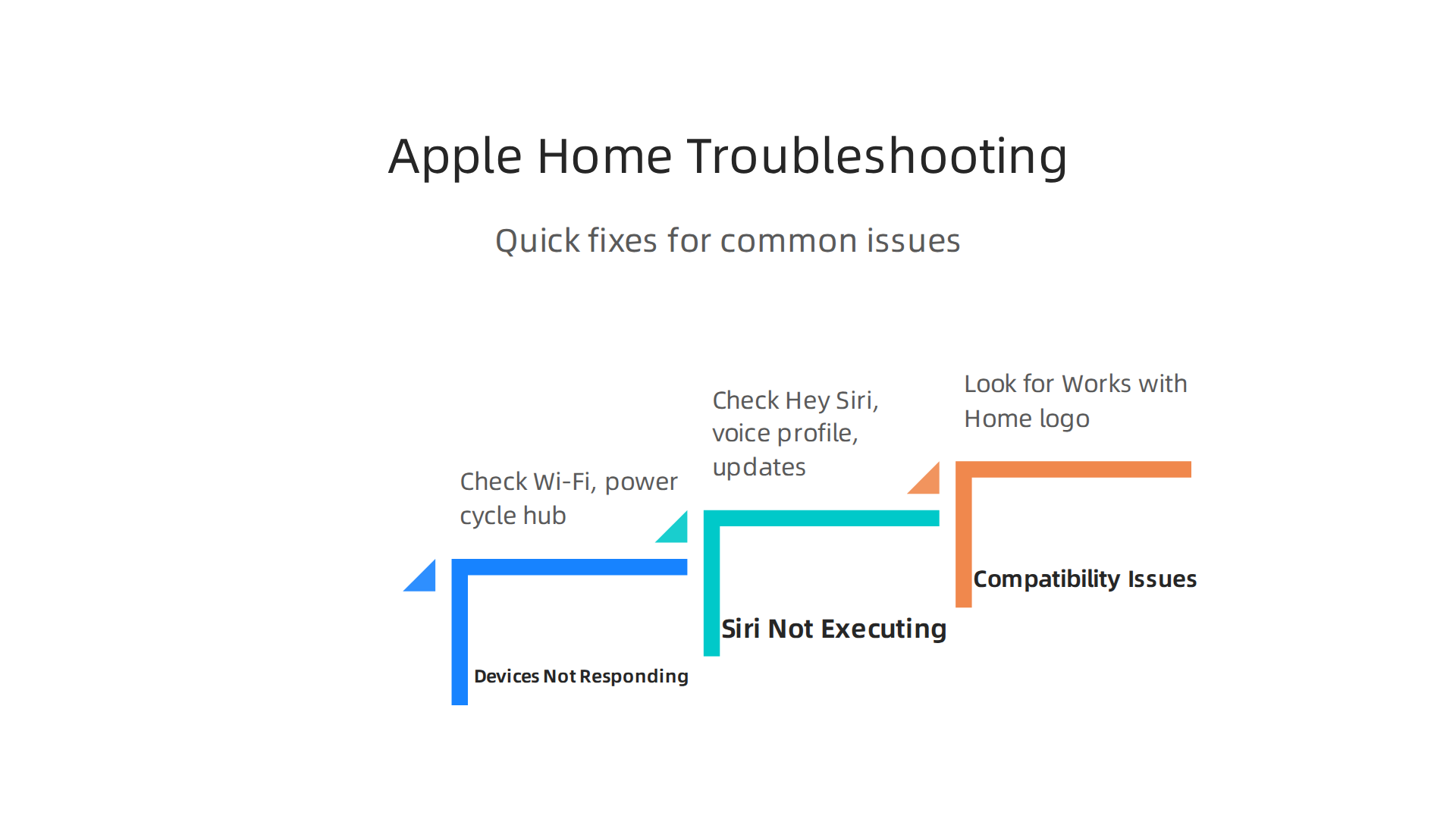
    Quick solutions for the most frequent problems encountered with your Apple Home Advisor setup.

    Devices Not Responding

    This is the number one complaint. You open the Home app, and your smart plug shows "No Response." The fix usually starts with your Wi‑Fi. Make sure your network is stable. Your Apple Home hub (HomePod or Apple TV) needs a strong connection. Try power cycling the accessory: unplug it for ten seconds, then plug it back in. Also check that the device’s firmware is up to date. You can often update firmware through the accessory’s own app. If that doesn’t work, restart your home hub by unplugging it for a minute. Many users find that simply following the steps in Apple’s guide to add a smart home accessory can re-establish a lost connection.

    Siri Not Executing Scenes

    You say "Goodnight" but the lights stay on. Siri might not recognize your voice or have the right permissions. First, check that "Hey Siri" is turned on for your device. Then open the Home app, tap the More button, go to Home Settings, and make sure Siri is enabled for your voice profile. If you have multiple people in the house, each person needs to set up voice recognition on their own device. Also verify location permissions if a scene is supposed to trigger when you arrive home. Sometimes the problem is simpler: your home hub needs a software update. You can check for updates by going to Home Settings and selecting Software Update. Apple provides clear instructions on how to upgrade to the new version of Apple Home, which often fixes Siri glitches.

    Compatibility Issues

    You bought a new smart bulb, but it won’t add to the Home app. This usually means the device doesn’t support Apple Home or Matter. Before buying any accessory, look for the "Works with Apple Home" or "Matter" logo on the box. Matter is the universal standard that lets devices from different brands work together. If you have an older device that only supports HomeKit, it will still work, but you need to confirm it’s on the same software version. Apple’s developer documentation on Matter support explains how newer accessories use this standard for easier pairing. If you already bought a device that isn’t compatible, you might need to use the manufacturer’s own app instead. For persistent problems, you can submit a formal issue through Apple’s website using the "apple report a problem" feature.

    If you run into a tricky situation, remember that you can always reach out to an apple home advisor for personalized help. They can guide you step by step and even help with refunds if a product is defective. For more tips on choosing reliable tech and troubleshooting smart home gear, check out our guide on how to find trusted tech sources. With a little patience and these fixes, your smart home will be running smoothly again.

    Future Outlook: Apple’s Roadmap for the Smart Home

    Once you’ve got your smart home running without hiccups, it’s fun to think about what’s next. Apple isn’t slowing down. In 2026, the company is rolling out new ideas that could change how you interact with your home every day. Here are three big developments to watch.

    A Dedicated Apple Smart Home Display

    One of the most exciting rumors is a standalone Apple smart home display. Picture a screen you can mount on your wall or sit on a counter. It would run the Home app and include a built-in apple home advisor to help you manage everything. You could check security cameras, adjust the temperature, or ask Siri questions without grabbing your phone. According to a report about Apple’s home automation updates and new product roadmap, Apple is working on a robotic arm for a home hub too, though that might take longer. This device would make your smart home feel more like a central command center.

    Siri AI Brings Deeper Intelligence

    The biggest leap forward is Siri itself. At WWDC 2026, Apple announced a completely new version called Siri AI. It understands personal context, sees what’s on your screen, and takes actions across apps. For your home, this means you can say "Turn on the porch light and set the thermostat to 68" and it just works. The system runs on Apple’s latest silicon, so everything stays private and fast. Apple’s new Siri AI announcement shows how the assistant can now handle multi-step requests and even suggest automations based on your daily patterns. Your home will start to anticipate what you need instead of just waiting for commands.

    Broader Matter Support and Builder Partnerships

    Apple is also pushing hard on Matter, the universal smart home standard. This means more device types like appliances, door locks, and sensors will work with Apple Home out of the box. You won’t have to check compatibility lists anymore. On top of that, Apple is reportedly talking to home builders to include Apple Home as a standard feature in new houses. Imagine moving into a home where everything is already set up and ready to go. A detailed guide on how iOS 27 Siri actually works explains how you can now create automations just by describing what you want in natural language. No more complicated setup steps.

    Stay Ahead of the Curve

    These changes mean your apple home advisor will become a much more capable tool. Instead of just fixing problems, it will help you design automations and get the most out of every accessory. To keep up with all these fast-moving tech updates, it helps to follow a trusted source. The AI Newsletter Worth Reading delivers clear daily AI updates to your inbox so you never miss a key announcement. And if you want to explore more ways AI can boost your daily life, our list of top interactive AI newsletters to follow in 2026 is a great starting point. The future of the smart home is almost here, and Apple is making sure it works for everyone.

    Summary

    This guide explains how to become your own Apple Home Advisor: the central brain that unifies HomeKit and Matter devices via the Home app, Siri, and a home hub (HomePod or Apple TV). It walks through why upgrading to Apple’s new Home architecture before the February 2026 cutoff matters, how Siri AI now suggests and runs multi-step automations, and how deep Apple integration across iPhone, iPad, and Mac simplifies control. The article also covers privacy protections like end‑to‑end encryption and on‑device processing, common troubleshooting fixes for unresponsive devices, and compatibility tips for choosing Matter-ready accessories. Finally, it outlines Apple’s roadmap—rumored smart home display, broader Matter support, and smarter Siri—so you can plan upgrades and keep your smart home secure and future-proof.

  • MacBook Air Sale 2026 Which Model Is Right for Creative Work

    MacBook Air Sale 2026 Which Model Is Right for Creative Work

    Introduction: Why the MacBook Air Is a Creative Powerhouse (Especially on Sale)

    Picture this: you are a graphic designer heading to a client meeting across town. You need a laptop that fits in your bag, runs Adobe Creative Suite without stuttering, and still has battery left for the train ride home.

    A creative professional confidently presenting design concepts to a group during a client meeting.

    That is exactly where the MacBook Air shines.

    Thanks to Apple’s M-series chips, the MacBook Air lineup now packs serious power. Whether you are editing 4K video, layering tracks in Logic Pro, or rendering 3D mockups, these machines handle it. The latest M4 and M5 models even support AI workloads, making them perfect for creators who use smart tools to speed up their work.

    And here is the best part: you do not need a MacBook Pro to get professional-grade performance. The MacBook Air delivers incredible speed in a package that weighs just 2.7 pounds. That is the macbook air weight you will barely notice in your backpack. Plus, you can choose from beautiful colors like the deep midnight macbook air or the fun pink macbook to match your style.

    But creative gear is not cheap. That is why finding the right macbook air sale matters so much. A good deal can slash hundreds off the price, turning a premium machine into an affordable investment. For example, recent macbook air sale events have seen discounts as high as $250 on popular configurations like the M3 model with 16GB of memory and 512GB storage. You can check the best MacBook deals right now in June 2025 to get a sense of typical savings.

    A screenshot of LaptopMag's webpage, showcasing current deals and discounts on various MacBook models.

    If you are thinking about which MacBook suits your creative needs, our guide on picking the best MacBooks for AI for your 2026 projects can help you compare models.

    And to stay on top of the latest tech deals and AI tools that can boost your creative workflow, consider subscribing to The AI Newsletter Worth Reading for daily updates delivered straight to your inbox.

    Bottom line: the MacBook Air is a creative powerhouse, and finding the right sale makes it a no-brainer upgrade for any artist, designer, or musician.

    Performance That Powers Your Creative Suite: MacBook Air Benchmarks

    Numbers on a spec sheet are one thing. Seeing a four-minute 4K video export finish in under 90 seconds is another. That is where the MacBook Air really proves itself. The jump from the M2 chip to the M3 and now the M4 has been huge, and the benchmarks back it up.

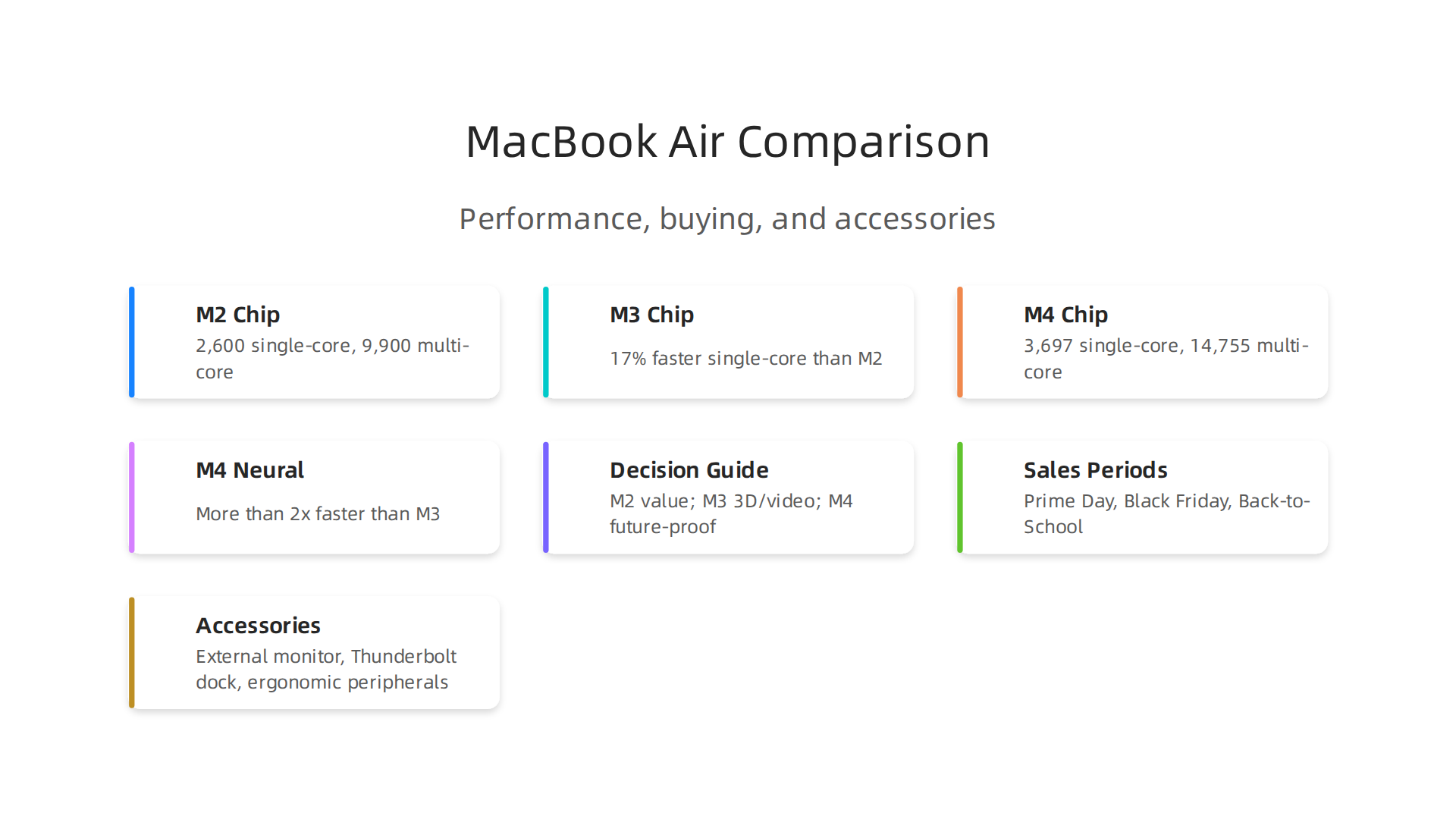
    A comparison of key performance characteristics across M2, M3, and M4 MacBook Air chips, tailored for creative applications.

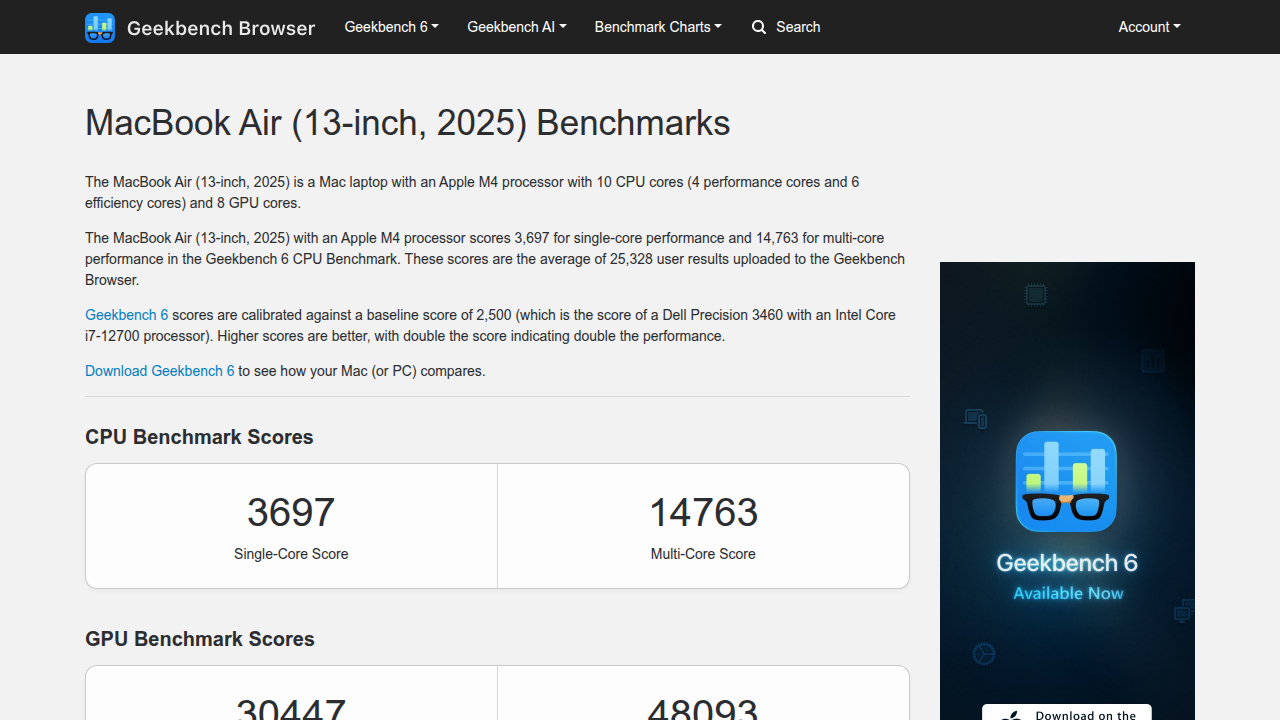
    Let us start with raw CPU power. According to MacBook Air (13-inch, 2025) benchmarks on Geekbench, the M4 model hits a single-core score of 3,697 and a multi-core score of 14,755.

    Detailed benchmark results from Geekbench, illustrating the M4 MacBook Air's performance in single-core and multi-core tests.

    That is about 23% faster in single-core than the M3, as shown in an Apple M3 versus M4 chip comparison. For creative work, that extra speed means smoother timeline scrubbing in Premiere Pro and faster rendering in Blender.

    The M4 MacBook Air also packs a faster Neural Engine. Apple says it is more than twice as fast as the M3 for AI tasks, which helps with smart masking in Photoshop or noise reduction in Logic Pro. A M1 vs M2 vs M3 vs M4 MacBook Air comparison video shows the M4 Air is about 21% faster in single-core than the M3 Air, and around 25% faster in Blender rendering. That is real-world muscle.

    Now, the trade-off. The MacBook Air has no fan. So when you push it hard for a long time, like rendering a complex animation, the chip will slow down slightly to stay cool. For most creative tasks like editing photos, mixing audio, or cutting short videos, you will never notice this. But if you do heavy 3D work every day, you might want a MacBook Pro. For everyone else, the Air is plenty.

    If you want to explore tools that can take your 3D projects even further, check out how Meshy AI turns text and images into 3D models in minutes. It is a great example of the kind of creative AI that runs smoothly on a modern MacBook Air.

    When you see a good macbook air sale, these benchmark gains mean you are not just saving money. You are getting a machine that handles professional creative suites with ease. That makes the deal even sweeter.

    Display That Brings Your Vision to Life: Color Accuracy and More

    You have seen the raw speed numbers. But what you actually look at all day makes a bigger difference. The MacBook Air’s Liquid Retina display is where your creative work comes to life. And it does a lot more than just look sharp.

    A person focused on a screen, meticulously reviewing visual details of a creative project for accuracy.

    The big deal here is color. The screen supports the P3 wide color gamut. That means it can show about 25% more colors than a standard sRGB display. For anyone editing photos or grading video, that extra color range matters a lot. When you are adjusting skin tones in a portrait or matching colors across a brand campaign, you need the display to be accurate. According to the MacBook Air (13-inch, M4, 2025) tech specs on Apple Support, the Liquid Retina display covers the P3 color space and can show 1 billion colors.

    Official Apple Support page detailing the technical specifications of the MacBook Air's Liquid Retina display, including color accuracy.

    That is professional-grade accuracy.

    The screen also has True Tone technology. It adjusts the color temperature based on the light in your room. So if you edit photos near a window at sunset, the display shifts to match the warm light. That helps your eyes stay comfortable and makes sure what you see on screen looks natural. The brightness hits 500 nits, which is plenty for indoor work and even usable outside in the shade.

    Now the limitation. The refresh rate is 60Hz. That is fine for photo editing, writing, and most video work. But if you do a lot of motion graphics or fast-paced animation, you might miss the smoother scrolling of a 120Hz ProMotion display. The MacBook Pro has that. The Air does not. For most creative pros, 60Hz is still totally workable. Just something to know.

    What the MacBook Air does have that many people miss is excellent external monitor support. You can connect up to two external displays, each with up to 6K resolution at 60Hz. That turns the Air into a real desktop hub. You can have your timeline on the big screen, your preview on the built-in display, and reference material on a second monitor. For a laptop this thin and light, that is impressive.

    If you are using AI tools for creative work, the MacBook Air display gives you the color confidence you need. Whether you are generating images with Midjourney or editing AI upscaled video, the P3 color space shows what your final output will really look like. And if you want to stay on top of the latest AI tools that work beautifully on machines like this, check out our guide on picking the best MacBooks for AI for your 2026 projects.

    The bottom line: The MacBook Air display is bright, color accurate, and supports professional workflows. The 60Hz refresh rate is the only real trade-off. And when you find a great macbook air sale, knowing the display can handle serious creative work makes the buy even smarter.

    Which MacBook Air Model Is Right for You? M2 vs M3 vs M4 Compared

    You now know the MacBook Air display is solid for creative work. But which chip should you go for? Right now Apple sells three MacBook Air generations: M2, M3, and M4. Each has a different sweet spot depending on your budget and what you actually do. Let’s break them down.

    M2 MacBook Air: Still a Value Champion

    The M2 MacBook Air came out in 2022, but Apple still sells it. And here is the thing: it is still plenty fast for most creative pros. In Geekbench 6, the M2 scores around 2,600 single-core and 9,900 multi-core. That handles Photoshop, Lightroom, and even 4K video editing in Final Cut Pro without breaking a sweat. The M2 also has that same beautiful Liquid Retina display with P3 color.

    The real draw is price. When you find a macbook air sale, the M2 model often drops to well under $900. That is incredible value for a machine that can handle serious design work. If you are a freelancer just starting out or a student building a creative portfolio, the M2 is the smart money move.

    The downside: no hardware ray tracing, no AV1 decode, and the neural engine is one generation behind. But if you do not use those features, you will not miss them.

    M3 MacBook Air: The Balanced Upgrade

    The M3 brought two big things for creative professionals: hardware-accelerated ray tracing and AV1 decode. Ray tracing matters for 3D artists using Blender or Cinema 4D. AV1 decode helps video editors work with modern streaming files more efficiently.

    In real-world tests, the M3 is about 17% faster in single-core and 21% faster in multi-core than the M2, based on MacBook Air (15-inch, M3, 2024) Geekbench results. The GPU also supports dynamic caching, which helps graphics performance in apps like DaVinci Resolve.

    If you edit video or do light 3D work, the M3 is a noticeable step up. And during sales, you can often find the M3 model for around $1,000 to $1,100. That puts it in a sweet spot for serious hobbyists and working pros alike. The macbook air weight stays the same 2.7 pounds, so portability is identical.

    M4 MacBook Air: Future-Proof Power

    The M4 is the newest chip, available in both 13-inch and 15-inch sizes. It pushes single-core performance past 3,700 and multi-core past 14,700 on Geekbench 6. That is roughly 25% faster single-core than M3 and 35% faster multi-core. For demanding workflows like heavy After Effects compositions or AI-assisted design, that extra speed translates to real time saved.

    The M4 also has a much faster neural engine, which Apple says is over two times faster than M3. That speeds up AI tasks like upscaling images with Topaz Gigapixel, running stable diffusion locally, or using AI masking in Photoshop. If you rely on AI tools daily, the M4 is worth the stretch.

    The M4 starts at $1,099 and goes up with upgrades. During a sale, you can often grab the base model for around $950 to $1,000. That is still more than the M2, but you get the longest future-proofing. And with the midnight macbook air finish, it looks stunning.

    Which One Should You Choose?

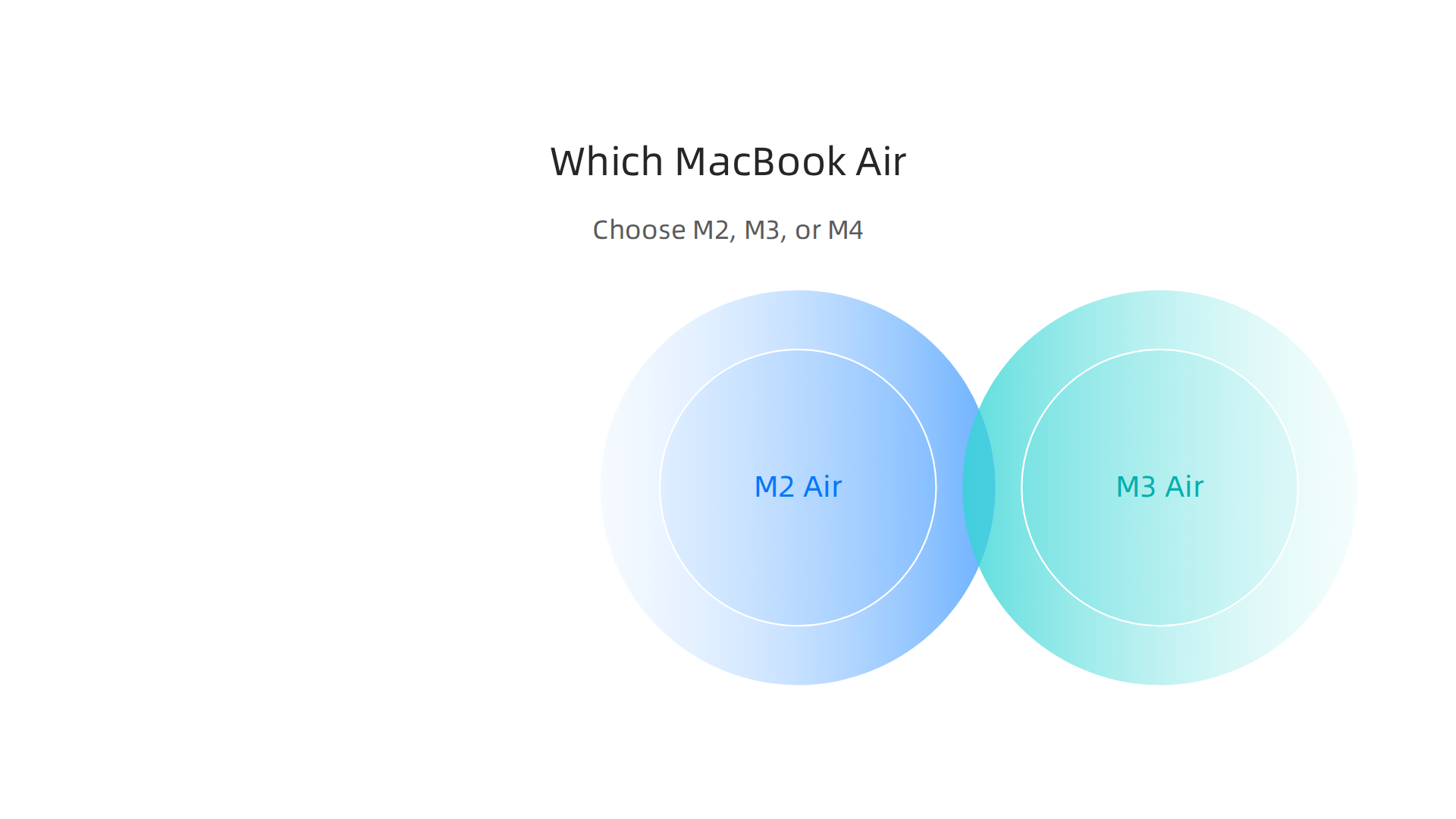
    Here is a simple rule: If budget is your main concern, grab the M2 on sale. If you work with 3D or video codecs, go M3. If you want the fastest AI performance and plan to keep your laptop for five years, get the M4.

    A clear guide to help creative professionals choose between the M2, M3, and M4 MacBook Air models based on their specific needs.

    No matter which you pick, the MacBook Air line is incredibly capable. To stay updated on the latest AI tools that run great on these machines, check out our AI tool discovery 2026 guide for finding trusted tech sources. And if you want daily AI insights delivered straight to your inbox, grab the AI Newsletter Worth Reading from The Deep View.

    The bottom line: No matter your choice, the best macbook air sale is the one that matches your actual workload. And now you know exactly which chip fits yours.

    Finding the Best MacBook Air Sale in 2026: Where, When, and How to Save

    Now you know which MacBook Air chip works best for your creative work. The next step is finding the best price.

    A person expressing joy and satisfaction after successfully finding a great deal or making a smart financial decision.

    MacBook Air sales happen all year, but some times and places give you much deeper discounts. Let’s look at the smartest ways to save in 2026.

    The Best Times to Buy

    Retailers follow a predictable calendar for big discounts. If you can wait, these events will save you the most:

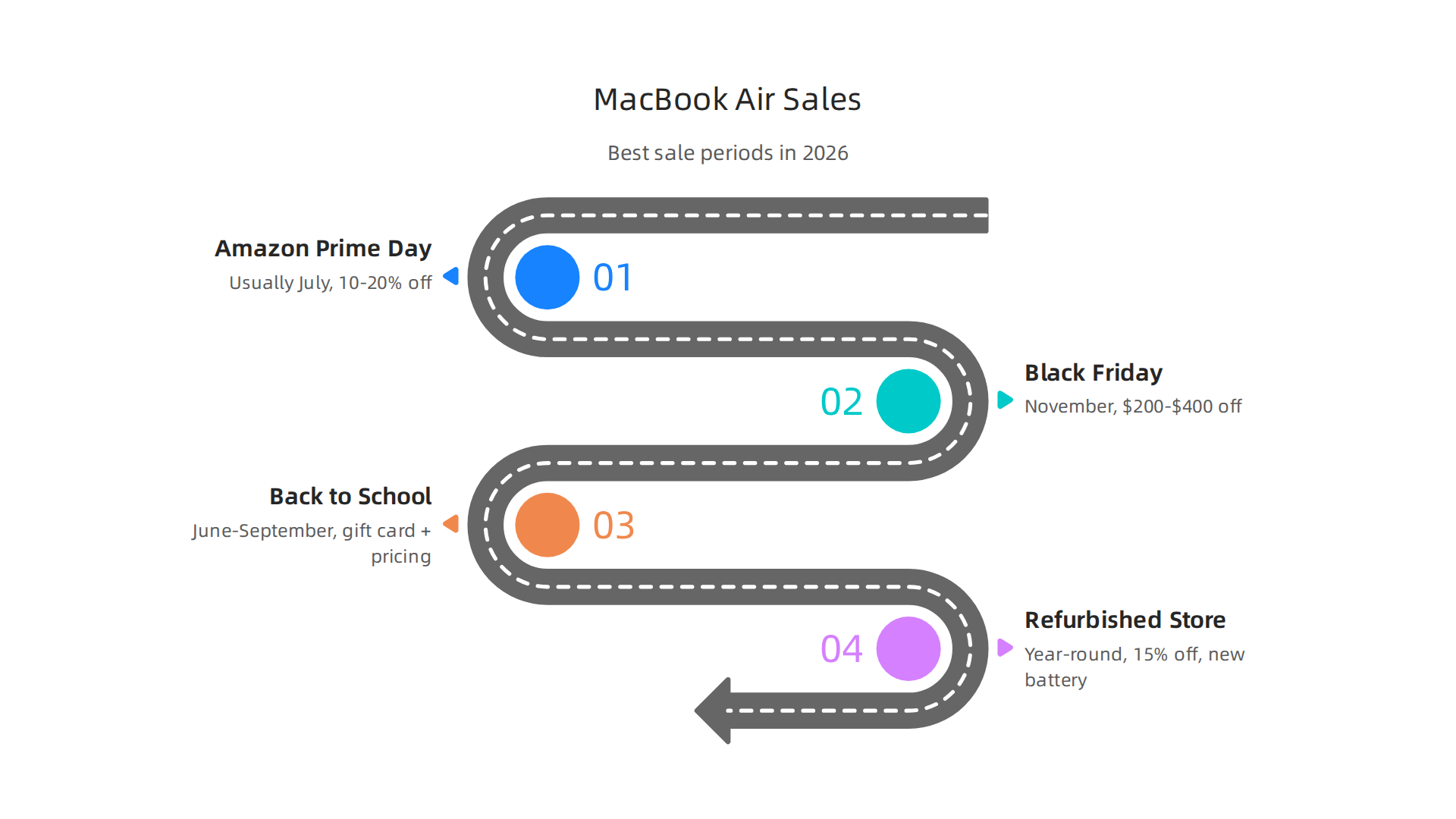
    An overview of the most opportune times throughout the year to find significant discounts on MacBook Air models.

    • Amazon Prime Day (usually July): Expect 10 to 20 percent off both M3 and M4 models. In past sales, the M3 Air dropped to around $844 at Amazon, according to the Black Friday MacBook deals roundup. That’s over $250 off retail.

    • Black Friday and Cyber Monday (November): This is the king of sales. Retailers like Best Buy, Amazon, and B&H Photo often cut prices by $200 to $400 on higher-end configurations. The M4 Air models see their first big discounts here.

    • Apple Back to School (June through September): Apple offers a $100 gift card with any MacBook Air purchase for students and educators. Plus you get education pricing, which already saves you around $100. Stack them together and you save over $200 on a brand new machine.

    Beyond these major events, keep an eye on Apple’s refurbished store. Every MacBook Air that Apple refurbishes gets a new battery, new outer shell, and the same one-year warranty as a new unit. You save 15 percent or more. It’s the closest thing to a new MacBook for a used price.

    How to Stack Your Savings

    The real magic happens when you combine multiple discounts. Here is how the smartest buyers do it:

    1. Start with education pricing if you qualify. Students, teachers, and parents of students can save $100 on a new MacBook Air directly from Apple. The Apple MacBook Air buy page shows the education prices.

    The official Apple Store webpage for configuring and purchasing a MacBook Air, showing available models and customization options.

    1. Trade in your old laptop. Apple’s trade-in program gives you credit toward a new MacBook. Even an old Windows laptop can get you $100 to $400 depending on condition. Best Buy and Amazon also have trade-in programs that sometimes give higher values during sales events.

    2. Use a cashback credit card or rewards app. Cards like Chase Freedom or Apple Card give you 3 percent back on Apple purchases during bonus categories. Some cards offer 5 percent back during holiday shopping. That extra cash adds up fast.

    3. Check clearance sections at Best Buy and B&H. When new models arrive, older stock gets marked down heavily. In mid-2026, the M4 Air can be found for as low as $850 at some retailers, based on MacBook Air deals tracked by Wirecutter. That is a steal for a machine that beats most desktop computers.

    Don’t Forget the Colors

    All the discounts apply across every color, including the popular pink macbook finish and the classic midnight option. So if you want a fun color, you don’t have to pay extra. The macbook air weight of 2.7 pounds stays the same no matter which color or chip you pick, so portability is always top-notch.

    One More Tip: Timing Is Everything

    If you see a good deal but aren’t sure, check the return policy. Most retailers extend their return windows during holiday season (October to January). That means you can buy early and still return or price-match if a better sale appears later.

    And if you want to stay ahead of the best technology deals and learn which AI tools run great on your new MacBook Air, check out our guide on picking the best MacBooks for AI projects. It will help you get the most out of your machine after you score that perfect sale.

    The bottom line: Wait for a major sale, stack your discounts, and always check the refurbished store. With a little patience, you can save hundreds on a macbook air sale in 2026.

    Maximizing Value: Configurations, Accessories, and Future-Proofing

    Getting a great price on your macbook air sale is only half the battle. The real value comes from picking the right setup so your new laptop stays fast and useful for years. In 2026, the smartest buyers focus on three things: memory, storage, and the extras that turn a portable laptop into a full creative workstation.

    Start With the Right Amount of Memory

    Unified memory is the most important upgrade you can make. You can’t add more later. In 2026, 16GB is the new baseline for anyone doing creative work. If you run Photoshop, Figma, and a dozen browser tabs at once, 16GB handles it smoothly. For heavier tasks like AI image generation or complex video timelines, 24GB gives you serious breathing room. The detailed MacBook memory configuration guide explains that 16GB is the smart minimum, while 24GB future-proofs you for the next four to five years. Skip the 8GB models entirely for professional use.

    Think Carefully About Storage

    MacBook Air models now start with 256GB or 512GB of SSD space, depending on the year. That sounds like a lot until you install Adobe Creative Cloud, a few games, and your photo library. For most people, 512GB is the practical starting point. But here is a trick: instead of paying Apple’s premium for a 1TB or 2TB upgrade, buy a fast external SSD. You can get a 2TB Thunderbolt drive for under $200, which is far cheaper than Apple’s upgrade. Keep active projects on your internal drive and archive everything else externally. This approach saves you money and keeps your laptop lean.

    Turn Your Air Into a Workstation With Accessories

    The MacBook Air is incredibly portable (the macbook air weight stays at 2.7 pounds no matter which chip or color you choose). But when you sit down at a desk, a few accessories make all the difference:

    Recommended accessories that enhance the functionality and ergonomics of a MacBook Air for a productive workstation.

    • An external monitor like a 27-inch 4K display gives you more screen real estate for design work or multitasking. The Air supports up to two external displays with the M4 chip.
    • A Thunderbolt dock lets you plug in one cable for power, monitor, mouse, keyboard, and external drives. It turns your desk into a clean, fast setup.
    • An ergonomic keyboard and mouse reduce wrist strain during long creative sessions. Simple upgrades that save your body.

    These extras don’t cost a fortune, but they transform how you work. The pink macbook or midnight macbook air look great on any desk, and with the right peripherals, they compete with pro desktops.

    Future-Proof the Smart Way

    The best way to protect your investment is to spend more on memory than on storage. Memory determines how long your MacBook stays current. Storage can always be expanded with external drives. If you find a great macbook air sale, put the savings toward a 24GB configuration. You will thank yourself in 2029.

    To keep getting smart tips on tech and AI that help you work smarter, check out the AI Tool Discovery 2026 guide for finding trusted sources that deliver real results. And for daily updates on tools that boost your workflow, subscribe to The AI Newsletter Worth Reading and get clear AI insights delivered to your inbox.

    Summary

    This article explains why the MacBook Air has become a practical powerhouse for creative professionals, driven by Apple’s M-series chips and color-accurate Liquid Retina displays. It covers real-world performance—showing how M3 and M4 models speed up tasks like 4K exports and AI-assisted editing—while noting the Air’s fanless design and the thermal trade-offs for sustained heavy loads. You’ll get a clear comparison of M2, M3, and M4 models to match budgets and workflows, plus actionable guidance on when and where to find the best MacBook Air sales and how to stack discounts. The guide also recommends configuration priorities (16GB minimum, 24GB for heavier work), smart storage strategies using external SSDs, and key accessories to convert the Air into a desktop-grade setup. After reading, you’ll know which Air model fits your needs, how to buy it at a discount, and how to configure it to stay useful for years.

  • Gaming PC Deals 2026 How AI Hardware Makes Mid Range Systems Outperform

    Gaming PC Deals 2026 How AI Hardware Makes Mid Range Systems Outperform

    Introduction

    Shopping for a gaming PC in 2026 feels different than it did even a year ago. Prices are climbing, stock is tight, and it all traces back to one thing: artificial intelligence.

    Here is the reality. AI data centers are eating up the global supply of memory chips. Experts predict that by the end of 2026, data centers will consume nearly 70 percent of all memory produced. That leaves less supply for the rest of us. The result? RAM prices have surged, and the PC market could shrink by as much as 9 percent this year alone.

    A breakdown of how AI data center demand is reshaping the gaming PC market in 2026, leading to significant shifts in supply and pricing.

    You can see how this AI hardware crisis is playing out across the consumer market.

    So where does that leave you if you want a new gaming desktop computer without breaking the bank?

    It means you have to be smarter about how you shop.

    Navigating the complexities of tech purchases requires informed decisions to find value without overspending.

    Finding real gaming pc deals in 2026 is not just about spotting a sale. It is about knowing which upgrades actually deliver value. AI powered features like DLSS upscaling, frame generation, and intelligent CPU scheduling can stretch your hardware further than ever before. A mid range gaming system with the right AI enhancements can outperform a top tier machine from a few years ago.

    This article breaks down the best AI powered gaming hardware and platforms hitting the market right now. You will learn which features matter most for your budget, where the real savings hide, and how to avoid wasting money on parts that do not move the needle.

    The landscape is shifting fast. Hardware makers are prioritizing AI clients over everyday buyers. But that also means the smart shopper who understands the trends can still score great value.

    If you want to keep up with how AI is changing the tech you buy every day, consider subscribing to a trusted source that tracks these shifts daily. The AI Newsletter Worth Reading delivers clear updates straight to your inbox so you never miss a critical change in pricing, supply, or performance.

    Let us walk through the top gaming systems worth your money in 2026 and the specific features that make them a smart buy.

    1. AI-Powered Gaming GPUs: Best Deals on NVIDIA and AMD Cards

    The heart of any gaming desktop computer in 2026 is the graphics card. And right now, the smartest money goes to cards that pack dedicated AI cores. Both NVIDIA’s RTX 50 series (Blackwell) and AMD’s RDNA 4 lineup come with specialized hardware designed for one thing: making your games run faster through AI.

    Here is the real kicker. These cards do not just brute-force their way through pixels anymore. They use neural upscaling tech like DLSS 4.5 on NVIDIA and FSR 4 on AMD to rebuild your image at a much higher resolution than the card actually renders. The result? You can get 2x to 3x the frame rate in supported titles without sacrificing visual quality. In Cyberpunk 2077 at 4K, the RTX 5080 jumps from 30 FPS native to around 71 FPS with DLSS 4 Performance mode, and the RX 970 XT climbs from 22 FPS to 60 FPS with FSR 4. That is a massive difference for a mid-range card.

    So when you are hunting for gaming pc deals, the question is not just "what is the price tag?" It is "what AI features does this card support?" A $500 GPU with DLSS 4 will outperform a $700 card from two generations ago in most modern games. That is the value shift in 2026.

    For 1080p and 1440p monitors, the sweet spot right now is the RTX 5060 Ti or the RX 9600 XT. Both offer solid AI upscaling and frame generation. The RTX 5060 Ti saw a 47% performance boost with DLSS in testing, while the RX 9600 XT gained 37% with FSR 4. If you are on a 4K display, the RTX 5080 or RX 970 XT are where the real gains happen, especially with frame generation pushing numbers above 90 FPS in demanding titles.

    The latest Deep Dive comparison between DLSS 4 and FSR 4 confirms that performance is now very close. NVIDIA still holds a slight lead in image quality and lower input lag thanks to Reflex, but AMD has finally closed the gap. That means you can pick based on price and availability without feeling like you are settling.

    Keep an eye on bundle deals too. Some retailers are pairing these GPUs with game keys or storage upgrades. That extra value can save you money on your whole gaming systems build.

    If you want to stay ahead of these hardware shifts, getting reliable daily updates makes a huge difference. The AI Newsletter Worth Reading breaks down exactly which parts are worth your money and when prices are about to move.

    2. AI Upscaling & DLSS/FSR: Hardware That Maximizes Performance

    You picked a great GPU. But are you getting the most out of it? The real magic happens when you turn on AI upscaling. DLSS 4 on NVIDIA cards and FSR 4 on AMD cards are not just filters. They are smart systems that use dedicated hardware to rebuild your game image in real time.

    Both technologies now run on transformer-based neural networks. These networks are much better at guessing what a full 4K frame should look like from a lower-resolution render. The result is sharper edges, less blurring, and fewer weird artifacts when things move fast. A detailed breakdown of DLSS 4 and FSR 4 shows that the new transformer models deliver image quality that often matches or beats native resolution.

    But there is a catch. This only works if your GPU has the right hardware inside. DLSS 4 needs NVIDIA’s fourth-generation Tensor Cores, which only come with the RTX 50 series (Blackwell). FSR 4 needs AMD’s new AI accelerators found only in RDNA 4 cards like the RX 9000 series.

    Specific hardware components are essential for unlocking the full potential of advanced AI upscaling technologies like DLSS 4 and FSR 4.

    Without those dedicated AI chips, you get older upscaling versions that are not as good.

    This is why choosing a GPU that supports the latest standards is so important for future-proofing your gaming desktop computer. Games in 2026 are already being built with these upscaling technologies in mind. If your card cannot run DLSS 4 or FSR 4 well, you will miss out on the best performance and visual quality. To make the best choice, it helps to find trusted tech sources that break down real performance numbers for each card.

    The hardware behind these upscaling features is the biggest reason to upgrade your gaming systems right now. It is not just about raw power. It is about having the AI chips that let you double or triple your frame rate while keeping the image crisp.

    Want to stay ahead of the latest hardware and software updates that affect your gaming pc deals? The AI Newsletter Worth Reading delivers daily news on exactly which AI-powered parts are worth your money and when to buy.

    3. AI-Optimized Gaming CPUs: Intel vs. AMD Showdown

    Your GPU handles the graphics, but your CPU handles everything else. In 2026, the best processors for a gaming desktop computer do more than just run fast. They use built-in AI engines to make your whole system smarter.

    Intel’s Core Ultra chips come with something called an NPU, or neural processing unit. This little AI brain handles tasks like smart resource allocation. It decides which parts of your CPU should focus on your game and which should handle background apps. The NPU can also do dynamic overclocking, boosting performance automatically when you need it most. You get higher frame rates without touching any settings.

    AMD’s Ryzen 8000 series takes a different approach. Their AI features focus on thermal management. The chip learns how hot your gaming systems get during different games and adjusts fan speeds and power use in real time. They also use AI for real-time core scheduling. This means the CPU shifts your game’s most important threads to the fastest cores, so gameplay stays smooth even when you have Discord or Chrome open in the background.

    Both companies are pushing hard on these AI features, and the competition is great for buyers. That is because you can often find bundled deals that pair a new CPU with a motherboard or RAM at a discount. Shopping during major sales events gives you the best shot at these savings. According to industry experts, the best time of year to buy a gaming PC is usually around Black Friday or after new CPU launches.

    When you are comparing Intel and AMD for your next build, do not just look at core counts. Look at the AI capabilities. The NPU in Intel or the smart thermal system in AMD can make a real difference in how your games feel.

    Prospective buyers carefully evaluate detailed specifications and AI capabilities to make informed CPU choices.

    To stay on top of which processors deliver the best value, it helps to check trusted tech sources for real performance numbers.

    4. Best AI Gaming Laptops: Portable Power and Deals

    Not everyone wants a big desktop tower sitting on their desk. If you need to game on the go, a good laptop is the answer. And in 2026, the best gaming laptops come packed with AI features that make them smarter and more efficient than ever.

    Take the ASUS ROG Zephyrus G16 for example. This laptop uses DLSS, an AI upscaling technology that makes games look sharper while using less power. It also has AI fan control that adjusts cooling based on what you are doing. When you are just browsing or watching video, the fans barely spin, saving battery life. When you fire up a demanding game, they kick in just enough to keep things cool. That means you can game longer without hunting for an outlet.

    Laptop deals this year often include free AI software suites with your purchase. These tools help optimize your system. They can clean up background tasks, manage power profiles, and even suggest settings for each game. That extra software makes the purchase price go further.

    Another big win is thermal design. Thin laptops used to get hot and loud. Now AI helps manage heat better, so the chassis stays cooler and the fans run quieter. Many models also include AI-driven noise cancellation for built-in microphones. This keeps your voice clear during team chats, even if you are gaming in a noisy coffee shop.

    If you are looking for a great value, the Acer Swift 16 AI is often called the best overall laptop. It balances price, performance, and portability. You can find it and similar models at strong discounts during sales events.

    To find the best deals, it helps to check trusted sources regularly. That way, you know which laptops are worth your money. You can use sites like ours that explain the technology clearly. For example, our guide on how to find trusted tech sources can help you cut through the noise.

    Staying updated on AI and gaming laptop news can also lead you to better deals. That is where a solid daily newsletter comes in handy. Right now, you can get clear daily AI updates from The Deep View Newsletter. It delivers practical info straight to your inbox, so you never miss a deal.

    Whether you need portable power for travel or just want something smaller under your desk, an AI gaming laptop gives you the best of both worlds.

    AI gaming laptops provide powerful performance in a portable format, suitable for gaming anywhere.

    Keep an eye on the deals, and you will find a machine that fits your needs and your budget.

    5. Pre-Built AI Gaming PCs: Top Configurations Under Budget

    If you want a powerful gaming desktop computer but do not feel like building one yourself, pre-built systems are the way to go. In 2026, major brands like Alienware, MSI, and Corsair pack their gaming desktop computers with AI software that handles the tricky stuff for you. That means automatic overclocking, smart fan curves, and system tuning that keeps your games running smooth without you touching a single setting.

    HP explains how these AI PCs include a dedicated NPU that helps with multitasking, streaming, and AI-powered features behind the scenes. You can read more in their AI PC for gaming overview.

    The official homepage for HP, a major brand offering AI-powered pre-built gaming PCs and related technology insights.

    The best part is you do not need to be a tech expert to get great performance.

    Pre-built deals can save you both time and money. When you buy a complete system instead of picking out each part, the manufacturer often passes on savings. Many deals also bundle AI gaming monitors, keyboards, or mice. That means you get everything you need in one box for less than buying separately. For example, systems from the HP OMEN line often include free software that optimizes your games automatically.

    When you compare different gaming systems, focus on the GPU. Look for an NVIDIA RTX 40-series or 50-series card with DLSS. That AI upscaling technology makes games look sharper and run faster, which extends the life of your machine. A good configuration with 32GB of RAM and a solid-state drive will handle new games for years.

    The best gaming pc deals appear during big sales events. You can save hundreds on models like the Alienware Aurora or MSI Aegis. If you are curious about other smart hardware that helps you get more done, check out our guide on the best startup gadgets 2026 that actually deliver results.

    Pre-built is the smart choice if you want plug-and-play power without the headache. Just watch for the right deal and you will get a gaming desktop computer that keeps up with everything you throw at it.

    6. Cloud Gaming Platforms with AI: GeForce NOW, Xbox Cloud, and More

    Not everyone wants to buy a new gaming desktop computer just to play the latest hits. In 2026, cloud gaming platforms offer a strong alternative. They let you stream games to almost any device, and AI makes them work better than ever.

    GeForce NOW from NVIDIA is a great example. The service uses AI to predict frames and buffer them ahead of time. This reduces lag and keeps your gameplay smooth, even on slower connections. NVIDIA has shown how GeForce NOW can handle complex gaming IP with full ray tracing and DLSS 4.5, bringing high-end graphics to any screen. According to NVIDIA, the cloud can now run AI models for game inference while you play, lowering the need for a powerful local GPU. You can read about this in the NVIDIA GeForce NOW AI inference for gaming blog.

    The official NVIDIA homepage, a hub for graphics cards, AI technologies, and cloud gaming services like GeForce NOW.

    Xbox Cloud Gaming takes a different approach. It uses AI to dynamically adjust resolution and bitrate based on your network. Your video stream stays clear and stable, no matter if you are on Wi-Fi or mobile data. Both services also work with subscription bundles that include free game passes or discounts on hardware.

    For budget-minded players, cloud gaming can be a smart way to enjoy AAA titles without spending big on a machine. If you are looking for gaming pc deals, consider spending less on your computer and putting the savings toward a cloud subscription.

    To keep up with how AI is changing the gaming world, browse our list of top interactive AI newsletters to follow in 2026. For a daily dose of AI news you can actually use, Get clear daily AI updates from The Deep View Newsletter.

    7. AI Accessories for Gamers: Headsets, Mice, and Keyboards with Smart Features

    The AI revolution is not just inside your computer. It is also sitting on your desk and covering your ears. In 2026, smart accessories use AI to give you a real edge in your games.

    Let us start with headsets. Background noise from your room can ruin a multiplayer session. AI noise cancellation in modern headsets learns your specific environment. It filters out the fan noise, the keyboard clicks, and the street sounds outside. Your voice comes through crystal clear to your teammates. If you want to see how this tech works on its own, check out this guide on AI noise cancellation tools like Krisp.

    Next up are gaming mice. Ever flick your mouse too fast or too slow in the middle of a firefight? AI mice adjust their DPI and sensitivity on the fly. They learn what you are doing. When you are sniping, the mouse slows down for precision. When you are running and gunning, it speeds up for quick turns. This gives you a serious competitive edge without you having to change settings mid-game.

    Keyboards are getting smarter too. Instead of spending hours setting up complex macros, AI-driven macro learning watches how you play. It spots the combos you use most often and suggests or creates macros for you. This saves you time and makes your gameplay much more efficient.

    These smart accessories can make your current setup feel brand new. They are often cheaper than buying a whole new gaming desktop computer. But if these gadgets show you that your core machine is too slow to keep up with modern gaming systems, you can look for the best 2026 gaming pc deals to pair with your new AI gear. For a full list of options, check out the best prebuilt gaming desktops in 2026.

    8. Where to Find the Best Gaming PC Deals in 2026

    You know you want a new gaming desktop computer with AI features. But you also do not want to overpay. In 2026, the market is full of sales. The trick is knowing where to look and when to buy.

    A person successfully navigating online sales to find the best value for a new gaming PC.

    Start with the big retail stores. Amazon, Newegg, and Best Buy run regular sales that cut deep into the price of prebuilt gaming systems. These retailers compete hard, especially during events like Black Friday, Prime Day, and back-to-school season.

    The homepage for Newegg, a leading online retailer for computer hardware and electronics, known for gaming PC deals.

    According to a guide on the best time to buy a gaming PC, these seasonal sales historically offer some of the deepest discounts of the year. You can save hundreds of dollars just by waiting for the right weekend.

    But you do not have to wait for a holiday to save. Price tracking tools like CamelCamelCamel and Slickdeals do the work for you. They watch prices daily and alert you when a deal drops. These tools are part of a bigger trend in smart shopping. If you want to learn more about finding reliable sources for tech, check out this AI tool discovery guide to see how AI helps you shop smarter.

    Another smart strategy is to buy right after major product launches. When new graphics cards or processors come out, older models drop in price. Retailers need to clear out inventory. That is when you can grab a powerful machine for much less.

    Finally, do not forget to sign up for deal alerts and newsletters that keep you informed. Staying updated is half the battle. To get the latest on AI tools and the tech that powers modern gaming systems, consider subscribing to The AI Newsletter Worth Reading. It delivers clear daily updates so you never miss a breakthrough.

    Summary

    AI demand for memory and specialized chips has tightened supply and driven up prices, changing how gamers should shop for a desktop in 2026. This article explains why AI features — like dedicated AI cores on GPUs, DLSS/FSR upscaling, NPUs in modern CPUs, and AI-driven thermal and resource management — matter more than raw specs when evaluating value. It compares NVIDIA and AMD GPU options, outlines which AI upscaling tech to prioritize, and shows how Intel and AMD CPUs use AI differently to improve gameplay. The guide covers best-in-class AI gaming laptops, smart pre-built configurations, cloud gaming alternatives, and AI accessories that extend the life of older systems. You’ll also get practical buying strategies, timing tips for sales, and tools to track real deals so you can maximize performance without overspending. By the end, you’ll know what AI features to insist on and where to find the best 2026 gaming PC bargains.

  • Picking the Best MacBooks for AI for Your 2026 Projects

    Picking the Best MacBooks for AI for Your 2026 Projects

    Why this guide on MacBooks for sale matters in 2026

    Buying a new MacBook in 2026 can feel a bit tricky, especially if you need it for serious work like Artificial Intelligence (AI).

    A professional contemplates options, considering the best MacBook for their AI work needs.

    With Apple releasing powerful new chips like the M5, M5 Pro, and M5 Max in their latest models, it’s tough to know which one is best for you and your team. You might be wondering, "Do I need the very latest M5 MacBook Pro, or is an M1-level performance still acceptable in 2026?"

    Screenshot of the 9to5Mac homepage, a resource for Apple news and reviews.

    Many professionals and teams are looking for macbooks for sale that can handle their AI projects, big data, or creative tasks without breaking the bank. It’s a real challenge to figure out the right specs and where to find the best deals. You also need to think about how these powerful new MacBooks fit into your workflow, especially if you’re exploring tools like AI virtual assistants for businesses or other advanced AI solutions.

    Screenshot of the AIToolsNewsToday homepage, a source for AI tools and strategy.

    That’s why this guide is here. We want to help you cut through the confusion. We’ll show you which MacBook models are best for different kinds of AI work and everyday tasks. We’ll explain the important specs like memory and processing power, and how they impact performance for things like running four new MacBooks in 2026 for private AI. Plus, we’ll give you clear advice on where to find macbooks for sale with confidence. By the end, you’ll know exactly what to look for and where to buy your next Apple laptop.

    If you’re interested in staying on top of the latest in AI and tech, make sure you get clear daily AI updates from The AI Newsletter Worth Reading.

    Screenshot of The Deep View's newsletter subscription page for AI updates.

    The truth is, Apple’s macOS ecosystem brings some big advantages for anyone doing AI work in 2026.

    A team collaborates seamlessly, benefiting from an efficient Apple ecosystem for AI projects.

    Whether you’re a creative person, a data expert, or a developer, MacBooks offer a smooth and powerful experience. The special chips like the M5, M5 Pro, and M5 Max are built to handle tough tasks, especially with their Neural Engine parts that are perfect for machine learning and AI processes. This means your MacBook can learn and think faster when running AI tools.

    For creators, MacBooks are known for handling big video projects and detailed graphics work easily. For data analysts, the speed and memory bandwidth of Apple Silicon chips help with crunching large numbers and running complex models. Developers also love how easy it is to set up and run their code for AI projects, with many useful apps available in the macOS environment. In fact, many people find that Apple devices are great for improving how they work with AI and for daily tasks, as outlined in guides about which AI productivity workflows actually deliver ROI in 2026.

    When you’re looking for macbooks for sale, it’s also important to think about things beyond just raw power. MacBooks are famous for their excellent battery life, letting you work on AI projects for hours without needing to plug in. They are also very portable, making it easy to take your work anywhere. Another big plus is how well Apple devices work together. Your MacBook can connect seamlessly with other Apple products. For example, future developments like apple ar glasses or other AI powered smart glasses could potentially integrate smoothly with your MacBook for an even bigger workflow. This close integration might even extend to advanced wearables like the Viture Pro XR/AR glasses, making your digital workspace truly unified.

    Of course, no system is perfect. While MacBooks are great for many AI tasks, some super specialized AI work might still need powerful desktop computers. But for most professionals and teams, the balance of power, battery, portability, and integration makes MacBooks a very strong choice for AI workflows in 2026.

    Choosing the right MacBook for your AI work means looking at what you need to do and how much you want to spend.

    An individual plans their tech purchase, balancing desired features with budget constraints.

    It’s not just about finding macbooks for sale; it’s about finding the right one for you. Apple offers a few main lines: the MacBook Air and the MacBook Pro. Each has different features that make them better for certain kinds of AI tasks.

    Matching MacBook Models to Your AI Tasks

    Think about what kind of AI work you’ll be doing most often:

    This infographic breaks down the ideal MacBook models for various AI workloads, from light LLM interaction to heavy model training.

    • Prompt-Heavy LLM Work and Light AI Tasks: If your main work involves using AI tools that respond to text prompts, like large language models (LLMs), or running smaller AI tasks, a MacBook Air with an M5 chip is often a great choice. It’s powerful enough for everyday AI use and very portable. Many M1-level MacBooks from older years are still good for these types of tasks in 2026, showing how capable even the base models are. In fact, one report says that M1-level performance still acceptable in 2026 for many users. The M5 MacBook Air offers even more speed and efficiency.
    • Content Creation with AI, Basic Model Inference: For creative tasks like editing photos or videos with AI help, or running AI models that have already been trained (this is called inference), the MacBook Pro with an M5 chip is a solid step up. It has more power and can handle more demanding apps.
    • Medium Model Training and Complex AI Development: If you’re training your own AI models, working with larger datasets, or doing heavy development, you’ll want the MacBook Pro models with the M5 Pro or M5 Max chips. These chips have more computing cores and much more memory, which are key for faster AI processing. They are built to handle the most demanding jobs, as Apple announced when they introduced MacBook Pro with all-new M5 Pro and M5 Max. The Neural Engine in these chips is also much faster, speeding up AI-specific tasks.

    Budget vs. Performance for Different Users

    When looking at macbooks for sale, your budget plays a big role.

    • Individual Professionals and Consultants: If you’re working for yourself or in a small team and need a balance of power and price, the MacBook Air M5 or a base MacBook Pro M5 is likely your sweet spot. They offer strong performance for most AI productivity tools without the highest price tag. You might also find good deals on slightly older M3 or M4 models that still perform well.
    • Small to Medium Businesses (SMBs): For SMBs, it’s often about getting enough power for your team without breaking the bank. A mix of MacBook Air M5s for lighter tasks and MacBook Pro M5s or M5 Pros for those doing more intensive AI work can be a good strategy. This helps you manage costs while ensuring everyone has the tools they need. Checking out guides on how to choose and use an AI powered research assistant in 2026 can help you decide which models will best support your team’s AI research needs.
    • High-End Developers and Researchers: For those who push AI to its limits, the MacBook Pro with the M5 Max chip is the way to go. While it costs more, the increased performance and memory can save you a lot of time on complex projects. These powerful chips can offer huge gains in AI performance.

    No matter which MacBook you choose, remember that staying informed about the latest AI tools and trends is crucial for making the most of your technology. Get clear daily AI updates from The AI Newsletter Worth Reading.

    When you are looking at macbooks for sale for AI tasks, it’s really important to understand what’s inside. The different parts of a MacBook work together, but some are more key for AI work than others. Let’s break down the main hardware pieces you should think about:

    A visual guide to essential MacBook hardware components and their roles in optimizing AI performance.

    CPU, GPU, Neural Engine, RAM, and Storage Explained

    • CPU (Central Processing Unit): Think of the CPU as the brain that handles most of the general tasks on your computer. For AI, it’s good for running programs and managing data flow. But for heavy AI math, it’s not the main worker. Apple’s M-series chips combine many parts, and the CPU is one powerful piece of that. You can see how Apple’s CPUs compare from M1 through M5 Max.
    • GPU (Graphics Processing Unit): The GPU is super important for AI. It’s built to do many calculations at the same time, which is exactly what training AI models and running complex AI processes need. The more cores your GPU has, the faster it can crunch numbers. MacBook Pro models with M5 Pro and M5 Max chips have much more powerful GPUs, which is why they’re better for demanding AI tasks.
    • Neural Engine: This is Apple’s special part made just for AI and machine learning. It makes AI tasks run really fast and efficiently. The Neural Engine in the M5 chip is much faster than older versions, offering a big boost for AI performance, according to Apple’s announcement about the M5 chip’s leap in AI performance. When you use AI tools built for Apple’s system, the Neural Engine is key to making them snappy.
    • RAM (Random Access Memory): RAM is like your computer’s short-term memory. For AI, it holds the models and the data they are working on. Apple’s "unified memory" is a special thing where the CPU, GPU, and Neural Engine all share the same pool of memory. This makes everything very fast. If you’re working with large AI models or big datasets, you’ll want as much RAM as possible. More RAM means your MacBook can handle bigger AI problems without slowing down.
    • Storage (SSD): This is where your files, programs, and AI models live permanently. Fast SSD storage means your computer can load and save huge AI datasets and trained models quickly. For AI work, storage speed is often more important than just having a lot of space, though capacity is also needed for large projects.

    Trade-offs: What to Consider

    Choosing your MacBook for AI also means thinking about some trade-offs:

    • More RAM vs. External Compute: Having a lot of RAM lets you run many AI tasks right on your MacBook, which can be faster and more private. But if your tasks are too big, you might need to use cloud computing services. These services offer almost unlimited power but can cost more over time.
    • Storage Speed vs. Capacity: For AI, quick access to data is vital. A super-fast SSD will make loading and saving models much smoother. You’ll need enough space for your projects, but a slower, larger drive won’t help if your daily work needs speed.
    • Thermal Constraints: Powerful chips make heat. MacBook Pro models usually have better cooling systems than MacBook Airs, which means they can keep working hard on tough AI tasks for longer without getting too hot and slowing down. If you plan on long AI training sessions, a MacBook Pro’s cooling is a big plus.

    Understanding these hardware pieces helps you pick the best MacBook for your specific AI work. To stay on top of the rapidly changing world of AI tools, make sure you know where to find reliable information. Discover trusted sources by checking out 10 Top AI Websites Professionals Trust.

    Now that you know what’s inside a MacBook for AI work, you might be wondering where to get one. Finding the right macbooks for sale means looking at a few different places. You can buy them new, refurbished, or through special business channels.

    Explore the pros and cons of purchasing MacBooks through new, refurbished, or enterprise channels.

    Each way has its own good and bad points.

    Buying New MacBooks

    When you buy a new MacBook, you get the latest technology, like the super-fast M5 chips with their advanced Neural Engine. This is great because it means your computer will be powerful and ready for AI tasks for many years. New MacBooks come with a full warranty directly from Apple, giving you peace of mind if something goes wrong. The downside is the price; new MacBooks are the most expensive option. But for serious AI professionals, getting the most cutting-edge performance can be worth the cost.

    Looking at Refurbished MacBooks

    Refurbished MacBooks are computers that have been returned, fixed up, and then sold again. They often cost much less than new ones, sometimes 15% to 30% less, which can save you a lot of money Is it Worth Buying a Refurbished Mac? Pros and Cons. When you buy a refurbished MacBook from a trusted seller, it usually comes with a warranty and has been checked to make sure it works well. In 2026, many places offer refurbished Macs, and they can be a smart choice if you want good value.

    There are a few things to think about with refurbished MacBooks:

    • Cost Savings: You can get a very capable MacBook for less money.
    • Quality: Reputable sellers, including Apple’s own Certified Refurbished store, thoroughly check and repair these machines. Sometimes, they even put new batteries and outer shells on them. This means you can get a machine that feels almost new The Ultimate Guide to Buying a Refurbished Mac in 2026.
    • Older Models: You might not always find the absolute newest M5 chip models right away in the refurbished market. But you can often find powerful M4 or M3 models that are still excellent for AI work.

    Choosing a reputable seller is key for refurbished macbooks for sale. Always check their return policy and what kind of warranty they offer.

    Enterprise and Business Purchases

    For businesses and larger teams, buying MacBooks often happens through enterprise channels. This can mean getting special pricing for bulk orders or having dedicated support from Apple or authorized resellers. These channels can help make sure all your team’s devices are set up the same way and make managing them easier. When buying for a business, warranties, quick repairs, and good customer support are very important to keep work flowing smoothly.

    Important Considerations: Warranties, Returns, and Support

    No matter where you buy your MacBook, always look into the warranty, return policy, and available support.

    • Warranties: A good warranty protects your investment. New MacBooks come with Apple’s standard warranty, and you can usually buy extra coverage like AppleCare. For refurbished models, check what the seller offers. Some give a full year, while others might offer less.
    • Return Windows: Make sure you have enough time to return the MacBook if it doesn’t meet your needs. This is extra important for AI tasks, as you’ll want to test its performance with your specific workflows.
    • Support: Knowing you can get help if you have a problem is important. Apple’s support is generally strong, but for enterprise buyers, dedicated account managers or specialized tech support can be a huge benefit.

    Finding the right macbooks for sale involves more than just picking a model; it’s also about choosing the best purchase path for your needs. If you want to keep up with how AI is changing and how these tools can help your business, it’s smart to stay informed.

    Want to make sure you’re always getting the freshest news and tips in the fast-moving world of AI? Get clear daily AI updates from The AI Newsletter Worth Reading.

    After picking out the right MacBook for your AI tasks, the next important step is making sure you have the right software. What good is a powerful machine without the tools to use it? Luckily, macOS is a great place for AI work because many important AI programs run well on Apple’s special M-series chips.

    AI Frameworks and Tools Made for macOS

    Apple has worked hard to make its M-series chips, like the M5, M5 Pro, and M5 Max, very good for AI. These chips have something called a Neural Engine, which is designed specifically for machine learning tasks, making AI operations super fast. The M5 chip has an improved 16-core Neural Engine that boosts AI performance significantly Apple Unleashes M5, The Next Big Leap in AI Performance For Apple Silicon.

    Because of this, many big AI frameworks now run directly on macOS with great speed.

    An overview of major AI frameworks and tools optimized for Apple's macOS ecosystem and M-series chips.

    • PyTorch and TensorFlow: These are two of the most popular tools for building AI models. In 2026, they work very well on Apple Silicon, taking advantage of the Metal framework for fast calculations on the GPU and Neural Engine Train Your Machine Learning and AI Models on Apple GPUs. This means you can train and run complex AI models right on your MacBook without needing expensive cloud computers as much. Many developers compare PyTorch vs TensorFlow for different tasks, and both are strong contenders on Mac.
    • Core ML: This is Apple’s own framework for bringing machine learning into apps. It’s built to get the best performance from Apple hardware, including the Neural Engine. Core ML can handle advanced AI models, including those for creating new content Core ML – Machine Learning – Apple Developer.
    • MLX: This is a newer framework from Apple designed specifically for the unique architecture of Apple Silicon. It makes it easier for researchers and developers to create custom AI solutions that run very efficiently on Macs.

    Most modern AI development can happen natively on Apple Silicon. While some very specialized or older tools might still need a workaround like a virtual machine, these cases are becoming rarer.

    Top macOS Apps for AI Work in 2026

    Beyond the core frameworks, a lot of user-friendly apps are making AI more accessible on MacBooks. These apps help with everything from crafting the best questions for an AI to creating new content.

    • Prompt Engineering Tools: With generative AI becoming so common, writing good "prompts" (the instructions you give to an AI) is a skill. There are many macOS apps now that help you store, organize, and test your AI prompts to get better results.
    • Local Inference Apps: These apps let you run AI models directly on your MacBook. This is great for privacy, speed, and saving money on cloud services. With an M5 chip, you can run powerful language models or image generators locally, making your MacBook a personal AI powerhouse.

    • AI-Powered Content Generation: From writing assistants that help you brainstorm ideas and draft emails to tools that generate images or even video clips, macOS has a growing number of apps that use AI to boost creativity. Programs that help you quickly make videos with AI avatars are becoming very popular. You can even find great options for best AI avatar tools for video content in 2026.
    • Productivity Apps with AI: Many everyday apps are adding AI features. For example, Apple’s Shortcuts app lets you build complex workflows that can use AI to automate tasks Apple Will Let You Build Workflows Using AI in Its New Shortcuts App. Other tools, like those for note-taking or task management, often include AI to summarize information or suggest next steps, making your work faster and smarter Best Mac Productivity Apps in 2026. These AI tools can really help you get more done and see a good return on your investment in time and effort Which AI Productivity Workflows Actually Deliver ROI in 2026?.

    Having the right software on your MacBook means you can unlock its full potential for AI, making it a truly powerful tool for your work.

    Now that you know which software tools can make your MacBook shine for AI tasks, let’s talk about how to set up your Mac itself. Getting the most out of your powerful machine means making a few smart choices about settings, adding helpful accessories, and knowing when to use extra computing power.

    Practical Tweaks for macOS and Your MacBook

    Even the best MacBooks for sale need a little tuning to perform their best for demanding AI work. Here are some simple ways to make your Mac even better:

    • Adjust Energy Settings: For big AI tasks, you want your MacBook to use its full power. Go to System Settings > Battery and choose "High Power Mode" if your model has it. This tells your Mac to use more battery and run hotter to get tasks done faster. For lighter work, "Low Power Mode" helps save battery.
    • Keep Your Software Updated: Always make sure your macOS and all your AI tools are the latest versions. Apple often releases updates that make its chips work even better for AI. These updates can bring speed boosts and new features, so don’t skip them.
    • Manage Heat: Heavy AI tasks make your MacBook work hard, which means it can get warm. Make sure your Mac is on a flat, hard surface so air can flow around it. You might also consider a laptop stand to help with cooling. A cooler Mac usually runs faster and lasts longer.
    • Optimize Storage: AI models and data can take up a lot of space. Keep your MacBook’s storage tidy. Delete old files you don’t need and use external hard drives for big datasets. This helps your Mac run smoothly. You can find many tips for setting up your Mac for better work, like those in this helpful video on How to set up your mac for maximum productivity in 2026.

    Most AI tasks can run right on your Apple Silicon MacBook without needing special workarounds. Apple has made huge strides, but sometimes, for very old tools or specific research needs, you might still hear about virtualization. This is less common now, but good to know for the few older tools that might not run directly on macOS.

    When to Use External Power

    Even with a super-fast M5 chip, some AI projects are just too big for any single laptop. This is where external compute comes in handy:

    • External GPUs (eGPUs): While Apple’s M-series chips have powerful built-in graphics, for extremely graphics-heavy AI training, an external GPU might offer a boost. However, with Apple’s continuous improvements to their integrated chips, the need for eGPUs is less common in 2026 than it used to be. It’s usually only for highly specialized tasks.
    • Cloud Computing (Cloud Bursting): For very large AI models or intense training that takes many hours, using cloud services is often the best choice. This is like "renting" super powerful computers over the internet. You can develop your AI models on your MacBook and then send the really big jobs to the cloud. This saves your MacBook from overheating and frees it up for other tasks.

    By smartly managing your MacBook’s settings and knowing when to tap into external power, you can tackle almost any AI challenge. To dive deeper into making the most of your AI tools, consider reading about how to choose and use an AI powered research assistant in 2026 to streamline your work.

    By smartly managing your MacBook’s settings and knowing when to tap into external power, you can tackle almost any AI challenge. But before you even start looking at new "macbooks for sale," it’s super important to know exactly what you need.

    A professional reviews a checklist, ensuring all considerations are met before a significant tech investment.

    Thinking ahead can save you money and make sure you get the best tool for your AI work.

    Buying Checklist and ROI Considerations Before You Search ‘Macbooks for Sale’

    Before you buy a new MacBook, take a moment to think about a few key things. This little checklist helps you make a smart choice and get good value for your money.

    What Do You Need Your MacBook to Do?

    • Performance: Think about the AI tasks you’ll be doing. Are they small, quick jobs, or big, complex projects that need a lot of power? For heavy AI work, you’ll want a MacBook with a powerful M-series chip (like an M3 or M4 Pro/Max), lots of RAM (memory), and plenty of storage. More power means your AI models will train faster.
    • Software: Make sure your favorite AI tools and programs will work smoothly on macOS and Apple’s own chips. Most popular AI software works great, but it’s always good to double-check.
    • Budget: How much can you spend? MacBooks can be a big investment. Think about the total cost, not just the sticker price. This might include accessories, extra storage, or even subscriptions to cloud computing services for bigger tasks.

    Thinking About What You Get Back (ROI)

    ROI stands for Return on Investment. It’s about figuring out if what you spend on a MacBook will help you or your business earn more or save time.

    • For Yourself: If you’re buying a MacBook for your own AI projects, how much faster will it help you finish tasks? Will it let you take on bigger, more exciting projects? A faster machine can mean more finished work, which is a great return on your money.
    • For a Team or Business: If you’re buying MacBooks for a whole team, the ROI can be even bigger. Faster machines for everyone means the team can be more productive, develop AI solutions quicker, and bring new ideas to life. This can really help your business grow. To better understand how AI can help your business grow, you might want to learn about AI virtual assistants for businesses master your 2026 strategy.
    • Consider Refurbished Options: Don’t forget that "macbooks for sale" doesn’t always mean brand new. You can often find refurbished MacBooks that work just like new ones but cost a lot less. Buying a refurbished Mac can save you anywhere from 15% to 30% of the price of a brand new one, according to experts. These often come with warranties and have been checked thoroughly, so any serious problems are already fixed. Many people find refurbished Macs to be a good deal because they offer lower prices and often still let you get full AppleCare coverage, as discussed in the Apple Communities. You can read more about if it’s worth buying a refurbished Mac pros and cons and check out a helpful guide on the ultimate guide to buying a refurbished Mac in 2026.

    By doing a little homework before you buy, you can make sure your investment in a MacBook helps you or your team achieve great things with AI. Stay updated with the latest in AI to make the best purchasing decisions.
    The AI Newsletter Worth Reading

    Summary

    This guide helps professionals and teams choose the right MacBook for AI work in 2026 by explaining the new M5 family (M5, M5 Pro, M5 Max), how different models match specific workflows, and what hardware specs actually matter. It walks you through which machines suit prompt-heavy tasks, content creation, or heavy model training, and explains key components—CPU, GPU, Neural Engine, RAM, and SSD—plus the trade-offs between portability, battery life, and cooling. The article also covers where to buy (new, refurbished, or enterprise channels), what macOS-native AI tools and frameworks run best on Apple Silicon, and practical setup tweaks to boost performance. You’ll learn when local inference is viable versus when to offload to cloud compute, how much memory and storage to target, and a pre-purchase checklist to maximize ROI for individuals or teams. By reading this, you’ll be able to pick the right MacBook model, find trustworthy buying options, and configure your Mac to handle real-world AI workflows efficiently.

  • Galaxy AI 2026 Agentic Assistant for Business and Content Creation

    Galaxy AI 2026 Agentic Assistant for Business and Content Creation

    Introduction

    Have you ever wished your phone could actually do the heavy lifting for you? Not just answer questions or set timers, but really handle the boring stuff like scheduling meetings, organizing your email, or helping you create content. That’s exactly what Galaxy AI is starting to deliver in 2026.

    A person looking focused and relaxed, benefiting from smart technology assisting with daily tasks.

    Galaxy AI is quickly becoming a serious player in the AI assistant space. Samsung has been pushing hard to make AI more useful and personal. The Galaxy S26 series now features what Samsung calls "agentic AI." This means the AI can act on your behalf to automate workflows, handle scheduling, and much more. Samsung shared the full details at their Unpacked event in February 2026.

    So what makes Galaxy AI different from other tools like HeyGen AI or Dreamina AI? A big part of it is on-device intelligence. Instead of sending all your data to the cloud, Galaxy AI processes a lot of information right on your device. This keeps your data more private and secure. Samsung has been open about how trust, security, and privacy shape the future of AI, especially during their talks at CES 2026.

    For businesses, this is big news. Teams in content creation, marketing, and operations are starting to explore what Galaxy AI can do. Whether it’s helping with writing, generating ideas, or automating daily tasks, the potential is real. According to a detailed whitepaper on the Galaxy AI revolution, Samsung is leading with technologies focused on communication, creativity, productivity, and health.

    In this article, we will give you a complete and practical overview of Galaxy AI. We will look at the technology behind it, how it works in real life, and whether it can actually deliver a good return on investment for your business.

    If you want to stay ahead in the fast-moving world of AI, it helps to have a trusted source of news. We recommend signing up for The Deep View Newsletter. It delivers clear daily AI updates straight to your inbox so you never miss what matters.

    And if you are curious about other smart tools that can boost your productivity, check out our guide on how to choose and use an AI powered research assistant. It covers practical tips for picking the right AI helper for your needs.

    What is Galaxy AI? Core Architecture and Philosophy

    So what actually powers Galaxy AI? It helps to understand the engine before you push the pedal.

    Galaxy AI is not one single tool. It is a full suite of AI models and features built by Samsung. At the February 2026 Unpacked event, Samsung introduced what they call "agentic AI" for the Galaxy S26 series. This means the AI can act on your behalf. It can handle tasks like scheduling meetings or organizing your inbox without you needing to guide every step.

    The secret to how Galaxy AI works lies in two core ideas: privacy and personalization.

    First, privacy. Samsung processes a lot of the AI work directly on your device. Your photos, messages, and personal data do not have to travel to a cloud server to be analyzed. This on-device processing is a big deal. Samsung has been open about how trust and security shape the future of AI, especially during their discussions at CES 2026. You get powerful AI help without giving up control of your information.

    Second, personalization. Galaxy AI learns from how you use your phone. It adapts to your habits, your tone, and your schedule. Over time, it becomes more helpful because it knows what matters to you. The system blends on-device smarts with cloud intelligence when needed. This hybrid approach means you get fast responses for simple tasks and deeper power for bigger jobs.

    According to a detailed whitepaper on the Samsung Galaxy AI revolution, Samsung’s technology focuses on four main areas: communication, creativity, productivity, and health.

    The four fundamental pillars driving Samsung's Galaxy AI technology.

    Understanding these pillars helps you know which features to use for your specific workflow.

    When you know how Galaxy AI thinks about privacy and personalization, it becomes easier to pick the right tools for your day. For example, you might use on-device translation for a private chat but use cloud-powered image editing for a creative project. Knowing the architecture helps you work smarter.

    If you want to explore other smart assistants that can boost your daily workflow, check out our guide on how to choose and use an AI powered research assistant. It covers practical tips for picking the right helper for your needs.

    And if you want to stay updated on all things AI without the noise, subscribe to The Deep View Newsletter. It sends clear daily AI news straight to your inbox so you never miss what matters.

    Galaxy AI for Content Creation: Text, Image, and Video Tools

    Now that you understand the engine behind Galaxy AI, let us look at how it helps you create content. Whether you write emails, edit photos, or make short videos, Galaxy AI brings powerful tools right to your phone.

    A creative professional focused on crafting engaging content, possibly with a mobile device nearby.

    Galaxy AI includes generative text assistants that can help you write messages, summarize long articles, or translate languages in real time. This is important for professionals who need to move fast. A 2026 benchmarks report on the state of AI in marketing shows that content velocity is a top trend reshaping the industry. Having an AI powered assistant on your device means you can draft a reply, polish a post, or summarize a meeting transcript without switching apps. It keeps your flow going.

    When it comes to images and video, Galaxy AI shines because it does the work right on your device. You do not need to upload your personal photos to a cloud server to edit them. This on-device processing means low latency and better privacy. You can remove objects from a video, adjust lighting in a photo, or generate a new background with just a few taps. It is like having a mini desktop editor in your pocket, but with the extra benefit of working offline.

    How does this stack up against tools like ChatGPT or Adobe Firefly? Those tools are powerful, but they usually need an internet connection and a separate account. Galaxy AI is built directly into the Samsung ecosystem. It is always ready, it learns your style, and it does not send your data to a distant server. For marketers following the latest AI investments, having a mobile-first, offline-capable creation suite is a major advantage.

    If you are curious about how AI creativity compares to human creativity across different platforms, check out our analysis on human or AI creativity.

    The world of AI content creation is changing fast. Do not get left behind. Subscribe to The Deep View Newsletter. It sends clear daily AI updates straight to your inbox so you always know what tools actually work.

    Galaxy AI for Marketing: Personalization and Campaign Automation

    Content creation is just the start. The real magic happens when you use Galaxy AI to run smarter marketing campaigns. In 2026, personalization is no longer a nice to have. It is what customers expect. Galaxy AI helps you deliver it, right from your phone.

    A small team collaborating on a marketing strategy, brainstorming ideas and reviewing data.

    Here is how. Galaxy AI can analyze on-device data to build hyper personalized customer segments. It looks at behavior, preferences, and past interactions without sending private data to the cloud. This matters because 46% of marketers now use AI to scale creative work, according to the 2026 Digital Advertising Trends Report by Smartly.

    Smartly.io homepage, a platform specializing in digital advertising automation for marketers.

    And up to 30% of marketing budgets get wasted on generic outreach. Galaxy AI helps you stop that waste.

    You can also automate repetitive campaign tasks. Galaxy AI writes ad copy variations for you. It sets up A/B tests automatically. It even integrates with major marketing platforms so your campaigns run on autopilot. This matches what the State of AI in Marketing 2026 benchmarks report calls content velocity: the ability to produce and test more content in less time. Early adopters report better conversion rates and much faster campaign setup times.

    Think about what that means for your workflow. Instead of spending hours writing five versions of a Facebook ad, you let your AI powered assistant handle the first draft. You just review and tweak. It is the same approach top marketing teams use when they invest in AI for creative workflows and testing, as the Section AI article on 2026 AI investments points out.

    If you want to learn more about writing copy that sounds natural and connects with people, check out our guide on how to use AI to write content that sounds human.

    Personalization and automation are changing marketing fast. Galaxy AI puts these tools in your pocket. Are you ready to use them? Stay ahead of the curve by getting clear daily updates on what actually works. Subscribe to The Deep View Newsletter. It delivers practical AI insights straight to your inbox every day.

    Galaxy AI for Business Operations: Workflow and Data Analysis

    Marketing gets all the glory, but the real time drains in business are the boring tasks. Data entry. Report generation. Chasing down numbers from different systems. If you run a small team or wear many hats, you know exactly what I mean. Galaxy AI can take over these repetitive jobs and free up your brain for bigger decisions.

    A business leader reviewing important documents or reports, making strategic decisions with confidence.

    Here is how it works in practice. Galaxy AI automates many of the routine tasks that eat up your day. It can pull data from spreadsheets, fill in forms, and generate weekly reports without you touching a keyboard. This is especially useful when you think about enterprise security. Galaxy AI offers data processing and feature restrictions through the Knox Service Plugin, so you can configure Galaxy AI data processing to match your company’s security policies.

    Samsung Knox documentation portal, detailing enterprise security solutions and policy configurations for Galaxy AI.

    Your sensitive business data stays safe.

    The feature that really changes things is natural language querying. You do not need to be a data analyst or know SQL. You just ask a question in plain English. "Show me last month’s sales by region." Or "Which products have the lowest inventory?" Galaxy AI understands your request, searches your business database, and returns the answer instantly. For non-technical team members, this is a game changer. It puts the power of data analysis into everyone’s hands.

    Think of the use cases across different departments. In supply chain management, Galaxy AI can spot delays and suggest reorder points before stock runs low. In customer service, it can summarize support tickets and identify common complaints. The time savings add up fast. Instead of spending two hours pulling a report, you get the answer in seconds.

    If you want to dig deeper into how AI can transform your daily research and analysis workflows, read our guide on how to choose and use an AI powered research assistant. It covers the best tools to pair with Galaxy AI for maximum efficiency.

    The bottom line is this. Galaxy AI turns your phone into a business operations hub. It automates the boring stuff, answers your data questions, and helps you move faster. Ready to see what else AI can do for your business? Subscribe to The Deep View Newsletter for daily insight on the tools that actually deliver results in 2026.

    Galaxy AI vs. Competitors: Feature-by-Feature Comparison

    By now you have seen how Galaxy AI handles business tasks. But how does it stack up against the big cloud-based names like GPT-4, Google Gemini, and Claude? Let us break it down feature by feature.

    The biggest difference comes down to where the processing happens. Most AI assistants, including GPT-4 and Gemini, rely on cloud servers to answer your questions. That means your data travels to a remote data center, gets processed, and comes back to you. Galaxy AI is different. It does a lot of work right on your device. This on-device processing is not just faster. It also means sensitive business data never leaves your phone. For industries like healthcare, law, and finance, that is a huge win.

    When we look at raw benchmarks, the cloud assistants still lead in some areas. According to recent testing, GPT-5.4 scores around 93.1% on coding benchmarks, edging out Claude Opus 4.6’s 90.4%. And on general reasoning tests, models like Gemini 3.0 score in the high 80s on GPQA Diamond. But here is the thing. These scores require an internet connection and sending data to the cloud. If you are offline, those models are useless. Galaxy AI keeps working without a network.

    The table below shows the key differences at a glance:

    | Feature | Galaxy AI | GPT-4/Gemini/Claude |

    A feature-by-feature comparison of Galaxy AI's on-device processing versus cloud-based AI models.

    |———|———–|———————|
    | Processing location | On-device (privacy focused) | Cloud (requires internet) |
    | Works offline | Yes | No |
    | Data privacy | High (data stays on your phone) | Lower (data sent to cloud) |
    | Coding benchmarks | Good for device tasks | Higher overall scores |
    | Latency | Instant (no network delay) | Depends on connection speed |

    For many business users, the privacy trade-off is worth it. You do not need the world’s best coding model to automate a report or pull up sales numbers. You need something that works fast, works offline, and keeps your data safe. Galaxy AI delivers on all three.

    If you want to stay on top of how these AI tools compare, check out our guide to the top AI websites professionals trust for real news and tools. It is a great resource for finding the latest benchmarks and reviews.

    Want side-by-side comparisons like this delivered to your inbox every day? Subscribe to The Deep View Newsletter for daily insight on the tools and models that actually deliver results in 2026.

    Integrating Galaxy AI with Existing Tech Stacks

    Now that you have seen how Galaxy AI stacks up against cloud-based tools, you might wonder: How do I actually connect this to the software my team already uses? The good news is that Galaxy AI is built to play nice with your current setup.

    Galaxy AI offers a range of APIs and SDKs that let developers build custom integrations. This means your IT team can connect Galaxy AI directly to your company’s internal systems, databases, and workflows. Instead of using a separate AI dashboard, you can embed the AI powered assistant right into the apps your people use every day. For example, if you run a healthcare clinic, you could integrate Galaxy AI with your patient management system so it helps schedule appointments or answer billing questions, all without sending patient data to the cloud. Samsung’s Knox Platform for Enterprise lets you set policies for Galaxy AI data processing to meet your security requirements check Samsung Knox docs.

    For teams that are not doing custom development, Galaxy AI also comes with plugins and connectors for popular business tools. You can connect it to Microsoft 365, Google Workspace, and Salesforce right out of the box. Imagine having Galaxy AI automatically generate a summary of your Google Doc or pull the latest sales numbers from Salesforce and turn them into a clean report. No extra coding needed. Your team just clicks and it works.

    And if your business deals with industry-specific language, you can fine-tune Galaxy AI models to fit. A law firm could train it on legal terms and case law. A factory might teach it to recognize specific machine errors. This custom model fine-tuning makes the AI much more useful than a one-size-fits-all solution.

    If you want to see how other AI tools connect to real-world workflows, check out our guide on how to choose and use an AI-powered research assistant in 2026. It gives practical tips for picking tools that fit your stack.

    Ready to get the latest on AI integrations? Subscribe to The Deep View Newsletter for daily updates on the tools that actually make a difference in 2026.

    Best Practices for Deploying Galaxy AI in Your Organization

    You have Galaxy AI connected to your systems. Now what? Rolling out a new AI powered assistant across an entire company can feel overwhelming. But you can avoid the common pitfalls by following three simple best practices.
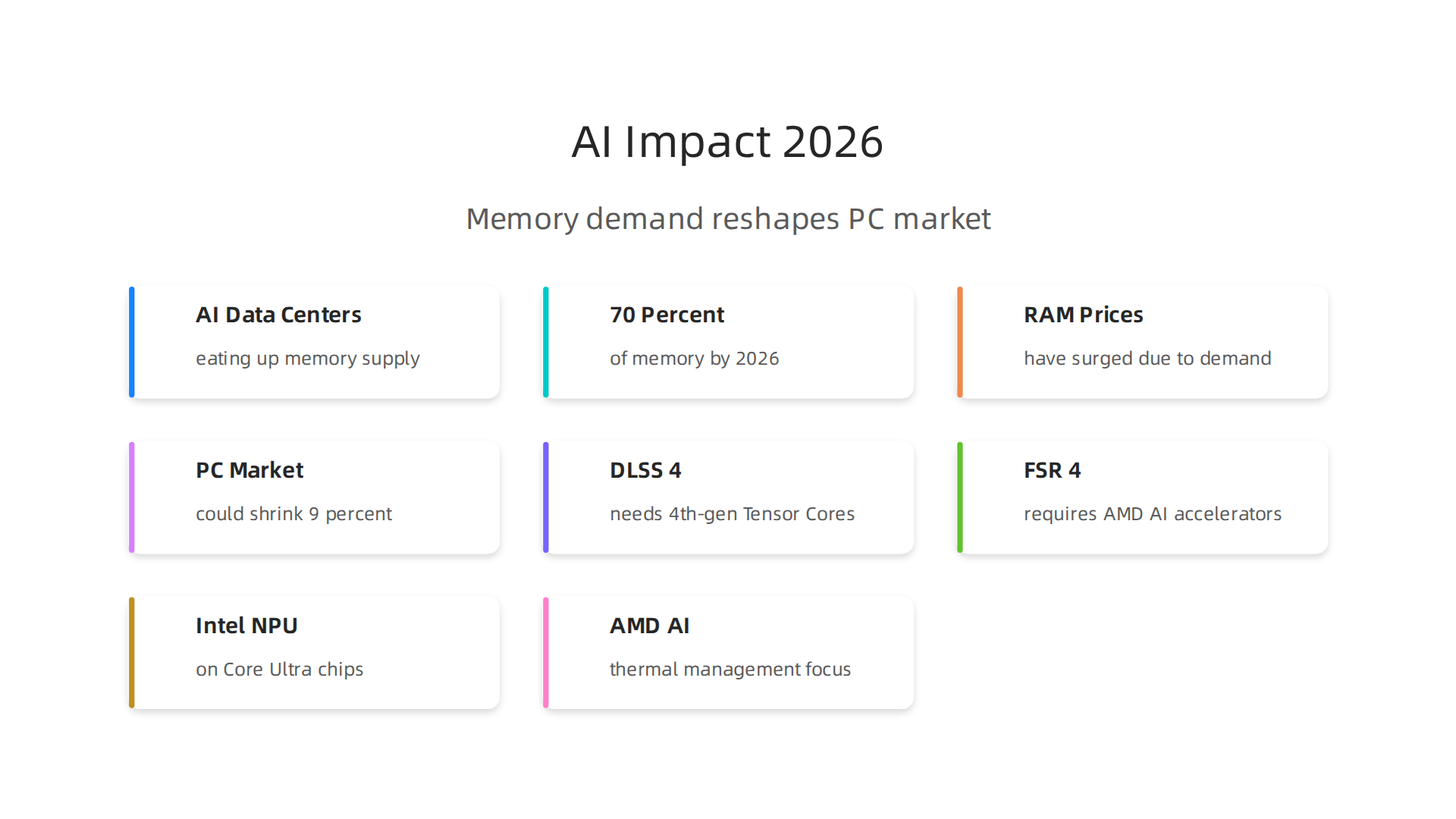
    Three essential best practices for a successful deployment of Galaxy AI within an organization.

    Start with a pilot project. Do not try to use Galaxy AI everywhere at once. Pick one high-impact use case. Maybe that is automating customer support replies. Or generating weekly sales reports. A small pilot lets your team learn what works without risking big disruptions. You can measure success by looking at time saved or error rates. For example, you might compare Galaxy AI’s performance against other top models on specific tasks by checking the latest benchmark results from MindStudio to see how it stacks up for coding or writing tasks.

    MindStudio.ai homepage, a platform for building AI applications without code.

    Once you prove the value in one area, expand slowly.

    Set clear governance policies. Before employees start using Galaxy AI, your organization needs rules. Who can access the AI? What data is okay to share? How do you handle privacy? Samsung Knox lets you control data processing policies, but you also need a written policy for acceptable use. This helps prevent mistakes like feeding sensitive customer information into the AI. A detailed analysis of ChatGPT versus Gemini versus Claude can show you how different models handle data, which informs your governance choices. Your policy should cover data retention, audit logs, and what happens if the AI makes a mistake.

    Invest in training and change management. The best AI tool fails if nobody uses it. Your people might worry that Galaxy AI will replace them. Or they might not understand how it helps their daily work. Provide hands-on training sessions. Show real examples. Let employees practice using the AI powered assistant in a safe environment. Talk about how AI can handle boring tasks so your team can focus on creative and strategic work. For more insight into how humans and AI can work together, read our guide on human or AI creativity and what the data says about collaboration in 2026. It explains how teams that embrace AI collaboration actually become more productive and innovative.
    Start small. Set clear rules. Teach your people well. That is the recipe for a smooth and successful Galaxy AI rollout.


    For daily updates on the AI tools shaping business in 2026, subscribe to The Deep View Newsletter.

    Measuring Success: KPIs and ROI of Galaxy AI

    You have deployed Galaxy AI. But how do you know if it is working? You need clear numbers to show the value. That means tracking the right KPIs and calculating your return on investment.

    Start by defining your most important KPIs. For Galaxy AI, focus on three main areas. First, productivity savings. How much time do your employees save each week? You can measure this by comparing task completion times before and after the rollout. Second, error reduction. Is the AI powered assistant making fewer mistakes than your old processes? Track error rates in customer support replies, data entry, or report generation. Third, new revenue from AI driven insights. Did Galaxy AI help your team find patterns in customer behavior that led to more sales? These three KPIs give you a solid baseline.

    According to the Olakai AI ROI framework, you should also measure qualitative benefits like employee satisfaction and innovation speed. A practical guide from Olakai explains how to balance hard metrics with softer outcomes.

    Olakai AI homepage, providing insights and frameworks for measuring AI ROI in business.

    Another helpful resource from Tropicapp shows how CFOs at companies like Zapier measure AI ROI using five frameworks that go beyond just time saved. You can read their AI ROI frameworks from Tropicapp to see real world examples.

    For the ROI calculation, add up all the costs: licensing fees, training time, integration work. Then compare that to the value of time saved and revenue gained. But do not forget the intangible wins. Employees who feel less bored by repetitive tasks tend to stay longer. That is harder to measure but just as important. A comprehensive framework from RevGen Partners outlines how to capture both tangible and intangible factors.

    To set realistic expectations, look at industry benchmarks. Reports from leading analysts can show what other companies achieve with similar AI tools. For a curated list of trusted sources for AI benchmarks and news, check out our guide on the 10 top AI websites professionals trust in 2026. This will help you compare your Galaxy AI results against industry standards.

    Measuring success is not a one time task. Check your KPIs monthly. Adjust your goals as you learn more. Galaxy AI can deliver big returns, but only if you track the right numbers.

    Want daily updates on AI tools that boost your bottom line? Subscribe to The Deep View Newsletter for clear, actionable insights every day.

    Summary

    Galaxy AI is Samsung’s hybrid, agentic assistant built into the Galaxy S26 line that combines on-device intelligence with cloud power to automate tasks, create content, and protect user data. This article explains Galaxy AI’s core architecture—privacy-first on-device processing plus selective cloud use—and shows how those design choices matter for marketers, content creators, and business teams. You’ll learn practical use cases for writing, image and video editing, campaign personalization, and operations automation, plus how Galaxy AI compares with cloud-first models like GPT and Gemini. The guide also covers integration paths, rollout best practices (pilot projects, governance, training), and ways to measure KPIs and ROI so you can decide if Galaxy AI fits your workflow and security needs.